

How to Create a Program Compatibility Troubleshooter Shortcut in Windows 7 and Windows 8
InformationThis tutorial will show you how to create or download a Program Compatibility Troubleshooter shortcut that you can pin or use where you like in Windows 7 and Windows 8.
EXAMPLE: Program Compatibility troubleshooter
OPTION ONETo Download a "Program Compatibility" Shortcut
1. Click/tap on the Download button below to download the file below.
Program_Compatibility_Troubleshoot.zip2. Save the .zip file to your desktop.
3. Open the .zip file and extract (drag and drop) the Program Compatibility Troubleshoot shortcut to your desktop.
4. Unblock the Program Compatibility Troubleshoot shortcut.
5. In Windows 7, you can now Pin to Taskbar or Pin to Start Menu, add to Quick Launch, assign a keyboard shortcut to it, or move this shortcut to where you like for easy use.
6. In Windows 8 and 8.1, you can Pin to Taskbar on desktop, Pin to Start screen, add to Quick Launch, assign a keyboard shortcut to it, or move this shortcut to where you like for easy use.
7. When done, you can delete the downloaded .zip file on the desktop if you like, or save it to use again.
OPTION TWOTo Manually Create a "Program Compatibility" Shortcut
1. Right click or press and hold on an empty area on your desktop, and click/tap on New and Shortcut.
2. Copy and Paste the location below into the location area, and click/tap on the Next button. (see screenshot below)
%systemroot%\system32\msdt.exe -id PCWDiagnostic3. Type Program Compatibility Troubleshoot for the name, and click/tap on the Finish button. (see screenshot below)That's it,
NOTE: You can name this anything you would like though.
4. Right click or press and hold on the new Program Compatibility Troubleshoot shortcut, and click/tap on Properties.
5. Click/tap on the Shortcut tab, then click/tap on the Change Icon button. (see screenshot below)
6. In the line under "Look for icons in this file", copy and paste the location below and press Enter. (see screenshot below)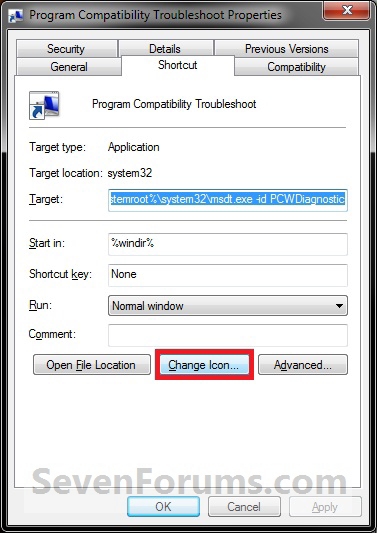
%SystemRoot%\diagnostics\system\PCW\DiagPackage.dll7. Select the icon highlighted in blue above, and click/tap on OK. (see screenshot above)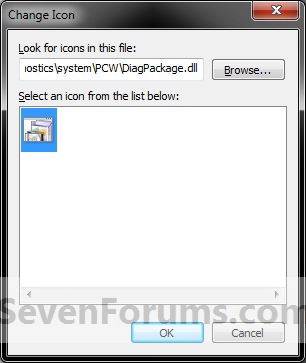
NOTE: You can use any icon that you would like instead though.
8. Click/tap on OK. (see screenshot below)
9. In Windows 7, you can now Pin to Taskbar or Pin to Start Menu, add to Quick Launch, assign a keyboard shortcut to it, or move this shortcut to where you like for easy use.
10. In Windows 8 and 8.1, you can Pin to Taskbar on desktop, Pin to Start screen, add to Quick Launch, assign a keyboard shortcut to it, or move this shortcut to where you like for easy use.
Shawn
Related Tutorials
- How to Run a Program in Compatibility Mode in Windows 7
- How to Use Compatibility Mode on Programs in Windows 8 and 8.1
- How to Open Troubleshooting in Windows 7
- How to Create a Windows 7 Troubleshooting Shortcut
- How to Create a Aero Troubleshoot Shortcut in Windows 7
- How to Create a Connection to Workplace using DirectAccess Troubleshoot Shortcut in Windows 7
- How to Create a Devices and Printers Troubleshoot Shortcut in Windows 7
- How to Create a Hardware and Devices Troubleshoot Shortcut in Windows 7
- How to Create a HomeGroup Troubleshoot Shortcut in Windows 7
- How to Create a Incoming Connections Troubleshoot Shortcut in Windows 7
- How to Create a Internet Connections Troubleshoot Shortcut in Windows 7
- How to Create a Network Adapter Troubleshoot Shortcut in Windows 7
- How to Create a Performance Troubleshoot Shortcut in Windows 7
- How to Create a Playing Audio Troubleshoot Shortcut in Windows 7
- How to Create a Power Troubleshoot Shortcut in Windows 7
- How to Create a Printing Troubleshoot Shortcut in Windows 7
- How to Create a Recording Audio Troubleshoot Shortcut in Windows 7
- How to Create a Search and Indexing Troubleshoot Shortcut in Windows 7
- How to Create a Shared Folders Troubleshoot Shortcut in Windows 7
- How to Create a System Maintenance Troubleshoot Shortcut in Windows 7
- How to Create a Windows Media Player DVD Troubleshoot Shortcut in Windows 7
- How to Create a Windows Media Player Library Troubleshoot Shortcut in Windows 7
- How to Create a Windows Media Player Settings Troubleshoot Shortcut in Windows 7
- How to Create a Windows Update Troubleshoot Shortcut in Windows 7
- How to Enable or Disable Windows 7 Program Compatibility Assistant
- How to Add or Remove "Troubleshoot compatibility" from the Context Menu in Windows 7
Program Compatibility Troubleshoot Shortcut - Create
-
-
New #2
You're most welcome Tews. Thank you. :)Last edited by Brink; 07 Mar 2010 at 08:11. Reason: typo
Program Compatibility Troubleshoot Shortcut - Create
How to Create a Program Compatibility Troubleshooter Shortcut in Windows 7 and Windows 8Published by Brink


 Quote
Quote
Related Discussions