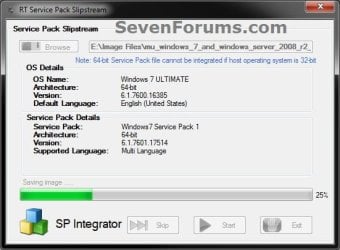
Slipstream Windows 7 SP1 into a Installation DVD or ISO File

How to Slipstream Windows 7 SP1 and Updates to Create a Bootable USB, Installation DVD, or ISO File

   Information
This will show you how to slipstream Windows 7 SP1 with your retail or student copy of Windows 7 without SP1 to create a slipstream Windows 7 SP1 installation "DVD", a slipstream Windows 7 SP1 bootable "ISO file", or a slipstream Windows 7 SP1 bootable installation "USB flash drive".

This will also show you how to integrate Windows Updates into your new or previously created slipstream Windows 7 SP1 to create a new updated slipstream Windows 7 SP1 installation "DVD", a slipstream Windows 7 SP1 bootable "ISO file", or a slipstream Windows 7 SP1 bootable installation "USB flash drive".

   Warning

  • You can only do this tutorial while logged in as an administrator.
  • You can only use a retail copy or student copy of a Windows 7 installation DVD, bootable USB flash drive, or ISO file to create a slipstream Windows 7 SP1 with.
  • You can only use a previously created slipstream Windows 7 SP1 installation DVD, bootable USB flash drive, or ISO file using this tutorial to integrate new Windows Updates to create a new updated slipstream Windows 7 SP1 installation DVD, bootable USB flash drive, or ISO file with.
  • You can only create a 64-bit slipstreamed Windows 7 SP1 DVD or ISO if your current Windows 7 installation is also 64-bit.
  • You can create a 32-bit slipstreamed Windows 7 SP1 DVD or ISO if your current Windows 7 installation is 32-bit or 64-bit.
  • When you install Windows 7 SP1 using the slipstreamed Windows 7 SP1 DVD/ISO/USB created in this tutorial, you will not be able to uninstall SP1.
   Tip

  • You cannot use a slipstream Windows 7 installation disc to do a repair install with on a currently installed Windows 7 SP1.
  • You cannot use a slipstream Windows 7 installation disc to do a repair install with on a currently installed slipstream Windows 7 SP1.
  • You can use a Windows 7 with SP1 installation disc (ex: Technet, MSDN, or retail) to do a repair install with on a current slipstream Windows 7 SP1 installation.
   Note
This tutorial is designed to be followed like a flow chart to help make it easier to use and select the options (ex: DVD or ISO) you want.


Here's How: 1. If you have not already, then you will need download and install the free 32-bit (x86) or 64-bit (x64) RT Seven Lite "Beta 2.6.0" for your same 32-bit or 64-bit Windows 7 installation DVD or ISO file.
   Note
Alternative RT Seven Lite Beta download link: RT Seven Lite Download - Softpedia

Softpedia.jpg

   Warning
At the rt7lite.com site, you will need to scroll down a bit past the RC 1.7.0 build to see the Beta 2.6.0 build download links.

This tutorial will not work using the RC 1.7.0 build.

2. Click on the RT Seven Lite shortcut on your desktop or in the Start Menu to run the program. (see screenshot below) Step1.jpg
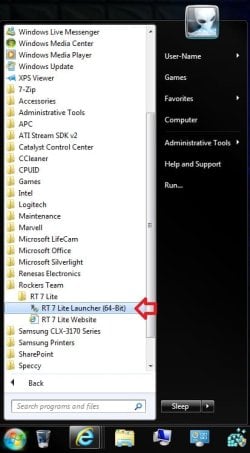
3. Do either step 4 or 5 for what you have to use to integrate the Windows 7 SP1 and/or Windows Updates into.

4. To Select and Use a Windows 7 Installation DVD or Bootable USB A) Insert your retail or previously slipstreamed Windows 7 installation DVD into the DVD drive and close it, OR plug in your Windows 7 bootable USB flash drive. If a AutoPlay pop-up opens, close it.

B) In RT Seven Lite, click on the Browse button, and select the Select OS path option. (see screenshot below)
NOTE: If you do not have much else running, then you may wish to change the Set priority setting to High first to help speed the slipstreaming process up some. DVD-1.jpg
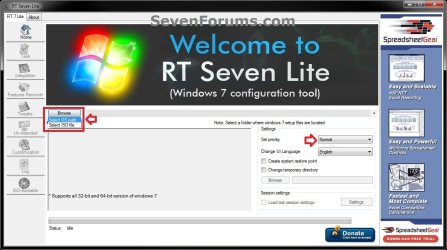
C) Navigate to and select your DVD drive or bootable USB flash drive with Windows 7 on it from steps 4A, and click on OK. (see screeshow below) DVD-2.jpg
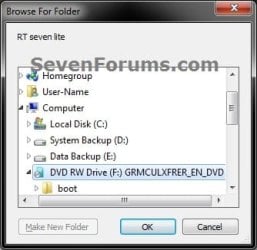
D) Click on OK. (see screenshot below) DVD-3.jpg
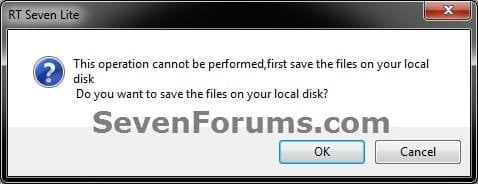
E) Select your Desktop, and click on the Make New Folder button. (see screenshot below) DVD-4.jpg
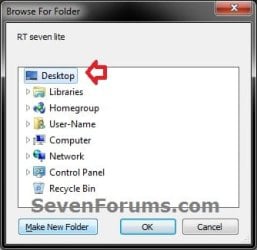
F) Select the New folder on the desktop, and click on OK. (see screenshot below) DVD-5.jpg
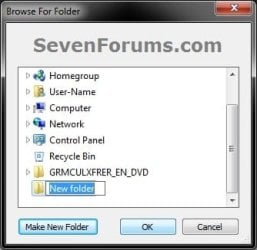
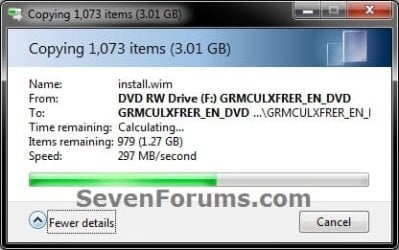
G) The contents of the Windows 7 installation DVD from steps 4A and 4C will now be copied into the New folder (step 4F) on the desktop. (see screenshot below)
NOTE: This may take a few minutes to complete. DVD-6.jpg
H) Go to step 6.
5. To Select and Use a Windows 7 ISO File

   Note
You could use a Windows 7 ISO file that you already created from say RT Seven Lite, or a Windows 7 w/SP1 U ISO downloaded from: Microsoft: Windows 7 Direct Download Links

A) In RT Seven Lite, click on the Browse button, and select the Select ISO file option. (see screenshot below)
NOTE: If you do not have much else running, then you may wish to change the Set priority setting to High first to help speed the slipstreaming process up some. ISO-1.jpg
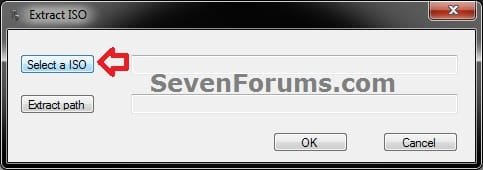
B) Click on the Select a ISO button. (see screenshot below) ISO-2.jpg
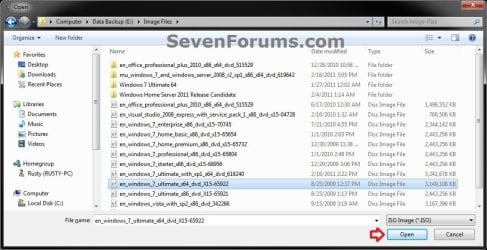
C) Navigate to and select the Windows 7 ISO file, and click on Open. (see screenshot below) ISO-3.jpg
D) Select the Extract path button. (see screenshot below) ISO-4.jpg
E) Select your Desktop, and click on the Make New Folder button. (see screenshot below) ISO-5.jpg
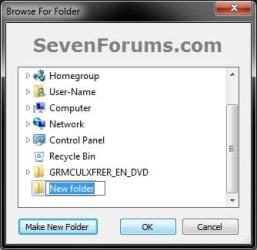
F) Select the New folder on the desktop, and click on OK. (see screenshot below) ISO-6.jpg
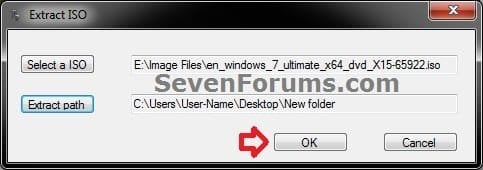
G) Click on OK. (see screenshot below) ISO-7.jpg
H) The contents of the Windows 7 ISO file from step 5C will now be extracted and copied into the New folder (step 5F) on the desktop. (see screenshot below)
NOTE: This may take only a few minutes to complete. ISO-8.jpg
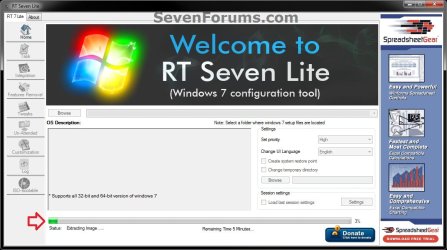
I) Continue on to step 6.
6. Do either step 7 or 8 below for what you want to do.

7. To Only Integrate New Windows Updates
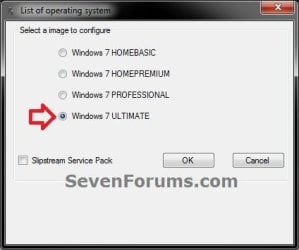
NOTE: You would only select this option if used a previously created slipstream Windows 7 SP1 installation DVD, bootable USB flash drive, or ISO file using this tutorial in step 4 or 5 above, and only want to update it by integrating new Windows Updates. A) When finished, select (dot) the Windows 7 edition that you want to create a updated SP1 slipstream version of, and click on OK. (see screenshot below)
NOTE: When this window below opens it likes to hide behind another opened active window, so you may need to check behind them when the screenshot above (step 5H) shows it's "Status" as Loading Image.... and does not appear to be doing anything. Step2.jpg
B) Go to step 9.
8. To Slipstream SP1 and to be able to Integrate Windows Updates
NOTE: You would select this option if you used a retail copy or student copy of a Windows 7 installation DVD, bootable USB flash drive, or ISO file that did not have SP1 slipstreamed in it in step 4 or 5 above. A) If you have not already, then you will need to download the same 32-bit (x86) or 64-bit (x64) Windows 7 SP1 EXE installation file for your same 32-bit or 64-bit Windows 7 installation DVD or ISO file at the Microsoft link below, and save it to your Desktop. Download details: Windows 7 and Windows Server 2008 R2 Service Pack 1 (KB976932)
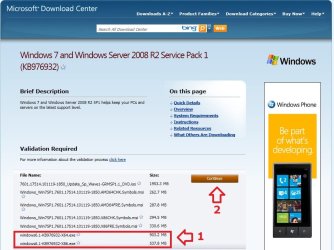
Download.jpg
B) Right click on the downloaded windows6.1-KB976932-X64.exe or windows6.1-KB976932-X86.exe file, click on Properties, click on the General tab, and click on Unblock.
NOTE: If you do not have a Unblock button under the General tab, then the SP1 exe file is already unblocked and you can continue on to step 8C.

C) When RT Seven Lite is finished from step 4G or 5H, select (dot) only the one Windows 7 edition that you want to create a slipstream SP1 version of, check the Slipstream Service Pack box, and click on OK. (see screenshot below) Step3.jpg
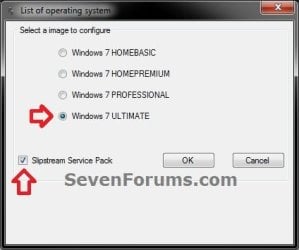
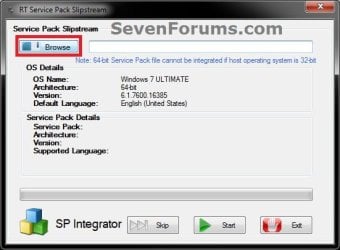
D) Click on the Browse button. (see screenshot below) Step4.jpg
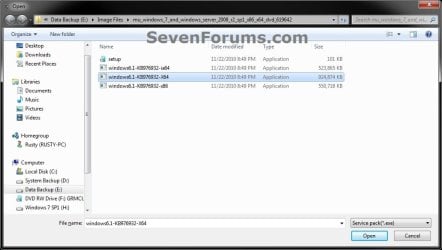
E) Navigate to and select the Windows 7 SP1 EXE installation file on your desktop from step 1, and click on Open. (see screenshot below) Step5.jpg
F) Click on the Start button. (see screenshot below) Step6.jpg
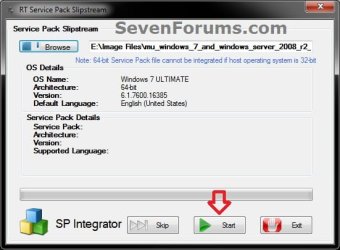
G) RT Seven Lite will now start preparing, integrating, and saving the SP1 (step 9) with the DVD (step 4) or ISO file (step 5). (see screenshots below)
NOTE: This will take a good while to complete depending on how fast your system is and what you have the priority level set as in step 4B. Step7.jpg

Step8.jpg

H) When finished, click on the Proceed button. (see screenshot below) Step10.jpg
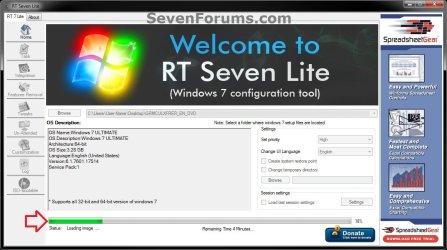
I) RT Seven Lite will now start start loading the image. (see screenshot below)
NOTE: This will take a few minutes to complete. Step11.jpg
J) Continue on to step 9.
9. When finished, click on the Task tab in the left pane. (see screenshot below) Step12.jpg
10. Do either step 11 or 12 below for what you want to do.

11. To Only Slipstream SP1
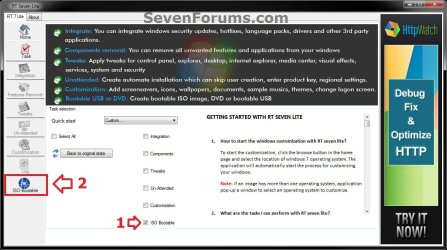
NOTE: You would do this step if you did step 8 above and do not want to integrate any Windows Updates into the Slipstream Windows 7 SP1 installation DVD, bootable USB flash drive, or ISO file. A) In the Task tab, check the ISO Bootable box option, then click on the ISO-Bootable tab in the left pane. (see screenshot below)
Step13.jpg
B) Go to step 12F.
12. To Integrate Windows Updates and still be able to Slipstream SP1 (if not already)
NOTE: You would do this step if you did step 7 above and want to integrate Windows Updates into this new or previously created Slipstream Windows 7 SP1 installation DVD, bootable USB flash drive, or ISO file. A) If you have not already, then you will need to download the standalone MSU installation files for each Windows Update that you want to integrate into the slipstream, and save them to your Desktop.

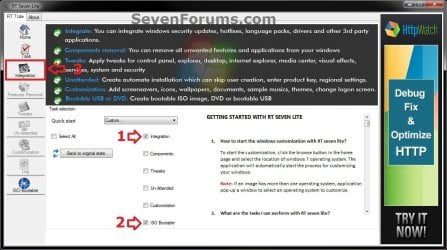
B) In the Task tab in RT Seven Lite, check the Integration box and ISO Bootable box options, then click on the Integration tab in the left pane. (see screenshot below) Update-1.jpg
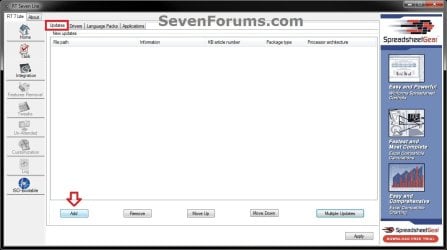
C) Under the Updates tab, click on the Add button. (see screenshot below) Update-2.jpg
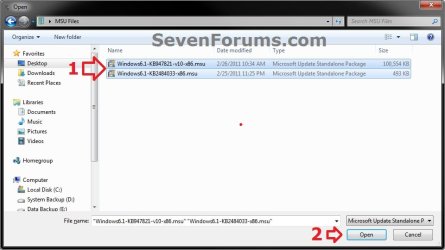
D) Navigate to and select all of the Windows Update MSU files that you want to integrate, and click on Open. (see screenshot below)
NOTE: You can press and hold the CTRL key to select more than one random MSU file. Update-3.jpg
E) When finished adding MSU files, click on Apply. (see screenshot below) Update-4.jpg
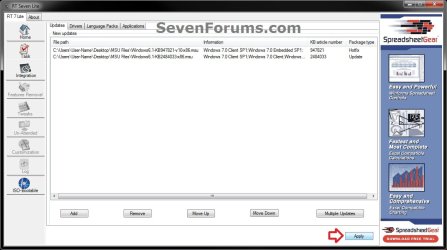
F) Do either step 12G or 12H for what type of Slipstream Windows 7 SP1 you want.

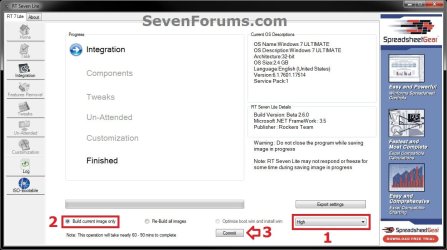
G) To Create a Single Windows 7 SP1 Edition Slipstream

NOTE: This will create a Slipstream Windows 7 SP1 with only the one Windows 7 edition that you selected in step 7A or 8C.
  • Select High priority level, select (dot) Build current image only, and click on Commit. (see screenshot below)
Update-5-single.jpg

  • Go to step 12I
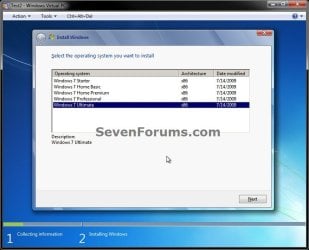
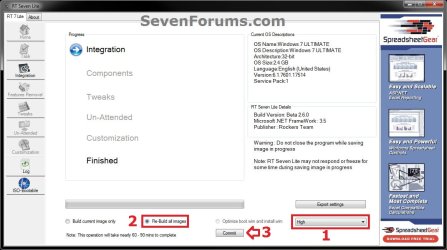
H) To Create a All-in-One Windows 7 SP1 Edition Slipstream
NOTE: This will create a Slipstream Windows 7 SP1 with all Windows 7 editions that will allow you to select which one to install during installation. (see screenshot below) All-in-one.jpg
  • Select High priority level, select (dot) Re-build all images, and click on Commit. (see screenshot below)
Update-5-all-in-one.jpg

  • Continue on to step 12I
I) RT Seven Lite will now start integrating the Windows Updates. (see screenshot below)
NOTE: This may take from a few minutes or longer depending on how many Windows Update MSU files you added. Update-6.jpg
J) When finished, click on the ISO-Bootable tab in the left pane. (see screenshot below) Update-7.jpg
K) Continue on to step 13.
13. Do either step 14, 15, or 16 for what you would like to have your Slipstreamed Windows 7 SP1 as.

14. To Burn a Slipstream Windows 7 SP1 Installation DVD A) Insert a blank DVD (ex: DVD-R) into the DVD drive and close it. If a AutoPlay pop-up opens, close it.

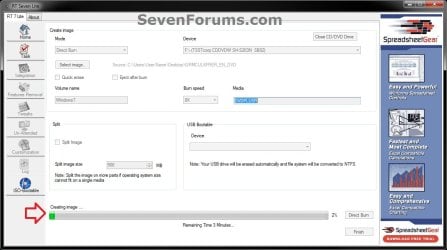
B) In RT Seven Lite, select the Direct Burn drop down menu option under Mode, select the drive letter used from step 14A under Device, then click on the Direct Burn button towards the bottom right. (see screenshot below) Step14-DVD.jpg
C) RT Seven Lite will now start creating the image. (see screenshot below)
NOTE: This will take a few minutes to complete. Step15-DVD.jpg
D) When finished, click on OK. If a AutoPlay pop-up opens, close it. (see screenshots below) Step16-DVD.jpg
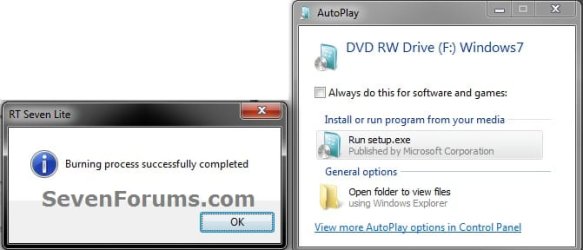
E) You now have a slipstream Windows 7 SP1 installation DVD.

F) Go to step 17.
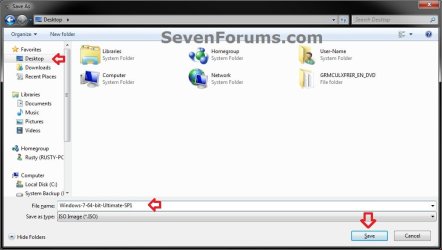
15. To Create a Slipstream Windows 7 SP1 ISO File A) In RT Seven Lite, select the Create Image drop down menu option under Mode, then click on the Make ISO button towards the bottom right. (see screenshot below) Step14-ISO.jpg
B) Navigate to and select your Desktop, type in a name that you want for the ISO file, then click on the Save button. (see screenshot below) Step15-ISO.jpg
C) When finished, click on OK. (see screenshot below) Step16-ISO.jpg

D) You now have a slipstream Windows 7 SP1 bootable ISO file.
   Note

  • You could also use this ISO file to burn and create a Slipstream Windows 7 SP1 installation DVD with.
  • You could also use this ISO file to create a Slipstream Windows 7 SP1 bootable installation USB flash drive with. For how, see part 2 here: Windows 7 USB/DVD Download Tool
  • You could also test or use this ISO file in a virtual machine if you like.

E) Go to step 17.
16. To Create a Slipstream Windows 7 SP1 Bootable Installation USB Flash Drive A) If you have not already, plug in your USB flash drive.
NOTE: You will need to have at least 4.5 GB free on the USB flash drive.

B) In RT Seven Lite, select the USB Bootable drop down menu option under Mode. (see screenshot below) USB-1.jpg
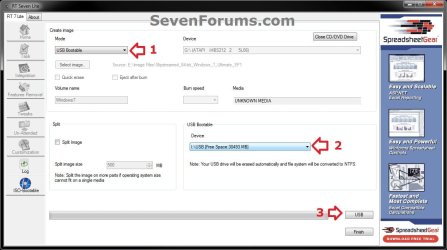
C) Select your USB flash drive from the drop down menu under USB Bootable. (see screenshot above)
NOTE: If there is not enough free space on the selected USB flash drive, you will get a notice telling you so. You will then need to select a larger USB flash drive. (see screenshot below) USB-Error.jpg
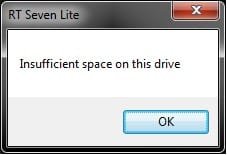
D) Click on the USB button towards the bottom right. (see screenshot below step 16B)

E) Click on OK to format the USB flash drive. (see screenshot below) USB-2.jpg
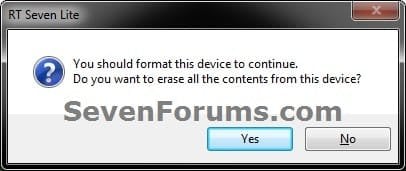
F) RT Seven Lite will now start formating the USB flash drive and copying the files to it. (see screenshot below)
NOTE: This will take a few minutes to complete. USB-3.jpg
G) When it's finished, click on OK. (see screenshot below) USB-4.jpg
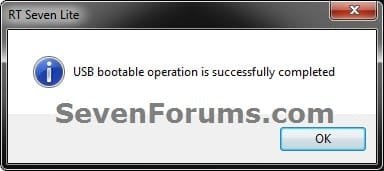
H) You now have a slipstream Windows 7 SP1 bootable installation USB flash drive.

I) Continue on to step 17.
17. Close RT Seven Lite.

18. Click on Yes to confirm closing RT Seven Lite. (see screenshot below) Step17.jpg
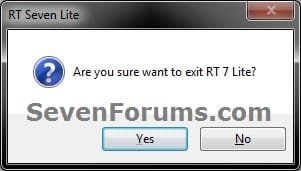
19. RT Seven Lite will now clean up it's temp files before closing. (see screenshot below)
:warn:WARNING: Do not stop or interrupt RT Seven Lite from cleaning it's temp files to avoid getting this error here the next time you try and run RT Seven Lite. Step18.jpg

20. You can now delete the New folder from step 4E or 5E and it's contents on the desktop if you like.
   Tip
You can keep your newly created slipstream Windows 7 SP1 installation DVD, bootable USB flash drive, or ISO file updated by doing this tutorial again with steps 7 and 12 to integrate any new Windows Updates released afterwards into it.

When you install Windows 7 SP1 using the slipstream Windows 7 SP1 DVD/ISO/USB created in this tutorial, you will be able to use the Windows 7 SP1 Disk Cleanup Tool (OPTION THREE at link) to delete the SP1 backup files.


That's it,
Shawn


Attachments

  • Step9.jpg
    Step9.jpg
    33.4 KB · Views: 252
  • Disk_Cleanup-1.jpg
    Disk_Cleanup-1.jpg
    35.9 KB · Views: 262
  • Disk_Cleanup-2.jpg
    Disk_Cleanup-2.jpg
    31.9 KB · Views: 276
Last edited:
@ Night Hawk: Thanks for the link, very useful, bookmarked.

FWIW, I recompiled an updated ISO and added the SURT update, tested in VMWare with the same result...SURT, MSRT and the aforementioned update failed to successfully install & were offered by WU upon first check for updates...

View attachment 179524

Haven't been able to try 7 on VMWare only haivng the Lite version here. There may be one or two other updates needed or another factor is preventing a good install.

One problem I saw here had to do with a restoration of a system image months before SP1 was final shortly before the beta release where it would not install until remounting C with a command. You may be running into something similar due to this being tried on VMWare as far as trying to install the slipstreamed 7 onto a VHD. Have to test this out on VirtualBox here if nothing goes on the VMLite Workstation.
 
Last edited by a moderator:

My Computers My Computers

  • At a glance

    W7 Ultimate x64/W10 Pro x64/W11 Pro Triple Bo...AMD Phenom II X4 975 Deneb 3.6ghz - 965 2nd r...Kingston Hyper X DDR3 1600 1.5v 16gb - Hyper ...MSI HD Radeon 5750 1gb - MSI HD Radeon 6450 o...
    Computer type
    PC/Desktop
    Computer Manufacturer/Model Number
    Custom builds = 2
    OS
    W7 Ultimate x64/W10 Pro x64/W11 Pro Triple Boot - Main PC W7 Remote PC Micro ATX W7 Pro x64/W11 Pro
    CPU
    AMD Phenom II X4 975 Deneb 3.6ghz - 965 2nd remote pc
    Motherboard
    Gigabyte GA-790XTA-UD4-Gigabyte GA-880GM-D2H remote pc
    Memory
    Kingston Hyper X DDR3 1600 1.5v 16gb - Hyper X Fury 8gb 2nd
    Graphics Card(s)
    MSI HD Radeon 5750 1gb - MSI HD Radeon 6450 on mini tower
    Sound Card
    Creative Labs X-Fi Xtreme Audio P - Realtek onooard 2nd case
    Monitor(s) Displays
    ASUS VW199T-P 19" HP 2082a Main-HP 2082a 20" remote pc
    Screen Resolution
    Asus 1440x900 - HP 1600x900
    Hard Drives
    WD Black 1TB HD per OS W7, W10, and pending W11 presently on 500gb OS Drive - Pending Triple 1TB HDs for Spanned Storage/backup volume
    Single 2TB external USB enclosure, single 1TB System 7 Host/Boot drive, Pending 8TB external HD for system image b
    PSU
    Corsair 750TX - primary / Corsair CX600 - second
    Case
    Antec 900-2 - SSD compatible / NZXT Vulcan mini tower
    Cooling
    Zalman CNPS9900A
    Keyboard
    AZIO L70 Backlit Letters Gaming - ONN Cordless/USB
    Mouse
    MSI DS200 Programmable, Logitech Cordless
    Internet Speed
    30mbps upgrade - primary hard wired - mini tower usb WiFi
    Antivirus
    GFI VIPRE Internet Security 2014 on W7 2016 beta on W10,
    Browser
    Cyberfox, WaterFox 64bit FF variants, FireFox x64, Pale Moon
    Other Info
    Accomdata fan cooled usb 2.0 PIDE/Sata II, III external enclosure.
    Sambient usb/eSata PATA/Sata II, III external enclosure.
  • At a glance

    W7 Pro x64/W11 ProAMD Deneb 3.6ghz - 965Kingston Hyper X Fury 8gbMSI HD Radeon 6450 DVI Output
    Computer type
    PC/Desktop
    System Manufacturer/Model Number
    CUSTOM ASSEMBLY
    OS
    W7 Pro x64/W11 Pro
    CPU
    AMD Deneb 3.6ghz - 965
    Motherboard
    Gigabyte GA-880GM-D2H remote pc
    Memory
    Kingston Hyper X Fury 8gb
    Graphics Card(s)
    MSI HD Radeon 6450 DVI Output
    Sound Card
    Realtek onooard Creative or Other separate PENDING
    Monitor(s) Displays
    VIZIO 32" LCD TV Separate LCD Pending
    Screen Resolution
    1600x1080
    Hard Drives
    WD 500GB OS Host/Boot WD Green 1TB Storage/Backup
    PSU
    Corsair 600W - THERMALTAKE 600W spare case
    Case
    NZXT Vulcan mini tower
    Cooling
    Twin 120mm Top Fans - 240mm Side Cover
    Keyboard
    ONN Cordless/USB Logitech Cordless
    Mouse
    ONN USB/Cordless - Logitech Cordless
    Internet Speed
    DSL 5G
    Browser
    MS Edge, FireFox, WaterFox x64, FireFox Nightly
    Other Info
    OS Testing-Remote Access to Main TeamViewer
I'm a bit puzzled by your reply...

Haven't been able to try 7 on VMWare only haivng the Lite version here. There may be one or two other updates needed or another factor is preventing a good install....You may be running into something similar due to this being tried on VMWare as far as trying to install the slipstreamed 7 onto a VHD...

Forgive me if I'm misinterpreting your reply, but I did not have ANY problem with the OS installation perse--the OS installed without a hitch-- only problem was the 2 updates that did not/would not install (SURT & the "C000034" update).

I installed the OS on VMWare Player (Free), not workstation. I do recommend using Player 3 and not the newly released Player 4. I tried to install (several times) via DVD burns of both Win 8 Developer Preview & Windows 7 SP1 on the new Player version and got a "missing DVD?? driver" error on both the 32 & 64 bit Win 8 Dev Prev and the x64 Win 7 SP1 (I can't remember the precise error message, but it's a prevalent topic on many forums, Google it) I got the same error on a 1/2 dozen different DVD burns, using a variety of progs (Nero Burning Rom 11, ImgBurn, Win 7's DVD burner) at a variety of speeds...same error. But when I installed them using the SAME ISO's used to burn the DVD, they ALL installed correctly. I rolled back to Player ver 3.1.5...as if by "magic" they all installed correctly using the SAME DVD's that failed in Player ver 4. I suspect a problem in the new version's VMWare Tools' DVD drivers.

Edit to add: Just remembered the precise error message: A required CD/DVD device driver is missing
 
Last edited:

My Computer My Computer

At a glance

Win 10 Pro x64, Win 7 Pro x64Intel Core i7-6700HQ Skylake16gb Crucial DDR4NVIDIA GeForce GTX 960M 2 GB
Computer type
Laptop
Computer Manufacturer/Model Number
MSI PE60 6QE
OS
Win 10 Pro x64, Win 7 Pro x64
CPU
Intel Core i7-6700HQ Skylake
Motherboard
MSI MS-16J5
Memory
16gb Crucial DDR4
Graphics Card(s)
NVIDIA GeForce GTX 960M 2 GB
Screen Resolution
1920 x 1080
Hard Drives
Samsung 850 EVO 250 GB M.2 SSD (MZ-N5E250BW)
HGST 1TB @7200 RPM HTS721010A9E630
Case
Plastic
Keyboard
Got one...
Mouse
Yep, one of those too.
Internet Speed
FIOS 75/75
Antivirus
Defender
Browser
Chrome/FFox/Ex-PLODE-r/(L)Edge
Other Info
Defender, Custom Hosts, uBlock, regular backups w/ Macrium (Free)
I was referring to the initial problems found first trying to install the SP1 beta then later rtm on the 64bit host install here. Yet a fast install of the service pack went on without fuss on a temp 32bit install. That's when the mount command was used to corrext the install problem seen when having an image previously restored to the host.

The 3.1.1. VMLite Workstation is the number here downloaded back in 2010. I'll have to give the full dvd with then alll 27 updated along with SP1 a go to see if I run into anything similar.
 

My Computers My Computers

  • At a glance

    W7 Ultimate x64/W10 Pro x64/W11 Pro Triple Bo...AMD Phenom II X4 975 Deneb 3.6ghz - 965 2nd r...Kingston Hyper X DDR3 1600 1.5v 16gb - Hyper ...MSI HD Radeon 5750 1gb - MSI HD Radeon 6450 o...
    Computer type
    PC/Desktop
    Computer Manufacturer/Model Number
    Custom builds = 2
    OS
    W7 Ultimate x64/W10 Pro x64/W11 Pro Triple Boot - Main PC W7 Remote PC Micro ATX W7 Pro x64/W11 Pro
    CPU
    AMD Phenom II X4 975 Deneb 3.6ghz - 965 2nd remote pc
    Motherboard
    Gigabyte GA-790XTA-UD4-Gigabyte GA-880GM-D2H remote pc
    Memory
    Kingston Hyper X DDR3 1600 1.5v 16gb - Hyper X Fury 8gb 2nd
    Graphics Card(s)
    MSI HD Radeon 5750 1gb - MSI HD Radeon 6450 on mini tower
    Sound Card
    Creative Labs X-Fi Xtreme Audio P - Realtek onooard 2nd case
    Monitor(s) Displays
    ASUS VW199T-P 19" HP 2082a Main-HP 2082a 20" remote pc
    Screen Resolution
    Asus 1440x900 - HP 1600x900
    Hard Drives
    WD Black 1TB HD per OS W7, W10, and pending W11 presently on 500gb OS Drive - Pending Triple 1TB HDs for Spanned Storage/backup volume
    Single 2TB external USB enclosure, single 1TB System 7 Host/Boot drive, Pending 8TB external HD for system image b
    PSU
    Corsair 750TX - primary / Corsair CX600 - second
    Case
    Antec 900-2 - SSD compatible / NZXT Vulcan mini tower
    Cooling
    Zalman CNPS9900A
    Keyboard
    AZIO L70 Backlit Letters Gaming - ONN Cordless/USB
    Mouse
    MSI DS200 Programmable, Logitech Cordless
    Internet Speed
    30mbps upgrade - primary hard wired - mini tower usb WiFi
    Antivirus
    GFI VIPRE Internet Security 2014 on W7 2016 beta on W10,
    Browser
    Cyberfox, WaterFox 64bit FF variants, FireFox x64, Pale Moon
    Other Info
    Accomdata fan cooled usb 2.0 PIDE/Sata II, III external enclosure.
    Sambient usb/eSata PATA/Sata II, III external enclosure.
  • At a glance

    W7 Pro x64/W11 ProAMD Deneb 3.6ghz - 965Kingston Hyper X Fury 8gbMSI HD Radeon 6450 DVI Output
    Computer type
    PC/Desktop
    System Manufacturer/Model Number
    CUSTOM ASSEMBLY
    OS
    W7 Pro x64/W11 Pro
    CPU
    AMD Deneb 3.6ghz - 965
    Motherboard
    Gigabyte GA-880GM-D2H remote pc
    Memory
    Kingston Hyper X Fury 8gb
    Graphics Card(s)
    MSI HD Radeon 6450 DVI Output
    Sound Card
    Realtek onooard Creative or Other separate PENDING
    Monitor(s) Displays
    VIZIO 32" LCD TV Separate LCD Pending
    Screen Resolution
    1600x1080
    Hard Drives
    WD 500GB OS Host/Boot WD Green 1TB Storage/Backup
    PSU
    Corsair 600W - THERMALTAKE 600W spare case
    Case
    NZXT Vulcan mini tower
    Cooling
    Twin 120mm Top Fans - 240mm Side Cover
    Keyboard
    ONN Cordless/USB Logitech Cordless
    Mouse
    ONN USB/Cordless - Logitech Cordless
    Internet Speed
    DSL 5G
    Browser
    MS Edge, FireFox, WaterFox x64, FireFox Nightly
    Other Info
    OS Testing-Remote Access to Main TeamViewer
More unsolved mysteries...

Gotcha. Now for something completely FUBAR. Mainly because I have too much time on my hands :p I downloaded VirtualBox and installed 7 using the SAME DVD with 47 updates slipstreamed, all of which installed in VMWare Player (save the two mentioned above) and..... NONE of the updates installed in VirtualBox. (screenshot attached below) :cry: WTF...SERIOUSLY, WTF?????

I'm at a loss to even try to begin to make sense of this, and I've already lost 5 hours sleep this morning, so......

View attachment 179583

EDIT TO ADD: Disregard the above re: Updates not installing in VirtualBox ...seems that in my sleep deprivamacation induced state, I inadvertently SWITCHED my "Vanilla" 7 SP1 DVD with the 7 SP1 with Post SP1 updates. (((blushes profusely)))
 
Last edited:

My Computer My Computer

At a glance

Win 10 Pro x64, Win 7 Pro x64Intel Core i7-6700HQ Skylake16gb Crucial DDR4NVIDIA GeForce GTX 960M 2 GB
Computer type
Laptop
Computer Manufacturer/Model Number
MSI PE60 6QE
OS
Win 10 Pro x64, Win 7 Pro x64
CPU
Intel Core i7-6700HQ Skylake
Motherboard
MSI MS-16J5
Memory
16gb Crucial DDR4
Graphics Card(s)
NVIDIA GeForce GTX 960M 2 GB
Screen Resolution
1920 x 1080
Hard Drives
Samsung 850 EVO 250 GB M.2 SSD (MZ-N5E250BW)
HGST 1TB @7200 RPM HTS721010A9E630
Case
Plastic
Keyboard
Got one...
Mouse
Yep, one of those too.
Internet Speed
FIOS 75/75
Antivirus
Defender
Browser
Chrome/FFox/Ex-PLODE-r/(L)Edge
Other Info
Defender, Custom Hosts, uBlock, regular backups w/ Macrium (Free)
The last time I ran a 7 install on VBox was during the RC stage since that only having the two previous versions on or simply for use with other OSs. The main reason updates won't work on the free Portable VBox when compared to VMware Lite is it wouldn't be found supporting as much.

Here I will need to play catch and finally go with the full version of VMWare. But as I recall no updates would go on for XP or Vista when installed on the Portable VBox either. That program's full version however might prove to be the winning ticket in that regard over the free version.
 

My Computers My Computers

  • At a glance

    W7 Ultimate x64/W10 Pro x64/W11 Pro Triple Bo...AMD Phenom II X4 975 Deneb 3.6ghz - 965 2nd r...Kingston Hyper X DDR3 1600 1.5v 16gb - Hyper ...MSI HD Radeon 5750 1gb - MSI HD Radeon 6450 o...
    Computer type
    PC/Desktop
    Computer Manufacturer/Model Number
    Custom builds = 2
    OS
    W7 Ultimate x64/W10 Pro x64/W11 Pro Triple Boot - Main PC W7 Remote PC Micro ATX W7 Pro x64/W11 Pro
    CPU
    AMD Phenom II X4 975 Deneb 3.6ghz - 965 2nd remote pc
    Motherboard
    Gigabyte GA-790XTA-UD4-Gigabyte GA-880GM-D2H remote pc
    Memory
    Kingston Hyper X DDR3 1600 1.5v 16gb - Hyper X Fury 8gb 2nd
    Graphics Card(s)
    MSI HD Radeon 5750 1gb - MSI HD Radeon 6450 on mini tower
    Sound Card
    Creative Labs X-Fi Xtreme Audio P - Realtek onooard 2nd case
    Monitor(s) Displays
    ASUS VW199T-P 19" HP 2082a Main-HP 2082a 20" remote pc
    Screen Resolution
    Asus 1440x900 - HP 1600x900
    Hard Drives
    WD Black 1TB HD per OS W7, W10, and pending W11 presently on 500gb OS Drive - Pending Triple 1TB HDs for Spanned Storage/backup volume
    Single 2TB external USB enclosure, single 1TB System 7 Host/Boot drive, Pending 8TB external HD for system image b
    PSU
    Corsair 750TX - primary / Corsair CX600 - second
    Case
    Antec 900-2 - SSD compatible / NZXT Vulcan mini tower
    Cooling
    Zalman CNPS9900A
    Keyboard
    AZIO L70 Backlit Letters Gaming - ONN Cordless/USB
    Mouse
    MSI DS200 Programmable, Logitech Cordless
    Internet Speed
    30mbps upgrade - primary hard wired - mini tower usb WiFi
    Antivirus
    GFI VIPRE Internet Security 2014 on W7 2016 beta on W10,
    Browser
    Cyberfox, WaterFox 64bit FF variants, FireFox x64, Pale Moon
    Other Info
    Accomdata fan cooled usb 2.0 PIDE/Sata II, III external enclosure.
    Sambient usb/eSata PATA/Sata II, III external enclosure.
  • At a glance

    W7 Pro x64/W11 ProAMD Deneb 3.6ghz - 965Kingston Hyper X Fury 8gbMSI HD Radeon 6450 DVI Output
    Computer type
    PC/Desktop
    System Manufacturer/Model Number
    CUSTOM ASSEMBLY
    OS
    W7 Pro x64/W11 Pro
    CPU
    AMD Deneb 3.6ghz - 965
    Motherboard
    Gigabyte GA-880GM-D2H remote pc
    Memory
    Kingston Hyper X Fury 8gb
    Graphics Card(s)
    MSI HD Radeon 6450 DVI Output
    Sound Card
    Realtek onooard Creative or Other separate PENDING
    Monitor(s) Displays
    VIZIO 32" LCD TV Separate LCD Pending
    Screen Resolution
    1600x1080
    Hard Drives
    WD 500GB OS Host/Boot WD Green 1TB Storage/Backup
    PSU
    Corsair 600W - THERMALTAKE 600W spare case
    Case
    NZXT Vulcan mini tower
    Cooling
    Twin 120mm Top Fans - 240mm Side Cover
    Keyboard
    ONN Cordless/USB Logitech Cordless
    Mouse
    ONN USB/Cordless - Logitech Cordless
    Internet Speed
    DSL 5G
    Browser
    MS Edge, FireFox, WaterFox x64, FireFox Nightly
    Other Info
    OS Testing-Remote Access to Main TeamViewer
...I tried to install (several times) via DVD burns of both Win 8 Developer Preview & Windows 7 SP1 on the new Player version and got a "missing DVD?? driver" error on both the 32 & 64 bit Win 8 Dev Prev and the x64 Win 7 SP1 (I can't remember the precise error message, but it's a prevalent topic on many forums, Google it)...

Edit to add: Just remembered the precise error message: A required CD/DVD device driver is missing

I just recreated the error installing Windows 8 Dev Preview in VMWare Workstation 8 installing via DVD: I got the same error installing Win 7 SP1 with updates slipstreamed via DVD...
 
Last edited:

My Computer My Computer

At a glance

Win 10 Pro x64, Win 7 Pro x64Intel Core i7-6700HQ Skylake16gb Crucial DDR4NVIDIA GeForce GTX 960M 2 GB
Computer type
Laptop
Computer Manufacturer/Model Number
MSI PE60 6QE
OS
Win 10 Pro x64, Win 7 Pro x64
CPU
Intel Core i7-6700HQ Skylake
Motherboard
MSI MS-16J5
Memory
16gb Crucial DDR4
Graphics Card(s)
NVIDIA GeForce GTX 960M 2 GB
Screen Resolution
1920 x 1080
Hard Drives
Samsung 850 EVO 250 GB M.2 SSD (MZ-N5E250BW)
HGST 1TB @7200 RPM HTS721010A9E630
Case
Plastic
Keyboard
Got one...
Mouse
Yep, one of those too.
Internet Speed
FIOS 75/75
Antivirus
Defender
Browser
Chrome/FFox/Ex-PLODE-r/(L)Edge
Other Info
Defender, Custom Hosts, uBlock, regular backups w/ Macrium (Free)
That sounds too much like one problem I ran into on VBox and deals with VMWare there not the slipstreamed dvd itself. As far as the preview I still haven't unplugged the host drive for that yet since it ran into it's own problem trying to install within 7. Check the VMWare FAQs troubleshooting section on the cd/dvd driver error there.
 

My Computers My Computers

  • At a glance

    W7 Ultimate x64/W10 Pro x64/W11 Pro Triple Bo...AMD Phenom II X4 975 Deneb 3.6ghz - 965 2nd r...Kingston Hyper X DDR3 1600 1.5v 16gb - Hyper ...MSI HD Radeon 5750 1gb - MSI HD Radeon 6450 o...
    Computer type
    PC/Desktop
    Computer Manufacturer/Model Number
    Custom builds = 2
    OS
    W7 Ultimate x64/W10 Pro x64/W11 Pro Triple Boot - Main PC W7 Remote PC Micro ATX W7 Pro x64/W11 Pro
    CPU
    AMD Phenom II X4 975 Deneb 3.6ghz - 965 2nd remote pc
    Motherboard
    Gigabyte GA-790XTA-UD4-Gigabyte GA-880GM-D2H remote pc
    Memory
    Kingston Hyper X DDR3 1600 1.5v 16gb - Hyper X Fury 8gb 2nd
    Graphics Card(s)
    MSI HD Radeon 5750 1gb - MSI HD Radeon 6450 on mini tower
    Sound Card
    Creative Labs X-Fi Xtreme Audio P - Realtek onooard 2nd case
    Monitor(s) Displays
    ASUS VW199T-P 19" HP 2082a Main-HP 2082a 20" remote pc
    Screen Resolution
    Asus 1440x900 - HP 1600x900
    Hard Drives
    WD Black 1TB HD per OS W7, W10, and pending W11 presently on 500gb OS Drive - Pending Triple 1TB HDs for Spanned Storage/backup volume
    Single 2TB external USB enclosure, single 1TB System 7 Host/Boot drive, Pending 8TB external HD for system image b
    PSU
    Corsair 750TX - primary / Corsair CX600 - second
    Case
    Antec 900-2 - SSD compatible / NZXT Vulcan mini tower
    Cooling
    Zalman CNPS9900A
    Keyboard
    AZIO L70 Backlit Letters Gaming - ONN Cordless/USB
    Mouse
    MSI DS200 Programmable, Logitech Cordless
    Internet Speed
    30mbps upgrade - primary hard wired - mini tower usb WiFi
    Antivirus
    GFI VIPRE Internet Security 2014 on W7 2016 beta on W10,
    Browser
    Cyberfox, WaterFox 64bit FF variants, FireFox x64, Pale Moon
    Other Info
    Accomdata fan cooled usb 2.0 PIDE/Sata II, III external enclosure.
    Sambient usb/eSata PATA/Sata II, III external enclosure.
  • At a glance

    W7 Pro x64/W11 ProAMD Deneb 3.6ghz - 965Kingston Hyper X Fury 8gbMSI HD Radeon 6450 DVI Output
    Computer type
    PC/Desktop
    System Manufacturer/Model Number
    CUSTOM ASSEMBLY
    OS
    W7 Pro x64/W11 Pro
    CPU
    AMD Deneb 3.6ghz - 965
    Motherboard
    Gigabyte GA-880GM-D2H remote pc
    Memory
    Kingston Hyper X Fury 8gb
    Graphics Card(s)
    MSI HD Radeon 6450 DVI Output
    Sound Card
    Realtek onooard Creative or Other separate PENDING
    Monitor(s) Displays
    VIZIO 32" LCD TV Separate LCD Pending
    Screen Resolution
    1600x1080
    Hard Drives
    WD 500GB OS Host/Boot WD Green 1TB Storage/Backup
    PSU
    Corsair 600W - THERMALTAKE 600W spare case
    Case
    NZXT Vulcan mini tower
    Cooling
    Twin 120mm Top Fans - 240mm Side Cover
    Keyboard
    ONN Cordless/USB Logitech Cordless
    Mouse
    ONN USB/Cordless - Logitech Cordless
    Internet Speed
    DSL 5G
    Browser
    MS Edge, FireFox, WaterFox x64, FireFox Nightly
    Other Info
    OS Testing-Remote Access to Main TeamViewer
More wierdness...

The VMWare KB for this error gives the same canned response I've seen all over the innernetz : corrupt ISO, corrupt burn, slower burn speed, blah blah blah ad nauseum...this problem reared it's ugly head when Vista first launched and Microslop still hasn't fixed it...surely some of them were due to corrupt downloads/burns, but MANY more do not appear to be corrupt & it seems a random thing to my untrained eye.

Now for the weirdness...I paused the failed install of 8 Dev Prev (screengrab attd previous post) and upon resuming, connected the SAME ISO I used to burn the DVD I started the install with--it "loaded" the "missing" driver and is installing as I type this, LMFAO...

Edit to add: The Fix for the dreaded missing driver error is enabling legacy emulation, see this post.
 
Last edited:

My Computer My Computer

At a glance

Win 10 Pro x64, Win 7 Pro x64Intel Core i7-6700HQ Skylake16gb Crucial DDR4NVIDIA GeForce GTX 960M 2 GB
Computer type
Laptop
Computer Manufacturer/Model Number
MSI PE60 6QE
OS
Win 10 Pro x64, Win 7 Pro x64
CPU
Intel Core i7-6700HQ Skylake
Motherboard
MSI MS-16J5
Memory
16gb Crucial DDR4
Graphics Card(s)
NVIDIA GeForce GTX 960M 2 GB
Screen Resolution
1920 x 1080
Hard Drives
Samsung 850 EVO 250 GB M.2 SSD (MZ-N5E250BW)
HGST 1TB @7200 RPM HTS721010A9E630
Case
Plastic
Keyboard
Got one...
Mouse
Yep, one of those too.
Internet Speed
FIOS 75/75
Antivirus
Defender
Browser
Chrome/FFox/Ex-PLODE-r/(L)Edge
Other Info
Defender, Custom Hosts, uBlock, regular backups w/ Macrium (Free)
You may want to go back to the slipstream 7 iso and see if the same correction suddenly appears. What this seems to suggest is an install to vhd problem being realized where the pause and restart may be a workaround to get past this type of error.
 

My Computers My Computers

  • At a glance

    W7 Ultimate x64/W10 Pro x64/W11 Pro Triple Bo...AMD Phenom II X4 975 Deneb 3.6ghz - 965 2nd r...Kingston Hyper X DDR3 1600 1.5v 16gb - Hyper ...MSI HD Radeon 5750 1gb - MSI HD Radeon 6450 o...
    Computer type
    PC/Desktop
    Computer Manufacturer/Model Number
    Custom builds = 2
    OS
    W7 Ultimate x64/W10 Pro x64/W11 Pro Triple Boot - Main PC W7 Remote PC Micro ATX W7 Pro x64/W11 Pro
    CPU
    AMD Phenom II X4 975 Deneb 3.6ghz - 965 2nd remote pc
    Motherboard
    Gigabyte GA-790XTA-UD4-Gigabyte GA-880GM-D2H remote pc
    Memory
    Kingston Hyper X DDR3 1600 1.5v 16gb - Hyper X Fury 8gb 2nd
    Graphics Card(s)
    MSI HD Radeon 5750 1gb - MSI HD Radeon 6450 on mini tower
    Sound Card
    Creative Labs X-Fi Xtreme Audio P - Realtek onooard 2nd case
    Monitor(s) Displays
    ASUS VW199T-P 19" HP 2082a Main-HP 2082a 20" remote pc
    Screen Resolution
    Asus 1440x900 - HP 1600x900
    Hard Drives
    WD Black 1TB HD per OS W7, W10, and pending W11 presently on 500gb OS Drive - Pending Triple 1TB HDs for Spanned Storage/backup volume
    Single 2TB external USB enclosure, single 1TB System 7 Host/Boot drive, Pending 8TB external HD for system image b
    PSU
    Corsair 750TX - primary / Corsair CX600 - second
    Case
    Antec 900-2 - SSD compatible / NZXT Vulcan mini tower
    Cooling
    Zalman CNPS9900A
    Keyboard
    AZIO L70 Backlit Letters Gaming - ONN Cordless/USB
    Mouse
    MSI DS200 Programmable, Logitech Cordless
    Internet Speed
    30mbps upgrade - primary hard wired - mini tower usb WiFi
    Antivirus
    GFI VIPRE Internet Security 2014 on W7 2016 beta on W10,
    Browser
    Cyberfox, WaterFox 64bit FF variants, FireFox x64, Pale Moon
    Other Info
    Accomdata fan cooled usb 2.0 PIDE/Sata II, III external enclosure.
    Sambient usb/eSata PATA/Sata II, III external enclosure.
  • At a glance

    W7 Pro x64/W11 ProAMD Deneb 3.6ghz - 965Kingston Hyper X Fury 8gbMSI HD Radeon 6450 DVI Output
    Computer type
    PC/Desktop
    System Manufacturer/Model Number
    CUSTOM ASSEMBLY
    OS
    W7 Pro x64/W11 Pro
    CPU
    AMD Deneb 3.6ghz - 965
    Motherboard
    Gigabyte GA-880GM-D2H remote pc
    Memory
    Kingston Hyper X Fury 8gb
    Graphics Card(s)
    MSI HD Radeon 6450 DVI Output
    Sound Card
    Realtek onooard Creative or Other separate PENDING
    Monitor(s) Displays
    VIZIO 32" LCD TV Separate LCD Pending
    Screen Resolution
    1600x1080
    Hard Drives
    WD 500GB OS Host/Boot WD Green 1TB Storage/Backup
    PSU
    Corsair 600W - THERMALTAKE 600W spare case
    Case
    NZXT Vulcan mini tower
    Cooling
    Twin 120mm Top Fans - 240mm Side Cover
    Keyboard
    ONN Cordless/USB Logitech Cordless
    Mouse
    ONN USB/Cordless - Logitech Cordless
    Internet Speed
    DSL 5G
    Browser
    MS Edge, FireFox, WaterFox x64, FireFox Nightly
    Other Info
    OS Testing-Remote Access to Main TeamViewer
  • Like
Reactions: JMH
More "FUBAR-ness"...

First point of FUBAR to adress:

I updated this post, seems I inadvertently used the wrong ("Vanilla" SP1) DVD on my V-Box install. As it turns out it actually installed flawlessly, albeit sans any post SP1 updates.

Second order of FUBAR:

...I tried to install...via DVD burns...Win 8 Dev Prev & 7 SP1 on the new Player version and got (A required CD/DVD device driver is missing [ error) on...Win 8 Dev Prev & 7 SP1...
You may want to go back to the slipstream 7 iso and see if the same correction suddenly appears. What this seems...the pause and restart may be a workaround to get past this type of error.
I went a little further before seeing your above quoted reply. I went back to the SP1 with updates slipstreamed DVD (that failed with the "CD/DVD driver missing" error) converted to ISO with ImgBurn & re-installed 7 SP1 including Post SP1 via ISO...using the SAME files that failed via DVD...on VMware Workstation 8... & EUREKA!! It installed FLAWLESSY, sans the 2 aforementioned updates (SURT & C000034).

Your (or anyone else following) thoughts/observations?

EDIT TO ADD:
I also re-downloaded the 8 Dev Preview x64 ISO & installed it via ISO in Workstation 8---installed without a glitch. I'm gonna burn a new 8 DVD and attempt to install via DVD & see what happens. I have Nero Burning Rom 11 (trial ver) ImgBurn the native Win 7 burner & the Win 7 USB/DVD tool installed. Which do you suggest I use to burn, and any "special" instrux?

Thanks for your work/attention in this & other threads, I've learned much from your posts.
 
Last edited:

My Computer My Computer

At a glance

Win 10 Pro x64, Win 7 Pro x64Intel Core i7-6700HQ Skylake16gb Crucial DDR4NVIDIA GeForce GTX 960M 2 GB
Computer type
Laptop
Computer Manufacturer/Model Number
MSI PE60 6QE
OS
Win 10 Pro x64, Win 7 Pro x64
CPU
Intel Core i7-6700HQ Skylake
Motherboard
MSI MS-16J5
Memory
16gb Crucial DDR4
Graphics Card(s)
NVIDIA GeForce GTX 960M 2 GB
Screen Resolution
1920 x 1080
Hard Drives
Samsung 850 EVO 250 GB M.2 SSD (MZ-N5E250BW)
HGST 1TB @7200 RPM HTS721010A9E630
Case
Plastic
Keyboard
Got one...
Mouse
Yep, one of those too.
Internet Speed
FIOS 75/75
Antivirus
Defender
Browser
Chrome/FFox/Ex-PLODE-r/(L)Edge
Other Info
Defender, Custom Hosts, uBlock, regular backups w/ Macrium (Free)
Glad to hear the retry went well. One thing I found for the 64bit Windows was ImgBurn seemed to be out. The native ISO Recorder 3.11 I believe in 7, the iso burn option in the RT 7 Lite, UltraISO(trial or full version), and a few others with some having a 300mb limit if trial not full paid version.

The problem used has to see the blank disk or even write to usb flash as an alternate for physical not VM installs made bootable. Some programs will not make a disk or drive bootable or you have to select the correct burn option for results. For various disk images like isos I've even tried the free for home version of StarBurn but have the Nero Burning Rom and PowerISO(full paid version required) in use here.

For flash drives and installs to physical drives the RT 7 Lite or UltraISO(free to try version) seem to work out well while I did go with the full version of the later there. Works well for slipstreams and other projects involving flash drives. Remember if you are adding a large number of updates along with SP1 on a flash the total will generally exceed the capacity of a 4gb flash drive. 8gb recommended.
 

My Computers My Computers

  • At a glance

    W7 Ultimate x64/W10 Pro x64/W11 Pro Triple Bo...AMD Phenom II X4 975 Deneb 3.6ghz - 965 2nd r...Kingston Hyper X DDR3 1600 1.5v 16gb - Hyper ...MSI HD Radeon 5750 1gb - MSI HD Radeon 6450 o...
    Computer type
    PC/Desktop
    Computer Manufacturer/Model Number
    Custom builds = 2
    OS
    W7 Ultimate x64/W10 Pro x64/W11 Pro Triple Boot - Main PC W7 Remote PC Micro ATX W7 Pro x64/W11 Pro
    CPU
    AMD Phenom II X4 975 Deneb 3.6ghz - 965 2nd remote pc
    Motherboard
    Gigabyte GA-790XTA-UD4-Gigabyte GA-880GM-D2H remote pc
    Memory
    Kingston Hyper X DDR3 1600 1.5v 16gb - Hyper X Fury 8gb 2nd
    Graphics Card(s)
    MSI HD Radeon 5750 1gb - MSI HD Radeon 6450 on mini tower
    Sound Card
    Creative Labs X-Fi Xtreme Audio P - Realtek onooard 2nd case
    Monitor(s) Displays
    ASUS VW199T-P 19" HP 2082a Main-HP 2082a 20" remote pc
    Screen Resolution
    Asus 1440x900 - HP 1600x900
    Hard Drives
    WD Black 1TB HD per OS W7, W10, and pending W11 presently on 500gb OS Drive - Pending Triple 1TB HDs for Spanned Storage/backup volume
    Single 2TB external USB enclosure, single 1TB System 7 Host/Boot drive, Pending 8TB external HD for system image b
    PSU
    Corsair 750TX - primary / Corsair CX600 - second
    Case
    Antec 900-2 - SSD compatible / NZXT Vulcan mini tower
    Cooling
    Zalman CNPS9900A
    Keyboard
    AZIO L70 Backlit Letters Gaming - ONN Cordless/USB
    Mouse
    MSI DS200 Programmable, Logitech Cordless
    Internet Speed
    30mbps upgrade - primary hard wired - mini tower usb WiFi
    Antivirus
    GFI VIPRE Internet Security 2014 on W7 2016 beta on W10,
    Browser
    Cyberfox, WaterFox 64bit FF variants, FireFox x64, Pale Moon
    Other Info
    Accomdata fan cooled usb 2.0 PIDE/Sata II, III external enclosure.
    Sambient usb/eSata PATA/Sata II, III external enclosure.
  • At a glance

    W7 Pro x64/W11 ProAMD Deneb 3.6ghz - 965Kingston Hyper X Fury 8gbMSI HD Radeon 6450 DVI Output
    Computer type
    PC/Desktop
    System Manufacturer/Model Number
    CUSTOM ASSEMBLY
    OS
    W7 Pro x64/W11 Pro
    CPU
    AMD Deneb 3.6ghz - 965
    Motherboard
    Gigabyte GA-880GM-D2H remote pc
    Memory
    Kingston Hyper X Fury 8gb
    Graphics Card(s)
    MSI HD Radeon 6450 DVI Output
    Sound Card
    Realtek onooard Creative or Other separate PENDING
    Monitor(s) Displays
    VIZIO 32" LCD TV Separate LCD Pending
    Screen Resolution
    1600x1080
    Hard Drives
    WD 500GB OS Host/Boot WD Green 1TB Storage/Backup
    PSU
    Corsair 600W - THERMALTAKE 600W spare case
    Case
    NZXT Vulcan mini tower
    Cooling
    Twin 120mm Top Fans - 240mm Side Cover
    Keyboard
    ONN Cordless/USB Logitech Cordless
    Mouse
    ONN USB/Cordless - Logitech Cordless
    Internet Speed
    DSL 5G
    Browser
    MS Edge, FireFox, WaterFox x64, FireFox Nightly
    Other Info
    OS Testing-Remote Access to Main TeamViewer
For flash drives and installs to physical drives the RT 7 Lite or UltraISO(free to try version) seem to work out well while I did go with the full version of the later there. Works well for slipstreams and other projects involving flash drives. Remember if you are adding a large number of updates along with SP1 on a flash the total will generally exceed the capacity of a 4gb flash drive. 8gb recommended.
I used this program to re-install XP via USB on my old Dell 2200 with a bum CD drive I restored last year & donated to a needy friend-- FlashBoot (Demo, $29.95 euro to buy) I found it to be very good & virtually idiot-proof (perfect for me,lol) Installing via USB flash drive in VMWare is not supported, but I've been perusing the innernetz and found a couple possible* workarounds...to be honest, they seem a bit too advanced for me at this point so I'm gonna put the USB boot on the shelf for now.

Thanks again, I really appreciate the input!
 
Last edited:

My Computer My Computer

At a glance

Win 10 Pro x64, Win 7 Pro x64Intel Core i7-6700HQ Skylake16gb Crucial DDR4NVIDIA GeForce GTX 960M 2 GB
Computer type
Laptop
Computer Manufacturer/Model Number
MSI PE60 6QE
OS
Win 10 Pro x64, Win 7 Pro x64
CPU
Intel Core i7-6700HQ Skylake
Motherboard
MSI MS-16J5
Memory
16gb Crucial DDR4
Graphics Card(s)
NVIDIA GeForce GTX 960M 2 GB
Screen Resolution
1920 x 1080
Hard Drives
Samsung 850 EVO 250 GB M.2 SSD (MZ-N5E250BW)
HGST 1TB @7200 RPM HTS721010A9E630
Case
Plastic
Keyboard
Got one...
Mouse
Yep, one of those too.
Internet Speed
FIOS 75/75
Antivirus
Defender
Browser
Chrome/FFox/Ex-PLODE-r/(L)Edge
Other Info
Defender, Custom Hosts, uBlock, regular backups w/ Macrium (Free)
...One thing I found for the 64bit Windows was ImgBurn seemed to be out. The native ISO Recorder 3.11 I believe in 7, the iso burn option in the RT 7 Lite, ...Some programs will not make a disk or drive bootable...but have the Nero Burning Rom...For flash drives and installs to physical drives the RT 7 Lite or UltraISO(free to try version) seem to work out well...

The ImgBurn issue could be the root cause of my problems here...or not. The & SP1 DVD I've been using as my "source" DVD/and/or ISO were burned/extracted with...ImgBurn. In deference to your opinions/experience/expertise I've decided to go back to SP 0 and start the process from scratch, integrating SP1 & post SP1 updates with RT7 to ISO form, test it in Workstation & then (depending on success/lack thereof) decide if/how to burn the DVD(S)--

A) Nero Burning Rom (Trial ver here)
B) RT 7
C) Win 7's Native w?/without? the 7 DVD Tool
D) Ultra ISO (free to try, will d/l that and have a look...not familiar with it)
E) ALL OF THE ABOVE, ROFL!

...to be continued

ETA: I've been using not so good quality DVD's--Memorex 16x DVD+R (got 100 of them dirt cheap from my nephew) Would it be worth investing in a higher quality Media or is the burning software more "important" for lack of a better term?
 
Last edited:

My Computer My Computer

At a glance

Win 10 Pro x64, Win 7 Pro x64Intel Core i7-6700HQ Skylake16gb Crucial DDR4NVIDIA GeForce GTX 960M 2 GB
Computer type
Laptop
Computer Manufacturer/Model Number
MSI PE60 6QE
OS
Win 10 Pro x64, Win 7 Pro x64
CPU
Intel Core i7-6700HQ Skylake
Motherboard
MSI MS-16J5
Memory
16gb Crucial DDR4
Graphics Card(s)
NVIDIA GeForce GTX 960M 2 GB
Screen Resolution
1920 x 1080
Hard Drives
Samsung 850 EVO 250 GB M.2 SSD (MZ-N5E250BW)
HGST 1TB @7200 RPM HTS721010A9E630
Case
Plastic
Keyboard
Got one...
Mouse
Yep, one of those too.
Internet Speed
FIOS 75/75
Antivirus
Defender
Browser
Chrome/FFox/Ex-PLODE-r/(L)Edge
Other Info
Defender, Custom Hosts, uBlock, regular backups w/ Macrium (Free)
As far as writing any SP1(with or without updates)/7 iso to a flash drive that wouldn't be for an VM project but an install to a physical drive. Optical media is still a requirement at this point for VMWare or another VM type program unless you were working with some other tedious floppy project and why "floppy A" is still seen along with cd/dvd drive.

ImgBurn is an old XP geared program that could be installed on the 32bit Vista and maybe 7 but definitely not for the 64bit Windows. ISO Recorder 3.1(slight typo on the 3.11 earlier) is what will appear when going to use the built in burn option in 7.

As far as brands of blank dvds I never preferred Memorex anyways while the brand name wouldn't stop any reliable burns. A bad batch of disks is more likely. That can be seen with premium name brands as well as with generic media you may find in bulk online.

For some time now when blanks were low a 50ct container of Sony dvd blanks picked up while in a local retail store have sufficed seeing good burns on 16x and later 22x drives not even reducing the burn speed to see good results. Also have dvd-rw blanks onhand when simply wanting to test something fast without using up a good blank since you simply reformat to clean those.
 

My Computers My Computers

  • At a glance

    W7 Ultimate x64/W10 Pro x64/W11 Pro Triple Bo...AMD Phenom II X4 975 Deneb 3.6ghz - 965 2nd r...Kingston Hyper X DDR3 1600 1.5v 16gb - Hyper ...MSI HD Radeon 5750 1gb - MSI HD Radeon 6450 o...
    Computer type
    PC/Desktop
    Computer Manufacturer/Model Number
    Custom builds = 2
    OS
    W7 Ultimate x64/W10 Pro x64/W11 Pro Triple Boot - Main PC W7 Remote PC Micro ATX W7 Pro x64/W11 Pro
    CPU
    AMD Phenom II X4 975 Deneb 3.6ghz - 965 2nd remote pc
    Motherboard
    Gigabyte GA-790XTA-UD4-Gigabyte GA-880GM-D2H remote pc
    Memory
    Kingston Hyper X DDR3 1600 1.5v 16gb - Hyper X Fury 8gb 2nd
    Graphics Card(s)
    MSI HD Radeon 5750 1gb - MSI HD Radeon 6450 on mini tower
    Sound Card
    Creative Labs X-Fi Xtreme Audio P - Realtek onooard 2nd case
    Monitor(s) Displays
    ASUS VW199T-P 19" HP 2082a Main-HP 2082a 20" remote pc
    Screen Resolution
    Asus 1440x900 - HP 1600x900
    Hard Drives
    WD Black 1TB HD per OS W7, W10, and pending W11 presently on 500gb OS Drive - Pending Triple 1TB HDs for Spanned Storage/backup volume
    Single 2TB external USB enclosure, single 1TB System 7 Host/Boot drive, Pending 8TB external HD for system image b
    PSU
    Corsair 750TX - primary / Corsair CX600 - second
    Case
    Antec 900-2 - SSD compatible / NZXT Vulcan mini tower
    Cooling
    Zalman CNPS9900A
    Keyboard
    AZIO L70 Backlit Letters Gaming - ONN Cordless/USB
    Mouse
    MSI DS200 Programmable, Logitech Cordless
    Internet Speed
    30mbps upgrade - primary hard wired - mini tower usb WiFi
    Antivirus
    GFI VIPRE Internet Security 2014 on W7 2016 beta on W10,
    Browser
    Cyberfox, WaterFox 64bit FF variants, FireFox x64, Pale Moon
    Other Info
    Accomdata fan cooled usb 2.0 PIDE/Sata II, III external enclosure.
    Sambient usb/eSata PATA/Sata II, III external enclosure.
  • At a glance

    W7 Pro x64/W11 ProAMD Deneb 3.6ghz - 965Kingston Hyper X Fury 8gbMSI HD Radeon 6450 DVI Output
    Computer type
    PC/Desktop
    System Manufacturer/Model Number
    CUSTOM ASSEMBLY
    OS
    W7 Pro x64/W11 Pro
    CPU
    AMD Deneb 3.6ghz - 965
    Motherboard
    Gigabyte GA-880GM-D2H remote pc
    Memory
    Kingston Hyper X Fury 8gb
    Graphics Card(s)
    MSI HD Radeon 6450 DVI Output
    Sound Card
    Realtek onooard Creative or Other separate PENDING
    Monitor(s) Displays
    VIZIO 32" LCD TV Separate LCD Pending
    Screen Resolution
    1600x1080
    Hard Drives
    WD 500GB OS Host/Boot WD Green 1TB Storage/Backup
    PSU
    Corsair 600W - THERMALTAKE 600W spare case
    Case
    NZXT Vulcan mini tower
    Cooling
    Twin 120mm Top Fans - 240mm Side Cover
    Keyboard
    ONN Cordless/USB Logitech Cordless
    Mouse
    ONN USB/Cordless - Logitech Cordless
    Internet Speed
    DSL 5G
    Browser
    MS Edge, FireFox, WaterFox x64, FireFox Nightly
    Other Info
    OS Testing-Remote Access to Main TeamViewer
replies inline...

As far as writing any SP1...7 iso to a flash drive that wouldn't be for an VM project but an install to a physical drive. Optical media is still a requirement at this point for VMWare or another VM type program unless you were working with some other tedious floppy project and why "floppy A" is still seen along with cd/dvd drive.

Might not be that hard after all. See this, tell me what u think: VMWare: how to install Windows 7 from USB media on VMWare Workstation? | Networknet.nl

I have a spare 8gb flashdrive about somewhere...How to format is the real challenge I suppose. The same author advises using the 7 USB/DVD Tool to format.

Windows 7: USB/DVD Download Tool | Networknet.nl

I may give it a go, AFTER I go out & buy a few...(see below)

Also have dvd-rw blanks onhand when simply wanting to test something fast without using up a good blank since you simply reformat to clean those.

Point taken. I feel like a dunderhead for not doing so in the first place.
 

My Computer My Computer

At a glance

Win 10 Pro x64, Win 7 Pro x64Intel Core i7-6700HQ Skylake16gb Crucial DDR4NVIDIA GeForce GTX 960M 2 GB
Computer type
Laptop
Computer Manufacturer/Model Number
MSI PE60 6QE
OS
Win 10 Pro x64, Win 7 Pro x64
CPU
Intel Core i7-6700HQ Skylake
Motherboard
MSI MS-16J5
Memory
16gb Crucial DDR4
Graphics Card(s)
NVIDIA GeForce GTX 960M 2 GB
Screen Resolution
1920 x 1080
Hard Drives
Samsung 850 EVO 250 GB M.2 SSD (MZ-N5E250BW)
HGST 1TB @7200 RPM HTS721010A9E630
Case
Plastic
Keyboard
Got one...
Mouse
Yep, one of those too.
Internet Speed
FIOS 75/75
Antivirus
Defender
Browser
Chrome/FFox/Ex-PLODE-r/(L)Edge
Other Info
Defender, Custom Hosts, uBlock, regular backups w/ Macrium (Free)
RWs can certainly save a world of hurt at times and are recognised by most burning programs as blank media. You just have to reformat them once or twice afterwards however. USB flash drives also solve the going through too many blanks problem..

Default format on usb flash drives is typically Fat 16 in order to cross OS compatible. Fat 32 works. With UltraISO the program will prompt to format if needed before writing. A simple right click on the drive while plugged in will see the option to format where you simply select NTFS or Fat 32.

Interesting reference on Installing 7 from flash drive. It looks at the flash drive as a Hard Disk which is also physical media rather then trying to mount an iso. The UltraISO program can be looked over at ISO CD DVD image creator, editor and ISZ DMG DAA UIF to ISO converter - UltraISO can extract/create/edit/convert CD and DVD image files directly, make bootable CDs and convert ISZ DMG DAA UIF to ISO. That can also be used to burn disk images as well to blank media.
 

My Computers My Computers

  • At a glance

    W7 Ultimate x64/W10 Pro x64/W11 Pro Triple Bo...AMD Phenom II X4 975 Deneb 3.6ghz - 965 2nd r...Kingston Hyper X DDR3 1600 1.5v 16gb - Hyper ...MSI HD Radeon 5750 1gb - MSI HD Radeon 6450 o...
    Computer type
    PC/Desktop
    Computer Manufacturer/Model Number
    Custom builds = 2
    OS
    W7 Ultimate x64/W10 Pro x64/W11 Pro Triple Boot - Main PC W7 Remote PC Micro ATX W7 Pro x64/W11 Pro
    CPU
    AMD Phenom II X4 975 Deneb 3.6ghz - 965 2nd remote pc
    Motherboard
    Gigabyte GA-790XTA-UD4-Gigabyte GA-880GM-D2H remote pc
    Memory
    Kingston Hyper X DDR3 1600 1.5v 16gb - Hyper X Fury 8gb 2nd
    Graphics Card(s)
    MSI HD Radeon 5750 1gb - MSI HD Radeon 6450 on mini tower
    Sound Card
    Creative Labs X-Fi Xtreme Audio P - Realtek onooard 2nd case
    Monitor(s) Displays
    ASUS VW199T-P 19" HP 2082a Main-HP 2082a 20" remote pc
    Screen Resolution
    Asus 1440x900 - HP 1600x900
    Hard Drives
    WD Black 1TB HD per OS W7, W10, and pending W11 presently on 500gb OS Drive - Pending Triple 1TB HDs for Spanned Storage/backup volume
    Single 2TB external USB enclosure, single 1TB System 7 Host/Boot drive, Pending 8TB external HD for system image b
    PSU
    Corsair 750TX - primary / Corsair CX600 - second
    Case
    Antec 900-2 - SSD compatible / NZXT Vulcan mini tower
    Cooling
    Zalman CNPS9900A
    Keyboard
    AZIO L70 Backlit Letters Gaming - ONN Cordless/USB
    Mouse
    MSI DS200 Programmable, Logitech Cordless
    Internet Speed
    30mbps upgrade - primary hard wired - mini tower usb WiFi
    Antivirus
    GFI VIPRE Internet Security 2014 on W7 2016 beta on W10,
    Browser
    Cyberfox, WaterFox 64bit FF variants, FireFox x64, Pale Moon
    Other Info
    Accomdata fan cooled usb 2.0 PIDE/Sata II, III external enclosure.
    Sambient usb/eSata PATA/Sata II, III external enclosure.
  • At a glance

    W7 Pro x64/W11 ProAMD Deneb 3.6ghz - 965Kingston Hyper X Fury 8gbMSI HD Radeon 6450 DVI Output
    Computer type
    PC/Desktop
    System Manufacturer/Model Number
    CUSTOM ASSEMBLY
    OS
    W7 Pro x64/W11 Pro
    CPU
    AMD Deneb 3.6ghz - 965
    Motherboard
    Gigabyte GA-880GM-D2H remote pc
    Memory
    Kingston Hyper X Fury 8gb
    Graphics Card(s)
    MSI HD Radeon 6450 DVI Output
    Sound Card
    Realtek onooard Creative or Other separate PENDING
    Monitor(s) Displays
    VIZIO 32" LCD TV Separate LCD Pending
    Screen Resolution
    1600x1080
    Hard Drives
    WD 500GB OS Host/Boot WD Green 1TB Storage/Backup
    PSU
    Corsair 600W - THERMALTAKE 600W spare case
    Case
    NZXT Vulcan mini tower
    Cooling
    Twin 120mm Top Fans - 240mm Side Cover
    Keyboard
    ONN Cordless/USB Logitech Cordless
    Mouse
    ONN USB/Cordless - Logitech Cordless
    Internet Speed
    DSL 5G
    Browser
    MS Edge, FireFox, WaterFox x64, FireFox Nightly
    Other Info
    OS Testing-Remote Access to Main TeamViewer
my suspicion appears to be correct...

...I do recommend using Player 3 and not the newly released Player 4. I tried to install (several times) via DVD burns of both Win 8 Developer Preview & Windows 7 SP1 on the new Player version and got a "missing DVD?? driver" error...on a 1/2 dozen different DVD burns, using a variety of progs...at a variety of speeds...same error...I rolled back to Player ver 3.1.5...as if by "magic" they all installed correctly using the SAME DVD's that failed in Player ver 4. I suspect a problem in the new version's VMWare Tools' DVD drivers.

Edit to add: Just remembered the precise error message: A required CD/DVD device driver is missing

From VMWare's help files:
Changing Virtual Device Node and Legacy Emulation Settings

You can use the advanced settings to change the virtual device node and legacy emulation settings for a CD-ROM or DVD drive. You must power off the virtual machine before you change these settings.

To configure virtual device and legacy emulation settings for a selected virtual machine, select VM > Settings, click the Hardware tab, select the drive, and click Advanced.

Use the settings to select which SCSI or IDE device identifier to use for the drive. For example, if you select SCSI 0:2, the guest operating system detects the drive as ID 2 on controller 0. You can select the IDE and SCSI node options regardless of the physical device type. For example, if the physical drive is an IDE device, you can select a SCSI node. In this case, the virtual machine detects the drive as a SCSI device.

If you select the Legacy emulation setting, the virtual hardware works as it did in an earlier release of Workstation. By default, Workstation attempts to make the advanced features of your drive available, but sometimes this setting might cause the drive to not work with the virtual machine. Selecting the Legacy emulation setting reverts Workstation to the previous emulation mode for the drive. Legacy emulation is helpful for troubleshooting purposes.
Using the settings Use physical drive and checking (enabling) Legacy emulation under CD/DVD Advanced Settings (attached PNG) the dreaded "driver is missing" error does not rear it's ugly head, lol. My newly compiled SP1 with Post SP updates integrated (RT 7 compiled ISO) is installing as I type this. For the record other than RT 7 no 3rd party tools, programs or software was/were used or needed---I used the Win 7 USB/DVD Tool & the native 7 disc burner to make my bootable DVD.

I just have to check if the updates integrated before declaring this a total success. I suspect the same 3 updates will appear...Surt, "C000034" & MSRT.

EDIT TO ADD: Yeperdoo, those 3 updates offered (after hiding Windows Defender defs), 46 + IE 9 installed (I added 1 or 2 Hotfixes I found @MSFN Forum)
 
Last edited:

My Computer My Computer

At a glance

Win 10 Pro x64, Win 7 Pro x64Intel Core i7-6700HQ Skylake16gb Crucial DDR4NVIDIA GeForce GTX 960M 2 GB
Computer type
Laptop
Computer Manufacturer/Model Number
MSI PE60 6QE
OS
Win 10 Pro x64, Win 7 Pro x64
CPU
Intel Core i7-6700HQ Skylake
Motherboard
MSI MS-16J5
Memory
16gb Crucial DDR4
Graphics Card(s)
NVIDIA GeForce GTX 960M 2 GB
Screen Resolution
1920 x 1080
Hard Drives
Samsung 850 EVO 250 GB M.2 SSD (MZ-N5E250BW)
HGST 1TB @7200 RPM HTS721010A9E630
Case
Plastic
Keyboard
Got one...
Mouse
Yep, one of those too.
Internet Speed
FIOS 75/75
Antivirus
Defender
Browser
Chrome/FFox/Ex-PLODE-r/(L)Edge
Other Info
Defender, Custom Hosts, uBlock, regular backups w/ Macrium (Free)
Sounds like you are making headway then. Often reviewing the help section for VMWare or another VM type program will prove to be useful in troubleshooting. Software companies realize that subsquent changes with newer versions will cause problems at times.

As for the other programs mentioned so far those are simply alternatives available. A few here were already onhand for some time to work on other projects but could still be used. At the time I was preparing the integrated dvds and even the one or two flash drives used there were only 27 updates to find along with IE 9 having been just released.

The next step taken will be adding the additional updates to a new burn or wait until SP2 is available where a newer version of RT 7 Lite may be no longer in beta form.
 

My Computers My Computers

  • At a glance

    W7 Ultimate x64/W10 Pro x64/W11 Pro Triple Bo...AMD Phenom II X4 975 Deneb 3.6ghz - 965 2nd r...Kingston Hyper X DDR3 1600 1.5v 16gb - Hyper ...MSI HD Radeon 5750 1gb - MSI HD Radeon 6450 o...
    Computer type
    PC/Desktop
    Computer Manufacturer/Model Number
    Custom builds = 2
    OS
    W7 Ultimate x64/W10 Pro x64/W11 Pro Triple Boot - Main PC W7 Remote PC Micro ATX W7 Pro x64/W11 Pro
    CPU
    AMD Phenom II X4 975 Deneb 3.6ghz - 965 2nd remote pc
    Motherboard
    Gigabyte GA-790XTA-UD4-Gigabyte GA-880GM-D2H remote pc
    Memory
    Kingston Hyper X DDR3 1600 1.5v 16gb - Hyper X Fury 8gb 2nd
    Graphics Card(s)
    MSI HD Radeon 5750 1gb - MSI HD Radeon 6450 on mini tower
    Sound Card
    Creative Labs X-Fi Xtreme Audio P - Realtek onooard 2nd case
    Monitor(s) Displays
    ASUS VW199T-P 19" HP 2082a Main-HP 2082a 20" remote pc
    Screen Resolution
    Asus 1440x900 - HP 1600x900
    Hard Drives
    WD Black 1TB HD per OS W7, W10, and pending W11 presently on 500gb OS Drive - Pending Triple 1TB HDs for Spanned Storage/backup volume
    Single 2TB external USB enclosure, single 1TB System 7 Host/Boot drive, Pending 8TB external HD for system image b
    PSU
    Corsair 750TX - primary / Corsair CX600 - second
    Case
    Antec 900-2 - SSD compatible / NZXT Vulcan mini tower
    Cooling
    Zalman CNPS9900A
    Keyboard
    AZIO L70 Backlit Letters Gaming - ONN Cordless/USB
    Mouse
    MSI DS200 Programmable, Logitech Cordless
    Internet Speed
    30mbps upgrade - primary hard wired - mini tower usb WiFi
    Antivirus
    GFI VIPRE Internet Security 2014 on W7 2016 beta on W10,
    Browser
    Cyberfox, WaterFox 64bit FF variants, FireFox x64, Pale Moon
    Other Info
    Accomdata fan cooled usb 2.0 PIDE/Sata II, III external enclosure.
    Sambient usb/eSata PATA/Sata II, III external enclosure.
  • At a glance

    W7 Pro x64/W11 ProAMD Deneb 3.6ghz - 965Kingston Hyper X Fury 8gbMSI HD Radeon 6450 DVI Output
    Computer type
    PC/Desktop
    System Manufacturer/Model Number
    CUSTOM ASSEMBLY
    OS
    W7 Pro x64/W11 Pro
    CPU
    AMD Deneb 3.6ghz - 965
    Motherboard
    Gigabyte GA-880GM-D2H remote pc
    Memory
    Kingston Hyper X Fury 8gb
    Graphics Card(s)
    MSI HD Radeon 6450 DVI Output
    Sound Card
    Realtek onooard Creative or Other separate PENDING
    Monitor(s) Displays
    VIZIO 32" LCD TV Separate LCD Pending
    Screen Resolution
    1600x1080
    Hard Drives
    WD 500GB OS Host/Boot WD Green 1TB Storage/Backup
    PSU
    Corsair 600W - THERMALTAKE 600W spare case
    Case
    NZXT Vulcan mini tower
    Cooling
    Twin 120mm Top Fans - 240mm Side Cover
    Keyboard
    ONN Cordless/USB Logitech Cordless
    Mouse
    ONN USB/Cordless - Logitech Cordless
    Internet Speed
    DSL 5G
    Browser
    MS Edge, FireFox, WaterFox x64, FireFox Nightly
    Other Info
    OS Testing-Remote Access to Main TeamViewer
Booting Win 7 with Post SP1 updates, hotfixes & IE9 integrated in VMWare via USB Flash Drive. Me so happy. :geek:

installing...
 
Last edited:

My Computer My Computer

At a glance

Win 10 Pro x64, Win 7 Pro x64Intel Core i7-6700HQ Skylake16gb Crucial DDR4NVIDIA GeForce GTX 960M 2 GB
Computer type
Laptop
Computer Manufacturer/Model Number
MSI PE60 6QE
OS
Win 10 Pro x64, Win 7 Pro x64
CPU
Intel Core i7-6700HQ Skylake
Motherboard
MSI MS-16J5
Memory
16gb Crucial DDR4
Graphics Card(s)
NVIDIA GeForce GTX 960M 2 GB
Screen Resolution
1920 x 1080
Hard Drives
Samsung 850 EVO 250 GB M.2 SSD (MZ-N5E250BW)
HGST 1TB @7200 RPM HTS721010A9E630
Case
Plastic
Keyboard
Got one...
Mouse
Yep, one of those too.
Internet Speed
FIOS 75/75
Antivirus
Defender
Browser
Chrome/FFox/Ex-PLODE-r/(L)Edge
Other Info
Defender, Custom Hosts, uBlock, regular backups w/ Macrium (Free)
There you go! Congradulations! :thumbsup::thumbsup::thumbsup:

Have to make a note that VMLite Workstation does support usb install keys! ;)
 

My Computers My Computers

  • At a glance

    W7 Ultimate x64/W10 Pro x64/W11 Pro Triple Bo...AMD Phenom II X4 975 Deneb 3.6ghz - 965 2nd r...Kingston Hyper X DDR3 1600 1.5v 16gb - Hyper ...MSI HD Radeon 5750 1gb - MSI HD Radeon 6450 o...
    Computer type
    PC/Desktop
    Computer Manufacturer/Model Number
    Custom builds = 2
    OS
    W7 Ultimate x64/W10 Pro x64/W11 Pro Triple Boot - Main PC W7 Remote PC Micro ATX W7 Pro x64/W11 Pro
    CPU
    AMD Phenom II X4 975 Deneb 3.6ghz - 965 2nd remote pc
    Motherboard
    Gigabyte GA-790XTA-UD4-Gigabyte GA-880GM-D2H remote pc
    Memory
    Kingston Hyper X DDR3 1600 1.5v 16gb - Hyper X Fury 8gb 2nd
    Graphics Card(s)
    MSI HD Radeon 5750 1gb - MSI HD Radeon 6450 on mini tower
    Sound Card
    Creative Labs X-Fi Xtreme Audio P - Realtek onooard 2nd case
    Monitor(s) Displays
    ASUS VW199T-P 19" HP 2082a Main-HP 2082a 20" remote pc
    Screen Resolution
    Asus 1440x900 - HP 1600x900
    Hard Drives
    WD Black 1TB HD per OS W7, W10, and pending W11 presently on 500gb OS Drive - Pending Triple 1TB HDs for Spanned Storage/backup volume
    Single 2TB external USB enclosure, single 1TB System 7 Host/Boot drive, Pending 8TB external HD for system image b
    PSU
    Corsair 750TX - primary / Corsair CX600 - second
    Case
    Antec 900-2 - SSD compatible / NZXT Vulcan mini tower
    Cooling
    Zalman CNPS9900A
    Keyboard
    AZIO L70 Backlit Letters Gaming - ONN Cordless/USB
    Mouse
    MSI DS200 Programmable, Logitech Cordless
    Internet Speed
    30mbps upgrade - primary hard wired - mini tower usb WiFi
    Antivirus
    GFI VIPRE Internet Security 2014 on W7 2016 beta on W10,
    Browser
    Cyberfox, WaterFox 64bit FF variants, FireFox x64, Pale Moon
    Other Info
    Accomdata fan cooled usb 2.0 PIDE/Sata II, III external enclosure.
    Sambient usb/eSata PATA/Sata II, III external enclosure.
  • At a glance

    W7 Pro x64/W11 ProAMD Deneb 3.6ghz - 965Kingston Hyper X Fury 8gbMSI HD Radeon 6450 DVI Output
    Computer type
    PC/Desktop
    System Manufacturer/Model Number
    CUSTOM ASSEMBLY
    OS
    W7 Pro x64/W11 Pro
    CPU
    AMD Deneb 3.6ghz - 965
    Motherboard
    Gigabyte GA-880GM-D2H remote pc
    Memory
    Kingston Hyper X Fury 8gb
    Graphics Card(s)
    MSI HD Radeon 6450 DVI Output
    Sound Card
    Realtek onooard Creative or Other separate PENDING
    Monitor(s) Displays
    VIZIO 32" LCD TV Separate LCD Pending
    Screen Resolution
    1600x1080
    Hard Drives
    WD 500GB OS Host/Boot WD Green 1TB Storage/Backup
    PSU
    Corsair 600W - THERMALTAKE 600W spare case
    Case
    NZXT Vulcan mini tower
    Cooling
    Twin 120mm Top Fans - 240mm Side Cover
    Keyboard
    ONN Cordless/USB Logitech Cordless
    Mouse
    ONN USB/Cordless - Logitech Cordless
    Internet Speed
    DSL 5G
    Browser
    MS Edge, FireFox, WaterFox x64, FireFox Nightly
    Other Info
    OS Testing-Remote Access to Main TeamViewer
Back
Top