
You are using an out of date browser. It may not display this or other websites correctly.
You should upgrade or use an alternative browser.
You should upgrade or use an alternative browser.
Tutorials
Windows 7 tutorials, tricks, tips, and guides.
Filters
Show only:
Loading…
How to Rename "Computer" in the Windows 7 Explorer Navigation Pane
This will show you how to rename the Computer folder in the Windows Explorer Navigation Pane to any name that you like for all users in Windows 7.
You can only do this while logged into an administrator account.
This will also rename the Computer desktop icon as well.
EXAMPLE: Computer in Navigation Pane
NOTE: This is the Computer group default name (left screenshot below) and renamed (right screenshot below) in the Navigation Pane.
Here's How:
1. Open the Start Menu and type regedit in the search line, then press enter.
2. If prompted by UAC, then click on Yes.
3. In regedit, go to the location below: (see screenshot below step 4)...
How to Rename "Homegroup" in Navigation Pane in Windows 7 and Windows 8
This tutorial will show you how to rename the Homegroup folder in the Navigation Pane to any name that you like for all users in Windows 7 and Windows 8.
You must be logged in as an administrator to be able to do the steps in this tutorial.
EXAMPLE: Homegroup in Navigation Pane
NOTE: This is the Homegroup group default name (left screenshot below) and renamed (right screenshot below) in the Navigation Pane.
Here's How:
1. Press the Windows + R keys to open the Run dialog, type regedit, then press Enter.
2. If prompted by UAC, then click/tap on Yes.
3. In regedit, go to the location below: (see screenshot below step 4)...
How to Rename "Libraries" in Navigation Pane in Windows 7 and Windows 8
This tutorial will show you how to rename the Libraries folder in the Navigation Pane to any name that you like for all users in Windows 7 and Windows 8.
You must be logged in as an administrator to be able to do the steps in this tutorial.
The default Libaries folder is located at the locations below.
For all users:
C:\Users\Public\Libraries
For current user only:
C:\Users\(user-name)\AppData\Roaming\Microsoft\Windows\Libraries
EXAMPLE: Libraries in Navigation Pane
NOTE: This is the Libraries group default name (left screenshot below) and renamed (right screenshot below) in the Navigation Pane.
Here's How: 1. Press the Windows + R keys to open the...
How to Rename "Favorites" in Navigation Pane in Windows 7 and Windows 8
This will show you how to rename the Favorites folder in the Navigation Pane to any name that you like for all users in Windows 7 and Windows 8.
You must be logged in as an administrator to be able to do the steps in this tutorial.
The default folder for Favorites is the Links folder located at the location below.
C:\Users\(user-name)\Links
EXAMPLE: Favorites in Navigation Pane
NOTE: This is the Favorites group default name (left screenshot below) and renamed (right screenshot below) in the Navigation Pane.
Here's How:
1. Press the Windows + R keys to open the Run dialog, type regedit, then press Enter.
2. If prompted by UAC, then click/tap on...
How to Remove that Extra Language
from your Language Bar
This will show you how to remove that extra language that appears in your Language Bar, even though you didn't choose it!
It will also remove that annoying little EN button that may appear in the upper left hand corner of your Welcome screen.
This usually happens when using an en-US set up disk when you will be using other languages. It seems to be a little known issue, mainly because most of us either use or include English in our set up.
Instructions
1) First you need to navigate your way to the Control Panel.
If you are using the Category view click on the link Change keyboard or other input methods under Clock, Language, and Region.
If however you are...
How to Change the Name of "My Documents" without Renaming the Folder
If you have multiple users on your machine, and you have moved their "My Documents" folders to a secondary drive (as shown in Option Two of the "How to Change the Default Location of Windows 7 User Folders" tutorial, then you might end up with a scenario where you see multiple copies of "My Documents" within Windows Explorer.
If you haven't already done so, move the "My Documents" folders for all your users to (for example) the following locations on another drive:
D:\User1Docs
D:\User2Docs
D:\User3Docs
FThis tutorial aims to show you how this problem can be resolved, in order to allow you to differenciate which one belongs to which user.
For...
How to Fix Task Scheduler Error (Event ID 404)
This will show you how fix Task Scheduler Error Event ID 404.This article applies to Vista,Windows 7 all versions (x32,x64)
Symptoms
-Task Scheduler not working
-Disk Defrag not working
-cannot create restore point
-cannot create system health report
-many applications not working
-Windows Update Error 0x80041315
and many other things
When you attempt to do one of above things you are getting following error
Could not create Scheduled Task for the following reason.The request is not supported (0x80070032)
Reasons
This error maybe caused by followings things:
-the Task Scheduler Service is disabled or incorrect set
-the Event Viewer Services is disabled or incorrect...
How to Select Host Devices to Share with Virtual Machines in Windows Virtual PC
This will show you how to select devices and drives from your Windows 7 computer (host) to share with virtual machines (guest) in Windows Virtual PC to make it easier to copy files and folders between the host and guest.
You will need to have installed and enabled Integration Features in the virtual machine first before you will be able to share the selected host devices and drives.Sharing host resources poses a potential security risk because the guest operating system may not be as secure as the Windows 7 host operating system. You should assess both the need for access to host devices and drives and the potential security risk so that you can...
How to Change the Displayed Name of the Processor in Windows 7, XP, and Vista
This short tutorial will teach you how to change your computer's processor's name. For example, before my computer's processor's name was displayed as Core 2 Duo T9600 @ 2.80 GHZ. After the simple hack, I changed the name to i7 @ 2.80GHZ. The processors new hacked name doesnt have to be a name of a real processor, you can name it something silly!
I have made a video on how to do this step by step, you can watch the video at the bottom of this tutorial .
In this tutorial we will be changing some registry values. Incorrectly following this tutorial could result in a damaged OS. I have done this tutorial myself and haven't experienced any problems.
Step...
How to Change Colors Used for Webpages in Internet Explorer
This will show you how to change the colors that are used to display on webpages in Internet Explorer to what you would like.
Resetting Internet Explorer will also reset any color changes you made below back to default as well.
Here's How:
1. Do step 2 or 3 below for what you would like to do.
2. Open Internet Explorer, click/tap on Tools and Internet Options, and go to step 4 below.
NOTE: In Windows 8, this would only apply to the IE10 desktop version, and not the IE10 Metro (Windows UI) version.
3. Open the Control Panel (icons View), click/tap on Internet Options, and go to step 4 below.
4. In the General tab under Appearance, click/tap on the Colors...
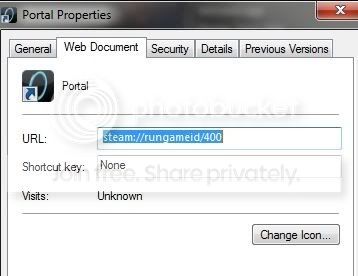
How to Add Steam Games to Windows 7 Games Explorer Folder
There is already an excellent tutorial showing how to add games to Win 7's game Explorer.
Found here:
http://www.sevenforums.com/tutorials/25787-games-explorer-folder-add-games.html
Many Steam games will automatically put shorcuts in the Game Explorer upon install, or for older ones can be done manually using the tutorial above.
Most Source games however, such as Half Life, Portal etc work slightly different.
For the purposes of this tutorial, I will be adding Portal to my Games Explorer, but it works the same for all other Source Games.
--So heres what you need to do:
--> The first thing you need to do is get the Steam ID number for your game you wish to add.
A...
How to Enable or Disable Presentation Settings in Windows 7 and Windows 8
Presentation settings are options on a laptop or desktop that you can apply when giving a presentation. When presentation settings are turned on, your laptop stays awake and system notifications are turned off. You can also turn off the screen saver, adjust the speaker volume, and change your desktop background image when presentation settings are turned on.
This tutorial will show you how to enable or disable the ability of all or specific users to be able to turn on presentation settings in Windows 7 and Windows 8.
In Windows 7, "Presentation Settings" is only available in the Windows 7 Professional, Windows 7 Ultimate, and Windows 7 Enterprise editions...
How to "Turn off all unnecessary animations" in Vista and Windows 7
The Turn off all unnecessary animations (when possible) option is for animation effects, such as fading effects, when you close windows and other elements.
If you use your computer without a display, prefer to block unnecessary animation effects, or want to turn them off in programs that support this option, then this will show you how to Turn off all unnecessary animations (when possible) without affecting Aero Snap, Aero Peek, Aero Shake, Transparency, etc...
If animation effects, such as fade windows when closed visual effects, run slow or sluggish on your computer, then using Turn off all unnecessary animations can help improve your computer's performance...
How to Enable or Disable Internet Explorer Tabbed Browsing
Tabbed browsing is a feature in Internet Explorer that enables you to open multiple websites in a single browser window. You can open webpages in new tabs, and switch between them by clicking the tabs you want to view.
This will show you how to enable or disable Internet Explorer tabbed browsing.This does not apply to Internet Explorer 11 (IE11).
Tabbed browsing cannot be disabled in Internet Explorer 11 (IE11).
EXAMPLE: Tabbed Browsing
EXAMPLE: Tabbed Browsing Settings
Enabled or Disable Tabbed Browsing for "Current User" Only
NOTE: This will only affect the user account that you are currently logged in when applied. 1. Open the Control Panel (icons view)...
How to Restore the Caret Browsing Confirmation Prompt
If you checked the Do not show me this dialog box again. in the Caret Browsing confirmation prompt, then this will show you how to restore the confirmation prompt in Internet Explorer and Firefox.
EXAMPLE: Caret Browsing confirmation prompt
NOTE: This is what you see when you press F7 in Internet Explorer or Firefox to confirm turning on Caret Browsing.
Restore Caret Browsing Confirmation Prompt in "Internet Explorer" 1. Click/tap on the Download button below to download the file below. Restore_IE_Caret_Browsing_Prompt.reg
http://www.sevenforums.com/attachment.php?attachmentid=88067&stc=1&d=1280373631
2. Save the .reg file to the desktop.
3. Double click/tap on the...
How to Turn Caret Browsing On or Off within Webpages
Rather than just using a mouse pointer to select text and move around within a webpage, you can also use standard navigation keys Home, End, Page Up, Page Down, and the arrow keys on your keyboard instead of a mouse pointer. This feature is called Caret Browsing and is named after the caret (cursor) that appears when you edit a document. Holding the SHIFT key down and pressing the arrow keys selects text.
This tutorial will show you how to turn Caret Browsing on or off within webpages in your web browser (ex: IE9, IE10, or Firefox).
Here's How:
1. Open Internet Explorer or Firefox.
NOTE: In Windows 8, this would aply to both the IE10 desktop and IE10 Metro (Windows UI)...

Ok, first tutorial, so Im not 100% on making a tutorial :geek:
This tutorial will show you how to enable or disable task manager for a certain user.
Disable Access to Task Manager
1. Open windows explorer and navigate to C:\Windows\System32
2. Scroll down to taskmgr.exe. Right click it and select properties.
3. Go to the security tab
4. Click edit
5. Click add
6. Click object types
7. Uncheck all but Users
8. Type the username for which you want task manager to be disabled.
9. Click check names.
10. Click ok.
11. Click on the username you typed in step 8.
12. Look at the permissions box and find Read & execute. Check deny. This will also check read.
13. Click apply
14. Click ok on the two windows that come up...
How To Install a Driver in Add Hardware Wizard
NOTE: For this example, I am installing the Network Adapter SIS 900; I will be Using Windows XP drivers.
1) Type hdwwiz in the Search bar, than press Enter.
2) Click on Next.
3) Click on Install hardware that I manually select from a list (advanced)
4) Click on Next.
5) Click on Have Disk.
6) Click on Browse.
7) Click on Computer.
8) Click on Open.
9) Click on Open.
10) Click on OK.
11) Click on Next.
12) Click on Next.
13) Click on Finish.
14) Restart your PC
Turn off Windows 7 Automatic Driver Installation
How to Install Vista Drivers on Windows 7
How to Install a Driver in Device Manager
How to Create a Add a Device Shortcut in Windows 7
How to Create...
How to Open Folder in New Process in Windows 7 and Windows 8
This tutorial will show you how to open a drive, folder, or library window in a separate new explorer process in Windows 7 and Windows 8.
This is not the same as just having a folder open in a separate new window. Those two folder windows would still just be running in the same single explorer.exe process.
Having a folder open in a separate process will allow multiple instances of the open folder window to be running with each instance running with a separate explorer.exe process. If one of these instances should close or crash, the other instances would be completely unaffected by it.This can increase the stability of Windows 7 by opening every folder in a separate...