Task Scheduler Error (Event ID 404) - Fix

How to Fix Task Scheduler Error (Event ID 404)

   Information
This will show you how fix Task Scheduler Error Event ID 404.This article applies to Vista,Windows 7 all versions (x32,x64)


Symptoms

-Task Scheduler not working
-Disk Defrag not working
-cannot create restore point
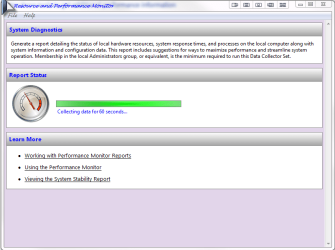
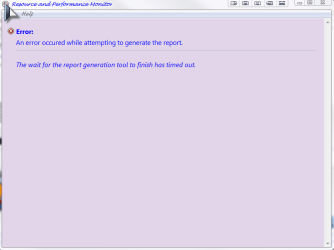
-cannot create system health report
-many applications not working
-Windows Update Error 0x80041315

and many other things

When you attempt to do one of above things you are getting following error

Could not create Scheduled Task for the following reason.The request is not supported (0x80070032)

Schedule2.png

Reasons

This error maybe caused by followings things:

-the Task Scheduler Service is disabled or incorrect set
-the Event Viewer Services is disabled or incorrect set
-blocked port 135
-possibly it may also be caused by disabling DCOM support (I'm not sure about this)


Go to Start>>services.msc and make sure below services exist, have correct settings and are working

Task Scheduler:Startup type:AUTOMATIC (STARTED),Log on as:LocalSystem
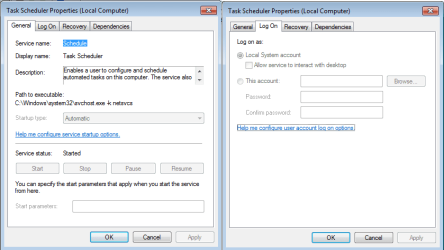
Schedule.png

Windows Event Log:Startup type:AUTOMATIC (STARTED),Log on as:LocalService

EventLog.png


SCENARIO I

Issue with Task Scheduler service.

Unfortunately you can't change settings for this service through services.msc because all options are grayed out.You can only correct this problem in registry.Download below fix,import to registry and restart computer

TaskSchedulerFix


SCENARIO II

Issue with Windows Event Log service

If it is only problem with startup type you can correct it normal in services.msc too,if it is problem with logon parameter it is only possible in registry.Below is fix which repair startup and logon parameter for this service.

EventLogFix


To apply changes you have to restart computer.

SCENARIO III

Issue with port 135.Both services are correct set and working neverless task scheduler not working

If you ever time you used Windows Worm Door Cleaner surly this application caused this.
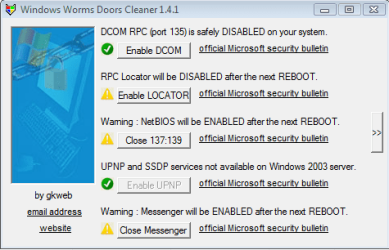
WWDC.png
WWDC is not applicable for Vista/Windows 7 and you shouldn't use it


Possibly any other security software can cause the same problem too.

Check the status of port 135, and if anything it has closed (any firewall or other application) simply unlock it.You can do that also directly check in registry:
Find HKEY_LOCAL_MACHINE\SOFTWARE\Microsoft\Rpc\Internet key, remove it and restart computer.

FWIW

I know WWDC disable DCOM support too and other things which can cause also issue with Task Scheduler too or any other issues although I don't have evidence.So I attached here fix which revert all dangerous changes made by WWDC.Disabling Universal Plug & Play and SSDP discovery services is not dangerous for system and thus below fix does not consider it.You can also import below fix even if you have never used WWDC and none of previous suggestions help.

Revert WWDC changes


To apply changes in registry you have to restart computer.


Attachments

Last edited by a moderator:
Last edited:

My Computer

Computer Manufacturer/Model Number
packard bell IXTREME M5722
OS
Operating System : Windows 7 Home Premium Edition 6.01.7600 SP1 (x64)
CPU
Processor : Intel Core 2 Quad Q8300 @ 2500 MHz
Motherboard
Mainboard : Packard Bell (Acer EG43M )
Memory
Physical Memory :8GB Corsair4x 2GB 800MHz C5 DDR2
Graphics Card(s)
Video Card : XFX 6700 AMD
Monitor(s) Displays
Maestro 234DL - BenQ V2220 - BenQ VW2420H
Screen Resolution
Current Display :1920x1080p pixels at 60 Hz in HD LED
Hard Drives
Hard Disks : WDC (1000 GB)
Drive C: (Hard Disk) : 428 GB available on 491 GB
Drive D: (Hard Disk) : 426 GB available on 492 GB
SAMSUNG spinpoint HD103SJ 1000.2 GB
(X 2) KINGSTON SSD NOW V 30GB
PSU
XFX ProSeries 550W PSU
Case
PACKARD BELL IXTREME
Cooling
System Blower Current: 150mA Air Flow16CFM ;Akasa 90mm rear
Keyboard
Gigabyte Aivia K8100
Mouse
TRUST-Wireless Laser Mouse - Carbon edition MI-7770C
Internet Speed
TP-LINK > TL-WN951N / AV500 Gigabit Powerline Adapters
Browser
chrome dev
Other Info
EXTRA COOLING>(FAN CONTROLLER) PC Bay Cooler 3 x 40mm fans; Akasa AK-HD-BL Blue hard drive cooler 2 x 40 mm fan 4500 rpm 29.7 dBA
Bios> American Megatrends Inc.
Version : P01-A1
Date : 08/31/2009
hi how do i check port 135?

You have to search in options in your security software,simpler - just remove this key HKEY_LOCAL_MACHINE\SOFTWARE\Microsoft\Rpc\Internet if you have it.
 

My Computer

Computer Manufacturer/Model Number
Custom made
OS
Windows 7 Professional x64 PL
CPU
AMD Athlon 4450e
Motherboard
Giga-Byte GA-MA69G-S3H
Memory
GoodRam DDR2 2x2048MB (FSB 800MHz)
Graphics Card(s)
nVidia GeForce 9600GT (G94-300) 1024 MB
Monitor(s) Displays
SAMSUNG SyncMaster HS2P301688
Hard Drives
Seagate ST3750330AS 750GB
PSU
Corsair 550W
Cooling
AeroCool ExtremeEngine 3T
Last edited:

My Computer

Computer Manufacturer/Model Number
packard bell IXTREME M5722
OS
Operating System : Windows 7 Home Premium Edition 6.01.7600 SP1 (x64)
CPU
Processor : Intel Core 2 Quad Q8300 @ 2500 MHz
Motherboard
Mainboard : Packard Bell (Acer EG43M )
Memory
Physical Memory :8GB Corsair4x 2GB 800MHz C5 DDR2
Graphics Card(s)
Video Card : XFX 6700 AMD
Monitor(s) Displays
Maestro 234DL - BenQ V2220 - BenQ VW2420H
Screen Resolution
Current Display :1920x1080p pixels at 60 Hz in HD LED
Hard Drives
Hard Disks : WDC (1000 GB)
Drive C: (Hard Disk) : 428 GB available on 491 GB
Drive D: (Hard Disk) : 426 GB available on 492 GB
SAMSUNG spinpoint HD103SJ 1000.2 GB
(X 2) KINGSTON SSD NOW V 30GB
PSU
XFX ProSeries 550W PSU
Case
PACKARD BELL IXTREME
Cooling
System Blower Current: 150mA Air Flow16CFM ;Akasa 90mm rear
Keyboard
Gigabyte Aivia K8100
Mouse
TRUST-Wireless Laser Mouse - Carbon edition MI-7770C
Internet Speed
TP-LINK > TL-WN951N / AV500 Gigabit Powerline Adapters
Browser
chrome dev
Other Info
EXTRA COOLING>(FAN CONTROLLER) PC Bay Cooler 3 x 40mm fans; Akasa AK-HD-BL Blue hard drive cooler 2 x 40 mm fan 4500 rpm 29.7 dBA
Bios> American Megatrends Inc.
Version : P01-A1
Date : 08/31/2009
this is what i get
 

Attachments

  • system error.PNG
    system error.PNG
    22 KB · Views: 713
  • system error2.PNG
    system error2.PNG
    12.3 KB · Views: 557
  • task scedular error.PNG
    task scedular error.PNG
    6.5 KB · Views: 12,453
Last edited:

My Computer

Computer Manufacturer/Model Number
packard bell IXTREME M5722
OS
Operating System : Windows 7 Home Premium Edition 6.01.7600 SP1 (x64)
CPU
Processor : Intel Core 2 Quad Q8300 @ 2500 MHz
Motherboard
Mainboard : Packard Bell (Acer EG43M )
Memory
Physical Memory :8GB Corsair4x 2GB 800MHz C5 DDR2
Graphics Card(s)
Video Card : XFX 6700 AMD
Monitor(s) Displays
Maestro 234DL - BenQ V2220 - BenQ VW2420H
Screen Resolution
Current Display :1920x1080p pixels at 60 Hz in HD LED
Hard Drives
Hard Disks : WDC (1000 GB)
Drive C: (Hard Disk) : 428 GB available on 491 GB
Drive D: (Hard Disk) : 426 GB available on 492 GB
SAMSUNG spinpoint HD103SJ 1000.2 GB
(X 2) KINGSTON SSD NOW V 30GB
PSU
XFX ProSeries 550W PSU
Case
PACKARD BELL IXTREME
Cooling
System Blower Current: 150mA Air Flow16CFM ;Akasa 90mm rear
Keyboard
Gigabyte Aivia K8100
Mouse
TRUST-Wireless Laser Mouse - Carbon edition MI-7770C
Internet Speed
TP-LINK > TL-WN951N / AV500 Gigabit Powerline Adapters
Browser
chrome dev
Other Info
EXTRA COOLING>(FAN CONTROLLER) PC Bay Cooler 3 x 40mm fans; Akasa AK-HD-BL Blue hard drive cooler 2 x 40 mm fan 4500 rpm 29.7 dBA
Bios> American Megatrends Inc.
Version : P01-A1
Date : 08/31/2009
If Performance Logs & Alerts service work fine and stiill you have this problem then remove the folder C:\Perflogs
 

My Computer

Computer Manufacturer/Model Number
Custom made
OS
Windows 7 Professional x64 PL
CPU
AMD Athlon 4450e
Motherboard
Giga-Byte GA-MA69G-S3H
Memory
GoodRam DDR2 2x2048MB (FSB 800MHz)
Graphics Card(s)
nVidia GeForce 9600GT (G94-300) 1024 MB
Monitor(s) Displays
SAMSUNG SyncMaster HS2P301688
Hard Drives
Seagate ST3750330AS 750GB
PSU
Corsair 550W
Cooling
AeroCool ExtremeEngine 3T
Back
Top