Windows will not recognise my backup image on external hard drive?

cougamvp

New member
Local time
1:50 PM
Messages
45
Hey guys, I restored my computer from the windows 7 CD that came with my computer and when I went to restore my computer to a backup that I had put on my external hard drive, windows will say that it cannot find any backups. Is there anyway I can fix this? I know my backup works because I first restored to my backup image and it worked fine, but I cancelled it half way thinking it was reversible.
 

My Computer My Computer

At a glance

windows 7 home premium 64 bit
OS
windows 7 home premium 64 bit
please help!!!
 

My Computer My Computer

At a glance

windows 7 home premium 64 bit
OS
windows 7 home premium 64 bit
Be clearer. You created a SYSTEM IMAGE of your OS-related drive(s) using the Windows 7 built-in Backup and Restore screen/process and placed that image on a target drive consisting of an external USB drive?

You then booted off of your Windows CD/DVD into the Recovery Environment of which one of the options is: Restore your computer from a System Image you created earlier.

You went ahead and chose the System Image (the screen defaults to the LAST system image you took) that was sitting on your external USB drive and began the restore process?

You cancelled this restore halfway through. How did you do this? Is there a CANCEL button during the restore process? If you did, I would guess that you OS image is now unusable as half will be from a system image from X time ago, and the other half will be what your OS looked like yesterday.

When you fired up the Windows CD/DVD again for Recovery Environment, did you have your external USB drive already attached? If not, there's a REFRESH button (I think) on that screen whereby you could NOW connect that USB drive, click Refresh and would hope to see that system image that resides upon that USB drive.
 

My Computer My Computer

At a glance

Windows 7AMD Phenom II X2 (dual-core)4Gintegrated ATI HD 4200
Computer type
PC/Desktop
Computer Manufacturer/Model Number
Custom
OS
Windows 7
CPU
AMD Phenom II X2 (dual-core)
Motherboard
GA-MA785GM-US2H
Memory
4G
Graphics Card(s)
integrated ATI HD 4200
Sound Card
integrated
Monitor(s) Displays
Samsung 24"
Screen Resolution
1920x1080
Hard Drives
1 SSD - Samsung 840 - 500 GB - OS and DATA partitions
1 SSD - Intel 320 - 120 GB (used for backups) - Misc/BACKUP
1 SATA HD - WD, 500 GB - BACKUP
PSU
Ultra X4 500W
Case
Ultra X-blaster
Keyboard
Microsoft Digital Media Pro
Mouse
Logitech WIRED!
Internet Speed
15 Mbps FIOS
Be clearer. You created a SYSTEM IMAGE of your OS-related drive(s) using the Windows 7 built-in Backup and Restore screen/process and placed that image on a target drive consisting of an external USB drive? yes

You then booted off of your Windows CD/DVD into the Recovery Environment of which one of the options is: Restore your computer from a System Image you created earlier. i used the CD and started fresh because I messed up the OS

You went ahead and chose the System Image (the screen defaults to the LAST system image you took) that was sitting on your external USB drive and began the restore process? yes

You cancelled this restore halfway through. How did you do this? Is there a CANCEL button during the restore process? If you did, I would guess that you OS image is now unusable as half will be from a system image from X time ago, and the other half will be what your OS looked like yesterday. i clicked cancel and then everytime i started my computer it just said missing Operating system, so then i restored a new OS from the CD/DVD

When you fired up the Windows CD/DVD again for Recovery Environment, did you have your external USB drive already attached? If not, there's a REFRESH button (I think) on that screen whereby you could NOW connect that USB drive, click Refresh and would hope to see that system image that resides upon that USB drive.
At this point the windows cd just installed the OS it didnt give me an option to restore
 

My Computer My Computer

At a glance

windows 7 home premium 64 bit
OS
windows 7 home premium 64 bit
So, you're saying the PRIOR time you did this, you COULD select the "restore computer from system image you created earlier", but this time, it just installs Windows 7 with no other option??
 

My Computer My Computer

At a glance

Windows 7AMD Phenom II X2 (dual-core)4Gintegrated ATI HD 4200
Computer type
PC/Desktop
Computer Manufacturer/Model Number
Custom
OS
Windows 7
CPU
AMD Phenom II X2 (dual-core)
Motherboard
GA-MA785GM-US2H
Memory
4G
Graphics Card(s)
integrated ATI HD 4200
Sound Card
integrated
Monitor(s) Displays
Samsung 24"
Screen Resolution
1920x1080
Hard Drives
1 SSD - Samsung 840 - 500 GB - OS and DATA partitions
1 SSD - Intel 320 - 120 GB (used for backups) - Misc/BACKUP
1 SATA HD - WD, 500 GB - BACKUP
PSU
Ultra X4 500W
Case
Ultra X-blaster
Keyboard
Microsoft Digital Media Pro
Mouse
Logitech WIRED!
Internet Speed
15 Mbps FIOS
So, you're saying the PRIOR time you did this, you COULD select the "restore computer from system image you created earlier", but this time, it just installs Windows 7 with no other option??
ok so basically i messed my computer up with this thing called deep freeze...so through the safe mode menu i clicked restore computer and clicked the image to backup that was on my external HDD. Then i cancelled it halfway and it messed computer up even more. Nothing i could do at this point. so i inserted the windows CD/DVD and just installed windows from scratch, then windows doesnt recognize my back up on my external hdd but i think it has something to do with the drivers and all that
 

My Computer My Computer

At a glance

windows 7 home premium 64 bit
OS
windows 7 home premium 64 bit
Interesting point. I've wondered about this.

I would have thought, prior to your post, that when you launch Win RE, it simply looks for all attached drives (fixed and removable NONflash drives) and if it finds the WindowsImageBackup folder in the root of that drive, it uses the contents to build the "system image" list.

Since your fresh install can not see your external drive's system image, it implies that maybe this whole process needs the C partition (OS) : \ System Volume Information folder which contains information about the system images as well as Restore Points.
 

My Computer My Computer

At a glance

Windows 7AMD Phenom II X2 (dual-core)4Gintegrated ATI HD 4200
Computer type
PC/Desktop
Computer Manufacturer/Model Number
Custom
OS
Windows 7
CPU
AMD Phenom II X2 (dual-core)
Motherboard
GA-MA785GM-US2H
Memory
4G
Graphics Card(s)
integrated ATI HD 4200
Sound Card
integrated
Monitor(s) Displays
Samsung 24"
Screen Resolution
1920x1080
Hard Drives
1 SSD - Samsung 840 - 500 GB - OS and DATA partitions
1 SSD - Intel 320 - 120 GB (used for backups) - Misc/BACKUP
1 SATA HD - WD, 500 GB - BACKUP
PSU
Ultra X4 500W
Case
Ultra X-blaster
Keyboard
Microsoft Digital Media Pro
Mouse
Logitech WIRED!
Internet Speed
15 Mbps FIOS
There is a way to salvage your image. But it is a pretty long procedure and you need a running system from which you can accdess the image. If you have no other option. I will be glad to explain it. But as I said, it is rather involved - but it works.

PS: It will be even more involved if you had a 100MB system partition.
 

My Computer My Computer

At a glance

Vista, Windows7, Mint Mate, Zorin, Windows 8from 1.6GHz Duo to i7
Computer Manufacturer/Model Number
HP, Dell, Gateway, Toshiba - 4 laptops and 2 desktops
OS
Vista, Windows7, Mint Mate, Zorin, Windows 8
CPU
from 1.6GHz Duo to i7
Monitor(s) Displays
2x HP w2207
Hard Drives
5x HDD, 7x SSD, 12x Externals
Keyboard
with trackball - no mices
Mouse
Trackball mice
Internet Speed
DSL 6000
There is a way to salvage your image. But it is a pretty long procedure and you need a running system from which you can accdess the image. If you have no other option. I will be glad to explain it. But as I said, it is rather involved - but it works.

PS: It will be even more involved if you had a 100MB system partition.
well right now on my laptop i can click into my external hdd and see the back up...only windows restore doesn't recognize it.
 

My Computer My Computer

At a glance

windows 7 home premium 64 bit
OS
windows 7 home premium 64 bit
There is a way to salvage your image. But it is a pretty long procedure and you need a running system from which you can accdess the image. If you have no other option. I will be glad to explain it. But as I said, it is rather involved - but it works.

PS: It will be even more involved if you had a 100MB system partition.

Could he rename his current WindowsImageBackup (or run my script to automate the renaming of the computer node to add the date) so the current image won't get deleted.

Then, rerun a new System Image. This would get the shadow info into the OS System Volume Information folder.

Then manually copy the 2 .vhd files from his renamed (original) WindowsImageBackup into the new WindowsImageBackup\computername\Backup ...... folder?
 

My Computer My Computer

At a glance

Windows 7AMD Phenom II X2 (dual-core)4Gintegrated ATI HD 4200
Computer type
PC/Desktop
Computer Manufacturer/Model Number
Custom
OS
Windows 7
CPU
AMD Phenom II X2 (dual-core)
Motherboard
GA-MA785GM-US2H
Memory
4G
Graphics Card(s)
integrated ATI HD 4200
Sound Card
integrated
Monitor(s) Displays
Samsung 24"
Screen Resolution
1920x1080
Hard Drives
1 SSD - Samsung 840 - 500 GB - OS and DATA partitions
1 SSD - Intel 320 - 120 GB (used for backups) - Misc/BACKUP
1 SATA HD - WD, 500 GB - BACKUP
PSU
Ultra X4 500W
Case
Ultra X-blaster
Keyboard
Microsoft Digital Media Pro
Mouse
Logitech WIRED!
Internet Speed
15 Mbps FIOS
To salvage your restore point, you can do the following (on any of your PCs)

1. find the image and find the VHD within all the image files. It is usually the last file with the many bytes.

2. Go to Disk Management, click on the 'Action button' (top left) and then on Attach. Navigate to that VHD in the image and attach it. Now you should see a virtual volume in Disk Management and in My Computer. Remember the drive letter And give it a different name that you can recognize.

3. Download and install free Macrium - some other imaging program may also work for the next steps, but I have done it with Macrium and I know that this works.

4. Start Macrium and burn the recovery CD as a first step.

5. Image the attached VHD - should be easy to find by the drive letter or the name you gave it.

6. With the help of the Macrium recovery CD, restore that image to the partition from where the original image (the VHD) came from. If there is a problem with size, you might have to first shrink the VHD volume before you do steo #5. Make sure you mark the partition as 'active' and also restore the MBR.

7. If that partition (the C: partition) was originally active, your system should now boot. If you originally had the 100MB active system partition, Then you have to first fix your bootmgr. Either run startup repair 3 times with your installation/recovery disc, or use one of the tutorials from the tutorial section.

 

My Computer My Computer

At a glance

Vista, Windows7, Mint Mate, Zorin, Windows 8from 1.6GHz Duo to i7
Computer Manufacturer/Model Number
HP, Dell, Gateway, Toshiba - 4 laptops and 2 desktops
OS
Vista, Windows7, Mint Mate, Zorin, Windows 8
CPU
from 1.6GHz Duo to i7
Monitor(s) Displays
2x HP w2207
Hard Drives
5x HDD, 7x SSD, 12x Externals
Keyboard
with trackball - no mices
Mouse
Trackball mice
Internet Speed
DSL 6000
To salvage your restore point, you can do the following (on any of your PCs)

1. find the image and find the VHD within all the image files. It is usually the last file with the many bytes.

2. Go to Disk Management, click on the 'Action button' (top left) and then on Attach. Navigate to that VHD in the image and attach it. Now you should see a virtual volume in Disk Management and in My Computer. Remember the drive letter And give it a different name that you can recognize.

3. Download and install free Macrium - some other imaging program may also work for the next steps, but I have done it with Macrium and I know that this works.

4. Start Macrium and burn the recovery CD as a first step.

5. Image the attached VHD - should be easy to find by the drive letter or the name you gave it.

6. With the help of the Macrium recovery CD, restore that image to the partition from where the original image (the VHD) came from. If there is a problem with size, you might have to first shrink the VHD volume before you do steo #5. Make sure you mark the partition as 'active' and also restore the MBR.

7. If that partition (the C: partition) was originally active, your system should now boot. If you originally had the 100MB active system partition, Then you have to first fix your bootmgr. Either run startup repair 3 times with your installation/recovery disc, or use one of the tutorials from the tutorial section.
im kind of scared i might mess up a step in all of this...do you think there is any way you could please teamviewer me and help me out? it would be greatly greatly appreciated!!!
 

My Computer My Computer

At a glance

windows 7 home premium 64 bit
OS
windows 7 home premium 64 bit
Nah, you can do it. There is nothing you can destroy. If it does not work first time, we'll try again. I could help you with Teamviewer which I have. But I prefer you do it yourself. Ask questions along the way when you think you are not certain what to do next.
 

My Computer My Computer

At a glance

Vista, Windows7, Mint Mate, Zorin, Windows 8from 1.6GHz Duo to i7
Computer Manufacturer/Model Number
HP, Dell, Gateway, Toshiba - 4 laptops and 2 desktops
OS
Vista, Windows7, Mint Mate, Zorin, Windows 8
CPU
from 1.6GHz Duo to i7
Monitor(s) Displays
2x HP w2207
Hard Drives
5x HDD, 7x SSD, 12x Externals
Keyboard
with trackball - no mices
Mouse
Trackball mice
Internet Speed
DSL 6000
Nah, you can do it. There is nothing you can destroy. If it does not work first time, we'll try again. I could help you with Teamviewer which I have. But I prefer you do it yourself. Ask questions along the way when you think you are not certain what to do next.

Fundamentally, does System Image Restore (Win RE) need ANY data off the OS drive (i.e. System Volume Information)?

I know the last successful system image info is in the registry (which is why it shows in System Image screen as well as win RE system image restore screen).

I understand your process above, but wouldn't my solution technically also work?
 

My Computer My Computer

At a glance

Windows 7AMD Phenom II X2 (dual-core)4Gintegrated ATI HD 4200
Computer type
PC/Desktop
Computer Manufacturer/Model Number
Custom
OS
Windows 7
CPU
AMD Phenom II X2 (dual-core)
Motherboard
GA-MA785GM-US2H
Memory
4G
Graphics Card(s)
integrated ATI HD 4200
Sound Card
integrated
Monitor(s) Displays
Samsung 24"
Screen Resolution
1920x1080
Hard Drives
1 SSD - Samsung 840 - 500 GB - OS and DATA partitions
1 SSD - Intel 320 - 120 GB (used for backups) - Misc/BACKUP
1 SATA HD - WD, 500 GB - BACKUP
PSU
Ultra X4 500W
Case
Ultra X-blaster
Keyboard
Microsoft Digital Media Pro
Mouse
Logitech WIRED!
Internet Speed
15 Mbps FIOS
Nah, you can do it. There is nothing you can destroy. If it does not work first time, we'll try again. I could help you with Teamviewer which I have. But I prefer you do it yourself. Ask questions along the way when you think you are not certain what to do next.

Fundamentally, does System Image Restore (Win RE) need ANY data off the OS drive (i.e. System Volume Information)?

I know the last successful system image info is in the registry (which is why it shows in System Image screen as well as win RE system image restore screen).

I understand your process above, but wouldn't my solution technically also work?
Jim, To tell you the truth - I don't know. Your approach may very well work, but I have never tried that option.
 

My Computer My Computer

At a glance

Vista, Windows7, Mint Mate, Zorin, Windows 8from 1.6GHz Duo to i7
Computer Manufacturer/Model Number
HP, Dell, Gateway, Toshiba - 4 laptops and 2 desktops
OS
Vista, Windows7, Mint Mate, Zorin, Windows 8
CPU
from 1.6GHz Duo to i7
Monitor(s) Displays
2x HP w2207
Hard Drives
5x HDD, 7x SSD, 12x Externals
Keyboard
with trackball - no mices
Mouse
Trackball mice
Internet Speed
DSL 6000
Jim, To tell you the truth - I don't know. Your approach may very well work, but I have never tried that option.

OK. It's almost as if he could also (another option) run my .bat script to take a new image to external (won't lose the original as it's renamed), then when it's done, takeown and delete the subdirectory (recursive) for the new System Image he just created and Win7 has been fooled into thinking the WIB folder contains the matching shadow entry.

Thinking about this more, if you have used an external (or have renamed the COMPUTERname folder node within WindowsImageBackup), when win RE is up, he doesn't try to match of OS Shadow information with any WIB folders as you could have (/procedurally/legal from Win7's point of view) an external in which you are backing up multiple PCs. Win RE should just display the damn things. The only I can think is he didn't click on REFRESH or something to recognize the external drive?
 

My Computer My Computer

At a glance

Windows 7AMD Phenom II X2 (dual-core)4Gintegrated ATI HD 4200
Computer type
PC/Desktop
Computer Manufacturer/Model Number
Custom
OS
Windows 7
CPU
AMD Phenom II X2 (dual-core)
Motherboard
GA-MA785GM-US2H
Memory
4G
Graphics Card(s)
integrated ATI HD 4200
Sound Card
integrated
Monitor(s) Displays
Samsung 24"
Screen Resolution
1920x1080
Hard Drives
1 SSD - Samsung 840 - 500 GB - OS and DATA partitions
1 SSD - Intel 320 - 120 GB (used for backups) - Misc/BACKUP
1 SATA HD - WD, 500 GB - BACKUP
PSU
Ultra X4 500W
Case
Ultra X-blaster
Keyboard
Microsoft Digital Media Pro
Mouse
Logitech WIRED!
Internet Speed
15 Mbps FIOS
Nah, you can do it. There is nothing you can destroy. If it does not work first time, we'll try again. I could help you with Teamviewer which I have. But I prefer you do it yourself. Ask questions along the way when you think you are not certain what to do next.
okay yeah your right, well if you could tell me whenever you're available for teamviewer because there is some terminology i don't know and some points i'm not 100% clear on. I'll def do the work, I'd just like to know if I get stuck on something, that I can turn to you.
 

My Computer My Computer

At a glance

windows 7 home premium 64 bit
OS
windows 7 home premium 64 bit
Don't worry. I am usually around.

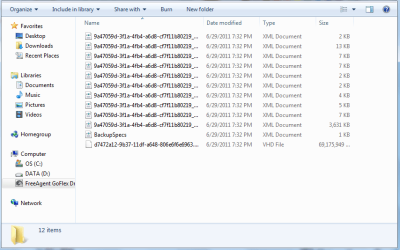
Let's start with step 1. When you look at the image, is there 1 VHD or are there 2. If there are 2 (the smaller one would be the 100MB active system partition with the bootmgr) , we could attach both and try to move the bootmgr with EasyBCD. That would make step 7 a lot easier. You could boot right away.
 

My Computer My Computer

At a glance

Vista, Windows7, Mint Mate, Zorin, Windows 8from 1.6GHz Duo to i7
Computer Manufacturer/Model Number
HP, Dell, Gateway, Toshiba - 4 laptops and 2 desktops
OS
Vista, Windows7, Mint Mate, Zorin, Windows 8
CPU
from 1.6GHz Duo to i7
Monitor(s) Displays
2x HP w2207
Hard Drives
5x HDD, 7x SSD, 12x Externals
Keyboard
with trackball - no mices
Mouse
Trackball mice
Internet Speed
DSL 6000
Don't worry. I am usually around.

Let's start with step 1. When you look at the image, is there 1 VHD or are there 2. If there are 2 (the smaller one would be the 100MB active system partition with the bootmgr) , we could attach both and try to move the bootmgr with EasyBCD. That would make step 7 a lot easier. You could boot right away.

looks like there is only 1
 

Attachments

  • backup.png
    backup.png
    17.4 KB · Views: 106

My Computer My Computer

At a glance

windows 7 home premium 64 bit
OS
windows 7 home premium 64 bit
That is good. Hopefully the bootmgr is intact.

Now attach that VHD and rename it in My Computer. Pick an easy name like 'VHD for image'.
 

My Computer My Computer

At a glance

Vista, Windows7, Mint Mate, Zorin, Windows 8from 1.6GHz Duo to i7
Computer Manufacturer/Model Number
HP, Dell, Gateway, Toshiba - 4 laptops and 2 desktops
OS
Vista, Windows7, Mint Mate, Zorin, Windows 8
CPU
from 1.6GHz Duo to i7
Monitor(s) Displays
2x HP w2207
Hard Drives
5x HDD, 7x SSD, 12x Externals
Keyboard
with trackball - no mices
Mouse
Trackball mice
Internet Speed
DSL 6000
Back
Top