

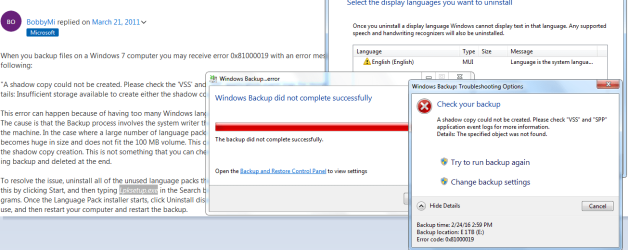
I just had Windows 7 Prof 64-bit reinstalled from my OEM CD/DVD a couple days ago. I noticed that by the clock in the task bar it said I should set up scheduled backups. So I decided to do it to my other internal HDD which is 1Gb in size (E drive) where as my C drive is 320Gb in size which Windows 7 is installed on. Not far in I got this error:
Windows Backup error: 0x81000019 - Check VSS and SPP event logs
I don't know why it is having an issue so I searched the net for an answer and found on old thread (730 days old) about this.
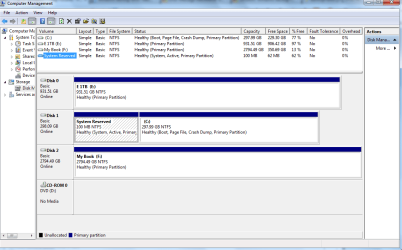
Which HDD do I need the System Reserved Partition on? I only have it on the C drive. Not the E drive. C has 100Mb reserved.
Okay I see where it says I have 62Mb free of that reserve. Isn't that enough? That is more than 40Mb.
I also noticed that the reserve is active. I found all the jargon confusing so I decided it best to start my own thread. Thanks for your help in advance.
Windows Backup error: 0x81000019 - Check VSS and SPP event logs
I don't know why it is having an issue so I searched the net for an answer and found on old thread (730 days old) about this.
Start> Right click Computer> Manage
Select Storage> Disk management
Verify that you have a System Reserved partition of 100 MB
If yes, right click on this volume and select Properties.
View used and free space.
You must have around 40 MB free space for backup to complete successfully
Which HDD do I need the System Reserved Partition on? I only have it on the C drive. Not the E drive. C has 100Mb reserved.
Okay I see where it says I have 62Mb free of that reserve. Isn't that enough? That is more than 40Mb.
I also noticed that the reserve is active. I found all the jargon confusing so I decided it best to start my own thread. Thanks for your help in advance.
Attachments
My Computer
At a glance
Microsoft Windows 7 Professional Edition Serv...Intel(R) Core(TM)2 Quad Q9550 @2.83GHz (Xeon)...4095 MB (4 x 1024 MBytes DDR2 Dual Symmetric)Sapphire HD 7770 GHz Edition (shows Radeon R7...
- Computer type
- PC/Desktop
- Computer Manufacturer/Model Number
- HP-Pavilion-a6000-Desktop-PC
- OS
- Microsoft Windows 7 Professional Edition Service Pack 1 (build 7601), 64-bit
- CPU
- Intel(R) Core(TM)2 Quad Q9550 @2.83GHz (Xeon) Socket 775 LGA
- Motherboard
- ASUSTeK Computer INC. Benicia (P35/G33/G31)
- Memory
- 4095 MB (4 x 1024 MBytes DDR2 Dual Symmetric)
- Graphics Card(s)
- Sapphire HD 7770 GHz Edition (shows Radeon R7 200)
- Sound Card
- Realtek High Definition Audio Driver Version 6.0.1.6662
- Monitor(s) Displays
- HP w19b 18.6" 5:3 (SN: CNC703PN1G)
- Screen Resolution
- 1440 x 900
- Hard Drives
- 1080 GB total
C: (320Gb): WDC WD3200AAKS-75L9A0 ATA
D: (Optical Drive): ATAPI DVD A DH16A6S ATA Device
E: (1Tb): WDC WD10EARS-00S8B1 ATA
F: (Backup 2 Tb): Clikfree Backup Drive USB
- PSU
- GX750
- Case
- Black/Blue APEVIA X-Hermes
- Cooling
- 2 Top , 1 back, 1 front fan all 180 mm & side 200mm
- Keyboard
- Logitech G110
- Mouse
- Logitech G500s
- Internet Speed
- High speed cable
- Antivirus
- Avast! Internet Security 2014.9.0.2021
- Browser
- Firefox 44 (x86 en-US)
- Other Info
- BIOS American Megatrends
Date:
09/10/09 10:25:18 Ver: 5.43


