Backup Error 0x81000019 - Fix

How to Fix Backup Error 0x81000019 in Windows 7

   Information
This tutorial will help show you some ways to deal with the backup error 0x81000019 which prevents you from creating a Windows System Image.

USN journal files can accumulate in the system reserved partition. If you don't have 40-50MB of free space then shadow storage copy in this partition can't occur and you get 0x81000019 errors when making a system image.


OPTION ONE

Try This First


First try clearing the USN journal files:1) If System Reserved has less than 50MB of free space then continue or else go to Option Two.
2) Assign a letter to system reserved with Disk Management eg F:
http://www.sevenforums.com/tutorials/82994-drive-letter-add-change-remove-windows-7-a.html
3) From a command prompt run
> fsutil usn queryjournal F:
you will probably see journal files
4) clear and disable USN journal file from system reserved by
> fsutil usn deletejournal /N/D F:
5) Using Disk management, remove the partition letter F:
http://www.sevenforums.com/tutorials/82994-drive-letter-add-change-remove-windows-7-a.html


OPTION TWO

Try This Second if OPTION ONE Doesn't Help


If the above isn't the problem then you need to consider one of the following below.
Free Partition Wizard is a useful tool for options 1) and 2). It is safer to use the bootable CD version of the tool. A useful tutorial on the tool is:
http://www.sevenforums.com/tutorials/93322-partition-wizard-use-bootable-cd.html1) Increasing the size of system reserved.1.1) Boot the Partition Wizard disk and highlight your OS partition to the right of System Reserved (let's call it C: ).

1.2) Drag the left handle of C: to the right by around 100MB to create a region of unallocated space between System Reserved and c:. Note: you may drag a little by hand then go down and enter more precise numbers in the field shown below.

1.3) Highlight the System Reserved and drag it to the right to recover the unallocated space giving you a System Reserved Partition approximately 100MB larger than before.

1.4) You may find in this process you have a small remnant unallocated space after C:. In this case Highlight C: and drag its right handle to the right to recover the unallocated space.
Note: When using Partition Wizard the actions are queued until you "Apply" them. I prefer to Apply changes at each stage of the operation than in one hit.
2) Remove system reserved and include its booting functions in the OS partition
Here is a tutorial on how to do this.
http://www.sevenforums.com/tutorials/71363-system-reserved-partition-delete.html
Alternatively:2.1) Boot the Partition Wizard CD and highlight the System Reserved Partition

2.2) Delete the System Reserved Partition leaving unallocated space.

2.3) Drag the C: partition to the left to take up the unallocated space.
Again I would perform the "Apply operation" at each stage.
Now your Drive will not be bootable because System Reserved contained important booting information. This needs to be transferred to the C: partition. This is done by booting the System Repair CD/DVD and carrying out a System repair operation 3 separate time rebooting between each application. This is described in more detail in this tutorial
http://www.sevenforums.com/tutorials/105541-startup-repair-run-3-separate-times.html

3) Use other 3rd party imaging software
Macrium Reflect is highly regarded and comes in both free and paid versions. The link is to the free version. There are altenatives both free and paid.

Note: If you have a System Reserved partition it should really be on the same Disk as your OS.
 
Last edited:
Great job Michael. :)
 

My Computer

Computer type
PC/Desktop
Computer Manufacturer/Model Number
Self built custom
OS
64-bit Windows 11 Pro for Workstations
CPU
Intel i7-8700K OC'd to 5 GHz
Motherboard
ASUS ROG Maximus XI Formula Z390
Memory
64 GB (4x16GB) G.SKILL TridentZ RGB DDR4 3600 MHz
Graphics Card(s)
ASUS ROG-STRIX-GTX1080TI-O11G-GAMING
Sound Card
Integrated
Monitor(s) Displays
2 x Samsung Odyssey G7 27"
Screen Resolution
2560x1440
Hard Drives
1TB Samsung 990 PRO M.2,
4TB Samsung 990 PRO PRO M.2,
TerraMaster F8 SSD Plus NAS
PSU
Seasonic Prime Titanium 850W
Case
Thermaltake Core P3
Cooling
Corsair Hydro H115i
Keyboard
Logitech wireless K800
Mouse
Logitech MX Master 4
Internet Speed
2 Gb/s Download and 100 Mb/s Upload
Antivirus
Malwarebyte Anti-Malware Premium
Browser
Google Chrome
Other Info
Logitech Z625 speaker system,
Logitech BRIO 4K Pro webcam,
HP Color LaserJet Pro MFP M477fdn,
APC SMART-UPS RT 1000 XL - SURT1000XLI,
Galaxy S23 Plus phone
Nice tutorial mjf, well done.
 

My Computer

Computer type
PC/Desktop
Computer Manufacturer/Model Number
76~2.0
OS
Windows 7 Ult x64 - SP1/ Windows 8 Pro x64
CPU
Intel Core i5-3570K 4.6GHz
Motherboard
Gigabyte GA-Z77X UD3H, f18
Memory
8GB (2X4GB) DDR3 1600 Corsair Vengeance CL8 1.5v
Graphics Card(s)
Sapphire HD 7770 Vapor-X OC 1GB DDR5
Sound Card
Onboard VIA VT2021
Monitor(s) Displays
22" LCD Dell
Screen Resolution
1680x1050
Hard Drives
Samsung 840Pro 128GB SSD,
Seagate Barracuda 500GB SATA2 7200rpm 32MB cache, Seagate Barracuda 1TB SATA2 7200rpm 32MB cache,
PSU
Corsair HX650W
Case
Cooler Master Storm Scout
Cooling
Corsair H80 2x12cm Noctua NF P12 , 2x14cm case fans
Keyboard
Logitech Wave
Mouse
CM Sentinel
Internet Speed
Dismal
Antivirus
Avast
Browser
Opera Next
Other Info
Haswell laptop: HP Envy 17t-j, i7-4700MQ, GeForce 740M 2GB DDR3, 17.3" Full HD 1920x1080, 16GB RAM, Samsung 840 Pro 128GB, 1TB Hitachi 7200 HDD,
Desktop: eSATA ports,
External eSATA Seagate 500GB SATA2 7200rpm,
External WD USB 500GB

My Computer

Computer Manufacturer/Model Number
Toshiba Satellite S875D-S7239 laptop
OS
MS Windows 7 Ultimate SP1 64-bit
CPU
AMD A10-4600M
Motherboard
AMD Pumori (Socket FT1)
Memory
6.00 GB Dual-Channel DDR3 @ 798MHz (11-11-12-28)
Graphics Card(s)
AMD Radeon HD 7660G
Sound Card
High Definition Audio Device
Monitor(s) Displays
Generic PnP Monitor (1600x900@60Hz)
Screen Resolution
1600x900@60Hz
Hard Drives
SSD 119GB Corsair CSSD-V128GB2 ATA Device
Keyboard
Standard PS/2 Keyboard
Mouse
HP Wireless Optical Mobile Mouse Model FHA-3410
Internet Speed
What the local pub, local coffee shop offers.
Other Info
Optical Drive:MATSHITA BD-CMB UJ160B ATA Device


Also have an Asus ha1002xp netbook with Win 7 Ultimate installed.
Yes
I will add uninstall all of the unused language packs for completeness.
I will also add
Both
1) Volume Shadow Copy
2) Microsoft Software Shadow Copy Provider
Should be set to manual as per MS advice.
and
a check for drive errors should be carried out
 

My Computer

Computer type
PC/Desktop
Computer Manufacturer/Model Number
Own build
OS
Windows 7x64 Home Premium SP1
CPU
Intel i7 2600k
Motherboard
ASUS P8Z68 Deluxe
Memory
G.Skill Ripjaws (DDR3-1600) 2x4GB
Graphics Card(s)
Nvidia GeForce GTS 450; Intel HD Graphics 3000(GT2+)
Monitor(s) Displays
Dell Ultrasharp IPS panel U2311H, Samsung SyncMaster P2350
Screen Resolution
1920x1080
Hard Drives
Samsung 850 Pro SSD 256GB, Samsung SSD 840 120GB, Seagates 1TB Barracuda ST31000528AS x2
PSU
Seasonic M12II 520W
Case
Lian Li Lancool PC-K60
Cooling
Case: 1x120mm, 3x140mm CPU: Hyper 212+
Keyboard
Logitech MK520 (wireless)
Mouse
Logitech MK520
Internet Speed
6-7 Mbps
Antivirus
Norton Security Premium, Malwarebytes on 2 (MSE on 3rd PC)
Browser
FireFox
Other Info
Audio: Logitech Z523 2.1
excellent.
 

My Computer

Computer Manufacturer/Model Number
Toshiba Satellite S875D-S7239 laptop
OS
MS Windows 7 Ultimate SP1 64-bit
CPU
AMD A10-4600M
Motherboard
AMD Pumori (Socket FT1)
Memory
6.00 GB Dual-Channel DDR3 @ 798MHz (11-11-12-28)
Graphics Card(s)
AMD Radeon HD 7660G
Sound Card
High Definition Audio Device
Monitor(s) Displays
Generic PnP Monitor (1600x900@60Hz)
Screen Resolution
1600x900@60Hz
Hard Drives
SSD 119GB Corsair CSSD-V128GB2 ATA Device
Keyboard
Standard PS/2 Keyboard
Mouse
HP Wireless Optical Mobile Mouse Model FHA-3410
Internet Speed
What the local pub, local coffee shop offers.
Other Info
Optical Drive:MATSHITA BD-CMB UJ160B ATA Device


Also have an Asus ha1002xp netbook with Win 7 Ultimate installed.
Is it ok for me to ask for help with this error here, or should I make a help request thread?

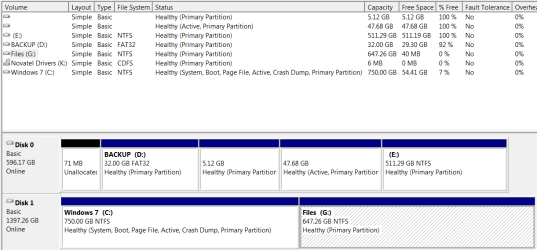
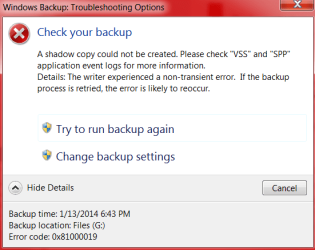
I recently removed the system reserved partition and have included its booting functions in the OS partition for other reasons. This has caused my backup to stop working and give this error.

I have tried a variety of fixes but none seem to work.

Also, is it possible to have set the system image backup to not include programs so I can use the 32 GB partition for my backups?
 

Attachments

  • storagemanage.PNG
    storagemanage.PNG
    18.7 KB · Views: 644
  • backup.PNG
    backup.PNG
    15.6 KB · Views: 13,163

My Computer

Computer type
PC/Desktop
Computer Manufacturer/Model Number
Dell
OS
Windows 7 Professional 64bit
CPU
Intel i7
Graphics Card(s)
nVidia 770
Antivirus
Avast
Browser
Chrome
It depends how much is on your OS to system image. Your Disk Management screen shot shows your disk 1 C: OS partition contains ~ 700GB. This is way too big to seriously consider an image. The OS partition and installed programs should ideally consume no more than 100 GB and even this is high for regular system imaging. You need to get quite a bit of data off c: .

Your installed programs will be and should be part of your system image.

Finally, your destination drive for your system image needs to be large enough and an external HDD is preferable (ideally USB 3 for speed). A separate internal HDD is ok but not a 32GB partition.
 

My Computer

Computer type
PC/Desktop
Computer Manufacturer/Model Number
Own build
OS
Windows 7x64 Home Premium SP1
CPU
Intel i7 2600k
Motherboard
ASUS P8Z68 Deluxe
Memory
G.Skill Ripjaws (DDR3-1600) 2x4GB
Graphics Card(s)
Nvidia GeForce GTS 450; Intel HD Graphics 3000(GT2+)
Monitor(s) Displays
Dell Ultrasharp IPS panel U2311H, Samsung SyncMaster P2350
Screen Resolution
1920x1080
Hard Drives
Samsung 850 Pro SSD 256GB, Samsung SSD 840 120GB, Seagates 1TB Barracuda ST31000528AS x2
PSU
Seasonic M12II 520W
Case
Lian Li Lancool PC-K60
Cooling
Case: 1x120mm, 3x140mm CPU: Hyper 212+
Keyboard
Logitech MK520 (wireless)
Mouse
Logitech MK520
Internet Speed
6-7 Mbps
Antivirus
Norton Security Premium, Malwarebytes on 2 (MSE on 3rd PC)
Browser
FireFox
Other Info
Audio: Logitech Z523 2.1
The problem is games take up ridiculously large amounts of space... probably a few hundred gigabytes on my C:... I don't want those backed up. I would love it if I could have 100 GB system images. I guess I'm going to start using EasUS -_-
 

My Computer

Computer type
PC/Desktop
Computer Manufacturer/Model Number
Dell
OS
Windows 7 Professional 64bit
CPU
Intel i7
Graphics Card(s)
nVidia 770
Antivirus
Avast
Browser
Chrome
I'm not a gamer but for large games the best option is to store your games on a non OS drive. When running an installer change the install directory to another non OS drive.
Windows inbuilt system imaging should be fine with this. Also, the free Macrium Reflect is probably a more popular imaging program which also includes compression.
 

My Computer

Computer type
PC/Desktop
Computer Manufacturer/Model Number
Own build
OS
Windows 7x64 Home Premium SP1
CPU
Intel i7 2600k
Motherboard
ASUS P8Z68 Deluxe
Memory
G.Skill Ripjaws (DDR3-1600) 2x4GB
Graphics Card(s)
Nvidia GeForce GTS 450; Intel HD Graphics 3000(GT2+)
Monitor(s) Displays
Dell Ultrasharp IPS panel U2311H, Samsung SyncMaster P2350
Screen Resolution
1920x1080
Hard Drives
Samsung 850 Pro SSD 256GB, Samsung SSD 840 120GB, Seagates 1TB Barracuda ST31000528AS x2
PSU
Seasonic M12II 520W
Case
Lian Li Lancool PC-K60
Cooling
Case: 1x120mm, 3x140mm CPU: Hyper 212+
Keyboard
Logitech MK520 (wireless)
Mouse
Logitech MK520
Internet Speed
6-7 Mbps
Antivirus
Norton Security Premium, Malwarebytes on 2 (MSE on 3rd PC)
Browser
FireFox
Other Info
Audio: Logitech Z523 2.1
MJF, you da man. Option one fixed my problem. One wee bit of housekeeping though in Option 1 #4 should read "4) clear and disable USN journal file from system reserved by > fsutil usn deletejournal /N /D F:" instead of /N/D F". Thank you very much.

tel224
 

My Computer

Computer type
PC/Desktop
Computer Manufacturer/Model Number
Custom build
OS
Win 7 Professional 64 bit
CPU
AMD Phenom 2 x4 965 3.64Ghz
Motherboard
Gigabyte 990FXA-UD3 Rev 1.0
Memory
16GB RAM Corsair XMS3 DDR3 1600 4GB x 4
Graphics Card(s)
ATI Radeon HD 5450
Sound Card
Onboard
Monitor(s) Displays
Acer G195W, V173
Screen Resolution
800x600
Hard Drives
Western Digital Caviar Black 1 TB,
Western Digital 500GB (ATA WDC WD5001AALS-00J7B1)
PSU
OCZ EXTREME 700W
Case
Cooler Master Gladiator Mid-Tower
Cooling
CoolerMaster (2) 120mm Front, Rear; 80mm Window, 90mm cpu
Keyboard
Logitech K120
Mouse
Logitech M110
Internet Speed
150 mbs
Antivirus
Kaspersky Internet Security
Browser
Firefox
Glad it work tel224.
The typo seems to be fixed now - thanks for pointing it out.
 

My Computer

Computer type
PC/Desktop
Computer Manufacturer/Model Number
Own build
OS
Windows 7x64 Home Premium SP1
CPU
Intel i7 2600k
Motherboard
ASUS P8Z68 Deluxe
Memory
G.Skill Ripjaws (DDR3-1600) 2x4GB
Graphics Card(s)
Nvidia GeForce GTS 450; Intel HD Graphics 3000(GT2+)
Monitor(s) Displays
Dell Ultrasharp IPS panel U2311H, Samsung SyncMaster P2350
Screen Resolution
1920x1080
Hard Drives
Samsung 850 Pro SSD 256GB, Samsung SSD 840 120GB, Seagates 1TB Barracuda ST31000528AS x2
PSU
Seasonic M12II 520W
Case
Lian Li Lancool PC-K60
Cooling
Case: 1x120mm, 3x140mm CPU: Hyper 212+
Keyboard
Logitech MK520 (wireless)
Mouse
Logitech MK520
Internet Speed
6-7 Mbps
Antivirus
Norton Security Premium, Malwarebytes on 2 (MSE on 3rd PC)
Browser
FireFox
Other Info
Audio: Logitech Z523 2.1
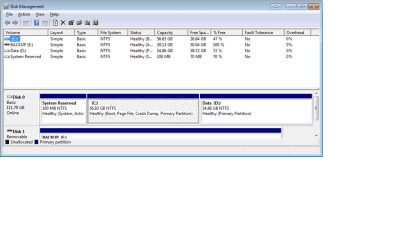
I had error 0x80780119 while creating the system image. I saw my system reserved partition had not enough space for shadow and followed option 1. Now it looks OK, but same 0x80780119 error is still preventing me from creating an image. I attached the screen shot of disk management showing the space allocated/used.

I reviewed Macrium s/w option, but the internet connection is problem on that system, so I'd much prefer to use native Windows tools.

I asked this question on answers.microsoft.com, but got nowhere. Maybe here someone knows how to fix it.
 

Attachments

  • ScreenShot1.png
    ScreenShot1.png
    32.4 KB · Views: 190

My Computer

Computer type
PC/Desktop
Computer Manufacturer/Model Number
Zotac
OS
Windows 7 64bit Home Premium
CPU
i7
Memory
8GB
Graphics Card(s)
Intel 4000 onboard
Hard Drives
128GB SSD
Antivirus
MS Security Essentials
Browser
IE 11
puzzling migurus. I guess you have rebooted and tried again?
I'm not sure what your internet problem is with the free Macrium download. I would suggest you go down this path and dowlnoad Macrium - maybe the server had a problem at the time you tried the download. The WHS tutorial provides a link for a pe rescue ISO that he has made for Macrium.
 

My Computer

Computer type
PC/Desktop
Computer Manufacturer/Model Number
Own build
OS
Windows 7x64 Home Premium SP1
CPU
Intel i7 2600k
Motherboard
ASUS P8Z68 Deluxe
Memory
G.Skill Ripjaws (DDR3-1600) 2x4GB
Graphics Card(s)
Nvidia GeForce GTS 450; Intel HD Graphics 3000(GT2+)
Monitor(s) Displays
Dell Ultrasharp IPS panel U2311H, Samsung SyncMaster P2350
Screen Resolution
1920x1080
Hard Drives
Samsung 850 Pro SSD 256GB, Samsung SSD 840 120GB, Seagates 1TB Barracuda ST31000528AS x2
PSU
Seasonic M12II 520W
Case
Lian Li Lancool PC-K60
Cooling
Case: 1x120mm, 3x140mm CPU: Hyper 212+
Keyboard
Logitech MK520 (wireless)
Mouse
Logitech MK520
Internet Speed
6-7 Mbps
Antivirus
Norton Security Premium, Malwarebytes on 2 (MSE on 3rd PC)
Browser
FireFox
Other Info
Audio: Logitech Z523 2.1
Back
Top