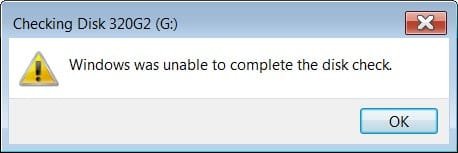
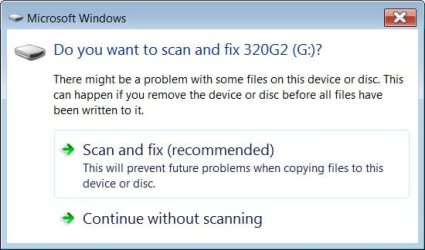
Macrium Reflect error: do you want to scan and fix G:

gordon55y

New member
Local time
6:26 AM
Messages
26
I have been using Macrium Reflect for a few years.
When I execute the .mrimg file MR will automatically create a drive letter and
make the image available in that drive letter.
Unfortunately I get an error :-(
By the way, I do not get this error from old .mrimg images.
Is the .mrimg corrupt?
Or is this a false error?
Do other people see this?
 

Attachments
  • MacriumError.jpg
    MacriumError.jpg
    26.7 KB · Views: 25

My Computer My Computer

At a glance

windows 7 proi5
Computer type
Laptop
Computer Manufacturer/Model Number
Dell
OS
windows 7 pro
CPU
i5
Have you tried running "Scan & Fix (recommended)" to see if it fixed the problem?.
 

My Computer My Computer

At a glance

Windows 7 Home Premium 64 bit sp1Intel i5 3570 3.4Ghz Ivy Bridge SKT 1155 quad...G-Skill Rip Jaws 16Gb (8x2) DDR3 -1600 PC3 12...Gigabyte NVIDIA GT610 1Gb DDR3 810/1200 PCI-E...
Computer type
PC/Desktop
Computer Manufacturer/Model Number
Self built using existing case
OS
Windows 7 Home Premium 64 bit sp1
CPU
Intel i5 3570 3.4Ghz Ivy Bridge SKT 1155 quad core
Motherboard
Gigabyte Z77-HD3 SKT 1155 2xSata 3, 4x USB 3.0
Memory
G-Skill Rip Jaws 16Gb (8x2) DDR3 -1600 PC3 12800 CL 10 red
Graphics Card(s)
Gigabyte NVIDIA GT610 1Gb DDR3 810/1200 PCI-E 2.0 Silent
Sound Card
NVIDIA High Definition & Realtech High Definition Audio
Monitor(s) Displays
2 x Philips 226V4L 16:9 aspect ratio
Screen Resolution
1920 x 1080 HD
Hard Drives
Samsung 840 Pro 256gb SSD, SATA 3.
Hitachi Touro Portable 1tb, USB 3.0 HDD used for image b/ups.
PSU
Corsair VS450
Case
Codeng
Cooling
PSU fan & CPU fan
Keyboard
Logitech
Mouse
Logitech Wireless trackball M570
Internet Speed
Wireless 3G. 3mg down & 550kb up.
Antivirus
Bitdefender Internet Security 2020
Browser
Opera (Current Version) & Firefox
Other Info
MS Office 2013 Pro. Davis weather station software. MGE Nova 600 avr UPS.
Have you tried running "Scan & Fix (recommended)" to see if it fixed the problem?.

Apparently I did not explain the situation clearly.
I am executing the .mrimg file.
That extracts the MR image and builds a read only drive letter.
In this case it used G:
This allows you to view a read only version of the image.

OK, just for grins, lets run "Scan & Fix" and see what happens.
Of course another system error.
 

Attachments

  • MacriumError2.jpg
    MacriumError2.jpg
    9.5 KB · Views: 23
Last edited:

My Computer My Computer

At a glance

windows 7 proi5
Computer type
Laptop
Computer Manufacturer/Model Number
Dell
OS
windows 7 pro
CPU
i5
Hi, I get the same warning when I am about to Image and or Clone a disk useing Paragon software.
It seems to me to only happen on Win 10 installed OS or it may even be any OS that is installed UEFI.
That is it has a 550MB System Reserved not 100MB.
I run the repair and that is successful and then I never have the warning again.
I'll research some more and let you know.
 

My Computer My Computer

At a glance

Windows 7 Ultimate x64 SP1 OEMIntel i7 3930KKingston Genesis KHX2133C11D3K4/32GAsus RTX 2070 Ti Turbo fan series
Computer type
PC/Desktop
Computer Manufacturer/Model Number
Owner Builder
OS
Windows 7 Ultimate x64 SP1 OEM
CPU
Intel i7 3930K
Motherboard
Asus X79 Deluxe
Memory
Kingston Genesis KHX2133C11D3K4/32G
Graphics Card(s)
Asus RTX 2070 Ti Turbo fan series
Sound Card
Creative Sound Blaster ZXR
Monitor(s) Displays
Samsung U32J39 UHD
Screen Resolution
3840 x 2160
Hard Drives
Samsung 860 Pro 256 GB
OCZ Vertex 4 512GB
Western Digital Black 4TB
PSU
Corsair AX850
Case
Gigabyte
Cooling
Push - Pull 120 mm Noctua PWM, Scythe Big Shuriken 2 Rev. B
Keyboard
Logitech K800 Backlit
Mouse
Logitech MX2 Master
Internet Speed
NBN 25 Mbps
Antivirus
Kaspersky Internet Security
Browser
Mozilla FireFox
Other Info
TP-Link Archer VR600v
Sennheiser TR220 WiFi Head Phones.
Me,
I should have given my versions:
Win7 pro
MBR for C:

Fiddling around reveals this:
I see that a C: image from 5/4/2017 did not have this problem.
I see that a C: image from 10/18/2017 had the problem.
I see that a C:/"recover partition" image from 10/18/2017 did not have the problem.

Maybe I should run Disk Cleanup on C: ??

I have installed Acronis True Image, and it does not have this problem.
 

My Computer My Computer

At a glance

windows 7 proi5
Computer type
Laptop
Computer Manufacturer/Model Number
Dell
OS
windows 7 pro
CPU
i5
Great well it seems you have a functional repair.
Yes, I run Disk Cleanup just to keep my Image sizes to a minimum.
Ccleaner is also utilized.
 

My Computer My Computer

At a glance

Windows 7 Ultimate x64 SP1 OEMIntel i7 3930KKingston Genesis KHX2133C11D3K4/32GAsus RTX 2070 Ti Turbo fan series
Computer type
PC/Desktop
Computer Manufacturer/Model Number
Owner Builder
OS
Windows 7 Ultimate x64 SP1 OEM
CPU
Intel i7 3930K
Motherboard
Asus X79 Deluxe
Memory
Kingston Genesis KHX2133C11D3K4/32G
Graphics Card(s)
Asus RTX 2070 Ti Turbo fan series
Sound Card
Creative Sound Blaster ZXR
Monitor(s) Displays
Samsung U32J39 UHD
Screen Resolution
3840 x 2160
Hard Drives
Samsung 860 Pro 256 GB
OCZ Vertex 4 512GB
Western Digital Black 4TB
PSU
Corsair AX850
Case
Gigabyte
Cooling
Push - Pull 120 mm Noctua PWM, Scythe Big Shuriken 2 Rev. B
Keyboard
Logitech K800 Backlit
Mouse
Logitech MX2 Master
Internet Speed
NBN 25 Mbps
Antivirus
Kaspersky Internet Security
Browser
Mozilla FireFox
Other Info
TP-Link Archer VR600v
Sennheiser TR220 WiFi Head Phones.
Back
Top