BSOD ntkrlnpa.exe win32k.sys

Nabukodonosor

New member
Local time
4:06 PM
Messages
21
Hello. I have several BSOD's during the day. I updated to the latest AMD Catalyst drivers. Also updated my network drivers. I changed places for my ram memory sticks. Tried with one stick of 2GB, and then with another of 1GB, solo, again BSOD. I thought it was because of my hard drive, but I bought a new one, installed fresh OS on it, and it still happens. Here are my minidumps below.


I get PAGE_FAULT_IN_NON_PAGED_AREA, IRQL_NOT_LESS_OR_EQUAL, KERNEL_MODE_MODE_EXCEPTION_NOT_HANDLED...

Windows 7 32bit SP1 Ultimate
3GB ram
Athlon X2 6000+
Biostar TA770 A2+

Let me know if you need more info.

EDIT: I tried with verifier /standard /all, restarted windows and got BSOD right after Windows start.
 

My Computer My Computer

At a glance

Windows 7 Ultimate 32bit
Computer type
PC/Desktop
OS
Windows 7 Ultimate 32bit

My Computer My Computer

At a glance

Microsoft Windows 10 Pro Insider Preview 64-bitIntel(R) Core(TM) i3-4130 CPU @ 3.40GHzCorsair Vengence 4GB x2 (8.00GB Dual-Channel ...2047MB GeForce GTS 450 (ZOTAC International)
Computer type
PC/Desktop
Computer Manufacturer/Model Number
Self Assembled
OS
Microsoft Windows 10 Pro Insider Preview 64-bit
CPU
Intel(R) Core(TM) i3-4130 CPU @ 3.40GHz
Motherboard
Gigabyte Technology Co., Ltd. B85M-D3H
Memory
Corsair Vengence 4GB x2 (8.00GB Dual-Channel DDR3 @ 798MHz)
Graphics Card(s)
2047MB GeForce GTS 450 (ZOTAC International)
Sound Card
Onboard (Realtek High Definition Audio)
Monitor(s) Displays
LG Flatron E2040T
Screen Resolution
1600x900
Hard Drives
Western Digital 1 TB
Seagate 500 GB
PSU
Corsair VS550
Case
Cooler Master K380
Cooling
Cooler Master Seidon 120V Plus
Keyboard
Logitech MK260r
Mouse
Logitech MK260r
Internet Speed
PMPL Broadband
Antivirus
Windows Defender + MBAM
Browser
Firefox
Other Info
Dell Studio 15" Laptop
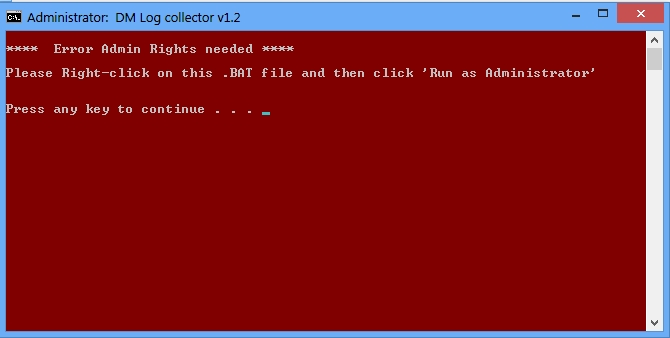
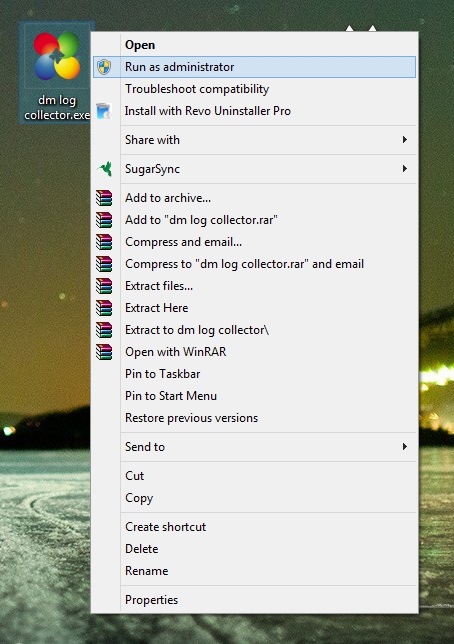
It does not work. Tried it on two computers to make sure. It says "Please right click on this .BAT file and then click 'Run as Administrator". But I do that. Right click on it and run as administrator. It's not a .bat file, but an exe file.
 

My Computer My Computer

At a glance

Windows 7 Ultimate 32bit
Computer type
PC/Desktop
OS
Windows 7 Ultimate 32bit
It does not work. Tried it on two computers to make sure. It says "Please right click on this .BAT file and then click 'Run as Administrator". But I do that. Right click on it and run as administrator. It's not a .bat file, but an exe file.
:huh:

It just says "press any key to continue ..."

View attachment 312168
 

My Computer My Computer

At a glance

Microsoft Windows 10 Pro Insider Preview 64-bitIntel(R) Core(TM) i3-4130 CPU @ 3.40GHzCorsair Vengence 4GB x2 (8.00GB Dual-Channel ...2047MB GeForce GTS 450 (ZOTAC International)
Computer type
PC/Desktop
Computer Manufacturer/Model Number
Self Assembled
OS
Microsoft Windows 10 Pro Insider Preview 64-bit
CPU
Intel(R) Core(TM) i3-4130 CPU @ 3.40GHz
Motherboard
Gigabyte Technology Co., Ltd. B85M-D3H
Memory
Corsair Vengence 4GB x2 (8.00GB Dual-Channel DDR3 @ 798MHz)
Graphics Card(s)
2047MB GeForce GTS 450 (ZOTAC International)
Sound Card
Onboard (Realtek High Definition Audio)
Monitor(s) Displays
LG Flatron E2040T
Screen Resolution
1600x900
Hard Drives
Western Digital 1 TB
Seagate 500 GB
PSU
Corsair VS550
Case
Cooler Master K380
Cooling
Cooler Master Seidon 120V Plus
Keyboard
Logitech MK260r
Mouse
Logitech MK260r
Internet Speed
PMPL Broadband
Antivirus
Windows Defender + MBAM
Browser
Firefox
Other Info
Dell Studio 15" Laptop
It's not like that, it's red screen istead of that blue one. Check my screens below. As you can see, I'm clicking Run as administrator.

3aFV6za.jpg


i8q8m8M.jpg
 

My Computer My Computer

At a glance

Windows 7 Ultimate 32bit
Computer type
PC/Desktop
OS
Windows 7 Ultimate 32bit

My Computer My Computer

At a glance

Microsoft Windows 10 Pro Insider Preview 64-bitIntel(R) Core(TM) i3-4130 CPU @ 3.40GHzCorsair Vengence 4GB x2 (8.00GB Dual-Channel ...2047MB GeForce GTS 450 (ZOTAC International)
Computer type
PC/Desktop
Computer Manufacturer/Model Number
Self Assembled
OS
Microsoft Windows 10 Pro Insider Preview 64-bit
CPU
Intel(R) Core(TM) i3-4130 CPU @ 3.40GHz
Motherboard
Gigabyte Technology Co., Ltd. B85M-D3H
Memory
Corsair Vengence 4GB x2 (8.00GB Dual-Channel DDR3 @ 798MHz)
Graphics Card(s)
2047MB GeForce GTS 450 (ZOTAC International)
Sound Card
Onboard (Realtek High Definition Audio)
Monitor(s) Displays
LG Flatron E2040T
Screen Resolution
1600x900
Hard Drives
Western Digital 1 TB
Seagate 500 GB
PSU
Corsair VS550
Case
Cooler Master K380
Cooling
Cooler Master Seidon 120V Plus
Keyboard
Logitech MK260r
Mouse
Logitech MK260r
Internet Speed
PMPL Broadband
Antivirus
Windows Defender + MBAM
Browser
Firefox
Other Info
Dell Studio 15" Laptop
Yes, your exe file. Downloaded it on two computers, on both same result. This other thing I didn't try.
 

My Computer My Computer

At a glance

Windows 7 Ultimate 32bit
Computer type
PC/Desktop
OS
Windows 7 Ultimate 32bit

My Computer My Computer

At a glance

Microsoft Windows 10 Pro Insider Preview 64-bitIntel(R) Core(TM) i3-4130 CPU @ 3.40GHzCorsair Vengence 4GB x2 (8.00GB Dual-Channel ...2047MB GeForce GTS 450 (ZOTAC International)
Computer type
PC/Desktop
Computer Manufacturer/Model Number
Self Assembled
OS
Microsoft Windows 10 Pro Insider Preview 64-bit
CPU
Intel(R) Core(TM) i3-4130 CPU @ 3.40GHz
Motherboard
Gigabyte Technology Co., Ltd. B85M-D3H
Memory
Corsair Vengence 4GB x2 (8.00GB Dual-Channel DDR3 @ 798MHz)
Graphics Card(s)
2047MB GeForce GTS 450 (ZOTAC International)
Sound Card
Onboard (Realtek High Definition Audio)
Monitor(s) Displays
LG Flatron E2040T
Screen Resolution
1600x900
Hard Drives
Western Digital 1 TB
Seagate 500 GB
PSU
Corsair VS550
Case
Cooler Master K380
Cooling
Cooler Master Seidon 120V Plus
Keyboard
Logitech MK260r
Mouse
Logitech MK260r
Internet Speed
PMPL Broadband
Antivirus
Windows Defender + MBAM
Browser
Firefox
Other Info
Dell Studio 15" Laptop
Tried it. Same. I will do the option two, with SF Diagnostic Tool.
 

My Computer My Computer

At a glance

Windows 7 Ultimate 32bit
Computer type
PC/Desktop
OS
Windows 7 Ultimate 32bit
Try running the bat file version (as admin)
 

My Computer My Computer

At a glance

Windows 11
Computer type
PC/Desktop
OS
Windows 11
OK, this one works. Thanks. This is for my friend, I have to start it on his computer and upload the results here. I will let you know as soon as I do that.
 

My Computer My Computer

At a glance

Windows 7 Ultimate 32bit
Computer type
PC/Desktop
OS
Windows 7 Ultimate 32bit
OK guys, here you go. It happens every time the PC is started.
 

My Computer My Computer

At a glance

Windows 7 Ultimate 32bit
Computer type
PC/Desktop
OS
Windows 7 Ultimate 32bit
You should not overclock an old computer.
Code:
  Max Speed                     3000MHz
[COLOR=Red]  Current Speed                 3100MHz[/COLOR]
As you are getting BSODs, you should stop overclocking and run all the hardware components like CPU, GPU and RAM to their default settings.

Test your RAM modules for possible errors.
How to Test and Diagnose RAM Issues with Memtest86+
Run memtest for at least 8 passes, preferably overnight.

If it start showing errors/red lines, stop testing. A single error is enough to determine that something is going bad there.

Let us know the results.
_______________________________________________
Code:
BugCheck A, {100, 2, 1, 8286dc9c}
[COLOR=Red]
Probably caused by : memory_corruption[/COLOR]

[COLOR=Black]Followup: memory_corruption[/COLOR]
---------
Code:
BugCheck 1A, {41201, c0002c98, 69b16025, 864da8d0}

[COLOR=Red]Probably caused by : memory_corruption[/COLOR] ( nt!MiGetPageProtection+1a6 )

Followup: MachineOwner
---------
http://pcsupport.about.com/od/fixtheproblem/tp/clearcmos.htm
 

My Computer My Computer

At a glance

Microsoft Windows 10 Pro Insider Preview 64-bitIntel(R) Core(TM) i3-4130 CPU @ 3.40GHzCorsair Vengence 4GB x2 (8.00GB Dual-Channel ...2047MB GeForce GTS 450 (ZOTAC International)
Computer type
PC/Desktop
Computer Manufacturer/Model Number
Self Assembled
OS
Microsoft Windows 10 Pro Insider Preview 64-bit
CPU
Intel(R) Core(TM) i3-4130 CPU @ 3.40GHz
Motherboard
Gigabyte Technology Co., Ltd. B85M-D3H
Memory
Corsair Vengence 4GB x2 (8.00GB Dual-Channel DDR3 @ 798MHz)
Graphics Card(s)
2047MB GeForce GTS 450 (ZOTAC International)
Sound Card
Onboard (Realtek High Definition Audio)
Monitor(s) Displays
LG Flatron E2040T
Screen Resolution
1600x900
Hard Drives
Western Digital 1 TB
Seagate 500 GB
PSU
Corsair VS550
Case
Cooler Master K380
Cooling
Cooler Master Seidon 120V Plus
Keyboard
Logitech MK260r
Mouse
Logitech MK260r
Internet Speed
PMPL Broadband
Antivirus
Windows Defender + MBAM
Browser
Firefox
Other Info
Dell Studio 15" Laptop
It's not overclocked. I don't even know how to do that.
 

My Computer My Computer

At a glance

Windows 7 Ultimate 32bit
Computer type
PC/Desktop
OS
Windows 7 Ultimate 32bit
Back
Top