How to rearrange the items in toolbar of windows explor

TY, Had to do in safe mode for some reason as kept getting an no go msg.

I use the Real Admin Account so may be reason.

Took ownership of .REG and added it and rebooted and its there. :)
 
Last edited:

My Computer

OS
Vista (Hate Win 7)
Great! Im happy you got it. Your post may help future members. Thanks for posting back.
 

My Computer

Computer Manufacturer/Model Number
Dell Dimension E520
OS
Windows 7 Ultimate (x86)
CPU
Intel 2.20 Dual Core
Memory
4 GB
Graphics Card(s)
nVidia 9400 GT (512 MB)
Sound Card
Sigmatel C Major HD
Monitor(s) Displays
22" Samsung 2232 bw
Screen Resolution
1680x1050
Mouse
Microsoft Arc
Other Info
Wacom Graphire 4 (6x8) Tablet
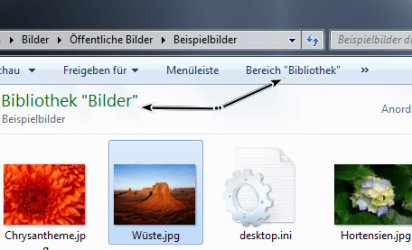
Another Button is cool.
You can Hide the Library in the Explorer.
With the value Windows.librarypane

For german user: deskmodder-Wiki
 

Attachments

  • toolbarexplorer5.png
    toolbarexplorer5.png
    73.4 KB · Views: 36
  • toolbarexplorer6.png
    toolbarexplorer6.png
    65.8 KB · Views: 26

My Computer

OS
Win 7
Thanks for this one Disk4mat, it's gonna be a life saver. Cheers.
 

My Computer

Computer Manufacturer/Model Number
SevenForums
OS
7 Prof
CPU
Q9550
Motherboard
Maximus II Formula
Memory
2x2 Mushkin Ascent 8500
Graphics Card(s)
4870X2
Sound Card
X-Fi Xtreme Gamer
Monitor(s) Displays
LN32A550
Screen Resolution
1920x1080
Hard Drives
Intel G2 80GB
5x1TB
PSU
Corsair 1000
Case
Cosmos
Cooling
Yates^13
Keyboard
G15v1
Mouse
MX518
Internet Speed
6Mbps
It works in vista but with a few changes. I had wrote a batch file to modify the registry so that you didnt need an application.

Unzip the 2 files to any folder and run the bat file (Enable Button.bat). Afterwards you can delete the files as they arent needed any longer. Save the zip for future use.

Be sure to run the file as an admin ;)

*For 32 bit only

This don't work for me. Is this correct?

Capturar.JPG
 

My Computer

OS
Win 7
Suriname

Im not sure what your attempting to create for a button. You shouldnt need to use a class id for the item 0. Unless your creating a custom button?
 

My Computer

Computer Manufacturer/Model Number
Dell Dimension E520
OS
Windows 7 Ultimate (x86)
CPU
Intel 2.20 Dual Core
Memory
4 GB
Graphics Card(s)
nVidia 9400 GT (512 MB)
Sound Card
Sigmatel C Major HD
Monitor(s) Displays
22" Samsung 2232 bw
Screen Resolution
1680x1050
Mouse
Microsoft Arc
Other Info
Wacom Graphire 4 (6x8) Tablet
Suriname

Im not sure what your attempting to create for a button. You shouldnt need to use a class id for the item 0. Unless your creating a custom button?

Hi Disk4mat,

I would like to put the buttons delete, cut, copy and paste. but I've got. The problem is that I tried several methods and then messed up everything. But it's all resolved. Thank you very much.
 

My Computer

OS
Win 7
arrrg. I would love to add some buttons but I'm stuck in the dummy mode right now. I'm not sure what actually gets modified? I've got the reg permission stuff done right I think. And I browsed the sample keys. I just don't get what I need to do next. I'd like to mod/show the following actions (with a button) in explore:

Windows.Copy
Windows.Cut
Windows.Paste
Windows.Delete
Windows.Properties

Any help for this *noob* would be appreciated. I'm in the middle of a new build/box process and I really could use this. Win7 x64. Thanks!

Rusty
 

My Computer

OS
Win 7 x64 Version 6.1.7600 Build 7600
CPU
QuadCore Intel Core i5 750, 3200 MHz (24 x 133)
Motherboard
Gigabyte GA-P55M-UD2
Memory
Corsair 8 GB DDR3
Graphics Card(s)
ATI Radeon HD 5700 Series
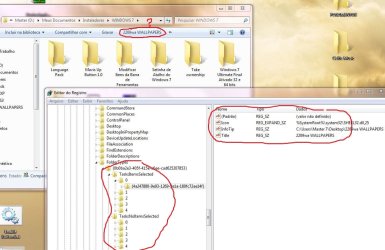
In regedit, navigate to HKEY_LOCAL_MACHINE\SOFTWARE\Microsoft\Windows\CurrentVersion\Explorer\FolderTypes\{0b2baaeb-0042-4dca-aa4d-3ee8648d03e5}

There should be sub keys TasksItemsSelected and TasksNoItemsSelected. Once you select one of those keys, you should see a 'Default' value in the right hand pane.

Modify that value by adding the following string to the end of it
;Windows.Copy;Windows.Cut;Windows.Paste;Windows.Delete;Windows.Properties

See post #12 for more info
 

My Computer

Computer Manufacturer/Model Number
Dell Dimension E520
OS
Windows 7 Ultimate (x86)
CPU
Intel 2.20 Dual Core
Memory
4 GB
Graphics Card(s)
nVidia 9400 GT (512 MB)
Sound Card
Sigmatel C Major HD
Monitor(s) Displays
22" Samsung 2232 bw
Screen Resolution
1680x1050
Mouse
Microsoft Arc
Other Info
Wacom Graphire 4 (6x8) Tablet
Thank you!
 

My Computer

OS
Win 7 x64 Version 6.1.7600 Build 7600
CPU
QuadCore Intel Core i5 750, 3200 MHz (24 x 133)
Motherboard
Gigabyte GA-P55M-UD2
Memory
Corsair 8 GB DDR3
Graphics Card(s)
ATI Radeon HD 5700 Series
Sorry for posting on a fairly old thread, but I'm wondering if there is a way to remove the "Include in library" and "Share with" options from the Explorer bar? I read through the thread and was able to remove some buttons and add extra buttons, but I can't get rid of these two. A forum search as well as a Google search turned up fruitless.


EDIT: Nevermind, I found the solution by digging through a year-old thread! lepton solved my issue nicely in this post!
 
Last edited:

My Computer

OS
Windows 7 Home Premium x64
It works in vista but with a few changes. I had wrote a batch file to modify the registry so that you didnt need an application.

Unzip the 2 files to any folder and run the bat file (Enable Button.bat). Afterwards you can delete the files as they arent needed any longer. Save the zip for future use.

Be sure to run the file as an admin ;)

*For 32 bit only

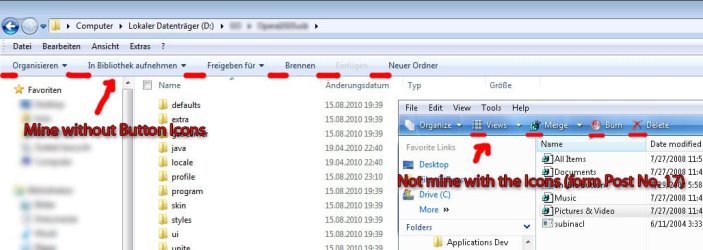
I got Windows 7 and i archieved to got the Items in the Menubar,
but im missing the graphical Icons.
Is how do u get them there ?
 

My Computer

OS
Windows 7
Please Post a screenshot, I cant understand you. (Pardon me ;))
 

My Computer

Computer Manufacturer/Model Number
COMPAQ Presario Laptop
OS
Windows 7 Ultimate 64 bit, Mac OS X 10.6
CPU
Intel Pentium Dual Core @2.0GHz
Motherboard
Compaq Generic
Memory
12GB
Graphics Card(s)
NVIDIA Graphics For Mobile 512MB VRAM
Sound Card
IDT High definition Audio
Monitor(s) Displays
Laptop LCD Display
Screen Resolution
1280*800 Bright View Widescreen
Hard Drives
500 GB Primary Master@7200rpm + 1 TB External HDD
Cooling
Direct ; generic fan
Keyboard
Generic Laptop Keyboard
Mouse
Touch Pad
Internet Speed
3.1 Mbps wireless Broadband
Other Info
Generic Dock
I hope this Picture shows what im missing.
 

Attachments

  • Button_Icons.jpg
    Button_Icons.jpg
    118.2 KB · Views: 106

My Computer

OS
Windows 7
I hope this Picture shows what im missing.
Looks like a Vista screenshot which did have icons. To date, I don't think anyone has been able to add the icons to that bar even though some of the registry entries include an icon value.
 

My Computer

Computer Manufacturer/Model Number
Averatec 6130HS-20
OS
Windows 7 Professional 32-bit (6.1, Build 7600)
CPU
Intel(R) Pentium(R) 4 3.00 GHz HT
Memory
2.0 GB
Graphics Card(s)
ATI Mobility Radeon 9600 64MB
Sound Card
Realtek AC'97 Audio
Screen Resolution
1280 x 800
Hard Drives
Seagate 96023A 60GB 7200RPM -
Seagate FreeAgentDesktop 250GB
Cooling
20 Inch Box Fan
Mouse
Targus PAWM10 Wireless Optical Laptop Mouse
Sorry for the late reply. As of now I have yet to add icons for the new buttons. It can be done by changing the default actions via class ID's. But I found that to be a rather mess that produced undesired results.

Vista wasnt an issue because many 'actions' has an icon associated with them. In W7, MS removed many toolbar and menu icons to lighten the GDI load. Great for performance. But bad for the eye candy.
 

My Computer

Computer Manufacturer/Model Number
Dell Dimension E520
OS
Windows 7 Ultimate (x86)
CPU
Intel 2.20 Dual Core
Memory
4 GB
Graphics Card(s)
nVidia 9400 GT (512 MB)
Sound Card
Sigmatel C Major HD
Monitor(s) Displays
22" Samsung 2232 bw
Screen Resolution
1680x1050
Mouse
Microsoft Arc
Other Info
Wacom Graphire 4 (6x8) Tablet
sorry for late replay, but what must be done to get icon in the toolbar ?
 

My Computer

OS
Windows 7 X64 Build 7063
Back
Top