ANN: new Classic Shell versions 1.0.3 and 1.9.0

Ivo

New member
Local time
1:43 PM
Messages
398
Location
Washington
Two new versions of Classic Shell were released today.

New for version 1.0.3:
- Added a setting to show overlay icon for shared folders in Windows 7
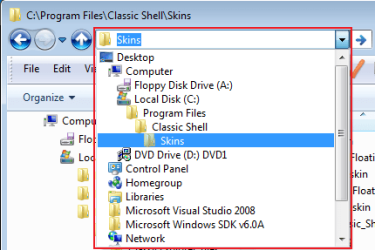
- The drop down of the address bar is replaced with a list of parent folders like in Windows XP (see screenshot)
- The status bar shows the details of the currently selected file
- Added a setting for sound alerts when overwriting system or read-only files
Download version 1.0.3 from here: http://sourceforge.net/projects/classicshell/


Version 1.9.0 contains all the latest features from 1.0.3, but also uses the new "skinning engine 2.0" for the classic start menu. The new features:
- the sub-menus can be skinned as well
- full glass support, even behind the menu items
- more skinnable elements - the sub-menu arrows, the scroll buttons, the vertical separator
- skins can provide customization options (small or large icons, add/remove caption, and many more)
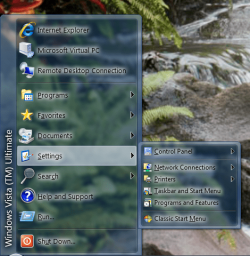
- two brand new skins that make use of the new features - "Full Glass" and "Smoked Glass" (see the screenshots)
To download version 1.9.0 first go here: http://sourceforge.net/projects/classicshell/files/ and then scroll down and click on ClassicShellSetup_1_9_0.exe


The reason there are two separate versions is that 1.9.0 is in "beta" status and needs more testing. I recommend to try the beta first. The initial testing suggests that it is pretty stable. In case you encounter any problems you can downgrade to 1.0.3 later (but please report the problems in the Source Forge forums).

BTW, because so many people requested it, as of a few weeks ago the Classic Shell project accepts donations.
 

Attachments
  • dropdown.png
    dropdown.png
    13.3 KB · Views: 28
  • smoked_glass.png
    smoked_glass.png
    109.6 KB · Views: 53
  • full_glass.png
    full_glass.png
    116.2 KB · Views: 41

My Computer My Computer

At a glance

Windows 7 Home 64, Vista Ultimate 64
Computer Manufacturer/Model Number
Me :) I build all my PCs
OS
Windows 7 Home 64, Vista Ultimate 64
Thanks for Info Ivo !!! :geek::geek::geek:
 

My Computer My Computer

At a glance

Windows 7 64 Bit
OS
Windows 7 64 Bit
ANN: New version 1.9.1 just released

It fixes all reported bugs in the old version and adds a new skin for XP-like look (see screenshot).

The website http://classicshell.sourceforge.net/ was also greatly improved. There is a new gallery page: Classic Shell: Gallery with many screenshots.

Ivo
 

Attachments

  • xpskin.png
    xpskin.png
    14.7 KB · Views: 31

My Computer My Computer

At a glance

Windows 7 Home 64, Vista Ultimate 64
Computer Manufacturer/Model Number
Me :) I build all my PCs
OS
Windows 7 Home 64, Vista Ultimate 64
It fixes all reported bugs in the old version and adds a new skin for XP-like look (see screenshot).

The website Welcome to Classic Shell was also greatly improved. There is a new gallery page: Classic Shell: Gallery with many screenshots.

Ivo

Excellent. I didn't really find any issues in 1.9.0, but 1.9.1 installed.

Is there a trick to installing. Even uninstalling the old one wasn't enough for me. I had to uninstall, then reboot, because explorer was still hanging on to some kind of handle.
 

My Computer My Computer

At a glance

Windows 7 x64 Home PremiumIntel Q9400 @ 3.2 GHz6GB PC 6400Nvidia 8800GT
OS
Windows 7 x64 Home Premium
CPU
Intel Q9400 @ 3.2 GHz
Motherboard
Gigabyte DS3L
Memory
6GB PC 6400
Graphics Card(s)
Nvidia 8800GT
Screen Resolution
1920x1200
Hard Drives
Dual WD Green 1TB
Internet Speed
10 Mb/s

My Computer My Computer

At a glance

Windows 7 Home 64, Vista Ultimate 64
Computer Manufacturer/Model Number
Me :) I build all my PCs
OS
Windows 7 Home 64, Vista Ultimate 64
I tried a restart on "explorer" process in process explorer (ok weird sentence), but that didn't work.

But all is well with uninstall/reboot if that is what it takes.
 

My Computer My Computer

At a glance

Windows 7 x64 Home PremiumIntel Q9400 @ 3.2 GHz6GB PC 6400Nvidia 8800GT
OS
Windows 7 x64 Home Premium
CPU
Intel Q9400 @ 3.2 GHz
Motherboard
Gigabyte DS3L
Memory
6GB PC 6400
Graphics Card(s)
Nvidia 8800GT
Screen Resolution
1920x1200
Hard Drives
Dual WD Green 1TB
Internet Speed
10 Mb/s
Hi Ivo, been awhile since I played around with your little invention, so I thought it was time to do so again. Really like the improvements you have made—sweet. Like the smoked glass look (using it now).

There is one thing that would be nice in your future updates, and that is to add in the ability to use the sleep function. You have the shut down and log off abilities which are nice, albeit a sleep button would be nice.

Thanks :)
 

My Computer My Computer

At a glance

Win 7 Pro x64, VM Win XP, Win7 Pro Sandbox, K...AMD Athlon(tm) II X4 640 @ 3.0 Gbz12GB 1066MHz DDR3 SDRAM - 2x4GB, 2x2GBATI Radeon HD 4350 HD Graphics/Audio with 512MB
Computer Manufacturer/Model Number
HP Pavilion a4302f
OS
Win 7 Pro x64, VM Win XP, Win7 Pro Sandbox, Kubuntu 11
CPU
AMD Athlon(tm) II X4 640 @ 3.0 Gbz
Memory
12GB 1066MHz DDR3 SDRAM - 2x4GB, 2x2GB
Graphics Card(s)
ATI Radeon HD 4350 HD Graphics/Audio with 512MB
Sound Card
Realtek High Definition Audio
Monitor(s) Displays
1. Dell 23" SP2307, 2. Mitsublishi 40" HDTV, Hannspree 25"
Screen Resolution
1. 2048x1152, 2. 1920-1080, 3. 1920x1200
Hard Drives
Int: 1 120 Gig SSD i
1 - 2.5" 500 USB External HDD
1 -1 Tb USB External HDD
Case
Mid Tower
Cooling
Standard Fans - 5 fans (very quiet)
Keyboard
Microsoft Wireless 2000
Mouse
Microsoft Wireless Mouse 5000
Internet Speed
10 Mbit (realistically 500 Kbit - 1.2 Mbit)
Other Info
Speakers - Bose Desktop (Excellent Sound)
1 external CD|DVD\Blue-ray Recorders/Players (Sony)
You can easily add a sleep command by editing StartMenuItems.ini:
Code:
SleepItem.Command=sleep
SleepItem.Name=Sleep
SleepItem.Icon=shell32.dll,16771
Add "SleepItem" in the MAIN_MENU.Items list (pick a spot where you want it) and remove the semicolon before MAIN_MENU.
That should do it.

For a fancier look you can make your Shut Down item to be a sub-menu with sleep, hibernate, etc. Look here how: SourceForge.net: Classic Shell: Topic: Where's Sleep? Hibernate? Switch User?
 

My Computer My Computer

At a glance

Windows 7 Home 64, Vista Ultimate 64
Computer Manufacturer/Model Number
Me :) I build all my PCs
OS
Windows 7 Home 64, Vista Ultimate 64
ANN: New version 1.9.6

The latest version adds few new features:
* A setting to track and display the recently used programs
* The middle mouse button can be used to open the start menu

There are also some bugfixes.

Ivo
 

My Computer My Computer

At a glance

Windows 7 Home 64, Vista Ultimate 64
Computer Manufacturer/Model Number
Me :) I build all my PCs
OS
Windows 7 Home 64, Vista Ultimate 64
I would like to know why the Classic Shell installer wants me to exit Thunderbird, Firefox, eMule et al.; I mean, I know why it has to access the explorer.exe, but all the other applications, too?
 

My Computer My Computer

At a glance

Windows XP and 7 (with Debian Squeeze in a VM)
OS
Windows XP and 7 (with Debian Squeeze in a VM)
Did you uncheck "Enable only in Explorer" for the copy UI or the shared folder icon? If so, the DLL is loaded into every process that deals with the shell so it can do its work. Technically it is loaded in all cases, but if "Enable only in Exporer" options are checked, it is unloaded very quickly.
 

My Computer My Computer

At a glance

Windows 7 Home 64, Vista Ultimate 64
Computer Manufacturer/Model Number
Me :) I build all my PCs
OS
Windows 7 Home 64, Vista Ultimate 64
Both checkboxes are unchecked. :huh:
 

My Computer My Computer

At a glance

Windows XP and 7 (with Debian Squeeze in a VM)
OS
Windows XP and 7 (with Debian Squeeze in a VM)
As I suspected - that means the DLL will be loaded in every process that deals with the shell (like if you do Save As for example)
 

My Computer My Computer

At a glance

Windows 7 Home 64, Vista Ultimate 64
Computer Manufacturer/Model Number
Me :) I build all my PCs
OS
Windows 7 Home 64, Vista Ultimate 64
So I should check the second one then?
 

My Computer My Computer

At a glance

Windows XP and 7 (with Debian Squeeze in a VM)
OS
Windows XP and 7 (with Debian Squeeze in a VM)
It is up to you. The option exists to give you choice.

If the first option (classic copy UI -> Enable only in Explorer) is checked, the copy UI will be replaced only for the Explorer process. So if you user another shell (like total commander), it will get the standard Windows copy UI. Uncheck the option to enable other software to use the classic copy UI.

If the second option (icon overlay -> Show only in Explorer) is checked, the shared icon will only show in Explorer. For example if you go to Save As in Notepad, you won't see the shared icon.

Remember: CHECKED - less features, better performance. UNCHECKED - more features, worse performance, problems during uninstall.
 

My Computer My Computer

At a glance

Windows 7 Home 64, Vista Ultimate 64
Computer Manufacturer/Model Number
Me :) I build all my PCs
OS
Windows 7 Home 64, Vista Ultimate 64
Ah, OK. I think I understood. Thanks. :)
 

My Computer My Computer

At a glance

Windows XP and 7 (with Debian Squeeze in a VM)
OS
Windows XP and 7 (with Debian Squeeze in a VM)
Hmm. Sub-subfolders are (sometimes) not automatically expanded. The folder Start menu -> Programs -> Debugmode -> Wink, for example, has to be clicked under some circumstances. Is that a known issue?
 

My Computer My Computer

At a glance

Windows XP and 7 (with Debian Squeeze in a VM)
OS
Windows XP and 7 (with Debian Squeeze in a VM)
I don't know what Debugmode -> Wink is, but I'm guessing it is a link to a folder.

You can make such links expandable by checking "Expand Links to Folders". However it is all or nothing - you can't make specific links to be expandable and others not.
 

My Computer My Computer

At a glance

Windows 7 Home 64, Vista Ultimate 64
Computer Manufacturer/Model Number
Me :) I build all my PCs
OS
Windows 7 Home 64, Vista Ultimate 64
Yep, it is a folder. In fact, that option is checked.
 

My Computer My Computer

At a glance

Windows XP and 7 (with Debian Squeeze in a VM)
OS
Windows XP and 7 (with Debian Squeeze in a VM)
OK, can you attach the lnk file here? I want to look at it.
 

My Computer My Computer

At a glance

Windows 7 Home 64, Vista Ultimate 64
Computer Manufacturer/Model Number
Me :) I build all my PCs
OS
Windows 7 Home 64, Vista Ultimate 64
Back
Top