
EvilDragonEX
New member
- Local time
- 12:35 AM
- Messages
- 2
Hey guys,
i have a monitor with a native screen resolution of 1280x1024 , but windows is unable to detect it since my monitor is quite old and the driver i found on the official website is for windows xp only. now windows display this list of resolutions
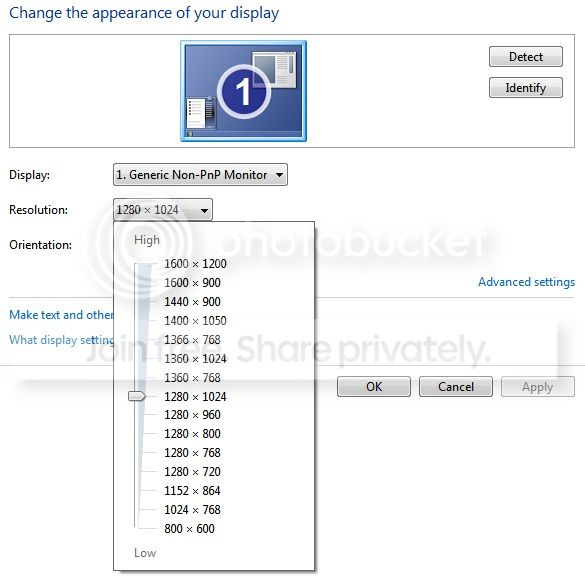
i have tried setting my monitor resolution in the AMD Catalyst Control Panel software but still no luck

Suggestions please~
i have a monitor with a native screen resolution of 1280x1024 , but windows is unable to detect it since my monitor is quite old and the driver i found on the official website is for windows xp only. now windows display this list of resolutions
i have tried setting my monitor resolution in the AMD Catalyst Control Panel software but still no luck
Suggestions please~
My Computer
- Computer type
- PC/Desktop
- Computer Manufacturer/Model Number
- Custom Build
- OS
- Microsoft Windows 7 Ultimate 64-bit 7601 Multiprocessor Free Service Pack 1
- CPU
- Pentium(R) Dual-Core CPU E5700 @ 3.00GHz
- Motherboard
- Gigabyte Technology Co., Ltd. G41MT-S2P
- Memory
- 4.00 GB
- Graphics Card(s)
- ATI Radeon HD 5450
- Sound Card
- (1) AMD High Definition Audio Device (2) WO Mic Device (
- Monitor(s) Displays
- 1
- Screen Resolution
- 1280 x 1024 x 32 bits (4294967296 colors) @ 60 Hz
- Hard Drives
- (1) HDS728080PLA380 ATA Device (2) TOSHIBA MK7559GSXP ATA Device (3) WDC WD5000AAKX-001CA0 ATA Device (4) WD Elements 10B8 USB Device
- PSU
- Corsair VS550
- Keyboard
- Logitech K260
- Mouse
- PowerLogic GMX-7
- Internet Speed
- 10MBps
- Browser
- Google Chrome Beta


