Solved Creating Partitions

rsnow

New member
Local time
5:31 PM
Messages
5
I have a new computer with a 1TB HD. I want to create new partitions for my various data.
Disk Management shows: SYSTEM RESERVED 100 MB NTFS Healthy, (C:) 906.34 GB NTFS
Healthy (Boot, Page File, Crash Dump, Primary Partition) 857.48 GB free space, 25.07 GB Healthy (OEM Partition)

In the past I have used 3rd party partitioning programs to create new partitions. I am not familiar with the situation where there is an unmovable file located in the middle
of the hard drive preventing me from using all of the available free space. Also, I have never had to temporarily relocate a page file, etc. I would appreciate some assistance
in determining what course of action I should take.

Disk Manager says:
Total size before shrink in MB: 928093
Size of available shrink space in MB: 449795
Enter amount of space to shrink in MB:
Total size after shrink in MB: 478298* *this amount if you enter 449795 in amount of space to shrink

!You cannot shrink a volume beyond the point where any unmovable files are located. See the "defrag" event in the Application log for detailed information about the
operation when it has completed.

See 'Shrink a Basic Volume' in Disk Management help for more information.


Help in Disk Management says:
When you shrink a partition, certain files (for example, the paging file or the shadow copy storage area) cannot be automatically relocated and you cannot decrease the
allocated space beyond the point where the unmovable files are located. If the shrink operation fails, check the Application Log for Event 259, which will identify the
unmovable file. If you know the cluster or clusters associated with the file that is preventing the shrink operation, you can also use the fsutil command at a command
prompt (type fsutil volume querycluster/? for usage). When you provide the querycluster parameter, the command output will identify the unmovable file that is preventing
the shrink operation from succeeding.

In some cases, you can relocate the file temporarily. For example, if the unmovable file is the paging file, you can use Control Panel to move it to another disk, shrink
the volume, and then move the page file back to the disk.
 

My Computer

Computer Manufacturer/Model Number
Lenovo IdeaCentre K330 Series
OS
Windows 7 Professional 64 bit
CPU
Intel i7 2600
Memory
8GB
Graphics Card(s)
Nividia Gforce GT 420
Sound Card
Nvidia High Definition Audio
Monitor(s) Displays
ViewSonic VX2433
Screen Resolution
1920x1080
Hard Drives
1 TB Hitachi
Hello rsnow, welcome to Seven Forums!


You can use the Partition Wizard Boot Disk (PWBD) to do this shrink but don't take it to less than 100GB to be on the safe side and be sure to use the boot disk and not the installed version.

Boot the PWBD and it will setup automatically without any input needed, right click the C: partition and select Move/Resize, then see the snip below for the next steps, then Apply and accept the final conformation.

Have a look at this tutorial at the link below for some other ideas and be sure to post back with any further questions you may have and to keep us informed.
First download the PWBD ISO file to the desktop, be sure to get the PWBD and not the installed version; scroll down to see the download link for the bootable CD ISO file at this link below.
Then use ImgBurn to burn the ISO to a CD, at no greater than 4x speed with a verify; it was designed for use and works best from a CD rather than a DVD, then boot the created CD to make the changes.
 

My Computer

Computer Manufacturer/Model Number
* BFK Customs *
OS
W 7 64-bit Ultimate
CPU
Intel Q9550 Yorkfield
Motherboard
ASUS P5Q Pro
Memory
8GB Dominator 8500C5D
Graphics Card(s)
ATI : XFX 5870
Sound Card
Realtek HD Audio 7-1
Monitor(s) Displays
1x 47" LCD HDMI & 3x 26" LCD HDMI
Screen Resolution
1920x1080P & 1920x1200
Hard Drives
1x 80GB Intel X25-M G2 SSD : 1x 500GB & 1x 640GB WD Caviar Black(s)
PSU
Corsair 620HX
Case
Cooler Master RC-690
Cooling
Tuniq Tower 120, 2x 140mm and 3x 120mm case fans
Keyboard
Microsoft 500
Mouse
Razer Diamondback 3G
Internet Speed
14 Mb/s
Other Info
1x Koutech 3Gb/s SATA HDD Hot Swap Rack
Thanks BFK. To answer your question, it is not that 400+ GB is or is not enough for my data, rather that I was mystified as to why the entire amount of unused space was not available. In the past I have mostly used custom built machines using hard drives from off the shelf so I had never encountered a hard drive with an unmovable file in the middle of the space available after installing the OS.

Anyway, thanks for the prompt response and I will be studying the information you have provided. It may take me a little while to decide on my course of action as it has also been suggested to me to just use what's there and not worry about partitioning. But I have always felt that a 'personal' computer should be something I can configure and use the way I want rather than how someone else dictates. I just wish I was smart enough to do it as easily as some folks seem to do it.

I will get back and post what I try to do and how it turns out.
 

My Computer

Computer Manufacturer/Model Number
Lenovo IdeaCentre K330 Series
OS
Windows 7 Professional 64 bit
CPU
Intel i7 2600
Memory
8GB
Graphics Card(s)
Nividia Gforce GT 420
Sound Card
Nvidia High Definition Audio
Monitor(s) Displays
ViewSonic VX2433
Screen Resolution
1920x1080
Hard Drives
1 TB Hitachi
Hello again.


My apologies, I deleted that question as it's not really my business how you configure your PC.

If you do use Partition Wizard be sure to use the boot disk, it's a lot more reliable than the installed version.

Using Windows disk management to create a partition of the 'new' unallocated space will give you an Extended partition by default, that is why I suggested the use of Logical drives as you can create as many Logical drives within an Extended partition as there are available drive letters.


Yes be sure to post back with updates.
 

My Computer

Computer Manufacturer/Model Number
* BFK Customs *
OS
W 7 64-bit Ultimate
CPU
Intel Q9550 Yorkfield
Motherboard
ASUS P5Q Pro
Memory
8GB Dominator 8500C5D
Graphics Card(s)
ATI : XFX 5870
Sound Card
Realtek HD Audio 7-1
Monitor(s) Displays
1x 47" LCD HDMI & 3x 26" LCD HDMI
Screen Resolution
1920x1080P & 1920x1200
Hard Drives
1x 80GB Intel X25-M G2 SSD : 1x 500GB & 1x 640GB WD Caviar Black(s)
PSU
Corsair 620HX
Case
Cooler Master RC-690
Cooling
Tuniq Tower 120, 2x 140mm and 3x 120mm case fans
Keyboard
Microsoft 500
Mouse
Razer Diamondback 3G
Internet Speed
14 Mb/s
Other Info
1x Koutech 3Gb/s SATA HDD Hot Swap Rack
I'm still trying to get things set up before I try to make any changes. I downloaded and burned the disk with PW Boot Disk. However, when I tried to test it, I discovered that my Lenovo K330 doesn't recognize it. I am not sure if it is because of the disk or because my bios is not set to read the cd drive before the hd for booting instructions. My other problem is that when I boot up I do not get the flash screen showing how to enter the bios. I guess I should have gotten a custom made machine with off the shelf parts so it would operate the way I am used to seeing.
 

My Computer

Computer Manufacturer/Model Number
Lenovo IdeaCentre K330 Series
OS
Windows 7 Professional 64 bit
CPU
Intel i7 2600
Memory
8GB
Graphics Card(s)
Nividia Gforce GT 420
Sound Card
Nvidia High Definition Audio
Monitor(s) Displays
ViewSonic VX2433
Screen Resolution
1920x1080
Hard Drives
1 TB Hitachi
If you have a Lenovo - the blue Thinkvantage button, at PC startup start continually tapping that, it may take a few tries to get the timing down so it boots.
 

My Computer

Computer Manufacturer/Model Number
* BFK Customs *
OS
W 7 64-bit Ultimate
CPU
Intel Q9550 Yorkfield
Motherboard
ASUS P5Q Pro
Memory
8GB Dominator 8500C5D
Graphics Card(s)
ATI : XFX 5870
Sound Card
Realtek HD Audio 7-1
Monitor(s) Displays
1x 47" LCD HDMI & 3x 26" LCD HDMI
Screen Resolution
1920x1080P & 1920x1200
Hard Drives
1x 80GB Intel X25-M G2 SSD : 1x 500GB & 1x 640GB WD Caviar Black(s)
PSU
Corsair 620HX
Case
Cooler Master RC-690
Cooling
Tuniq Tower 120, 2x 140mm and 3x 120mm case fans
Keyboard
Microsoft 500
Mouse
Razer Diamondback 3G
Internet Speed
14 Mb/s
Other Info
1x Koutech 3Gb/s SATA HDD Hot Swap Rack
Hey, thanks again! The only problem is I don't have a blue button. I do have an orange button labeled LVT. So, I guess I'll try that and see what happens. I'll let you know.
 

My Computer

Computer Manufacturer/Model Number
Lenovo IdeaCentre K330 Series
OS
Windows 7 Professional 64 bit
CPU
Intel i7 2600
Memory
8GB
Graphics Card(s)
Nividia Gforce GT 420
Sound Card
Nvidia High Definition Audio
Monitor(s) Displays
ViewSonic VX2433
Screen Resolution
1920x1080
Hard Drives
1 TB Hitachi
Hey rsnow, I have a K330 also and asked a similar question. Received some good info maybe it could be of some help to you. http://www.sevenforums.com/installation-setup/173874-partition-question.html

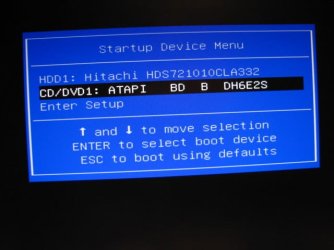
To get to the boot menu tap F-12 at startup until you hear a beep.
IMG_0544.JPG

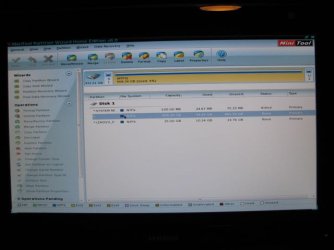
Then select your CD drive, put in the CD and hit enter. Next screen should be pick a resolution then boot to PW.
IMG_0546.JPG

If you want to restore your computer to the way she arrived hit F-2 at startup. That will bring you to the Lenovo Rescue System where you can restore to original or to a saved image. There are some other options there also.

Later

This is my 1st help post. (Found one I could contribute to.) :D
 

My Computer

Computer type
PC/Desktop
Computer Manufacturer/Model Number
Born on date-10-7-2011
OS
Windows 7 Home Premium 64bit
CPU
Intel Core i5-2500 K
Motherboard
Asus P8Z68-V Bios 0902
Memory
8GB J Skill- F312800CLD-8GBXM
Graphics Card(s)
Saphire 6870 & Intel HD 3000
Sound Card
Realtek HD Audio
Monitor(s) Displays
Asus VE258Q
Screen Resolution
1920 X 1080
Hard Drives
64g Crucial M4 SSD, 750g WD Caviar Black
PSU
Corsair TX 650 V2
Case
Corsair Carbide 400R
Cooling
Corsair H60
Keyboard
CM Storm Trigger Cherry Blues
Mouse
Logitech G500, G700
Thanks to all. Yes, I found out that the F1 key lets me into the bios and there I was able to enable the screen showing that F12 would let me into the boot menu. I did and was able to boot from the PW boot disk.

So, it looks good to go for the resizing and creating the data partition as soon as I complete making my Recovery disks. I see the system has a built in recovery method but I always like to have the disks just in case.

Thanks again for all the help. I'll mark this thread as solved. Of course I may be back with other problems. I seem to have a knack for that.:geek:
 

My Computer

Computer Manufacturer/Model Number
Lenovo IdeaCentre K330 Series
OS
Windows 7 Professional 64 bit
CPU
Intel i7 2600
Memory
8GB
Graphics Card(s)
Nividia Gforce GT 420
Sound Card
Nvidia High Definition Audio
Monitor(s) Displays
ViewSonic VX2433
Screen Resolution
1920x1080
Hard Drives
1 TB Hitachi
Back
Top