slipstream55
New member
- Local time
- 9:11 AM
- Messages
- 27
Good morning, Forum.
On my Windows 7 PC, it was simple to create an image of my C: and D: partitions as they were the only two partitions on my HDD. I used an early version of Macrium Reflect and was very happy with the program.
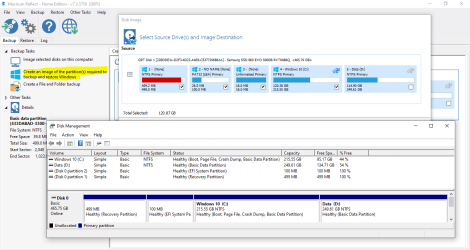
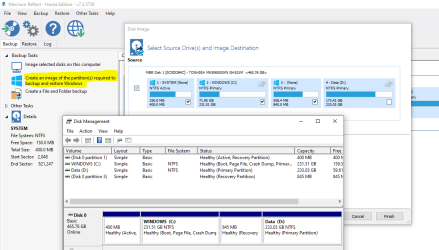
I have a new Asus Windows 10 laptop I bought in 2019 and am just getting around to setting it up for first time use. I would like to create backup images of the HDD partitions but am a little confused as to how to do this because there are extra (recovery) partitions I have never had to deal with before. I still want to use Macrium Reflect to create these images. So...do I create an image for the C: (System) and D: (Data) partitions as I did for my Windows 7 laptop and also create separate images of the recovery partition(s)? There seem to be two of these extra partitions. Any help is appreciated.
On my Windows 7 PC, it was simple to create an image of my C: and D: partitions as they were the only two partitions on my HDD. I used an early version of Macrium Reflect and was very happy with the program.
I have a new Asus Windows 10 laptop I bought in 2019 and am just getting around to setting it up for first time use. I would like to create backup images of the HDD partitions but am a little confused as to how to do this because there are extra (recovery) partitions I have never had to deal with before. I still want to use Macrium Reflect to create these images. So...do I create an image for the C: (System) and D: (Data) partitions as I did for my Windows 7 laptop and also create separate images of the recovery partition(s)? There seem to be two of these extra partitions. Any help is appreciated.
My Computer
At a glance
Windows 7 Professional 64-bit
- OS
- Windows 7 Professional 64-bit