Urgent Please:Windows cannot load the device driver for hardware.

artinusa

New member
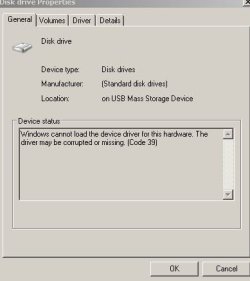
Windows cannot load the device driver for this hardware. The driver may be corrupted or missing. (Code 39)

Windows Critical update and now sadly I have all USB drivers with yellow triangle type sign..tried uninstalling drivers etc..still the same. Search web but found nothing that I can handle ..anyone help please..I have 3 USB drives I cannot use..I se them in device manger etc but nothing I can do to them.. I see only my c: drive and my cd/dvd drive indicated as good. I updated USB drivers and am desperate for help..My backups etc are on the USB drives..restore does not see m to work. I read about filters and conflicts..can anyone guide me here..
 

My Computer

Computer type
PC/Desktop
Computer Manufacturer/Model Number
Compaq Presario
OS
Windows 7 64 bit
Have you tried a system restore to a restore point before this happened?
 

My Computer

Computer type
PC/Desktop
Computer Manufacturer/Model Number
Custom Built
OS
Windows 10 Pro x64, Windows 8.1 Pro x64, Windows 7 Ultimate x64 SP1,
CPU
INTEL i9-7920X LGA 2066
Motherboard
Gigabyte X299-WU8 F3
Memory
64 GB (4 X 16 GB) G-Skill V Series DDR4 3200 Quad Channel
Graphics Card(s)
EVGA GTX 1060 SC 3 GB
Sound Card
Realtek Onboard ALC1220
Monitor(s) Displays
2 x Samsung S27E310
Screen Resolution
1920x1080
Hard Drives
Samsung 2 x 970 EVO Plus 500 GB NVMe
1 x 6TB WD 6003FZBX SATA
1 x 6TB WD 60EFRX SATA
12 x 3TB WD 30EFRX SATA
PSU
Seasonic X-1050
Case
Thermaltake Armor+
Cooling
Corsair H80i V2 Liquid AOI Cooler
Keyboard
Logitech G510s
Mouse
Logitech MX Master 2S
Internet Speed
200 Mb/s
Antivirus
ESET NOD32 13.1
Browser
EDGE (Dev, Canary, Beta), Chrome
Other Info
ASUS RT-AC68U router
Malwarebytes 4.0.4
pbcopter: yes I did from 4 points and it will not restore correctly.. I tried a reg merge from a full reg backup and it would not merge correctly.. I was hoping that would help... I have ERUNT one on the other drives...smile..I have all sort as it were..but..but nothing that will help me..it seems it may be a permissions thing wrapped up in a upper and lower filter issues..out of my league but I can follow instructions.
 

My Computer

Computer type
PC/Desktop
Computer Manufacturer/Model Number
Compaq Presario
OS
Windows 7 64 bit
When did this happen?
 

My Computer

Computer Manufacturer/Model Number
Custom System
OS
Win7-64 Home Premium
CPU
AMD Phenom 9500 Quad core 2.2
Motherboard
MSI K9N2 SLI
Memory
4g
Graphics Card(s)
Geforce GTX560Ti OC
Monitor(s) Displays
2x-Dynex 22" lcd
Screen Resolution
1680-1050x2
Hard Drives
1-seagate 500g
1-WD 1TB
PSU
850w
Internet Speed
6mb DSL
Can you tell us a little more of when it happened?
Were you upgrading windows? Just happened? etc. more information will allow us to better point u in a direction to follow
 

My Computer

Computer Manufacturer/Model Number
Custom System
OS
Win7-64 Home Premium
CPU
AMD Phenom 9500 Quad core 2.2
Motherboard
MSI K9N2 SLI
Memory
4g
Graphics Card(s)
Geforce GTX560Ti OC
Monitor(s) Displays
2x-Dynex 22" lcd
Screen Resolution
1680-1050x2
Hard Drives
1-seagate 500g
1-WD 1TB
PSU
850w
Internet Speed
6mb DSL
USB Probs

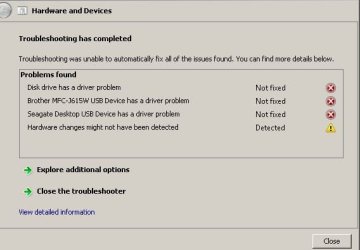
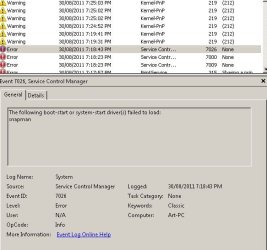
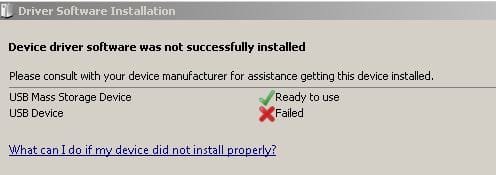
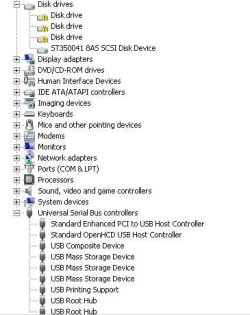
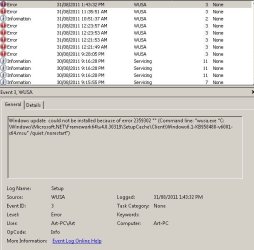
I think it happened during a 'critical update' or removal of Acronis 11 not sure but just today or so..at first I had a problem with Microsoft essential did not update correctly..and had to remove it..Microsoft helped me..but removed many many permissions seemingly. When it rebooted I saw the effects no USB disk drives recognized by win 7x64. I have many screen capture shot of each sort of error..I found out the my USB Device is corrupt that is the drivers when I uninstalled and then installed via reboot same thing I get a yellow triangle in Devicedriver not fixed USB Capture.JPG

usb error event viewer Capture.JPG

usb device failed Capture.JPG manger...storage I have 3 drives all saying same thing.. I think permissions has been taken away or something like that..
 

Attachments

  • Device manager yellow indicators Capture.JPG
    Device manager yellow indicators Capture.JPG
    46.3 KB · Views: 16
Last edited:

My Computer

Computer type
PC/Desktop
Computer Manufacturer/Model Number
Compaq Presario
OS
Windows 7 64 bit
I don't see the Device Manager screenshot, the most important one.

We need the Driver tab from each device in error as well.

Meanwhile try installing the drivers from an Admin account.

You may have messed up the registry with the attempted reg merge which is more advanced than any normal user should try. Run SFC -SCANNOW Command if necessary from DVD Repair console or Repair CD command prompt so it doesn't depend on possibly corrupt System Files: SFC -SCANNOW Run in Command Prompt at Boot

If this fails, consider a Repair Install
 
'I did not understand two things We need the Driver tab from each device in error as well.'''............'

if necessary from DVD Repair console or Repair CD command Sorry'
 
Last edited:

My Computer

Computer type
PC/Desktop
Computer Manufacturer/Model Number
Compaq Presario
OS
Windows 7 64 bit
Take a screenshot of the Device Manager with any devices in error expanded so we can see their listings.

Use Snipping Tool in Start Menu, attach using paper clip in reply box.

Then click on the erroring Devices to take a screenshot of the Properties box with Driver tab showing for each.

If you have Problems running System File Checker, boot the DVD or Repair CD, press Shift + F10 to open a Command Prompt, then run SFC command as shown in tutorial linked in blue.
 
I have run sfc many times but not from safe mode....as well as a start up repair type from repair disk hoping that it might pick up the original sys file or inf files.....no change.

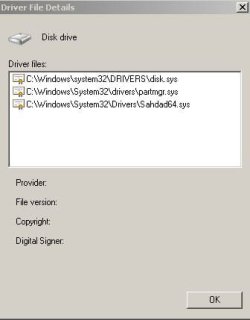
Still not sure what is mean but when I click on the yellow triangle I get properties etc..will show that but it say cannot load mass storage so I will snapshot one the other are identical..The driver detail indicate error code 39...on Google searching I found 1000;s reference but no solutions

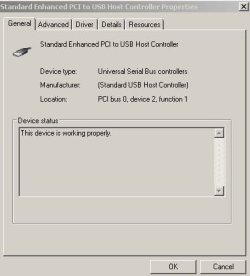
When I go down to USB sections they are all working but I updated every one..but did not uninstall as I was not sure where I would get replacements..when expanded they all reported they said they were working OK I show a shot of Standard Bus controller all others were same working

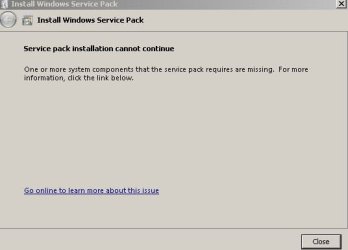
I also show my attempt at updating windows windows defender and the service pack..

I appreciate all your help.. thanks
 

Attachments

  • Device manager yellow indicators Capture.JPG
    Device manager yellow indicators Capture.JPG
    46.3 KB · Views: 11
  • windows update failed Capture.JPG
    windows update failed Capture.JPG
    69.6 KB · Views: 21
  • driver detail whne opeing yellow triangle Capture.JPG
    driver detail whne opeing yellow triangle Capture.JPG
    23 KB · Views: 13
  • disk drive propereties Capture.JPG
    disk drive propereties Capture.JPG
    29.2 KB · Views: 11
  • USB working OK Capture.JPG
    USB working OK Capture.JPG
    31.1 KB · Views: 15
  • Service pack sp1 problem Capture.JPG
    Service pack sp1 problem Capture.JPG
    25 KB · Views: 14

My Computer

Computer type
PC/Desktop
Computer Manufacturer/Model Number
Compaq Presario
OS
Windows 7 64 bit
If you don't have more than the one SCSCI HD then those disk devices missing drivers are likely card readers built into your machine which needdrivers from computer maker's Support Downloads webpage for your model.

Fill out your System Specs in the bottom left corner of your post so we can help you better.

I would locate a Win7 Installation DVD for your version to run a Repair Install
 
I Google'd extensively and wondered about this advice below..please comment at will


  1. Check Device Manager to see if the device displays under the USB section or the Other Devices section. To do this, follow the procedures below:
    1. Click Start
      c00833249.gif
      , right-click Computer , and select Properties .
    2. Click Device Manager .
    3. Click the (+ ) plus sign next to the Universal Serial Bus controllers and next to Other Device section.
      Check for the USB device under the Universal Serial Bus controllers or under the Other Devices section.
    4. If the device is found under Universal Serial Bus controllers or Other Devices , click the reference name for the "unknown" device, and then click Uninstall
      c00833250.gif
      icon to remove the device.
    5. Close Device Manager and restart the computer.
    6. If the USB device that is having problems came with software and it was not previously installed, install the software now following the manufacturer provided instructions.
    7. Reconnect the USB device that was having problems and test it to see if it works.
      The device should now work properly. Continue if the device name cannot be found in Device Manager .
  2. If the USB device is missing, double-click the USB Root Hub , click the Power tab, and then click Power Properties (if it is shown). The available ports and power usage is shown. If the displayed power is over 500mA, remove the devices and use a powered HUB. To check the properties of a HUB, double-click HUB and the HUB information window opens.
  3. Remove high-speed USB cables that are over three meters and use high-speed cables that are less than three meters.
    Only use high-speed cables less than three meters with high-speed USB devices (Multifunction devices, scanners, and cameras).
  4. If the USB device is connected to a USB port on a keyboard, unplug it and plug it into a USB port on the PC or into a powered HUB.
  5. There may be an issue with the USB port. Try plugging into a different USB port. If the USB device displays in Device Manager after plugging the cable into a different port, then uninstall and reinstall the USB device software driver.
 

My Computer

Computer type
PC/Desktop
Computer Manufacturer/Model Number
Compaq Presario
OS
Windows 7 64 bit
Those devices are USB drives..seems they are all called the same thing.... printer is working fine

SFC integrity check..done full SFC many times..nothing..

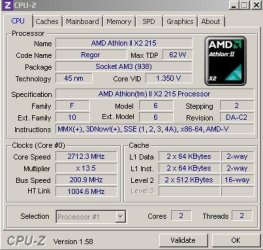
Enclosed CPU-2 runs

I don't have a windows disk just the partition on my hard drive supplied by HP..can I use this,,as for a repair of windows as windows 7 was pre -installed..
 

Attachments

  • SFC integrtiy check..Capture.JPG
    SFC integrtiy check..Capture.JPG
    33.1 KB · Views: 3
  • CPU-2 scan Capture.JPG
    CPU-2 scan Capture.JPG
    53.6 KB · Views: 2
  • CPU-2 Pegatron MAin board Capture.JPG
    CPU-2 Pegatron MAin board Capture.JPG
    41.3 KB · Views: 1
Last edited:

My Computer

Computer type
PC/Desktop
Computer Manufacturer/Model Number
Compaq Presario
OS
Windows 7 64 bit
Can anyone help please..what more is needed..?
 

My Computer

Computer type
PC/Desktop
Computer Manufacturer/Model Number
Compaq Presario
OS
Windows 7 64 bit
I think it would be just as well to restore your computer using the HP recovery partition.

When you've done that, the first thing you need to do is create a set of recovery discs so that you can get your system back if ever the recovery partition fails.
 

My Computer

Computer Manufacturer/Model Number
HP Pavilion Elite 495UK
OS
Windows 7 Ultimate SP1 64-Bit
CPU
Intel Core i7 870 @ 2.93GHz
Motherboard
MSI 2A9C (CPU1)
Memory
8Gb Dual-Channel DDR3 @ 664MHz
Graphics Card(s)
nVidia GeForce GTX 460 1024MB dedicated RAM
Sound Card
Realtek HD Audio
Monitor(s) Displays
HP2310i
Screen Resolution
1920 x 1080
Hard Drives
1x1954GB Hitachi HDS22020ALA 330 (RAID), 1x1954GB Hitachi External for backup and storage
PSU
460W
Case
HP Elite
Cooling
Air cooled
Keyboard
Logitech K750 solar-powered keyboard
Mouse
Logitech Wireless M180 mouse
Internet Speed
2Mb
Other Info
Pure Avanti Flow Internet Radio with iPod Dock, 64Gb iPod, HP USB Speakers, Sony MDR-V500 Headphones, Sony Vaio F-Series Laptop
seavixen32

The problem is or may be that the drivers that windows says are the latest may be corrupt in my system .. the backup or restore or recovery may have exactly the same files as are being used and therefor I will be no better off...Catch 22 eh. It really annoying I cannot use any of my USB drives. I hate the yellow triangle..smile:sarc:
 

My Computer

Computer type
PC/Desktop
Computer Manufacturer/Model Number
Compaq Presario
OS
Windows 7 64 bit
gregrocker

Any idea where I can get my hands on one of those Installation disks (or is it a repair disk) ..or are they the same as the one I ran/made off when I got my system..
 

My Computer

Computer type
PC/Desktop
Computer Manufacturer/Model Number
Compaq Presario
OS
Windows 7 64 bit
You need to locate a Win7 installer to run a Repair Install as suggested several days ago. This is the next best thing to a clean reinstall which is ultimately what you may need with that level or corruption.

A clean reinstall of factory OEM following the steps in my signature below will avoid the inherent corruption in full Factory Recovery with all of the preinstalled sponsors bloatware. However I don't think this is caused by the factory install but something which was added or even more likely tweaked.
 
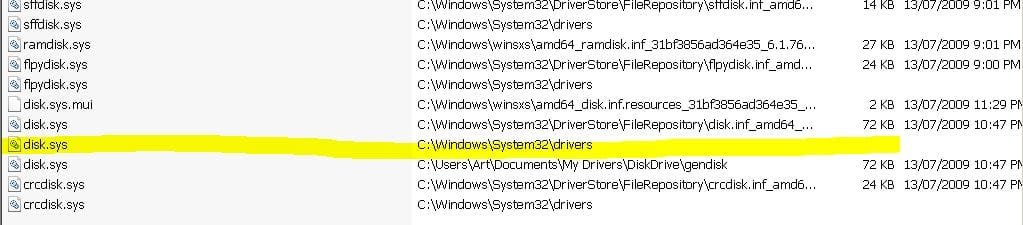
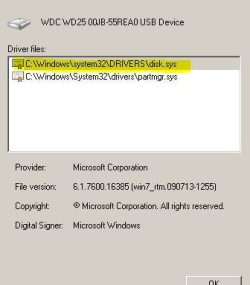
Thank you all who have helped...I ran autoruns and found that the file disk.sys is reported as not found..yet when I look at the device manager installed drivers and uninstall and re-install I see disk.sys as one of the requirements. When I go to system.32 and look for disk.sys I see it. When I search for it and click on the drivers version (see attachments) of disk.sys nothing happens at all..like its not there..nothing on right click etc. All my Drives except internal one need this file to run..If it is corrupt how can I replace it..If say a permissions is stopping a replacement can this cause the problem?
 

Attachments

  • disk sys not shown Capture.JPG
    disk sys not shown Capture.JPG
    67 KB · Views: 8
  • Disk sys needed by as driver Capture.JPG
    Disk sys needed by as driver Capture.JPG
    25.3 KB · Views: 3

My Computer

Computer type
PC/Desktop
Computer Manufacturer/Model Number
Compaq Presario
OS
Windows 7 64 bit
Use any registry fixing tools like registry booster.if that too not works format and reinstall windows.Try disk defragmenter and checkdisk too
 

My Computer

Computer Manufacturer/Model Number
ausus A7V266-MX
OS
windows xp 32bit
CPU
Amd athlon xp 2000+
Motherboard
Asus
Memory
500
Graphics Card(s)
Via s3g unichrome igp
Sound Card
creative
Monitor(s) Displays
Crt
Back
Top