Windows Mail problem

djs

New member
Member
Local time
11:15 PM
Messages
68
Location
Plymouth
I've been using Windows Mail ported over from Vista successfully, until it developed a problem I couldn't correct.

No images were being downloaded, just showing a red cross where images should be. No options had been altered and each e mail was showing the
' Click here to download pictures' at the top of each one.

From within Vista I deleted the Windows Mail folders in Windows 7 and copied the working folders from Vista to Win 7, but still the images were not being downloaded.

I was unable to correct it, so reinstalled 7 from an Image File from when it was running correctly.

Problem sorted, but has anyone else had problems like this running Windows Mail in 7 ?

David.
 

My Computer

Computer Manufacturer/Model Number
Self Build
OS
Windows RC 7100 x64, Vista Ultimate x64,
CPU
Intel Q6700
Motherboard
Asus P5Q3 Deluxe wi-fi
Memory
Corsair DDR3 4gb
Graphics Card(s)
ATI X1650
Monitor(s) Displays
LCD
Hard Drives
WD 1500gb 10k
WD 320gb 7.5k
WD 320gb 7.5k
Samsung 750gb 7.5k
PSU
Enermax 500w
Case
Lian-Li PC-7B Plus
Cooling
Scythe Infinity
Keyboard
Logitech cordless
Mouse
Logitech cordless
Internet Speed
20meg Cable
Hi David,

Haven't had that particular problem, but have had some other minor nuisances. They seem to come and go. System restore points sometimes help. If they don't activate WM in the final release, and I'm guessing they probably won't, I'll have to settle on something else unless I can get WM working properly.

Gary
 

My Computer

Computer Manufacturer/Model Number
Dell XPS420
OS
Vista Ult 64 bit Seven Ult RTM x64
CPU
Intel Core2 Quad Q6600 2.40 gigahertz
Memory
Crucial Ballistix 4x2GB PC2 6400
Graphics Card(s)
NVIDIA GeForce 8600 GTS 256 MB
Sound Card
Creative SB X-Fi audio
Monitor(s) Displays
HP w2207 + HPvs15
Screen Resolution
1680x1050 + 1024x768
Hard Drives
2-WD5000AAKS-500 GB
WD5000AAV-500 GB external
Keyboard
Microsoft Comfort Curve
Mouse
MX Revolution
Other Info
Wacom Intuos 2 Graphics Tablet
Experience Index=5.5
Hi Gary,
I tried Thunderbird, but it didn't let Kaspersky integrate the Anti-Spam part, or I couldn't see how too.
The anti spam in Kaspersky Internet Security works very well for me, intercepts so many nasties, bank phishing and 'pharmacy offerings'!!!!!
I used to pay a subscription for Spam Fighter, but having it built into KIS is a bonus as it works much better than Spam Fighter did.

Which is why I want to stay with Windows Mail, unless anyone has a recommend for alternatives.

I always make back up image files of my system partitions, so it's only a few minutes to revert back to a working system, (after I've broken it again)

David.
 

My Computer

Computer Manufacturer/Model Number
Self Build
OS
Windows RC 7100 x64, Vista Ultimate x64,
CPU
Intel Q6700
Motherboard
Asus P5Q3 Deluxe wi-fi
Memory
Corsair DDR3 4gb
Graphics Card(s)
ATI X1650
Monitor(s) Displays
LCD
Hard Drives
WD 1500gb 10k
WD 320gb 7.5k
WD 320gb 7.5k
Samsung 750gb 7.5k
PSU
Enermax 500w
Case
Lian-Li PC-7B Plus
Cooling
Scythe Infinity
Keyboard
Logitech cordless
Mouse
Logitech cordless
Internet Speed
20meg Cable
What about using Windows Live Mail, which I believe is the email client Microsoft want us to use instead of Outlook Express and Windows Mail.
I use that and like it as it means I can have all my email accounts, RSS Feeds and Newsgroups in the one application.
 

My Computer

Computer type
PC/Desktop
Computer Manufacturer/Model Number
Acer Aspire XC-704 x64 bit/ Asus K55A Notebook PC/HP Envy x360 Convertible 15-bq0xx
OS
Windows 10 64bit/Windows 10 64bit/Windows 10 64bit
CPU
Intel Pentium J3710 @ 60GHz/Intel B820,1.7GHz/AMD A9 Radeon
Motherboard
Acer Aspire XC-704 (SOCKET 0)/Asus/HP 8312 (Socket FP4)
Memory
8.00GB DDR3 @ 1599MHz/8GB 2 x 4GB DDR3/8.00GB Dual-Channel
Graphics Card(s)
Intel HD Graphics/Intel/512MB ATI AMD Radeon R5 Graphics (HP
Sound Card
Realtek High Definition Audio/Onboard/AMD High Definition Au
Monitor(s) Displays
Acer LCD K222HQL /Asus 15.6/Generic PnP Monitor (1920x1080@6
Screen Resolution
1920x1080@59Hz/1366 x 768/1920x1080@60Hz
Hard Drives
1863GBWesternn Digital WDC/Asus/119GB SanDisk SD8SN8U-128G-1006 (SSD)
931GB Hitachi HGST HTS721010A9E630 (SATA)
Keyboard
Microsoft Natural Ergonomic Keyboard 4000 (UK)/Inbuilt/Inbui
Mouse
Microsoft Optical Wheel Mouse/Same plus Touchpad/Same + Pad
Internet Speed
Infinity 2 up to 76 Mbps
Antivirus
MSE/MSE/MSE and all 3 have MalwareBytes Premium
Browser
Edge, Firefox/Edge, Firefox/Edge, Firefox, Chrome
Other Info
Seagate Expansion 500GB External Desktop Drive
Seagate Expansion Portable Drives 500GB and 1TB
Epson XP-332 Wireless Printer
Allthough I can't wait to use the latest software, in other ways I'm old fashioned.:o
I tried Live mail and much prefer Windows Mail.
 

My Computer

Computer Manufacturer/Model Number
Self Build
OS
Windows RC 7100 x64, Vista Ultimate x64,
CPU
Intel Q6700
Motherboard
Asus P5Q3 Deluxe wi-fi
Memory
Corsair DDR3 4gb
Graphics Card(s)
ATI X1650
Monitor(s) Displays
LCD
Hard Drives
WD 1500gb 10k
WD 320gb 7.5k
WD 320gb 7.5k
Samsung 750gb 7.5k
PSU
Enermax 500w
Case
Lian-Li PC-7B Plus
Cooling
Scythe Infinity
Keyboard
Logitech cordless
Mouse
Logitech cordless
Internet Speed
20meg Cable
There are some things I like about Live Mail, but the things I don't like out weight them. I prefer Windows Mail. I'll be getting Office 2007 soon and will then go to Outlook. I liked that when I used it before Vista.

Gary
 

My Computer

Computer Manufacturer/Model Number
Dell XPS420
OS
Vista Ult 64 bit Seven Ult RTM x64
CPU
Intel Core2 Quad Q6600 2.40 gigahertz
Memory
Crucial Ballistix 4x2GB PC2 6400
Graphics Card(s)
NVIDIA GeForce 8600 GTS 256 MB
Sound Card
Creative SB X-Fi audio
Monitor(s) Displays
HP w2207 + HPvs15
Screen Resolution
1680x1050 + 1024x768
Hard Drives
2-WD5000AAKS-500 GB
WD5000AAV-500 GB external
Keyboard
Microsoft Comfort Curve
Mouse
MX Revolution
Other Info
Wacom Intuos 2 Graphics Tablet
Experience Index=5.5
Check your anti-virus settings first & those of any other protection software you may have.

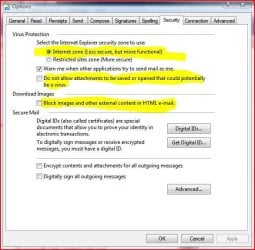
Make sure in Windows Mail Tools/Options/Security that the options are as shown in the attached thumbnail...Internet Zone and the two other highlighted ones are unchecked.
 

Attachments

  • Capture.JPG
    Capture.JPG
    57.9 KB · Views: 213

My Computer

Computer type
PC/Desktop
Computer Manufacturer/Model Number
Alienware® ALX X58
OS
Win 7 Ult SP1/Win 10 Pro (all x64)
CPU
Intel® Core™ i7-975 Extreme O/C to 4.02 GHz, 8MB Cache
Motherboard
Asus® P6T Deluxe V2 X58 LGA1366
Memory
24GB Corsair Vengeance DDR3 SDRAM at 1600MHz - 6 x 4096MB
Graphics Card(s)
1792 MB NVIDIA® GeForce® GTX 295 Dual Core
Sound Card
Onboard Soundmax® High-Definition 7.1 Performance Audio
Monitor(s) Displays
Samsung XL2370 LED backlit 23" W/S 2ms response time
Screen Resolution
1920 X 1080
Hard Drives
2 x 500gb SATA II
1 x 1TB SATA II
1 external eSATA LaCie 3TB
(Non-RAID)
PSU
Alienware® 1200 Watt Multi-GPU
Case
Alienware® P2 ALX Chassis with AlienIce™ 3.0 Video Cooling
Cooling
Alienware® High-Perf. Liquid Cooling + Acoustic Dampening
Keyboard
Microsoft® Wireless Entertainment 8000 + Logitech® G15 Wired
Mouse
Microsoft® Wireless Laser 8000 + Logitech® G9 Wired
Internet Speed
1Gb/s
Antivirus
McAfee LiveSafe
Browser
Firefox - latest
Other Info
Using non-RAID on purpose as I find RAID to be too temperamental.
Now set to AHCI
Thanks Peter, but the tick should be in the,
'Block images and other external content in HTML e-mail.
This makes Windows Mail ask if you want to download the image, otherwise for undesirable e-mails, they get a response back from you automatically.

Whatever the fault was, it wasn't an altered option in the program, but something else, registry perhaps ??
 

My Computer

Computer Manufacturer/Model Number
Self Build
OS
Windows RC 7100 x64, Vista Ultimate x64,
CPU
Intel Q6700
Motherboard
Asus P5Q3 Deluxe wi-fi
Memory
Corsair DDR3 4gb
Graphics Card(s)
ATI X1650
Monitor(s) Displays
LCD
Hard Drives
WD 1500gb 10k
WD 320gb 7.5k
WD 320gb 7.5k
Samsung 750gb 7.5k
PSU
Enermax 500w
Case
Lian-Li PC-7B Plus
Cooling
Scythe Infinity
Keyboard
Logitech cordless
Mouse
Logitech cordless
Internet Speed
20meg Cable
Not sure then. Good luck.
 

My Computer

Computer type
PC/Desktop
Computer Manufacturer/Model Number
Alienware® ALX X58
OS
Win 7 Ult SP1/Win 10 Pro (all x64)
CPU
Intel® Core™ i7-975 Extreme O/C to 4.02 GHz, 8MB Cache
Motherboard
Asus® P6T Deluxe V2 X58 LGA1366
Memory
24GB Corsair Vengeance DDR3 SDRAM at 1600MHz - 6 x 4096MB
Graphics Card(s)
1792 MB NVIDIA® GeForce® GTX 295 Dual Core
Sound Card
Onboard Soundmax® High-Definition 7.1 Performance Audio
Monitor(s) Displays
Samsung XL2370 LED backlit 23" W/S 2ms response time
Screen Resolution
1920 X 1080
Hard Drives
2 x 500gb SATA II
1 x 1TB SATA II
1 external eSATA LaCie 3TB
(Non-RAID)
PSU
Alienware® 1200 Watt Multi-GPU
Case
Alienware® P2 ALX Chassis with AlienIce™ 3.0 Video Cooling
Cooling
Alienware® High-Perf. Liquid Cooling + Acoustic Dampening
Keyboard
Microsoft® Wireless Entertainment 8000 + Logitech® G15 Wired
Mouse
Microsoft® Wireless Laser 8000 + Logitech® G9 Wired
Internet Speed
1Gb/s
Antivirus
McAfee LiveSafe
Browser
Firefox - latest
Other Info
Using non-RAID on purpose as I find RAID to be too temperamental.
Now set to AHCI
Another thought....

1. Click Tools, then Options.
2. Click the Read tab
Make sure the "Read all messages in plain text" is unchecked.
 

My Computer

Computer type
PC/Desktop
Computer Manufacturer/Model Number
Alienware® ALX X58
OS
Win 7 Ult SP1/Win 10 Pro (all x64)
CPU
Intel® Core™ i7-975 Extreme O/C to 4.02 GHz, 8MB Cache
Motherboard
Asus® P6T Deluxe V2 X58 LGA1366
Memory
24GB Corsair Vengeance DDR3 SDRAM at 1600MHz - 6 x 4096MB
Graphics Card(s)
1792 MB NVIDIA® GeForce® GTX 295 Dual Core
Sound Card
Onboard Soundmax® High-Definition 7.1 Performance Audio
Monitor(s) Displays
Samsung XL2370 LED backlit 23" W/S 2ms response time
Screen Resolution
1920 X 1080
Hard Drives
2 x 500gb SATA II
1 x 1TB SATA II
1 external eSATA LaCie 3TB
(Non-RAID)
PSU
Alienware® 1200 Watt Multi-GPU
Case
Alienware® P2 ALX Chassis with AlienIce™ 3.0 Video Cooling
Cooling
Alienware® High-Perf. Liquid Cooling + Acoustic Dampening
Keyboard
Microsoft® Wireless Entertainment 8000 + Logitech® G15 Wired
Mouse
Microsoft® Wireless Laser 8000 + Logitech® G9 Wired
Internet Speed
1Gb/s
Antivirus
McAfee LiveSafe
Browser
Firefox - latest
Other Info
Using non-RAID on purpose as I find RAID to be too temperamental.
Now set to AHCI
Images not being allowed to download is definitely NOT an option that has been changed in Windows Mail.
It must be, perhaps a registry corruption.

I was only able to get it working again by re-installing from an earlier image file.

My first thought was that I had altered something within win mail, but I checked the options in Vista and they were both the same, so it was a problem outside of the Windows Mail folders in Programs Files, Program Files (x86) and in the message store in app data.
 

My Computer

Computer Manufacturer/Model Number
Self Build
OS
Windows RC 7100 x64, Vista Ultimate x64,
CPU
Intel Q6700
Motherboard
Asus P5Q3 Deluxe wi-fi
Memory
Corsair DDR3 4gb
Graphics Card(s)
ATI X1650
Monitor(s) Displays
LCD
Hard Drives
WD 1500gb 10k
WD 320gb 7.5k
WD 320gb 7.5k
Samsung 750gb 7.5k
PSU
Enermax 500w
Case
Lian-Li PC-7B Plus
Cooling
Scythe Infinity
Keyboard
Logitech cordless
Mouse
Logitech cordless
Internet Speed
20meg Cable
Strange, but I'm glad it's working again.
 

My Computer

Computer type
PC/Desktop
Computer Manufacturer/Model Number
Alienware® ALX X58
OS
Win 7 Ult SP1/Win 10 Pro (all x64)
CPU
Intel® Core™ i7-975 Extreme O/C to 4.02 GHz, 8MB Cache
Motherboard
Asus® P6T Deluxe V2 X58 LGA1366
Memory
24GB Corsair Vengeance DDR3 SDRAM at 1600MHz - 6 x 4096MB
Graphics Card(s)
1792 MB NVIDIA® GeForce® GTX 295 Dual Core
Sound Card
Onboard Soundmax® High-Definition 7.1 Performance Audio
Monitor(s) Displays
Samsung XL2370 LED backlit 23" W/S 2ms response time
Screen Resolution
1920 X 1080
Hard Drives
2 x 500gb SATA II
1 x 1TB SATA II
1 external eSATA LaCie 3TB
(Non-RAID)
PSU
Alienware® 1200 Watt Multi-GPU
Case
Alienware® P2 ALX Chassis with AlienIce™ 3.0 Video Cooling
Cooling
Alienware® High-Perf. Liquid Cooling + Acoustic Dampening
Keyboard
Microsoft® Wireless Entertainment 8000 + Logitech® G15 Wired
Mouse
Microsoft® Wireless Laser 8000 + Logitech® G9 Wired
Internet Speed
1Gb/s
Antivirus
McAfee LiveSafe
Browser
Firefox - latest
Other Info
Using non-RAID on purpose as I find RAID to be too temperamental.
Now set to AHCI
Vista early betas didn't have a working email program either FYI.
 

My Computer

Computer type
PC/Desktop
Computer Manufacturer/Model Number
Alienware® ALX X58
OS
Win 7 Ult SP1/Win 10 Pro (all x64)
CPU
Intel® Core™ i7-975 Extreme O/C to 4.02 GHz, 8MB Cache
Motherboard
Asus® P6T Deluxe V2 X58 LGA1366
Memory
24GB Corsair Vengeance DDR3 SDRAM at 1600MHz - 6 x 4096MB
Graphics Card(s)
1792 MB NVIDIA® GeForce® GTX 295 Dual Core
Sound Card
Onboard Soundmax® High-Definition 7.1 Performance Audio
Monitor(s) Displays
Samsung XL2370 LED backlit 23" W/S 2ms response time
Screen Resolution
1920 X 1080
Hard Drives
2 x 500gb SATA II
1 x 1TB SATA II
1 external eSATA LaCie 3TB
(Non-RAID)
PSU
Alienware® 1200 Watt Multi-GPU
Case
Alienware® P2 ALX Chassis with AlienIce™ 3.0 Video Cooling
Cooling
Alienware® High-Perf. Liquid Cooling + Acoustic Dampening
Keyboard
Microsoft® Wireless Entertainment 8000 + Logitech® G15 Wired
Mouse
Microsoft® Wireless Laser 8000 + Logitech® G9 Wired
Internet Speed
1Gb/s
Antivirus
McAfee LiveSafe
Browser
Firefox - latest
Other Info
Using non-RAID on purpose as I find RAID to be too temperamental.
Now set to AHCI
A strange happening with windows mail folders in Win 7

Hi guys

I'm a newbie, just joined and not quite sure where to start a post.
I have a triple boot system, XP/Vista/Win 7. I loaded Win 7 as a clean install over Vista back in early May. Then I found I couldn't restore my Vista backups stored on another partition.

So I formatted the win 7 partition and did a new load of Vista. Took a while to get back up to date but then I thought, why not do a Win 7 upgrade over Vista?

Worked like a charm! All my folders and files were where they should be. Except, of course, Windows Mail.

Wasn't too bothered as I had backed up my winmail folder on another drive and I also had Winmail on a USB dongle which has its own Winmail copy and can synchronise the files when you plug it in.

I noticed that the Windows Mail program was there as were the storage folders but, Win 7 had disabled the exe program and removed the desktop icon.

I fixed that by loading Vista again on a spare backup drive and copying over the exe program, thus getting winmail running.
Slight problem.

All my email message histories going back seven years were in the Windows mail folders but were not showing on the desktop. If I triggered an import they would arrive as folders but would be empty of messages.If I look in a storage location the folders are full of messages!

I now have three Windows mail programs. One in Vista, one in Win 7 and one on the dongle but, whichever I run and restore I get empty folders. I also have backups of those folders but they have the same problem.

I have installed Thunderbird in anticipation of Windows mail shortly becoming redundant but until I can get the folder contents into Windows Mail to transfer to Outlook, I have no change of importing them into Thunderbird.

The empty folders when they arrive, are fully functioning and I can store newly received messages with no problem.
Been like this for a month now. I have reached the end of my expertise as I don't know the relationship between the Windows Mail files, nor have I seen an explanation of this problem on the net, never mind a solution.

Hope this is of interest to someone.

Apart from this, I am very happy with the Win 7 RC, at least until next June.

Bobthequill
 

My Computer

Computer Manufacturer/Model Number
Optima/TOSHIBA nb/Medion Akoya
OS
XP/Vista 32 bit/Win 7 hp 64 bit
CPU
Core 2 duo 1.8/AMD Turion 64/Pentium Dual core 2.3Ghz
Motherboard
Gigabyte 945 GZM-S2/MEDIONPC MS -7621 2.1
Memory
4 GB/dunno/4GB (part share vid)
Graphics Card(s)
Nvidia GeForce 8500 GT/ dunno/ Nvidia GeForce 9100 M
Sound Card
Realtek/??/Realtek
Monitor(s) Displays
Optima (Toshiba) 18 inch LCD/13 inch tft/MSI 21.5 inch touch
Screen Resolution
1440 x 900/not good/1920 x 1080
Hard Drives
2 x 320 GB sata

1 x 70 GB ide

1 x 1TB sata
PSU
400w/150w/300w
Case
Full/notebook/All in one desktop
Cooling
Fan/fan/ heat pipe fan
Keyboard
MEDION wireless/built in/MEDION wireless
Mouse
MEDION wireless/Genius wireless/MEDION wireless
Internet Speed
1.1 Mb
Other Info
Logitech webcam(3)
Back
Top