|
|
|
|||||||||||||||||||||||||||||||||||||||||||||||||||||||||||||||||||||||||||||||||||||||||||||||||||
| 22 Nov 2009 | #1 |
|
|
too many primary partitions
Hi,
My new HP came with Windows 7 installed. I would like to allow my computer to dual boot, but Windows 7 has already installed four primary partitions (SYSTEM, c: WINDOWS, d: RECOVERY, and HP_TOOLS). I am not sure what my options are. Can I merge two or three of the partitions? Is HP_TOOLS important? Can I delete it? Other suggestions? Any help would much appreciated! Tyler |
| My System Specs |
| . |
|
|
| 22 Nov 2009 | #2 |
|
|
Hi,
My new HP came with Windows 7 installed. I would like to allow my computer to dual boot, but Windows 7 has already installed four primary partitions (SYSTEM, c: WINDOWS, d: RECOVERY, and HP_TOOLS). I am not sure what my options are. Can I merge two or three of the partitions? Is HP_TOOLS important? Can I delete it? Other suggestions? Any help would much appreciated! Tyler The simplest solution would be to add a second hard drive. For other options, could you take a screen shot of your Windows 7 Disk Management screen and attach it to a post? Cheers! Robert |
| My System Specs |
| 23 Nov 2009 | #3 |
|
|
Ok...
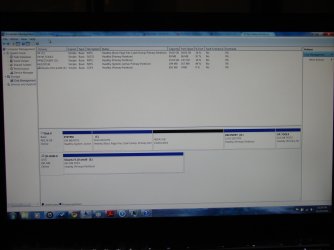
I'll consider getting a second hard drive! And attached is a screen shot of disk management. Thanks! |
| My System Specs |
| . |
|
|
| 23 Nov 2009 | #4 |
|
|
Hello Tyme,
From that screenshot, you should be able to use Disk Management to extend the C: drive into the 400.43GB unallocated space to add it all to the C: drive for more free space.
|
| My System Specs |
| 23 Nov 2009 | #5 |
|
|
I would suggest the HP_TOOLS is the least important. Check your documentation and see if HP facilitates creating a HP_TOOLS CD (and RECOVERY DVDs). If so, you could burn off the TOOLS CD and delete that partition. Same thing with the RECOVERY. If you can burn some RECOVERY DVDs, you could also use that space. Last, I like the 100MB/200MB system partition and would recommend you keep it. But you can get along without it. If you insist on removing it, let us know so we can go over the steps with you. Please let us know if we help. Cheers! Robert |
| My System Specs |
| 23 Nov 2009 | #6 |
|
|
Hello Tyme,
From that screenshot, you should be able to use Disk Management to extend the C: drive into the 400.43GB unallocated space to add it all to the C: drive for more free space. ![]() |
| My System Specs |
| 24 Nov 2009 | #7 |
|
|
Tyme,
In this case, you can just right click on the unallocated space, and click on "Create New Simple Volume". Afterwards, you can install the second OS on that partition.
|
| My System Specs |
| 25 Nov 2009 | #8 |
|
|
Ok,
So after two days of emailing back and forth with multiple HP techs there was little consensus between them as to whether or not I should delete either the recovery or the hp_tools partition, I made my recovery cds and deleted both of the partitions. Then installed Ubuntu one of those partitions and a "shared storage" disc on the other. So far there have not been any ill effects of deleting those partitions or installing a second OS. When I tried to make a new simple volume with Windows disk management, a prompt informed me that I was going to change the basic volume to a dynamic volume and that I would not be able to boot from the disk... After that message, I decided not to create the simple volume. GParted (Ubuntu) did not seem able to create a logical partition where Ubuntu could be installed. It wanted to create my two partitions on primary partitions. Thanks for your advice! Tyler |
| My System Specs |
| 25 Nov 2009 | #9 |
|
|
One thing that is not well publicised is that Win7 and I believe vista does not need to be on a primary partition. as long as the boot partition is on a primary partition the OS can sit on a logical disk on an extended partiton.
I ran beta copies of Win7 for some time in this configuration |
| My System Specs |
| 31 Mar 2011 | #10 |
|
|
You need to create a partition using all or some of that unallocated space then format it. If you make 2 partitions, 1 for the Linux version you want to install, and 1 for storeage of files you will be able to do the dual boot |
| My System Specs |
| Similar help and support threads | ||||
| Thread | Forum | |||
|
Merging Two Primary Partitions. My Boot Partition (C Drive) is around 97.5GB and I want to extend the volume to around 150GB. So I made into partitions. Look at the picture. I want to merge both the C and G drives. When I select C drive and the select merge partitions, it shows that it can only be merged with D drive. I can't... |
Hardware & Devices | |||
|
Is having two primary partitions ok? I'm using Windows 7 Ultimate x64 and I have two primary partitions (C and D). Is it ok to have two primary partitions or should I convert D drive into a logical partition? :) http://i.imgur.com/aGeTMtO.jpg |
General Discussion | |||
|
More than 4 primary partitions? Hey, I am sorry if this is in the wrong category, But I didn't know where to place it. I was wondering if there is any way to have more than the default 4 primary partitions. It's not me having 4 partitions up running, but it is my HP computer. What I have on my partitions: C: My main drive.... |
Hardware & Devices | |||
|
2 Active Primary Partitions? Hi, I'm looking into setting up a dual boot and I discovered that I have 2 Primary partitions on my hard drive in addition to the backup partition. One of the Primaries is my C: (main) drive and the other is un-named. My question is, can I repurpose the un-named primary partion? I have included a... |
General Discussion | |||
|
Primary partitions Hi, I have a question. When formatting my HD with Diskpart and I'm setting up the partitions do I need to list them all as primary or do I list the OS one as primary? If I list only the OS one as primary what do I need to list the others as? |
Installation & Setup | |||
| Our Sites |
Site Links |
About Us |
Find Us |
|
Windows 7 Forums is an independent web site and has not been authorized,
sponsored, or otherwise approved by Microsoft Corporation.
"Windows 7" and related materials are trademarks of Microsoft Corp.
© Designer Media Ltd All times are GMT -5. The time now is 11:15. |
|