too many primary partitions

tyme

New member
Local time
2:23 AM
Messages
4
Hi,

My new HP came with Windows 7 installed. I would like to allow my computer to dual boot, but Windows 7 has already installed four primary partitions (SYSTEM, c: WINDOWS, d: RECOVERY, and HP_TOOLS). I am not sure what my options are. Can I merge two or three of the partitions? Is HP_TOOLS important? Can I delete it? Other suggestions? Any help would much appreciated!

Tyler
 

My Computer

OS
windows 7
Hi,

My new HP came with Windows 7 installed. I would like to allow my computer to dual boot, but Windows 7 has already installed four primary partitions (SYSTEM, c: WINDOWS, d: RECOVERY, and HP_TOOLS). I am not sure what my options are. Can I merge two or three of the partitions? Is HP_TOOLS important? Can I delete it? Other suggestions? Any help would much appreciated!

Tyler
Hello tyme, and welcome to Windows Seven Forums!

The simplest solution would be to add a second hard drive.

For other options, could you take a screen shot of your Windows 7 Disk Management screen and attach it to a post?

Cheers!
Robert
 

My Computer

OS
...
Ok...

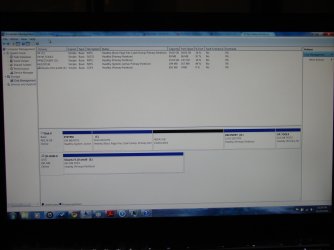
I'll consider getting a second hard drive! And attached is a screen shot of disk management.

Thanks!
 

Attachments

  • disk management_partition.jpg
    disk management_partition.jpg
    289.5 KB · Views: 4,153

My Computer

OS
windows 7
Hello Tyme,

From that screenshot, you should be able to use Disk Management to extend the C: drive into the 400.43GB unallocated space to add it all to the C: drive for more free space. :)
 

My Computer

Computer type
PC/Desktop
Computer Manufacturer/Model Number
Self built custom
OS
64-bit Windows 11 Pro for Workstations
CPU
Intel i7-8700K OC'd to 5 GHz
Motherboard
ASUS ROG Maximus XI Formula Z390
Memory
64 GB (4x16GB) G.SKILL TridentZ RGB DDR4 3600 MHz
Graphics Card(s)
ASUS ROG-STRIX-GTX1080TI-O11G-GAMING
Sound Card
Integrated
Monitor(s) Displays
2 x Samsung Odyssey G7 27"
Screen Resolution
2560x1440
Hard Drives
1TB Samsung 990 PRO M.2,
4TB Samsung 990 PRO PRO M.2,
TerraMaster F8 SSD Plus NAS
PSU
Seasonic Prime Titanium 850W
Case
Thermaltake Core P3
Cooling
Corsair Hydro H115i
Keyboard
Logitech wireless K800
Mouse
Logitech MX Master 4
Internet Speed
2 Gb/s Download and 100 Mb/s Upload
Antivirus
Malwarebyte Anti-Malware Premium
Browser
Google Chrome
Other Info
Logitech Z625 speaker system,
Logitech BRIO 4K Pro webcam,
HP Color LaserJet Pro MFP M477fdn,
APC SMART-UPS RT 1000 XL - SURT1000XLI,
Galaxy S23 Plus phone
(SYSTEM, c: WINDOWS, d: RECOVERY, and HP_TOOLS). I am not sure what my options are. Can I merge two or three of the partitions? Is HP_TOOLS important? Can I delete it? Other suggestions? Any help would much appreciated!

Tyler
Tyler;

I would suggest the HP_TOOLS is the least important. Check your documentation and see if HP facilitates creating a HP_TOOLS CD (and RECOVERY DVDs). If so, you could burn off the TOOLS CD and delete that partition.

Same thing with the RECOVERY. If you can burn some RECOVERY DVDs, you could also use that space.

Last, I like the 100MB/200MB system partition and would recommend you keep it. But you can get along without it. If you insist on removing it, let us know so we can go over the steps with you.

Please let us know if we help.

Cheers!
Robert
 

My Computer

OS
...
Hello Tyme,

From that screenshot, you should be able to use Disk Management to extend the C: drive into the 400.43GB unallocated space to add it all to the C: drive for more free space. :)

The C: Partition is home to Windows 7 OS and was originally extended into the entire unallocated partition. I shrunk that partition, creating the unallocated space that i would like to divide into two separate partitions, one to install a second OS and the other to create a storage partition that is accessible to both OS's. I would like the second OS to be located on its own primary partition! And I'm not sure whether the "storage" partition needs to be a primary or logical (or other) partition. The issue I'm encountering is that my computer was already pre-installed with four primary partitions (the max allowable). I would like to merge or delete one or two of them. I'm currently checking with HP as to whether or not I can backup/delete either the RECOVERY or HP_TOOLS partitions without affecting the SYSTEM or C: partitions (as per Roberts reply).
 

My Computer

OS
windows 7
Tyme,

In this case, you can just right click on the unallocated space, and click on "Create New Simple Volume". Afterwards, you can install the second OS on that partition. :)
 

My Computer

Computer type
PC/Desktop
Computer Manufacturer/Model Number
Self built custom
OS
64-bit Windows 11 Pro for Workstations
CPU
Intel i7-8700K OC'd to 5 GHz
Motherboard
ASUS ROG Maximus XI Formula Z390
Memory
64 GB (4x16GB) G.SKILL TridentZ RGB DDR4 3600 MHz
Graphics Card(s)
ASUS ROG-STRIX-GTX1080TI-O11G-GAMING
Sound Card
Integrated
Monitor(s) Displays
2 x Samsung Odyssey G7 27"
Screen Resolution
2560x1440
Hard Drives
1TB Samsung 990 PRO M.2,
4TB Samsung 990 PRO PRO M.2,
TerraMaster F8 SSD Plus NAS
PSU
Seasonic Prime Titanium 850W
Case
Thermaltake Core P3
Cooling
Corsair Hydro H115i
Keyboard
Logitech wireless K800
Mouse
Logitech MX Master 4
Internet Speed
2 Gb/s Download and 100 Mb/s Upload
Antivirus
Malwarebyte Anti-Malware Premium
Browser
Google Chrome
Other Info
Logitech Z625 speaker system,
Logitech BRIO 4K Pro webcam,
HP Color LaserJet Pro MFP M477fdn,
APC SMART-UPS RT 1000 XL - SURT1000XLI,
Galaxy S23 Plus phone
Ok,

So after two days of emailing back and forth with multiple HP techs there was little consensus between them as to whether or not I should delete either the recovery or the hp_tools partition, I made my recovery cds and deleted both of the partitions. Then installed Ubuntu one of those partitions and a "shared storage" disc on the other. So far there have not been any ill effects of deleting those partitions or installing a second OS.

When I tried to make a new simple volume with Windows disk management, a prompt informed me that I was going to change the basic volume to a dynamic volume and that I would not be able to boot from the disk... After that message, I decided not to
create the simple volume.

GParted (Ubuntu) did not seem able to create a logical partition where Ubuntu could be installed. It wanted to create my two partitions on primary partitions.

Thanks for your advice!

Tyler
 

My Computer

OS
windows 7
One thing that is not well publicised is that Win7 and I believe vista does not need to be on a primary partition. as long as the boot partition is on a primary partition the OS can sit on a logical disk on an extended partiton.

I ran beta copies of Win7 for some time in this configuration
 

My Computers

System One System Two

  • Computer type
    PC/Desktop
    Computer Manufacturer/Model Number
    ChillBlast - Custom to my design
    OS
    Windows 11 Pro x64 [Latest Release and Release Preview]
    CPU
    Ryzen 9 5950X, 3.8 - 5.2 MHz
    Motherboard
    Asus Prime X570-Pro
    Memory
    64GB [2 x 32GB] DDR4 3200MHz
    Graphics Card(s)
    4GB NVIDIA GEFORCE GTX 1650 Ti
    Sound Card
    On-board SPDIF to 5.1 System + HDMI [5.1 system]
    Monitor(s) Displays
    32" UHD 32 Bit HDR Monitor + 43" UHD 4K 32Bit HDR TV
    Screen Resolution
    2 x 3840 x 2160 @60Hz
    Hard Drives
    1TB M2 SSD OS, 500GB Fast Access SSD, 2 x 8TB Data + Various Externals from 1TB to 4TB, 10TB NAS
    PSU
    NZXT C750 80 PLUS Gold 750W Modular PSU
    Case
    Workstation Case [Matt Black]
    Cooling
    NZXT Kraken X63 280mm CPU Cooler +2x Quiet Case fans
    Keyboard
    Logitech Wireless MX Keys & K400 + others
    Mouse
    Logitech Wireless MX Master 3S
    Internet Speed
    920 MB Down 50 MB Up
    Antivirus
    BitDefender Total Security Pro
    Browser
    Chrome (always run latest Non-Beta)
    Other Info
    Also run ...
    Laptop - Quad 8GB - Windows 10 Pro x64
    Nexus 7 Android tablet x2
    Samsung 10.2" tablet
    Blackview TAB 8 4G Android Tablet c/w Keyboard
    Wacom Intuos Pro Medium Pen Pad
    Wacom Intuos Pro Small Pen Pad
    Wacom Expresskeys Remote
    Loopdeck+ Graphics Controller
    Shuttle Pro v2 Control
  • Computer type
    Laptop
    System Manufacturer/Model Number
    Dell XPS 17 10750H
    OS
    Windows 11 Pro x64 Latest RP
    CPU
    Intel I7 10750H 5.0GHz
    Motherboard
    Dell XPS
    Memory
    32GB [2x16GB] DDR4 2933 MHz
    Graphics Card(s)
    nVidia GTX1650Ti 4 GB GDDR6
    Sound Card
    Stock [Realtek] 4 Speaker
    Monitor(s) Displays
    17" IPS UHD+ Infinity Edge Touchscreen
    Screen Resolution
    3840 x 2400
    Hard Drives
    2TB M2 NVMe, 4TB External + various 500GB & 1TB External NVMe (also have access to spinner HDD from
    PSU
    Stock
    Case
    Stock XPS Aluminium & Carbon Fibre
    Cooling
    Stock - Active Fan Control
    Keyboard
    Backlit + Various Logitech
    Mouse
    Stock Track Pad + Logitech MX Trackball
    Internet Speed
    72 MB Down 18MB Up
    Browser
    Chrome
    Other Info
    Also run ...
    Laptop - Quad 8GB - Windows 10 Pro x64
    Nexus 7 Android tablet x2
    10.2" tablet
    Sony Z3 Android Smartphone
    Wacom Intuos Pro Medium Pen Pad
    Wacom Intuos Pro Small Pen Pad
    Wacom Expresskeys Remote
    Loopdeck+ Graphics Controller
    Shuttle Pro v2 Control Pad
    10TB NAS
Ok...

I'll consider getting a second hard drive! And attached is a screen shot of disk management.

Thanks!

Very funny that HP ships PC with 400+GBs of unallocated space on the hard drive.

You need to create a partition using all or some of that unallocated space then format it. If you make 2 partitions, 1 for the Linux version you want to install, and 1 for storeage of files you will be able to do the dual boot
 

My Computer

Computer Manufacturer/Model Number
Built be Me
OS
Windows 7 Pro x64
CPU
i5 760
Motherboard
Asus P7P55D-E Pro
Memory
16GB
Graphics Card(s)
Nvidia GTS450
Sound Card
On board
Monitor(s) Displays
Dell 2007WFP Dell 1800FP
Screen Resolution
1680x1050 1280x1024
Hard Drives
Seagate 250GB & 750GB
WD 1TB
PSU
Antec 750
Case
In Win
Cooling
Cooler Master Hyper 212+
Keyboard
IBM
Mouse
MS
Hey, I am having the same problem. I want to Dualboot Windows 7 (Current) and Windows 8 (I will test if I like it, so I might buy it later). But like you have...
15xwkf5.png
-__- So, What did HP recommend. Just deleting the Recovery and HP_tools?
 

My Computer

OS
windows 7 home premium 64bit.
Hard Drives
NTFS 500gig.
As Barman said here, you can turn the disk C and the new disk for Windows 8 into extended partitions, as long as the SYSTEM partition is primary, everything should be fine.
 

My Computer

Computer type
PC/Desktop
Computer Manufacturer/Model Number
custom built
OS
Win 7 Pro 64-bit 7601
CPU
AMD Phenom 9650 QuadCore, revision DR-B3
Motherboard
ASUS M4A78
Memory
5 GB yes I run 2x 2GB and 1x 1GB, different brand, spank me.
Graphics Card(s)
NVIDIA GeForce 9800 GT 512 Mb, unknown manufacturer.
Sound Card
Crappy Realtek Integrated Audio
Monitor(s) Displays
Fujitsu Siemens P19-3P
Screen Resolution
1280 x 1024 x 32 bits @ 60 Hz Oh yeah, 4:3 rocks!
Hard Drives
(1) MAXTOR S TM3320613AS SATA Disk Device (2) STM35004 18AS SATA Disk Device (3) TOSHIBA USB 2.5"-HDD
PSU
whatever, around 450w
Case
Scavenged from old company PC, 10+ years old
Cooling
CPU fan, GPU fan, case fan, nothing fancy
Keyboard
Microsoft, PS/2, white.
Mouse
Optical, logitec.
Internet Speed
effective max speeds: 70-ish kB/s down 30-ish kB/s up
Antivirus
Avira, free edition.
Browser
Firefox with FXChrome to make it look like Google Chrome :P
Other Info
Was discarded by previous owner due to "horrible performance".
Was running Win Xp from a IDE drive. Yeah. Was a pain.
SATA II drive and Win7 and it zips away! Yay!
HP_TOOLS contains the HP EFI utilities and a Quick Web OS on my dv6 laptop.
Recovery contains the Windows installation files (as well as all of the HP bloatware). You can and should create the Recovery discs from this partition using the HP tool provided.

I created discs and removed the Recovery part on my machine. Some people caution against removing this partition since it is a safer bet than discs. OEM mfgs don't give you much choice when they allocate all 4 parts.

You might want to use windows back up for D:\Recovery to a DVD, then create the HP recovery disc set and then delete it. This will free up one of the four parts so you can create an extended partition and logical drives in that.

You'll need to shrink your C:\ drive (150GB should suffice) - it depends on what's on your drive now.

Once you have unallocated space, you should be able to create an extended part, then logicial drives ( you might have to shrink the first logical drive in order to create more). Windows 8 - 100GB should give you more than enough room to play with.

DO NOT create a DYNAMIC volume. If you get this warning, STOP and post a disk management screen shot.
 

My Computer

Computer type
Laptop
Computer Manufacturer/Model Number
HP Pavilion dv6-6c10us
OS
x64 (6.3.9600) Win8.1 Pro & soon dual boot x64 (6.1.7601) Win7_SP1 HomePrem
CPU
AMD A6-3420M APU with Radeon(tm) HD Graphics
Motherboard
Hewlett-Packard 1805
Memory
6.00 GB
Graphics Card(s)
AMD Radeon(TM) HD 6520G
Sound Card
(1) AMD High Definition Audio Device (2) IDT High Definiti
Monitor(s) Displays
HP W2072a 20" LCD (1600 x 900) @ 60 Hz
Screen Resolution
1366 x 768 x 32 bits (4294967296 colors) @ 60 Hz
Hard Drives
ST640LM0 00 HM641JI SATA Disk Device
Keyboard
Logitech k520 wireless KB
Mouse
Logitech m320 wireless mouse (bundled with KB)
Internet Speed
15/5 | 54 MB Wireless 'n'
Antivirus
Realtime: Defender or Avast | On-demand: Malwarebytes, ESET
Browser
IE 11 on Win8, IE 10 on win 7
Other Info
Media: [Gimp, Audacity, VLC] || Comm: [WEmail 2012, Skype] || Productivity: [OpenOffice,| Textpad] || Utils: [Sysinternals, cCleaner, Speccy, Defraggler]
Back
Top