Windows won't fully start

Hi cedar,
Sir,
1. Detach/eject that pen drive also before proceeding for recovery. Eject all CD/DVD, Floppy, Pen drives, External hard disks, external memory cards. Just be plugged with the single internal hard disk.
2.I usually buy WD passports (external usb drives) and run them. Though now that I think about it when I had 3 plugged in at once it was a bit much as the passports take power from the computer rather than an outlet.
Facing any problems ? You are talking about external harddisks. Yes, it is so. They take power from the computer through the USB port they are plugged in. But some external hard disks have in built /independent PSU as well if they can't draw enough power from USB port. Do your external harddisks have external power plugging options apart from the USB connecting port ? I think it would be better if you keep only one external harddisk plugged in at a time.
3. And mine is a SFF (small form factor) with small psu.
EXTRAS:
(a) Is your pc having a battery ? Do you have any type of power backup and voltage regulators like UPS ? Do you use surge protectors ?
(b) The fan for cooling your pc components is working good ? Your psu is working good ? PSUs control voltage to keep pc cool. your hard disk was so hot!
4. Download Bitdefender here & delete all others.
Thank You Page
5. And keep it on pen drive or hard drive of computer?
We are preparing to recover with recovery partition & you will lose everything on the corrupted pc hard disk.
6. F11 is not getting me into recovery manager. Goes to desktop
You are delaying in pressing F11. As soon as you turn the cpu on , you have to keep on pressing F11, even not to wait for a second. And you don't have to keep it on hold but keep on pressing again & again.
7. Desktop has not been rendering all icons for a bit.
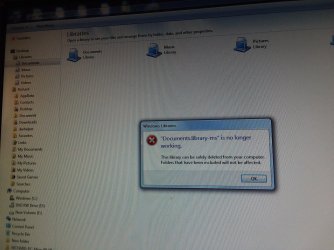
And when trying to open some folders like documents I get this error message
.
May be because you are booted in safe mode. Copy all the files of your interest. We are going to lose them all.

Let us know.

Thanks & Regards. ...
 

My Computer My Computer

Computer type
Laptop
Computer Manufacturer/Model Number
hp compaq presario c795VU notebook pc
OS
Windows 7 Ultimate x32 With Sp1 + Vista Ultimate x32 with Sp1 & Sp2 !!
CPU
Intel Mobile Core 2 Duo T5750 @ 2.00GHz Merom 65nm Technolog
Motherboard
Hewlett-Packard 30D9 (CPU)
Memory
2.00GB Dual-Channel DDR2 @ 332MHz (5-5-5-15)
Graphics Card(s)
Mobile Intel(R) 965 Express Chipset Family
Sound Card
High Definition Audio Device
Monitor(s) Displays
LP154WX4-TLCB on Mobile Intel 965 Express Chipset Family
Screen Resolution
1280x800 @ 60Hz
Hard Drives
149GB Western Digital WDC WD1600BEVS-60VAT0 ATA Device (SATA)
Keyboard
Standard 101/102-Key or Microsoft Natural PS/2 Key + HP QLB
Mouse
ALPS pointing device
Antivirus
Kaspersky AV 2017(Win 7) & AVG AntiVirus Free 2016 (VISTA)
Browser
google chrome
Everything IS disconnected from my computer except the monitor, keyboard, and mouse.
All media is gone.
I am pressing F11 repeatedly BEFORE I press power button just to make sure.
Still goes thru to desktop.
Please watch video I took with my phone and uploaded.
That will show you what happens.
Link is


Uploadfiles.io - comp-win7--20180808_002907.mp4


thanks!
 

My Computer My Computer

Computer type
PC/Desktop
Computer Manufacturer/Model Number
HP 6005 Pro
OS
Windows 7 Pro x64
CPU
Athlon II X2 B24 (3.00GHz)
Memory
8GB DDR3
Hard Drives
1TB HDD
Hi cedar,
I will go by your video today evening.
Good Night!
 

My Computer My Computer

Computer type
Laptop
Computer Manufacturer/Model Number
hp compaq presario c795VU notebook pc
OS
Windows 7 Ultimate x32 With Sp1 + Vista Ultimate x32 with Sp1 & Sp2 !!
CPU
Intel Mobile Core 2 Duo T5750 @ 2.00GHz Merom 65nm Technolog
Motherboard
Hewlett-Packard 30D9 (CPU)
Memory
2.00GB Dual-Channel DDR2 @ 332MHz (5-5-5-15)
Graphics Card(s)
Mobile Intel(R) 965 Express Chipset Family
Sound Card
High Definition Audio Device
Monitor(s) Displays
LP154WX4-TLCB on Mobile Intel 965 Express Chipset Family
Screen Resolution
1280x800 @ 60Hz
Hard Drives
149GB Western Digital WDC WD1600BEVS-60VAT0 ATA Device (SATA)
Keyboard
Standard 101/102-Key or Microsoft Natural PS/2 Key + HP QLB
Mouse
ALPS pointing device
Antivirus
Kaspersky AV 2017(Win 7) & AVG AntiVirus Free 2016 (VISTA)
Browser
google chrome

My Computer My Computer

Computer type
PC/Desktop
Computer Manufacturer/Model Number
HP 6005 Pro
OS
Windows 7 Pro x64
CPU
Athlon II X2 B24 (3.00GHz)
Memory
8GB DDR3
Hard Drives
1TB HDD
Hi cedar,
Sir,
1) Your video : It was not a safe mode ? Is your pc is on a network &/or your hard disk on a network ?
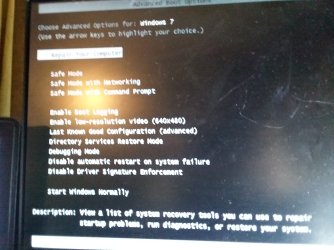
2) Tell me how you get to Advanced Boot options and where it takes you to ? I would like to have a look on that as well.
3) Shut Down your pc. As soon as you put it on, keep pressing F9 and get me the snap.
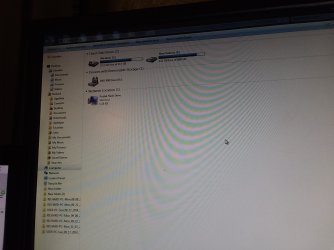
4) A snap of 'Computer' window as well. ( When you go into 'Computer' from start menu as in your video )

Let us know.

Thanks & Regards. ...
 

My Computer My Computer

Computer type
Laptop
Computer Manufacturer/Model Number
hp compaq presario c795VU notebook pc
OS
Windows 7 Ultimate x32 With Sp1 + Vista Ultimate x32 with Sp1 & Sp2 !!
CPU
Intel Mobile Core 2 Duo T5750 @ 2.00GHz Merom 65nm Technolog
Motherboard
Hewlett-Packard 30D9 (CPU)
Memory
2.00GB Dual-Channel DDR2 @ 332MHz (5-5-5-15)
Graphics Card(s)
Mobile Intel(R) 965 Express Chipset Family
Sound Card
High Definition Audio Device
Monitor(s) Displays
LP154WX4-TLCB on Mobile Intel 965 Express Chipset Family
Screen Resolution
1280x800 @ 60Hz
Hard Drives
149GB Western Digital WDC WD1600BEVS-60VAT0 ATA Device (SATA)
Keyboard
Standard 101/102-Key or Microsoft Natural PS/2 Key + HP QLB
Mouse
ALPS pointing device
Antivirus
Kaspersky AV 2017(Win 7) & AVG AntiVirus Free 2016 (VISTA)
Browser
google chrome
Hi cedar,
Sir,
1) Your video : It was not a safe mode ? Is your pc is on a network &/or your hard disk on a network ?
2) Tell me how you get to Advanced Boot options and where it takes you to ? I would like to have a look on that as well.
3) Shut Down your pc. As soon as you put it on, keep pressing F9 and get me the snap.
4) A snap of 'Computer' window as well. ( When you go into 'Computer' from start menu as in your video )
No safe mode, just normal start up.
No network.
Single home user.


Will get the other things you wanted.
thanks.
 

My Computer My Computer

Computer type
PC/Desktop
Computer Manufacturer/Model Number
HP 6005 Pro
OS
Windows 7 Pro x64
CPU
Athlon II X2 B24 (3.00GHz)
Memory
8GB DDR3
Hard Drives
1TB HDD
Pictures are as follows:


1. Screen after f9 repeatedly


2., 3. "Computer" view


4. Advanced Boot Options (press F8 repeatedly)


Remember my desktop icons don't all render and the ones that don't it says that windows cannot locate them when I try to open them.
Error message pics are on previous page.


thanks!
 

Attachments

  • 20180808_235627.jpg
    20180808_235627.jpg
    393.6 KB · Views: 0
  • 20180808_235905.jpg
    20180808_235905.jpg
    626.3 KB · Views: 0
  • 20180808_235914.jpg
    20180808_235914.jpg
    334.7 KB · Views: 0
  • 20180809_001049.jpg
    20180809_001049.jpg
    446.7 KB · Views: 0

My Computer My Computer

Computer type
PC/Desktop
Computer Manufacturer/Model Number
HP 6005 Pro
OS
Windows 7 Pro x64
CPU
Athlon II X2 B24 (3.00GHz)
Memory
8GB DDR3
Hard Drives
1TB HDD
And here's the desktop and error message when trying to open one of the non-rendering icon programs.
 

Attachments

  • 20180807_191311.jpg
    20180807_191311.jpg
    326.6 KB · Views: 1
  • 20180807_191343.jpg
    20180807_191343.jpg
    707.5 KB · Views: 0

My Computer My Computer

Computer type
PC/Desktop
Computer Manufacturer/Model Number
HP 6005 Pro
OS
Windows 7 Pro x64
CPU
Athlon II X2 B24 (3.00GHz)
Memory
8GB DDR3
Hard Drives
1TB HDD
Hi cedar,
Sir,
1. All things answered. I think F11 is hidden in your bios. Even when its hidden, it should show when you repeatedly press it. We would look into it.
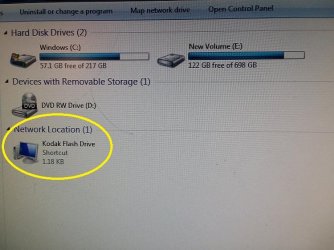
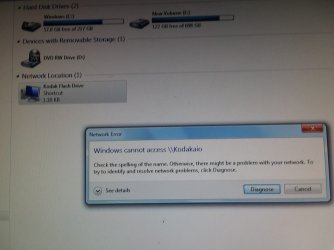
2. But what's that ''Network Location 1' Kodak Flash Drive'' in the image :

cedar's computer folder.jpg

Let us know.

Thanks & Regards. ...
 

My Computer My Computer

Computer type
Laptop
Computer Manufacturer/Model Number
hp compaq presario c795VU notebook pc
OS
Windows 7 Ultimate x32 With Sp1 + Vista Ultimate x32 with Sp1 & Sp2 !!
CPU
Intel Mobile Core 2 Duo T5750 @ 2.00GHz Merom 65nm Technolog
Motherboard
Hewlett-Packard 30D9 (CPU)
Memory
2.00GB Dual-Channel DDR2 @ 332MHz (5-5-5-15)
Graphics Card(s)
Mobile Intel(R) 965 Express Chipset Family
Sound Card
High Definition Audio Device
Monitor(s) Displays
LP154WX4-TLCB on Mobile Intel 965 Express Chipset Family
Screen Resolution
1280x800 @ 60Hz
Hard Drives
149GB Western Digital WDC WD1600BEVS-60VAT0 ATA Device (SATA)
Keyboard
Standard 101/102-Key or Microsoft Natural PS/2 Key + HP QLB
Mouse
ALPS pointing device
Antivirus
Kaspersky AV 2017(Win 7) & AVG AntiVirus Free 2016 (VISTA)
Browser
google chrome
I think it is just for my printer/scanner.
 

My Computer My Computer

Computer type
PC/Desktop
Computer Manufacturer/Model Number
HP 6005 Pro
OS
Windows 7 Pro x64
CPU
Athlon II X2 B24 (3.00GHz)
Memory
8GB DDR3
Hard Drives
1TB HDD
Hi cedar,

I think it is just for my printer/scanner.

Sir,

1. May be you are true as its something in the brand name 'Kodak' But the 'Flash Drive' appears to be representing a pen drive/disk. I think if you double click it, you will come to know. I think when we finally do the recovery, we would have to eject that also.

2. Just have a look on your booting screen from your video : is it always like that ?

cedar's pc during boot.JPG

(a).Here you see that your pc initially looking for some '8192MB' capacity drive ( probably an 8 GB network pen drive ) to boot from with 'HP Ethernet Boot Agent 12.0.1v' functionality. That may be related to point '1' above.
(b).Besides, it seems to be another problem! When we look at your 'One Time Boot Menu', It puts 'Hard Disk' priority above 'Ethernet Boot Agent'. So, it should not have even appeared at all.
Actually, 'Ethernet Boot Agent' functionality provides boot from remote/network image/OS.If you can make out that pen drive/disk, you have to eject it, reboot & check the boot screen again.
(c). Also, it is not good for safety.

It seems we should get rid of it first! I think we have to disable this boot option in BIOS & then check again with the boot screen. I fear this may be the reason for all your problem. You had boot problems! May it be your bios is problematic! We would try to back up Bios settings & then reset Bios.

Let us know.

Thanks & Regards. ...
 
Last edited:

My Computer My Computer

Computer type
Laptop
Computer Manufacturer/Model Number
hp compaq presario c795VU notebook pc
OS
Windows 7 Ultimate x32 With Sp1 + Vista Ultimate x32 with Sp1 & Sp2 !!
CPU
Intel Mobile Core 2 Duo T5750 @ 2.00GHz Merom 65nm Technolog
Motherboard
Hewlett-Packard 30D9 (CPU)
Memory
2.00GB Dual-Channel DDR2 @ 332MHz (5-5-5-15)
Graphics Card(s)
Mobile Intel(R) 965 Express Chipset Family
Sound Card
High Definition Audio Device
Monitor(s) Displays
LP154WX4-TLCB on Mobile Intel 965 Express Chipset Family
Screen Resolution
1280x800 @ 60Hz
Hard Drives
149GB Western Digital WDC WD1600BEVS-60VAT0 ATA Device (SATA)
Keyboard
Standard 101/102-Key or Microsoft Natural PS/2 Key + HP QLB
Mouse
ALPS pointing device
Antivirus
Kaspersky AV 2017(Win 7) & AVG AntiVirus Free 2016 (VISTA)
Browser
google chrome
Hi cedar,
Sir,
I thought for a while & finally decided to not deviate from Recovery idea. For that we would try to make F11 show & work at boot!
1. Yes, 'Kodak Flash Drive' is a pen drive on network ,probably of 8 gb capacity. Just eject/unplug it to avoid any problems.
2. As for accessing Recovery Partition : Go to 'Advanced Boot Options > Repair your computer' and just check where it takes you to (SNAP).

Let us know.

Thanks & Regards. ...
 

My Computer My Computer

Computer type
Laptop
Computer Manufacturer/Model Number
hp compaq presario c795VU notebook pc
OS
Windows 7 Ultimate x32 With Sp1 + Vista Ultimate x32 with Sp1 & Sp2 !!
CPU
Intel Mobile Core 2 Duo T5750 @ 2.00GHz Merom 65nm Technolog
Motherboard
Hewlett-Packard 30D9 (CPU)
Memory
2.00GB Dual-Channel DDR2 @ 332MHz (5-5-5-15)
Graphics Card(s)
Mobile Intel(R) 965 Express Chipset Family
Sound Card
High Definition Audio Device
Monitor(s) Displays
LP154WX4-TLCB on Mobile Intel 965 Express Chipset Family
Screen Resolution
1280x800 @ 60Hz
Hard Drives
149GB Western Digital WDC WD1600BEVS-60VAT0 ATA Device (SATA)
Keyboard
Standard 101/102-Key or Microsoft Natural PS/2 Key + HP QLB
Mouse
ALPS pointing device
Antivirus
Kaspersky AV 2017(Win 7) & AVG AntiVirus Free 2016 (VISTA)
Browser
google chrome
Hey Vineet!


I'm not sure if my boot screen has always said that.
Never paid much attention to it.

I've NEVER messed with my bios or even know how to!


1. Yes, 'Kodak Flash Drive' is a pen drive on network ,probably of 8 gb capacity. Just eject/unplug it to avoid any problems.
2. As for accessing Recovery Partition : Go to 'Advanced Boot Options > Repair your computer' and just check where it takes you to (SNAP).


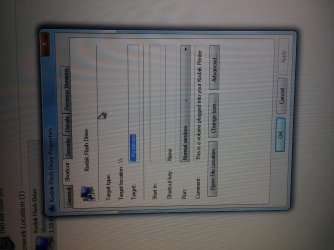
It's not the pen drive, it's to my printer.
Look at the screenshot I am posting.
It (properties1) even says "This is a volume that is plugged into your Kodak printer".


And I've tried the repair computer option before.
It runs awhile and then says that it can't complete the repairs.
 

Attachments

  • 20180812_020250.jpg
    20180812_020250.jpg
    642.6 KB · Views: 1

My Computer My Computer

Computer type
PC/Desktop
Computer Manufacturer/Model Number
HP 6005 Pro
OS
Windows 7 Pro x64
CPU
Athlon II X2 B24 (3.00GHz)
Memory
8GB DDR3
Hard Drives
1TB HDD
So,
1. It (properties1) even says "This is a volume that is plugged into your Kodak printer"
Your kodak printer has an external or internal port where this pen drive or volume is plugged. Even that printer should be ejected/disconnected from the pc for recovery,etc.
2.I've NEVER messed with my bios or even know how to!
One should never if one don't know. But i know & can use you as a guided missile! I will take proper cover.
3. I'm not sure if my boot screen has always said that
(a) You pressed F11 & got the screen video. Now simply restart it & look for!
(b) disconnect printer, restart pc & watch.
(c) just put off the printer/ power off, restart & watch.
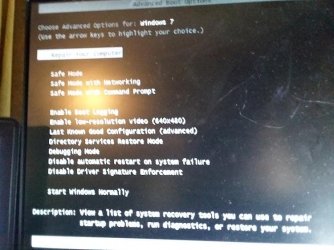
4.As for accessing Recovery Partition : Go to 'Advanced Boot Options > Repair your computer' and just check where it takes you to (SNAP).
Did you try that ? First disconnect the printer. Can you ?
5.And I've tried the repair computer option before. It runs awhile and then says that it can't complete the repairs.
I am not asking to do anything there. Just click 'Repair Your Computer' from the 'Advanced Boot Options' screen & snap where it takes you to. No further action. I am eyeing what options are offered!
Look 'Repair Your Computer' is already selected there in the snap you posted. You have to just 'Enter' there & see where it takes you to.

cedar's advanced boot options.jpg

Whats the next screen ?

Let us Know.

Thanks & Regards. ...
 
Last edited:

My Computer My Computer

Computer type
Laptop
Computer Manufacturer/Model Number
hp compaq presario c795VU notebook pc
OS
Windows 7 Ultimate x32 With Sp1 + Vista Ultimate x32 with Sp1 & Sp2 !!
CPU
Intel Mobile Core 2 Duo T5750 @ 2.00GHz Merom 65nm Technolog
Motherboard
Hewlett-Packard 30D9 (CPU)
Memory
2.00GB Dual-Channel DDR2 @ 332MHz (5-5-5-15)
Graphics Card(s)
Mobile Intel(R) 965 Express Chipset Family
Sound Card
High Definition Audio Device
Monitor(s) Displays
LP154WX4-TLCB on Mobile Intel 965 Express Chipset Family
Screen Resolution
1280x800 @ 60Hz
Hard Drives
149GB Western Digital WDC WD1600BEVS-60VAT0 ATA Device (SATA)
Keyboard
Standard 101/102-Key or Microsoft Natural PS/2 Key + HP QLB
Mouse
ALPS pointing device
Antivirus
Kaspersky AV 2017(Win 7) & AVG AntiVirus Free 2016 (VISTA)
Browser
google chrome
Cedar == It appears that F11 is not the proper key to get into BIOS. Each computer is different. A lot use the Delete key but it appears from reading yours is F10. When getting into BIOS, as soon as you see the first screen after booting, start tapping F10 continuously and it should go into BIOS. == Since you had some progress when you cleaned it, I would suggest to give it a good Eyeball Check and another spray of air just to be sure. == You said you sometimes have 15 windows open, don't do that. That is a lot of extra work on the PC and will cause overheating. Three or four is fine, but not 15. When your computer is running, go into Speccy (I believe you said that was installed) and check the Temperature every two or three minutes and you can tell if it is a heating problem.
 
Last edited:

My Computer My Computer

Computer type
PC/Desktop
Computer Manufacturer/Model Number
Custom Build
OS
Windows 7 Home Premium 32-Bit - Build 7600 SP1
CPU
Intel Core i3-2120 3.30Ghz
Motherboard
Asus P8Z68-V LX Intel Z68 Socket H2 ATX
Memory
Kingston 4 GB DDR3 1333 mhz
Graphics Card(s)
AMD Radeon HD6670
Sound Card
Sound Blaster Audigy SE 24-Bit
Monitor(s) Displays
Asus VE228
Screen Resolution
1440 X 900
Hard Drives
OCZ Vertex 3 120 GB Sata 3 SSD ==
Kingston SH103/S3 120 G Hyper X 120 GB SSD ==
Western Digital 500 GB Caviar Green 7200 RPM ==
PSU
Corsair CX600M == 600 Watt
Case
NZXT Apollo - Silver with Clear Side Panel
Cooling
Three 120 mm Fans
Keyboard
Microsoft Natural 4000
Mouse
Microsoft Custom Optical 3000
Internet Speed
AT&T Fiber Optic Wireless Network
Antivirus
Microsoft Security Essentials
Browser
Chrome
Other Info
120 mm Blue LED Fan -- Three Blue LED Lazer Light Sticks
So,
1. It (properties1) even says "This is a volume that is plugged into your Kodak printer"
Your kodak printer has an external or internal port where this pen drive or volume is plugged. Even that printer should be ejected/disconnected from the pc for recovery,etc.

3. I'm not sure if my boot screen has always said that
(a) You pressed F11 & got the screen video. Now simply restart it & look for!
(b) disconnect printer, restart pc & watch.
(c) just put off the printer/ power off, restart & watch.
4.As for accessing Recovery Partition : Go to 'Advanced Boot Options > Repair your computer' and just check where it takes you to (SNAP).
Did you try that ? First disconnect the printer. Can you ?


Whats the next screen ?

Let us Know.


The printer has been disconnected ever since you said to unplug everything except keyboard, mouse, & monitor.


F11 gives same look.


Funny but F8 is not usually taking me into repair screen anymore.
It just keeps loading windows normally and goes to desktop.
I found a workaround though.
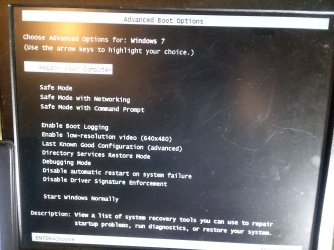
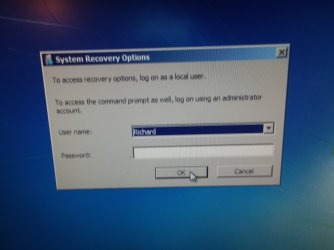
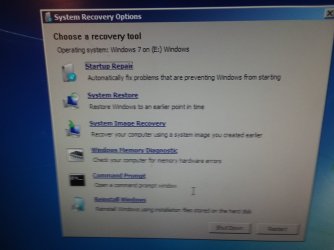
I press F10 to get to setup, choose english, then choose ignore changes and exit and then press F8 and it takes me to repair screen.


I am enclosing snaps of repair screen and subsequent selections I made.
 

Attachments

  • 20180812_144943.jpg
    20180812_144943.jpg
    463.7 KB · Views: 0
  • 20180812_145014.jpg
    20180812_145014.jpg
    161.9 KB · Views: 0
  • 20180812_145030.jpg
    20180812_145030.jpg
    278.1 KB · Views: 0
  • 20180812_145049.jpg
    20180812_145049.jpg
    221.8 KB · Views: 3

My Computer My Computer

Computer type
PC/Desktop
Computer Manufacturer/Model Number
HP 6005 Pro
OS
Windows 7 Pro x64
CPU
Athlon II X2 B24 (3.00GHz)
Memory
8GB DDR3
Hard Drives
1TB HDD
Thanks for replying bigmck! (go HT, DW4!)


You said you sometimes have 15 windows open, don't do that. That is a lot of extra work on the PC and will cause overheating. Three or four is fine, but not 15. When your computer is running, go into Speccy (I believe you said that was installed) and check the Temperature every two or three minutes and you can tell if it is a heating problem. ==


Really?
I've had 50 windows open before.
And windows + tabs I've had 200.
My other computer (windows 10) I bought with 16gb ram just to be able to run as many windows as I want.
Hasn't worked out like that though.
I was trying to figure out if I needed a good video card or something else.
Your saying that many windows will heat up any computer no matter what?
bummer.
 

My Computer My Computer

Computer type
PC/Desktop
Computer Manufacturer/Model Number
HP 6005 Pro
OS
Windows 7 Pro x64
CPU
Athlon II X2 B24 (3.00GHz)
Memory
8GB DDR3
Hard Drives
1TB HDD
Hi All,
Greets,
cedar : Sir,
1.He made some very good points to absorb/adopt. It made me rethink whats bad in the current installation. What you say ? But we never tried/intended to access Bios Setup. By pressing F11, we tried to access only the Recovery Partition & not the Bios Setup.
2. The printer has been disconnected ever since you said to unplug everything except keyboard, mouse, & monitor.
(a).Then why/how it is still showing in the Computer folder ? May be it is still connected some way for eg. through network or wireless. Just power off the printer & check.
(b) Does double clicking 'Kodak Flash Drive' shortcut take you some where ? No, then its a non working/residual material now after disconnecting the printer & is no worry.
3. Funny but F8 is not usually taking me into repair screen anymore.
It just keeps loading windows normally and goes to desktop.
I found a workaround though.
I press F10 to get to setup, choose english, then choose ignore changes and exit and then press F8 and it takes me to repair screen.

Its just that you did not press it at the right time first & the next time you happened to press it at the right time. I always had the doubt with F11 as well!
Actually, you should keep/turn your monitor/screen on, then turn on cpu ,[B]as soon as you see the first screen, start tapping F10, F8, etc. continuously and it should take you where you want This is what he suggested!
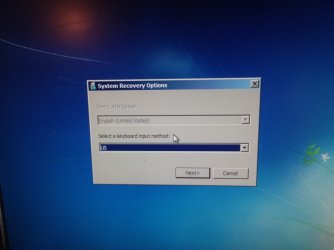
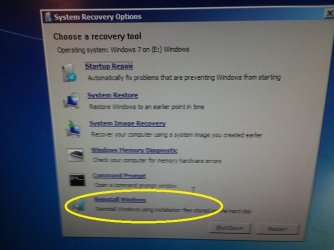
4. What's the next screen if you go with 'Reinstall Windows' option ?

cedar's system recovery options.jpg

Let us know.

5. bigmck : Sir, Thanks for all the tips. Besides, I notice its better to use Speecy Installer than its portable version for continuous monitoring purposes. thanks again.

Thanks & Regards. ...
 
Last edited:

My Computer My Computer

Computer type
Laptop
Computer Manufacturer/Model Number
hp compaq presario c795VU notebook pc
OS
Windows 7 Ultimate x32 With Sp1 + Vista Ultimate x32 with Sp1 & Sp2 !!
CPU
Intel Mobile Core 2 Duo T5750 @ 2.00GHz Merom 65nm Technolog
Motherboard
Hewlett-Packard 30D9 (CPU)
Memory
2.00GB Dual-Channel DDR2 @ 332MHz (5-5-5-15)
Graphics Card(s)
Mobile Intel(R) 965 Express Chipset Family
Sound Card
High Definition Audio Device
Monitor(s) Displays
LP154WX4-TLCB on Mobile Intel 965 Express Chipset Family
Screen Resolution
1280x800 @ 60Hz
Hard Drives
149GB Western Digital WDC WD1600BEVS-60VAT0 ATA Device (SATA)
Keyboard
Standard 101/102-Key or Microsoft Natural PS/2 Key + HP QLB
Mouse
ALPS pointing device
Antivirus
Kaspersky AV 2017(Win 7) & AVG AntiVirus Free 2016 (VISTA)
Browser
google chrome
Hi All,

(b) Does double clicking 'Kodak Flash Drive' shortcut take you some where ? No, then its a non working/residual material now after disconnecting the printer & is no worry.

4. What's the next screen if you go with 'Reinstall Windows' option ?

5. @bigmck : Sir, Thanks for all the tips. Besides, I notice its better to use Speecy Installer than its portable version for continuous monitoring purposes.


The printer doesn't even have power to it.
Will include double-click snap.


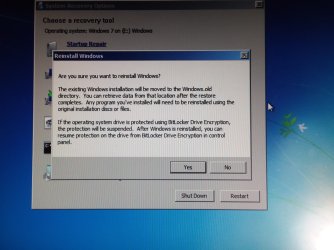
After windows reinstall click it takes me to this screen:
 

Attachments

  • 20180813_171606.jpg
    20180813_171606.jpg
    420.1 KB · Views: 0
  • 20180813_172033.jpg
    20180813_172033.jpg
    288.2 KB · Views: 0

My Computer My Computer

Computer type
PC/Desktop
Computer Manufacturer/Model Number
HP 6005 Pro
OS
Windows 7 Pro x64
CPU
Athlon II X2 B24 (3.00GHz)
Memory
8GB DDR3
Hard Drives
1TB HDD
After selecting yes it said starting windows setup or something and was starting to reinstall windows (I think) so I panicked and turned it off.
 

My Computer My Computer

Computer type
PC/Desktop
Computer Manufacturer/Model Number
HP 6005 Pro
OS
Windows 7 Pro x64
CPU
Athlon II X2 B24 (3.00GHz)
Memory
8GB DDR3
Hard Drives
1TB HDD
Back
Top