No sound coming from laptop

dzirkelb

New member
Local time
10:00 PM
Messages
22
I have a sony vaio VGN-FE890 that is not playing any sound. I see the sound meter bouncing up and down as if it is wanting to output sound; however, nothing is coming out. Even plugging in headphones does not work.

I have given the laptop a fresh install of windows 7 ultimate 32 bit, played around with it for a couple hours, then tried a fresh install of vista business 32 bit. The problem still exists.

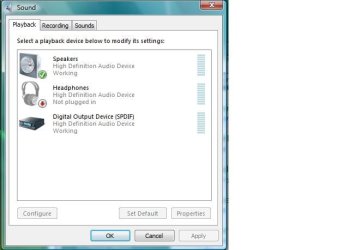
The sound in control panel show speakers as working, and headphones as working (when plugged in).

It also shows spdif out as working; however, I do not know how to connect to that output from a laptop.

I have added every driver I can think of to no avail.

Any ideas?
 

My Computer My Computer

At a glance

7 ultimate 64
OS
7 ultimate 64
Hi

Could you post a screenshot of your playback devices?
Right click the speaker icon on your system tray>Select playback devices and use the sniping tool>Upload the image

Regards
 

My Computer My Computer

At a glance

Win7 HP (x64)/Win7 Ultimate (x64)Core i7 9206 x 2GB Corsair XMS3CF HD4890
Computer Manufacturer/Model Number
Custom
OS
Win7 HP (x64)/Win7 Ultimate (x64)
CPU
Core i7 920
Motherboard
Intel X58
Memory
6 x 2GB Corsair XMS3
Graphics Card(s)
CF HD4890
Sound Card
Asus Xonar
Monitor(s) Displays
Dell 2408WFP
Screen Resolution
1920 x 1200
Hard Drives
2 x 150GB WDC Velociraptors (Raid 0)
1 x 1TB Seagate
1 x 1.5TB Seagate
PSU
Corsair HX1000W
Case
Antec 1200
Keyboard
Razer Lycosa/N52te
Mouse
Razer Lachesis
see pic
 

Attachments

  • sound.jpg
    sound.jpg
    25.3 KB · Views: 77

My Computer My Computer

At a glance

7 ultimate 64
OS
7 ultimate 64
Thanks for the snip. :)
Have you downloaded the drivers for your sound-card from here?
You may need to install it in compatibility mode as these are Vista drivers - please use this tutorial for reference.

Keep us posted and regards
 

My Computer My Computer

At a glance

Win7 HP (x64)/Win7 Ultimate (x64)Core i7 9206 x 2GB Corsair XMS3CF HD4890
Computer Manufacturer/Model Number
Custom
OS
Win7 HP (x64)/Win7 Ultimate (x64)
CPU
Core i7 920
Motherboard
Intel X58
Memory
6 x 2GB Corsair XMS3
Graphics Card(s)
CF HD4890
Sound Card
Asus Xonar
Monitor(s) Displays
Dell 2408WFP
Screen Resolution
1920 x 1200
Hard Drives
2 x 150GB WDC Velociraptors (Raid 0)
1 x 1TB Seagate
1 x 1.5TB Seagate
PSU
Corsair HX1000W
Case
Antec 1200
Keyboard
Razer Lycosa/N52te
Mouse
Razer Lachesis
One thing you might try... err.. two things.

Using the Playback Devices clip you posted... left click once on the Digital Output device then select "Set Default. Then click on the "Speakers" device and again select Set Default.

Sometimes a simple switch of default devices gets things working.

Second, some laptops don't like Windows Enhancements.. again, single left click on the Speakers device and select the "Properties" button. There should be an Enhancements Tab, select it then check "Disable All Sound Effects"... Apply... you may have to reboot.

Also make sure you're set to Stereo Output... that's under the "Configure" button (activated like the Properties button).

Ap
 

My Computer My Computer

At a glance

Windows 7 Home PremiumIntel Core 2 Duo @ 3.00gHz4 GBATI Radeon HD 2600 XT
Computer Manufacturer/Model Number
Assembled in my workshop
OS
Windows 7 Home Premium
CPU
Intel Core 2 Duo @ 3.00gHz
Motherboard
Gigabyte GA-P35-S3G
Memory
4 GB
Graphics Card(s)
ATI Radeon HD 2600 XT
Sound Card
RME 24/96 Card, Realtek Internal Audio PreSonus FireStudio
Monitor(s) Displays
Acer 1917 (x2)
Screen Resolution
1280 x 1024 on both monitors
Hard Drives
Three 250GB Seagate SATA Barracuda 7200rpm
PSU
Rosewill 500-watt
Case
Rosewill mid-tower
Cooling
Noctua NH-U9B (CPU), PwrSupply fan + single large case Fan
Keyboard
Macally w/2/USB ports.
Mouse
Trackman Wheel
Other Info
Event 20/20 bas studio monitors, Yamaha sub.
Rackmount Korg/Roland/Yamaha synthesizers,
Cubase MIDI/audio recording. Sony Soundforge audio/mastering software. CD Architect Mastering. RME & Presonus audio interfaces.
All drivers are up to date according to Sony's site (I used the link provided), and I tried the recomendation of Ap. I also disabled the SPDIF out as I had problems with that on another computer.

I was able to disable all enhancements, hit apply, and it would take it. However, when going back in, the check to disable them would be unchecked again. however, nothing underneath was ever checked.
 

My Computer My Computer

At a glance

7 ultimate 64
OS
7 ultimate 64
From the Sony site... (sigma-tel codec)

Did you first install this driver 6.10.5379.0 and then install the 6.10.5379.1 update... these drivers for Vista should work.

Ap
 

My Computer My Computer

At a glance

Windows 7 Home PremiumIntel Core 2 Duo @ 3.00gHz4 GBATI Radeon HD 2600 XT
Computer Manufacturer/Model Number
Assembled in my workshop
OS
Windows 7 Home Premium
CPU
Intel Core 2 Duo @ 3.00gHz
Motherboard
Gigabyte GA-P35-S3G
Memory
4 GB
Graphics Card(s)
ATI Radeon HD 2600 XT
Sound Card
RME 24/96 Card, Realtek Internal Audio PreSonus FireStudio
Monitor(s) Displays
Acer 1917 (x2)
Screen Resolution
1280 x 1024 on both monitors
Hard Drives
Three 250GB Seagate SATA Barracuda 7200rpm
PSU
Rosewill 500-watt
Case
Rosewill mid-tower
Cooling
Noctua NH-U9B (CPU), PwrSupply fan + single large case Fan
Keyboard
Macally w/2/USB ports.
Mouse
Trackman Wheel
Other Info
Event 20/20 bas studio monitors, Yamaha sub.
Rackmount Korg/Roland/Yamaha synthesizers,
Cubase MIDI/audio recording. Sony Soundforge audio/mastering software. CD Architect Mastering. RME & Presonus audio interfaces.
From the Sony site... (sigma-tel codec)

Did you first install this driver 6.10.5379.0 and then install the 6.10.5379.1 update... these drivers for Vista should work.

Ap

Yup

I don't think I'm even getting system sounds, like during post, if you hold down a button it usually beeps at your, it's not even doing that.
 

My Computer My Computer

At a glance

7 ultimate 64
OS
7 ultimate 64
From the Sony site... (sigma-tel codec)

Did you first install this driver 6.10.5379.0 and then install the 6.10.5379.1 update... these drivers for Vista should work.

Ap

Yup

I don't think I'm even getting system sounds, like during post, if you hold down a button it usually beeps at your, it's not even doing that.

Ok, that's odd, as it's way before Windows loads...

Does the Vaio use an FN key combination for various functions? Is it possible the hardware volume has been set to zero or that you've accidently hit a key combination that disables sound?

Have you looked in the BIOS, try setting it to Defaults.

Ap
 

My Computer My Computer

At a glance

Windows 7 Home PremiumIntel Core 2 Duo @ 3.00gHz4 GBATI Radeon HD 2600 XT
Computer Manufacturer/Model Number
Assembled in my workshop
OS
Windows 7 Home Premium
CPU
Intel Core 2 Duo @ 3.00gHz
Motherboard
Gigabyte GA-P35-S3G
Memory
4 GB
Graphics Card(s)
ATI Radeon HD 2600 XT
Sound Card
RME 24/96 Card, Realtek Internal Audio PreSonus FireStudio
Monitor(s) Displays
Acer 1917 (x2)
Screen Resolution
1280 x 1024 on both monitors
Hard Drives
Three 250GB Seagate SATA Barracuda 7200rpm
PSU
Rosewill 500-watt
Case
Rosewill mid-tower
Cooling
Noctua NH-U9B (CPU), PwrSupply fan + single large case Fan
Keyboard
Macally w/2/USB ports.
Mouse
Trackman Wheel
Other Info
Event 20/20 bas studio monitors, Yamaha sub.
Rackmount Korg/Roland/Yamaha synthesizers,
Cubase MIDI/audio recording. Sony Soundforge audio/mastering software. CD Architect Mastering. RME & Presonus audio interfaces.
I did try looking in the bios; however, it seems odd. There was only a couple settings to change, not like a regular bios where there are all sorts of stuff you can modify.

Like, I don't even think it gave me the option to look at what drives were connected to the mobo; however, this may be different on laptops opposed to PC's, I don't really remember looking at many bios settings on laptops. An example is it doesnt' show the hard drive anywhere (where it usually identifies it as an entity with x amount of hard drive space).

Regardless, I looked for on board audio or any sort of audio settings in the bios and I didn't see anything there either, which I thought to be very odd.

I will try setting it to the defaults, didn't even think of that, as maybe something hidden or something I don't understand was changed somehow.

Also, I'll look for some sort of bios update for that machine, don't remember if there were any on the sony site or not.
 

My Computer My Computer

At a glance

7 ultimate 64
OS
7 ultimate 64
I did try looking in the bios; however, it seems odd. There was only a couple settings to change, not like a regular bios where there are all sorts of stuff you can modify.

Right, laptops generally have a limited BIOS selection.

Does the Sony have an "fn" key?
Holding it down can allow adjustments at the hardware level, it's possible to lower speaker volume and/or disable volume on some machines.

Ap
 

My Computer My Computer

At a glance

Windows 7 Home PremiumIntel Core 2 Duo @ 3.00gHz4 GBATI Radeon HD 2600 XT
Computer Manufacturer/Model Number
Assembled in my workshop
OS
Windows 7 Home Premium
CPU
Intel Core 2 Duo @ 3.00gHz
Motherboard
Gigabyte GA-P35-S3G
Memory
4 GB
Graphics Card(s)
ATI Radeon HD 2600 XT
Sound Card
RME 24/96 Card, Realtek Internal Audio PreSonus FireStudio
Monitor(s) Displays
Acer 1917 (x2)
Screen Resolution
1280 x 1024 on both monitors
Hard Drives
Three 250GB Seagate SATA Barracuda 7200rpm
PSU
Rosewill 500-watt
Case
Rosewill mid-tower
Cooling
Noctua NH-U9B (CPU), PwrSupply fan + single large case Fan
Keyboard
Macally w/2/USB ports.
Mouse
Trackman Wheel
Other Info
Event 20/20 bas studio monitors, Yamaha sub.
Rackmount Korg/Roland/Yamaha synthesizers,
Cubase MIDI/audio recording. Sony Soundforge audio/mastering software. CD Architect Mastering. RME & Presonus audio interfaces.
It does have an Fn key; however, it appears to not be working. I tested it on the brightness of the screen Fn key combination, and nothing happened.
 

My Computer My Computer

At a glance

7 ultimate 64
OS
7 ultimate 64
It does have an Fn key; however, it appears to not be working. I tested it on the brightness of the screen Fn key combination, and nothing happened.


Something is wrong then, the fn key on my 4yr old Acer laptop can change brightness during post or in the BIOS.

Even though doing a BIOS re-flash or upgrade can be a little risky it might be worth your time.


Ap
 

My Computer My Computer

At a glance

Windows 7 Home PremiumIntel Core 2 Duo @ 3.00gHz4 GBATI Radeon HD 2600 XT
Computer Manufacturer/Model Number
Assembled in my workshop
OS
Windows 7 Home Premium
CPU
Intel Core 2 Duo @ 3.00gHz
Motherboard
Gigabyte GA-P35-S3G
Memory
4 GB
Graphics Card(s)
ATI Radeon HD 2600 XT
Sound Card
RME 24/96 Card, Realtek Internal Audio PreSonus FireStudio
Monitor(s) Displays
Acer 1917 (x2)
Screen Resolution
1280 x 1024 on both monitors
Hard Drives
Three 250GB Seagate SATA Barracuda 7200rpm
PSU
Rosewill 500-watt
Case
Rosewill mid-tower
Cooling
Noctua NH-U9B (CPU), PwrSupply fan + single large case Fan
Keyboard
Macally w/2/USB ports.
Mouse
Trackman Wheel
Other Info
Event 20/20 bas studio monitors, Yamaha sub.
Rackmount Korg/Roland/Yamaha synthesizers,
Cubase MIDI/audio recording. Sony Soundforge audio/mastering software. CD Architect Mastering. RME & Presonus audio interfaces.
How do I do a bios re-flash again? I am fine with doing that as this laptop, without sound, is worthless to me. I am recommissioning it as a strict Boxee machine for a TV, and if there is no sound, then it is worthless to me.
 

My Computer My Computer

At a glance

7 ultimate 64
OS
7 ultimate 64
How do I do a bios re-flash again? I am fine with doing that as this laptop, without sound, is worthless to me. I am recommissioning it as a strict Boxee machine for a TV, and if there is no sound, then it is worthless to me.


Full instructions and BIOS download can be found here.

Sony eSupport - VGN-FE890 - Software Updates & Drivers

Double check that everything matches your system, read the instructions carefully, you can turn it into a doorstop.

You should probably be running Vista when doing this as that's what the Utility calls for.

Ap
 

My Computer My Computer

At a glance

Windows 7 Home PremiumIntel Core 2 Duo @ 3.00gHz4 GBATI Radeon HD 2600 XT
Computer Manufacturer/Model Number
Assembled in my workshop
OS
Windows 7 Home Premium
CPU
Intel Core 2 Duo @ 3.00gHz
Motherboard
Gigabyte GA-P35-S3G
Memory
4 GB
Graphics Card(s)
ATI Radeon HD 2600 XT
Sound Card
RME 24/96 Card, Realtek Internal Audio PreSonus FireStudio
Monitor(s) Displays
Acer 1917 (x2)
Screen Resolution
1280 x 1024 on both monitors
Hard Drives
Three 250GB Seagate SATA Barracuda 7200rpm
PSU
Rosewill 500-watt
Case
Rosewill mid-tower
Cooling
Noctua NH-U9B (CPU), PwrSupply fan + single large case Fan
Keyboard
Macally w/2/USB ports.
Mouse
Trackman Wheel
Other Info
Event 20/20 bas studio monitors, Yamaha sub.
Rackmount Korg/Roland/Yamaha synthesizers,
Cubase MIDI/audio recording. Sony Soundforge audio/mastering software. CD Architect Mastering. RME & Presonus audio interfaces.
I have a fresh install of Vista on it currently, so I will try that when I get home, thanks.
 

My Computer My Computer

At a glance

7 ultimate 64
OS
7 ultimate 64
I have a fresh install of Vista on it currently, so I will try that when I get home, thanks.


Curious to know if the screen dim/brighten key combination works while in the BIOS, it could possibly be something like a non-working key.

Good luck-

Ap
 

My Computer My Computer

At a glance

Windows 7 Home PremiumIntel Core 2 Duo @ 3.00gHz4 GBATI Radeon HD 2600 XT
Computer Manufacturer/Model Number
Assembled in my workshop
OS
Windows 7 Home Premium
CPU
Intel Core 2 Duo @ 3.00gHz
Motherboard
Gigabyte GA-P35-S3G
Memory
4 GB
Graphics Card(s)
ATI Radeon HD 2600 XT
Sound Card
RME 24/96 Card, Realtek Internal Audio PreSonus FireStudio
Monitor(s) Displays
Acer 1917 (x2)
Screen Resolution
1280 x 1024 on both monitors
Hard Drives
Three 250GB Seagate SATA Barracuda 7200rpm
PSU
Rosewill 500-watt
Case
Rosewill mid-tower
Cooling
Noctua NH-U9B (CPU), PwrSupply fan + single large case Fan
Keyboard
Macally w/2/USB ports.
Mouse
Trackman Wheel
Other Info
Event 20/20 bas studio monitors, Yamaha sub.
Rackmount Korg/Roland/Yamaha synthesizers,
Cubase MIDI/audio recording. Sony Soundforge audio/mastering software. CD Architect Mastering. RME & Presonus audio interfaces.
Ok, the Fn key is definately not working, not even in the bios. is it possible the Fn key somehow turned the sound all the way down, even though the sound is shown at max on windows?
 

My Computer My Computer

At a glance

7 ultimate 64
OS
7 ultimate 64
Ok, the Fn key is definately not working, not even in the bios. is it possible the Fn key somehow turned the sound all the way down, even though the sound is shown at max on windows?

To be honest, I don't know..

I have an even older IBM Thinkpad and the fn key controls the hardware directly, turning the volume level up/down does not affect the Windows mixer levels, it strictly controls the hardware. The Acer controls the hardware up to a point then seems to turn over fn key functions to Windows. With the Win audio mixer open I can see the fn key volume adjustment moving the Winmixer master volume.

If you've exhausted all of the options..(in Audio setting) then the BIOS update may be the way to go.

Ap
 

My Computer My Computer

At a glance

Windows 7 Home PremiumIntel Core 2 Duo @ 3.00gHz4 GBATI Radeon HD 2600 XT
Computer Manufacturer/Model Number
Assembled in my workshop
OS
Windows 7 Home Premium
CPU
Intel Core 2 Duo @ 3.00gHz
Motherboard
Gigabyte GA-P35-S3G
Memory
4 GB
Graphics Card(s)
ATI Radeon HD 2600 XT
Sound Card
RME 24/96 Card, Realtek Internal Audio PreSonus FireStudio
Monitor(s) Displays
Acer 1917 (x2)
Screen Resolution
1280 x 1024 on both monitors
Hard Drives
Three 250GB Seagate SATA Barracuda 7200rpm
PSU
Rosewill 500-watt
Case
Rosewill mid-tower
Cooling
Noctua NH-U9B (CPU), PwrSupply fan + single large case Fan
Keyboard
Macally w/2/USB ports.
Mouse
Trackman Wheel
Other Info
Event 20/20 bas studio monitors, Yamaha sub.
Rackmount Korg/Roland/Yamaha synthesizers,
Cubase MIDI/audio recording. Sony Soundforge audio/mastering software. CD Architect Mastering. RME & Presonus audio interfaces.
well, i tried the obvoius, set the bios settings to he default settings, and viola, it works! Amazing what tryin one o the first things I should have tried does :)

Side note, the bios update wouldn't even run, said it was required to run on vista, when I have a fresh install of vists, so whatever :)
 

My Computer My Computer

At a glance

7 ultimate 64
OS
7 ultimate 64
Back
Top