Startup Repair - Run 3 Separate Times

Why it's Sometimes Necessary to Run a Startup Repair 3 Times to Create Windows Boot Files to Another, New Location


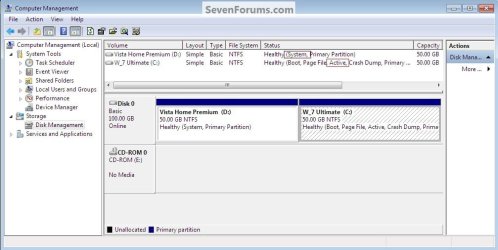
When a Windows Operating System (OS) is installed it becomes the system volume or commonly referred to as "System, Active" partition and by default it will contain all the files needed to boot Windows. When a second OS is installed to the same PC (a dual or multi boot) the files needed to boot that OS will be added to the existing "system volume" containing boot files from the previous install and the 2 OSs will 'share' the boot files and if either of the 2 is removed or damaged so as to not boot, that may directly affect the other OS's ability to boot.​


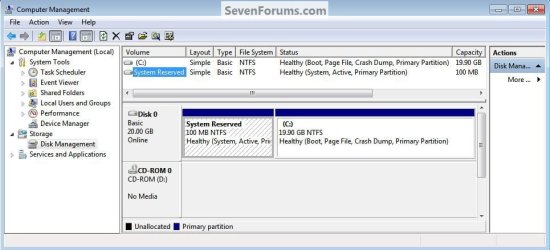
There is another situation that is common now, when Windows 7 is installed to an un-partitioned or "unallocated space" on a Hard Disk Drive (HDD) it creates one partition (the first) labeled "System Reserved" that becomes the "system volume" and a second partition that Windows 7 installs to, both "Primary" partitions; the "System Reserved" partition is where the boot files are created and has a link to the recovery options console built into Windows 7, it serves a very useful purpose but there may be times when removing or repairing the "System Reserved" partition becomes necessary.


click any image to enlarge
DM.jpg


The simplest way to make these changes is to do what is referred to as a startup repair it's a process that will write new boot files to the selected OS and it will then be able to boot independently; or in other cases you may want to rearrange / change the partition structure, you can use a startup repair to correct this also.

The trick is that sometime and in certain situations it becomes absolutely necessary to do as many as 3 separate startup repairs with a system restart between each repair to completely write boot files to the "new" location and if the process is interrupted or not completed you will be right back where you started, with a PC that will not start-up at all.

   Warning

As with anything that makes changes to the Windows structure there is always the chance for an error to occur, it would be advisable to make reliable backups to the media of your choice of any important data, i.e. pictures, music or documents, that you would not want to lose before you make any changes to your system, it is always better to be safe than sorry.

Let's get started!

   Note

If you can't boot into (start) Windows have a look at Option Two below.

If there is more than 1 partition marked "Active" that will cause WinRE to not be able to complete the repairs properly as the active flag is the designation of where the new boot files are to be created, if so the other partitions will have to be marked as "Inactive" for the repairs to be completed.
See Option Two #2 below for the process.


The first step in the process is to mark the desired volume/partition as "Active" so that WinRE (Windows Recovery Environment) will know which volume you want to become "System" when the startup repairs are run.

The second step in this process is to run at least 3 separate startup repairs to create a new set of boot files to the new "Active" volume/partition, be sure to complete all 3 steps of Option One below to complete this entire process.


Option One

Using Disk Management


1) In the Windows start menu search box type diskmgmt.msc right click the entry and click "Run as Administrator" if you get a User Account Control (UAC) prompt enter your user credentials and click Yes; in Disk Management right click the partition you want to be the "system volume" and click "Mark Partition as Active".
DM_MarkAsActive.jpg
2) Now click yes for the dialog box that opens; the second snip down is what you will have after that.
DM_MarkAsActive2.jpg
DM_MarkAsActive8.jpg
3) Now put the Windows full installer DVD or a windows repair disk into the Optical Disk Drive (ODD) and restart the PC, at the BIOS select the ODD as first boot device and when the PC boots run the 3 startup repairs with restarts discussed above to write the new boot files to the selected volume.

How to Run a Startup Repair in Windows 7

This is what you will have after the repairs.
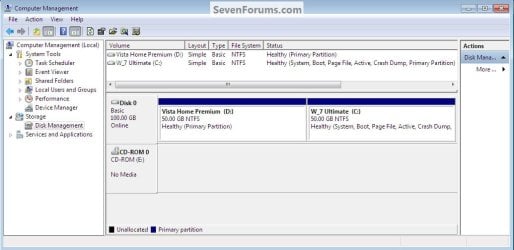
DM_MarkAsActive5.jpg


Option Two

Using DISKPART


If you have a Windows 7 full installer DVD, have a look at Method One in this tutorial at the link below to see how to boot to diskpart so you can mark the desired partition as "Active" so that WinRE (Windows Recovery Environment) will know where to write the new boot files.

How to Boot to DISKPART at PC Startup
http://www.sevenforums.com/tutorials/119713-diskpart-pc-startup.htmlhttp://www.sevenforums.com/tutorials/119713-diskpart-pc-startup.html
If you are using a created windows repair disk have a look at Method Two and if you are using a Vista full installer view Method Three.

Once in diskpart of course you would substitute your disk / partition information in-place of that listed in the snips for demonstration purposes.

1) To mark the selected partition as "Active" click to see this snip below.
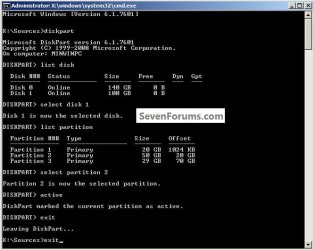
1.jpg
2) To mark the selected partition as "Inactive" click to see this snip below.

If there is more than 1 partition marked "Active" that will cause WinRE to not be able to complete the repairs properly as the active flag is the designation of where the new boot files are to be created / repaired, if so the other partitions will have to be marked as "Inactive" for the repairs to be completed.

To see how to mark the selected partition as "Inactive" click this snip below.

This can also be done from an elevated command window.
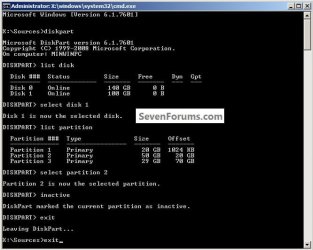
2.jpg
3) How to check if a partition is marked "Active" click to see the snip below.
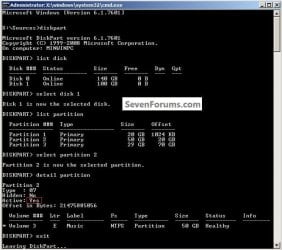
3.jpg
Enjoy! :)


Last edited:
Bare Foot Kid,
That worked great! Once I disconnected the other drives (I did it in BIOS so I didn't have to open the box), Startup Repair fixed the problem on the first pass.

Thank you very much for the help sir!
 

My Computer My Computer

At a glance

Windows 7 x64, Windows XP x64, Ubuntu
OS
Windows 7 x64, Windows XP x64, Ubuntu
Bare Foot Kid,
That worked great! Once I disconnected the other drives (I did it in BIOS so I didn't have to open the box), Startup Repair fixed the problem on the first pass.

Thank you very much for the help sir!


You are most welcome, I'm pleased I could help! :)
 

My Computer My Computer

At a glance

W 7 64-bit UltimateIntel Q9550 Yorkfield8GB Dominator 8500C5DATI : XFX 5870
Computer Manufacturer/Model Number
* BFK Customs *
OS
W 7 64-bit Ultimate
CPU
Intel Q9550 Yorkfield
Motherboard
ASUS P5Q Pro
Memory
8GB Dominator 8500C5D
Graphics Card(s)
ATI : XFX 5870
Sound Card
Realtek HD Audio 7-1
Monitor(s) Displays
1x 47" LCD HDMI & 3x 26" LCD HDMI
Screen Resolution
1920x1080P & 1920x1200
Hard Drives
1x 80GB Intel X25-M G2 SSD : 1x 500GB & 1x 640GB WD Caviar Black(s)
PSU
Corsair 620HX
Case
Cooler Master RC-690
Cooling
Tuniq Tower 120, 2x 140mm and 3x 120mm case fans
Keyboard
Microsoft 500
Mouse
Razer Diamondback 3G
Internet Speed
14 Mb/s
Other Info
1x Koutech 3Gb/s SATA HDD Hot Swap Rack
I've just done a re-work of this tutorial, especially Option Two to make it clearer to understand if someone can't boot into Windows to mark the desired partition as active for the repairs.
 

My Computer My Computer

At a glance

W 7 64-bit UltimateIntel Q9550 Yorkfield8GB Dominator 8500C5DATI : XFX 5870
Computer Manufacturer/Model Number
* BFK Customs *
OS
W 7 64-bit Ultimate
CPU
Intel Q9550 Yorkfield
Motherboard
ASUS P5Q Pro
Memory
8GB Dominator 8500C5D
Graphics Card(s)
ATI : XFX 5870
Sound Card
Realtek HD Audio 7-1
Monitor(s) Displays
1x 47" LCD HDMI & 3x 26" LCD HDMI
Screen Resolution
1920x1080P & 1920x1200
Hard Drives
1x 80GB Intel X25-M G2 SSD : 1x 500GB & 1x 640GB WD Caviar Black(s)
PSU
Corsair 620HX
Case
Cooler Master RC-690
Cooling
Tuniq Tower 120, 2x 140mm and 3x 120mm case fans
Keyboard
Microsoft 500
Mouse
Razer Diamondback 3G
Internet Speed
14 Mb/s
Other Info
1x Koutech 3Gb/s SATA HDD Hot Swap Rack
Great help thank you
 

My Computer My Computer

At a glance

Windows 7 32 bit
OS
Windows 7 32 bit

My Computer My Computer

At a glance

W 7 64-bit UltimateIntel Q9550 Yorkfield8GB Dominator 8500C5DATI : XFX 5870
Computer Manufacturer/Model Number
* BFK Customs *
OS
W 7 64-bit Ultimate
CPU
Intel Q9550 Yorkfield
Motherboard
ASUS P5Q Pro
Memory
8GB Dominator 8500C5D
Graphics Card(s)
ATI : XFX 5870
Sound Card
Realtek HD Audio 7-1
Monitor(s) Displays
1x 47" LCD HDMI & 3x 26" LCD HDMI
Screen Resolution
1920x1080P & 1920x1200
Hard Drives
1x 80GB Intel X25-M G2 SSD : 1x 500GB & 1x 640GB WD Caviar Black(s)
PSU
Corsair 620HX
Case
Cooler Master RC-690
Cooling
Tuniq Tower 120, 2x 140mm and 3x 120mm case fans
Keyboard
Microsoft 500
Mouse
Razer Diamondback 3G
Internet Speed
14 Mb/s
Other Info
1x Koutech 3Gb/s SATA HDD Hot Swap Rack
Help Please

Hi I have tried your suggestions and I have some questions.
I have a Windows 7 installation DVD as well as a repair CD - I have trie dusing both
I cannot get into windows at all so I tried using diskpart (must i do diskpart everytime I restart or just the first time)
I set the partition that will be my C: drive with windows as the active partition (is this correct or should it be the 100Mb one)
It now shows the operating system (in Startup Repair) as C: Windows 7 (recovered)
I select this and the first time it takes a long time running Startup Repair
Each time after that it is quick and gives message that no errors found
But after a number of times running with the dvd / cd in and doing startup repair (always at least 5 ntimes) if I try to boot from the disk I just go straight into startup repair

Please tell me what i am doing wrong

Thanks

Gary
 

My Computer My Computer

At a glance

windows 7 64
OS
windows 7 64
Hello Gary, welcome to Seven Forums!


If windows will start and, before we make any specific recommendations will you please post a snip/screen-shot of the entire Windows disk management drive map with a full description as to which drive/partition is which, so we can see what you have going on as there may be a fairly simple way to resolve the situation.

In the Windows start menu right click computer and click manage, in the left pane of the "Computer Management" window that opens click disk management and post a maximized snip of that.


How to Upload and Post a Screenshot and File in Seven Forums


My Computer My Computer

At a glance

W 7 64-bit UltimateIntel Q9550 Yorkfield8GB Dominator 8500C5DATI : XFX 5870
Computer Manufacturer/Model Number
* BFK Customs *
OS
W 7 64-bit Ultimate
CPU
Intel Q9550 Yorkfield
Motherboard
ASUS P5Q Pro
Memory
8GB Dominator 8500C5D
Graphics Card(s)
ATI : XFX 5870
Sound Card
Realtek HD Audio 7-1
Monitor(s) Displays
1x 47" LCD HDMI & 3x 26" LCD HDMI
Screen Resolution
1920x1080P & 1920x1200
Hard Drives
1x 80GB Intel X25-M G2 SSD : 1x 500GB & 1x 640GB WD Caviar Black(s)
PSU
Corsair 620HX
Case
Cooler Master RC-690
Cooling
Tuniq Tower 120, 2x 140mm and 3x 120mm case fans
Keyboard
Microsoft 500
Mouse
Razer Diamondback 3G
Internet Speed
14 Mb/s
Other Info
1x Koutech 3Gb/s SATA HDD Hot Swap Rack
Yes thank you indeed. My sister just phoned me and wants to come and get me to stay at her place up north for a week to 10 days to help clear my head a bit about my health news and so I think I will go and resume this topic when I get back OK? I hope I'll be able to think much more clearer when I return. I'm trying to follow all the instructions but my mind is racing a million miles an hour right now. Please don't be offended if I don't continue right away, I really really do appreciate all the help!!!!!:)
 

My Computer My Computer

At a glance

windows 7 home premium 32 bitintel 7754 gigsnvidia 6800
Computer Manufacturer/Model Number
home built
OS
windows 7 home premium 32 bit
CPU
intel 775
Motherboard
asus p5nsli
Memory
4 gigs
Graphics Card(s)
nvidia 6800
Sound Card
onboard
Monitor(s) Displays
19 inch nec
Hard Drives
wd 1 ter.
maxtor 750 gigs
seagate barracuda 750 gigs
PSU
450 watt
Case
custom
Cooling
standard
Yes thank you indeed. My sister just phoned me and wants to come and get me to stay at her place up north for a week to 10 days to help clear my head a bit about my health news and so I think I will go and resume this topic when I get back OK? I hope I'll be able to think much more clearer when I return. I'm trying to follow all the instructions but my mind is racing a million miles an hour right now. Please don't be offended if I don't continue right away, I really really do appreciate all the help!!!!!:)

Hello again.


No problem mate, it has been our pleasure; take all the time you need and just post back to the thread you started and we'll pick it up right there when you're able.
 

My Computer My Computer

At a glance

W 7 64-bit UltimateIntel Q9550 Yorkfield8GB Dominator 8500C5DATI : XFX 5870
Computer Manufacturer/Model Number
* BFK Customs *
OS
W 7 64-bit Ultimate
CPU
Intel Q9550 Yorkfield
Motherboard
ASUS P5Q Pro
Memory
8GB Dominator 8500C5D
Graphics Card(s)
ATI : XFX 5870
Sound Card
Realtek HD Audio 7-1
Monitor(s) Displays
1x 47" LCD HDMI & 3x 26" LCD HDMI
Screen Resolution
1920x1080P & 1920x1200
Hard Drives
1x 80GB Intel X25-M G2 SSD : 1x 500GB & 1x 640GB WD Caviar Black(s)
PSU
Corsair 620HX
Case
Cooler Master RC-690
Cooling
Tuniq Tower 120, 2x 140mm and 3x 120mm case fans
Keyboard
Microsoft 500
Mouse
Razer Diamondback 3G
Internet Speed
14 Mb/s
Other Info
1x Koutech 3Gb/s SATA HDD Hot Swap Rack
Hi and thanks for the great tutorial. Just wanted to point out a minor thing that could help it be a little more clear. The info you have under step 3 in method 1, should probably go in as a final step in Method 2. It took me a little while to realize that, so I was like "when do I do the 3 reboots?". Or at least thats what I think is what your supposed to do...

I also have a question, is it possible to set the partition you want as active in disk manager and set the partition you want inactive in diskpart (in an elevated cmd promt?) In other words to combine the methods? Or does one preclude or mess up the other?
 

My Computer My Computer

At a glance

Win7 Ultimate x64 & WinXP SP3 x86 Dual Boot
OS
Win7 Ultimate x64 & WinXP SP3 x86 Dual Boot
Hello mate and thanks for the input.


You can use an elevated command window to mark active and inactive, disk management can only be used to mark active.

If mistakes are made, no system changes are registered until a reboot.

Once I accidently marked another partition active and when I realized the goof I used diskpart to correct and there was no issue at restart.
 

My Computer My Computer

At a glance

W 7 64-bit UltimateIntel Q9550 Yorkfield8GB Dominator 8500C5DATI : XFX 5870
Computer Manufacturer/Model Number
* BFK Customs *
OS
W 7 64-bit Ultimate
CPU
Intel Q9550 Yorkfield
Motherboard
ASUS P5Q Pro
Memory
8GB Dominator 8500C5D
Graphics Card(s)
ATI : XFX 5870
Sound Card
Realtek HD Audio 7-1
Monitor(s) Displays
1x 47" LCD HDMI & 3x 26" LCD HDMI
Screen Resolution
1920x1080P & 1920x1200
Hard Drives
1x 80GB Intel X25-M G2 SSD : 1x 500GB & 1x 640GB WD Caviar Black(s)
PSU
Corsair 620HX
Case
Cooler Master RC-690
Cooling
Tuniq Tower 120, 2x 140mm and 3x 120mm case fans
Keyboard
Microsoft 500
Mouse
Razer Diamondback 3G
Internet Speed
14 Mb/s
Other Info
1x Koutech 3Gb/s SATA HDD Hot Swap Rack
Thanks again my friend for the answers, your help and tutorial taught me things I needed to know so I can correctly handle my OS's and hard drives, and Im sure this will lead me to solve my booting issues (thats on another thread :-)
Peace,
Alex
 

My Computer My Computer

At a glance

Win7 Ultimate x64 & WinXP SP3 x86 Dual Boot
OS
Win7 Ultimate x64 & WinXP SP3 x86 Dual Boot
Nice to meet you Alex and welcome to Seven Forums!


Keep looking up mate!
 

My Computer My Computer

At a glance

W 7 64-bit UltimateIntel Q9550 Yorkfield8GB Dominator 8500C5DATI : XFX 5870
Computer Manufacturer/Model Number
* BFK Customs *
OS
W 7 64-bit Ultimate
CPU
Intel Q9550 Yorkfield
Motherboard
ASUS P5Q Pro
Memory
8GB Dominator 8500C5D
Graphics Card(s)
ATI : XFX 5870
Sound Card
Realtek HD Audio 7-1
Monitor(s) Displays
1x 47" LCD HDMI & 3x 26" LCD HDMI
Screen Resolution
1920x1080P & 1920x1200
Hard Drives
1x 80GB Intel X25-M G2 SSD : 1x 500GB & 1x 640GB WD Caviar Black(s)
PSU
Corsair 620HX
Case
Cooler Master RC-690
Cooling
Tuniq Tower 120, 2x 140mm and 3x 120mm case fans
Keyboard
Microsoft 500
Mouse
Razer Diamondback 3G
Internet Speed
14 Mb/s
Other Info
1x Koutech 3Gb/s SATA HDD Hot Swap Rack
Bare Foot Kid -

OMG, I want to lace this response with about a thousand smiley faces and thank you's with a gazillion exclamation points for this thread. I might not even use these forums again (unless I get another serious problem but this is the first I've had) but I felt compelled to create a user name at 1:30AM just to say thanks. Yesterday I had reformatted a second hard drive that had XP on it that I no longer needed, and only had the hard drive with WIN7 on it left installed. After doing so I got the boot error that this thread covered. Going in and activating the partition allowed me to fix the BOOTMGR error which was the error I got next. I would have never gotten that far if it wasn't for this thread! Most importantly, I didn't lose any of my data or settings and everything is back to normal. Sorry for the story, I'm explaining this story rather than jumping around in circles in pure happiness.

DD
 

My Computer My Computer

At a glance

Windows 7 Home Premium 64bit
OS
Windows 7 Home Premium 64bit
Hello DrunkenDonuts, welcome to Seven Forums! I love that AKA! ;)


I'm pleased you found a solution and thanks for the kind words; if ever you need help in future, we'll be around!
 

My Computer My Computer

At a glance

W 7 64-bit UltimateIntel Q9550 Yorkfield8GB Dominator 8500C5DATI : XFX 5870
Computer Manufacturer/Model Number
* BFK Customs *
OS
W 7 64-bit Ultimate
CPU
Intel Q9550 Yorkfield
Motherboard
ASUS P5Q Pro
Memory
8GB Dominator 8500C5D
Graphics Card(s)
ATI : XFX 5870
Sound Card
Realtek HD Audio 7-1
Monitor(s) Displays
1x 47" LCD HDMI & 3x 26" LCD HDMI
Screen Resolution
1920x1080P & 1920x1200
Hard Drives
1x 80GB Intel X25-M G2 SSD : 1x 500GB & 1x 640GB WD Caviar Black(s)
PSU
Corsair 620HX
Case
Cooler Master RC-690
Cooling
Tuniq Tower 120, 2x 140mm and 3x 120mm case fans
Keyboard
Microsoft 500
Mouse
Razer Diamondback 3G
Internet Speed
14 Mb/s
Other Info
1x Koutech 3Gb/s SATA HDD Hot Swap Rack
I've used a similar method for years, then due to a nasty rootkit infection a senior member linked me to this tutorial, and I completed it exactly as written, and,...well technically it didnt work, but that was because of the infecton (it reinfects MBR at boot before reading it). But my point is, mine was a special case, I'm sure it would have worked. The similar method, I actually learned by MS tech staff online, is to do the startup repair which initially occurs in the system recovery panel after choosing the OS from a listbox of detected OS's, then when it (usually) replys with a "startup repair cannot fix this error" , close the "send or dont send window by the [x] corner, press the button (with a title which eludes me currently) but it is the one that brings up the recovery options. Then run startup repair (2nd time) much quicker, often a different responce is given, and then repeat the close window press (unknown named)button and click startup repair, it will be fast again, answer text varies, then close the send/dont window and click [reboot] button.

Just an observation to ponder or whatnot. I have quite a few sucesses under my belt as ive been in he computer repair/assistance business for many years.

It's posted on some of their forums/answers areas of technet too, but i don't have a link to show you.

thanks for your time,
mike
 

My Computer My Computer

At a glance

MS Windows 7 Home Premium SP1 64-bit (Family ...AMD Phenom II X6: Black Ed 1090T - AM3 / 3.2G...2 dual ch sets OCZ DDR3 PC3-10666 Platinum 13...Onboard
Computer Manufacturer/Model Number
Custom self build - Desktop
OS
MS Windows 7 Home Premium SP1 64-bit (Family Pack Lic.) Upgrade
CPU
AMD Phenom II X6: Black Ed 1090T - AM3 / 3.2GHz / 8MB
Motherboard
Biostar TA790XE3
Memory
2 dual ch sets OCZ DDR3 PC3-10666 Platinum 1333MHz 8GB total
Graphics Card(s)
Onboard
Sound Card
Onboard 5.1 channel HD
Monitor(s) Displays
SyncMaster "Legal-sized" LCD (rotatable)
Screen Resolution
unknown (8.5"x15")? pixels are not known
Hard Drives
HDD1: WD RE3 Enterprize [p/n: WD500ABYS-NDW]
________SATA-II (3Gb/s) 500GB/7200rpm/16MB

HDD2: Deskstar 7K1000.C [p/n: HDS721010CLA332]
________SATA-II (3Gb/s) 1TB/7200rpm/32MB
PSU
Antec 900W mATX 20+4 w/6-8SATA;2MLX;4x6(+2)PCIe[p/n HCG-900]
Case
Mid 10-bay tower - free space design interior & well vented
Cooling
CPU HS cooler, 14.5" Case-sysfan1, dual sysfan2, exhaust
Keyboard
Blue Star Ergonomic - ps/2
Mouse
LED coorded w/v. roller wheel - ps/2
Internet Speed
GbLAN 10/100/1000 & WLAN - on T1 (Peer Network)
Other Info
Harmon-Karden speakers (L,R @ sub)

APC (Lead/Acid Batt backup UPC+Surge protector+etc)

Sony DVD SATA(300) - RW DVD/CD SATA-II(300)
What worked for me was setting the partition active using DISKPART per Bare Foot Kid's instructions. Kudos!

I had a dual boot system with XP as the active partition, with the boot manager and all that, then 7 as a second partition, also a system partition. I blew away the XP partition with Acronis Disk Director, resized the 7 partition to occupy the disk fully. I then did Startup Repair 3-4 times as instructed elsewhere (apparently it has to keep doing repairs over and over). Eventually it went nowhere since the partition was not active. So finally, I did the Command Prompt, DISKPART, set the partition with 7 as Active, and blammo, I was good to go.

So, don't forget about the Active flag! :D
 

My Computer My Computer

At a glance

Windows 7 Professional, 64-bit
OS
Windows 7 Professional, 64-bit
Congrats ksipma, glad you got it working.
 

My Computer My Computer

At a glance

Windows 7 Ult x64 - SP1/ Windows 8 Pro x64Intel Core i5-3570K 4.6GHz8GB (2X4GB) DDR3 1600 Corsair Vengeance CL8 1.5vSapphire HD 7770 Vapor-X OC 1GB DDR5
Computer type
PC/Desktop
Computer Manufacturer/Model Number
76~2.0
OS
Windows 7 Ult x64 - SP1/ Windows 8 Pro x64
CPU
Intel Core i5-3570K 4.6GHz
Motherboard
Gigabyte GA-Z77X UD3H, f18
Memory
8GB (2X4GB) DDR3 1600 Corsair Vengeance CL8 1.5v
Graphics Card(s)
Sapphire HD 7770 Vapor-X OC 1GB DDR5
Sound Card
Onboard VIA VT2021
Monitor(s) Displays
22" LCD Dell
Screen Resolution
1680x1050
Hard Drives
Samsung 840Pro 128GB SSD,
Seagate Barracuda 500GB SATA2 7200rpm 32MB cache, Seagate Barracuda 1TB SATA2 7200rpm 32MB cache,
PSU
Corsair HX650W
Case
Cooler Master Storm Scout
Cooling
Corsair H80 2x12cm Noctua NF P12 , 2x14cm case fans
Keyboard
Logitech Wave
Mouse
CM Sentinel
Internet Speed
Dismal
Antivirus
Avast
Browser
Opera Next
Other Info
Haswell laptop: HP Envy 17t-j, i7-4700MQ, GeForce 740M 2GB DDR3, 17.3" Full HD 1920x1080, 16GB RAM, Samsung 840 Pro 128GB, 1TB Hitachi 7200 HDD,
Desktop: eSATA ports,
External eSATA Seagate 500GB SATA2 7200rpm,
External WD USB 500GB
Manually creating 100MB partition

I just wanted to post a solution that fixed my startup problem that was not listed above.

Problem:
I had a dual boot system (2 physical drives) and I wanted to remove one of the OS selection from the startup screen. I did this through msconfig, but I didn't know it would delete the 100MB partition windows makes during install. After that I could not boot from the second hard drive. None of the startup repair options worked until I figured out that the 100MB partition was not present.

Solution:
I installed the drive on a working computer so I could get to the disk management tool. There I manually created the 100MB partition and set it as active. I then ran the auto repair and everything worked.
 

My Computer My Computer

At a glance

Windows Seven Ultimate
OS
Windows Seven Ultimate
Finally determined the problem was an overheating processor. The Dell Studio 1557 was good for 4 years but started overheating and shutting down.
The repair procedure actually allowed me to reinstall the os but i decided to ::) nstall a newer os nstead.
The only way to keep the laptop running was a bag of ice cubes underneath.
This works for about 6 hours .. b4 i need to replace the ice cubes.
 

My Computer My Computer

At a glance

windows 7
OS
windows 7
Back
Top