Making my Win7 really fast

The first place to start would be upgrading your graphics card. As an example the ATI Radeon 5770 in my Win 7 x64 computer gets WEI scores of 7.4 in both Graphics categories, but it also has a different processor and RAM than you are using.

~Maxx~
.
da59fa57.png
 

My Computer My Computer

Computer Manufacturer/Model Number
HP HPE 270f
OS
Windows 7 x64 Home Premium
CPU
Intel Core i7 930 @ 2.8 Ghz Socket 1366 LGA
Motherboard
Pegatron Truckee v1.04E41
Memory
8 GB 1366 Mhz DDR3 (PC3-10700) RAM
Graphics Card(s)
ATI Radeon 5770 1 GB DDR5 RAM
Sound Card
Realtech High Definition
Monitor(s) Displays
32" Sony Bravia
Screen Resolution
1366 X 768
Hard Drives
Intel 25nm 120 GB Series 320 SSD HD Tune- 265 MBps Read/ 130 MBps Write

LaCie 1TB + 1TB RAID 0 eSATA Drive HD Tune- 160 MBps Read/ 90 MBps Write
Keyboard
Logitech Illuminated
Mouse
Logitech MX Revolution
Internet Speed
36.4 Mbps Maximum on a 37 Mbps Motorola SB501 Modem
Hi i'm running windows 7 X64 ultimate could you maybe advise on how i could maybe make my system any faster or better if possible?
If you are interested in pure performance, ignore the WEI, as it isn't a benchmarking tool, and has been relegated to a near complete waste of time. It was meant to give a rating so a non-tech user could figure out of an app or a game would run on their system...nothing more.

Take a look at your hardware, and then consider what you use your computer for. A gaming system would need to focus on different areas as compared to a video editing system.
 

My Computer My Computer

OS
Windows 7 Ultimate x64 SP1
CPU
Intel Core i7-2600
Motherboard
Gigabyte GA-P67A-UD3P-B3
Memory
12 GB Patriot Extreme DDR3-1333
Graphics Card(s)
Nvidia GTX 470
Monitor(s) Displays
Dell UltraSharp 2209WA
Hard Drives
OCZ Agility3 240 GB, WD5001AALS, WD7501AALS
PSU
OCZ ModStream 700W
Case
CoolerMaster HAF 912 Advanced
Cooling
CoolerMaster Hyper 212 Plus
Please understand that my computer security preferences are based on having to recover from a Malware infection that occurred using the OEM computer security software that my HP computer came with and I completely understand how those who have never had to face that nightmare may not fully understand the mindset of those who have recovered and subsequently armed themselves to the teeth with the latest State of the Art computer security software in an effort to prevent future Malware infections.
This is one of the most condescending posts I've ever read on these boards.
If you are completely satisfied and comfortable with the Windows 7 Firewall and the capabilities of the computer security software you are now using like the Frostman is then that's just fine please just remember that there are others of us and possibly some of you who are trying to learn from our own mistakes and prevent an ugly Malware infection from reoccurring as it did when we were using basic OEM security and telling others of the solutions we have found which can also speed a computer up in the process in hopes that...
Again, please stop the wild assumptions that I haven't had to fight off plenty of malware infections. If you climb down from your pedestal long enough to gain some REAL experience on the subject, and not just fighting malware on your own system, you'll soon realize the firewall was not what allowed malware in. The two primary methods of infection are user actions and poor AV software, such as your very own example. A firewall is not a method of preventing infections. MSE, Malwarebytes, and user common sense are all you need....tried and true.
A wise man learns from his own mistakes, but an even wiser man learns from the mistakes of others.
Again, very condescending. I'll repeat it one more time. If a person uses MSE, Malwarebytes and the Windows Firewall...they aren't making a mistake. Drop the holier-than-thou crap, and stop acting like one malware infection on your one system suddenly gives you knowledge that non of us possess.

Here's a quote....from me: "Just because you think differently from the masses, doesn't make you wrong. But it doesn't make us wrong by default, either." You have a way of doing something, and so do others. Neither is wrong, so stop trying to insinuate that we are wrong, or aren't as knowledgable.
 

My Computer My Computer

OS
Windows 7 Ultimate x64 SP1
CPU
Intel Core i7-2600
Motherboard
Gigabyte GA-P67A-UD3P-B3
Memory
12 GB Patriot Extreme DDR3-1333
Graphics Card(s)
Nvidia GTX 470
Monitor(s) Displays
Dell UltraSharp 2209WA
Hard Drives
OCZ Agility3 240 GB, WD5001AALS, WD7501AALS
PSU
OCZ ModStream 700W
Case
CoolerMaster HAF 912 Advanced
Cooling
CoolerMaster Hyper 212 Plus
Actually, one of the prime infection vectors is Cross-Site Injections which require a much higher level form of Firewall protection that I don't think is easily available to the normal market, at least, not within the price range most normal users would be willing to pay.

I have one Network Engineer who will swear a certain Firewall Appliance will prevent things like that, how, I have yet to see, although I am not actively trying to find infected sites as most of them would get me in trouble at work.

The one thing to note that harping current consumer grade firewall solutions to prove a point is becoming moot at the moment and this sort of argument should be held in the Security thread guys. And when I say moot, I mean this tirade is now beginning to sound like a political debate that reared its head into a friendly Q and A session about floral arrangements.

Maxx - I direct this to you. Just stop. Argue your points and merits in the Security forum. You have done enough here, but this has really got to stop.

Deacon - Just stop responding to Maxx about it. If you want to argue further about it, do it on the Security Forums thread or just let it be.
 

My Computer My Computer

Computer Manufacturer/Model Number
Alienware Area 51 Desktop and Dell Inspirion 17R (N7010)
OS
Windows 7 Ultimate x64 and Home Premium x64
CPU
Intel i7 960 (3.2 GHz Quad Core)
Motherboard
Alienware Intel based X58
Memory
12 Gigs (Triple Channel)
Graphics Card(s)
Alienware OEM nVidia GTX 560 Ti (1.25 Gig)
Sound Card
Creative Labs X-Fi Titanium
Monitor(s) Displays
Samsung PX2370 LED 23" Monitor
Screen Resolution
1920x1080
Hard Drives
2 320 Gig SATA in Raid 1 Configuration (System/App)
1 1 Tera SATA (Games)
1 1 Tera SATA (Data/Music/Videos)
PSU
750 Watt Power Supply
Case
Alienware Area 51 Desktop
Cooling
Liquid Cooled
Keyboard
Logitech G510
Mouse
Microsoft Trackball Explorer
Internet Speed
Cable
If you are interested in pure performance, ignore the WEI, as it isn't a benchmarking tool, and has been relegated to a near complete waste of time. It was meant to give a rating so a non-tech user could figure out of an app or a game would run on their system...nothing more.

Actually....

The Windows Experience Index measures the capability of your computer's hardware and software configuration and expresses this measurement as a number called a base score. A higher base score generally means that your computer will perform better and faster than a computer with a lower base score, especially when performing more advanced and resource-intensive tasks.
What is the Windows Experience Index?

In short, it's meant to compare systems against one another. Is it foolproof, No... But then again, no program is.

The by-product is....
You can use the base score to confidently buy programs and other software that are matched to your computer's base score. For example, if your computer has a base score of 3.3, then you can confidently purchase any software designed for this version of Windows that requires a computer with a base score of 3 or lower.
As to the question of making a system "faster".... there are hundreds of ways to make a system faster, from hardware/software upgrades to overclocks to tweaking Windows, so no one answer is a fix all.

It depends on how much time, effort, and money you want to put in, and if it's worth it in the end.

My two cents.
 

My Computer My Computer

Computer type
PC/Desktop
Computer Manufacturer/Model Number
Custom built by me.
OS
Windows 10 Pro
CPU
Intel Core i7-4770K (3.5Ghz)
Motherboard
Gigabyte G1 Sniper 5 (F10 Bios)
Memory
32 gig Corsair Dominator Platinum (4x8Gig)
Graphics Card(s)
Sapphire Tri-X R9 Fury
Sound Card
Soundblaster ZXR
Monitor(s) Displays
NEC PA242W 24" LCD Monitor
Screen Resolution
1920 x 1200
Hard Drives
Primary - Samsung 850 Pro (512gig), Samsung 840 Pro (256gig), 2TB WD Caviar Black.
PSU
EVGA Supernova 1000 G2
Case
Cooler Master HAF X
Cooling
Corsair H100i with Corsair Air Series SP120 Quiet Fans
Keyboard
Logitech Wireless Wave
Mouse
Logitech Performance MX
Internet Speed
High Speed Cable
Antivirus
Norton Security
Browser
IE11
Other Info
Memory Timings - 1866MHz @ 9-9-9-27-1T @ 1.5 volts
If you are interested in pure performance, ignore the WEI, as it isn't a benchmarking tool, and has been relegated to a near complete waste of time. It was meant to give a rating so a non-tech user could figure out of an app or a game would run on their system...nothing more.

Actually....

The Windows Experience Index measures the capability of your computer's hardware and software configuration and expresses this measurement as a number called a base score. A higher base score generally means that your computer will perform better and faster than a computer with a lower base score, especially when performing more advanced and resource-intensive tasks.
What is the Windows Experience Index?

In short, it's meant to compare systems against one another. Is it foolproof, No... But then again, no program is.

As to making a system "faster".... there are hundreds of ways to make a system faster, from hardware/software upgrades to overclocks to tweaking Windows, so no one answer is a fix all.

It depends on how much time, effort, and money you want to put in, and if it's worth it in the end.

My two cents.

True, no one answer is a fix for all, with the exception of stating the intention of what you plan on doing with the rig.

Identifying how the computer is going to be used, will invariably lead to several proper answers to help speed a system. For instance, identifying a need for a business Desktop versus an ACAD desktop user means focusing on having the right type of video card to handle the graphics process as well as what certain hardware focus should be placed. Not all desktop designs will favor certain kinds of hardware or will allow optimal performance because of the myriad type of programs one might need.

Going based on Gaming versus just business desktop, you will have to know that some AV suites may not be ideal given how they tend to act under certain conditions as well as some hardware requirements, you may not want certain cards due to known issues due to driver implementation. Just last week, World of Warcraft introduced their 4.0.1 Patch and introduced a whole slew of problems, which some were implementation errors that people had to put in what you could do to mitigate some of it, such as weird sound delays were due to some users having Windows use Hardware Acceleration. While it worked fine for me using a Creative X-Fi card, two people I know were having problems using Realtek Sound cards.
 

My Computer My Computer

Computer Manufacturer/Model Number
Alienware Area 51 Desktop and Dell Inspirion 17R (N7010)
OS
Windows 7 Ultimate x64 and Home Premium x64
CPU
Intel i7 960 (3.2 GHz Quad Core)
Motherboard
Alienware Intel based X58
Memory
12 Gigs (Triple Channel)
Graphics Card(s)
Alienware OEM nVidia GTX 560 Ti (1.25 Gig)
Sound Card
Creative Labs X-Fi Titanium
Monitor(s) Displays
Samsung PX2370 LED 23" Monitor
Screen Resolution
1920x1080
Hard Drives
2 320 Gig SATA in Raid 1 Configuration (System/App)
1 1 Tera SATA (Games)
1 1 Tera SATA (Data/Music/Videos)
PSU
750 Watt Power Supply
Case
Alienware Area 51 Desktop
Cooling
Liquid Cooled
Keyboard
Logitech G510
Mouse
Microsoft Trackball Explorer
Internet Speed
Cable
Deacon - Just stop responding to Maxx about it. If you want to argue further about it, do it on the Security Forums thread or just let it be.
I like your suggestions, and I'm going to chose the let it be option. There's no point in debating a topic with someone who falls under the "think like me or you're wrong" category.
In short, it's meant to compare systems against one another. Is it foolproof, No... But then again, no program is.
The reason I said it wasn't a benchmark, is that it isn't very accurate at all in determining a system's performance. If you read some other forums, like the [H]ardForums, you'll find plenty of threads mocking the tool overall. We've done some tests over there, and have been able to get differing scores just be rerunning the test. It was created to serve a purpose for the non-tech savvy community, but unfortunately, I have yet to see a game or app on a retail shelf use the scoring system.

You really can't take a look at your WEI score and use that as a basis for upgrading your computer. You could build identical systems, and get differing results as well. Besides, you can easily make your computer score 7.9s across the board.

It's only real function is making sure the system is aware of it's capabilities, so you an enable Aero.
 

My Computer My Computer

OS
Windows 7 Ultimate x64 SP1
CPU
Intel Core i7-2600
Motherboard
Gigabyte GA-P67A-UD3P-B3
Memory
12 GB Patriot Extreme DDR3-1333
Graphics Card(s)
Nvidia GTX 470
Monitor(s) Displays
Dell UltraSharp 2209WA
Hard Drives
OCZ Agility3 240 GB, WD5001AALS, WD7501AALS
PSU
OCZ ModStream 700W
Case
CoolerMaster HAF 912 Advanced
Cooling
CoolerMaster Hyper 212 Plus
Hi i'm running windows 7 X64 ultimate could you maybe advise on how i could maybe make my system any faster or better if possible?
If you are interested in pure performance, ignore the WEI, as it isn't a benchmarking tool, and has been relegated to a near complete waste of time. It was meant to give a rating so a non-tech user could figure out of an app or a game would run on their system...nothing more.

Take a look at your hardware, and then consider what you use your computer for. A gaming system would need to focus on different areas as compared to a video editing system.


That's cleared that up :D

thanks
 

My Computer My Computer

Computer Manufacturer/Model Number
ACER ASPIRE AX1301 DESKTOP
OS
WINDOWS 7 ULTIMATE X64
CPU
AMD ATHLON II X2 215 DUAL CORE PROCESSOR
Motherboard
ACER WMCP78M (SOCKET AM2)
Memory
4GB DDR2
Graphics Card(s)
NVIDIA GEFORCE 9200 INTERGRATED
Sound Card
NVIDIA HIGH DEF AUDIO
Monitor(s) Displays
X223W - ACER
Screen Resolution
1680X1050
Hard Drives
HDD 1TB DDR2

ODD DVD SUPER MULTI DRIVE
Keyboard
MICROSOFT INTELI PRO COMFORT
Mouse
MICROSOFT INTELI PRO
Internet Speed
16.9MB
The reason I said it wasn't a benchmark, is that it isn't very accurate at all in determining a system's performance. If you read some other forums, like the [H]ardForums, you'll find plenty of threads mocking the tool overall. We've done some tests over there, and have been able to get differing scores just be rerunning the test. It was created to serve a purpose for the non-tech savvy community, but unfortunately, I have yet to see a game or app on a retail shelf use the scoring system.

You really can't take a look at your WEI score and use that as a basis for upgrading your computer. You could build identical systems, and get differing results as well. Besides, you can easily make your computer score 7.9s across the board.

It's only real function is making sure the system is aware of it's capabilities, so you an enable Aero.

My opinion about the WEI bites attitude is people took/take it wrong. It was never meant to be a "benchmarking" tool. And quite a few people take it to mean that. http://www.sevenforums.com/performance-maintenance/83699-show-us-your-wei-2-a.html. If people understood it better, there wouldn't be such high "mocking"

Bottom line.... If you want to benchmark your system.... WEI isn't it. If you want to compare two systems.... WEI is a quick way to "visually" do so.

Anyway I'm getting off the subject. Sorry.
 

My Computer My Computer

Computer type
PC/Desktop
Computer Manufacturer/Model Number
Custom built by me.
OS
Windows 10 Pro
CPU
Intel Core i7-4770K (3.5Ghz)
Motherboard
Gigabyte G1 Sniper 5 (F10 Bios)
Memory
32 gig Corsair Dominator Platinum (4x8Gig)
Graphics Card(s)
Sapphire Tri-X R9 Fury
Sound Card
Soundblaster ZXR
Monitor(s) Displays
NEC PA242W 24" LCD Monitor
Screen Resolution
1920 x 1200
Hard Drives
Primary - Samsung 850 Pro (512gig), Samsung 840 Pro (256gig), 2TB WD Caviar Black.
PSU
EVGA Supernova 1000 G2
Case
Cooler Master HAF X
Cooling
Corsair H100i with Corsair Air Series SP120 Quiet Fans
Keyboard
Logitech Wireless Wave
Mouse
Logitech Performance MX
Internet Speed
High Speed Cable
Antivirus
Norton Security
Browser
IE11
Other Info
Memory Timings - 1866MHz @ 9-9-9-27-1T @ 1.5 volts
The reason I said it wasn't a benchmark, is that it isn't very accurate at all in determining a system's performance. If you read some other forums, like the [H]ardForums, you'll find plenty of threads mocking the tool overall. We've done some tests over there, and have been able to get differing scores just be rerunning the test. It was created to serve a purpose for the non-tech savvy community, but unfortunately, I have yet to see a game or app on a retail shelf use the scoring system.

You really can't take a look at your WEI score and use that as a basis for upgrading your computer. You could build identical systems, and get differing results as well. Besides, you can easily make your computer score 7.9s across the board.

It's only real function is making sure the system is aware of it's capabilities, so you an enable Aero.

To be honest, I think it is only usable for people who don't know if their system can handle certain things. I know, for instance, some games Post-Vista are using the WEI as a means to say, "Your computer needs to be at this level to handle it."

And to be honest, the normal, non-technical computer user will not know his computer has certain attributes, like video card, processor or memory. They will remember the model of the computer, but not much else. The WEI dumbs it down enough to give a user a rough idea and then they apply it to what the game says it might need. Better the number, higher chance of it working for the games.
 

My Computer My Computer

Computer Manufacturer/Model Number
Alienware Area 51 Desktop and Dell Inspirion 17R (N7010)
OS
Windows 7 Ultimate x64 and Home Premium x64
CPU
Intel i7 960 (3.2 GHz Quad Core)
Motherboard
Alienware Intel based X58
Memory
12 Gigs (Triple Channel)
Graphics Card(s)
Alienware OEM nVidia GTX 560 Ti (1.25 Gig)
Sound Card
Creative Labs X-Fi Titanium
Monitor(s) Displays
Samsung PX2370 LED 23" Monitor
Screen Resolution
1920x1080
Hard Drives
2 320 Gig SATA in Raid 1 Configuration (System/App)
1 1 Tera SATA (Games)
1 1 Tera SATA (Data/Music/Videos)
PSU
750 Watt Power Supply
Case
Alienware Area 51 Desktop
Cooling
Liquid Cooled
Keyboard
Logitech G510
Mouse
Microsoft Trackball Explorer
Internet Speed
Cable
The reason I said it wasn't a benchmark, is that it isn't very accurate at all in determining a system's performance. If you read some other forums, like the [H]ardForums, you'll find plenty of threads mocking the tool overall. We've done some tests over there, and have been able to get differing scores just be rerunning the test. It was created to serve a purpose for the non-tech savvy community, but unfortunately, I have yet to see a game or app on a retail shelf use the scoring system.

You really can't take a look at your WEI score and use that as a basis for upgrading your computer. You could build identical systems, and get differing results as well. Besides, you can easily make your computer score 7.9s across the board.

It's only real function is making sure the system is aware of it's capabilities, so you an enable Aero.

My opinion about the WEI bites attitude is people took/take it wrong. It was never meant to be a "benchmarking" tool. And quite a few people take it to mean that. http://www.sevenforums.com/performance-maintenance/83699-show-us-your-wei-2-a.html. If people understood it better, there wouldn't be such high "mocking"

Bottom line.... If you want to benchmark your system.... WEI isn't it. If you want to compare two systems.... WEI is a quick way to "visually" do so.

Anyway I'm getting off the subject. Sorry.

Thanks for the info!
 

My Computer My Computer

Computer Manufacturer/Model Number
ACER ASPIRE AX1301 DESKTOP
OS
WINDOWS 7 ULTIMATE X64
CPU
AMD ATHLON II X2 215 DUAL CORE PROCESSOR
Motherboard
ACER WMCP78M (SOCKET AM2)
Memory
4GB DDR2
Graphics Card(s)
NVIDIA GEFORCE 9200 INTERGRATED
Sound Card
NVIDIA HIGH DEF AUDIO
Monitor(s) Displays
X223W - ACER
Screen Resolution
1680X1050
Hard Drives
HDD 1TB DDR2

ODD DVD SUPER MULTI DRIVE
Keyboard
MICROSOFT INTELI PRO COMFORT
Mouse
MICROSOFT INTELI PRO
Internet Speed
16.9MB
I know, for instance, some games Post-Vista are using the WEI as a means to say, "Your computer needs to be at this level to handle it."
I haven't seen any games yet, but that's great news. If software companies starting using this tool, I'd start feeling like it had more of a purpose.
 

My Computer My Computer

OS
Windows 7 Ultimate x64 SP1
CPU
Intel Core i7-2600
Motherboard
Gigabyte GA-P67A-UD3P-B3
Memory
12 GB Patriot Extreme DDR3-1333
Graphics Card(s)
Nvidia GTX 470
Monitor(s) Displays
Dell UltraSharp 2209WA
Hard Drives
OCZ Agility3 240 GB, WD5001AALS, WD7501AALS
PSU
OCZ ModStream 700W
Case
CoolerMaster HAF 912 Advanced
Cooling
CoolerMaster Hyper 212 Plus
I know, for instance, some games Post-Vista are using the WEI as a means to say, "Your computer needs to be at this level to handle it."
I haven't seen any games yet, but that's great news. If software companies starting using this tool, I'd start feeling like it had more of a purpose.

Prime example I have seen so far is with Halo 2 (If you install it, look in the games and click on it, you will a section on the right showing things like ESRB rating, and a section for WEI Recommended. I also saw this for Dragon's Age Origins.
 

My Computer My Computer

Computer Manufacturer/Model Number
Alienware Area 51 Desktop and Dell Inspirion 17R (N7010)
OS
Windows 7 Ultimate x64 and Home Premium x64
CPU
Intel i7 960 (3.2 GHz Quad Core)
Motherboard
Alienware Intel based X58
Memory
12 Gigs (Triple Channel)
Graphics Card(s)
Alienware OEM nVidia GTX 560 Ti (1.25 Gig)
Sound Card
Creative Labs X-Fi Titanium
Monitor(s) Displays
Samsung PX2370 LED 23" Monitor
Screen Resolution
1920x1080
Hard Drives
2 320 Gig SATA in Raid 1 Configuration (System/App)
1 1 Tera SATA (Games)
1 1 Tera SATA (Data/Music/Videos)
PSU
750 Watt Power Supply
Case
Alienware Area 51 Desktop
Cooling
Liquid Cooled
Keyboard
Logitech G510
Mouse
Microsoft Trackball Explorer
Internet Speed
Cable
Ah, I see what you mean. I've seen that in Games Explorer before. I meant that the retail packaging would have listings, so you could pick up the game in a store and know if it would run on your system or not.
 

My Computer My Computer

OS
Windows 7 Ultimate x64 SP1
CPU
Intel Core i7-2600
Motherboard
Gigabyte GA-P67A-UD3P-B3
Memory
12 GB Patriot Extreme DDR3-1333
Graphics Card(s)
Nvidia GTX 470
Monitor(s) Displays
Dell UltraSharp 2209WA
Hard Drives
OCZ Agility3 240 GB, WD5001AALS, WD7501AALS
PSU
OCZ ModStream 700W
Case
CoolerMaster HAF 912 Advanced
Cooling
CoolerMaster Hyper 212 Plus
Ah, I see what you mean. I've seen that in Games Explorer before. I meant that the retail packaging would have listings, so you could pick up the game in a store and know if it would run on your system or not.

Don't think they have done that quite just yet... Mostly cause of so many XP machines out there and the complete lack of 'WEI' in XP at this time. However, once XP goes completely bye bye and Windows 7 becomes the 'standard' overall, they might just start doing that. Right now, with XP and Vista, they aren't going to use a new standard quite yet until everyone uses it.

I would, however, believe that the WEI would be a word of mouth type thing, as again, most people will go, "I saw this game on so and so's computer... I wonder if I can run it on mine."
 

My Computer My Computer

Computer Manufacturer/Model Number
Alienware Area 51 Desktop and Dell Inspirion 17R (N7010)
OS
Windows 7 Ultimate x64 and Home Premium x64
CPU
Intel i7 960 (3.2 GHz Quad Core)
Motherboard
Alienware Intel based X58
Memory
12 Gigs (Triple Channel)
Graphics Card(s)
Alienware OEM nVidia GTX 560 Ti (1.25 Gig)
Sound Card
Creative Labs X-Fi Titanium
Monitor(s) Displays
Samsung PX2370 LED 23" Monitor
Screen Resolution
1920x1080
Hard Drives
2 320 Gig SATA in Raid 1 Configuration (System/App)
1 1 Tera SATA (Games)
1 1 Tera SATA (Data/Music/Videos)
PSU
750 Watt Power Supply
Case
Alienware Area 51 Desktop
Cooling
Liquid Cooled
Keyboard
Logitech G510
Mouse
Microsoft Trackball Explorer
Internet Speed
Cable
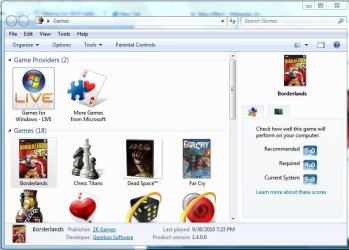
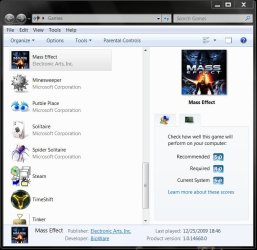
WEI Game score recommendations (for games I have installed).....

- Borderlands - Recommended...4.0, Required...5.0
- Dragon Age: Origins - Recommended...4.0, Required...5.0
- Mass Effect (released in 2008) - Recommended...4.0, Required...5.0

My current rating is 5.9 due to my mechanical HD score, otherwise my lowest 7 score is 7.6
 

My Computer My Computer

Computer type
PC/Desktop
Computer Manufacturer/Model Number
Custom built by me.
OS
Windows 10 Pro
CPU
Intel Core i7-4770K (3.5Ghz)
Motherboard
Gigabyte G1 Sniper 5 (F10 Bios)
Memory
32 gig Corsair Dominator Platinum (4x8Gig)
Graphics Card(s)
Sapphire Tri-X R9 Fury
Sound Card
Soundblaster ZXR
Monitor(s) Displays
NEC PA242W 24" LCD Monitor
Screen Resolution
1920 x 1200
Hard Drives
Primary - Samsung 850 Pro (512gig), Samsung 840 Pro (256gig), 2TB WD Caviar Black.
PSU
EVGA Supernova 1000 G2
Case
Cooler Master HAF X
Cooling
Corsair H100i with Corsair Air Series SP120 Quiet Fans
Keyboard
Logitech Wireless Wave
Mouse
Logitech Performance MX
Internet Speed
High Speed Cable
Antivirus
Norton Security
Browser
IE11
Other Info
Memory Timings - 1866MHz @ 9-9-9-27-1T @ 1.5 volts
Don't think they have done that quite just yet... Mostly cause of so many XP machines out there and the complete lack of 'WEI' in XP at this time.
It was supposed to be implemented to coincide with Vista's release to the public, as part of the huge Games For Windows initiative. We did get the support that to achieve Games For Windows status, a game would need to work on both OS platforms, and support the Xbox 360 controller, so it wasn't a total wash.
WEI Game score recommendations (for games I have installed).....

- Borderlands - Recommended...4.0, Required...5.0
- Dragon Age: Origins - Recommended...4.0, Required...5.0
- Mass Effect (released in 2008) - Recommended...4.0, Required...5.0

My current rating is 5.9 due to my mechanical HD score, otherwise my lowest 7 score is 7.6
Just out of curiosity, are those scores coming from a game box, or after you've installed them?
 

My Computer My Computer

OS
Windows 7 Ultimate x64 SP1
CPU
Intel Core i7-2600
Motherboard
Gigabyte GA-P67A-UD3P-B3
Memory
12 GB Patriot Extreme DDR3-1333
Graphics Card(s)
Nvidia GTX 470
Monitor(s) Displays
Dell UltraSharp 2209WA
Hard Drives
OCZ Agility3 240 GB, WD5001AALS, WD7501AALS
PSU
OCZ ModStream 700W
Case
CoolerMaster HAF 912 Advanced
Cooling
CoolerMaster Hyper 212 Plus
After the games are installed.

WEI Game score.JPG

Never noticed a score on the box itself. In fact looking at the physical box of Borderlands reveals no such WEI score requirement.

Here's Mass Effect.....

Mass Effect WEI score.JPG
 

My Computer My Computer

Computer type
PC/Desktop
Computer Manufacturer/Model Number
Custom built by me.
OS
Windows 10 Pro
CPU
Intel Core i7-4770K (3.5Ghz)
Motherboard
Gigabyte G1 Sniper 5 (F10 Bios)
Memory
32 gig Corsair Dominator Platinum (4x8Gig)
Graphics Card(s)
Sapphire Tri-X R9 Fury
Sound Card
Soundblaster ZXR
Monitor(s) Displays
NEC PA242W 24" LCD Monitor
Screen Resolution
1920 x 1200
Hard Drives
Primary - Samsung 850 Pro (512gig), Samsung 840 Pro (256gig), 2TB WD Caviar Black.
PSU
EVGA Supernova 1000 G2
Case
Cooler Master HAF X
Cooling
Corsair H100i with Corsair Air Series SP120 Quiet Fans
Keyboard
Logitech Wireless Wave
Mouse
Logitech Performance MX
Internet Speed
High Speed Cable
Antivirus
Norton Security
Browser
IE11
Other Info
Memory Timings - 1866MHz @ 9-9-9-27-1T @ 1.5 volts
I expected to see that info in Games Explorer, but you've already purchased the game...what if your system couldn't handle it? The boxes were supposed to contain the minimum requirements, so consumers would know ahead of time.
 

My Computer My Computer

OS
Windows 7 Ultimate x64 SP1
CPU
Intel Core i7-2600
Motherboard
Gigabyte GA-P67A-UD3P-B3
Memory
12 GB Patriot Extreme DDR3-1333
Graphics Card(s)
Nvidia GTX 470
Monitor(s) Displays
Dell UltraSharp 2209WA
Hard Drives
OCZ Agility3 240 GB, WD5001AALS, WD7501AALS
PSU
OCZ ModStream 700W
Case
CoolerMaster HAF 912 Advanced
Cooling
CoolerMaster Hyper 212 Plus
I expected to see that info in Games Explorer, but you've already purchased the game...what if your system couldn't handle it? The boxes were supposed to contain the minimum requirements, so consumers would know ahead of time.

Not sure what you mean, but the boxes do contain minimum system requirements, as well as "recommended" system requirements, it just doesn't mention a "WEI" score requirement.

I suppose Microsoft would like to see this as well....

You can use the base score to confidently buy programs and other software that are matched to your computer's base score. For example, if your computer has a base score of 3.3, then you can confidently purchase any software designed for this version of Windows that requires a computer with a base score of 3 or lower.

But as of now I'm not aware of any software company, even Microsoft, listing a "minimum" WEI score requirement on it's software. It might be a goal but....
 

My Computer My Computer

Computer type
PC/Desktop
Computer Manufacturer/Model Number
Custom built by me.
OS
Windows 10 Pro
CPU
Intel Core i7-4770K (3.5Ghz)
Motherboard
Gigabyte G1 Sniper 5 (F10 Bios)
Memory
32 gig Corsair Dominator Platinum (4x8Gig)
Graphics Card(s)
Sapphire Tri-X R9 Fury
Sound Card
Soundblaster ZXR
Monitor(s) Displays
NEC PA242W 24" LCD Monitor
Screen Resolution
1920 x 1200
Hard Drives
Primary - Samsung 850 Pro (512gig), Samsung 840 Pro (256gig), 2TB WD Caviar Black.
PSU
EVGA Supernova 1000 G2
Case
Cooler Master HAF X
Cooling
Corsair H100i with Corsair Air Series SP120 Quiet Fans
Keyboard
Logitech Wireless Wave
Mouse
Logitech Performance MX
Internet Speed
High Speed Cable
Antivirus
Norton Security
Browser
IE11
Other Info
Memory Timings - 1866MHz @ 9-9-9-27-1T @ 1.5 volts
Back
Top