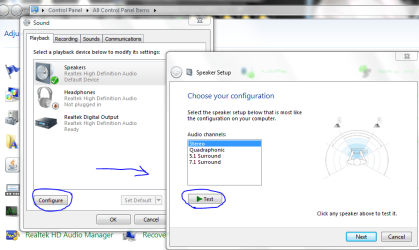
I have to reverse my speakers position. (L is at R and vice versa)

imeem

New member
Member
VIP
Local time
3:58 PM
Messages
387
IDK y but if I don't reverse my speakers, the sound from my games sounds reverse.

For example. If I put my speakers in the proper order, sounds of bullet will come from my left speaker but actually it's coming from my right side and vice versa. This also happens on my old speakers and old computer and other games too.

Is it just me?
 

My Computer My Computer

At a glance

Win 7 & 10 x64Intel(R) Core(TM)2 Quad CPU Q8400 @ 2.66GHz (...8GB DDR2HD 6970 2 GB
Computer type
PC/Desktop
Computer Manufacturer/Model Number
Acer M802
OS
Win 7 & 10 x64
CPU
Intel(R) Core(TM)2 Quad CPU Q8400 @ 2.66GHz (4 CPUs), ~2.7GH
Motherboard
MB.SCQ07.002 MB KIT G43 ICH10R HMII EUPLOT6 ECS R
Memory
8GB DDR2
Graphics Card(s)
HD 6970 2 GB
Sound Card
Realtek ALC 888s
Monitor(s) Displays
AOC
Screen Resolution
1920x1080 60hz
Hard Drives
WD Black 1 TB

WD My Book Essential 1 TB external HDD
PSU
Corsair TX650m
Case
CM 690 II Advanced mid tower
Cooling
fan
Some games can reverse left and right in the audio options. So first check if you didn't click that by accident.

If that's OK, go to Control panel/Sound/Speaker/Configure and run the test.
If it comes up reversed, just unplug and switch the speakers .

Capture.PNG

-DG
 

My Computer My Computer

At a glance

Windows 7 Ultimate x86DualCore AMD Athlon 64 X2, 2600 MHz 5200+Samsung 2GB DDR2Onboard NVIDIA GeForce 6150SE nForce 430
Computer Manufacturer/Model Number
HP m8000n
OS
Windows 7 Ultimate x86
CPU
DualCore AMD Athlon 64 X2, 2600 MHz 5200+
Motherboard
Asus M2N68-LA (Narra)
Memory
Samsung 2GB DDR2
Graphics Card(s)
Onboard NVIDIA GeForce 6150SE nForce 430
Sound Card
Onboard nVIDIA nForce 6100-430 (MCP61P)
Monitor(s) Displays
Westinghouse 19" LED
Screen Resolution
1280x1024
Hard Drives
SATA II Seagate Barracuda 500GB
USB II WD Elements 500GB
USB II WD My Book 1TB
USB II WD My Book 2TB
PSU
Stock (HP)
Case
Stock (HP)
Cooling
Stock
Keyboard
Logitech Classic KB 200
Mouse
Standard HP opticle USB mouse
yea it comes out reverse because I reverse the speakers. But in games, reversing the speakers is normal for me. AFAIK, none of the games I play have reverse audio option such as BC2.
 

My Computer My Computer

At a glance

Win 7 & 10 x64Intel(R) Core(TM)2 Quad CPU Q8400 @ 2.66GHz (...8GB DDR2HD 6970 2 GB
Computer type
PC/Desktop
Computer Manufacturer/Model Number
Acer M802
OS
Win 7 & 10 x64
CPU
Intel(R) Core(TM)2 Quad CPU Q8400 @ 2.66GHz (4 CPUs), ~2.7GH
Motherboard
MB.SCQ07.002 MB KIT G43 ICH10R HMII EUPLOT6 ECS R
Memory
8GB DDR2
Graphics Card(s)
HD 6970 2 GB
Sound Card
Realtek ALC 888s
Monitor(s) Displays
AOC
Screen Resolution
1920x1080 60hz
Hard Drives
WD Black 1 TB

WD My Book Essential 1 TB external HDD
PSU
Corsair TX650m
Case
CM 690 II Advanced mid tower
Cooling
fan
you might have an option in your sound drivers that has been switched because I've never come across a game that had the sound reversed...then again, I don't play many FPS games...I'm more a D&D guy :D
 

My Computer My Computer

At a glance

Windows 7 Ultimate x86DualCore AMD Athlon 64 X2, 2600 MHz 5200+Samsung 2GB DDR2Onboard NVIDIA GeForce 6150SE nForce 430
Computer Manufacturer/Model Number
HP m8000n
OS
Windows 7 Ultimate x86
CPU
DualCore AMD Athlon 64 X2, 2600 MHz 5200+
Motherboard
Asus M2N68-LA (Narra)
Memory
Samsung 2GB DDR2
Graphics Card(s)
Onboard NVIDIA GeForce 6150SE nForce 430
Sound Card
Onboard nVIDIA nForce 6100-430 (MCP61P)
Monitor(s) Displays
Westinghouse 19" LED
Screen Resolution
1280x1024
Hard Drives
SATA II Seagate Barracuda 500GB
USB II WD Elements 500GB
USB II WD My Book 1TB
USB II WD My Book 2TB
PSU
Stock (HP)
Case
Stock (HP)
Cooling
Stock
Keyboard
Logitech Classic KB 200
Mouse
Standard HP opticle USB mouse
Could it be just be my brain? since i also mention that this happens on my old computer too and with different speakers and different games.
 

My Computer My Computer

At a glance

Win 7 & 10 x64Intel(R) Core(TM)2 Quad CPU Q8400 @ 2.66GHz (...8GB DDR2HD 6970 2 GB
Computer type
PC/Desktop
Computer Manufacturer/Model Number
Acer M802
OS
Win 7 & 10 x64
CPU
Intel(R) Core(TM)2 Quad CPU Q8400 @ 2.66GHz (4 CPUs), ~2.7GH
Motherboard
MB.SCQ07.002 MB KIT G43 ICH10R HMII EUPLOT6 ECS R
Memory
8GB DDR2
Graphics Card(s)
HD 6970 2 GB
Sound Card
Realtek ALC 888s
Monitor(s) Displays
AOC
Screen Resolution
1920x1080 60hz
Hard Drives
WD Black 1 TB

WD My Book Essential 1 TB external HDD
PSU
Corsair TX650m
Case
CM 690 II Advanced mid tower
Cooling
fan
Could it be just be my brain? since i also mention that this happens on my old computer too and with different speakers and different games.

If you're 100% positive the speakers are positioned correctly (they should me marked left/right) than it's possible the speakers were accidentally wired in reverse, which seems like the most likely scenario.

Here's an easy test you can try, this will tell you if the speakers are correct.
(unless they are USB speakers, then this test doesn't apply)

Pull out the speaker plug, make sure the speakers are on and at a medium/low volume. Touch the tip of the plug with a finger, helps if you dampen the end of the finger first, a quick lick will do.

You should hear static or a pop out of the LEFT speaker.

Ap
 

My Computer My Computer

At a glance

Windows 7 Home PremiumIntel Core 2 Duo @ 3.00gHz4 GBATI Radeon HD 2600 XT
Computer Manufacturer/Model Number
Assembled in my workshop
OS
Windows 7 Home Premium
CPU
Intel Core 2 Duo @ 3.00gHz
Motherboard
Gigabyte GA-P35-S3G
Memory
4 GB
Graphics Card(s)
ATI Radeon HD 2600 XT
Sound Card
RME 24/96 Card, Realtek Internal Audio PreSonus FireStudio
Monitor(s) Displays
Acer 1917 (x2)
Screen Resolution
1280 x 1024 on both monitors
Hard Drives
Three 250GB Seagate SATA Barracuda 7200rpm
PSU
Rosewill 500-watt
Case
Rosewill mid-tower
Cooling
Noctua NH-U9B (CPU), PwrSupply fan + single large case Fan
Keyboard
Macally w/2/USB ports.
Mouse
Trackman Wheel
Other Info
Event 20/20 bas studio monitors, Yamaha sub.
Rackmount Korg/Roland/Yamaha synthesizers,
Cubase MIDI/audio recording. Sony Soundforge audio/mastering software. CD Architect Mastering. RME & Presonus audio interfaces.
I've got same problem too. But in mine it's laptop built-in speaker so I can't reverse it
Problem gone after I reinstall Windows and update drive
I've got Realtek BTW
 

My Computer My Computer

At a glance

Windows 7 Ultimate x64 SP1Intel Core i7 3630QM8GBNVIDIA GeForce 740M 2GB
Computer type
Laptop
Computer Manufacturer/Model Number
ASUS N56VB
OS
Windows 7 Ultimate x64 SP1
CPU
Intel Core i7 3630QM
Motherboard
ASUS N56VB
Memory
8GB
Graphics Card(s)
NVIDIA GeForce 740M 2GB
Sound Card
Realtek
Screen Resolution
1920*1080
Hard Drives
1 Drive 1TB 5400RPM:
C Drive : 149GB
D Drive : 781GB
Mouse
Logitech M325
Could it be just be my brain? since i also mention that this happens on my old computer too and with different speakers and different games.

If you're 100% positive the speakers are positioned correctly (they should me marked left/right) than it's possible the speakers were accidentally wired in reverse, which seems like the most likely scenario.

Here's an easy test you can try, this will tell you if the speakers are correct.
(unless they are USB speakers, then this test doesn't apply)

Pull out the speaker plug, make sure the speakers are on and at a medium/low volume. Touch the tip of the plug with a finger, helps if you dampen the end of the finger first, a quick lick will do.

You should hear static or a pop out of the LEFT speaker.

Ap

it doesn't make any sound.
 

My Computer My Computer

At a glance

Win 7 & 10 x64Intel(R) Core(TM)2 Quad CPU Q8400 @ 2.66GHz (...8GB DDR2HD 6970 2 GB
Computer type
PC/Desktop
Computer Manufacturer/Model Number
Acer M802
OS
Win 7 & 10 x64
CPU
Intel(R) Core(TM)2 Quad CPU Q8400 @ 2.66GHz (4 CPUs), ~2.7GH
Motherboard
MB.SCQ07.002 MB KIT G43 ICH10R HMII EUPLOT6 ECS R
Memory
8GB DDR2
Graphics Card(s)
HD 6970 2 GB
Sound Card
Realtek ALC 888s
Monitor(s) Displays
AOC
Screen Resolution
1920x1080 60hz
Hard Drives
WD Black 1 TB

WD My Book Essential 1 TB external HDD
PSU
Corsair TX650m
Case
CM 690 II Advanced mid tower
Cooling
fan
Could it be just be my brain? since i also mention that this happens on my old computer too and with different speakers and different games.

If you're 100% positive the speakers are positioned correctly (they should me marked left/right) than it's possible the speakers were accidentally wired in reverse, which seems like the most likely scenario.

Here's an easy test you can try, this will tell you if the speakers are correct.
(unless they are USB speakers, then this test doesn't apply)

Pull out the speaker plug, make sure the speakers are on and at a medium/low volume. Touch the tip of the plug with a finger, helps if you dampen the end of the finger first, a quick lick will do.

You should hear static or a pop out of the LEFT speaker.

Ap

it doesn't make any sound.

You have amplified speakers correct? Turn them up a bit, you should hear something out of the left side when you touch the tip of the speaker plug.

Ap
 

My Computer My Computer

At a glance

Windows 7 Home PremiumIntel Core 2 Duo @ 3.00gHz4 GBATI Radeon HD 2600 XT
Computer Manufacturer/Model Number
Assembled in my workshop
OS
Windows 7 Home Premium
CPU
Intel Core 2 Duo @ 3.00gHz
Motherboard
Gigabyte GA-P35-S3G
Memory
4 GB
Graphics Card(s)
ATI Radeon HD 2600 XT
Sound Card
RME 24/96 Card, Realtek Internal Audio PreSonus FireStudio
Monitor(s) Displays
Acer 1917 (x2)
Screen Resolution
1280 x 1024 on both monitors
Hard Drives
Three 250GB Seagate SATA Barracuda 7200rpm
PSU
Rosewill 500-watt
Case
Rosewill mid-tower
Cooling
Noctua NH-U9B (CPU), PwrSupply fan + single large case Fan
Keyboard
Macally w/2/USB ports.
Mouse
Trackman Wheel
Other Info
Event 20/20 bas studio monitors, Yamaha sub.
Rackmount Korg/Roland/Yamaha synthesizers,
Cubase MIDI/audio recording. Sony Soundforge audio/mastering software. CD Architect Mastering. RME & Presonus audio interfaces.
If you're 100% positive the speakers are positioned correctly (they should me marked left/right) than it's possible the speakers were accidentally wired in reverse, which seems like the most likely scenario.

Here's an easy test you can try, this will tell you if the speakers are correct.
(unless they are USB speakers, then this test doesn't apply)

Pull out the speaker plug, make sure the speakers are on and at a medium/low volume. Touch the tip of the plug with a finger, helps if you dampen the end of the finger first, a quick lick will do.

You should hear static or a pop out of the LEFT speaker.

Ap

it doesn't make any sound.

You have amplified speakers correct? Turn them up a bit, you should hear something out of the left side when you touch the tip of the speaker plug.

Ap

yea I hear the popping noises in my left speaker, I have to turn it to max volume to hear it.
 

My Computer My Computer

At a glance

Win 7 & 10 x64Intel(R) Core(TM)2 Quad CPU Q8400 @ 2.66GHz (...8GB DDR2HD 6970 2 GB
Computer type
PC/Desktop
Computer Manufacturer/Model Number
Acer M802
OS
Win 7 & 10 x64
CPU
Intel(R) Core(TM)2 Quad CPU Q8400 @ 2.66GHz (4 CPUs), ~2.7GH
Motherboard
MB.SCQ07.002 MB KIT G43 ICH10R HMII EUPLOT6 ECS R
Memory
8GB DDR2
Graphics Card(s)
HD 6970 2 GB
Sound Card
Realtek ALC 888s
Monitor(s) Displays
AOC
Screen Resolution
1920x1080 60hz
Hard Drives
WD Black 1 TB

WD My Book Essential 1 TB external HDD
PSU
Corsair TX650m
Case
CM 690 II Advanced mid tower
Cooling
fan
it doesn't make any sound.

You have amplified speakers correct? Turn them up a bit, you should hear something out of the left side when you touch the tip of the speaker plug.

Ap

yea I hear the popping noises in my left speaker, I have to turn it to max volume to hear it.

Ok, so your speakers are good and wired correctly, so it's software.

Don't know what to tell you as I've never had this problem, I kind of assumed it had to be the speakers because it was the same way under XP. Was that on a different computer system, or the same system upgraded to Windows 7?

Ap
 

My Computer My Computer

At a glance

Windows 7 Home PremiumIntel Core 2 Duo @ 3.00gHz4 GBATI Radeon HD 2600 XT
Computer Manufacturer/Model Number
Assembled in my workshop
OS
Windows 7 Home Premium
CPU
Intel Core 2 Duo @ 3.00gHz
Motherboard
Gigabyte GA-P35-S3G
Memory
4 GB
Graphics Card(s)
ATI Radeon HD 2600 XT
Sound Card
RME 24/96 Card, Realtek Internal Audio PreSonus FireStudio
Monitor(s) Displays
Acer 1917 (x2)
Screen Resolution
1280 x 1024 on both monitors
Hard Drives
Three 250GB Seagate SATA Barracuda 7200rpm
PSU
Rosewill 500-watt
Case
Rosewill mid-tower
Cooling
Noctua NH-U9B (CPU), PwrSupply fan + single large case Fan
Keyboard
Macally w/2/USB ports.
Mouse
Trackman Wheel
Other Info
Event 20/20 bas studio monitors, Yamaha sub.
Rackmount Korg/Roland/Yamaha synthesizers,
Cubase MIDI/audio recording. Sony Soundforge audio/mastering software. CD Architect Mastering. RME & Presonus audio interfaces.
You have amplified speakers correct? Turn them up a bit, you should hear something out of the left side when you touch the tip of the speaker plug.

Ap

yea I hear the popping noises in my left speaker, I have to turn it to max volume to hear it.

Ok, so your speakers are good and wired correctly, so it's software.

Don't know what to tell you as I've never had this problem, I kind of assumed it had to be the speakers because it was the same way under XP. Was that on a different computer system, or the same system upgraded to Windows 7?

Ap

completely different computers. Also this happens with my other speakers too. I'll try putting the speakers in the right position again and see the problem.
 

My Computer My Computer

At a glance

Win 7 & 10 x64Intel(R) Core(TM)2 Quad CPU Q8400 @ 2.66GHz (...8GB DDR2HD 6970 2 GB
Computer type
PC/Desktop
Computer Manufacturer/Model Number
Acer M802
OS
Win 7 & 10 x64
CPU
Intel(R) Core(TM)2 Quad CPU Q8400 @ 2.66GHz (4 CPUs), ~2.7GH
Motherboard
MB.SCQ07.002 MB KIT G43 ICH10R HMII EUPLOT6 ECS R
Memory
8GB DDR2
Graphics Card(s)
HD 6970 2 GB
Sound Card
Realtek ALC 888s
Monitor(s) Displays
AOC
Screen Resolution
1920x1080 60hz
Hard Drives
WD Black 1 TB

WD My Book Essential 1 TB external HDD
PSU
Corsair TX650m
Case
CM 690 II Advanced mid tower
Cooling
fan
I tried playing BC2 and CoD4 with the speakers in the right position;I can't tell if the gun noise is from far away or up close. Also the sounds are reversed for me (just like I mentioned on my first post.)

However, When I use my earphones or headphones everything sounds right.
 
Last edited:

My Computer My Computer

At a glance

Win 7 & 10 x64Intel(R) Core(TM)2 Quad CPU Q8400 @ 2.66GHz (...8GB DDR2HD 6970 2 GB
Computer type
PC/Desktop
Computer Manufacturer/Model Number
Acer M802
OS
Win 7 & 10 x64
CPU
Intel(R) Core(TM)2 Quad CPU Q8400 @ 2.66GHz (4 CPUs), ~2.7GH
Motherboard
MB.SCQ07.002 MB KIT G43 ICH10R HMII EUPLOT6 ECS R
Memory
8GB DDR2
Graphics Card(s)
HD 6970 2 GB
Sound Card
Realtek ALC 888s
Monitor(s) Displays
AOC
Screen Resolution
1920x1080 60hz
Hard Drives
WD Black 1 TB

WD My Book Essential 1 TB external HDD
PSU
Corsair TX650m
Case
CM 690 II Advanced mid tower
Cooling
fan
Back
Top