Upgrade to Netgear WG111V3 Win 7

Froggy88

New member
Local time
10:29 PM
Messages
9
Hello~!

First post here I've seen two other threads relating to this problem on here but only 1 with any replies really.

Today I bought a WG111V3 adapter to install on my Windows 7 Desktop computer and uninstalled Version 2 of the same adapter. It installs fine and Windows recognises the hardware in Device Manager with no problems.

However it is unable to find our home network or even ones from neighbours. Installing Version 2 has the same problems even though it was working fine a couple of hours ago on the same machine.

The annoying part is that both adapters will work on the other desktops and laptops in the house running XP and Vista.

Thank you in advance!

J
 

My Computer My Computer

At a glance

Windows 7 Home Premium 64bit
OS
Windows 7 Home Premium 64bit
These drivers are supposed to work with Windows 7. The v2 is very problematic with Windows 7, I'm not so sure about the v3.

It should help when you set up the connection to use the manual wireless set up and designate the settings that are on your router for your wireless.

Answer
 

My Computer My Computer

At a glance

Windows 7 Ult, Windows 8.1 Pro,Q9650-4.275GHz, E8600 4.5GHz, E6750-3.8GHzG.Skill PC2 9600 1200Mhz 5 5 5 15 2TGTX480
Computer type
PC/Desktop
Computer Manufacturer/Model Number
Home built
OS
Windows 7 Ult, Windows 8.1 Pro,
CPU
Q9650-4.275GHz, E8600 4.5GHz, E6750-3.8GHz
Motherboard
Evga 780i FTW
Memory
G.Skill PC2 9600 1200Mhz 5 5 5 15 2T
Graphics Card(s)
GTX480
Sound Card
Asus Xonar D2
Monitor(s) Displays
HannsG
Screen Resolution
1680X1050
Hard Drives
GSkill Phoenix Pro 120GB SSD
PSU
ThermalTake Toughpower 1000Watt modular
Case
ThermalTake XaserV
Cooling
Xigmatek S1283
Keyboard
Logitech G15
Mouse
Logitech G9
Internet Speed
T1
Yep, these are the ones I have and they install fine its just that it won't pick up the network at all with this adapter and won't even work now when I re install Version 2 of WG111
 

My Computer My Computer

At a glance

Windows 7 Home Premium 64bit
OS
Windows 7 Home Premium 64bit
Okay is your router broadcasting and could you ever pick up the Neighbours before?
secondly have you tried uninstalling, removing and then rebooting, injecting, installing?
thirdly have you tried checking for Vista 64 bit driver as you may have downloaded the 32 bit by accident...

Get Back to us matey.
 

My Computer My Computer

At a glance

Windows 8.1Intel i5 3750k OC'd 4.0Ghz16GB Vengence CorsairGTX 770 OC 2GB Windforce
Computer type
PC/Desktop
Computer Manufacturer/Model Number
Custom Build
OS
Windows 8.1
CPU
Intel i5 3750k OC'd 4.0Ghz
Motherboard
P8Z77-V LX3
Memory
16GB Vengence Corsair
Graphics Card(s)
GTX 770 OC 2GB Windforce
Sound Card
C-Media 7.1 Surround Card
Monitor(s) Displays
Asus 3D 23" & BenQ 24" & LG 19"
Screen Resolution
1920*1080, 1920*1080, 1440*900
Hard Drives
Crucial 512GB SSD
WD 1.5 TB
WD 500Gb
PSU
850MW Silverstone
Case
inWin DragonRider
Cooling
4 * 140mm LED Akasa, One 140mm Fan Akasa
Keyboard
Corsair k95
Mouse
R.A.T 7 Contagion
Internet Speed
152 Mb Fiber Optic
Antivirus
ESET Nod32
Browser
Waterfox x64 / Chrome x64
Other Info
Freenas / Plex Media server
Q6600
6Gb DDR3
6TB ZFS Raid
500W PSu
2 x Intel NIC's
Like I mentioned before, you need to take a look at your routers wireless setting then designate those settings when you set up the wireless connection for this adaptor. The SSID the type of encryption "preferribly WPA2 with AES encryption, and the type of 802.11 frequency choose "G" for this adaptor.

It also is supposed to install better if you go into the device manager and update the driver from there or try letting Windows 7 install it's own drivers after delating the Netgear ones. Updating your router is another option you might want to pursue. Also get rid of that Netgear software as it mostly seems to cause problems.
 

My Computer My Computer

At a glance

Windows 7 Ult, Windows 8.1 Pro,Q9650-4.275GHz, E8600 4.5GHz, E6750-3.8GHzG.Skill PC2 9600 1200Mhz 5 5 5 15 2TGTX480
Computer type
PC/Desktop
Computer Manufacturer/Model Number
Home built
OS
Windows 7 Ult, Windows 8.1 Pro,
CPU
Q9650-4.275GHz, E8600 4.5GHz, E6750-3.8GHz
Motherboard
Evga 780i FTW
Memory
G.Skill PC2 9600 1200Mhz 5 5 5 15 2T
Graphics Card(s)
GTX480
Sound Card
Asus Xonar D2
Monitor(s) Displays
HannsG
Screen Resolution
1680X1050
Hard Drives
GSkill Phoenix Pro 120GB SSD
PSU
ThermalTake Toughpower 1000Watt modular
Case
ThermalTake XaserV
Cooling
Xigmatek S1283
Keyboard
Logitech G15
Mouse
Logitech G9
Internet Speed
T1
The router is broadcasting as everyone else is able to connect without any problems. Could pick up a weak signal before from next door but now the Netgear "Smart Wizard" just lets me pick the first available network (Which is non as it can't find any)

Not sure why I'd need Vista 64 bit drivers when I have Windows 7 64 bit although I could be being dim ¬_¬
 

My Computer My Computer

At a glance

Windows 7 Home Premium 64bit
OS
Windows 7 Home Premium 64bit
The reason for the vista Drivers is that Vista and win 7 run the same engines, win 7 is vista 'Remade with a bit of polish' so the drivers for vista are compatible, its the same for most drivers that they work this way...

and the weak signal sounds like windows is "limiting" the broadcast pickup. try the Vista 64 Drivers


******
As an Afterthough try enabling the Windows WLAN Auto Config in the services and let Windows Look for it without the "Smart Wizard" Controlling it
 
Last edited:

My Computer My Computer

At a glance

Windows 8.1Intel i5 3750k OC'd 4.0Ghz16GB Vengence CorsairGTX 770 OC 2GB Windforce
Computer type
PC/Desktop
Computer Manufacturer/Model Number
Custom Build
OS
Windows 8.1
CPU
Intel i5 3750k OC'd 4.0Ghz
Motherboard
P8Z77-V LX3
Memory
16GB Vengence Corsair
Graphics Card(s)
GTX 770 OC 2GB Windforce
Sound Card
C-Media 7.1 Surround Card
Monitor(s) Displays
Asus 3D 23" & BenQ 24" & LG 19"
Screen Resolution
1920*1080, 1920*1080, 1440*900
Hard Drives
Crucial 512GB SSD
WD 1.5 TB
WD 500Gb
PSU
850MW Silverstone
Case
inWin DragonRider
Cooling
4 * 140mm LED Akasa, One 140mm Fan Akasa
Keyboard
Corsair k95
Mouse
R.A.T 7 Contagion
Internet Speed
152 Mb Fiber Optic
Antivirus
ESET Nod32
Browser
Waterfox x64 / Chrome x64
Other Info
Freenas / Plex Media server
Q6600
6Gb DDR3
6TB ZFS Raid
500W PSu
2 x Intel NIC's
Thank you will give it a shot :)

Edit: I realise this is a bit drastic but if this doesn't work I've been wanting to format it for a while anyway so would give that a go (¬_¬) just wondering if I'll be able to use the same license key again on the same machine its an upgrade disk (If this makes any difference was an upgrae from Vista X64) I've got an OEM edition of Vista I could use if need be but would rather not.
 

My Computer My Computer

At a glance

Windows 7 Home Premium 64bit
OS
Windows 7 Home Premium 64bit
Thank you will give it a shot :)

Edit: I realise this is a bit drastic but if this doesn't work I've been wanting to format it for a while anyway so would give that a go (¬_¬) just wondering if I'll be able to use the same license key again on the same machine its an upgrade disk (If this makes any difference was an upgrae from Vista X64) I've got an OEM edition of Vista I could use if need be but would rather not.


Upgrades can be problematic although most of the problems I've seen with Vista upgrades can be solved by resetting winsock or the TCP/IP stack.

This batch files will reset TCP/IP reset winsock and release/renew your IP.
Download Renew IP + Reset Winsock Batch File
 

My Computer My Computer

At a glance

Windows 7 Ult, Windows 8.1 Pro,Q9650-4.275GHz, E8600 4.5GHz, E6750-3.8GHzG.Skill PC2 9600 1200Mhz 5 5 5 15 2TGTX480
Computer type
PC/Desktop
Computer Manufacturer/Model Number
Home built
OS
Windows 7 Ult, Windows 8.1 Pro,
CPU
Q9650-4.275GHz, E8600 4.5GHz, E6750-3.8GHz
Motherboard
Evga 780i FTW
Memory
G.Skill PC2 9600 1200Mhz 5 5 5 15 2T
Graphics Card(s)
GTX480
Sound Card
Asus Xonar D2
Monitor(s) Displays
HannsG
Screen Resolution
1680X1050
Hard Drives
GSkill Phoenix Pro 120GB SSD
PSU
ThermalTake Toughpower 1000Watt modular
Case
ThermalTake XaserV
Cooling
Xigmatek S1283
Keyboard
Logitech G15
Mouse
Logitech G9
Internet Speed
T1
...
 
Last edited:

My Computer My Computer

At a glance

Windows 8.1Intel i5 3750k OC'd 4.0Ghz16GB Vengence CorsairGTX 770 OC 2GB Windforce
Computer type
PC/Desktop
Computer Manufacturer/Model Number
Custom Build
OS
Windows 8.1
CPU
Intel i5 3750k OC'd 4.0Ghz
Motherboard
P8Z77-V LX3
Memory
16GB Vengence Corsair
Graphics Card(s)
GTX 770 OC 2GB Windforce
Sound Card
C-Media 7.1 Surround Card
Monitor(s) Displays
Asus 3D 23" & BenQ 24" & LG 19"
Screen Resolution
1920*1080, 1920*1080, 1440*900
Hard Drives
Crucial 512GB SSD
WD 1.5 TB
WD 500Gb
PSU
850MW Silverstone
Case
inWin DragonRider
Cooling
4 * 140mm LED Akasa, One 140mm Fan Akasa
Keyboard
Corsair k95
Mouse
R.A.T 7 Contagion
Internet Speed
152 Mb Fiber Optic
Antivirus
ESET Nod32
Browser
Waterfox x64 / Chrome x64
Other Info
Freenas / Plex Media server
Q6600
6Gb DDR3
6TB ZFS Raid
500W PSu
2 x Intel NIC's
The upgrade shouldnt be any problem since it was genuine, and if you wanna try running a batch file run this first as it cleared my machine when i first connected to my new router,

************
ipconfig /release *Con*
ipconfig /flushdns
ipconfig /renew
pause
************

Just put that in notepad and rename to confix.bat

You didn't just post something that does the same thing as the batch file I just posted? There is no need to repeat or copy my posts ok.

Yes it's also a fact that upgrades can be problematic. Do you have any idea how many times I've fixed these sorts of problems?

Both the 111v2 and 111v3, fail to work correctly with Windows 7 so many I've lost count LOL Those adaptors are just terrible with Windows 7, sometimes they work, other times not so well. Could be a chipset problem or drivers hard to say for sure but it's inconsistant to say the least.
 

My Computer My Computer

At a glance

Windows 7 Ult, Windows 8.1 Pro,Q9650-4.275GHz, E8600 4.5GHz, E6750-3.8GHzG.Skill PC2 9600 1200Mhz 5 5 5 15 2TGTX480
Computer type
PC/Desktop
Computer Manufacturer/Model Number
Home built
OS
Windows 7 Ult, Windows 8.1 Pro,
CPU
Q9650-4.275GHz, E8600 4.5GHz, E6750-3.8GHz
Motherboard
Evga 780i FTW
Memory
G.Skill PC2 9600 1200Mhz 5 5 5 15 2T
Graphics Card(s)
GTX480
Sound Card
Asus Xonar D2
Monitor(s) Displays
HannsG
Screen Resolution
1680X1050
Hard Drives
GSkill Phoenix Pro 120GB SSD
PSU
ThermalTake Toughpower 1000Watt modular
Case
ThermalTake XaserV
Cooling
Xigmatek S1283
Keyboard
Logitech G15
Mouse
Logitech G9
Internet Speed
T1
Sorry, didnt realise that was what your links suggested, i just posted a quicker way, no harm..

Back to the Topic,
Which of the Above Suggestions have you Tried and Have Any of them worked?
 

My Computer My Computer

At a glance

Windows 8.1Intel i5 3750k OC'd 4.0Ghz16GB Vengence CorsairGTX 770 OC 2GB Windforce
Computer type
PC/Desktop
Computer Manufacturer/Model Number
Custom Build
OS
Windows 8.1
CPU
Intel i5 3750k OC'd 4.0Ghz
Motherboard
P8Z77-V LX3
Memory
16GB Vengence Corsair
Graphics Card(s)
GTX 770 OC 2GB Windforce
Sound Card
C-Media 7.1 Surround Card
Monitor(s) Displays
Asus 3D 23" & BenQ 24" & LG 19"
Screen Resolution
1920*1080, 1920*1080, 1440*900
Hard Drives
Crucial 512GB SSD
WD 1.5 TB
WD 500Gb
PSU
850MW Silverstone
Case
inWin DragonRider
Cooling
4 * 140mm LED Akasa, One 140mm Fan Akasa
Keyboard
Corsair k95
Mouse
R.A.T 7 Contagion
Internet Speed
152 Mb Fiber Optic
Antivirus
ESET Nod32
Browser
Waterfox x64 / Chrome x64
Other Info
Freenas / Plex Media server
Q6600
6Gb DDR3
6TB ZFS Raid
500W PSu
2 x Intel NIC's
Umm the batch file is quicker, all you have to do is click on it and run the file, which is why I posted it in the first place.

Most likely it's either the crappy Netgear connection software which should be removed or just finding the right driver which can be a bit of a guessing game with these 111v series adaptors.
 

My Computer My Computer

At a glance

Windows 7 Ult, Windows 8.1 Pro,Q9650-4.275GHz, E8600 4.5GHz, E6750-3.8GHzG.Skill PC2 9600 1200Mhz 5 5 5 15 2TGTX480
Computer type
PC/Desktop
Computer Manufacturer/Model Number
Home built
OS
Windows 7 Ult, Windows 8.1 Pro,
CPU
Q9650-4.275GHz, E8600 4.5GHz, E6750-3.8GHz
Motherboard
Evga 780i FTW
Memory
G.Skill PC2 9600 1200Mhz 5 5 5 15 2T
Graphics Card(s)
GTX480
Sound Card
Asus Xonar D2
Monitor(s) Displays
HannsG
Screen Resolution
1680X1050
Hard Drives
GSkill Phoenix Pro 120GB SSD
PSU
ThermalTake Toughpower 1000Watt modular
Case
ThermalTake XaserV
Cooling
Xigmatek S1283
Keyboard
Logitech G15
Mouse
Logitech G9
Internet Speed
T1
Tried all of the above looking in Netgear settings, Batch file and Vista drivers still the same problem with having no internet access and an "unidentified network"

I'm currently the entire contents of my C drive onto an external drive just in case I decide to reinstall. Says I've got about an hour remaining to copy everything over seeing as its 11:30pm now, Still 93GB to go and a little over 107K files to go at 20.8MB/Second does an hour really sound realistic? If not I'll just wait till morning......

Edit again: Also tried uninstalling and allowing Windows to find the drivers and updating via Device Manager all to no avail
 

My Computer My Computer

At a glance

Windows 7 Home Premium 64bit
OS
Windows 7 Home Premium 64bit
Tried all of the above looking in Netgear settings, Batch file and Vista drivers still the same problem with having no internet access and an "unidentified network"

I'm currently the entire contents of my C drive onto an external drive just in case I decide to reinstall. Says I've got about an hour remaining to copy everything over seeing as its 11:30pm now, Still 93GB to go and a little over 107K files to go at 20.8MB/Second does an hour really sound realistic? If not I'll just wait till morning......

Edit again: Also tried uninstalling and allowing Windows to find the drivers and updating via Device Manager all to no avail

I'm not too surprized that the quick and simple answers aren't working for you.

If you can post a screen shot your ipconfig /all here it would be very helpful.

There many are other reasons for the Unidentified network problem but I can't diagnose it unless I can see the ipconfig /all from your machine.

I think I already mentioned that it's best to use the "manual wireless set up" in Windows to set up your wireless connection. It's best to take a look at the routers settings before hand.
 

My Computer My Computer

At a glance

Windows 7 Ult, Windows 8.1 Pro,Q9650-4.275GHz, E8600 4.5GHz, E6750-3.8GHzG.Skill PC2 9600 1200Mhz 5 5 5 15 2TGTX480
Computer type
PC/Desktop
Computer Manufacturer/Model Number
Home built
OS
Windows 7 Ult, Windows 8.1 Pro,
CPU
Q9650-4.275GHz, E8600 4.5GHz, E6750-3.8GHz
Motherboard
Evga 780i FTW
Memory
G.Skill PC2 9600 1200Mhz 5 5 5 15 2T
Graphics Card(s)
GTX480
Sound Card
Asus Xonar D2
Monitor(s) Displays
HannsG
Screen Resolution
1680X1050
Hard Drives
GSkill Phoenix Pro 120GB SSD
PSU
ThermalTake Toughpower 1000Watt modular
Case
ThermalTake XaserV
Cooling
Xigmatek S1283
Keyboard
Logitech G15
Mouse
Logitech G9
Internet Speed
T1
As an Afterthough try enabling the Windows WLAN Auto Config in the services and let Windows Look for it without the "Smart Wizard" Controlling it ******
Have You Tried This Way?

Control Panel \ Admin Tools \ Services
 

My Computer My Computer

At a glance

Windows 8.1Intel i5 3750k OC'd 4.0Ghz16GB Vengence CorsairGTX 770 OC 2GB Windforce
Computer type
PC/Desktop
Computer Manufacturer/Model Number
Custom Build
OS
Windows 8.1
CPU
Intel i5 3750k OC'd 4.0Ghz
Motherboard
P8Z77-V LX3
Memory
16GB Vengence Corsair
Graphics Card(s)
GTX 770 OC 2GB Windforce
Sound Card
C-Media 7.1 Surround Card
Monitor(s) Displays
Asus 3D 23" & BenQ 24" & LG 19"
Screen Resolution
1920*1080, 1920*1080, 1440*900
Hard Drives
Crucial 512GB SSD
WD 1.5 TB
WD 500Gb
PSU
850MW Silverstone
Case
inWin DragonRider
Cooling
4 * 140mm LED Akasa, One 140mm Fan Akasa
Keyboard
Corsair k95
Mouse
R.A.T 7 Contagion
Internet Speed
152 Mb Fiber Optic
Antivirus
ESET Nod32
Browser
Waterfox x64 / Chrome x64
Other Info
Freenas / Plex Media server
Q6600
6Gb DDR3
6TB ZFS Raid
500W PSu
2 x Intel NIC's
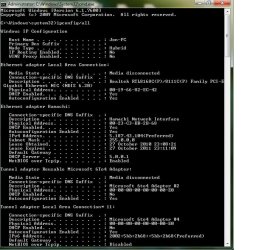
Auto Config was already turned on. It did just say "Network 2" a few hours ago before I stupidly started messing around and its now Unidentified. Here is the Ipconfig:
 

Attachments

  • Ipconfig1.jpg
    Ipconfig1.jpg
    77.7 KB · Views: 10

My Computer My Computer

At a glance

Windows 7 Home Premium 64bit
OS
Windows 7 Home Premium 64bit
Ok that was a bit small hopefully this is better:

2hhp108.jpg
 

My Computer My Computer

At a glance

Windows 7 Home Premium 64bit
OS
Windows 7 Home Premium 64bit
Sorry Wrong Entry,
OKaii can you access The Wireless Managment Section of windows and Have you tried manually inputting your settings into a connection and setting to connect when not broadcasting
 

My Computer My Computer

At a glance

Windows 8.1Intel i5 3750k OC'd 4.0Ghz16GB Vengence CorsairGTX 770 OC 2GB Windforce
Computer type
PC/Desktop
Computer Manufacturer/Model Number
Custom Build
OS
Windows 8.1
CPU
Intel i5 3750k OC'd 4.0Ghz
Motherboard
P8Z77-V LX3
Memory
16GB Vengence Corsair
Graphics Card(s)
GTX 770 OC 2GB Windforce
Sound Card
C-Media 7.1 Surround Card
Monitor(s) Displays
Asus 3D 23" & BenQ 24" & LG 19"
Screen Resolution
1920*1080, 1920*1080, 1440*900
Hard Drives
Crucial 512GB SSD
WD 1.5 TB
WD 500Gb
PSU
850MW Silverstone
Case
inWin DragonRider
Cooling
4 * 140mm LED Akasa, One 140mm Fan Akasa
Keyboard
Corsair k95
Mouse
R.A.T 7 Contagion
Internet Speed
152 Mb Fiber Optic
Antivirus
ESET Nod32
Browser
Waterfox x64 / Chrome x64
Other Info
Freenas / Plex Media server
Q6600
6Gb DDR3
6TB ZFS Raid
500W PSu
2 x Intel NIC's
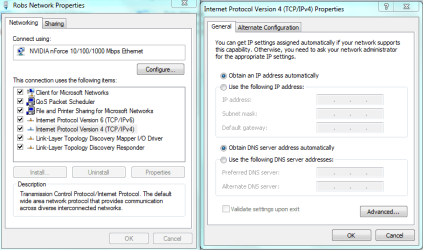
You aren't getting a default gateway from your router in either of those. And I have no idea where that ipv4 address or the DNS of 5.0.0.1 but it looks like someone was playing around with your IPv4 properties to me.

Can you look at your IPv4 properties windows and make sure it's set to obtain DHCP ip automatically and that there isn't a DNS server listed there.
 

Attachments

  • DHCP turn to static IP's.PNG
    DHCP turn to static IP's.PNG
    24.7 KB · Views: 23

My Computer My Computer

At a glance

Windows 7 Ult, Windows 8.1 Pro,Q9650-4.275GHz, E8600 4.5GHz, E6750-3.8GHzG.Skill PC2 9600 1200Mhz 5 5 5 15 2TGTX480
Computer type
PC/Desktop
Computer Manufacturer/Model Number
Home built
OS
Windows 7 Ult, Windows 8.1 Pro,
CPU
Q9650-4.275GHz, E8600 4.5GHz, E6750-3.8GHz
Motherboard
Evga 780i FTW
Memory
G.Skill PC2 9600 1200Mhz 5 5 5 15 2T
Graphics Card(s)
GTX480
Sound Card
Asus Xonar D2
Monitor(s) Displays
HannsG
Screen Resolution
1680X1050
Hard Drives
GSkill Phoenix Pro 120GB SSD
PSU
ThermalTake Toughpower 1000Watt modular
Case
ThermalTake XaserV
Cooling
Xigmatek S1283
Keyboard
Logitech G15
Mouse
Logitech G9
Internet Speed
T1
Back
Top