WD's 3TB Internal HD

I think I'm gonna skip the 3TB HDD. I'm gonna invest in SSDs from now on.
 

My Computer My Computer

Computer Manufacturer/Model Number
Dell Inspiron 1520 (Laptop)/ Home (Desktop)
OS
Windows 7 x64 / Same
CPU
Intel Core 2 Duo T7250 / Intel Core i7 930
Motherboard
Intel 945 / Asus P6X58D-E
Memory
4GB / 6GB
Graphics Card(s)
NVIDIA GeForce 8400M GS / ASUS 1GB
Sound Card
Whatever Dell gave me :-( / Onboard
Monitor(s) Displays
15.4" LCD / Crappy CRT
Hard Drives
Seagate 500GB SATA; 7200 RPM / Seagate 1TB SATA; 7200 RPM
PSU
N/A / OCZ Fatal1ty 550W Modular
Case
N/A / Antec 900
Cooling
Air
Mouse
Microsoft Presenter (Bluetooth)
ssd are great i am using a Kingston ssd 30GB to run linux kubuntu on as a back up operating system and i must say i am well pleased it reads and writes with no problems :)
 

My Computer My Computer

Computer Manufacturer/Model Number
packard bell IXTREME M5722
OS
Operating System : Windows 7 Home Premium Edition 6.01.7600 SP1 (x64)
CPU
Processor : Intel Core 2 Quad Q8300 @ 2500 MHz
Motherboard
Mainboard : Packard Bell (Acer EG43M )
Memory
Physical Memory :8GB Corsair4x 2GB 800MHz C5 DDR2
Graphics Card(s)
Video Card : XFX 6700 AMD
Monitor(s) Displays
Maestro 234DL - BenQ V2220 - BenQ VW2420H
Screen Resolution
Current Display :1920x1080p pixels at 60 Hz in HD LED
Hard Drives
Hard Disks : WDC (1000 GB)
Drive C: (Hard Disk) : 428 GB available on 491 GB
Drive D: (Hard Disk) : 426 GB available on 492 GB
SAMSUNG spinpoint HD103SJ 1000.2 GB
(X 2) KINGSTON SSD NOW V 30GB
PSU
XFX ProSeries 550W PSU
Case
PACKARD BELL IXTREME
Cooling
System Blower Current: 150mA Air Flow16CFM ;Akasa 90mm rear
Keyboard
Gigabyte Aivia K8100
Mouse
TRUST-Wireless Laser Mouse - Carbon edition MI-7770C
Internet Speed
TP-LINK > TL-WN951N / AV500 Gigabit Powerline Adapters
Browser
chrome dev
Other Info
EXTRA COOLING>(FAN CONTROLLER) PC Bay Cooler 3 x 40mm fans; Akasa AK-HD-BL Blue hard drive cooler 2 x 40 mm fan 4500 rpm 29.7 dBA
Bios> American Megatrends Inc.
Version : P01-A1
Date : 08/31/2009
ssd are great i am using a Kingston ssd 30GB to run linux kubuntu on as a back up operating system and i must say i am well pleased it reads and writes with no problems :)

My main concern is getting important data on a more reliable technology such as flash. It is costly at the moment though. :(
 

My Computer My Computer

Computer Manufacturer/Model Number
Dell Inspiron 1520 (Laptop)/ Home (Desktop)
OS
Windows 7 x64 / Same
CPU
Intel Core 2 Duo T7250 / Intel Core i7 930
Motherboard
Intel 945 / Asus P6X58D-E
Memory
4GB / 6GB
Graphics Card(s)
NVIDIA GeForce 8400M GS / ASUS 1GB
Sound Card
Whatever Dell gave me :-( / Onboard
Monitor(s) Displays
15.4" LCD / Crappy CRT
Hard Drives
Seagate 500GB SATA; 7200 RPM / Seagate 1TB SATA; 7200 RPM
PSU
N/A / OCZ Fatal1ty 550W Modular
Case
N/A / Antec 900
Cooling
Air
Mouse
Microsoft Presenter (Bluetooth)
SSD has gone down considerably over the past few months, I hope that trend continues. Seems Apple plans on going the SSD, especially with their latest MacBook Air line.
 

My Computer My Computer

Computer Manufacturer/Model Number
Dell Optiplex 755
OS
Windows 7 Professional (32-bit)
CPU
Intel Core 2 Duo E8400 @ 3.00GHz - Wolfdale 45nm Technology
Motherboard
Dell Inc. 0R092H (CPU)
Memory
4.0GB Dual-Channel DDR2 @ 399MHz (6-6-6-18)
Graphics Card(s)
Intel(R) Q35 Express Chipset Family
Sound Card
High Definition Audio Device (built-in)
Monitor(s) Displays
Viore 24" LED LCD HDTV
Screen Resolution
1920x1080 (32 bits per pixel @ 60 Hz)
Hard Drives
156GB Seagate ST3160815AS ATA Device
Keyboard
Dell
Mouse
Dell
Internet Speed
3.0 Mbits/sec @ Verizon DSL
It's not SATA 3 :cry:

Ah well! That will come! And anyway, I don't need 3TB (yet!)
 

My Computer My Computer

Computer Manufacturer/Model Number
Dell XPS 420
OS
Vista Home Premium x86 SP2
CPU
Intel Core 2 Quad Q9300 2.50GHz
Motherboard
Stock Dell 0TP406
Memory
4 gb (DDR2 800) 400MHz
Graphics Card(s)
ATI Radeon HD 3870 (512 MBytes)
Monitor(s) Displays
1 x Dell 2007FP and 1 x (old) Sonic flat screen
Screen Resolution
1600 x 1200 and 1280 x 1204
Hard Drives
1 x 640Gb (SATA 300) Western Digital: WDC WD6400AAKS-75A7B0 1 x 1Tb (SATA 600) Western Digital: Caviar Black, SATA 6GB/S, 64Mb cache, 8ms Western Digital: WDC WD1002FAEX-00Z3A0 ATA Device
Case
Dell XPS 420
Cooling
Stock Fan
Keyboard
Dell Bluetooth
Mouse
Advent Optical ADE-WG01 (colour change light up)
Internet Speed
Varies from 10kb/s to 170kb/s. So unreliable it is not funny
Other Info
ASUS USB 3.0 5Gbps/SATA 6Gbps - PCI-Express Combo Controller Card (U3S6)
500GB drives are a dime a dozen here. I prefer going with several smaller drives if I can, rather than one huge one. This allows me to retain data if a drive goes legs up.

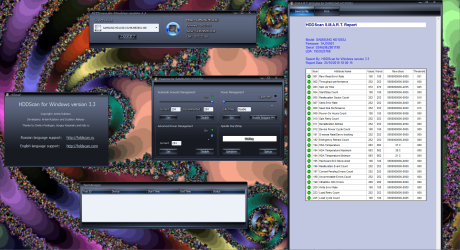
i got the drive today its all up and running:D

if you like the drive management software you can get it here HDDScan
 

Attachments

  • brys samsung2.PNG
    brys samsung2.PNG
    478.6 KB · Views: 30

My Computer My Computer

Computer Manufacturer/Model Number
packard bell IXTREME M5722
OS
Operating System : Windows 7 Home Premium Edition 6.01.7600 SP1 (x64)
CPU
Processor : Intel Core 2 Quad Q8300 @ 2500 MHz
Motherboard
Mainboard : Packard Bell (Acer EG43M )
Memory
Physical Memory :8GB Corsair4x 2GB 800MHz C5 DDR2
Graphics Card(s)
Video Card : XFX 6700 AMD
Monitor(s) Displays
Maestro 234DL - BenQ V2220 - BenQ VW2420H
Screen Resolution
Current Display :1920x1080p pixels at 60 Hz in HD LED
Hard Drives
Hard Disks : WDC (1000 GB)
Drive C: (Hard Disk) : 428 GB available on 491 GB
Drive D: (Hard Disk) : 426 GB available on 492 GB
SAMSUNG spinpoint HD103SJ 1000.2 GB
(X 2) KINGSTON SSD NOW V 30GB
PSU
XFX ProSeries 550W PSU
Case
PACKARD BELL IXTREME
Cooling
System Blower Current: 150mA Air Flow16CFM ;Akasa 90mm rear
Keyboard
Gigabyte Aivia K8100
Mouse
TRUST-Wireless Laser Mouse - Carbon edition MI-7770C
Internet Speed
TP-LINK > TL-WN951N / AV500 Gigabit Powerline Adapters
Browser
chrome dev
Other Info
EXTRA COOLING>(FAN CONTROLLER) PC Bay Cooler 3 x 40mm fans; Akasa AK-HD-BL Blue hard drive cooler 2 x 40 mm fan 4500 rpm 29.7 dBA
Bios> American Megatrends Inc.
Version : P01-A1
Date : 08/31/2009
I could be very happy with a 500 gb SSD. I'm some what wondering why a 3 tb hard drive only runs a 6000 rpm. Buy a SSD to speed things up and then buy a 3 tb hard drive at 6000 rpm to slow things down. Their has to be a good answer that has went over my head, please help me understand.
 

My Computer My Computer

Computer type
PC/Desktop
Computer Manufacturer/Model Number
Home made Desktop
OS
Windows 10 Pro. 64/ version 1709 Windows 7 Pro/64
CPU
Intel i7-6800K @ 4.3
Motherboard
ASUS X-99 Deluxe II
Memory
Corsair Platinum 16 gig @2400
Graphics Card(s)
EVGA GTX 1070 OC
Monitor(s) Displays
Asus 27" LED LCD/VE278Q
Screen Resolution
1920-1080 or 1280-720 HDMI
Hard Drives
INTEL SSD 730-240 Gb Sata 3.0/
PSU
EVGA Platium 1200W
Case
Phanteks Luxe Tempered Glass 8 fans/ one radiator
Cooling
XSPC/ Water Cooled CPU
Keyboard
Das 4 Professional
Mouse
Logitech M705/MX Anywhere 2-S
Internet Speed
100 mbits
Antivirus
Microsoft Security Essentials/ Malwarebytes Premium 3.0/ SAS
Browser
I.E. 11 default/Firefox/ ISP Time Warner Cable/Spectrum
Other Info
LG BluRay Burner/
Sound system-KLipsch-THX/
Icy Dock ssd Hot Swap bays.
I could be very happy with a 500 gb SSD. I'm some what wondering why a 3 tb hard drive only runs a 6000 rpm. Buy a SSD to speed things up and then buy a 3 tb hard drive at 6000 rpm to slow things down. Their has to be a good answer that has went over my head, please help me understand.

It will be because it is at the cutting edge of technology. They pushed so much data capacity onto the same size disks that at the moment they cannot make it run as fast. It is the same as why it is not SATA III. 10,000rpm on SATA III will come in time!

EDIT: 3TB SSD will also come in time, just a bit longer!
 

My Computer My Computer

Computer Manufacturer/Model Number
Dell XPS 420
OS
Vista Home Premium x86 SP2
CPU
Intel Core 2 Quad Q9300 2.50GHz
Motherboard
Stock Dell 0TP406
Memory
4 gb (DDR2 800) 400MHz
Graphics Card(s)
ATI Radeon HD 3870 (512 MBytes)
Monitor(s) Displays
1 x Dell 2007FP and 1 x (old) Sonic flat screen
Screen Resolution
1600 x 1200 and 1280 x 1204
Hard Drives
1 x 640Gb (SATA 300) Western Digital: WDC WD6400AAKS-75A7B0 1 x 1Tb (SATA 600) Western Digital: Caviar Black, SATA 6GB/S, 64Mb cache, 8ms Western Digital: WDC WD1002FAEX-00Z3A0 ATA Device
Case
Dell XPS 420
Cooling
Stock Fan
Keyboard
Dell Bluetooth
Mouse
Advent Optical ADE-WG01 (colour change light up)
Internet Speed
Varies from 10kb/s to 170kb/s. So unreliable it is not funny
Other Info
ASUS USB 3.0 5Gbps/SATA 6Gbps - PCI-Express Combo Controller Card (U3S6)
i think the reason the big disks run slower is because they contain more platters;)
 

My Computer My Computer

Computer Manufacturer/Model Number
packard bell IXTREME M5722
OS
Operating System : Windows 7 Home Premium Edition 6.01.7600 SP1 (x64)
CPU
Processor : Intel Core 2 Quad Q8300 @ 2500 MHz
Motherboard
Mainboard : Packard Bell (Acer EG43M )
Memory
Physical Memory :8GB Corsair4x 2GB 800MHz C5 DDR2
Graphics Card(s)
Video Card : XFX 6700 AMD
Monitor(s) Displays
Maestro 234DL - BenQ V2220 - BenQ VW2420H
Screen Resolution
Current Display :1920x1080p pixels at 60 Hz in HD LED
Hard Drives
Hard Disks : WDC (1000 GB)
Drive C: (Hard Disk) : 428 GB available on 491 GB
Drive D: (Hard Disk) : 426 GB available on 492 GB
SAMSUNG spinpoint HD103SJ 1000.2 GB
(X 2) KINGSTON SSD NOW V 30GB
PSU
XFX ProSeries 550W PSU
Case
PACKARD BELL IXTREME
Cooling
System Blower Current: 150mA Air Flow16CFM ;Akasa 90mm rear
Keyboard
Gigabyte Aivia K8100
Mouse
TRUST-Wireless Laser Mouse - Carbon edition MI-7770C
Internet Speed
TP-LINK > TL-WN951N / AV500 Gigabit Powerline Adapters
Browser
chrome dev
Other Info
EXTRA COOLING>(FAN CONTROLLER) PC Bay Cooler 3 x 40mm fans; Akasa AK-HD-BL Blue hard drive cooler 2 x 40 mm fan 4500 rpm 29.7 dBA
Bios> American Megatrends Inc.
Version : P01-A1
Date : 08/31/2009
I could be very happy with a 500 gb SSD. I'm some what wondering why a 3 tb hard drive only runs a 6000 rpm. Buy a SSD to speed things up and then buy a 3 tb hard drive at 6000 rpm to slow things down. Their has to be a good answer that has went over my head, please help me understand.


Hi there
SSD's are GREAT for running OS'es / real time paging, swapping, scratch files -- but for Backup and Archiving of essentially "Static" or not very dynamic data then SSD's aren't the tool of choice -- too expensive for this purpose.

Use them of course also for INDEXES of Data bases for FAST data access -- but don't store the actual data segments themselves of multi user databases on SSB's.

You don't need at the moment to have an expensive SSD for user data.

This is where the 3TB HDD comes in-- just think how many DVD's you can store on a 3TB drive even uncompressed.

Cheers
jimbo
 

My Computer My Computer

Computer type
PC/Desktop
Computer Manufacturer/Model Number
Custom built, several laptops HP/ASUS
OS
Linux CENTOS 7 / various Windows OS'es and servers
CPU
Intel i7 Intel i5
Memory
8GB, 16GB
Graphics Card(s)
On Motherboard
Sound Card
Realtek HD audio
Monitor(s) Displays
Apple Cinema display, Samsung LCD
Screen Resolution
1920 X 1080
Hard Drives
4 X 1TB SATA
Mouse
Toshiba wireless laser
Internet Speed
> 20MB up
I'm a die hard WD HDD fan. It's the only brand of HDD I've never had fail on me. I've been running them since like, well I remember having a 320meg WD HDDs and so on right up to my current config which is two 74 GB WD Raptors HDDs in RAID for speed for my OS drive and then two WD 1.5 TB SATA drives not RAID for storage which are pretty much full.

Just picked up a WD 2 TB SATA HDD. All this used HDD storage has me worried about data loss. I mean, what would I do if I lost all 10 seasons of Stargate SG-1 and my complete X-Files collection! :(

I think I'm going to setup my 1.5 TBs to be mirrored RAID for storage/backup purposes and use my 2TB for my not so important stuff when I get my new PC built this week.

With these new HDDs being so big it almost makes sense to buy them in two's or three's for some type of RAID to prevent data loss. Man, 2 or 3 TB would be a LOT of stuff to lose if something goes wrong. :(
 

My Computer My Computer

Computer Manufacturer/Model Number
My Own Computer!
OS
Windows 7 Ultimate x64
CPU
AMD Athlon II X2 245 Regor 2.9GHz Socket AM3 65W Dual-Core
Motherboard
ASUS M4A88TD-M/USB3 880G
Memory
Crucial Ballistix Tracer 8GB (4x2GB) DDR3 1600 (PC3 12800)
Graphics Card(s)
ATI Radeon HD3870 X2
Sound Card
Onboard HD Audio
Monitor(s) Displays
Westinghouse 22" LCD, Samsung 46" LCD TV
Screen Resolution
1680x1050, Extended Display Setup
Hard Drives
2x Western Digital 74GB Raptors SATA Raid (OS & Games Drive)
1x Western Digital 1.5TB SATA (Storage)
1x Western Digital 2TB SATA (Storage)
PSU
Antec 550 Watt
Case
Antec Three Hundred
Cooling
3x Antec 120mm Fans & OEM CPU/GPU Coolers
Keyboard
Microsoft Comfort Curve Keyboard 2000
Mouse
Microsoft Bluetooth Explorer Mouse
Internet Speed
Comcastic Cable Internet! When it works!
i think the reason the big disks run slower is because they contain more platters;)

Hi there
Not necessarily true -- more platters -- more access arms etc etc. Depends on what you mean by "Run slower".

Data access slower or physical speed in RPM is slower. The Bus connection also is significant -- SATA, e-sata, IDE etc etc.

If the "Caching" size is large enough and the "Pre-fetching" algorithm decently accurate - this is an algorithm that gets "predicted" data from the HDD based on statistics the OS gathers while you are logged on - then technically the disc could rotate at 1 RPM per minute and still serve data quicker than a disc rotating at 10,000 RPM with poor caching and a useless pre fetch algorithm --an extreme case but there is a lot more in Disk access optimisation than just brute RPM speed.

In fact newer discs even at 6400 RPM deliver data much quicker than older discs such as 60 GB disks -- large a few year ago --having the same RPM speed.

As always in all things computing things are generally NOT as they seem to be.

Hi kdogg

You don't need 10 seasons of Stargate to be online all the time -- just get a couple of 500GB external USB disks - really CHEAP now and back the episodes up.

Keep two copies of backup (ALWAYS have 2 copies of ANYTHING backed up in case one fails) and then you can free your primary disk space on your computer.

Incidentally you don't need super fast access for watching a Stargate or any other DVD (even if copied to disc) so there isn't any need to keep the whole lot on line all the time. Just run from the external USB disc -- even a small netbook will do this just fine.

Cheers
jimbo


RAID doesn't prevent data loss if the disks fail. You STILL need decent backup.

Cheers
jimbo

 

My Computer My Computer

Computer type
PC/Desktop
Computer Manufacturer/Model Number
Custom built, several laptops HP/ASUS
OS
Linux CENTOS 7 / various Windows OS'es and servers
CPU
Intel i7 Intel i5
Memory
8GB, 16GB
Graphics Card(s)
On Motherboard
Sound Card
Realtek HD audio
Monitor(s) Displays
Apple Cinema display, Samsung LCD
Screen Resolution
1920 X 1080
Hard Drives
4 X 1TB SATA
Mouse
Toshiba wireless laser
Internet Speed
> 20MB up
Back
Top