
3TB Internal Hard Drive 2.19GB barier

Baltar

New member
Local time
1:12 PM
Messages
12
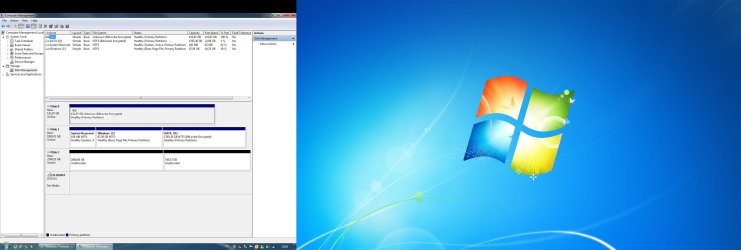
Hi. I just bought new Western Digital's Caviar Green 3TB hard drive. Along came Host Bus Adapter. I am using this HDD as secondary storage. I event installed the latest driver for Host Bus Adapter but still when I open disk management it says Disk 2: 2794,52GB (2048GB Unallocated / 746,52GB Unallocated) and I only can format the 2046GB. See screenshot. Do I need 64-bit Windows?
 

Attachments
  • screenshot.jpg
    screenshot.jpg
    177.7 KB · Views: 279

My Computer My Computer

At a glance

Win 7
OS
Win 7
Suggest you partition the drive into two 1.5GB partitions - or anything smaller than 2GBs.
 

My Computer My Computer

At a glance

Vista, Windows7, Mint Mate, Zorin, Windows 8from 1.6GHz Duo to i7
Computer Manufacturer/Model Number
HP, Dell, Gateway, Toshiba - 4 laptops and 2 desktops
OS
Vista, Windows7, Mint Mate, Zorin, Windows 8
CPU
from 1.6GHz Duo to i7
Monitor(s) Displays
2x HP w2207
Hard Drives
5x HDD, 7x SSD, 12x Externals
Keyboard
with trackball - no mices
Mouse
Trackball mice
Internet Speed
DSL 6000
^^ That
 

My Computer My Computer

At a glance

W7 Professional x64AMD Athlon II X3 445 Rana 3.10 GHzPNY XLR DDR3 1600 4x2GBNVIDIA GeForce GTS 450 (fermi) 1GB GDDR5
Computer Manufacturer/Model Number
Pugh Technologies
OS
W7 Professional x64
CPU
AMD Athlon II X3 445 Rana 3.10 GHz
Motherboard
MSI 870A-G54
Memory
PNY XLR DDR3 1600 4x2GB
Graphics Card(s)
NVIDIA GeForce GTS 450 (fermi) 1GB GDDR5
Sound Card
Realtek ALC892 onboard
Monitor(s) Displays
ASUS VE205t, Viewsonic VX2035WM
Screen Resolution
1600x900, 1600x1050
Hard Drives
977GB Hitachi Hitachi HDS721010CLA332
244GB Western Digital WDC WD2500AAJS-65B4A0
488GB Western Digital WDC WD5000AAJS-00A8B0
488GB Western Digital WDC WD5000AAKS-00UU3A0
PSU
Antec EarthWatts EA650 650W
Case
ThermalTake Armor A90 Mid Tower
Cooling
3x 120mm in, 1x 120mm & 200mm out, self built hydro-cooler
Keyboard
Logitec 55
Mouse
Razer Deathadder
Internet Speed
20 Mbps D/L, 9 Mbps U/L
Actaully you should see if your motherboard manufacturer has put out a BIOS update addressing such a large hard drive. I know Gigabyte has one.

You list no system specs so......
 

My Computer My Computer

At a glance

Windows 10 ProIntel Core i7-4770K (3.5Ghz)32 gig Corsair Dominator Platinum (4x8Gig)Sapphire Tri-X R9 Fury
Computer type
PC/Desktop
Computer Manufacturer/Model Number
Custom built by me.
OS
Windows 10 Pro
CPU
Intel Core i7-4770K (3.5Ghz)
Motherboard
Gigabyte G1 Sniper 5 (F10 Bios)
Memory
32 gig Corsair Dominator Platinum (4x8Gig)
Graphics Card(s)
Sapphire Tri-X R9 Fury
Sound Card
Soundblaster ZXR
Monitor(s) Displays
NEC PA242W 24" LCD Monitor
Screen Resolution
1920 x 1200
Hard Drives
Primary - Samsung 850 Pro (512gig), Samsung 840 Pro (256gig), 2TB WD Caviar Black.
PSU
EVGA Supernova 1000 G2
Case
Cooler Master HAF X
Cooling
Corsair H100i with Corsair Air Series SP120 Quiet Fans
Keyboard
Logitech Wireless Wave
Mouse
Logitech Performance MX
Internet Speed
High Speed Cable
Antivirus
Norton Security
Browser
IE11
Other Info
Memory Timings - 1866MHz @ 9-9-9-27-1T @ 1.5 volts
Is it MBR or GPT? You need GPT
 

My Computer My Computer

At a glance

Windows
OS
Windows
Yes I need GPT. How can I enable this? I tought thats why the HDD came with Host Bus Adapter that enables Windows 7 to use GPT. What am I missing here?
 

My Computer My Computer

At a glance

Win 7
OS
Win 7

My Computer My Computer

At a glance

Windows 7Intel E6600 @ 2.9Ghz4GB Crucial DDR2 PC6400EVGA GTS 260 768mb
OS
Windows 7
CPU
Intel E6600 @ 2.9Ghz
Motherboard
Gigabyte EP45 UD3
Memory
4GB Crucial DDR2 PC6400
Graphics Card(s)
EVGA GTS 260 768mb
Monitor(s) Displays
24" DGM
Screen Resolution
1920x1200
Hard Drives
1.5TB
1TB
750GB
500GB x 2
PSU
750w Corsair
Back
Top