
Help needed, can't get NEW hard drive to be recognized

apple3

New member
Local time
3:00 PM
Messages
50
Okay, here is what I know and thought might have been the problem, not sure though.

I have THREE Hard Drives.
1) XP. Old PATA hard drive
2) Windows 7 SATA
3) New Hard Drive (E; with program files, back up, images, music.

Sorry, I had to edit this message as every time I went to type E colon, slash, it gave a smiley face. so the E; = E colon, slash to indicate E assigned hard drive letter, the new hard drive.


When I boot to XP with the new hard drive (E; shows up fine.
When I disconnect XP and boot to Windows 7, the new hard drive (E; shows that it installs fine (lower right in windows, shows that the OS see's it and says it installed fine), yet I cannot see it.

The configuration that does not work is two (2) SATA drives, one with Windows 7, the other, the new hard drive.

To be sure, I disconnected the Windows 7, connected XP (PATA) and booted again, sure enough, the new hard drive (E; is fine and shows up.

I then disconnect and attach the Windows 7 hard drive with the new hard drive, (I even tried moving the SATA cable around) and Windows 7 boots fine, shows me that it installs the newly found hard drive (E; but does not show up on my computer.

Now, here is what may, or may not be a bug.

The new hard drive was formatted NTFS in WINDOWS XP, the drive letter assigned was E:, when I boot to Windows 7, I have a Virtual Clone Drive which also has the letter E: assigned to it. Could it be possible that Windows 7 does not know what to do since the Virtual Hard Drive was there first and therefore, doesn't show the new hard drive when running Windows 7?

I have tried everything I can to get it to be seen in Win 7 to no avail. Again, it works fine in XP, but does not show up in Windows 7.

Has anyone heard of this problem before? Do I need to rename, or assigned a different hard drive letter to E:? If so, how do I do that?

Everyone's help is greatly appreciated as I need to get this up and running as I have some work on there that I need to get done.

Thank you all so very much for your time and troubleshooting.
 
Last edited:

My Computer My Computer

At a glance

Windows 7D940 Intel Duo CoreOCZ PlatinumNvidia 7600 256 GT
Computer Manufacturer/Model Number
Intel
OS
Windows 7
CPU
D940 Intel Duo Core
Motherboard
Intel D945GTP
Memory
OCZ Platinum
Graphics Card(s)
Nvidia 7600 256 GT
Sound Card
On Board but use external Firewire
Monitor(s) Displays
Dual Samsung
Screen Resolution
1200x1078
Hard Drives
Several internal Sata
PSU
Generiz 550
Case
Can't remember but looks like a G4
Cooling
Intel Fan
Keyboard
Apple Keyboard
Mouse
Logitech
Internet Speed
1.5 Mega Bytes per second (cable) 15000 mbits
change your drive letter...using Disk Management in windows 7
 

My Computer My Computer

At a glance

Windows 7 x64
OS
Windows 7 x64
change your drive letter...using Disk Management in windows 7

Not sure how, but I disabled the Virtual Hard Drive, rebooted and still do not see the new hard drive and the Virtual Hard drive is disabled and not showing up (on purpose).

When I run Disk Management, I do not see the drive, well, I do see a Disk 1 Dynamic with a yellow triangle and explanation point, it says foreign. No idea what to do.

Please advise.

PS. If I click to convert to basic disk it says all data will be lost.
 

My Computer My Computer

At a glance

Windows 7D940 Intel Duo CoreOCZ PlatinumNvidia 7600 256 GT
Computer Manufacturer/Model Number
Intel
OS
Windows 7
CPU
D940 Intel Duo Core
Motherboard
Intel D945GTP
Memory
OCZ Platinum
Graphics Card(s)
Nvidia 7600 256 GT
Sound Card
On Board but use external Firewire
Monitor(s) Displays
Dual Samsung
Screen Resolution
1200x1078
Hard Drives
Several internal Sata
PSU
Generiz 550
Case
Can't remember but looks like a G4
Cooling
Intel Fan
Keyboard
Apple Keyboard
Mouse
Logitech
Internet Speed
1.5 Mega Bytes per second (cable) 15000 mbits
The only place I can see the new hard drive is if I click on another hard drive, right click properties, and then see the list of hard drives when I click the hardware tab.
 

My Computer My Computer

At a glance

Windows 7D940 Intel Duo CoreOCZ PlatinumNvidia 7600 256 GT
Computer Manufacturer/Model Number
Intel
OS
Windows 7
CPU
D940 Intel Duo Core
Motherboard
Intel D945GTP
Memory
OCZ Platinum
Graphics Card(s)
Nvidia 7600 256 GT
Sound Card
On Board but use external Firewire
Monitor(s) Displays
Dual Samsung
Screen Resolution
1200x1078
Hard Drives
Several internal Sata
PSU
Generiz 550
Case
Can't remember but looks like a G4
Cooling
Intel Fan
Keyboard
Apple Keyboard
Mouse
Logitech
Internet Speed
1.5 Mega Bytes per second (cable) 15000 mbits
The only place I can see the new hard drive is if I click on another hard drive, right click properties, and then see the list of hard drives when I click the hardware tab.

Here is a snapshot of my computer management:


[img=http://img42.imageshack.us/img42/2799/computermanagement.th.png]


<a href="http://img42.imageshack.us/my.php?image=computermanagement.png" target="_blank"><img src="http://img42.imageshack.us/img42/2799/computermanagement.th.png" border="0" alt="Free Image Hosting at www.ImageShack.us" /></a><br /><br /><a href="http://img604.imageshack.us/content.php?page=blogpost&files=img42/2799/computermanagement.png" title="QuickPost"><img src="http://imageshack.us/img/butansn.png" alt="QuickPost" border="0"></a> Quickpost this image to Myspace, Digg, Facebook, and others!
 

My Computer My Computer

At a glance

Windows 7D940 Intel Duo CoreOCZ PlatinumNvidia 7600 256 GT
Computer Manufacturer/Model Number
Intel
OS
Windows 7
CPU
D940 Intel Duo Core
Motherboard
Intel D945GTP
Memory
OCZ Platinum
Graphics Card(s)
Nvidia 7600 256 GT
Sound Card
On Board but use external Firewire
Monitor(s) Displays
Dual Samsung
Screen Resolution
1200x1078
Hard Drives
Several internal Sata
PSU
Generiz 550
Case
Can't remember but looks like a G4
Cooling
Intel Fan
Keyboard
Apple Keyboard
Mouse
Logitech
Internet Speed
1.5 Mega Bytes per second (cable) 15000 mbits
right click on Computer...Manage...Disk Management...right click on your (not show) Disk...chose Change Drive Letter and Paths...then change your drive letter...for sure your not gonna lose anything...
 

My Computer My Computer

At a glance

Windows 7 x64
OS
Windows 7 x64
right click on Computer...Manage...Disk Management...right click on your (not show) Disk...chose Change Drive Letter and Paths...then change your drive letter...for sure your not gonna lose anything...

If you click on my link and look at the computer management, you can't see my hard drive, or maybe that's it, the one that says foreign, when I click on any of the OTHER hard drives, it gives me the option to change drive letter, when I click on the foreign, I get this options, none are change drive letter.. The only optins when clicking the FOREIGN are Import Foreign Disk, Convert to Basic Disk, Offline, Properties and Help.... that's it, no change drive letter.

There is no option to change drive letter on a unseen hard drive! :cry:
 

My Computer My Computer

At a glance

Windows 7D940 Intel Duo CoreOCZ PlatinumNvidia 7600 256 GT
Computer Manufacturer/Model Number
Intel
OS
Windows 7
CPU
D940 Intel Duo Core
Motherboard
Intel D945GTP
Memory
OCZ Platinum
Graphics Card(s)
Nvidia 7600 256 GT
Sound Card
On Board but use external Firewire
Monitor(s) Displays
Dual Samsung
Screen Resolution
1200x1078
Hard Drives
Several internal Sata
PSU
Generiz 550
Case
Can't remember but looks like a G4
Cooling
Intel Fan
Keyboard
Apple Keyboard
Mouse
Logitech
Internet Speed
1.5 Mega Bytes per second (cable) 15000 mbits
um...by looking @your pic...you mean Disk 1? um...I don't know how to fix it...sorry...maybe cause of driver...or try to unplug your harddrive and plug it in again...
 

My Computer My Computer

At a glance

Windows 7 x64
OS
Windows 7 x64
um...by looking @your pic...you mean Disk 1? um...I don't know how to fix it...sorry...maybe cause of driver...or try to unplug your harddrive and plug it in again...

This is what I mean, I have changed the cable/port, double checked that it is seen in XP, it is, but for the life of me, I cannot get windows 7 to see this disk.

Very frustrating as I have spent a few days merging all these older hard drives into folders on this new 1 terabyte hard drive.

Please, I hope someone can help me.

Thanks
 

My Computer My Computer

At a glance

Windows 7D940 Intel Duo CoreOCZ PlatinumNvidia 7600 256 GT
Computer Manufacturer/Model Number
Intel
OS
Windows 7
CPU
D940 Intel Duo Core
Motherboard
Intel D945GTP
Memory
OCZ Platinum
Graphics Card(s)
Nvidia 7600 256 GT
Sound Card
On Board but use external Firewire
Monitor(s) Displays
Dual Samsung
Screen Resolution
1200x1078
Hard Drives
Several internal Sata
PSU
Generiz 550
Case
Can't remember but looks like a G4
Cooling
Intel Fan
Keyboard
Apple Keyboard
Mouse
Logitech
Internet Speed
1.5 Mega Bytes per second (cable) 15000 mbits
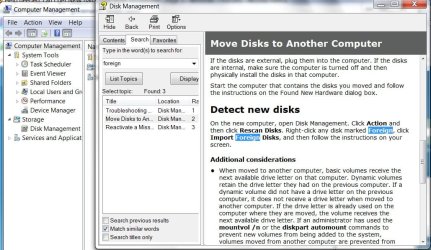
Got it, it's right click, IMPORT FOREIGN DISK.

Yay!!!

:-)
 

My Computer My Computer

At a glance

Windows 7D940 Intel Duo CoreOCZ PlatinumNvidia 7600 256 GT
Computer Manufacturer/Model Number
Intel
OS
Windows 7
CPU
D940 Intel Duo Core
Motherboard
Intel D945GTP
Memory
OCZ Platinum
Graphics Card(s)
Nvidia 7600 256 GT
Sound Card
On Board but use external Firewire
Monitor(s) Displays
Dual Samsung
Screen Resolution
1200x1078
Hard Drives
Several internal Sata
PSU
Generiz 550
Case
Can't remember but looks like a G4
Cooling
Intel Fan
Keyboard
Apple Keyboard
Mouse
Logitech
Internet Speed
1.5 Mega Bytes per second (cable) 15000 mbits
thanks...next time i do it...if i across this problem ;)
 

My Computer My Computer

At a glance

Windows 7 x64
OS
Windows 7 x64
It's in the Disk Management Help file:

FOREIGN DISKS-2009-05-24_025128.jpg
 

My Computers My Computers

  • At a glance

    7 X64i5 84002x8gb 3200mhz
    Computer type
    PC/Desktop
    OS
    7 X64
    CPU
    i5 8400
    Motherboard
    gigabyte b365m ds3h
    Memory
    2x8gb 3200mhz
    Hard Drives
    various
    PSU
    pure power 11 400w cm
    Case
    Coolermaster
    Cooling
    cryorig m9i
  • At a glance

    7x64g54008gb ddr4 2400
    Computer type
    PC/Desktop
    OS
    7x64
    CPU
    g5400
    Motherboard
    ga b365m ds3h
    Memory
    8gb ddr4 2400
    PSU
    xfx pro 450w
Back
Top