SB Audigy SE - Not Working in Windows 7

Don't give up
Hope U didn't messing with registry
because I did (wanted What U hear) (fresh install)
And the result was no sound at all after many restarts & driver installation.
Did U turn off some of the services ?? maybe they are the problem.
 

My Computer My Computer

At a glance

7 Ultimate x64 sp1Intel i5-4690K16Gb HyperX furyR9-270x 2Gb
Computer type
PC/Desktop
Computer Manufacturer/Model Number
696
OS
7 Ultimate x64 sp1
CPU
Intel i5-4690K
Motherboard
GA Z97X Gaming 5
Memory
16Gb HyperX fury
Graphics Card(s)
R9-270x 2Gb
Sound Card
On Board
Monitor(s) Displays
2443NW
Screen Resolution
1920x1200
Hard Drives
WD5000 -
WD5001 -
WD1002
PSU
Cft-650-14cs
Case
Very Big Case
Cooling
stock
Keyboard
G11
Mouse
Logitech
Internet Speed
Adsl
Browser
FF
Other Info
RWD
Hello,

Follow these steps :

1) Open Device Manager, locate your soundcard, right click it, choose Uninstall, check "Delete driver files" and click on OK. Reboot when prompted to do so.

2) Boot into Safe Mode:

For 32-bit: Open the \Windows\System32 folder and delete APOIM32.EXE, APOMngr.dll, CmdRtr.dll.

For 64-bit: Open the \Windows\System32 folder and delete APOMgr64.dll, CmdRtr64.dll.
Now open the \Windows\SysWOW64 folder and delete APOIM64.EXE, APOMngr.dll and CmdRtr.dll.

Now delete the following registry trees:

For 32-bit: HKEY_LOCAL_MACHINE\SOFTWARE\Creative Tech\Software Installed\APOIM
HKEY_LOCAL_MACHINE\SOFTWARE\Creative Tech\Installation\CTRedist\APOIM

For 64-bit: HKEY_LOCAL_MACHINE\SOFTWARE\Wow6432Node\Creative Tech\Software Installed\APOIM
HKEY_LOCAL_MACHINE\SOFTWARE\Wow6432Node\Creative Tech\Installation\CTRedist\APOIM


Then Download this Re: SB P17X Series Support Pack 2.7 (04/01/2010) -... - Creative Labs
 

My Computer My Computer

At a glance

Windows 7 Ultimate - 64-bit | Windows 8 Pro -...Intel® Core™ i7 Processor 3,610QM (2.30Hz, 6M...8 GBNVIDIA® GeForce® GT 650M 2GB Graphics, Optimu...
Computer Manufacturer/Model Number
Samsung NP550P5C-S02IN
OS
Windows 7 Ultimate - 64-bit | Windows 8 Pro - 64-bit
CPU
Intel® Core™ i7 Processor 3,610QM (2.30Hz, 6MB L3 Cach
Memory
8 GB
Graphics Card(s)
NVIDIA® GeForce® GT 650M 2GB Graphics, Optimus™ techno
Sound Card
SoundAlive™ JBL 3 Speakers (With sub-Woofer)
Monitor(s) Displays
39.62cm (15.6) SuperBright 300nit HD+ LED Display
Screen Resolution
1,600 x 900, Anti-Reflective
Hard Drives
1TB S-ATA II Hard Drive (5,400RPM)
In addition to the above before trying to install the modded driver pack have a look in,

C:\Windows\System32\DriverStore\FileRepository

and see if there are any folders named P17.inf_amd64_neutral (if 64 bit Windows) or P17.inf_x86_neutral (if 32 bit Windows), with both being followed by a series or numbers and letters (looking at his specs Capt. Jack should be able to confirm the folder name). These folders are where Windows keeps enough info to re-install (or for supported hardware when detected, of which as far as I know no Creative card has a native Windows driver) to install the drivers for various devices.

If it is there (or more than one), delete it as well before trying the modded driver pack.

If that doesn't get the driver to install we can then try manually installing the driver.

P.S. Would help if you could fill in the rest of your system specs. Depending on what motherboard and chispet you have, it could also need proper chipset drivers installed first before the sound card driver will install.
 

My Computer My Computer

At a glance

Win 7 Ultimate x64FX-8350 @ 4.6 GHz so farADATA XPG V1 Series Black 8GB DDR3 1600Sapphire R9 270x Dual-X
Computer type
PC/Desktop
Computer Manufacturer/Model Number
Me
OS
Win 7 Ultimate x64
CPU
FX-8350 @ 4.6 GHz so far
Motherboard
Asus M5A97 EVO
Memory
ADATA XPG V1 Series Black 8GB DDR3 1600
Graphics Card(s)
Sapphire R9 270x Dual-X
Sound Card
Xonar DGX w/ Corsair Vengence 1300
Monitor(s) Displays
Acer S232HL Abid
Screen Resolution
1920x1080
Hard Drives
120 GB OCZ Vertex 3
500 GB Seagate 7200.12
PSU
Antec Earthwatts 650W Green
Case
Antec Three Hundred
Cooling
Cooler Master 212 EVO
Keyboard
Logitech G510
Mouse
Logitech G500s
Internet Speed
35000/3000
When downloading direct from Creative following a clean install of 7 I grab both the app download for the audio console as well as the device drivers being two different downloads and run them apart seeing a restart after prompted by the first being the driver set. When the audio console launcher goes on afterwards the configuration wizard is what will get the sound working.

Note that has been seen with the Audigy 2 ZS Gamer, Audigy 4 Pro, and X-Fi XtremeGamer model cards. The 32bit 7 will even run the XP version of drivers as found recently when setting a temp install on an old clunker case while the main case was down. The web updater throughout each install saw the correct drivers downloaded and installed with only the last part being the selection of the playback hardware.

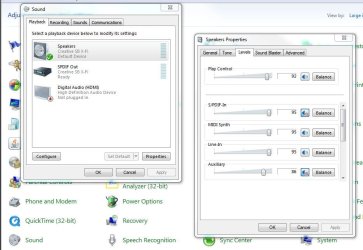
Another place besides simply opening up the Playback tab in the CP>Sound would be a look at the speaker properties to be sure nothing is disabled if you are no longer finding yellow marked items in the device manager. Yellow marks simply show the drivers never went on fully.
 

Attachments

  • Speaker Properties.jpg
    Speaker Properties.jpg
    75.5 KB · Views: 74

My Computers My Computers

  • At a glance

    W7 Ultimate x64/W10 Pro x64/W11 Pro Triple Bo...AMD Phenom II X4 975 Deneb 3.6ghz - 965 2nd r...Kingston Hyper X DDR3 1600 1.5v 16gb - Hyper ...MSI HD Radeon 5750 1gb - MSI HD Radeon 6450 o...
    Computer type
    PC/Desktop
    Computer Manufacturer/Model Number
    Custom builds = 2
    OS
    W7 Ultimate x64/W10 Pro x64/W11 Pro Triple Boot - Main PC W7 Remote PC Micro ATX W7 Pro x64/W11 Pro
    CPU
    AMD Phenom II X4 975 Deneb 3.6ghz - 965 2nd remote pc
    Motherboard
    Gigabyte GA-790XTA-UD4-Gigabyte GA-880GM-D2H remote pc
    Memory
    Kingston Hyper X DDR3 1600 1.5v 16gb - Hyper X Fury 8gb 2nd
    Graphics Card(s)
    MSI HD Radeon 5750 1gb - MSI HD Radeon 6450 on mini tower
    Sound Card
    Creative Labs X-Fi Xtreme Audio P - Realtek onooard 2nd case
    Monitor(s) Displays
    ASUS VW199T-P 19" HP 2082a Main-HP 2082a 20" remote pc
    Screen Resolution
    Asus 1440x900 - HP 1600x900
    Hard Drives
    WD Black 1TB HD per OS W7, W10, and pending W11 presently on 500gb OS Drive - Pending Triple 1TB HDs for Spanned Storage/backup volume
    Single 2TB external USB enclosure, single 1TB System 7 Host/Boot drive, Pending 8TB external HD for system image b
    PSU
    Corsair 750TX - primary / Corsair CX600 - second
    Case
    Antec 900-2 - SSD compatible / NZXT Vulcan mini tower
    Cooling
    Zalman CNPS9900A
    Keyboard
    AZIO L70 Backlit Letters Gaming - ONN Cordless/USB
    Mouse
    MSI DS200 Programmable, Logitech Cordless
    Internet Speed
    30mbps upgrade - primary hard wired - mini tower usb WiFi
    Antivirus
    GFI VIPRE Internet Security 2014 on W7 2016 beta on W10,
    Browser
    Cyberfox, WaterFox 64bit FF variants, FireFox x64, Pale Moon
    Other Info
    Accomdata fan cooled usb 2.0 PIDE/Sata II, III external enclosure.
    Sambient usb/eSata PATA/Sata II, III external enclosure.
  • At a glance

    W7 Pro x64/W11 ProAMD Deneb 3.6ghz - 965Kingston Hyper X Fury 8gbMSI HD Radeon 6450 DVI Output
    Computer type
    PC/Desktop
    System Manufacturer/Model Number
    CUSTOM ASSEMBLY
    OS
    W7 Pro x64/W11 Pro
    CPU
    AMD Deneb 3.6ghz - 965
    Motherboard
    Gigabyte GA-880GM-D2H remote pc
    Memory
    Kingston Hyper X Fury 8gb
    Graphics Card(s)
    MSI HD Radeon 6450 DVI Output
    Sound Card
    Realtek onooard Creative or Other separate PENDING
    Monitor(s) Displays
    VIZIO 32" LCD TV Separate LCD Pending
    Screen Resolution
    1600x1080
    Hard Drives
    WD 500GB OS Host/Boot WD Green 1TB Storage/Backup
    PSU
    Corsair 600W - THERMALTAKE 600W spare case
    Case
    NZXT Vulcan mini tower
    Cooling
    Twin 120mm Top Fans - 240mm Side Cover
    Keyboard
    ONN Cordless/USB Logitech Cordless
    Mouse
    ONN USB/Cordless - Logitech Cordless
    Internet Speed
    DSL 5G
    Browser
    MS Edge, FireFox, WaterFox x64, FireFox Nightly
    Other Info
    OS Testing-Remote Access to Main TeamViewer
Hello,

Follow these steps :

1) Open Device Manager, locate your soundcard, right click it, choose Uninstall, check "Delete driver files" and click on OK. Reboot when prompted to do so.

2) Boot into Safe Mode:

For 32-bit: Open the \Windows\System32 folder and delete APOIM32.EXE, APOMngr.dll, CmdRtr.dll.

For 64-bit: Open the \Windows\System32 folder and delete APOMgr64.dll, CmdRtr64.dll.
Now open the \Windows\SysWOW64 folder and delete APOIM64.EXE, APOMngr.dll and CmdRtr.dll.

Now delete the following registry trees:

For 32-bit: HKEY_LOCAL_MACHINE\SOFTWARE\Creative Tech\Software Installed\APOIM
HKEY_LOCAL_MACHINE\SOFTWARE\Creative Tech\Installation\CTRedist\APOIM

For 64-bit: HKEY_LOCAL_MACHINE\SOFTWARE\Wow6432Node\Creative Tech\Software Installed\APOIM
HKEY_LOCAL_MACHINE\SOFTWARE\Wow6432Node\Creative Tech\Installation\CTRedist\APOIM


Then Download this Re: SB P17X Series Support Pack 2.7 (04/01/2010) -... - Creative Labs

Capt, thanks for the help.
When I booted into save mode, it installed the sound card?
I uninstalled it again in the safe mode, then deleted the file APOIM32.EXE, but these 2 were not there APOMngr.dll, CmdRtr.dll and the 2 registry tree's were not there either?
 

My Computer My Computer

At a glance

Windows 7 32bitIntel Core 2 DuoOCZ Platinum Revision 2 2GB (2 x 1GB) 240-Pin...Nvidia GeForce 9500 GT
OS
Windows 7 32bit
CPU
Intel Core 2 Duo
Motherboard
Asus P5B Deluxe
Memory
OCZ Platinum Revision 2 2GB (2 x 1GB) 240-Pin DDR2 SDRAM DDR
Graphics Card(s)
Nvidia GeForce 9500 GT
Sound Card
Creative Sound Blaster Audigy SE
Monitor(s) Displays
ViewSonic
In addition to the above before trying to install the modded driver pack have a look in,

C:\Windows\System32\DriverStore\FileRepository

and see if there are any folders named P17.inf_amd64_neutral (if 64 bit Windows) or P17.inf_x86_neutral (if 32 bit Windows), with both being followed by a series or numbers and letters (looking at his specs Capt. Jack should be able to confirm the folder name). These folders are where Windows keeps enough info to re-install (or for supported hardware when detected, of which as far as I know no Creative card has a native Windows driver) to install the drivers for various devices.

If it is there (or more than one), delete it as well before trying the modded driver pack.

If that doesn't get the driver to install we can then try manually installing the driver.

P.S. Would help if you could fill in the rest of your system specs. Depending on what motherboard and chispet you have, it could also need proper chipset drivers installed first before the sound card driver will install.

Hi, thanks for the help, I updated my system specs, let me know if I should put more in.
I found the file, but I cant believe I dont have the power to delete any files I want in my own system, but I think I managed to do it.
 

My Computer My Computer

At a glance

Windows 7 32bitIntel Core 2 DuoOCZ Platinum Revision 2 2GB (2 x 1GB) 240-Pin...Nvidia GeForce 9500 GT
OS
Windows 7 32bit
CPU
Intel Core 2 Duo
Motherboard
Asus P5B Deluxe
Memory
OCZ Platinum Revision 2 2GB (2 x 1GB) 240-Pin DDR2 SDRAM DDR
Graphics Card(s)
Nvidia GeForce 9500 GT
Sound Card
Creative Sound Blaster Audigy SE
Monitor(s) Displays
ViewSonic
Hello,

Follow these steps :

1) Open Device Manager, locate your soundcard, right click it, choose Uninstall, check "Delete driver files" and click on OK. Reboot when prompted to do so.

2) Boot into Safe Mode:

For 32-bit: Open the \Windows\System32 folder and delete APOIM32.EXE, APOMngr.dll, CmdRtr.dll.

For 64-bit: Open the \Windows\System32 folder and delete APOMgr64.dll, CmdRtr64.dll.
Now open the \Windows\SysWOW64 folder and delete APOIM64.EXE, APOMngr.dll and CmdRtr.dll.

Now delete the following registry trees:

For 32-bit: HKEY_LOCAL_MACHINE\SOFTWARE\Creative Tech\Software Installed\APOIM
HKEY_LOCAL_MACHINE\SOFTWARE\Creative Tech\Installation\CTRedist\APOIM

For 64-bit: HKEY_LOCAL_MACHINE\SOFTWARE\Wow6432Node\Creative Tech\Software Installed\APOIM
HKEY_LOCAL_MACHINE\SOFTWARE\Wow6432Node\Creative Tech\Installation\CTRedist\APOIM


Then Download this Re: SB P17X Series Support Pack 2.7 (04/01/2010) -... - Creative Labs

Capt, thanks for the help.
When I booted into save mode, it installed the sound card?
I uninstalled it again in the safe mode, then deleted the file APOIM32.EXE, but these 2 were not there APOMngr.dll, CmdRtr.dll and the 2 registry tree's were not there either?

After rebooting into normal mode I tried the file above, but no good results, same as before.
 

My Computer My Computer

At a glance

Windows 7 32bitIntel Core 2 DuoOCZ Platinum Revision 2 2GB (2 x 1GB) 240-Pin...Nvidia GeForce 9500 GT
OS
Windows 7 32bit
CPU
Intel Core 2 Duo
Motherboard
Asus P5B Deluxe
Memory
OCZ Platinum Revision 2 2GB (2 x 1GB) 240-Pin DDR2 SDRAM DDR
Graphics Card(s)
Nvidia GeForce 9500 GT
Sound Card
Creative Sound Blaster Audigy SE
Monitor(s) Displays
ViewSonic
Sorry about that, forgot to add this,

http://www.sevenforums.com/tutorials/1911-take-ownership-shortcut.html

follow that and then go back to that folder, right click on it and then use the "TakeOwnership) shortcut then you will be able to delete the folder. That folder is why Windows automatically re-installed the driver.

And thanks for filling in the rest of your specs. The chipset should be OK with the default Windows drivers but it won't hurt to download and run this,

Intel® Driver Update Utility

and let it update what it wants before trying the sound card driver again.
 

My Computer My Computer

At a glance

Win 7 Ultimate x64FX-8350 @ 4.6 GHz so farADATA XPG V1 Series Black 8GB DDR3 1600Sapphire R9 270x Dual-X
Computer type
PC/Desktop
Computer Manufacturer/Model Number
Me
OS
Win 7 Ultimate x64
CPU
FX-8350 @ 4.6 GHz so far
Motherboard
Asus M5A97 EVO
Memory
ADATA XPG V1 Series Black 8GB DDR3 1600
Graphics Card(s)
Sapphire R9 270x Dual-X
Sound Card
Xonar DGX w/ Corsair Vengence 1300
Monitor(s) Displays
Acer S232HL Abid
Screen Resolution
1920x1080
Hard Drives
120 GB OCZ Vertex 3
500 GB Seagate 7200.12
PSU
Antec Earthwatts 650W Green
Case
Antec Three Hundred
Cooling
Cooler Master 212 EVO
Keyboard
Logitech G510
Mouse
Logitech G500s
Internet Speed
35000/3000
I have the same P17.sys card. It works fine. Daniel_k's support pack is what i use. Follow the what stromy13 suggests you should be able to get it up and running.
 

My Computer My Computer

At a glance

Windows 7 Ultimate - 64-bit | Windows 8 Pro -...Intel® Core™ i7 Processor 3,610QM (2.30Hz, 6M...8 GBNVIDIA® GeForce® GT 650M 2GB Graphics, Optimu...
Computer Manufacturer/Model Number
Samsung NP550P5C-S02IN
OS
Windows 7 Ultimate - 64-bit | Windows 8 Pro - 64-bit
CPU
Intel® Core™ i7 Processor 3,610QM (2.30Hz, 6MB L3 Cach
Memory
8 GB
Graphics Card(s)
NVIDIA® GeForce® GT 650M 2GB Graphics, Optimus™ techno
Sound Card
SoundAlive™ JBL 3 Speakers (With sub-Woofer)
Monitor(s) Displays
39.62cm (15.6) SuperBright 300nit HD+ LED Display
Screen Resolution
1,600 x 900, Anti-Reflective
Hard Drives
1TB S-ATA II Hard Drive (5,400RPM)
Capt and Stormy, I have been dealing with this for over a month now, what do you think about me getting rid of everything using revo and starting again. I have been installing all kinds of drivers and files.

The problem I keep running into is that on boot up, windows keeps installing the card, is there a way I can stop that, so I can install the file from Daniel K?
 

My Computer My Computer

At a glance

Windows 7 32bitIntel Core 2 DuoOCZ Platinum Revision 2 2GB (2 x 1GB) 240-Pin...Nvidia GeForce 9500 GT
OS
Windows 7 32bit
CPU
Intel Core 2 Duo
Motherboard
Asus P5B Deluxe
Memory
OCZ Platinum Revision 2 2GB (2 x 1GB) 240-Pin DDR2 SDRAM DDR
Graphics Card(s)
Nvidia GeForce 9500 GT
Sound Card
Creative Sound Blaster Audigy SE
Monitor(s) Displays
ViewSonic

My Computer My Computer

At a glance

Windows 7 Ultimate - 64-bit | Windows 8 Pro -...Intel® Core™ i7 Processor 3,610QM (2.30Hz, 6M...8 GBNVIDIA® GeForce® GT 650M 2GB Graphics, Optimu...
Computer Manufacturer/Model Number
Samsung NP550P5C-S02IN
OS
Windows 7 Ultimate - 64-bit | Windows 8 Pro - 64-bit
CPU
Intel® Core™ i7 Processor 3,610QM (2.30Hz, 6MB L3 Cach
Memory
8 GB
Graphics Card(s)
NVIDIA® GeForce® GT 650M 2GB Graphics, Optimus™ techno
Sound Card
SoundAlive™ JBL 3 Speakers (With sub-Woofer)
Monitor(s) Displays
39.62cm (15.6) SuperBright 300nit HD+ LED Display
Screen Resolution
1,600 x 900, Anti-Reflective
Hard Drives
1TB S-ATA II Hard Drive (5,400RPM)

My Computer My Computer

At a glance

Windows 7 32bitIntel Core 2 DuoOCZ Platinum Revision 2 2GB (2 x 1GB) 240-Pin...Nvidia GeForce 9500 GT
OS
Windows 7 32bit
CPU
Intel Core 2 Duo
Motherboard
Asus P5B Deluxe
Memory
OCZ Platinum Revision 2 2GB (2 x 1GB) 240-Pin DDR2 SDRAM DDR
Graphics Card(s)
Nvidia GeForce 9500 GT
Sound Card
Creative Sound Blaster Audigy SE
Monitor(s) Displays
ViewSonic
Did you manage to remove that folder I mentioned previously that is in the DirverStore folder? If not that is why Windows is automatically installing upon reboot.
 

My Computer My Computer

At a glance

Win 7 Ultimate x64FX-8350 @ 4.6 GHz so farADATA XPG V1 Series Black 8GB DDR3 1600Sapphire R9 270x Dual-X
Computer type
PC/Desktop
Computer Manufacturer/Model Number
Me
OS
Win 7 Ultimate x64
CPU
FX-8350 @ 4.6 GHz so far
Motherboard
Asus M5A97 EVO
Memory
ADATA XPG V1 Series Black 8GB DDR3 1600
Graphics Card(s)
Sapphire R9 270x Dual-X
Sound Card
Xonar DGX w/ Corsair Vengence 1300
Monitor(s) Displays
Acer S232HL Abid
Screen Resolution
1920x1080
Hard Drives
120 GB OCZ Vertex 3
500 GB Seagate 7200.12
PSU
Antec Earthwatts 650W Green
Case
Antec Three Hundred
Cooling
Cooler Master 212 EVO
Keyboard
Logitech G510
Mouse
Logitech G500s
Internet Speed
35000/3000
Did you manage to remove that folder I mentioned previously that is in the DirverStore folder? If not that is why Windows is automatically installing upon reboot.

Stormy, I will confirm that when I get home, so if I wipe everything clean and delete that file, when I boot back into windows, what will happen? Will it say that it found new hardware and ask what to do??
 

My Computer My Computer

At a glance

Windows 7 32bitIntel Core 2 DuoOCZ Platinum Revision 2 2GB (2 x 1GB) 240-Pin...Nvidia GeForce 9500 GT
OS
Windows 7 32bit
CPU
Intel Core 2 Duo
Motherboard
Asus P5B Deluxe
Memory
OCZ Platinum Revision 2 2GB (2 x 1GB) 240-Pin DDR2 SDRAM DDR
Graphics Card(s)
Nvidia GeForce 9500 GT
Sound Card
Creative Sound Blaster Audigy SE
Monitor(s) Displays
ViewSonic
Unless there is another folder hiding in there somewhere, that is exactly what should happen,

so if I wipe everything clean and delete that file, when I boot back into windows, what will happen? Will it say that it found new hardware and ask what to do??
 

My Computer My Computer

At a glance

Win 7 Ultimate x64FX-8350 @ 4.6 GHz so farADATA XPG V1 Series Black 8GB DDR3 1600Sapphire R9 270x Dual-X
Computer type
PC/Desktop
Computer Manufacturer/Model Number
Me
OS
Win 7 Ultimate x64
CPU
FX-8350 @ 4.6 GHz so far
Motherboard
Asus M5A97 EVO
Memory
ADATA XPG V1 Series Black 8GB DDR3 1600
Graphics Card(s)
Sapphire R9 270x Dual-X
Sound Card
Xonar DGX w/ Corsair Vengence 1300
Monitor(s) Displays
Acer S232HL Abid
Screen Resolution
1920x1080
Hard Drives
120 GB OCZ Vertex 3
500 GB Seagate 7200.12
PSU
Antec Earthwatts 650W Green
Case
Antec Three Hundred
Cooling
Cooler Master 212 EVO
Keyboard
Logitech G510
Mouse
Logitech G500s
Internet Speed
35000/3000
Ok, will give it a try when I get home today. DoI just run the file
SB P17X Series Support Pack 2.7 (04/01/2010) -... - Creative Labs or somehow just point to a driver in the folder? and if so, can you tell me which one I would be pointing too, thanks.
 

My Computer My Computer

At a glance

Windows 7 32bitIntel Core 2 DuoOCZ Platinum Revision 2 2GB (2 x 1GB) 240-Pin...Nvidia GeForce 9500 GT
OS
Windows 7 32bit
CPU
Intel Core 2 Duo
Motherboard
Asus P5B Deluxe
Memory
OCZ Platinum Revision 2 2GB (2 x 1GB) 240-Pin DDR2 SDRAM DDR
Graphics Card(s)
Nvidia GeForce 9500 GT
Sound Card
Creative Sound Blaster Audigy SE
Monitor(s) Displays
ViewSonic
If you want to try to install just the driver to start manually through Device Manager, the place you want to point it to after extracting is,

P17X_SupportPack_2_7\Drivers\vista

Personally I would go with the manual attempt first and if the driver install is successful, then run the setup.exe in the main folder to install any of the apps after.
 

My Computer My Computer

At a glance

Win 7 Ultimate x64FX-8350 @ 4.6 GHz so farADATA XPG V1 Series Black 8GB DDR3 1600Sapphire R9 270x Dual-X
Computer type
PC/Desktop
Computer Manufacturer/Model Number
Me
OS
Win 7 Ultimate x64
CPU
FX-8350 @ 4.6 GHz so far
Motherboard
Asus M5A97 EVO
Memory
ADATA XPG V1 Series Black 8GB DDR3 1600
Graphics Card(s)
Sapphire R9 270x Dual-X
Sound Card
Xonar DGX w/ Corsair Vengence 1300
Monitor(s) Displays
Acer S232HL Abid
Screen Resolution
1920x1080
Hard Drives
120 GB OCZ Vertex 3
500 GB Seagate 7200.12
PSU
Antec Earthwatts 650W Green
Case
Antec Three Hundred
Cooling
Cooler Master 212 EVO
Keyboard
Logitech G510
Mouse
Logitech G500s
Internet Speed
35000/3000
Stormy, sounds good, will try it as soon a I get home today. I will let you know how it works out.
 

My Computer My Computer

At a glance

Windows 7 32bitIntel Core 2 DuoOCZ Platinum Revision 2 2GB (2 x 1GB) 240-Pin...Nvidia GeForce 9500 GT
OS
Windows 7 32bit
CPU
Intel Core 2 Duo
Motherboard
Asus P5B Deluxe
Memory
OCZ Platinum Revision 2 2GB (2 x 1GB) 240-Pin DDR2 SDRAM DDR
Graphics Card(s)
Nvidia GeForce 9500 GT
Sound Card
Creative Sound Blaster Audigy SE
Monitor(s) Displays
ViewSonic
Stormy and Capt Jack, ok, I followed all instructions. I cleaned everything up with revo uninstaller and then deleted all the files both of you told me to and when I booted back up, there was the sound card installed, but same error message

Windows cannot load the device driver for this hardware. The driver may be corrupted or missing. (Code 39)

I tried to manually install the drivers by going to P17X_SupportPack_2_7\Drivers\vista , but no luck, so I ran the setup program and no luck there either.

The Leafs are going to win a Cup before I have sound for Windows 7...........
 

My Computer My Computer

At a glance

Windows 7 32bitIntel Core 2 DuoOCZ Platinum Revision 2 2GB (2 x 1GB) 240-Pin...Nvidia GeForce 9500 GT
OS
Windows 7 32bit
CPU
Intel Core 2 Duo
Motherboard
Asus P5B Deluxe
Memory
OCZ Platinum Revision 2 2GB (2 x 1GB) 240-Pin DDR2 SDRAM DDR
Graphics Card(s)
Nvidia GeForce 9500 GT
Sound Card
Creative Sound Blaster Audigy SE
Monitor(s) Displays
ViewSonic
Hello,

After updating did you check under Device Manager for any Yellow mark ? Go to Sounds and check if Creative sound card is showing up.

- Captain
 

My Computer My Computer

At a glance

Windows 7 Ultimate - 64-bit | Windows 8 Pro -...Intel® Core™ i7 Processor 3,610QM (2.30Hz, 6M...8 GBNVIDIA® GeForce® GT 650M 2GB Graphics, Optimu...
Computer Manufacturer/Model Number
Samsung NP550P5C-S02IN
OS
Windows 7 Ultimate - 64-bit | Windows 8 Pro - 64-bit
CPU
Intel® Core™ i7 Processor 3,610QM (2.30Hz, 6MB L3 Cach
Memory
8 GB
Graphics Card(s)
NVIDIA® GeForce® GT 650M 2GB Graphics, Optimus™ techno
Sound Card
SoundAlive™ JBL 3 Speakers (With sub-Woofer)
Monitor(s) Displays
39.62cm (15.6) SuperBright 300nit HD+ LED Display
Screen Resolution
1,600 x 900, Anti-Reflective
Hard Drives
1TB S-ATA II Hard Drive (5,400RPM)
Back
Top