- Local time
- 12:30 PM
- Messages
- 47
I've been fretting over slow disk access myself of late - which in turn led me to check the usual suspects... so if I may, here are my suggestions:
1. Is the BIOS set to SATA or IDE emulation? I know you mentioned you have SATA drivers, but still. (Note: if you change it in the BIOS without adjusting the registry as needed, you will not be able to boot up)
2. Since you have the Intel RST stuff installed, have you enabled the write caches through RST / device manager on the drives?
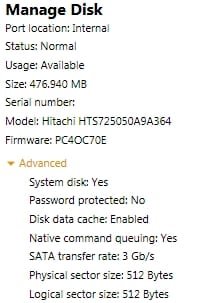
3. Does RST report NCQ enabled, etc?
4. Did you change the performance role - ie, background vs. foreground apps?
5. Drive alignment - since you mentioned you have cloned the drives, just wondering if the drive offset did not get done
Hi

I'll try answering your questions but I'm afraid I'll need some help from you
1. I don't have access to this part of the BIOS. It is very limited as on most notebooks
2. I haven't done anything manually, apart from updating the RST drivers...
3. Yes, attached is the complete info from RST.
4. What do you mean?
5. Don't understand this one either...

Attachments
My Computer
- OS
- Windows 7 Pro x64