Solved Administrator Sharing Security Permissions Ownership

effjay

New member
Local time
10:37 AM
Messages
17
I believe I have a unique problem since I have searched this forum and have found nothing like it.

My account is an administrator & have no other accounts. I originally set up a homegroup between my 2 laptop PCs but have deleted the homegroup since I can't get the network sharing to work.

When I look at the Network list from Computer A, I can see both Computer A & Computer B. Since I am sharing the User Folder I can see both A & B, open both A & B and when I look at the Properties I see the dialog box immediately and the Computer A Properties has both Security & Sharing tabs, Computer B Propertes has only the Security tab which I believe is correct.

Computer B is entirely different. Again both computers only have adminstrator accounts.

When I look at the Network list from Computer B, I can see both Computer B & Computer A. Since I am sharing the User Folder I can see both B & A, I can open A's User Folder but not B's (its own folder) and when I look at the Properties I see the dialog box of A immediately and the Computer A Properties has Security tab only (as it did above) & Sharing tabs, Computer B Properites (its oen User Folder) takes a long time to open & it Properities only show the Sharing tab, not the Security Tab. Since I can't see the Security tab I can't change the sharing. The Permissions & Ownership look correct. How can I get the Security Tab back.

I have tried sttting the UAC to never notify, but this doesn't do it. I have tried a system restore & it doesn't help.

Oh I can go to the C: drive & access B's files so I'm not really hung up, but I don't understand why there is no security taab even though I am the administrator. I'm hop[ing its just a regustry key.

Thanks for listening
 

My Computer My Computer

At a glance

windows 7
OS
windows 7
Sounds like a permissions problem, but I am not positive.

Please post screen shots of the share on both machines, the folder on both machines, the permissions on the folder on both machines.

Thanks -WS
 

My Computer My Computer

At a glance

Windows 7 Enterprise (x64); Windows Server 20...16GB
Computer type
PC/Desktop
Computer Manufacturer/Model Number
Dell OP7010
OS
Windows 7 Enterprise (x64); Windows Server 2008 R2 (x64)
Memory
16GB
Monitor(s) Displays
4 Dell 24" LCD
Screen Resolution
1280x1024
Keyboard
Dell
Mouse
Dell Optical
Internet Speed
40meg
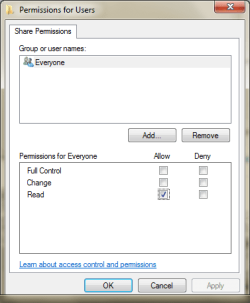
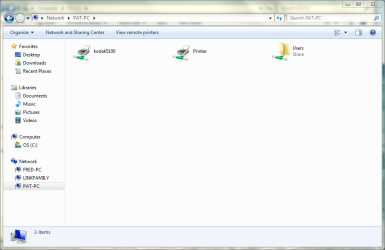
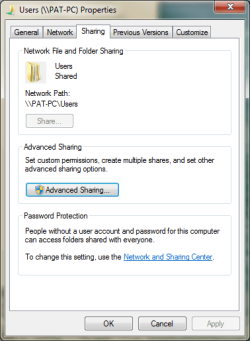
Here are the screen shots from the offending computer
 

Attachments

  • PatyPermissions.PNG
    PatyPermissions.PNG
    10.4 KB · Views: 6
  • PatFolders.PNG
    PatFolders.PNG
    35.2 KB · Views: 9
  • PatProperties.PNG
    PatProperties.PNG
    12.3 KB · Views: 10
  • PatSharing.PNG
    PatSharing.PNG
    14.3 KB · Views: 7

My Computer My Computer

At a glance

windows 7
OS
windows 7
Do you have a security tab??? What version of Windows 7 is this?
 

My Computer My Computer

At a glance

Windows 7 Enterprise (x64); Windows Server 20...16GB
Computer type
PC/Desktop
Computer Manufacturer/Model Number
Dell OP7010
OS
Windows 7 Enterprise (x64); Windows Server 2008 R2 (x64)
Memory
16GB
Monitor(s) Displays
4 Dell 24" LCD
Screen Resolution
1280x1024
Keyboard
Dell
Mouse
Dell Optical
Internet Speed
40meg
I'm not home right now, so I will check the version - But yes my problem seems to be no security tab even though I'm the administrator
 

My Computer My Computer

At a glance

windows 7
OS
windows 7
Windows 7 Home Premium Edition
 

My Computer My Computer

At a glance

windows 7
OS
windows 7
If you allowed the C drive to be shared with Everyone using Properties>security permissions tab it would override the security on the User folder which might pervent the Security tab from being shown on the User folder. So maybe you should try to "unshare" the C drive by using the Security settings tab and see if that restores your Security tab on the User folder.

It's safer from a Security stand point to share the User folder rather than the entire drive.
 

My Computer My Computer

At a glance

Windows 7 Ult, Windows 8.1 Pro,Q9650-4.275GHz, E8600 4.5GHz, E6750-3.8GHzG.Skill PC2 9600 1200Mhz 5 5 5 15 2TGTX480
Computer type
PC/Desktop
Computer Manufacturer/Model Number
Home built
OS
Windows 7 Ult, Windows 8.1 Pro,
CPU
Q9650-4.275GHz, E8600 4.5GHz, E6750-3.8GHz
Motherboard
Evga 780i FTW
Memory
G.Skill PC2 9600 1200Mhz 5 5 5 15 2T
Graphics Card(s)
GTX480
Sound Card
Asus Xonar D2
Monitor(s) Displays
HannsG
Screen Resolution
1680X1050
Hard Drives
GSkill Phoenix Pro 120GB SSD
PSU
ThermalTake Toughpower 1000Watt modular
Case
ThermalTake XaserV
Cooling
Xigmatek S1283
Keyboard
Logitech G15
Mouse
Logitech G9
Internet Speed
T1
If you allowed the C drive to be shared with Everyone using Properties>security permissions tab it would override the security on the User folder which might pervent the Security tab from being shown on the User folder. So maybe you should try to "unshare" the C drive by using the Security settings tab and see if that restores your Security tab on the User folder.

It's safer from a Security stand point to share the User folder rather than the entire drive.

+1 :)
 

My Computer My Computer

At a glance

Windows 7 Enterprise (x64); Windows Server 20...16GB
Computer type
PC/Desktop
Computer Manufacturer/Model Number
Dell OP7010
OS
Windows 7 Enterprise (x64); Windows Server 2008 R2 (x64)
Memory
16GB
Monitor(s) Displays
4 Dell 24" LCD
Screen Resolution
1280x1024
Keyboard
Dell
Mouse
Dell Optical
Internet Speed
40meg
OK I'll try that tonight.

What about the fact that in the Permissions Dialog Box only Everyone is shown? Is that normal?
 

My Computer My Computer

At a glance

windows 7
OS
windows 7
OK I'll try that tonight.

What about the fact that in the Permissions Dialog Box only Everyone is shown? Is that normal?

Everyone is normal, however it is normal that all the boxes are checked by default. If you made changes then that is reflected as only the READ is checked.
 

My Computer My Computer

At a glance

Windows 7 Enterprise (x64); Windows Server 20...16GB
Computer type
PC/Desktop
Computer Manufacturer/Model Number
Dell OP7010
OS
Windows 7 Enterprise (x64); Windows Server 2008 R2 (x64)
Memory
16GB
Monitor(s) Displays
4 Dell 24" LCD
Screen Resolution
1280x1024
Keyboard
Dell
Mouse
Dell Optical
Internet Speed
40meg
OK I am not sharing my C Drive - so that didn't work. I noticed that my Share button in the Dialog Box Sharing Tab is grayed out so I can't do sharing - how do you get this button to start sharing again?
 

My Computer My Computer

At a glance

windows 7
OS
windows 7
Hi,
Please disable your third party security software like antivirus software\firewall to check the result first.
Regarding to the grayed out button, if you disable File haring Wizard on Windows 7, the Share would be grayed out.Windows 7 File Sharing Wizard is similar to XP Simple File Sharing. By default, File Sharing Wizard is enabled. To disable/re-enable it, please follow these steps.
1. Open Control Panel>Classic Viewer>Folder Options or Windows Explorer>Organize>Folder and Search Options..
2. Click on the View tab.
3. Uncheck/check the Use Sharing Wizard (Recommended) box. "you want to leave it checked.
Note: After disabling the File Sharing Wizard, the Share option under Sharing tab will also be grayed out.
Found here> Win 7 / Win networking

If that is already checked then check in your Advanced Sharing Settings window and make sure that file and printer sharing is turned on.
 

My Computer My Computer

At a glance

Windows 7 Ult, Windows 8.1 Pro,Q9650-4.275GHz, E8600 4.5GHz, E6750-3.8GHzG.Skill PC2 9600 1200Mhz 5 5 5 15 2TGTX480
Computer type
PC/Desktop
Computer Manufacturer/Model Number
Home built
OS
Windows 7 Ult, Windows 8.1 Pro,
CPU
Q9650-4.275GHz, E8600 4.5GHz, E6750-3.8GHz
Motherboard
Evga 780i FTW
Memory
G.Skill PC2 9600 1200Mhz 5 5 5 15 2T
Graphics Card(s)
GTX480
Sound Card
Asus Xonar D2
Monitor(s) Displays
HannsG
Screen Resolution
1680X1050
Hard Drives
GSkill Phoenix Pro 120GB SSD
PSU
ThermalTake Toughpower 1000Watt modular
Case
ThermalTake XaserV
Cooling
Xigmatek S1283
Keyboard
Logitech G15
Mouse
Logitech G9
Internet Speed
T1
I tried The File Sharing Wizard and it somewhat worked, but instead of placing the shared Folder within the Users Folder, it was put at the same level as the Users Folder. For example it was \\Computer\Share rather than \\Computer\Users\Share. And I still can't access my own Network Users Folder and it still takes forever to access Properties.

Also when trying to file share I was getting the "your Folder could not be shared" error. It is very annoying, since it was obvious the folder was not shared, what I need to know is why???
 

My Computer My Computer

At a glance

windows 7
OS
windows 7

My Computer My Computer

At a glance

Windows 7 Enterprise (x64); Windows Server 20...16GB
Computer type
PC/Desktop
Computer Manufacturer/Model Number
Dell OP7010
OS
Windows 7 Enterprise (x64); Windows Server 2008 R2 (x64)
Memory
16GB
Monitor(s) Displays
4 Dell 24" LCD
Screen Resolution
1280x1024
Keyboard
Dell
Mouse
Dell Optical
Internet Speed
40meg
Sorry for the delay in completing this string of messages.

I finally got things to work

I used file sharing wizard to set up which folders I wanted to share & when I disabled the McAfee Firewall everything worked. So I went into the mcAfee settings & reverted to the default settings & turned the Firewall back on & all of my shared folders were available for sharing.

I guess I was very stubborn :p in thinking that the firewall was not the problem since my other computer worked without any issues. So reverting to the defaults made everything work :D

Thanks for all the help
;)

Not sure how to indicate that my problem was solved??
 

My Computer My Computer

At a glance

windows 7
OS
windows 7
I requested this to be marked as resolved. Thanks, glad everything is working.
 

My Computer My Computer

At a glance

Windows 7 Enterprise (x64); Windows Server 20...16GB
Computer type
PC/Desktop
Computer Manufacturer/Model Number
Dell OP7010
OS
Windows 7 Enterprise (x64); Windows Server 2008 R2 (x64)
Memory
16GB
Monitor(s) Displays
4 Dell 24" LCD
Screen Resolution
1280x1024
Keyboard
Dell
Mouse
Dell Optical
Internet Speed
40meg
I tried The File Sharing Wizard and it somewhat worked, but instead of placing the shared Folder within the Users Folder, it was put at the same level as the Users Folder. For example it was \\Computer\Share rather than \\Computer\Users\Share. And I still can't access my own Network Users Folder and it still takes forever to access Properties.

Also when trying to file share I was getting the "your Folder could not be shared" error. It is very annoying, since it was obvious the folder was not shared, what I need to know is why???

Hi,
Please disable your third party security software like antivirus software\firewall to check the result first.
Regarding to the grayed out button, if you disable File haring Wizard on Windows 7, the Share would be grayed out.Windows 7 File Sharing Wizard is similar to XP Simple File Sharing. By default, File Sharing Wizard is enabled. To disable/re-enable it, please follow these steps.
1. Open Control Panel>Classic Viewer>Folder Options or Windows Explorer>Organize>Folder and Search Options..
2. Click on the View tab.
3. Uncheck/check the Use Sharing Wizard (Recommended) box. "you want to leave it checked.
Note: After disabling the File Sharing Wizard, the Share option under Sharing tab will also be grayed out.
Found here> Win 7 / Win networking

If that is already checked then check in your Advanced Sharing Settings window and make sure that file and printer sharing is turned on.

It's no wonder I do not trust real time A/V's, looks like disabling McAfee helped. Glad you have this fixed.
 

My Computer My Computer

At a glance

Windows 7 Ult, Windows 8.1 Pro,Q9650-4.275GHz, E8600 4.5GHz, E6750-3.8GHzG.Skill PC2 9600 1200Mhz 5 5 5 15 2TGTX480
Computer type
PC/Desktop
Computer Manufacturer/Model Number
Home built
OS
Windows 7 Ult, Windows 8.1 Pro,
CPU
Q9650-4.275GHz, E8600 4.5GHz, E6750-3.8GHz
Motherboard
Evga 780i FTW
Memory
G.Skill PC2 9600 1200Mhz 5 5 5 15 2T
Graphics Card(s)
GTX480
Sound Card
Asus Xonar D2
Monitor(s) Displays
HannsG
Screen Resolution
1680X1050
Hard Drives
GSkill Phoenix Pro 120GB SSD
PSU
ThermalTake Toughpower 1000Watt modular
Case
ThermalTake XaserV
Cooling
Xigmatek S1283
Keyboard
Logitech G15
Mouse
Logitech G9
Internet Speed
T1
Back
Top