Hi im having the same problem as everyone else in here. The sound on my Gateway MX7118 is very choppy during playback unless the program is minimized.
I've tried the links posted but most aren't working and the ones that are dont resolve the problem. Hopefully you can help me as i cant seem to solve this on my own.
The hardware ID's
PCI\VEN_1002&DEV_4370&SUBSYS_0506107B&REV_02
PCI\VEN_1002&DEV_4370&SUBSYS_0506107B
PCI\VEN_1002&DEV_4370&CC_040100
PCI\VEN_1002&DEV_4370&CC_0401
Thank you in advance if you can find the drivers. You seem to be a big help around here.
GBreaux
I'm going to kindof pre-write my next tutorial here so other folks can see how I find these drivers. Ready? Let's go...
First we use the instructions that everyone seems well trained by now to follow -- get me the list of Plug and Play IDs. Folks seem to have that down. Now which to use?
PCI\VEN_1002&DEV_4370&SUBSYS_0506107B
You're looking for a version independent string with subsystem if possible.
PCI\VEN_1002&DEV_4370&SUBSYS_0506107B&REV_02 has a version (revision 2) so we don't want to get THAT specific yet if we don't have to.
The subsystem insures that we are getting the right driver for hardware that might implement several functions. Voice/FAX/Data Modems are notorious for that as they can be seen as software COM: ports, audio adapters, digital signal processors, and of course modems!

The subsystem lets us zero in on the actual driver needed rather than having to install some monolithic package installing drivers for all subsystems that typically will NOT work in Windows 7. And that's not how Microsoft Update Catalog works anyway!
What's "Microsoft Update Catalog"? Open Internet Explorer. No, Firefox won't work and don't start whining about anti-trust or even thing about typing "M$" or I'll choose to simply disappear and stop helping
"Microsoft Update Catalog" used to be an internal repository of drivers that had attained WHQL certification but, as many of you know, the hardware business is rather twisty-turny and often one chip ends up in hardware with a LOT of different vendor names on it. So, rather than indexing by just hardware make and model, they started indexing by PnP ID to eliminate dupes. If you open
Microsoft Update Catalog , again in Internet Explorer, and accept all the ActiveX prompts you should see blue screen with a single text box:

Just paste your PnP ID as chosen above in there and press Search. In this case it came back with a big 'ole NOTHING. So lets see who really makes this hardware. Let's head over to the PCI Database. Please note if your PnP ID string starts with something other than "PCI\" you'll need to wait for the full version of this tutorial...
Hit
PCI Vendor and Device Lists (any browser will do) and decompose the rest of your PnP ID string thusly:
PCI\VEN_
1002&DEV_
4370&SUBSYS_0506107B
Enter the two values into the
vendor and
device boxes on the PCI Database webpage. Press search and we see:
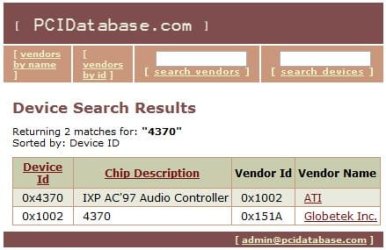
It's an ATI part "IXP AC'97 Audio Controller" telling me that you've got a motherboard based on the ATI 9100 IGP
Radeon 9100 IGP Even if you'd not listed anything in your hardware profile on this site I'd have enough to go on to find 90% of the drivers you need for Windows 7. PnP IDs are GOLD!
Let's remove the subsystem part from the PnP ID and resubmit to the Catalog now. We'll browse the available drivers and look for one that mentions ATI, IXP or 9100 IGP. Start Internet Explorer, go back to
Microsoft Update Catalog , enter
PCI\VEN_1002&DEV_4370 "windows 7"
and click Search. Now sort by the last updated column and examine the version column. Usually (not always) that will also bring the highest version to the top as well. In this case it did:
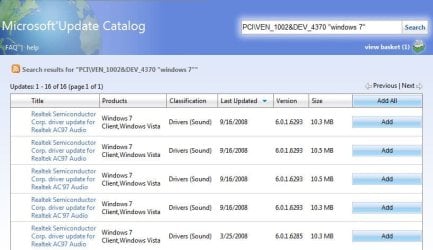
Now we just click the links at the left to examine the driver packages:
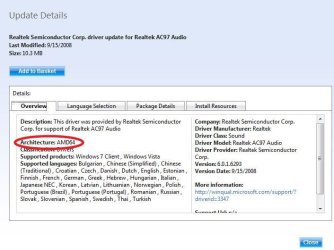
You didn't say if you were using 32 or 64 bit Windows 7 (or even what version) so I'm going to leave the rest up to you to choose which driver is best for your machine. Just add the drivers you want to try to your basket and download them all at once. You'll find a lot of dupes in some cases -- here the same driver is duplicated twice -- once under "ac97" and again under "ac'97". Check the driver cab hashes with something like 7zip to make sure they are indeed duplicates to be sure. Then just expand the remaining cabs to descriptively named folders and use device manager to try them out. If a particular driver installs OK but doesn't work right remember to use the device manager rollback feature to prevent leaving nasty junk behind when trying out the next driver.
In this case I'm guessing that you'll be wanting the 32-bit as even though your hardware can theoretically support 64-bit the RAM limitations of your laptop hardware negate any advantage.
Please post back with suggestions, etc. as I'm going to use this post as a source for my next tutorial...



