SO close - Conexant AC-Link Audio Driver

Hi im having the same problem as everyone else in here. The sound on my Gateway MX7118 is very choppy during playback unless the program is minimized.

I've tried the links posted but most aren't working and the ones that are dont resolve the problem. Hopefully you can help me as i cant seem to solve this on my own.

The hardware ID's

PCI\VEN_1002&DEV_4370&SUBSYS_0506107B&REV_02
PCI\VEN_1002&DEV_4370&SUBSYS_0506107B
PCI\VEN_1002&DEV_4370&CC_040100
PCI\VEN_1002&DEV_4370&CC_0401

Thank you in advance if you can find the drivers. You seem to be a big help around here.

GBreaux
 

My Computer My Computer

OS
Windows 7 ultimate
Hi im having the same problem as everyone else in here. The sound on my Gateway MX7118 is very choppy during playback unless the program is minimized.

I've tried the links posted but most aren't working and the ones that are dont resolve the problem. Hopefully you can help me as i cant seem to solve this on my own.

The hardware ID's

PCI\VEN_1002&DEV_4370&SUBSYS_0506107B&REV_02
PCI\VEN_1002&DEV_4370&SUBSYS_0506107B
PCI\VEN_1002&DEV_4370&CC_040100
PCI\VEN_1002&DEV_4370&CC_0401

Thank you in advance if you can find the drivers. You seem to be a big help around here.

GBreaux

I'm going to kindof pre-write my next tutorial here so other folks can see how I find these drivers. Ready? Let's go...

First we use the instructions that everyone seems well trained by now to follow -- get me the list of Plug and Play IDs. Folks seem to have that down. Now which to use?

PCI\VEN_1002&DEV_4370&SUBSYS_0506107B

You're looking for a version independent string with subsystem if possible.

PCI\VEN_1002&DEV_4370&SUBSYS_0506107B&REV_02 has a version (revision 2) so we don't want to get THAT specific yet if we don't have to.

The subsystem insures that we are getting the right driver for hardware that might implement several functions. Voice/FAX/Data Modems are notorious for that as they can be seen as software COM: ports, audio adapters, digital signal processors, and of course modems! ;) The subsystem lets us zero in on the actual driver needed rather than having to install some monolithic package installing drivers for all subsystems that typically will NOT work in Windows 7. And that's not how Microsoft Update Catalog works anyway!

What's "Microsoft Update Catalog"? Open Internet Explorer. No, Firefox won't work and don't start whining about anti-trust or even thing about typing "M$" or I'll choose to simply disappear and stop helping ;)

"Microsoft Update Catalog" used to be an internal repository of drivers that had attained WHQL certification but, as many of you know, the hardware business is rather twisty-turny and often one chip ends up in hardware with a LOT of different vendor names on it. So, rather than indexing by just hardware make and model, they started indexing by PnP ID to eliminate dupes. If you open Microsoft Update Catalog , again in Internet Explorer, and accept all the ActiveX prompts you should see blue screen with a single text box:
Capture.JPG
Just paste your PnP ID as chosen above in there and press Search. In this case it came back with a big 'ole NOTHING. So lets see who really makes this hardware. Let's head over to the PCI Database. Please note if your PnP ID string starts with something other than "PCI\" you'll need to wait for the full version of this tutorial...

Hit PCI Vendor and Device Lists (any browser will do) and decompose the rest of your PnP ID string thusly:

PCI\VEN_1002&DEV_4370&SUBSYS_0506107B

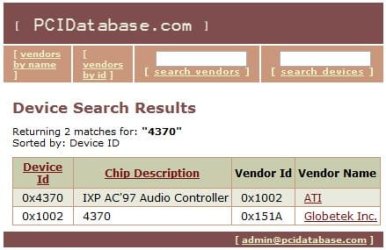
Enter the two values into the vendor and device boxes on the PCI Database webpage. Press search and we see:Capture2.JPG

It's an ATI part "IXP AC'97 Audio Controller" telling me that you've got a motherboard based on the ATI 9100 IGP Radeon 9100 IGP Even if you'd not listed anything in your hardware profile on this site I'd have enough to go on to find 90% of the drivers you need for Windows 7. PnP IDs are GOLD!

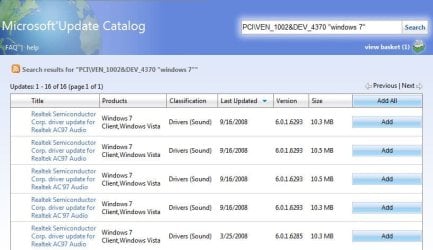
Let's remove the subsystem part from the PnP ID and resubmit to the Catalog now. We'll browse the available drivers and look for one that mentions ATI, IXP or 9100 IGP. Start Internet Explorer, go back to Microsoft Update Catalog , enter

PCI\VEN_1002&DEV_4370 "windows 7"

and click Search. Now sort by the last updated column and examine the version column. Usually (not always) that will also bring the highest version to the top as well. In this case it did:Capture3.JPG

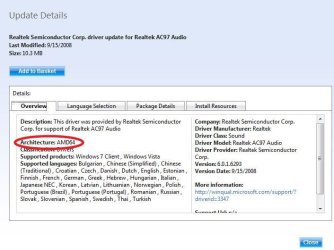
Now we just click the links at the left to examine the driver packages:Capture4.JPG

You didn't say if you were using 32 or 64 bit Windows 7 (or even what version) so I'm going to leave the rest up to you to choose which driver is best for your machine. Just add the drivers you want to try to your basket and download them all at once. You'll find a lot of dupes in some cases -- here the same driver is duplicated twice -- once under "ac97" and again under "ac'97". Check the driver cab hashes with something like 7zip to make sure they are indeed duplicates to be sure. Then just expand the remaining cabs to descriptively named folders and use device manager to try them out. If a particular driver installs OK but doesn't work right remember to use the device manager rollback feature to prevent leaving nasty junk behind when trying out the next driver.

In this case I'm guessing that you'll be wanting the 32-bit as even though your hardware can theoretically support 64-bit the RAM limitations of your laptop hardware negate any advantage.

Please post back with suggestions, etc. as I'm going to use this post as a source for my next tutorial...

 

My Computer My Computer

Computer type
Laptop
Computer Manufacturer/Model Number
Apple
OS
El Capitan / Windows 10
CPU
i7-4980HQ
Memory
16GB
Graphics Card(s)
Iris 5200
Hello SevenForums! This is my first post!

Anyway, I am posting here out of desperation.

baarod I have followed your entire guide and tried to install, probably close to 20 different drivers. :confused:

If possible could you point me in the right direction.

My PCI # is as follows:

PCI\VEN_1002&DEV_4370&SUBSYS_309B103C&REV_02
PCI\VEN_1002&DEV_4370&SUBSYS_309B103C
PCI\VEN_1002&DEV_4370&CC_040100
PCI\VEN_1002&DEV_4370&CC_0401

It is called a "multimedia audio controller".

I have windows 7 RC x64. This driver would be for my Pavilion dv8000.

If you can't help me perhaps you can point me to someone who can.

Thanks in advance.
 

My Computer My Computer

OS
Windows 7 x64
Hello SevenForums! This is my first post!

Anyway, I am posting here out of desperation.

baarod I have followed your entire guide and tried to install, probably close to 20 different drivers. :confused:

If possible could you point me in the right direction.

My PCI # is as follows:

PCI\VEN_1002&DEV_4370&SUBSYS_309B103C&REV_02
PCI\VEN_1002&DEV_4370&SUBSYS_309B103C
PCI\VEN_1002&DEV_4370&CC_040100
PCI\VEN_1002&DEV_4370&CC_0401

It is called a "multimedia audio controller".

I have windows 7 RC x64. This driver would be for my Pavilion dv8000.

If you can't help me perhaps you can point me to someone who can.

Thanks in advance.

Please don't ever buy HP again. Their driver support sux. Conexant AC97 Audio Driver for Microsoft Windows Vista (64-bit) - HP Business Support Center
 

My Computer My Computer

Computer type
Laptop
Computer Manufacturer/Model Number
Apple
OS
El Capitan / Windows 10
CPU
i7-4980HQ
Memory
16GB
Graphics Card(s)
Iris 5200
Thank you for trying baarod, but I am afraid that one does work either.
Everytime I try installing it I get this error message:

"Driver Installation Failed: Could not find the MEDIA device for this driver."

If it helps I my model number is ET834UA#ABA

Also a random bit, but I was successful in installing a realtek driver, however it also was unable to make my card work.

Thank you if decided to continue to aid me, and if not then thanks for trying. :)


P.S. It was a hand-me-down computer...
 

My Computer My Computer

OS
Windows 7 x64
Nevermind I have decided to go back to XP:(

This problem has already cost me the better part of 2 days.
 

My Computer My Computer

OS
Windows 7 x64
Thanks for the tutorial and answers, but sadly, when i installed the RC i then uninstalled IE. Upon reading this i tried to reinstall IE 8 but when i do i get told that it wont work on this operating system. I searched around a bit and it looks like you cant download the Windows 7 IE8 version. So i cant even fix my drivers unless i find a way to either get IE8 to work properly or reinstall the RC, which isnt going to happen anytime soon

Thanks again
 

My Computer My Computer

OS
Windows 7 ultimate
Thanks for the tutorial and answers, but sadly, when i installed the RC i then uninstalled IE. Upon reading this i tried to reinstall IE 8 but when i do i get told that it wont work on this operating system. I searched around a bit and it looks like you cant download the Windows 7 IE8 version. So i cant even fix my drivers unless i find a way to either get IE8 to work properly or reinstall the RC, which isnt going to happen anytime soon

Thanks again

How did you "uninstall" IE? In the "Turn Windows Features On or Off" dialog or some third party hack? If the former is true, you can just click it back on...
 

My Computer My Computer

Computer type
Laptop
Computer Manufacturer/Model Number
Apple
OS
El Capitan / Windows 10
CPU
i7-4980HQ
Memory
16GB
Graphics Card(s)
Iris 5200
nope went into the programs menu and uninstalled it, Thinking i would never need it again.
 

My Computer My Computer

OS
Windows 7 ultimate
Doesn't show up there on legit copies of 7. It's part of Windows so it's in the Turn Windows Features On or Off dialog. You might have got a hacked copy of 7?
 

My Computer My Computer

Computer type
Laptop
Computer Manufacturer/Model Number
Apple
OS
El Capitan / Windows 10
CPU
i7-4980HQ
Memory
16GB
Graphics Card(s)
Iris 5200
You're right, i turned it off, i dont know why i though i uninstalled it...uhhh. thanks again, gonna try doing the driver thing now.

/sigh
 

My Computer My Computer

OS
Windows 7 ultimate
Baarod's method worked for me, plus I learned a little something new about PnP IDs.

Thank you. ^^
 

My Computer My Computer

OS
Windows 7
Nevermind I have decided to go back to XP:(

This problem has already cost me the better part of 2 days.

Have fun with your obsolete OS. Not sure why the installer was complaining but just had another use report that simply using 7zip to expand the self-extracting archive and installing drivers manually from there worked fine.
 

My Computer My Computer

Computer type
Laptop
Computer Manufacturer/Model Number
Apple
OS
El Capitan / Windows 10
CPU
i7-4980HQ
Memory
16GB
Graphics Card(s)
Iris 5200
Works for me... I have the DV8013cl (DV8000 variant)

simple, I just downloaded and installed 7Zip 64 bit msi

then, downloaded the file from HERE

use 7zip to extract it.
go to device manager,
right click the device,
select update device driver.
select 'Browse my computer for driver software'.
click 'let me pick from a list...'
scroll down select sound, video and game controlers
click 'have disk'
click browse and navigate to the folder containg the file called cp6308Ba.inf
click open
click ok
If asked about it not being the right driver just force it and it works.

Thanks for this thread guys. I have had Win7 installed for about 30 mins now and already I'm a guru hahahaha:p
 

My Computer My Computer

OS
7
fidel, I don't get it. you are saying to extract a file that is not even zipped. The link you left above is to download a executable file (.EXE) and not .zip or something like that. How should I proceed?? I would like so much having sound from my HP EC365VA#ABA. Thanks.:geek:
 

My Computer My Computer

Computer Manufacturer/Model Number
HP Pavilion zv6270us
OS
Windows 7 Ultimate x64
CPU
AMD64 Athlon
Motherboard
Hewlett-Packard Pavilion ZV6100 (EC365UA#ABA)
Memory
1.50 GB
Graphics Card(s)
ATI
Sound Card
Conexant Cx20468 @ ATI SB400 - AC'97 Audio Controller PCI
Monitor(s) Displays
ATI Radeon Xpress 200M (RS480M) 3D Accelerator
Screen Resolution
1280 x 800
Hard Drives
ST9100822A ATA Device
Internet Speed
768 kbps download 128 kbps upload
Other Info
ATI SB400 AC 97 Modem

Mass Storage Controller's Hardware ID:

PCI\VEN_104C&DEV_8033&SUBSYS_3085103C&REV_00
PCI\VEN_104C&DEV_8033&SUBSYS_3085103C
PCI\VEN_104C&DEV_8033&CC_018000
PCI\VEN_104C&DEV_8033&CC_0180
Baarod, I really can't find my driver. I followed ur tutorial, but I downloaded only incompletes drivers, I mean, once I downloaded, I don't know wich icon to click, I tried everyone, dozn't work :( How can I find drivers for HP pavilion ZV6270us ?? (EC365VA#ABA) PCI\VEN_1002&DEV_4370 I got no sound at all :cry:
 
Last edited:

My Computer My Computer

Computer Manufacturer/Model Number
HP Pavilion zv6270us
OS
Windows 7 Ultimate x64
CPU
AMD64 Athlon
Motherboard
Hewlett-Packard Pavilion ZV6100 (EC365UA#ABA)
Memory
1.50 GB
Graphics Card(s)
ATI
Sound Card
Conexant Cx20468 @ ATI SB400 - AC'97 Audio Controller PCI
Monitor(s) Displays
ATI Radeon Xpress 200M (RS480M) 3D Accelerator
Screen Resolution
1280 x 800
Hard Drives
ST9100822A ATA Device
Internet Speed
768 kbps download 128 kbps upload
Other Info
ATI SB400 AC 97 Modem

Mass Storage Controller's Hardware ID:

PCI\VEN_104C&DEV_8033&SUBSYS_3085103C&REV_00
PCI\VEN_104C&DEV_8033&SUBSYS_3085103C
PCI\VEN_104C&DEV_8033&CC_018000
PCI\VEN_104C&DEV_8033&CC_0180
Had same issue and found solution...

Hi,

I spent some time trying to resolve the driver issue with the Conexant AC-Link Audio driver too. The only one I could find related to my Presario V2000 would fail to install.

So I tried them all. I simply searched HP for all versions of the driver. I installed sp34885.exe which failed. Then I downloaded sp34789.exe which offered to upgrade the existing failed driver. I opted for yes and it installed successfully. I now have sound.

Hope this works for other.

Cheers...
 

My Computer My Computer

OS
Windows 7
fidel, I don't get it. you are saying to extract a file that is not even zipped. The link you left above is to download a executable file (.EXE) and not .zip or something like that. How should I proceed?? I would like so much having sound from my HP EC365VA#ABA. Thanks.:geek:

Its a self extracting file, basically a compressed file (zip, rar, 7zip) that is saved as a self extracting exe.

Use WinRAR or 7zip choose the exe file and extract it.
 

My Computer My Computer

OS
Windows x64
An easier way to find out what your missing devices are is to just copy the device id into Google.
 

My Computer My Computer

OS
Windows x64
Fidel your amanzing thank you so much IT WORKED! I have a HP pavilion dv8000 labtop and i was thinking it was going to be a hopeless cause to fix and i was going to have to go back to XP. Thank you so much!
 
Last edited:

My Computer My Computer

OS
Windows 7 64 bit
Back
Top