
What is GoogleUpdate in the task manager?

Thanks guys, but there is a problem, look at the screen-shot for the error message. Like I said, everything Google has already been uninstalled. The service itself does not exist anymore, but the entry in the list does. So technically I do not need to delete the service, but rather the entry in the services list, if that makes sense.
 

Attachments
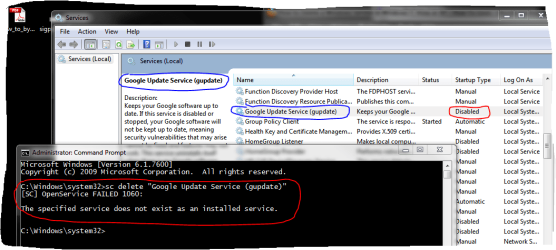
  • Capture.PNG
    Capture.PNG
    39.4 KB · Views: 28

My Computer My Computer

At a glance

Windows 7 Ultimate (x64)Q66008 GBATI Radeon HD 2600 XT
Computer Manufacturer/Model Number
Dell Inspiron 530
OS
Windows 7 Ultimate (x64)
CPU
Q6600
Memory
8 GB
Graphics Card(s)
ATI Radeon HD 2600 XT
Monitor(s) Displays
Samsung Syncmaster P2450
Screen Resolution
1920x1080
Hard Drives
Samsung HD103UJ
Samsung HD501LJ
Internet Speed
25 Mb/s
The extensions are the best part of FF, plus the extensive customisation possible.
Not only extensions, I also think Mozilla is more honest than Google which becomes more and more financial tyrannic, imposing what it wants!
Except the simple and beautiful user interface in chrome, FF is much better in my mind!
 

My Computer My Computer

At a glance

windows
OS
windows
Google updater uses very little memory, but if you did want to disable it you can do so through msconfig by unchecking the box under the startup tab.

It is not memory matter but principle matter!
Why we can't get rid off this service? Why google imposes it?
Google now replaces Microsoft in its old and bad policy in forcing people to install and undergo what they don't necessarily appreciate!
 

My Computer My Computer

At a glance

windows
OS
windows
Thanks guys, but there is a problem, look at the screen-shot for the error message. Like I said, everything Google has already been uninstalled. The service itself does not exist anymore, but the entry in the list does. So technically I do not need to delete the service, but rather the entry in the services list, if that makes sense.

What this means is that one or more Registry keys were not removed during uninstall. This is why we recommend using Revo Uninstaller in Advanced mode, not restarting if prompted until you click Next to delete all of the bolded leftover Reg Keys and files.

To correct this now, reinstall the Program and Updater then uninstall it completely using Revo in Advanced mode. Google Updater may appear as a separate program.

Google Updater is deliberately left in Registry to spy on you.
 
Thanks guys, but there is a problem, look at the screen-shot for the error message. Like I said, everything Google has already been uninstalled. The service itself does not exist anymore, but the entry in the list does. So technically I do not need to delete the service, but rather the entry in the services list, if that makes sense.
Thats not the name of the service, you are entering it wrong. Please check, I think it would either be gupdate or gusvc.
 

My Computer My Computer

At a glance

Windows 7 x64 pro/ Windows 7 x86 Pro/ XP SP3 x86
Computer Manufacturer/Model Number
Too many to describe...
OS
Windows 7 x64 pro/ Windows 7 x86 Pro/ XP SP3 x86
Google Updater is deliberately left in Registry to spy on you.
Yes, I think so too!
Plus, Google Chrome install secretly! You don' see anything! We can't download the exe file but it is google which does every thing at your place!
You download a tiny file of somme Ko, and the rest Google in charge! This would be spy, scan your machine while installing (as you don't see anything!)...etc.

More and more google lacks transparency!
What a hateful google!
 

My Computer My Computer

At a glance

windows
OS
windows
Not necessarily. I believe they still try to comport with their motto to "Do No Evil," however they are easily able to justify gathering marketing data from users to "improve" their services - as do other companies hungry for income from reselling this data.

The Updater gives them a lifeline to your computer, as does keeping signed into Google when doing searches.

It is generally a good policy to not allow these Updaters to phone home from your computer. The programs will notify you if they need an update when you run them. Otherwise keep them out of the msconfig>Startup list. http://www.sevenforums.com/tutorials/1401-startup-programs-change.html
 
Thats not the name of the service, you are entering it wrong. Please check, I think it would either be gupdate or gusvc.


Right, thank you Bill! SC delete "gupdate" worked. No more Google Update service. Thanks again!
 

My Computer My Computer

At a glance

Windows 7 Ultimate (x64)Q66008 GBATI Radeon HD 2600 XT
Computer Manufacturer/Model Number
Dell Inspiron 530
OS
Windows 7 Ultimate (x64)
CPU
Q6600
Memory
8 GB
Graphics Card(s)
ATI Radeon HD 2600 XT
Monitor(s) Displays
Samsung Syncmaster P2450
Screen Resolution
1920x1080
Hard Drives
Samsung HD103UJ
Samsung HD501LJ
Internet Speed
25 Mb/s
Right, thank you Bill! SC delete "gupdate" worked. No more Google Update service. Thanks again!

Even after restart your system? Did you check it after restart your OS? it may come back !
 

My Computer My Computer

At a glance

windows
OS
windows
Back
Top