The partition table does not have a valid system partition

polorsport

New member
Member
Local time
8:17 AM
Messages
67
OK, one of two things has screwed up my pc.

1. I opened my pc to clean all the dust bunnies, which I do every 6 months (customer pc from 07). I installed two new 2 tb western digital caviar blacks I got from target via the essentials deal.

2. A few hours ago I extended the volume of my e: for some reason there was almost 100 gigs unallocated. I noticed it changed from normal to simple.

Now ever time I reboot my pc I get prompted to enter a boot dvd or repair disc. (Which I have).

I have done few google searches and have tried to follow the repair steps with no luck.

Can anyone please help me out. Thanks in advance.

Forgot to mention I am running Windows 7 Pro x64 OEM
 

My Computer My Computer

At a glance

windows 7 Pro x64Intel I5 2500KG.SKILL Ripjaw + Ripjaw X 16gb totalEvga 780 gtx Superclocked ACX Cooler
Computer type
PC/Desktop
Computer Manufacturer/Model Number
ME
OS
windows 7 Pro x64
CPU
Intel I5 2500K
Motherboard
ASRock Z68 PROFESSIONAL GEN3 LGA 1155 Intel Z68 HDMI SATA 6G
Memory
G.SKILL Ripjaw + Ripjaw X 16gb total
Graphics Card(s)
Evga 780 gtx Superclocked ACX Cooler
Monitor(s) Displays
Asus VG278 3D Vision 2 Monitor
Screen Resolution
1920x1080p
Hard Drives
Crucial M4 CT256M4SSD2CCA 2.5" 256GB SATA III SSD

x3 Western Digital Caviar Black WD2001FASS 2TB 7200 RPM 64MB(6TB)

Fantom Drives G-Force3 3TB Black External Hard Drive GF3B3000U (3TB)
PSU
Antec High Current Pro HCP-1200 1200W ATX12V / EPS12V SLI Re
Case
COOLER MASTER HAF 922
Cooling
Cooler Master RR-B10-212P-G1 Hyper 212 Plus
Keyboard
Microsoft X4 sidewinder
Mouse
Logitech G400
Internet Speed
5 mbps up/ 75 down
Hello polorsport.


Since you can get into Windows; and before we make any specific recommendations will you please post a snip/screen-shot of the entire disk management drive map with a full description as to which drive/partition is which, so we can see what you have going on as there may be a fairly simple way to resolve the situation.

In the Windows start menu right click computer and click manage, in the left pane of the "Computer Management" window that opens click disk management and post a snip of that.


How to Upload and Post a Screenshot and File in Seven Forums
 

My Computer My Computer

At a glance

W 7 64-bit UltimateIntel Q9550 Yorkfield8GB Dominator 8500C5DATI : XFX 5870
Computer Manufacturer/Model Number
* BFK Customs *
OS
W 7 64-bit Ultimate
CPU
Intel Q9550 Yorkfield
Motherboard
ASUS P5Q Pro
Memory
8GB Dominator 8500C5D
Graphics Card(s)
ATI : XFX 5870
Sound Card
Realtek HD Audio 7-1
Monitor(s) Displays
1x 47" LCD HDMI & 3x 26" LCD HDMI
Screen Resolution
1920x1080P & 1920x1200
Hard Drives
1x 80GB Intel X25-M G2 SSD : 1x 500GB & 1x 640GB WD Caviar Black(s)
PSU
Corsair 620HX
Case
Cooler Master RC-690
Cooling
Tuniq Tower 120, 2x 140mm and 3x 120mm case fans
Keyboard
Microsoft 500
Mouse
Razer Diamondback 3G
Internet Speed
14 Mb/s
Other Info
1x Koutech 3Gb/s SATA HDD Hot Swap Rack
Unfortunatly windows will not boot up for me. I just receive boot error to insert dvd and press enter
 

My Computer My Computer

At a glance

windows 7 Pro x64Intel I5 2500KG.SKILL Ripjaw + Ripjaw X 16gb totalEvga 780 gtx Superclocked ACX Cooler
Computer type
PC/Desktop
Computer Manufacturer/Model Number
ME
OS
windows 7 Pro x64
CPU
Intel I5 2500K
Motherboard
ASRock Z68 PROFESSIONAL GEN3 LGA 1155 Intel Z68 HDMI SATA 6G
Memory
G.SKILL Ripjaw + Ripjaw X 16gb total
Graphics Card(s)
Evga 780 gtx Superclocked ACX Cooler
Monitor(s) Displays
Asus VG278 3D Vision 2 Monitor
Screen Resolution
1920x1080p
Hard Drives
Crucial M4 CT256M4SSD2CCA 2.5" 256GB SATA III SSD

x3 Western Digital Caviar Black WD2001FASS 2TB 7200 RPM 64MB(6TB)

Fantom Drives G-Force3 3TB Black External Hard Drive GF3B3000U (3TB)
PSU
Antec High Current Pro HCP-1200 1200W ATX12V / EPS12V SLI Re
Case
COOLER MASTER HAF 922
Cooling
Cooler Master RR-B10-212P-G1 Hyper 212 Plus
Keyboard
Microsoft X4 sidewinder
Mouse
Logitech G400
Internet Speed
5 mbps up/ 75 down
OK here you go.

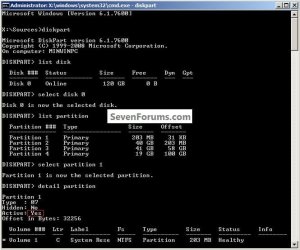
Start by disconnecting all the Hard Disk Drives (HDD) except the one with Windows 7 on it; then boot to diskpart and run these commands to see if the Windows 7 partition is "Active", if it is run the 3 separate startup repairs with the restarts to correct the boot errors; if it is not "Active" use Option Two #1 to mark it active and then run the 3 startup repairs.

Be sure to post back with any further questions you may have and to keep us informed.

Startup Repair - Run 3 Separate Times

click to enlarge
DetailPartition.jpg
 

My Computer My Computer

At a glance

W 7 64-bit UltimateIntel Q9550 Yorkfield8GB Dominator 8500C5DATI : XFX 5870
Computer Manufacturer/Model Number
* BFK Customs *
OS
W 7 64-bit Ultimate
CPU
Intel Q9550 Yorkfield
Motherboard
ASUS P5Q Pro
Memory
8GB Dominator 8500C5D
Graphics Card(s)
ATI : XFX 5870
Sound Card
Realtek HD Audio 7-1
Monitor(s) Displays
1x 47" LCD HDMI & 3x 26" LCD HDMI
Screen Resolution
1920x1080P & 1920x1200
Hard Drives
1x 80GB Intel X25-M G2 SSD : 1x 500GB & 1x 640GB WD Caviar Black(s)
PSU
Corsair 620HX
Case
Cooler Master RC-690
Cooling
Tuniq Tower 120, 2x 140mm and 3x 120mm case fans
Keyboard
Microsoft 500
Mouse
Razer Diamondback 3G
Internet Speed
14 Mb/s
Other Info
1x Koutech 3Gb/s SATA HDD Hot Swap Rack
I just want to be clear now when you say to remove all the hard disk drives except the one with windows 7 on it...I have windows 7 on both my c: and e: drives.

Also do I need to remove the install dvd that is my external dvd drive?
 

My Computer My Computer

At a glance

windows 7 Pro x64Intel I5 2500KG.SKILL Ripjaw + Ripjaw X 16gb totalEvga 780 gtx Superclocked ACX Cooler
Computer type
PC/Desktop
Computer Manufacturer/Model Number
ME
OS
windows 7 Pro x64
CPU
Intel I5 2500K
Motherboard
ASRock Z68 PROFESSIONAL GEN3 LGA 1155 Intel Z68 HDMI SATA 6G
Memory
G.SKILL Ripjaw + Ripjaw X 16gb total
Graphics Card(s)
Evga 780 gtx Superclocked ACX Cooler
Monitor(s) Displays
Asus VG278 3D Vision 2 Monitor
Screen Resolution
1920x1080p
Hard Drives
Crucial M4 CT256M4SSD2CCA 2.5" 256GB SATA III SSD

x3 Western Digital Caviar Black WD2001FASS 2TB 7200 RPM 64MB(6TB)

Fantom Drives G-Force3 3TB Black External Hard Drive GF3B3000U (3TB)
PSU
Antec High Current Pro HCP-1200 1200W ATX12V / EPS12V SLI Re
Case
COOLER MASTER HAF 922
Cooling
Cooler Master RR-B10-212P-G1 Hyper 212 Plus
Keyboard
Microsoft X4 sidewinder
Mouse
Logitech G400
Internet Speed
5 mbps up/ 75 down
What I would do is do this same process to each HDD that has a Windows 7 installation, separately, do one with it only connected then disconnect that one and do the second, that way they will boot independently of each other using the BIOS one-time boot menu instead of the Windows boot manager; that way they won't be 'tied' to each-other.


"Also do I need to remove the install dvd that is my external dvd drive?"

You lost me with this one, do you mean to remove the installer DVD from the DVD drive; if you do that how will you boot to diskpart?
 

My Computer My Computer

At a glance

W 7 64-bit UltimateIntel Q9550 Yorkfield8GB Dominator 8500C5DATI : XFX 5870
Computer Manufacturer/Model Number
* BFK Customs *
OS
W 7 64-bit Ultimate
CPU
Intel Q9550 Yorkfield
Motherboard
ASUS P5Q Pro
Memory
8GB Dominator 8500C5D
Graphics Card(s)
ATI : XFX 5870
Sound Card
Realtek HD Audio 7-1
Monitor(s) Displays
1x 47" LCD HDMI & 3x 26" LCD HDMI
Screen Resolution
1920x1080P & 1920x1200
Hard Drives
1x 80GB Intel X25-M G2 SSD : 1x 500GB & 1x 640GB WD Caviar Black(s)
PSU
Corsair 620HX
Case
Cooler Master RC-690
Cooling
Tuniq Tower 120, 2x 140mm and 3x 120mm case fans
Keyboard
Microsoft 500
Mouse
Razer Diamondback 3G
Internet Speed
14 Mb/s
Other Info
1x Koutech 3Gb/s SATA HDD Hot Swap Rack
Well I disconnected the new drives and left both c: and e: connected.

Followed the steps to get to diskpart and entered the commands in your picture.

Disk 0 which I think is my e: was listed as Dynamic Data under Partition 1

Disk 1 which I believe is my c: was listed as "Primary" under type in Partition 1

When I entered detail partition 1

Type: 07
Hidden: No
Active: Yes
Offset in Bytes: 1048576

* Volume 3 C New Volume NTFS Partition 931 GB Health
 

My Computer My Computer

At a glance

windows 7 Pro x64Intel I5 2500KG.SKILL Ripjaw + Ripjaw X 16gb totalEvga 780 gtx Superclocked ACX Cooler
Computer type
PC/Desktop
Computer Manufacturer/Model Number
ME
OS
windows 7 Pro x64
CPU
Intel I5 2500K
Motherboard
ASRock Z68 PROFESSIONAL GEN3 LGA 1155 Intel Z68 HDMI SATA 6G
Memory
G.SKILL Ripjaw + Ripjaw X 16gb total
Graphics Card(s)
Evga 780 gtx Superclocked ACX Cooler
Monitor(s) Displays
Asus VG278 3D Vision 2 Monitor
Screen Resolution
1920x1080p
Hard Drives
Crucial M4 CT256M4SSD2CCA 2.5" 256GB SATA III SSD

x3 Western Digital Caviar Black WD2001FASS 2TB 7200 RPM 64MB(6TB)

Fantom Drives G-Force3 3TB Black External Hard Drive GF3B3000U (3TB)
PSU
Antec High Current Pro HCP-1200 1200W ATX12V / EPS12V SLI Re
Case
COOLER MASTER HAF 922
Cooling
Cooler Master RR-B10-212P-G1 Hyper 212 Plus
Keyboard
Microsoft X4 sidewinder
Mouse
Logitech G400
Internet Speed
5 mbps up/ 75 down
Did you see my post #6 above?
 

My Computer My Computer

At a glance

W 7 64-bit UltimateIntel Q9550 Yorkfield8GB Dominator 8500C5DATI : XFX 5870
Computer Manufacturer/Model Number
* BFK Customs *
OS
W 7 64-bit Ultimate
CPU
Intel Q9550 Yorkfield
Motherboard
ASUS P5Q Pro
Memory
8GB Dominator 8500C5D
Graphics Card(s)
ATI : XFX 5870
Sound Card
Realtek HD Audio 7-1
Monitor(s) Displays
1x 47" LCD HDMI & 3x 26" LCD HDMI
Screen Resolution
1920x1080P & 1920x1200
Hard Drives
1x 80GB Intel X25-M G2 SSD : 1x 500GB & 1x 640GB WD Caviar Black(s)
PSU
Corsair 620HX
Case
Cooler Master RC-690
Cooling
Tuniq Tower 120, 2x 140mm and 3x 120mm case fans
Keyboard
Microsoft 500
Mouse
Razer Diamondback 3G
Internet Speed
14 Mb/s
Other Info
1x Koutech 3Gb/s SATA HDD Hot Swap Rack
Yes, I had submitted that post before reading yours. Going to disconnect the e: and just try it with the c: as you stated.

A question I had you said to use option 1. Run Startup repair 3 separate times. But, thus far I can't get windows to boot up
 

My Computer My Computer

At a glance

windows 7 Pro x64Intel I5 2500KG.SKILL Ripjaw + Ripjaw X 16gb totalEvga 780 gtx Superclocked ACX Cooler
Computer type
PC/Desktop
Computer Manufacturer/Model Number
ME
OS
windows 7 Pro x64
CPU
Intel I5 2500K
Motherboard
ASRock Z68 PROFESSIONAL GEN3 LGA 1155 Intel Z68 HDMI SATA 6G
Memory
G.SKILL Ripjaw + Ripjaw X 16gb total
Graphics Card(s)
Evga 780 gtx Superclocked ACX Cooler
Monitor(s) Displays
Asus VG278 3D Vision 2 Monitor
Screen Resolution
1920x1080p
Hard Drives
Crucial M4 CT256M4SSD2CCA 2.5" 256GB SATA III SSD

x3 Western Digital Caviar Black WD2001FASS 2TB 7200 RPM 64MB(6TB)

Fantom Drives G-Force3 3TB Black External Hard Drive GF3B3000U (3TB)
PSU
Antec High Current Pro HCP-1200 1200W ATX12V / EPS12V SLI Re
Case
COOLER MASTER HAF 922
Cooling
Cooler Master RR-B10-212P-G1 Hyper 212 Plus
Keyboard
Microsoft X4 sidewinder
Mouse
Logitech G400
Internet Speed
5 mbps up/ 75 down
Did you have only the C: HDD connected?
 

My Computer My Computer

At a glance

W 7 64-bit UltimateIntel Q9550 Yorkfield8GB Dominator 8500C5DATI : XFX 5870
Computer Manufacturer/Model Number
* BFK Customs *
OS
W 7 64-bit Ultimate
CPU
Intel Q9550 Yorkfield
Motherboard
ASUS P5Q Pro
Memory
8GB Dominator 8500C5D
Graphics Card(s)
ATI : XFX 5870
Sound Card
Realtek HD Audio 7-1
Monitor(s) Displays
1x 47" LCD HDMI & 3x 26" LCD HDMI
Screen Resolution
1920x1080P & 1920x1200
Hard Drives
1x 80GB Intel X25-M G2 SSD : 1x 500GB & 1x 640GB WD Caviar Black(s)
PSU
Corsair 620HX
Case
Cooler Master RC-690
Cooling
Tuniq Tower 120, 2x 140mm and 3x 120mm case fans
Keyboard
Microsoft 500
Mouse
Razer Diamondback 3G
Internet Speed
14 Mb/s
Other Info
1x Koutech 3Gb/s SATA HDD Hot Swap Rack
So the Detail Partition you ran was on C: which is Disk1, correct?

If so, we now know it is marked Active and should repair using Startup Repair from the booted DVD Repair Console.

However first power down to unplug DISK0 so it doesn't interfere. When you power back up enter BIOS setup to make sure Disk1 is set as first HD to boot in BIOS setup, after your DVD drive.

Now boot the Win7 DVD Repair console, accept any offered repair, if it doesn't start Win7 then boot back in, click through to Recovery tools list to run Startup Repair up to 3 separate times with reboots until Win7 starts on its own.

Once Win7 starts, power down to plug back in your other HD's and post back a screenshot so we can see what needs to be done further to boot your two OS's via the BIOS boot order or one-time BIOS Boot menu key.
 
Yes, I do. I'm just waiting on the extremely slow boot up of my recover/install disk. Takes about 10 min to boot each time
 

My Computer My Computer

At a glance

windows 7 Pro x64Intel I5 2500KG.SKILL Ripjaw + Ripjaw X 16gb totalEvga 780 gtx Superclocked ACX Cooler
Computer type
PC/Desktop
Computer Manufacturer/Model Number
ME
OS
windows 7 Pro x64
CPU
Intel I5 2500K
Motherboard
ASRock Z68 PROFESSIONAL GEN3 LGA 1155 Intel Z68 HDMI SATA 6G
Memory
G.SKILL Ripjaw + Ripjaw X 16gb total
Graphics Card(s)
Evga 780 gtx Superclocked ACX Cooler
Monitor(s) Displays
Asus VG278 3D Vision 2 Monitor
Screen Resolution
1920x1080p
Hard Drives
Crucial M4 CT256M4SSD2CCA 2.5" 256GB SATA III SSD

x3 Western Digital Caviar Black WD2001FASS 2TB 7200 RPM 64MB(6TB)

Fantom Drives G-Force3 3TB Black External Hard Drive GF3B3000U (3TB)
PSU
Antec High Current Pro HCP-1200 1200W ATX12V / EPS12V SLI Re
Case
COOLER MASTER HAF 922
Cooling
Cooler Master RR-B10-212P-G1 Hyper 212 Plus
Keyboard
Microsoft X4 sidewinder
Mouse
Logitech G400
Internet Speed
5 mbps up/ 75 down
Ok, so when I only had the c: connected, ran startup repair.

My system has booted normally. Should I continue with the start up repair 3 separate times?

@gregrocker thanks for chiming in. That is correct Detail Partition I ran was on C: which is Disk1.
 

My Computer My Computer

At a glance

windows 7 Pro x64Intel I5 2500KG.SKILL Ripjaw + Ripjaw X 16gb totalEvga 780 gtx Superclocked ACX Cooler
Computer type
PC/Desktop
Computer Manufacturer/Model Number
ME
OS
windows 7 Pro x64
CPU
Intel I5 2500K
Motherboard
ASRock Z68 PROFESSIONAL GEN3 LGA 1155 Intel Z68 HDMI SATA 6G
Memory
G.SKILL Ripjaw + Ripjaw X 16gb total
Graphics Card(s)
Evga 780 gtx Superclocked ACX Cooler
Monitor(s) Displays
Asus VG278 3D Vision 2 Monitor
Screen Resolution
1920x1080p
Hard Drives
Crucial M4 CT256M4SSD2CCA 2.5" 256GB SATA III SSD

x3 Western Digital Caviar Black WD2001FASS 2TB 7200 RPM 64MB(6TB)

Fantom Drives G-Force3 3TB Black External Hard Drive GF3B3000U (3TB)
PSU
Antec High Current Pro HCP-1200 1200W ATX12V / EPS12V SLI Re
Case
COOLER MASTER HAF 922
Cooling
Cooler Master RR-B10-212P-G1 Hyper 212 Plus
Keyboard
Microsoft X4 sidewinder
Mouse
Logitech G400
Internet Speed
5 mbps up/ 75 down
Not necessary to continue repairs once System boots.

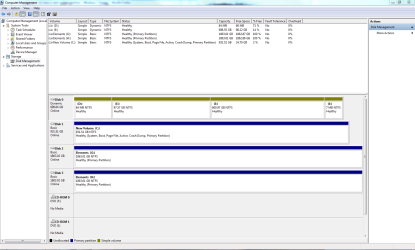
At this point I would plug back in the other HD's and post back a screenshot of your full Disk Mgmt drive map with listings, using Snipping Tool in Start Menu.

As a test, see if you can boot DISK0 using the one-time BIOS boot Menu key given on first boot screen - which is ESC, DEL or F8 on most Asus mobo's.

The dynamic DISK0 is a concern as it can present complications to repair and booting correctly in a Dual Boot. We'll know better once we see the screenshot.
 
Will do will post a screen shot asap.

Connecting the hdd's is a pain in the ass with all the wires.

I really don't want a dual boot if it can be avoided. I noticed I did have a windows folder on both my C: and E: drives and tried to delete windows files I thought where not necessary a few weeks ago. (I had my pc worked on after i had a hardware failure and they left a dual boot months ago)
 

My Computer My Computer

At a glance

windows 7 Pro x64Intel I5 2500KG.SKILL Ripjaw + Ripjaw X 16gb totalEvga 780 gtx Superclocked ACX Cooler
Computer type
PC/Desktop
Computer Manufacturer/Model Number
ME
OS
windows 7 Pro x64
CPU
Intel I5 2500K
Motherboard
ASRock Z68 PROFESSIONAL GEN3 LGA 1155 Intel Z68 HDMI SATA 6G
Memory
G.SKILL Ripjaw + Ripjaw X 16gb total
Graphics Card(s)
Evga 780 gtx Superclocked ACX Cooler
Monitor(s) Displays
Asus VG278 3D Vision 2 Monitor
Screen Resolution
1920x1080p
Hard Drives
Crucial M4 CT256M4SSD2CCA 2.5" 256GB SATA III SSD

x3 Western Digital Caviar Black WD2001FASS 2TB 7200 RPM 64MB(6TB)

Fantom Drives G-Force3 3TB Black External Hard Drive GF3B3000U (3TB)
PSU
Antec High Current Pro HCP-1200 1200W ATX12V / EPS12V SLI Re
Case
COOLER MASTER HAF 922
Cooling
Cooler Master RR-B10-212P-G1 Hyper 212 Plus
Keyboard
Microsoft X4 sidewinder
Mouse
Logitech G400
Internet Speed
5 mbps up/ 75 down
Which Win7 do you want? C which has already started? Is its performance satisfactory now?

If you don't want the other Win7, then once we see the screenshot we can advise you the easiest way to remove it.

Remember not to work on your PC on a carpet due to severe danger of static discharge to mobo. Touch the case each time you reach inside to work.
 
I would like to keep the C: drive as my primary drive, everything seems to be working as it should now.

My only concern at this point is Disk 0 or the E: drive. I would like to make it a basic drive, as it is currently dynamic.
 

Attachments

  • Disk management screen.PNG
    Disk management screen.PNG
    41.8 KB · Views: 53

My Computer My Computer

At a glance

windows 7 Pro x64Intel I5 2500KG.SKILL Ripjaw + Ripjaw X 16gb totalEvga 780 gtx Superclocked ACX Cooler
Computer type
PC/Desktop
Computer Manufacturer/Model Number
ME
OS
windows 7 Pro x64
CPU
Intel I5 2500K
Motherboard
ASRock Z68 PROFESSIONAL GEN3 LGA 1155 Intel Z68 HDMI SATA 6G
Memory
G.SKILL Ripjaw + Ripjaw X 16gb total
Graphics Card(s)
Evga 780 gtx Superclocked ACX Cooler
Monitor(s) Displays
Asus VG278 3D Vision 2 Monitor
Screen Resolution
1920x1080p
Hard Drives
Crucial M4 CT256M4SSD2CCA 2.5" 256GB SATA III SSD

x3 Western Digital Caviar Black WD2001FASS 2TB 7200 RPM 64MB(6TB)

Fantom Drives G-Force3 3TB Black External Hard Drive GF3B3000U (3TB)
PSU
Antec High Current Pro HCP-1200 1200W ATX12V / EPS12V SLI Re
Case
COOLER MASTER HAF 922
Cooling
Cooler Master RR-B10-212P-G1 Hyper 212 Plus
Keyboard
Microsoft X4 sidewinder
Mouse
Logitech G400
Internet Speed
5 mbps up/ 75 down
Move the data off of Disk0, then convert it to Basic following this: Change a dynamic disk back to a basic disk: Storage Services; Local File Systems

Make sure once you repartition that none of the data partitions become marked Active, as this will derail the System MBR to it during repairs. The repair looks for the first Active partition to write the MBR to.

This is also a good reason to keep your OS HD in DISK0 position - if you swap it remember to set it first to boot in BIOS setup.
 
Yes, I do. I'm just waiting on the extremely slow boot up of my recover/install disk. Takes about 10 min to boot each time
Now the main things appear sorted.
You may want to make a System Repair disk rather than use your only install DVD (which is fine). You can boot from the System Repair Disk and do all the things the people have explained. You can make as many as you want if one gets damaged.

Booting from the system repair disk should only take a couple of minutes.
You go to the Backup & Restore screen and simply select "Create a System Repair Disk"
 

My Computer My Computer

At a glance

Windows 7x64 Home Premium SP1Intel i7 2600kG.Skill Ripjaws (DDR3-1600) 2x4GBNvidia GeForce GTS 450; Intel HD Graphics 300...
Computer type
PC/Desktop
Computer Manufacturer/Model Number
Own build
OS
Windows 7x64 Home Premium SP1
CPU
Intel i7 2600k
Motherboard
ASUS P8Z68 Deluxe
Memory
G.Skill Ripjaws (DDR3-1600) 2x4GB
Graphics Card(s)
Nvidia GeForce GTS 450; Intel HD Graphics 3000(GT2+)
Monitor(s) Displays
Dell Ultrasharp IPS panel U2311H, Samsung SyncMaster P2350
Screen Resolution
1920x1080
Hard Drives
Samsung 850 Pro SSD 256GB, Samsung SSD 840 120GB, Seagates 1TB Barracuda ST31000528AS x2
PSU
Seasonic M12II 520W
Case
Lian Li Lancool PC-K60
Cooling
Case: 1x120mm, 3x140mm CPU: Hyper 212+
Keyboard
Logitech MK520 (wireless)
Mouse
Logitech MK520
Internet Speed
6-7 Mbps
Antivirus
Norton Security Premium, Malwarebytes on 2 (MSE on 3rd PC)
Browser
FireFox
Other Info
Audio: Logitech Z523 2.1
Hello again.


Good to see you got it running; as Greg said, it would be a good idea to move the Disk #1 C: connector to the SATA1 port on the mobo and set it as first boot device in the BIOS to cut down on the confusion in future.
 

My Computer My Computer

At a glance

W 7 64-bit UltimateIntel Q9550 Yorkfield8GB Dominator 8500C5DATI : XFX 5870
Computer Manufacturer/Model Number
* BFK Customs *
OS
W 7 64-bit Ultimate
CPU
Intel Q9550 Yorkfield
Motherboard
ASUS P5Q Pro
Memory
8GB Dominator 8500C5D
Graphics Card(s)
ATI : XFX 5870
Sound Card
Realtek HD Audio 7-1
Monitor(s) Displays
1x 47" LCD HDMI & 3x 26" LCD HDMI
Screen Resolution
1920x1080P & 1920x1200
Hard Drives
1x 80GB Intel X25-M G2 SSD : 1x 500GB & 1x 640GB WD Caviar Black(s)
PSU
Corsair 620HX
Case
Cooler Master RC-690
Cooling
Tuniq Tower 120, 2x 140mm and 3x 120mm case fans
Keyboard
Microsoft 500
Mouse
Razer Diamondback 3G
Internet Speed
14 Mb/s
Other Info
1x Koutech 3Gb/s SATA HDD Hot Swap Rack
Back
Top