Solved problems with setting media player classic home cinema as default prog

xeonIV

New member
Local time
11:11 AM
Messages
2
As topic, I cant set mpc-hc (media player classic home cinema) as a default program.
here is some screen shots to make things clearer.

Im sure that the program is properly installed but i just cant find mpchc in the default program list.

I cant select it as a default program by doing the "open-with" thinggy as well.

Folks, any help? please?
 

Attachments
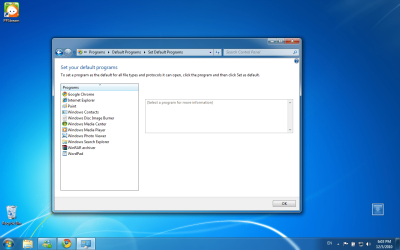
  • 1.png
    1.png
    179.9 KB · Views: 219

My Computer My Computer

At a glance

windows 7 ultimate x32
Computer Manufacturer/Model Number
hp pavilion dv6885se
OS
windows 7 ultimate x32
Welcome to Seven Forums xeonIV. It's actually quite easy in MPC.

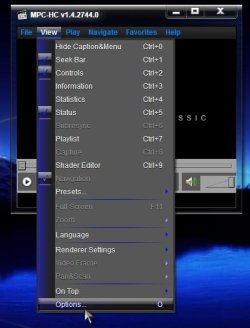
Open MPC> View> Options

View Options.jpg

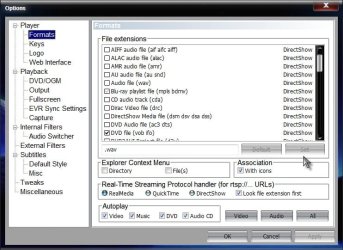
Click on Formats

Formats.jpg

Choose the file types you want to associate with MPC. Click on Set and Apply and OK your way out.

Or you can click the Video, or Audio, or All buttons to select all those types of files.

A Guy
 

My Computer My Computer

At a glance

Windows 10 Home x64INTEL Core i5-750 Quad-Core 3.37GHzHyperX Fury Black Series 8GB (2 x 4GB) 1866MhzEVGA GeForce GTX 750 Superclocked 1GB 128-Bit...
Computer type
PC/Desktop
OS
Windows 10 Home x64
CPU
INTEL Core i5-750 Quad-Core 3.37GHz
Motherboard
ASUS P7P55D
Memory
HyperX Fury Black Series 8GB (2 x 4GB) 1866Mhz
Graphics Card(s)
EVGA GeForce GTX 750 Superclocked 1GB 128-Bit GDDR5
Monitor(s) Displays
LG 32MA68HY 32" IPS
Screen Resolution
1920 x 1080
Hard Drives
Samsung 840 Evo 120GB, SEAGATE 500GB Barracuda® 7200.12, SATA 3 Gb/s, 7200 RPM, 16MB cache
PSU
ANTEC TruePower New TP-550, 80 PLUS, 550W
Case
ANTEC Three Hundred Illusion
Cooling
COOLER MASTER Hyper 212 Plus, 4 x 120mm 1 x 140mm Noctua's
Internet Speed
85 + Mbps
Antivirus
Avast
Browser
Vivaldi
Omg!

Thank you!!!!!!
Thank you very much~!!!
 

My Computer My Computer

At a glance

windows 7 ultimate x32
Computer Manufacturer/Model Number
hp pavilion dv6885se
OS
windows 7 ultimate x32

My Computer My Computer

At a glance

Windows 10 Home x64INTEL Core i5-750 Quad-Core 3.37GHzHyperX Fury Black Series 8GB (2 x 4GB) 1866MhzEVGA GeForce GTX 750 Superclocked 1GB 128-Bit...
Computer type
PC/Desktop
OS
Windows 10 Home x64
CPU
INTEL Core i5-750 Quad-Core 3.37GHz
Motherboard
ASUS P7P55D
Memory
HyperX Fury Black Series 8GB (2 x 4GB) 1866Mhz
Graphics Card(s)
EVGA GeForce GTX 750 Superclocked 1GB 128-Bit GDDR5
Monitor(s) Displays
LG 32MA68HY 32" IPS
Screen Resolution
1920 x 1080
Hard Drives
Samsung 840 Evo 120GB, SEAGATE 500GB Barracuda® 7200.12, SATA 3 Gb/s, 7200 RPM, 16MB cache
PSU
ANTEC TruePower New TP-550, 80 PLUS, 550W
Case
ANTEC Three Hundred Illusion
Cooling
COOLER MASTER Hyper 212 Plus, 4 x 120mm 1 x 140mm Noctua's
Internet Speed
85 + Mbps
Antivirus
Avast
Browser
Vivaldi
Media Player Home Cinema as default in WIN 7

Hello. I have similar problem, but nothing helped me. I tried these steps in this order:
1. Modified file type associations under MPHC -> View -> Options -> Formats. WIN 7 asked extra permission for that, I gave it (I have admin account), changed, applied, OK'd, bud still the WIN Media Player is the default app.
2. Changed MPHC as default program under "Control Panel\Programs\Default Programs\Set Default Programs"
3. Disabled all the features in my antivirus (Norton I.S.) and repeated these points
4. Reinstalled MPHC to the latest 1.6.4.6052 (32687bc)
5. Updated WIN 7
6. Repeated 1, 2, while 3, but did not help. The WIN Media Player is still the default app.

During these steps never got any error from WIN 7, but it absolutely ignores all my effort to change the file associations. Anybody any new idea? Many Thanks.
 

My Computer My Computer

At a glance

Windows 7 Home Premium 64xi7-2670QM16GB DDRNVIDIA GTX 570M / 1.5 GB DDR
Computer Manufacturer/Model Number
MSI GT780DX
OS
Windows 7 Home Premium 64x
CPU
i7-2670QM
Memory
16GB DDR
Graphics Card(s)
NVIDIA GTX 570M / 1.5 GB DDR
Monitor(s) Displays
17.3"
Hard Drives
128GB SSD + 750GB 7200RPM
Welcome to Seven Forums GT780DX. Hmmm...do any files open with MPC? Or do ALL files open with WMP? If all files, you might try turning WMP off, and see if the files associate to MPC.

http://www.sevenforums.com/tutorials/5023-windows-features-turn-off.html

Scroll down to Media features, expand it and uncheck WMP. Restart your PC and try to open a media file. If they open in MPC, you can try re-enabling WMP and see if the associations stick with MPC. A Guy
 

My Computer My Computer

At a glance

Windows 10 Home x64INTEL Core i5-750 Quad-Core 3.37GHzHyperX Fury Black Series 8GB (2 x 4GB) 1866MhzEVGA GeForce GTX 750 Superclocked 1GB 128-Bit...
Computer type
PC/Desktop
OS
Windows 10 Home x64
CPU
INTEL Core i5-750 Quad-Core 3.37GHz
Motherboard
ASUS P7P55D
Memory
HyperX Fury Black Series 8GB (2 x 4GB) 1866Mhz
Graphics Card(s)
EVGA GeForce GTX 750 Superclocked 1GB 128-Bit GDDR5
Monitor(s) Displays
LG 32MA68HY 32" IPS
Screen Resolution
1920 x 1080
Hard Drives
Samsung 840 Evo 120GB, SEAGATE 500GB Barracuda® 7200.12, SATA 3 Gb/s, 7200 RPM, 16MB cache
PSU
ANTEC TruePower New TP-550, 80 PLUS, 550W
Case
ANTEC Three Hundred Illusion
Cooling
COOLER MASTER Hyper 212 Plus, 4 x 120mm 1 x 140mm Noctua's
Internet Speed
85 + Mbps
Antivirus
Avast
Browser
Vivaldi
A Guy, thanks for your reply and for your suggestion, it helped. I did turn off the WMP as you described and after restart no any file was associated with any app. So I associated under the MPHC again and it became the default as I wanted. The only uncomfortable, that I use Total Commander to navigate and from there it does not work, it literally opens the files (goes into file, like if it opens an archived one), but from Win Explorer no issue. I didn't want to turn back WMP, I did it only for curiosity to see if MPHC stays the default, but it turned back to the same WMP by default issue again, so I turned it off again and this time it stays off for sure. Any idea for the Total Commander issue is welcome. Thanks a lot for your help again, hope it helps to others too.
 

My Computer My Computer

At a glance

Windows 7 Home Premium 64xi7-2670QM16GB DDRNVIDIA GTX 570M / 1.5 GB DDR
Computer Manufacturer/Model Number
MSI GT780DX
OS
Windows 7 Home Premium 64x
CPU
i7-2670QM
Memory
16GB DDR
Graphics Card(s)
NVIDIA GTX 570M / 1.5 GB DDR
Monitor(s) Displays
17.3"
Hard Drives
128GB SSD + 750GB 7200RPM
THANKS A MILLION
Banging my head and here it is Easy-Peasy!
 

My Computer My Computer

At a glance

Microsoft Windows 7 Ultimate 64-bit 7601 Mult...AMD Phenom(tm) II X3 720 Processor4.00 GBATI Radeon HD 4800 Series
Computer type
PC/Desktop
Computer Manufacturer/Model Number
Custom Build
OS
Microsoft Windows 7 Ultimate 64-bit 7601 Multiprocessor Free Service Pack 1
CPU
AMD Phenom(tm) II X3 720 Processor
Motherboard
Gigabyte Technology Co., Ltd. GA-MA785GPMT-UD2H
Memory
4.00 GB
Graphics Card(s)
ATI Radeon HD 4800 Series
Sound Card
(1) AMD High Definition Audio Device (2) Realtech H/D Audio
Screen Resolution
DELL 2405FPW (1920 x 1200 ) @ 75 Hz
Hard Drives
(1) Samsung SSD 840 Series ATA Device (2) WDC WD400BD-75MRA1 ATA Device
PSU
700w Kingwin Mach-1
Antivirus
Avast
Browser
Firefox
Glad you got it sorted idahjo ;)

A Guy
 

My Computer My Computer

At a glance

Windows 10 Home x64INTEL Core i5-750 Quad-Core 3.37GHzHyperX Fury Black Series 8GB (2 x 4GB) 1866MhzEVGA GeForce GTX 750 Superclocked 1GB 128-Bit...
Computer type
PC/Desktop
OS
Windows 10 Home x64
CPU
INTEL Core i5-750 Quad-Core 3.37GHz
Motherboard
ASUS P7P55D
Memory
HyperX Fury Black Series 8GB (2 x 4GB) 1866Mhz
Graphics Card(s)
EVGA GeForce GTX 750 Superclocked 1GB 128-Bit GDDR5
Monitor(s) Displays
LG 32MA68HY 32" IPS
Screen Resolution
1920 x 1080
Hard Drives
Samsung 840 Evo 120GB, SEAGATE 500GB Barracuda® 7200.12, SATA 3 Gb/s, 7200 RPM, 16MB cache
PSU
ANTEC TruePower New TP-550, 80 PLUS, 550W
Case
ANTEC Three Hundred Illusion
Cooling
COOLER MASTER Hyper 212 Plus, 4 x 120mm 1 x 140mm Noctua's
Internet Speed
85 + Mbps
Antivirus
Avast
Browser
Vivaldi
Back
Top