Buzz noise - SB Audigy 2 ZS

I "just" made the settings change (studio quality 24 bit) and the buzzing seemed to stop while listening to Pandora . I also have an Audigy 4. I'll go to Netflix and listen to a movie and see if the buzzing subsides.
 

My Computer My Computer

At a glance

Windows 7 Home Premium 64BIT6GB
Computer Manufacturer/Model Number
Dell Studio 540
OS
Windows 7 Home Premium 64BIT
Memory
6GB
Perhaps new Creative driver for Vista will help

I just downloaded and installed the newest Vista driver on the Windows 7 installation and it is working just fine, in fact I have better volume and EAX seems to work as well.

The driver file is SBAX_PCDRV_LB_2_18_0010.exe and appears to have been posted within the last couple of weeks over at Creative.

The last word I saw posted from Creative about an Audigy 2 ZS driver is that it would be considered but no date is available yet. In the meantime I'm going to keep on trying to use the Vista driver.

No, I did not have to use compatibility mode to install it. The installation removes the Windows 7 Update driver and goes through it's paces with no problems.

I do have Windows 7 build 7068 and the noise seemed more prevalent in a previous build I had been trying (7057).

Hope this helps someone else... :D
 

My Computer My Computer

At a glance

Dual boot WindowsXP/Windows 7Intel Pentium 4 3.2GHz HT1 GBnVidia GeForce FX 5500
Computer Manufacturer/Model Number
Dell B-110
OS
Dual boot WindowsXP/Windows 7
CPU
Intel Pentium 4 3.2GHz HT
Memory
1 GB
Graphics Card(s)
nVidia GeForce FX 5500
Sound Card
Creative Soundblaster Audigy 2 ZS
Screen Resolution
1024 X 768 32bit
Hard Drives
2 WD - 80/160 GB
Other Info
Highly upgraded from Dell stock unit
I just downloaded and installed the newest Vista driver on the Windows 7 installation and it is working just fine, in fact I have better volume and EAX seems to work as well.

The driver file is SBAX_PCDRV_LB_2_18_0010.exe and appears to have been posted within the last couple of weeks over at Creative.

The last word I saw posted from Creative about an Audigy 2 ZS driver is that it would be considered but no date is available yet. In the meantime I'm going to keep on trying to use the Vista driver.

No, I did not have to use compatibility mode to install it. The installation removes the Windows 7 Update driver and goes through it's paces with no problems.

I do have Windows 7 build 7068 and the noise seemed more prevalent in a previous build I had been trying (7057).

Hope this helps someone else... :D

How to fix noise, could you detail me step by step?
OS? SP? Version?

Thank you
 

My Computer My Computer

At a glance

Win XP
OS
Win XP
More problems from Spain...

I'm running the Win7 RC and I have also an Audigy2 ZS Notebook.

I tried the official creative drivers, the kX's and Danial_K's. No one of them solved my (us) problem.

In my case, I heard noises when sounds playing, like electric. If I select the worst quality, it disappears a little, but it can be audible jet.

Waiting for replys...and thanks!!
 

My Computer My Computer

At a glance

WinXP
OS
WinXP
Very difficult to say exactly is causing the buzzing as it could be anything from a short in one of your wires or you may have it parked too close to a magnetic source and not realize it. My cell phone generates a slight buzz whenever someone is about to call me!

What I have is the official Windows 7 Release Candidate. Windows Update immediately installed drivers for the Audigy 2ZS that do work but the volume is a bit low. I installed the Windows Vista drivers from the Creative support site with no problems whatsoever and now have the volume back to about normal. EAX also works.

The file name is SBAX_PCDRV_LB_2_18_0010.exe.

Creative has the Audigy 2 ZS and Audigy 2 ZS Notebook PCMCIA listed as TBC (To Be Confirmed). I take it that means a driver will be available at some point but it is still to be confirmed when. Seems to me that they need to get on the ball and pretty darn quick.

Long story short on the buzzing - you might want to double check your connections before getting too wrapped up in the software. Mine works fine and has since version 6.1.7057.
 

My Computer My Computer

At a glance

Dual boot WindowsXP/Windows 7Intel Pentium 4 3.2GHz HT1 GBnVidia GeForce FX 5500
Computer Manufacturer/Model Number
Dell B-110
OS
Dual boot WindowsXP/Windows 7
CPU
Intel Pentium 4 3.2GHz HT
Memory
1 GB
Graphics Card(s)
nVidia GeForce FX 5500
Sound Card
Creative Soundblaster Audigy 2 ZS
Screen Resolution
1024 X 768 32bit
Hard Drives
2 WD - 80/160 GB
Other Info
Highly upgraded from Dell stock unit
Additionally...

I did install the Audigy_SupportPack_2_0 which says it has a better driver and provides a graphic equalizer.

My drawback is I only have 2 speakers so my assessment of this package may be based on not having a full compliment of speakers to rock the house.

I did find that there was much more volume over the Creative/Vista drivers but the volume goes away if trying to use any of the add ons like the graphic equalizer. The sound dies when using EAX and does not produce the effects accurately.

As a package this thing stinks and I'm more inclined to wait on the Windows 7 drivers from Creative. Just hope this thing installs without having to reinstall the operating system...
 

My Computer My Computer

At a glance

Dual boot WindowsXP/Windows 7Intel Pentium 4 3.2GHz HT1 GBnVidia GeForce FX 5500
Computer Manufacturer/Model Number
Dell B-110
OS
Dual boot WindowsXP/Windows 7
CPU
Intel Pentium 4 3.2GHz HT
Memory
1 GB
Graphics Card(s)
nVidia GeForce FX 5500
Sound Card
Creative Soundblaster Audigy 2 ZS
Screen Resolution
1024 X 768 32bit
Hard Drives
2 WD - 80/160 GB
Other Info
Highly upgraded from Dell stock unit
I don't think it could be problem of wires or an electromagnetic source because previously, (in windows xp) it works perfectly and it happens also with earphones.

Win7 installed automatically the drivers, but it doesn't work correctly; the sound buzzing and the speaker assignation isn't right. Then, I tried to install the creative's (SBAX_PCDRV_LB_2_18_0010.exe), but the results was the same. Also I installed the Danial_K's (Audigy_SupportPack_2_0.exe): more options, more programs by creative, but same same quality sound. At least I installed the kX's, but when do a BSOD appears.

I really like this OS, but if I can't solve this trouble, I'll have to install WinXP again...
 

My Computer My Computer

At a glance

WinXP
OS
WinXP
I am also having the buzzing noise problem, though I have an X-Fi Extremegamer card. I have tried the various fixes and tweaks listed here (changing sample rate, disabling my onboard card), but the buzz persists.

I am using an older Asus A8N-E motherboard with the n-force chipset, which may or may not be related to this issue.

I have run everything from WinXP, xp64, vista32 and vista64 on this machine and haven't had the buzzing problem with this card before.
 

My Computer My Computer

At a glance

Windows 7 Build 7137
OS
Windows 7 Build 7137
buzz happens with onboard sound card as well

So I tried installing the Vista64 drivers for my onboard Realtek AC97 sound card and the buzzing sound happens when using that card as well!
 

My Computer My Computer

At a glance

Windows 7 Build 7137
OS
Windows 7 Build 7137
So I tried installing the Vista64 drivers for my onboard Realtek AC97 sound card and the buzzing sound happens when using that card as well!


Are you still running the Windows 7 beta? Or have you installed the RC1? I have had no issues with the RC1.
 

My Computer My Computer

At a glance

windows 7 (beta-7000 build)
OS
windows 7 (beta-7000 build)
not really a windows 7 issue

So I did some more messing with my system, and it turns out that having both my laptop soundcard and my desktop soundcard plugged into the two inputs on my speakers was causing the buzz.

Its strange that the buzz started after installing windows 7, but when i plug the windows 7 desktop exclusively into my speakers - no buzz! :rolleyes:
 

My Computer My Computer

At a glance

Windows 7 Build 7137
OS
Windows 7 Build 7137
Buzzing sound

I don't know if you fixed your buzzing sound yet but I did. I have an Audigy II Platinum Plus sound card. This all starting happeneing when I installed the CCCP codec pack but I don't that is the problem for this reason. Well, who knows where the problem REALLY is since it's all beta software. Here is what I did to fix it.

Pretty much just installed the driver Windows offered. I removed the SB Audity entry from the device manager list including drivers when asked > uninstalled all the Creative software from add remove programs > reboot as asked > Went to MS Updates in contol panel > scan for updates > click on 'optional updates' (Option was there for me) > installed the driver from MS > rebooted when asked > and I"m now able to play DVD's with Windows Media Center 7.

Haven't tested MKV playback yet but I will. I want to watch Barry Lyndon badly. I hope it works out.

UPDATE:

Actually, I just uninstalled the Windows SB Audigy driver and reinstalled the vista driver from the Creative website and the sound still works ok. So, for me, it was something w/ the CCCP Codec pack (probably ffdshow). So I'm not sure what to tell you guys. But maybe this will help you in some way.
 
Last edited:

My Computer My Computer

At a glance

Windows RC + (can't remember)
OS
Windows RC + (can't remember)
So I did some more messing with my system, and it turns out that having both my laptop soundcard and my desktop soundcard plugged into the two inputs on my speakers was causing the buzz.

Its strange that the buzz started after installing windows 7, but when i plug the windows 7 desktop exclusively into my speakers - no buzz! :rolleyes:

Hi....
While i was using windows 7 post-beta that is build 68** i experienced the same problem. Mine was caused due incompatible driver.
But i fixed it. You can try it.

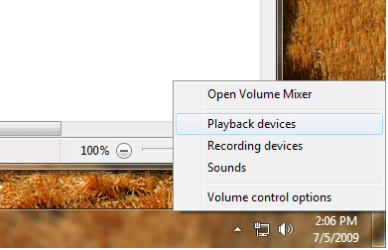
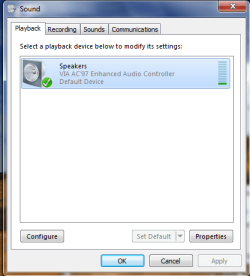
Ok right click on the volume notification icon and open playback devices.
Now double click the speaker. Now you will see another dialog box is opened.
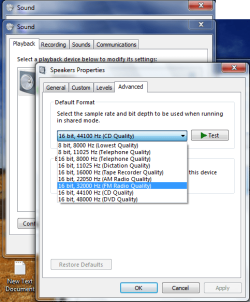
Go to advanced tab there you will find Default format Change it to fm radio quality then apply. Test it by playing any song. If it does not work again change the fm radio quality to am radio quality. And test it again.

And i know i am replying to 4 week old post..

Hope it will work..:)
 

Attachments

  • Untitled.png
    Untitled.png
    22.8 KB · Views: 29
  • Untitled1.png
    Untitled1.png
    15.1 KB · Views: 131
  • Untitled2.png
    Untitled2.png
    35 KB · Views: 169

My Computer My Computer

At a glance

Window 7 build 7600, Xp pro(VM)Amd Athlon 2000 xp+kingstone(1gb+256MB)Nvdia 6200(256 mb+255mb(shared))
Computer Manufacturer/Model Number
Custom made
OS
Window 7 build 7600, Xp pro(VM)
CPU
Amd Athlon 2000 xp+
Motherboard
Asus x series
Memory
kingstone(1gb+256MB)
Graphics Card(s)
Nvdia 6200(256 mb+255mb(shared))
Sound Card
soundmax
Monitor(s) Displays
Lg Flatron w1943
Screen Resolution
1360x768
Hard Drives
segate 80GB
Case
i-ball
Keyboard
i-ball
Mouse
i-ball
Internet Speed
256kbps up and 256 kbps down
Buzz

Hello,

I also had the buzzing problem in Win7.
No buzzing sounds in Linux or WinXP though.

In my case the cause of the problem turned out to be the CD Audio volume.
My CD device is not connected to the Sound Blaster board anyway so I just turned the volume all the way down.

Right click the volume control on the taskbar -> select Playback Devices'' -> Double click on 'Speakers'' -> Select the 'Levels' tab -> turn down CD Audio

I hope that helps
 

Attachments

  • audigy.png
    audigy.png
    27.6 KB · Views: 150

My Computer My Computer

At a glance

Windows 7
OS
Windows 7
Try selecting SPDIF Out as your default device in the Sound settings in Control Panel. Fixed the issue for me.

Wow, been looking for an answer to buzzing sounds every now and then with my audigy 2 zs with win7 RTM and came across this thread via google. Im using headphones and by setting my default playback device to spdif it fixed it....lol, unreal as my headphones have nothing to do with a digital spdif yet it works...

:D
 

My Computer My Computer

At a glance

win7
OS
win7
Back
Top