
Can't uninstall/reinstall Oblivion

Bubbayoshi

New member
Member
VIP
Local time
8:03 PM
Messages
97
I'm trying to reinstall Oblivion, but I was an idiot and just deleted the directory, instead of using InstallShield. Now when I try to click on the "Uninstall" button on the launch screen for Oblivion, it gives me the following error message:
Setup has experienced and error.
Please do the following:
-Close any running programs
-Empty your temporary Folder
-Check your Internet connection (Internet-based Setups)
Then try to run the Setup again
-----------------------------------------------
Error code: -6003

I did what it said, tried again, same result. I've had Oblivion on my computer before, so I know I can run it.
 

My Computer My Computer

Computer Manufacturer/Model Number
Alienware M17X-R2
OS
Windows 7 Home Premium 64bit SP 1
CPU
Intel Core i7 720QM @ 1.60 GHz
Motherboard
Alienware A10
Graphics Card(s)
ATI Mobility Radeon HD 5870
Sound Card
ATI High Definition Audio Device
Screen Resolution
1440x900
Hard Drives
313GB Western Digital WDC WD3200BEKT-75F3T0 (SATA)
SeaGate FreeAgent GoFlex 1TB USB 3.0
Cooling
Cooler Master NotePal U3
Mouse
Microsoft Wireless Mobile Mouse 4000
Try just re-installing the game with out completing the un-uinstall.
It may offer a repair option.

If you wish to, you can un-install after the repair has completed.
 

My Computer My Computer

Computer Manufacturer/Model Number
Custom (Self Build)
OS
Windows 7 Home Premium 64bit
CPU
Intel Core i7 2700k
Motherboard
eVGA P67 SLI
Memory
8GB Mushkin Redline Ridgebacks @1866
Graphics Card(s)
EVGA GTX570 SC
Sound Card
XiFi Titanium HD
Monitor(s) Displays
LG W2453V
Screen Resolution
1920x1080
Hard Drives
Intel 320 80GB -- Intel X25-V 40GB --WD Black 1TB x2 -- WD Blue 640GB
PSU
Seasonic x750
Case
Corsair 600T SE White
Cooling
eVGA Superclocked CPU Cooler
Keyboard
Saitek Cyborg
Antivirus
Kaspersky
Browser
IE
Other Info
LG BD/DVD
Try just re-installing the game with out completing the un-uinstall.
It may offer a repair option.

If you wish to, you can un-install after the repair has completed.


+1 - agree.
Keep us posted and regards
 

My Computer My Computer

Computer Manufacturer/Model Number
Custom
OS
Win7 HP (x64)/Win7 Ultimate (x64)
CPU
Core i7 920
Motherboard
Intel X58
Memory
6 x 2GB Corsair XMS3
Graphics Card(s)
CF HD4890
Sound Card
Asus Xonar
Monitor(s) Displays
Dell 2408WFP
Screen Resolution
1920 x 1200
Hard Drives
2 x 150GB WDC Velociraptors (Raid 0)
1 x 1TB Seagate
1 x 1.5TB Seagate
PSU
Corsair HX1000W
Case
Antec 1200
Keyboard
Razer Lycosa/N52te
Mouse
Razer Lachesis
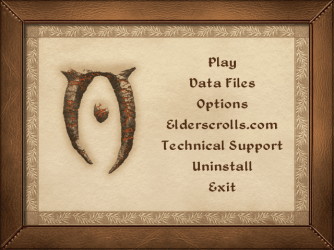
No re-install or repair options
 

My Computer My Computer

Computer Manufacturer/Model Number
Alienware M17X-R2
OS
Windows 7 Home Premium 64bit SP 1
CPU
Intel Core i7 720QM @ 1.60 GHz
Motherboard
Alienware A10
Graphics Card(s)
ATI Mobility Radeon HD 5870
Sound Card
ATI High Definition Audio Device
Screen Resolution
1440x900
Hard Drives
313GB Western Digital WDC WD3200BEKT-75F3T0 (SATA)
SeaGate FreeAgent GoFlex 1TB USB 3.0
Cooling
Cooler Master NotePal U3
Mouse
Microsoft Wireless Mobile Mouse 4000
No re-install or repair options


Have you tried installing over i.e. as if it is a new install?
Otherwise we are going to have to go the long route>registry editing etc :huh:
 

My Computer My Computer

Computer Manufacturer/Model Number
Custom
OS
Win7 HP (x64)/Win7 Ultimate (x64)
CPU
Core i7 920
Motherboard
Intel X58
Memory
6 x 2GB Corsair XMS3
Graphics Card(s)
CF HD4890
Sound Card
Asus Xonar
Monitor(s) Displays
Dell 2408WFP
Screen Resolution
1920 x 1200
Hard Drives
2 x 150GB WDC Velociraptors (Raid 0)
1 x 1TB Seagate
1 x 1.5TB Seagate
PSU
Corsair HX1000W
Case
Antec 1200
Keyboard
Razer Lycosa/N52te
Mouse
Razer Lachesis
so far i've been doing using the control panel programs/features and the autorun screen. is there another way to install the game?
 

My Computer My Computer

Computer Manufacturer/Model Number
Alienware M17X-R2
OS
Windows 7 Home Premium 64bit SP 1
CPU
Intel Core i7 720QM @ 1.60 GHz
Motherboard
Alienware A10
Graphics Card(s)
ATI Mobility Radeon HD 5870
Sound Card
ATI High Definition Audio Device
Screen Resolution
1440x900
Hard Drives
313GB Western Digital WDC WD3200BEKT-75F3T0 (SATA)
SeaGate FreeAgent GoFlex 1TB USB 3.0
Cooling
Cooler Master NotePal U3
Mouse
Microsoft Wireless Mobile Mouse 4000
so far i've been doing using the control panel programs/features and the autorun screen. is there another way to install the game?


Are you game for a custom install? You could try installing to a different directory (one which you specify).
Are you able to interact with install menu from the autorun screen or is install grayed out?

Regards
 

My Computer My Computer

Computer Manufacturer/Model Number
Custom
OS
Win7 HP (x64)/Win7 Ultimate (x64)
CPU
Core i7 920
Motherboard
Intel X58
Memory
6 x 2GB Corsair XMS3
Graphics Card(s)
CF HD4890
Sound Card
Asus Xonar
Monitor(s) Displays
Dell 2408WFP
Screen Resolution
1920 x 1200
Hard Drives
2 x 150GB WDC Velociraptors (Raid 0)
1 x 1TB Seagate
1 x 1.5TB Seagate
PSU
Corsair HX1000W
Case
Antec 1200
Keyboard
Razer Lycosa/N52te
Mouse
Razer Lachesis
no install option
 

Attachments

  • autorun.png
    autorun.png
    134.8 KB · Views: 4

My Computer My Computer

Computer Manufacturer/Model Number
Alienware M17X-R2
OS
Windows 7 Home Premium 64bit SP 1
CPU
Intel Core i7 720QM @ 1.60 GHz
Motherboard
Alienware A10
Graphics Card(s)
ATI Mobility Radeon HD 5870
Sound Card
ATI High Definition Audio Device
Screen Resolution
1440x900
Hard Drives
313GB Western Digital WDC WD3200BEKT-75F3T0 (SATA)
SeaGate FreeAgent GoFlex 1TB USB 3.0
Cooling
Cooler Master NotePal U3
Mouse
Microsoft Wireless Mobile Mouse 4000
Ok, found this on the web:

Cure: Use Windows registry editor as follows:-

1. Navigate to HKEY_LOCAL_MACHINE\SOFTWARE\Bethesda Softworks
2. Delete the Oblivion subkey (looks like a folder)

Setup checks for the existence of the Oblivion subkey (or one of the subkeys or values under it) to determine whether Oblivion is already installed. The uninstall should have removed it. If not, deleting it should fool Setup into allowing you to install Oblivion again.

When you install a program, you run its Setup utility, which creates new Windows registry entries, folders and files. It also creates a "uninstall" log file somewhere on your machine which contains a list of everything Setup created, in the order it created them. When you run the program's uninstall procedure, it simply goes through the uninstall log in reverse order, deleting everything. However, if new files have been created in the folders SINCE Setup was run, they're not deleted and, if folders still contain files, those folders are not deleted.

The reason the Oblivion folder wasn't deleted is that many of the files in there didn't match the ones in the uninstall log (because afterwards, you patched Oblivion and installed utilities, mods, etc, i.e. MORE new folders/files). This is INTENTIONAL behaviour, to ensure that you can uninstall Oblivion (if corrupt) then reinstall/patch it and still have all mods and their files as intact as possible. That way, Oblivion should pick up your mods again the first time it runs. It doesn't work in every case, but at least it avoids you reinstalling ALL mods from scratch every time.

As long as Oblivion uninstall has run OK (and deleted what it can, including the Windows registry entries), it's safe to delete the Oblivion folder to complete the uninstallation manually.

You should ONLY ever use a 3rd party uninstaller to delete leftover traces of a program if you NEVER intend to reinstall that program again. After all, if you're reinstalling, Setup will overwrite existing traces anyway, so why bother deleting them only to have Setup simply recreate them again?

More here

Hope this helps in some way
 

My Computer My Computer

Computer Manufacturer/Model Number
Custom
OS
Win7 HP (x64)/Win7 Ultimate (x64)
CPU
Core i7 920
Motherboard
Intel X58
Memory
6 x 2GB Corsair XMS3
Graphics Card(s)
CF HD4890
Sound Card
Asus Xonar
Monitor(s) Displays
Dell 2408WFP
Screen Resolution
1920 x 1200
Hard Drives
2 x 150GB WDC Velociraptors (Raid 0)
1 x 1TB Seagate
1 x 1.5TB Seagate
PSU
Corsair HX1000W
Case
Antec 1200
Keyboard
Razer Lycosa/N52te
Mouse
Razer Lachesis
Instafix! Thank you!
 

My Computer My Computer

Computer Manufacturer/Model Number
Alienware M17X-R2
OS
Windows 7 Home Premium 64bit SP 1
CPU
Intel Core i7 720QM @ 1.60 GHz
Motherboard
Alienware A10
Graphics Card(s)
ATI Mobility Radeon HD 5870
Sound Card
ATI High Definition Audio Device
Screen Resolution
1440x900
Hard Drives
313GB Western Digital WDC WD3200BEKT-75F3T0 (SATA)
SeaGate FreeAgent GoFlex 1TB USB 3.0
Cooling
Cooler Master NotePal U3
Mouse
Microsoft Wireless Mobile Mouse 4000

My Computer My Computer

Computer Manufacturer/Model Number
Custom
OS
Win7 HP (x64)/Win7 Ultimate (x64)
CPU
Core i7 920
Motherboard
Intel X58
Memory
6 x 2GB Corsair XMS3
Graphics Card(s)
CF HD4890
Sound Card
Asus Xonar
Monitor(s) Displays
Dell 2408WFP
Screen Resolution
1920 x 1200
Hard Drives
2 x 150GB WDC Velociraptors (Raid 0)
1 x 1TB Seagate
1 x 1.5TB Seagate
PSU
Corsair HX1000W
Case
Antec 1200
Keyboard
Razer Lycosa/N52te
Mouse
Razer Lachesis
Back
Top