Agj32mrgibbits
New member
- Local time
- 12:09 AM
- Messages
- 21
I am trying to install the latest drivers for a new keyboard and mouse I got today.
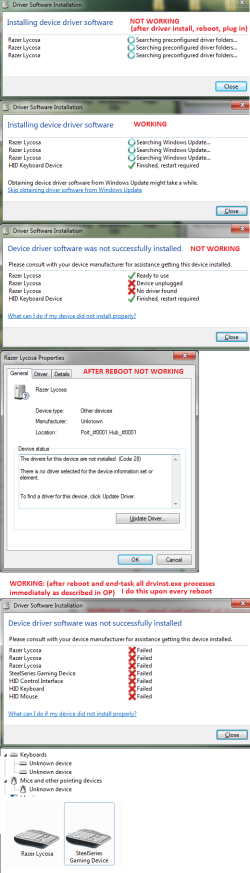
Windows tries to install drivers for them but cannot find any. This causes the manufacturers driver software to not be able to detect the new keyboard and mouse. The only way that I can get them to work is if I use the task manager to kill all the "drvinst.exe" processes before they can fail at finding drivers, and then install the manufacturers drivers. But, this fix only works until I reboot my computer and Windows fails at finding drivers again causing the new devices to become undetectable.
I have updated my bios to the latest version. My motherboard isn't even old.
I am using Windows 7 Ultimate 64 bit with the latest updates.
I am using (trying to anyways) the latest keyboard and mouse drivers from the manufacturers website.
I have tried many other keyboards and mice with no success, Windows just fails to find drivers and makes them undetectable.
I have even tried switching my currently working keyboard and mouse to different USB ports and the same thing happens. Windows fails to find drivers and causes them to be undetectable.
EDIT:
Current working keyboard and mouse: (only works in current USB ports)
Saitek Eclipse
Logitech MX518
New keyboard and mouse:
Razer Lycosa
Steelseries XAI
Another keyboard and mouse that I tested:
Logitech G510
Logitech G700
System:
Windows 7 Ultimate 64 bit
DFI LP DK-790FX-M2RS
AMD Phenom II X4 955 3.20 GHz
G.Skill 8GB DDR2 800MHz
AMD Radeon HD 6850 1GB (ASUS)
Seagate 250GB
Windows tries to install drivers for them but cannot find any. This causes the manufacturers driver software to not be able to detect the new keyboard and mouse. The only way that I can get them to work is if I use the task manager to kill all the "drvinst.exe" processes before they can fail at finding drivers, and then install the manufacturers drivers. But, this fix only works until I reboot my computer and Windows fails at finding drivers again causing the new devices to become undetectable.
I have updated my bios to the latest version. My motherboard isn't even old.
I am using Windows 7 Ultimate 64 bit with the latest updates.
I am using (trying to anyways) the latest keyboard and mouse drivers from the manufacturers website.
I have tried many other keyboards and mice with no success, Windows just fails to find drivers and makes them undetectable.
I have even tried switching my currently working keyboard and mouse to different USB ports and the same thing happens. Windows fails to find drivers and causes them to be undetectable.
EDIT:
Current working keyboard and mouse: (only works in current USB ports)
Saitek Eclipse
Logitech MX518
New keyboard and mouse:
Razer Lycosa
Steelseries XAI
Another keyboard and mouse that I tested:
Logitech G510
Logitech G700
System:
Windows 7 Ultimate 64 bit
DFI LP DK-790FX-M2RS
AMD Phenom II X4 955 3.20 GHz
G.Skill 8GB DDR2 800MHz
AMD Radeon HD 6850 1GB (ASUS)
Seagate 250GB
Last edited:
My Computer
At a glance
Windows 7 Ultimate x64AMD Phenom II X4 955 3.20 GHzG.Skill 8GB DDR2 800MHz (4x2GB)AMD Radeon HD 6850 1GB (ASUS)
- Computer Manufacturer/Model Number
- Custom
- OS
- Windows 7 Ultimate x64
- CPU
- AMD Phenom II X4 955 3.20 GHz
- Motherboard
- DFI LP DK-790FX-M2RS
- Memory
- G.Skill 8GB DDR2 800MHz (4x2GB)
- Graphics Card(s)
- AMD Radeon HD 6850 1GB (ASUS)
- Sound Card
- SB Audigy
- Monitor(s) Displays
- LG Flatron W2241T 22"
- Screen Resolution
- 1680x1050
- Hard Drives
- ST3250210AS 256GB (Main SATA II drive)
WDC WD800JD-22LSA0 (Backup SATA II drive)
TOSHIBA MK1059GSM 1TB (External USB drive)
- PSU
- Rocketfish 900W
- Case
- Cooler Master Centurion
- Cooling
- Arctic Cooling Freezer 64 Pro
- Keyboard
- Razer Lycosa
- Mouse
- Steelseries XAI
- Internet Speed
- 2mbps down / 2mbps up