Unable to use new keyboard and mouse

Agj32mrgibbits

New member
Local time
3:34 AM
Messages
21
I am trying to install the latest drivers for a new keyboard and mouse I got today.

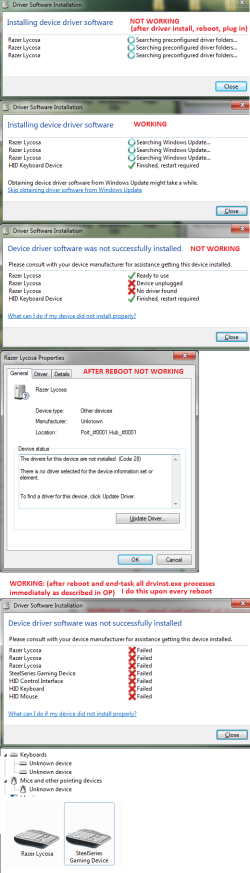
Windows tries to install drivers for them but cannot find any. This causes the manufacturers driver software to not be able to detect the new keyboard and mouse. The only way that I can get them to work is if I use the task manager to kill all the "drvinst.exe" processes before they can fail at finding drivers, and then install the manufacturers drivers. But, this fix only works until I reboot my computer and Windows fails at finding drivers again causing the new devices to become undetectable.

I have updated my bios to the latest version. My motherboard isn't even old.
I am using Windows 7 Ultimate 64 bit with the latest updates.
I am using (trying to anyways) the latest keyboard and mouse drivers from the manufacturers website.
I have tried many other keyboards and mice with no success, Windows just fails to find drivers and makes them undetectable.

I have even tried switching my currently working keyboard and mouse to different USB ports and the same thing happens. Windows fails to find drivers and causes them to be undetectable.


EDIT:


Current working keyboard and mouse: (only works in current USB ports)
Saitek Eclipse
Logitech MX518

New keyboard and mouse:
Razer Lycosa
Steelseries XAI


Another keyboard and mouse that I tested:
Logitech G510
Logitech G700


System:
Windows 7 Ultimate 64 bit
DFI LP DK-790FX-M2RS
AMD Phenom II X4 955 3.20 GHz
G.Skill 8GB DDR2 800MHz
AMD Radeon HD 6850 1GB (ASUS)
Seagate 250GB
 
Last edited:

My Computer My Computer

At a glance

Windows 7 Ultimate x64AMD Phenom II X4 955 3.20 GHzG.Skill 8GB DDR2 800MHz (4x2GB)AMD Radeon HD 6850 1GB (ASUS)
Computer Manufacturer/Model Number
Custom
OS
Windows 7 Ultimate x64
CPU
AMD Phenom II X4 955 3.20 GHz
Motherboard
DFI LP DK-790FX-M2RS
Memory
G.Skill 8GB DDR2 800MHz (4x2GB)
Graphics Card(s)
AMD Radeon HD 6850 1GB (ASUS)
Sound Card
SB Audigy
Monitor(s) Displays
LG Flatron W2241T 22"
Screen Resolution
1680x1050
Hard Drives
ST3250210AS 256GB (Main SATA II drive)
WDC WD800JD-22LSA0 (Backup SATA II drive)
TOSHIBA MK1059GSM 1TB (External USB drive)
PSU
Rocketfish 900W
Case
Cooler Master Centurion
Cooling
Arctic Cooling Freezer 64 Pro
Keyboard
Razer Lycosa
Mouse
Steelseries XAI
Internet Speed
2mbps down / 2mbps up
Agj32mrgibbits, welcome to the Seven Forums.

Make and model of the mouse and keyboard would help (system specs wouldn't hurt either).
 

My Computer My Computer

At a glance

Win 7 Ultimate x64FX-8350 @ 4.6 GHz so farADATA XPG V1 Series Black 8GB DDR3 1600Sapphire R9 270x Dual-X
Computer type
PC/Desktop
Computer Manufacturer/Model Number
Me
OS
Win 7 Ultimate x64
CPU
FX-8350 @ 4.6 GHz so far
Motherboard
Asus M5A97 EVO
Memory
ADATA XPG V1 Series Black 8GB DDR3 1600
Graphics Card(s)
Sapphire R9 270x Dual-X
Sound Card
Xonar DGX w/ Corsair Vengence 1300
Monitor(s) Displays
Acer S232HL Abid
Screen Resolution
1920x1080
Hard Drives
120 GB OCZ Vertex 3
500 GB Seagate 7200.12
PSU
Antec Earthwatts 650W Green
Case
Antec Three Hundred
Cooling
Cooler Master 212 EVO
Keyboard
Logitech G510
Mouse
Logitech G500s
Internet Speed
35000/3000
Agj32mrgibbits, welcome to the Seven Forums.

Make and model of the mouse and keyboard would help (system specs wouldn't hurt either).

I've edited the info into the original post.
 

My Computer My Computer

At a glance

Windows 7 Ultimate x64AMD Phenom II X4 955 3.20 GHzG.Skill 8GB DDR2 800MHz (4x2GB)AMD Radeon HD 6850 1GB (ASUS)
Computer Manufacturer/Model Number
Custom
OS
Windows 7 Ultimate x64
CPU
AMD Phenom II X4 955 3.20 GHz
Motherboard
DFI LP DK-790FX-M2RS
Memory
G.Skill 8GB DDR2 800MHz (4x2GB)
Graphics Card(s)
AMD Radeon HD 6850 1GB (ASUS)
Sound Card
SB Audigy
Monitor(s) Displays
LG Flatron W2241T 22"
Screen Resolution
1680x1050
Hard Drives
ST3250210AS 256GB (Main SATA II drive)
WDC WD800JD-22LSA0 (Backup SATA II drive)
TOSHIBA MK1059GSM 1TB (External USB drive)
PSU
Rocketfish 900W
Case
Cooler Master Centurion
Cooling
Arctic Cooling Freezer 64 Pro
Keyboard
Razer Lycosa
Mouse
Steelseries XAI
Internet Speed
2mbps down / 2mbps up
I am still looking for a way to fix this problem.
 

My Computer My Computer

At a glance

Windows 7 Ultimate x64AMD Phenom II X4 955 3.20 GHzG.Skill 8GB DDR2 800MHz (4x2GB)AMD Radeon HD 6850 1GB (ASUS)
Computer Manufacturer/Model Number
Custom
OS
Windows 7 Ultimate x64
CPU
AMD Phenom II X4 955 3.20 GHz
Motherboard
DFI LP DK-790FX-M2RS
Memory
G.Skill 8GB DDR2 800MHz (4x2GB)
Graphics Card(s)
AMD Radeon HD 6850 1GB (ASUS)
Sound Card
SB Audigy
Monitor(s) Displays
LG Flatron W2241T 22"
Screen Resolution
1680x1050
Hard Drives
ST3250210AS 256GB (Main SATA II drive)
WDC WD800JD-22LSA0 (Backup SATA II drive)
TOSHIBA MK1059GSM 1TB (External USB drive)
PSU
Rocketfish 900W
Case
Cooler Master Centurion
Cooling
Arctic Cooling Freezer 64 Pro
Keyboard
Razer Lycosa
Mouse
Steelseries XAI
Internet Speed
2mbps down / 2mbps up

My Computer My Computer

At a glance

win 7 ultimate32bit, Win8.1pro wmc 32bitamd phenom x4 9600corsair twinxs 2x2gb2x nvidia 1gb 8500gt
Computer type
PC/Desktop
Computer Manufacturer/Model Number
self build
OS
win 7 ultimate32bit, Win8.1pro wmc 32bit
CPU
amd phenom x4 9600
Motherboard
asus m2n32-sli deluxe
Memory
corsair twinxs 2x2gb
Graphics Card(s)
2x nvidia 1gb 8500gt
Sound Card
onboard
Monitor(s) Displays
23" PB Viseo 233d
Screen Resolution
1920x1080
Hard Drives
maxtor sata 500gb
maxtor sata 320gb
fujitsu sata200gb
PSU
oryxx tornado 750w
Case
thermaltake xaser lll
Cooling
artic freezer64 pro + 7 case fans
If you woudl fiil in your system specs here, then everyone wouldn't have to go to your first post they could just click on the My System Specs in the lower left hand corner of every post.
usercp 1.png
Thanks. Fabe
 

My Computer My Computer

At a glance

Windows 7 ultimate 64 bit / XP Home sp3intel Core 2 Duo E8400 3.0ghz8 gigs 1066 OCZ Fata1tyEVGA GTX 580 Call of Duty Black Ops Edition
Computer Manufacturer/Model Number
Self Built
OS
Windows 7 ultimate 64 bit / XP Home sp3
CPU
intel Core 2 Duo E8400 3.0ghz
Motherboard
Asus P5ND bios 1401
Memory
8 gigs 1066 OCZ Fata1ty
Graphics Card(s)
EVGA GTX 580 Call of Duty Black Ops Edition
Sound Card
Creative Soundblaster Audigy 2zs
Monitor(s) Displays
Asus 24in LCD's 2MS X2
Screen Resolution
1920x1080p @60Hz
Hard Drives
WD Caviar 500 Black/ WD Caviar 200 Blue
PSU
OCZ 700W GameXtreme
Case
NZXT Apollo
Cooling
Corsair H50 CPU/120mm x3 /60mm x2 /Corsair Dominator Ram
Keyboard
Logitech Bluetooth Wireless MX5000
Mouse
Logitech Bluetooth Wireless MX1000
Internet Speed
Download 19.83 Upload 0.97
Other Info
Logitech Z2300 Speakers/ Bose Noise Cancelling Headphones/Avermedia PCI-e Hybrid TV Bravo/Epson NX415 all in one/ 4 Port Powered USB Hub/ LG 10x Bluray Burner /TSST Corp DVDRW External

Already tried this before starting this thread and it did not fix the problem. Windows still tried to find and install drivers for the mouse and keyboard, failed to find any, and made the mouse and keyboard stop working.

If you woudl fiil in your system specs here, then everyone wouldn't have to go to your first post they could just click on the My System Specs in the lower left hand corner of every post.
View attachment 128249
Thanks. Fabe

Done.
 

My Computer My Computer

At a glance

Windows 7 Ultimate x64AMD Phenom II X4 955 3.20 GHzG.Skill 8GB DDR2 800MHz (4x2GB)AMD Radeon HD 6850 1GB (ASUS)
Computer Manufacturer/Model Number
Custom
OS
Windows 7 Ultimate x64
CPU
AMD Phenom II X4 955 3.20 GHz
Motherboard
DFI LP DK-790FX-M2RS
Memory
G.Skill 8GB DDR2 800MHz (4x2GB)
Graphics Card(s)
AMD Radeon HD 6850 1GB (ASUS)
Sound Card
SB Audigy
Monitor(s) Displays
LG Flatron W2241T 22"
Screen Resolution
1680x1050
Hard Drives
ST3250210AS 256GB (Main SATA II drive)
WDC WD800JD-22LSA0 (Backup SATA II drive)
TOSHIBA MK1059GSM 1TB (External USB drive)
PSU
Rocketfish 900W
Case
Cooler Master Centurion
Cooling
Arctic Cooling Freezer 64 Pro
Keyboard
Razer Lycosa
Mouse
Steelseries XAI
Internet Speed
2mbps down / 2mbps up
I am still having the same problem. Something is seriously screwed up with Windows 7 and the driver system. It can never find drivers for anything. I have even tried rebuilding the driver database using the recovery disk.
 

My Computer My Computer

At a glance

Windows 7 Ultimate x64AMD Phenom II X4 955 3.20 GHzG.Skill 8GB DDR2 800MHz (4x2GB)AMD Radeon HD 6850 1GB (ASUS)
Computer Manufacturer/Model Number
Custom
OS
Windows 7 Ultimate x64
CPU
AMD Phenom II X4 955 3.20 GHz
Motherboard
DFI LP DK-790FX-M2RS
Memory
G.Skill 8GB DDR2 800MHz (4x2GB)
Graphics Card(s)
AMD Radeon HD 6850 1GB (ASUS)
Sound Card
SB Audigy
Monitor(s) Displays
LG Flatron W2241T 22"
Screen Resolution
1680x1050
Hard Drives
ST3250210AS 256GB (Main SATA II drive)
WDC WD800JD-22LSA0 (Backup SATA II drive)
TOSHIBA MK1059GSM 1TB (External USB drive)
PSU
Rocketfish 900W
Case
Cooler Master Centurion
Cooling
Arctic Cooling Freezer 64 Pro
Keyboard
Razer Lycosa
Mouse
Steelseries XAI
Internet Speed
2mbps down / 2mbps up
bump
 

My Computer My Computer

At a glance

Windows 7 Ultimate x64AMD Phenom II X4 955 3.20 GHzG.Skill 8GB DDR2 800MHz (4x2GB)AMD Radeon HD 6850 1GB (ASUS)
Computer Manufacturer/Model Number
Custom
OS
Windows 7 Ultimate x64
CPU
AMD Phenom II X4 955 3.20 GHz
Motherboard
DFI LP DK-790FX-M2RS
Memory
G.Skill 8GB DDR2 800MHz (4x2GB)
Graphics Card(s)
AMD Radeon HD 6850 1GB (ASUS)
Sound Card
SB Audigy
Monitor(s) Displays
LG Flatron W2241T 22"
Screen Resolution
1680x1050
Hard Drives
ST3250210AS 256GB (Main SATA II drive)
WDC WD800JD-22LSA0 (Backup SATA II drive)
TOSHIBA MK1059GSM 1TB (External USB drive)
PSU
Rocketfish 900W
Case
Cooler Master Centurion
Cooling
Arctic Cooling Freezer 64 Pro
Keyboard
Razer Lycosa
Mouse
Steelseries XAI
Internet Speed
2mbps down / 2mbps up
Can you please post a view of device manager for us with the keyboard and mouse items expanded.
 

My Computer My Computer

At a glance

Windows 7 Home Premium 64 bit SP1Intel i7 4790k16 GB Corsair 2400 MHz DDR3Visiontek Radeon R9 285
Computer type
PC/Desktop
Computer Manufacturer/Model Number
Custom Build
OS
Windows 7 Home Premium 64 bit SP1
CPU
Intel i7 4790k
Motherboard
MSI Z97-G55 SLI
Memory
16 GB Corsair 2400 MHz DDR3
Graphics Card(s)
Visiontek Radeon R9 285
Sound Card
None
Monitor(s) Displays
Gateway FHX2402L
Screen Resolution
1920 X 1080
Hard Drives
Samsung 840 EVO 500GB
PSU
Corsair 750 TX
Case
Fractal Design
Cooling
Stock fans
Keyboard
Logitech K800
Mouse
Logitech M510
Internet Speed
60.88 Mbps download 10.47 Mbps upload (Speedtest.net)
Antivirus
Norton
Browser
Opera
Other Info
First Computer used: A Commodore Pet of course
Love using Manjaro KDE Linux 64 bit and Windows 7/10 64 bit
Can you please post a view of device manager for us with the keyboard and mouse items expanded.

I can't take a screenshot of when the keyboard and mouse fail to install because I don't have a keyboard to press PrintScreen on.

They show up under "Other Devices" as "Steelseries XAI" and "Razer Lycosa" with a yellow triangular icon and an exclamation mark on them.


Here is a screenshot of them right now, they are working using the following method:

The only way that I can get them to work is if I use the task manager to kill all the "drvinst.exe" processes before they can fail at finding drivers, and then install the manufacturers drivers. But, this fix only works until I reboot my computer and Windows fails at finding drivers again causing the new devices to become undetectable.

PvZ.jpg


I am getting extremely tired of having to end task of so many "drvinst.exe" processes every time I start my computer. Just today I didn't do it quick enough and spent an hour reinstalling them.
 

My Computer My Computer

At a glance

Windows 7 Ultimate x64AMD Phenom II X4 955 3.20 GHzG.Skill 8GB DDR2 800MHz (4x2GB)AMD Radeon HD 6850 1GB (ASUS)
Computer Manufacturer/Model Number
Custom
OS
Windows 7 Ultimate x64
CPU
AMD Phenom II X4 955 3.20 GHz
Motherboard
DFI LP DK-790FX-M2RS
Memory
G.Skill 8GB DDR2 800MHz (4x2GB)
Graphics Card(s)
AMD Radeon HD 6850 1GB (ASUS)
Sound Card
SB Audigy
Monitor(s) Displays
LG Flatron W2241T 22"
Screen Resolution
1680x1050
Hard Drives
ST3250210AS 256GB (Main SATA II drive)
WDC WD800JD-22LSA0 (Backup SATA II drive)
TOSHIBA MK1059GSM 1TB (External USB drive)
PSU
Rocketfish 900W
Case
Cooler Master Centurion
Cooling
Arctic Cooling Freezer 64 Pro
Keyboard
Razer Lycosa
Mouse
Steelseries XAI
Internet Speed
2mbps down / 2mbps up
Let's try to resolve this issue one device at a time.

When you have the devices that work plugged in, install the driver for your new keyboard making sure the driver is the latest from the manufacturer for the 64 bit version of Windows 7. Then go to device manager, uninstall the current keyboard driver then shutdown, plug in the new keyboard then restart and see what happens and let me know.
 

My Computer My Computer

At a glance

Windows 7 Home Premium 64 bit SP1Intel i7 4790k16 GB Corsair 2400 MHz DDR3Visiontek Radeon R9 285
Computer type
PC/Desktop
Computer Manufacturer/Model Number
Custom Build
OS
Windows 7 Home Premium 64 bit SP1
CPU
Intel i7 4790k
Motherboard
MSI Z97-G55 SLI
Memory
16 GB Corsair 2400 MHz DDR3
Graphics Card(s)
Visiontek Radeon R9 285
Sound Card
None
Monitor(s) Displays
Gateway FHX2402L
Screen Resolution
1920 X 1080
Hard Drives
Samsung 840 EVO 500GB
PSU
Corsair 750 TX
Case
Fractal Design
Cooling
Stock fans
Keyboard
Logitech K800
Mouse
Logitech M510
Internet Speed
60.88 Mbps download 10.47 Mbps upload (Speedtest.net)
Antivirus
Norton
Browser
Opera
Other Info
First Computer used: A Commodore Pet of course
Love using Manjaro KDE Linux 64 bit and Windows 7/10 64 bit
attachment.php
 

Attachments

  • k.png
    k.png
    61.9 KB · Views: 474

My Computer My Computer

At a glance

Windows 7 Ultimate x64AMD Phenom II X4 955 3.20 GHzG.Skill 8GB DDR2 800MHz (4x2GB)AMD Radeon HD 6850 1GB (ASUS)
Computer Manufacturer/Model Number
Custom
OS
Windows 7 Ultimate x64
CPU
AMD Phenom II X4 955 3.20 GHz
Motherboard
DFI LP DK-790FX-M2RS
Memory
G.Skill 8GB DDR2 800MHz (4x2GB)
Graphics Card(s)
AMD Radeon HD 6850 1GB (ASUS)
Sound Card
SB Audigy
Monitor(s) Displays
LG Flatron W2241T 22"
Screen Resolution
1680x1050
Hard Drives
ST3250210AS 256GB (Main SATA II drive)
WDC WD800JD-22LSA0 (Backup SATA II drive)
TOSHIBA MK1059GSM 1TB (External USB drive)
PSU
Rocketfish 900W
Case
Cooler Master Centurion
Cooling
Arctic Cooling Freezer 64 Pro
Keyboard
Razer Lycosa
Mouse
Steelseries XAI
Internet Speed
2mbps down / 2mbps up
Is there a way I can tell Windows just to not try installing drivers for these devices?
 

My Computer My Computer

At a glance

Windows 7 Ultimate x64AMD Phenom II X4 955 3.20 GHzG.Skill 8GB DDR2 800MHz (4x2GB)AMD Radeon HD 6850 1GB (ASUS)
Computer Manufacturer/Model Number
Custom
OS
Windows 7 Ultimate x64
CPU
AMD Phenom II X4 955 3.20 GHz
Motherboard
DFI LP DK-790FX-M2RS
Memory
G.Skill 8GB DDR2 800MHz (4x2GB)
Graphics Card(s)
AMD Radeon HD 6850 1GB (ASUS)
Sound Card
SB Audigy
Monitor(s) Displays
LG Flatron W2241T 22"
Screen Resolution
1680x1050
Hard Drives
ST3250210AS 256GB (Main SATA II drive)
WDC WD800JD-22LSA0 (Backup SATA II drive)
TOSHIBA MK1059GSM 1TB (External USB drive)
PSU
Rocketfish 900W
Case
Cooler Master Centurion
Cooling
Arctic Cooling Freezer 64 Pro
Keyboard
Razer Lycosa
Mouse
Steelseries XAI
Internet Speed
2mbps down / 2mbps up
Windows will not normally try to update drivers unless you tell it to;


You can also disable "Automatic updates", and select only those updates you want to install.

The drivers for various devices are the responsibility of the device manufacturer. If you have a device that does not work properly for some reason, it is no use blaming Windows.

Buying various devices only to discover that they have no drivers for Windows 7, or that the drivers don't work, is quite common. It's best to check before you purchase various devices.

I have at least fifteen mice and a large collection of keyboards that will not work properly on Windows 7. That's just how it is.......

Regards....Mike Connor
 

My Computer My Computer

At a glance

Several, including Windows 7 x64 Ultimate
OS
Several, including Windows 7 x64 Ultimate
Windows will not normally try to update drivers unless you tell it to;


You can also disable "Automatic updates", and select only those updates you want to install.

The drivers for various devices are the responsibility of the device manufacturer. If you have a device that does not work properly for some reason, it is no use blaming Windows.

Buying various devices only to discover that they have no drivers for Windows 7, or that the drivers don't work, is quite common. It's best to check before you purchase various devices.

I have at least fifteen mice and a large collection of keyboards that will not work properly on Windows 7. That's just how it is.......

Regards....Mike Connor

If you took the time to read my previously posts in this thread you would find that Windows is not trying to update the drivers, instead it is trying to install drivers over the drivers that are already installed and working perfectly. Upon reboot Windows will try installing drivers and fail, it then disables the devices.

I have automatic updates set to notify me when an update is available, but do not download or install. Although, this has nothing or little to do with my problem.

My mouse and keyboard DO have drivers for Windows 7 64 bit. I install them and they work perfectly up until reboot, then Windows trys to install it's own drivers even though drivers are already installed for the devices, fails to find drivers, and thus disables the devices.

I've replicated the problem using mice that previously worked just by moving them to a different USB port, so it is not the hardwares' fault.
 

My Computer My Computer

At a glance

Windows 7 Ultimate x64AMD Phenom II X4 955 3.20 GHzG.Skill 8GB DDR2 800MHz (4x2GB)AMD Radeon HD 6850 1GB (ASUS)
Computer Manufacturer/Model Number
Custom
OS
Windows 7 Ultimate x64
CPU
AMD Phenom II X4 955 3.20 GHz
Motherboard
DFI LP DK-790FX-M2RS
Memory
G.Skill 8GB DDR2 800MHz (4x2GB)
Graphics Card(s)
AMD Radeon HD 6850 1GB (ASUS)
Sound Card
SB Audigy
Monitor(s) Displays
LG Flatron W2241T 22"
Screen Resolution
1680x1050
Hard Drives
ST3250210AS 256GB (Main SATA II drive)
WDC WD800JD-22LSA0 (Backup SATA II drive)
TOSHIBA MK1059GSM 1TB (External USB drive)
PSU
Rocketfish 900W
Case
Cooler Master Centurion
Cooling
Arctic Cooling Freezer 64 Pro
Keyboard
Razer Lycosa
Mouse
Steelseries XAI
Internet Speed
2mbps down / 2mbps up
If you took the time to read my previously posts in this thread you would find that Windows is not trying to update the drivers, instead it is trying to install drivers over the drivers that are already installed and working perfectly. Upon reboot Windows will try installing drivers and fail, it then disables the devices.

I have automatic updates set to notify me when an update is available, but do not download or install. Although, this has nothing or little to do with my problem.

My mouse and keyboard DO have drivers for Windows 7 64 bit. I install them and they work perfectly up until reboot, then Windows trys to install it's own drivers even though drivers are already installed for the devices, fails to find drivers, and thus disables the devices.

I've replicated the problem using mice that previously worked just by moving them to a different USB port, so it is not the hardwares' fault.

I always try to read and comprehend posts as carefully as possible. Obviously not always successfully. My apologies if I misunderstood somewhat.

However, there is no reason for Windows to try and install drivers on hardware that is working. Something else must be causing it to do that. The only reason for Windows to try and install drivers is if the hardware is removed.

If it is not recognising installed hardware at boot, then the problem is also not with the hardware itself.

Have you tried disabling your main USB hub, uninstalling the drivers, reinstalling the USB drivers, and then replugging the devices?

This has worked before on some recalcitrant devices. Once installed on a particular hub channel they misbehave when moved. ( I don't know exactly why). The only way I have found to cure this is to disable the USB hub itself, and then reinstall the hub drivers.

Regards....Mike Connor
 

My Computer My Computer

At a glance

Several, including Windows 7 x64 Ultimate
OS
Several, including Windows 7 x64 Ultimate
Hello Agj32mrgibbits if mikes advice does not work try this

General USB problems
After a USB device is installed and then removed Windows hides the driver this first part makes all hidden drivers visible.
Remove all USB devices
Click on start orb, Type Advanced System settings in the search box and click to go there.
Click on Advanced tab, Click on Enviroment Variables.
Under the window System variables click on New.
Type " devmgr_show_nonpresent_devices" (without the ") as the variable name and type 1 as the value.
Click ok 3 times to close the windows
Click on start orb, Type Device Manager in the search box and click to go there.
Click on View, Click on Show hidden devices.
Now you can uninstall all old and unknown USB devices.
The infcache.1 file is used to store information about USB drivers, the information in this file may have become corrupted or may cause windows to load the wrong driver or cause a driver not found message to be generated.
Deleting this file will force windows to generate a new infcache.1 file
Right click on the start orb and select Windows Explorer,
Select Computer in the address bar and search for infcache.1
Right click on the file infcache.1 (if you have more instances of Windows installed only do this for infcache.1 C:\Windows\System32\Driver Store)
Click on properties, Click on security tab, Click on Edit, Click on Add
Type Administrators In the window with the blinking cursor, Click OK
Place a tick in the box under allow to the right of Full Control, Click Apply, Yes and OK
Delete the infcache.1 file
Connect a USB device, but not the one you were having trouble with to make a new infcache .1
New Start the PC and try your device again.
 

My Computer My Computer

At a glance

Windows 7 Ultimate x64Intel Core i7-2600K16 GB G Skill F3-10666 CL9D-4GBRLATI Radeon HD 6870
Computer Manufacturer/Model Number
Something I threw together
OS
Windows 7 Ultimate x64
CPU
Intel Core i7-2600K
Motherboard
Asus P8P67
Memory
16 GB G Skill F3-10666 CL9D-4GBRL
Graphics Card(s)
ATI Radeon HD 6870
Sound Card
ATI Radeon HDMI / Realtek ALC892
Monitor(s) Displays
2 x 22" standard monitors / LG32LC56v TV to watch films
Screen Resolution
1920 x1080
Hard Drives
2 x OCZ Vertex2 111.79GB
3 x Samsung103SJ
1 x Samsung103UJ
1 x WD3200BEVT
1 x Hitachi5K320-160
PSU
Thermaltake Toughpower Cable Management 750W
Case
Antec 300
Cooling
Noctua NH-U12P SE2 and 5 120mm Case fans
Keyboard
Microsoft Comfort Curve Keyboard 2000
Mouse
Hama M3110 / Logitech M305
Internet Speed
16000
Other Info
I have also used Fedora, Suse, Ubuntu Linux
And all other Windows from 95 to date except ME
Have you tried booting into safe mode first to see if you get any response from your keyboard and mouse?

You may also have a faulty motherboard or some RAM gone bad.
 

My Computer My Computer

At a glance

Windows 7 Ultimate SP1 64-BitIntel Core i7 870 @ 2.93GHz8Gb Dual-Channel DDR3 @ 664MHznVidia GeForce GTX 460 1024MB dedicated RAM
Computer Manufacturer/Model Number
HP Pavilion Elite 495UK
OS
Windows 7 Ultimate SP1 64-Bit
CPU
Intel Core i7 870 @ 2.93GHz
Motherboard
MSI 2A9C (CPU1)
Memory
8Gb Dual-Channel DDR3 @ 664MHz
Graphics Card(s)
nVidia GeForce GTX 460 1024MB dedicated RAM
Sound Card
Realtek HD Audio
Monitor(s) Displays
HP2310i
Screen Resolution
1920 x 1080
Hard Drives
1x1954GB Hitachi HDS22020ALA 330 (RAID), 1x1954GB Hitachi External for backup and storage
PSU
460W
Case
HP Elite
Cooling
Air cooled
Keyboard
Logitech K750 solar-powered keyboard
Mouse
Logitech Wireless M180 mouse
Internet Speed
2Mb
Other Info
Pure Avanti Flow Internet Radio with iPod Dock, 64Gb iPod, HP USB Speakers, Sony MDR-V500 Headphones, Sony Vaio F-Series Laptop
JUST DOWNLOAD DRIVERMAX OR DEVICE DOCTOR OR DriverGenius
THEY ARE DRIVER MANAGING SOFTWARE. THIS WILL SOLVE YOUR PROB
 

My Computer My Computer

At a glance

Windows 7 Home Premium 32bitintel e5400 2.7ghz fsb 800mhz2*1 gb 800mhznot installed, using internal(g31 chipset)
OS
Windows 7 Home Premium 32bit
CPU
intel e5400 2.7ghz fsb 800mhz
Motherboard
asus p5kpl am/ps
Memory
2*1 gb 800mhz
Graphics Card(s)
not installed, using internal(g31 chipset)
Sound Card
realtek
Monitor(s) Displays
acer (1366*768)
Screen Resolution
1366*768
Hard Drives
seagate bracuda 250gb 7200rpm
PSU
450 watt
Case
foxin
Cooling
intel package with processor
Keyboard
microsoft ps/2
Mouse
microsoft usb
Internet Speed
mobile dail-up connection
Other Info
frontech headfone, creative 2.0 speaker,
Back
Top