Show us your SSD performance

Status
Not open for further replies.
Well.... I guess I'm spending $20 bucks :D

Just wanted to make sure the drive is running in peak performance doing it this way, as opposed to a fresh install.

Thanks.
 

My Computer My Computer

Computer type
PC/Desktop
Computer Manufacturer/Model Number
Custom built by me.
OS
Windows 10 Pro
CPU
Intel Core i7-4770K (3.5Ghz)
Motherboard
Gigabyte G1 Sniper 5 (F10 Bios)
Memory
32 gig Corsair Dominator Platinum (4x8Gig)
Graphics Card(s)
Sapphire Tri-X R9 Fury
Sound Card
Soundblaster ZXR
Monitor(s) Displays
NEC PA242W 24" LCD Monitor
Screen Resolution
1920 x 1200
Hard Drives
Primary - Samsung 850 Pro (512gig), Samsung 840 Pro (256gig), 2TB WD Caviar Black.
PSU
EVGA Supernova 1000 G2
Case
Cooler Master HAF X
Cooling
Corsair H100i with Corsair Air Series SP120 Quiet Fans
Keyboard
Logitech Wireless Wave
Mouse
Logitech Performance MX
Internet Speed
High Speed Cable
Antivirus
Norton Security
Browser
IE11
Other Info
Memory Timings - 1866MHz @ 9-9-9-27-1T @ 1.5 volts
That note is talking about the Intel RST RAID driver, it's the one that enables Trim and is used by most SSD users, at least the ones that can.
It gets very good performance. You don't have to have any RAID arrays to use it.
I'm using the 10.0 beta with no problems.

It will work with your Intel ICH10R chipset, just use the RST driver 9.6.0.1014 version for your OCZ SSD.

Have you found this guide on the OCZ site:


Just got clarification from OCZ that stating that the RST 10 series drivers are problematic, but the 9 series are fine. Anyway I don't use RAID, but I do use AHCI.

From: Eric Ryder [mailto:[email protected]]
Sent: Friday, December 31, 2010 10:30 AM
To: Andrew
Subject: RE: clarification on Intel RST 10 series drivers

The drivers for the ICH10R from intel.com. There are 10.1.x series (the new current ones) and the (now older) 9.6.x drivers.

The 10 series seem to block the toolbox from communicating with the drive.
_____________________________
Eric Ryder
OCZ Forum Support Manager
OCZ Technology Group - www.ocztechnology.com

My reply.....

Sorry but you confused me. So to be clear…. If I have the 9.xxx drivers for the chipset installed I can use the toolbox. But if I have the new 10.xxx drivers installed I can’t?

BTW I'm using the 9.xxx drivers. Didn’t even know the 10.xxxx were out.

Thanks.

His answer....

Yes, you have it right.

And yes, I did read through this - THE BASIC GUIDE & FAQ - ABC for OCZ SSD

Thanks.

If you are not afraid of spending the 20 bucks, the tool is the way to go. Then you are certain that everything is perfect.

Just downloaded it. Now all I'm waiting for it delivery of the SSD drive. Will report back when I get things set up.

Thanks guys :D

Peace :cool:
 

My Computer My Computer

Computer type
PC/Desktop
Computer Manufacturer/Model Number
Custom built by me.
OS
Windows 10 Pro
CPU
Intel Core i7-4770K (3.5Ghz)
Motherboard
Gigabyte G1 Sniper 5 (F10 Bios)
Memory
32 gig Corsair Dominator Platinum (4x8Gig)
Graphics Card(s)
Sapphire Tri-X R9 Fury
Sound Card
Soundblaster ZXR
Monitor(s) Displays
NEC PA242W 24" LCD Monitor
Screen Resolution
1920 x 1200
Hard Drives
Primary - Samsung 850 Pro (512gig), Samsung 840 Pro (256gig), 2TB WD Caviar Black.
PSU
EVGA Supernova 1000 G2
Case
Cooler Master HAF X
Cooling
Corsair H100i with Corsair Air Series SP120 Quiet Fans
Keyboard
Logitech Wireless Wave
Mouse
Logitech Performance MX
Internet Speed
High Speed Cable
Antivirus
Norton Security
Browser
IE11
Other Info
Memory Timings - 1866MHz @ 9-9-9-27-1T @ 1.5 volts
I haven't looked at the Paragon tool so can't say anything about it, if whs recommends it it must be good.

That note is talking about the Intel RST RAID driver, it's the one that enables Trim and is used by most SSD users, at least the ones that can.
It gets very good performance. You don't have to have any RAID arrays to use it.
I'm using the 10.0 beta with no problems.

It will work with your Intel ICH10R chipset, just use the RST driver 9.6.0.1014 version for your OCZ SSD.

Have you found this guide on the OCZ site:


What 10.0 Beta version are you using Dave?

I'm using the 10.1.0.1008 version. The latest that I know of. They're WHQL and there even posted on Intels site now. (Although, OCZ doesn't have there firmware geared using the 10v yet, so you cant use their toolbox or flash firmware to the drive with them as it won't recognize. But they're fine to use otherwise.)

http://downloadcenter.intel.com/Sea...tel®+RST)&ProdId=2101&LineId=1090&FamilyId=40
 

My Computer My Computer

Computer type
PC/Desktop
Computer Manufacturer/Model Number
Airbot 2.0
OS
Windows 7 Ultimate x64 SP1
CPU
Core i7 920 (D0) @ 4Ghz, *26c idle *65c full load on air
Motherboard
Asus P6X58D Premium - Sata 6Gb/s - USB 3.0
Memory
12GB DDR3 Corsair Dominator -CMD12GX3M6A1600C8 at 1600MHz
Graphics Card(s)
Zotac Geforce GTX 770
Sound Card
ASUS Xonar D2X
Monitor(s) Displays
1 LG 24" Flatron W2453V-PF 1 Samsung 24" P2450H both 2ms RT
Screen Resolution
1920x1080@60hz
Hard Drives
1 Samsung 250GB 840 Evo SSD
1 OCZ Vertex2 180GB SSD
1 TB Samsung Spinpoint F1 7200RPM 32MB cache
2 500GB WD Caviar Blacks 7200RPM 32MB cache (WD5001AALS)

Pioneer DVD Burner DVR-S18M
PSU
Corsair HX1000W
Case
Cooler Master HAF 932
Cooling
Case Fans *3 230mm, *1 140mm/CPU - *Tuniq Tower 120 Extreme
Keyboard
Logitech Wireless MK700
Mouse
Logitech Wireless MK700
Internet Speed
DL 15 Mbps UL 0.98 Mbps
Antivirus
None
Browser
Firefox Nightly
Other Info
Processor-7.7 *RAM- 7.9 *Graphics-7.9 *Gaming Graphics- 7.9 *SSD- 7.8 W.E.I final score= 7.7
*Phone- LG Nexus 5
I can confirm what Airbot, and OCZ is saying. I just discovered I am using the 10 series driver and Toolbox won't read my drive with them. I had to use my old machine which has an ICH7R chipset using 8.9 drivers. So yeah, 10 series don't work :(

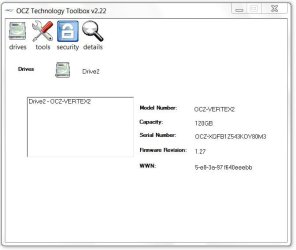
Also, OCZ's website claims version 1.24 as the latest firmware update for my drive, but toolbox shows it as 1.27

OCZ Drive Info.JPG

Am I missing something??? - OCZ Technology. I have an OCZ Vertex 2

Thanks.

@ whs, the paragon software worked like a champ. Thanks.
 

My Computer My Computer

Computer type
PC/Desktop
Computer Manufacturer/Model Number
Custom built by me.
OS
Windows 10 Pro
CPU
Intel Core i7-4770K (3.5Ghz)
Motherboard
Gigabyte G1 Sniper 5 (F10 Bios)
Memory
32 gig Corsair Dominator Platinum (4x8Gig)
Graphics Card(s)
Sapphire Tri-X R9 Fury
Sound Card
Soundblaster ZXR
Monitor(s) Displays
NEC PA242W 24" LCD Monitor
Screen Resolution
1920 x 1200
Hard Drives
Primary - Samsung 850 Pro (512gig), Samsung 840 Pro (256gig), 2TB WD Caviar Black.
PSU
EVGA Supernova 1000 G2
Case
Cooler Master HAF X
Cooling
Corsair H100i with Corsair Air Series SP120 Quiet Fans
Keyboard
Logitech Wireless Wave
Mouse
Logitech Performance MX
Internet Speed
High Speed Cable
Antivirus
Norton Security
Browser
IE11
Other Info
Memory Timings - 1866MHz @ 9-9-9-27-1T @ 1.5 volts
The 10v work just fine. The only thing that doesn't work is if you want to use their toolbox or flash the drive with having them installed because they don't recognize the drive because OCZ hasn't made their firmware use the 10v yet. They go off the old outdated 9 version. They're just slow to update it. Other than that, using the 10 version is fine, most use them and I've seen no real problems with them. If you want to use the toolbox for whatever reason, you can just rollback to the old 9v to use, then back to 10v for normal use if you wanted.

1.24 is the current one they have out that you can get from a posted link ATM. But if you've just purchased a drive (newer one) they come with new firmware, i.e 1.26/1.27. They ship new drives with their newer firmware. Just haven't made it available to the general public yet. Some of their firmware updates are just 1.24 fixes with new drive size capacities.

Technical Discussion OCZ Vertex 2 80GB with fw 1.27?


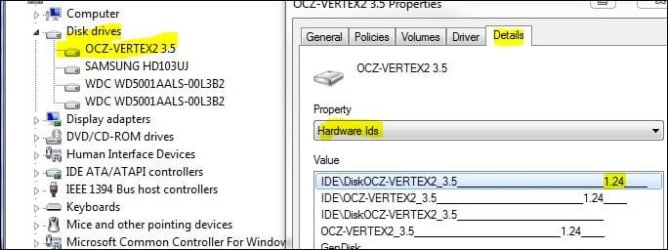
If you want to check what firmware is currently on the drive, go there:

drive.JPG


My Computer My Computer

Computer type
PC/Desktop
Computer Manufacturer/Model Number
Airbot 2.0
OS
Windows 7 Ultimate x64 SP1
CPU
Core i7 920 (D0) @ 4Ghz, *26c idle *65c full load on air
Motherboard
Asus P6X58D Premium - Sata 6Gb/s - USB 3.0
Memory
12GB DDR3 Corsair Dominator -CMD12GX3M6A1600C8 at 1600MHz
Graphics Card(s)
Zotac Geforce GTX 770
Sound Card
ASUS Xonar D2X
Monitor(s) Displays
1 LG 24" Flatron W2453V-PF 1 Samsung 24" P2450H both 2ms RT
Screen Resolution
1920x1080@60hz
Hard Drives
1 Samsung 250GB 840 Evo SSD
1 OCZ Vertex2 180GB SSD
1 TB Samsung Spinpoint F1 7200RPM 32MB cache
2 500GB WD Caviar Blacks 7200RPM 32MB cache (WD5001AALS)

Pioneer DVD Burner DVR-S18M
PSU
Corsair HX1000W
Case
Cooler Master HAF 932
Cooling
Case Fans *3 230mm, *1 140mm/CPU - *Tuniq Tower 120 Extreme
Keyboard
Logitech Wireless MK700
Mouse
Logitech Wireless MK700
Internet Speed
DL 15 Mbps UL 0.98 Mbps
Antivirus
None
Browser
Firefox Nightly
Other Info
Processor-7.7 *RAM- 7.9 *Graphics-7.9 *Gaming Graphics- 7.9 *SSD- 7.8 W.E.I final score= 7.7
*Phone- LG Nexus 5
I'm assuming I need to wait for Intel to release new firmware for my X25-M for the toolbox to work again?
 

My Computer My Computer

Computer Manufacturer/Model Number
Self
OS
Main - Windows 7 Pro SP1 64-Bit; 2nd - Windows Server 2008 R2
CPU
Main - Core i7 2600K; 2nd - Core i7 920
Motherboard
Main - Asus P8Z68-V Pro/Gen3; 2nd - Gigabyte GA-EX58-UDR3
Memory
Main - 16GB Corsair Vengeance; 2nd - 12GB Corsair Vengeance
Graphics Card(s)
Main - XFX Radeon 6870 1GB; 2nd - XFX Radeon 4870 1GB
Sound Card
Both: Onboard Realtek Azalia
Monitor(s) Displays
Main - Hann 25" + I-INC 25" + Acer 23"; 2nd - Upgrading Soon
Screen Resolution
Main - 1920x1080 (All Three Monitors); 2nd - Upgrading Soon
Hard Drives
Main - (1) Crucial M4 128GB (Boot)
Main - (1) Seagate 2TB 64MB Cache (Data)
Main - (1) Seagate 2TB 64MB Cache (Data Backup)
2nd - (1) Intel X25-M SSD 80GB (Boot)
2nd - (3) Seagate 1TB 32MB Cache (Data Backup)
2nd - (1) Seagate 320GB (Because)
PSU
Main - OCZ 600W Modular; 2nd - OCZ 600W
Case
Main - Thermaltake Element G; 2nd - NZXT something or other
Cooling
Main - Corsair H80; 2nd - Prolimatech Megahalems
Keyboard
Main - Razer Reclusa; 2nd - Old MS Keyboard
Mouse
Main - Logitech MX Revolution; 2nd - Old MS Mouse
Internet Speed
20Mbps Time-Warner Cable
If you are not afraid of spending the 20 bucks, the tool is the way to go. Then you are certain that everything is perfect.

I assume that this DOESNT apply if one of the reasons you are adding an SSD is because something has gone haywire in your current OS? Or is that not an issue? I ask because I wrote this earlier today as my first post (no one has answered it yet....):

OK, newbie here!

Glad I found this forum and
tutorial.

I'm running a Dell XPS Studio 8100, Lynnfield, I7-860, 2.8 & 8gb RAM. I do a lot of photo editing and was getting tired of my old XP machine. I upgraded to this a few months ago. It's been fairly good but certainly not as snappy as I had hoped for going from my old 8400 to this.


That said, the OS has been a bit flaky lately and I can't boot without getting the black screen and flashing cursor, I have to hit f12 and then go from there for the OS to boot properly.


With that in mind, I've decided to order a 120gb or so SSD as my primary drive. I keep the old boot drive for data only.


Here's what I need to know:


- I will be clean installing Windows 7 Pro x64 from the factory Re-installation disc from Dell onto the new SSD. Will this work?


- Do I need to do anything other than putting the disc into the drive when I start the computer?


- I assume, once I have the OS installed on the SSD, I can then reattach the original HD without fear of the computer trying to boot from that drive?
 

My Computer My Computer

Computer Manufacturer/Model Number
Dell XPS 8100
OS
Windows 7 Professional x64
CPU
Lynnfield, I7-860, 2.8
Memory
8gb
This is the way recommended by the forum. Optimize SSD/HD for installation. Although I don't believe the 'clean all' command is necessary for a new drive and it seems that most people align at 1024. 64 will work good too but I have been told that 1024 is better for some reason.

Also, before you install disconnect all other hard drives in your system.
 

My Computers My Computers

System One System Two

  • Computer type
    PC/Desktop
    Computer Manufacturer/Model Number
    ALWAYS UNDER CONSTRUCTION
    OS
    Windows 11 Pro
    CPU
    Ryzen 9 5900X
    Motherboard
    Asus X570 Crosshair Viii Hero
    Memory
    32GB G Skill DDR4-3600
    Graphics Card(s)
    EVGA RTX 3080 FTW 3 Ultra
    Sound Card
    On Board/Sennheiser PC37X Headset
    Monitor(s) Displays
    3 X Asus 27"
    Screen Resolution
    2560x1440
    Hard Drives
    2 X 1 TB NVME drives
    PSU
    EVGA 850
    Case
    Phanteks Eclipse P400A
    Cooling
    EVGA 280 AIO
    Keyboard
    Logitech G510s/ Logitech G13
    Mouse
    Logitech G502
    Internet Speed
    24/1
    Antivirus
    ESET/MBAM Pro/SAS Pro
    Browser
    Chrome/ Firefox/ Edge
  • Computer type
    Laptop
    System Manufacturer/Model Number
    Dell 16 Plus
    OS
    Windows 11 Pro
    CPU
    Intel Ultra 9 288V
    Memory
    32 GB LPDDR5X 8533
    Monitor(s) Displays
    16" Mini-LED HDR600 Touch 90 Hz
    Screen Resolution
    2560X1600
    Hard Drives
    1 TB NVME
Hi Abouna, Welcome to seven forums and Happy New Year.

Now, first off you need to try and figure out why you're getting black screens. And since you're moving to a new drive and doing a fresh install (which I recommend due to your issues), this might cure your problems, but if it doesn't suspect a hardware issue.

As far as doing anything to the SSD drive prior to the OS install, maybe a firmware update, otherwise since your installing Windows 7 on it you shouldn't need to do any other maintenance. Well, make sure you enable AHCI in the BIOS most all SSD drives perform better on AHCI as opposed to IDE.

Now, if you’re going to image the drive, that is copy it over from the old drive, then the program whs recommended works like a champ as I just used it to image my drive and it was very quick and easy. I had my drive copied in less than 20 minutes -
However given your issues I wouldn’t image the drive, I would just do a fresh install of the OS on the SSD drive.

My two cents
 

My Computer My Computer

Computer type
PC/Desktop
Computer Manufacturer/Model Number
Custom built by me.
OS
Windows 10 Pro
CPU
Intel Core i7-4770K (3.5Ghz)
Motherboard
Gigabyte G1 Sniper 5 (F10 Bios)
Memory
32 gig Corsair Dominator Platinum (4x8Gig)
Graphics Card(s)
Sapphire Tri-X R9 Fury
Sound Card
Soundblaster ZXR
Monitor(s) Displays
NEC PA242W 24" LCD Monitor
Screen Resolution
1920 x 1200
Hard Drives
Primary - Samsung 850 Pro (512gig), Samsung 840 Pro (256gig), 2TB WD Caviar Black.
PSU
EVGA Supernova 1000 G2
Case
Cooler Master HAF X
Cooling
Corsair H100i with Corsair Air Series SP120 Quiet Fans
Keyboard
Logitech Wireless Wave
Mouse
Logitech Performance MX
Internet Speed
High Speed Cable
Antivirus
Norton Security
Browser
IE11
Other Info
Memory Timings - 1866MHz @ 9-9-9-27-1T @ 1.5 volts
You don't have to have any RAID arrays to use it.
I'm using the 10.0 beta with no problems.

It will work with your Intel ICH10R chipset, just use the RST driver 9.6.0.1014 version for your OCZ SSD.

What 10.0 Beta version are you using Dave?

I'm using the 10.1.0.1008 version. The latest that I know of. They're WHQL and there even posted on Intels site now. (Although, OCZ doesn't have there firmware geared using the 10v yet, so you cant use their toolbox or flash firmware to the drive with them as it won't recognize. But they're fine to use otherwise.)

http://downloadcenter.intel.com/SearchResult.aspx?lang=eng&ProductFamily=Chipsets&ProductLine=Chipset+Software&ProductProduct=Intel%C2%AE+Rapid+Storage+Technology+%28Intel%C2%AE+RST%29&ProdId=2101&LineId=1090&FamilyId=40


Don't think it's actually a beta, 10.0.0.1046, got it from Station Drivers and it wasn't on Intel's site yet so, maybe pre-published.

Just D/L'ed the 10.1.0.1008 version.


If you are not afraid of spending the 20 bucks, the tool is the way to go. Then you are certain that everything is perfect.

I assume that this DOESNT apply if one of the reasons you are adding an SSD is because something has gone haywire in your current OS? Or is that not an issue? I ask because I wrote this earlier today as my first post (no one has answered it yet....):

OK, newbie here!

Glad I found this forum and tutorial.

I'm running a Dell XPS Studio 8100, Lynnfield, I7-860, 2.8 & 8gb RAM. I do a lot of photo editing and was getting tired of my old XP machine. I upgraded to this a few months ago. It's been fairly good but certainly not as snappy as I had hoped for going from my old 8400 to this.

That said, the OS has been a bit flaky lately and I can't boot without getting the black screen and flashing cursor, I have to hit f12 and then go from there for the OS to boot properly.

With that in mind, I've decided to order a 120gb or so SSD as my primary drive. I keep the old boot drive for data only.

Here's what I need to know:

- I will be clean installing Windows 7 Pro x64 from the factory Re-installation disc from Dell onto the new SSD. Will this work?

- Do I need to do anything other than putting the disc into the drive when I start the computer?

- I assume, once I have the OS installed on the SSD, I can then reattach the original HD without fear of the computer trying to boot from that drive?
Agree with essenbe and sygnus21.
- I will be clean installing Windows 7 Pro x64 from the factory Re-installation disc from Dell onto the new SSD. Will this work?
Yes, since you're having OS issues I would recommend to do the clean install, as you mentioned.

- Do I need to do anything other than putting the disc into the drive when I start the computer?
Yes,
First check for firmware update, install if not the latest.

Second, enable ACHI or RAID in your BIOS, whichever your Dell has options for. RAID will give you all the benefits of AHCI and you don't need to have anything in a RAID array.

Third, it's best to have the SSD in SATA port 0, unplug all other drives. Except the DVD if you are using it. I would recommend installing from USB memory stick, will be a little faster, but not absolutely necessary.

You don't need to do anything else to a new 'out of the box' SSD. Don't format it or make any partitions.
This will give you the small 'System Reserved' partition, 100mb, which is preferable. Unless you have a preference against it, up to you.

Win7 will align the partition and set all of the basic settings for the SSD.

MS Engineering for Windows 7 Support and Q&A for Solid-State Drives

You can make more partitions after the installation if you want.
- I assume, once I have the OS installed on the SSD, I can then reattach the original HD without fear of the computer trying to boot from that drive?

Should be set to the SSD.
If it's not just go into the Boot device list in BIOS and change the preference order to the SSD above the HDD.

 
Last edited:

My Computer My Computer

Computer type
PC/Desktop
Computer Manufacturer/Model Number
76~2.0
OS
Windows 7 Ult x64 - SP1/ Windows 8 Pro x64
CPU
Intel Core i5-3570K 4.6GHz
Motherboard
Gigabyte GA-Z77X UD3H, f18
Memory
8GB (2X4GB) DDR3 1600 Corsair Vengeance CL8 1.5v
Graphics Card(s)
Sapphire HD 7770 Vapor-X OC 1GB DDR5
Sound Card
Onboard VIA VT2021
Monitor(s) Displays
22" LCD Dell
Screen Resolution
1680x1050
Hard Drives
Samsung 840Pro 128GB SSD,
Seagate Barracuda 500GB SATA2 7200rpm 32MB cache, Seagate Barracuda 1TB SATA2 7200rpm 32MB cache,
PSU
Corsair HX650W
Case
Cooler Master Storm Scout
Cooling
Corsair H80 2x12cm Noctua NF P12 , 2x14cm case fans
Keyboard
Logitech Wave
Mouse
CM Sentinel
Internet Speed
Dismal
Antivirus
Avast
Browser
Opera Next
Other Info
Haswell laptop: HP Envy 17t-j, i7-4700MQ, GeForce 740M 2GB DDR3, 17.3" Full HD 1920x1080, 16GB RAM, Samsung 840 Pro 128GB, 1TB Hitachi 7200 HDD,
Desktop: eSATA ports,
External eSATA Seagate 500GB SATA2 7200rpm,
External WD USB 500GB
I'm assuming I need to wait for Intel to release new firmware for my X25-M for the toolbox to work again?


What firmware do you have?

Mine is 2CV102HD, the Intel toolbox works fine.

What is the toolbox version?
 

My Computer My Computer

Computer type
PC/Desktop
Computer Manufacturer/Model Number
76~2.0
OS
Windows 7 Ult x64 - SP1/ Windows 8 Pro x64
CPU
Intel Core i5-3570K 4.6GHz
Motherboard
Gigabyte GA-Z77X UD3H, f18
Memory
8GB (2X4GB) DDR3 1600 Corsair Vengeance CL8 1.5v
Graphics Card(s)
Sapphire HD 7770 Vapor-X OC 1GB DDR5
Sound Card
Onboard VIA VT2021
Monitor(s) Displays
22" LCD Dell
Screen Resolution
1680x1050
Hard Drives
Samsung 840Pro 128GB SSD,
Seagate Barracuda 500GB SATA2 7200rpm 32MB cache, Seagate Barracuda 1TB SATA2 7200rpm 32MB cache,
PSU
Corsair HX650W
Case
Cooler Master Storm Scout
Cooling
Corsair H80 2x12cm Noctua NF P12 , 2x14cm case fans
Keyboard
Logitech Wave
Mouse
CM Sentinel
Internet Speed
Dismal
Antivirus
Avast
Browser
Opera Next
Other Info
Haswell laptop: HP Envy 17t-j, i7-4700MQ, GeForce 740M 2GB DDR3, 17.3" Full HD 1920x1080, 16GB RAM, Samsung 840 Pro 128GB, 1TB Hitachi 7200 HDD,
Desktop: eSATA ports,
External eSATA Seagate 500GB SATA2 7200rpm,
External WD USB 500GB
...
128012d1293835461-show-us-your-ssd-performance-drive.jpg

is yours a three and a half incher, Airbot? (if you pardon the expression :p)

what's the 3.5 bit about?

here's mine...
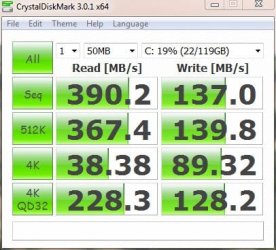
vert.PNG

(i wonder why my device manager is calling my drives 'ATA devices'?)
 

My Computer My Computer

Computer Manufacturer/Model Number
mickey megabyte 1234
OS
ultimate 64 sp1
CPU
i5 2500K [email protected]
Motherboard
MSI P67A-GD53
Memory
8 gigs GSkill Ripjaws 1600
Graphics Card(s)
amd hd6950
Sound Card
creative x-fi gamer
Monitor(s) Displays
samsung 24"
Screen Resolution
1920x1080
Hard Drives
ocz vertex 2e 60 gig, samsung f3 1tb, buffalo 2tb ext
PSU
antec 550
Case
antec three hundred
Cooling
i'm a cooling fan
Keyboard
saitek eclipse ii
Mouse
logitech g3
Internet Speed
about 4 Mbps
Other Info
i love win7
Happy New Year everyone!

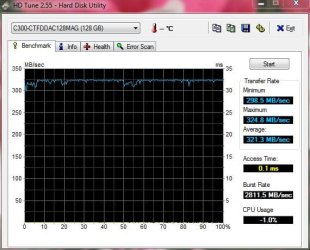
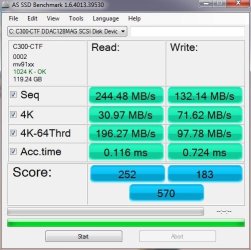
Crucial C300 128GB SSD SATA 3.0
HD Tune benchmark:

crucial c300.JPG

AS SSD benchmark:

AS benchmark.jpg

CrystalDisk benchmark:

cd benchmark.JPG

Three benchmarks and three different results...

CrystalDisk is out of whack, the maximum read speed for this drive is 355MB/s.

I am not too familiar with HD Tune in regards to its accuracy for testing SSD drives.

It is probably the AS SSD benchmark that is the most accurate, this benchmark is designed for SSD drives.
 

Attachments

  • crucial c300.JPG
    crucial c300.JPG
    49.5 KB · Views: 14
  • AS benchmark.jpg
    AS benchmark.jpg
    48.4 KB · Views: 12
  • cd benchmark.JPG
    cd benchmark.JPG
    38.9 KB · Views: 7

My Computer My Computer

Computer type
PC/Desktop
Computer Manufacturer/Model Number
Custom built at Home
OS
Windows 7 64-bit, Windows 8.1 64-bit, OSX El Capitan, Windows 10 (VMware)
CPU
Intel i5-3350P 3.1 GHz
Motherboard
Gigabyte GA-Z77X-UP5 TH
Memory
16 GBs GSkill Sniper
Graphics Card(s)
Radeon HD 7850
Sound Card
VIA HD Audio
Monitor(s) Displays
Dell U2410 24"
Screen Resolution
1920x1200
Hard Drives
1 x Intel 520 240 GBs
1 x Seagate 1TBs SATA 2.0,
1 x Seagate 1TBs eSATA 2.0
PSU
Thermaltake 850W
Case
Antec P183
Cooling
Noctua NH-D14 Heatsink 2 x 120mm fans, 4 x 120mm case fans
Keyboard
Dell Multimedia keyboard
Mouse
Logitech Trackball
Internet Speed
28.5 Mb/s
Also, OCZ's website claims version 1.24 as the latest firmware update for my drive, but toolbox shows it as 1.27

View attachment 127996

Am I missing something??? - OCZ Technology. I have an OCZ Vertex 2

1.24 is the current one they have out that you can get from a posted link ATM. But if you've just purchased a drive (newer one) they come with new firmware, i.e 1.26/1.27. They ship new drives with their newer firmware. Just haven't made it available to the general public yet. Some of their firmware updates are just 1.24 fixes with new drive size capacities.

Technical Discussion OCZ Vertex 2 80GB with fw 1.27?


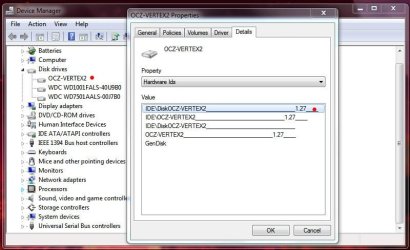
If you want to check what firmware is currently on the drive, go there:

View attachment 128012


Done and it's definitely 1.27....

OCZ SSD Info.JPG

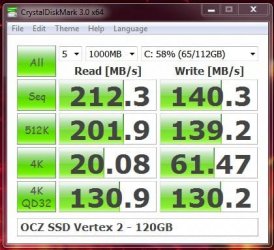
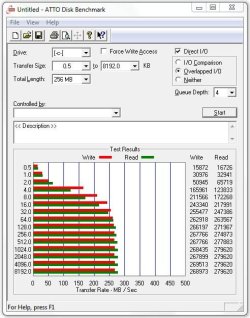
BTW do these speeds look right?

OCZ Test 1.JPG

ATTO Score.JPG

Thanks.
 

My Computer My Computer

Computer type
PC/Desktop
Computer Manufacturer/Model Number
Custom built by me.
OS
Windows 10 Pro
CPU
Intel Core i7-4770K (3.5Ghz)
Motherboard
Gigabyte G1 Sniper 5 (F10 Bios)
Memory
32 gig Corsair Dominator Platinum (4x8Gig)
Graphics Card(s)
Sapphire Tri-X R9 Fury
Sound Card
Soundblaster ZXR
Monitor(s) Displays
NEC PA242W 24" LCD Monitor
Screen Resolution
1920 x 1200
Hard Drives
Primary - Samsung 850 Pro (512gig), Samsung 840 Pro (256gig), 2TB WD Caviar Black.
PSU
EVGA Supernova 1000 G2
Case
Cooler Master HAF X
Cooling
Corsair H100i with Corsair Air Series SP120 Quiet Fans
Keyboard
Logitech Wireless Wave
Mouse
Logitech Performance MX
Internet Speed
High Speed Cable
Antivirus
Norton Security
Browser
IE11
Other Info
Memory Timings - 1866MHz @ 9-9-9-27-1T @ 1.5 volts
your atto looks very similar to mine.
atto.PNG
 

My Computer My Computer

Computer Manufacturer/Model Number
mickey megabyte 1234
OS
ultimate 64 sp1
CPU
i5 2500K [email protected]
Motherboard
MSI P67A-GD53
Memory
8 gigs GSkill Ripjaws 1600
Graphics Card(s)
amd hd6950
Sound Card
creative x-fi gamer
Monitor(s) Displays
samsung 24"
Screen Resolution
1920x1080
Hard Drives
ocz vertex 2e 60 gig, samsung f3 1tb, buffalo 2tb ext
PSU
antec 550
Case
antec three hundred
Cooling
i'm a cooling fan
Keyboard
saitek eclipse ii
Mouse
logitech g3
Internet Speed
about 4 Mbps
Other Info
i love win7
Yeah that one looks simuliar to a lot of others so I guess I'm good.

Thanks
 

My Computer My Computer

Computer type
PC/Desktop
Computer Manufacturer/Model Number
Custom built by me.
OS
Windows 10 Pro
CPU
Intel Core i7-4770K (3.5Ghz)
Motherboard
Gigabyte G1 Sniper 5 (F10 Bios)
Memory
32 gig Corsair Dominator Platinum (4x8Gig)
Graphics Card(s)
Sapphire Tri-X R9 Fury
Sound Card
Soundblaster ZXR
Monitor(s) Displays
NEC PA242W 24" LCD Monitor
Screen Resolution
1920 x 1200
Hard Drives
Primary - Samsung 850 Pro (512gig), Samsung 840 Pro (256gig), 2TB WD Caviar Black.
PSU
EVGA Supernova 1000 G2
Case
Cooler Master HAF X
Cooling
Corsair H100i with Corsair Air Series SP120 Quiet Fans
Keyboard
Logitech Wireless Wave
Mouse
Logitech Performance MX
Internet Speed
High Speed Cable
Antivirus
Norton Security
Browser
IE11
Other Info
Memory Timings - 1866MHz @ 9-9-9-27-1T @ 1.5 volts
Anyone have a preference for which SSD I should buy? I haven't ordered yet. I need to get a 120-128gb.
 

My Computer My Computer

Computer Manufacturer/Model Number
Dell XPS 8100
OS
Windows 7 Professional x64
CPU
Lynnfield, I7-860, 2.8
Memory
8gb
I don't know, a lot of people like OCZ, some prefer Intel. Do your homework. It took me months to decide on what to get and in the end I chose OCZ's Vertex 2 120Gig. I got it for $219 from Amazon.com. They now have it pushed back up to 223.

In the end it's going to come down to your wallet and personal tastes.
 

My Computer My Computer

Computer type
PC/Desktop
Computer Manufacturer/Model Number
Custom built by me.
OS
Windows 10 Pro
CPU
Intel Core i7-4770K (3.5Ghz)
Motherboard
Gigabyte G1 Sniper 5 (F10 Bios)
Memory
32 gig Corsair Dominator Platinum (4x8Gig)
Graphics Card(s)
Sapphire Tri-X R9 Fury
Sound Card
Soundblaster ZXR
Monitor(s) Displays
NEC PA242W 24" LCD Monitor
Screen Resolution
1920 x 1200
Hard Drives
Primary - Samsung 850 Pro (512gig), Samsung 840 Pro (256gig), 2TB WD Caviar Black.
PSU
EVGA Supernova 1000 G2
Case
Cooler Master HAF X
Cooling
Corsair H100i with Corsair Air Series SP120 Quiet Fans
Keyboard
Logitech Wireless Wave
Mouse
Logitech Performance MX
Internet Speed
High Speed Cable
Antivirus
Norton Security
Browser
IE11
Other Info
Memory Timings - 1866MHz @ 9-9-9-27-1T @ 1.5 volts
I don't know, a lot of people like OCZ, some prefer Intel. Do your homework. It took me months to decide on what to get and in the end I chose OCZ's Vertex 2 120Gig. I got it for $219 from Amazon.com. They now have it pushed back up to 223.

In the end it's going to come down to your wallet and personal tastes.

I've done a fair amount of reading and it does seem that those are the two front runners. My biggest concern is reliability and warranty coverage. In that vein I have to lean toward Intel.

On the other hand, everyone seems to like the Sandforce 1200, which the OCZ uses I think but the Intel doesn't
 

My Computer My Computer

Computer Manufacturer/Model Number
Dell XPS 8100
OS
Windows 7 Professional x64
CPU
Lynnfield, I7-860, 2.8
Memory
8gb
Yeah it’s a hard decision. I started to go Intel but the sandforce controller and price pushed my wallet towards OCZ. Don't know what the warranty is for Intel, but the OCZ Vertex 2 is 3 years.

To be honest I can’t see you going bad with Intel. I could have easily done it myself and wouldn’t have lost any sleep.

The big requirement for me was the drive had to be at least 120GB. I think that (capacity) should be your consideration as well

Good luck.
 

My Computer My Computer

Computer type
PC/Desktop
Computer Manufacturer/Model Number
Custom built by me.
OS
Windows 10 Pro
CPU
Intel Core i7-4770K (3.5Ghz)
Motherboard
Gigabyte G1 Sniper 5 (F10 Bios)
Memory
32 gig Corsair Dominator Platinum (4x8Gig)
Graphics Card(s)
Sapphire Tri-X R9 Fury
Sound Card
Soundblaster ZXR
Monitor(s) Displays
NEC PA242W 24" LCD Monitor
Screen Resolution
1920 x 1200
Hard Drives
Primary - Samsung 850 Pro (512gig), Samsung 840 Pro (256gig), 2TB WD Caviar Black.
PSU
EVGA Supernova 1000 G2
Case
Cooler Master HAF X
Cooling
Corsair H100i with Corsair Air Series SP120 Quiet Fans
Keyboard
Logitech Wireless Wave
Mouse
Logitech Performance MX
Internet Speed
High Speed Cable
Antivirus
Norton Security
Browser
IE11
Other Info
Memory Timings - 1866MHz @ 9-9-9-27-1T @ 1.5 volts
Status
Not open for further replies.
Back
Top