Windows 7 64bit Clean Install FAIL

As suggested when you had DISKPART Clean All fail, this is when you needed to run diagnostics:
SO while in the install menu I hit shift / F10 to diskpart

When I hit clean all I get an error
Diskpart has encountered an error: the request could not be preformed because of a I/O device error
 
Both my Vista and Win 7 installed failed - Both OEM and both worked on other PCs

I contacted newegg customer service - They are awesome!!

I'm getting a refund and just ordered another Asus board. I'll post up early next week with details.

Thanks again all!
 

My Computer My Computer

OS
Windows 7 Professional x64
CPU
AMD PHENOM II x4 945 3.0G
Motherboard
Asus M4A79XTD EVO 790X
Memory
G.SKILL 4GB (2 x 2GB) 240-Pin DDR3 1600
Graphics Card(s)
ASUS GeForce GTX 460 (Fermi) 1GB
Monitor(s) Displays
ViewSonic VA1912WB
Hard Drives
1TB SATA Seagate Barracuda
PSU
Antec EarthWatts EA650 650W
Case
Rosewill CHALLENGER
Cooling
Four Fans-1x Front, 1x Top, 1x Rear, 1x Side
Keyboard
Logitech G15
FYI -

I did call Asus Tech support - Non of you folks are Shawn are you? I explained the symptoms and shared the troubleshooting we preformed with your guidance.

Shawn says sounds like a Sata controller issue. He also said that if it would have been memory related we would have seen a very different error - Just FYI for those that might encounter this later. I will edit my first post with additional details once we are up and running. That prevents someone having to read the entire thread. :D
 

My Computer My Computer

OS
Windows 7 Professional x64
CPU
AMD PHENOM II x4 945 3.0G
Motherboard
Asus M4A79XTD EVO 790X
Memory
G.SKILL 4GB (2 x 2GB) 240-Pin DDR3 1600
Graphics Card(s)
ASUS GeForce GTX 460 (Fermi) 1GB
Monitor(s) Displays
ViewSonic VA1912WB
Hard Drives
1TB SATA Seagate Barracuda
PSU
Antec EarthWatts EA650 650W
Case
Rosewill CHALLENGER
Cooling
Four Fans-1x Front, 1x Top, 1x Rear, 1x Side
Keyboard
Logitech G15

My Computer My Computer

Computer type
PC/Desktop
Computer Manufacturer/Model Number
Custom built by me.
OS
Windows 10 Pro
CPU
Intel Core i7-4770K (3.5Ghz)
Motherboard
Gigabyte G1 Sniper 5 (F10 Bios)
Memory
32 gig Corsair Dominator Platinum (4x8Gig)
Graphics Card(s)
Sapphire Tri-X R9 Fury
Sound Card
Soundblaster ZXR
Monitor(s) Displays
NEC PA242W 24" LCD Monitor
Screen Resolution
1920 x 1200
Hard Drives
Primary - Samsung 850 Pro (512gig), Samsung 840 Pro (256gig), 2TB WD Caviar Black.
PSU
EVGA Supernova 1000 G2
Case
Cooler Master HAF X
Cooling
Corsair H100i with Corsair Air Series SP120 Quiet Fans
Keyboard
Logitech Wireless Wave
Mouse
Logitech Performance MX
Internet Speed
High Speed Cable
Antivirus
Norton Security
Browser
IE11
Other Info
Memory Timings - 1866MHz @ 9-9-9-27-1T @ 1.5 volts
Happy New Year....

Here's the latest....

I called Asus and spoke with Tech support on the 23rd. After sharing the extensive trouble shooting we did, the tech said to RMA the board as it wsa a failure with the SATA controller. I spoke with Newegg had a REFUND RMA provided and ordered a replacement Asus MB for time sake, keep in mind this was a Christmas gift for my sister.

Yesterday, with 3 day shipping I receive the new MB, I pull the old one, put it in the new box and ship it back to Newegg / RMA....keep in mind the RMA UPS label was only good for 7 days and Thrusday was the 7th day.

So here we are new board all hooked up, bios updated and settings in place, load Win 7 and no drives are detected. I tweak IDE - AHCI, Marvell Esata dis/enable.

At this point I'm frustated. So I pull the 500GB Seagate HD and put it into my desktop and install windows 7 on it without issue. I pull that 500GB hd and put it back into the troubled PC and now I can't boot to it.....
 
Last edited:

My Computer My Computer

OS
Windows 7 Professional x64
CPU
AMD PHENOM II x4 945 3.0G
Motherboard
Asus M4A79XTD EVO 790X
Memory
G.SKILL 4GB (2 x 2GB) 240-Pin DDR3 1600
Graphics Card(s)
ASUS GeForce GTX 460 (Fermi) 1GB
Monitor(s) Displays
ViewSonic VA1912WB
Hard Drives
1TB SATA Seagate Barracuda
PSU
Antec EarthWatts EA650 650W
Case
Rosewill CHALLENGER
Cooling
Four Fans-1x Front, 1x Top, 1x Rear, 1x Side
Keyboard
Logitech G15
Here's the error I get from Win 7 installer at "where do you want to install windows"

Error - Windows cannot be installed to this disk. This computer's hardware may not support booting to this disk. Ensure that the Disk's controller is enabled in the computer's Bios menu.

This error was received with the following bios settings changed from Default:
Storage Config - OnChip Sata Channel - Enabled
Sata port 1-4 - IDE
Sata port 5-6 - IDE

Advanced
Onboard Devices configuration -
Marvell ESata Disabled

PCI/PnP
Plug and play O/S - YES
 

My Computer My Computer

OS
Windows 7 Professional x64
CPU
AMD PHENOM II x4 945 3.0G
Motherboard
Asus M4A79XTD EVO 790X
Memory
G.SKILL 4GB (2 x 2GB) 240-Pin DDR3 1600
Graphics Card(s)
ASUS GeForce GTX 460 (Fermi) 1GB
Monitor(s) Displays
ViewSonic VA1912WB
Hard Drives
1TB SATA Seagate Barracuda
PSU
Antec EarthWatts EA650 650W
Case
Rosewill CHALLENGER
Cooling
Four Fans-1x Front, 1x Top, 1x Rear, 1x Side
Keyboard
Logitech G15
With the fiollowing settings I get the error code 0x80070057
Storage Config - OnChip Sata Channel - Enabled
Sata port 1-4 - AHCI
Sata port 5-6 - AHCI

Advanced
Onboard Devices configuration -
Marvell ESata Disabled

PCI/PnP
Plug and play O/S - NO
 

My Computer My Computer

OS
Windows 7 Professional x64
CPU
AMD PHENOM II x4 945 3.0G
Motherboard
Asus M4A79XTD EVO 790X
Memory
G.SKILL 4GB (2 x 2GB) 240-Pin DDR3 1600
Graphics Card(s)
ASUS GeForce GTX 460 (Fermi) 1GB
Monitor(s) Displays
ViewSonic VA1912WB
Hard Drives
1TB SATA Seagate Barracuda
PSU
Antec EarthWatts EA650 650W
Case
Rosewill CHALLENGER
Cooling
Four Fans-1x Front, 1x Top, 1x Rear, 1x Side
Keyboard
Logitech G15
You can prepare the HD which had Win7 installed in another machine to boot on the problem build using Paragon Adaptive Restore CD, or image it using Acronis 10+ with Universal Restore if you have that.

Paragon Adaptive Restore - Overview

Were you ever able to wipe the HD with Diskpart Clean All command? This is an essential troubleshooting step after updating BIOS or resettting the CMOS, setting SATA controller to AHCI, or IDE if necessary.

If Diskpart fails then the HD needs to be diagnosed using maker's full diag/repair CD scan: http://www.carrona.org/hddiag.html followed by http://www.sevenforums.com/tutorials/433-disk-check.html from the DVD/Repair CD Command Line.
 
Last edited:
I believe I have a SATA driver issue.
I need would like to try the Nvidia drivers SATAIDE Driver (v11.1.0.33) WHQL. Anyone know a resource where I can acquire without the force_winvista64_15.16_international.exe
 

My Computer My Computer

OS
Windows 7 Professional x64
CPU
AMD PHENOM II x4 945 3.0G
Motherboard
Asus M4A79XTD EVO 790X
Memory
G.SKILL 4GB (2 x 2GB) 240-Pin DDR3 1600
Graphics Card(s)
ASUS GeForce GTX 460 (Fermi) 1GB
Monitor(s) Displays
ViewSonic VA1912WB
Hard Drives
1TB SATA Seagate Barracuda
PSU
Antec EarthWatts EA650 650W
Case
Rosewill CHALLENGER
Cooling
Four Fans-1x Front, 1x Top, 1x Rear, 1x Side
Keyboard
Logitech G15
You can prepare the HD which had Win7 installed in another machine to boot on the problem build using Paragon Adaptive Restore CD, or image it using Acronis 10+ with Universal Restore if you have that.

Paragon Adaptive Restore - Overview

Were you ever able to wipe the HD with Diskpart Clean All command? This is an essential troubleshooting step after updating BIOS or resettting the CMOS, setting SATA controller to AHCI, or IDE if necessary.

If Diskpart fails then the HD needs to be diagnosed using maker's full diag/repair CD scan: HD Diagnostic followed by http://www.sevenforums.com/tutorials/433-disk-check.html from the DVD/Repair CD Command Line.

Greg - No offense but I'm not a real big fan of script and kernel hacks on a new system with recent hardware. Thanks but I'm not going that route.

As for wipes with Diskpart CLEANALL yes it happened. It happened on both HD drives and partitions happened on both.
 

My Computer My Computer

OS
Windows 7 Professional x64
CPU
AMD PHENOM II x4 945 3.0G
Motherboard
Asus M4A79XTD EVO 790X
Memory
G.SKILL 4GB (2 x 2GB) 240-Pin DDR3 1600
Graphics Card(s)
ASUS GeForce GTX 460 (Fermi) 1GB
Monitor(s) Displays
ViewSonic VA1912WB
Hard Drives
1TB SATA Seagate Barracuda
PSU
Antec EarthWatts EA650 650W
Case
Rosewill CHALLENGER
Cooling
Four Fans-1x Front, 1x Top, 1x Rear, 1x Side
Keyboard
Logitech G15
What scripts or kernel hacks are you referring to?

You said you tried to start Win7 which had been installed in another machine so I provided you with what is needed to accomplish this.

I suggested Paragon's highly regarded adaptive technology, simlar to what is used by Acronis Universal Restore.

These are not hacks that I know of, but state of the art technology.

Your mobo is reported faulty in numerous Google results, and it has an AMD chipset - not NVIDIA.
 
Last edited:
Yes Greg I have looked at Nvidia's site for the drivers, but they are part of an EXE install and I need just SATAIDE Driver (v11.1.0.33) WHQL

Anyone have any other ideas!
 

My Computer My Computer

OS
Windows 7 Professional x64
CPU
AMD PHENOM II x4 945 3.0G
Motherboard
Asus M4A79XTD EVO 790X
Memory
G.SKILL 4GB (2 x 2GB) 240-Pin DDR3 1600
Graphics Card(s)
ASUS GeForce GTX 460 (Fermi) 1GB
Monitor(s) Displays
ViewSonic VA1912WB
Hard Drives
1TB SATA Seagate Barracuda
PSU
Antec EarthWatts EA650 650W
Case
Rosewill CHALLENGER
Cooling
Four Fans-1x Front, 1x Top, 1x Rear, 1x Side
Keyboard
Logitech G15
Greg - "Google it" is nearly an offensive suggestion! As for download, run and observe install location...again an obvious solution.

The EXE has a hardware check that prevents me from installing on a working desktop - thus the request for stand-alone driver.


Anybody with some constructive useful ideas?
 

My Computer My Computer

OS
Windows 7 Professional x64
CPU
AMD PHENOM II x4 945 3.0G
Motherboard
Asus M4A79XTD EVO 790X
Memory
G.SKILL 4GB (2 x 2GB) 240-Pin DDR3 1600
Graphics Card(s)
ASUS GeForce GTX 460 (Fermi) 1GB
Monitor(s) Displays
ViewSonic VA1912WB
Hard Drives
1TB SATA Seagate Barracuda
PSU
Antec EarthWatts EA650 650W
Case
Rosewill CHALLENGER
Cooling
Four Fans-1x Front, 1x Top, 1x Rear, 1x Side
Keyboard
Logitech G15
What is offensive about suggesting you do what we all do here to find instantly a driver, solve an error by supplying its text and number, etc? Google now holds almost all of human knowledge if you ask the question right. Simple searches like "SATAIDE Win7 Driver (v11.1.0.33) WHQL" once got no or few responses but in recent years almost always return what you're seeking after sifting through multiple results.

Unfortunately when you are needlessly belligerant with someone trying earnestly to help you, others are driven away and you will get the help you deserve.
 
What is offensive about suggesting you do what we all do here to find instantly a driver, solve an error by supplying its text and number, etc? Google now holds almost all of human knowledge if you ask the question right. Simple searches like "SATAIDE Win7 Driver (v11.1.0.33) WHQL" once got no or few responses but in recent years almost always return what you're seeking after sifting through multiple results.

Unfortunately when you are needlessly belligerant with someone trying earnestly to help you, others are driven away and you will get the help you deserve.

As an IT professional the first thing I do is research, google, bing etc or use other resources. I provided very specific information in my request - the need for SATAIDE Win7 Driver (v11.1.0.33) WHQL not something generic.

I understand that often on forums Captain Obvious states "google it" so that's why I take offense. I came to a windows 7 forum specifically for the constructive, creative and trained input of other IT professional.

Greg if Google produced the answer to my original question we wouldn't have 100 posts here without a solution.
 

My Computer My Computer

OS
Windows 7 Professional x64
CPU
AMD PHENOM II x4 945 3.0G
Motherboard
Asus M4A79XTD EVO 790X
Memory
G.SKILL 4GB (2 x 2GB) 240-Pin DDR3 1600
Graphics Card(s)
ASUS GeForce GTX 460 (Fermi) 1GB
Monitor(s) Displays
ViewSonic VA1912WB
Hard Drives
1TB SATA Seagate Barracuda
PSU
Antec EarthWatts EA650 650W
Case
Rosewill CHALLENGER
Cooling
Four Fans-1x Front, 1x Top, 1x Rear, 1x Side
Keyboard
Logitech G15
So still looking for someone who has the Nvidia SATAIDE Drivers (v11.1.0.33) WHQL.

Both the new Hard Drives are Seagates (1TB and 500GB), however both Seagates. I have a loaner WD 80GB SATA drive that I'll attempt an install on.

I searched Seagates site to determine if either drive had firmware, or other notices (recalls etc) attached and neither do.
 

My Computer My Computer

OS
Windows 7 Professional x64
CPU
AMD PHENOM II x4 945 3.0G
Motherboard
Asus M4A79XTD EVO 790X
Memory
G.SKILL 4GB (2 x 2GB) 240-Pin DDR3 1600
Graphics Card(s)
ASUS GeForce GTX 460 (Fermi) 1GB
Monitor(s) Displays
ViewSonic VA1912WB
Hard Drives
1TB SATA Seagate Barracuda
PSU
Antec EarthWatts EA650 650W
Case
Rosewill CHALLENGER
Cooling
Four Fans-1x Front, 1x Top, 1x Rear, 1x Side
Keyboard
Logitech G15
When installing to the WD Sata 80GB HD.

Windows is unable to install to the selected location. Error 0x80300024
 

My Computer My Computer

OS
Windows 7 Professional x64
CPU
AMD PHENOM II x4 945 3.0G
Motherboard
Asus M4A79XTD EVO 790X
Memory
G.SKILL 4GB (2 x 2GB) 240-Pin DDR3 1600
Graphics Card(s)
ASUS GeForce GTX 460 (Fermi) 1GB
Monitor(s) Displays
ViewSonic VA1912WB
Hard Drives
1TB SATA Seagate Barracuda
PSU
Antec EarthWatts EA650 650W
Case
Rosewill CHALLENGER
Cooling
Four Fans-1x Front, 1x Top, 1x Rear, 1x Side
Keyboard
Logitech G15
So still looking for someone who has the Nvidia SATAIDE Drivers (v11.1.0.33) WHQL.
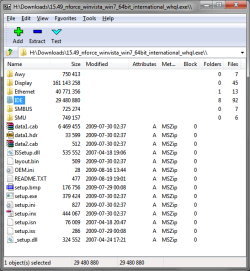
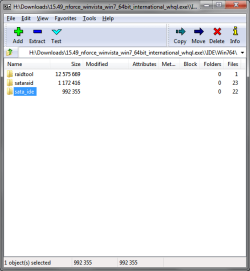
I think I have those, my rig has the GF8200 chipset. Anywho when I Google'd 'Nvidia SATAIDE Drivers (v11.1.0.33) WHQL' .. I found that it came up with the same nForce drivers I had DL'ed and installed in my computer - '15.49_nforce_winvista_win7_64bit_international_whql.exe'

If you have 7zip or Winrar installed, you can right click that file and open it .. and extract the IDE\Win764\sata_ide\ folder.


edit: have you tried installing W7 from USB yet?
http://www.sevenforums.com/tutorials/2432-usb-windows-7-installation-key-drive-create.html
http://www.sevenforums.com/tutorials/91798-install-windows-7-usb-pen-drive-using-grub4dos.html
 

Attachments

  • sataide-01.png
    sataide-01.png
    21.1 KB · Views: 3
  • sataide-02.png
    sataide-02.png
    13.7 KB · Views: 3

My Computer My Computer

Computer Manufacturer/Model Number
Asus V2-M3M8200 Barebones
OS
Windows 7 Professional x64
CPU
AMD Phenom II X4 925
Motherboard
V2-M3M8200 (basically a M3N78-VM)
Memory
4x1024mb Kingston HyperX DDR2-1066 KHX8500D2/1G
Graphics Card(s)
Asus GTS 450 OC
Sound Card
Creative Sound Blaster X-Fi Titanium PCIe
Monitor(s) Displays
Asus 24" LCD VH242H
Screen Resolution
1920x1080
Hard Drives
WDC WD5000AAKS
WDC WD5002ABYS
Seagate ST325062 USB-to-IDE
Fujitsu 160GB Pocket USB HDD
PSU
Antec Earthwatts EA-430D
Case
Asus V2-M3M8200
Cooling
120mm side fan & 80mm front & 92mm rear fan
Keyboard
Dell USB mini Multimedia
Mouse
Logitech MX518
Internet Speed
Comcast Xfinity
Other Info
Logitech Webcam Pro 9000
Accurian 40-1462 Speakers
little dot MKII Headphone Amp
I thought I read all the posts .. but why do you need the nvidia sataide drivers? your mobo has AMD 790x chipset.
 

My Computer My Computer

Computer Manufacturer/Model Number
Asus V2-M3M8200 Barebones
OS
Windows 7 Professional x64
CPU
AMD Phenom II X4 925
Motherboard
V2-M3M8200 (basically a M3N78-VM)
Memory
4x1024mb Kingston HyperX DDR2-1066 KHX8500D2/1G
Graphics Card(s)
Asus GTS 450 OC
Sound Card
Creative Sound Blaster X-Fi Titanium PCIe
Monitor(s) Displays
Asus 24" LCD VH242H
Screen Resolution
1920x1080
Hard Drives
WDC WD5000AAKS
WDC WD5002ABYS
Seagate ST325062 USB-to-IDE
Fujitsu 160GB Pocket USB HDD
PSU
Antec Earthwatts EA-430D
Case
Asus V2-M3M8200
Cooling
120mm side fan & 80mm front & 92mm rear fan
Keyboard
Dell USB mini Multimedia
Mouse
Logitech MX518
Internet Speed
Comcast Xfinity
Other Info
Logitech Webcam Pro 9000
Accurian 40-1462 Speakers
little dot MKII Headphone Amp
I thought I read all the posts .. but why do you need the nvidia sataide drivers? your mobo has AMD 790x chipset.

Still trying to get Windows 7 installed on either Sata HD. The Asus drivers didn't work.

Suggestions?
 

My Computer My Computer

OS
Windows 7 Professional x64
CPU
AMD PHENOM II x4 945 3.0G
Motherboard
Asus M4A79XTD EVO 790X
Memory
G.SKILL 4GB (2 x 2GB) 240-Pin DDR3 1600
Graphics Card(s)
ASUS GeForce GTX 460 (Fermi) 1GB
Monitor(s) Displays
ViewSonic VA1912WB
Hard Drives
1TB SATA Seagate Barracuda
PSU
Antec EarthWatts EA650 650W
Case
Rosewill CHALLENGER
Cooling
Four Fans-1x Front, 1x Top, 1x Rear, 1x Side
Keyboard
Logitech G15
Back
Top