I have 2 SATA drives installed on my desktop i.e. h/d 0 & h/d 1
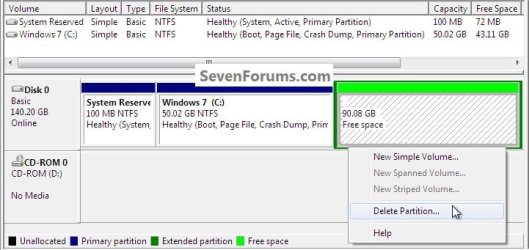
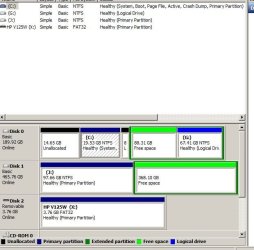
I had the second h/d Partitioned into several Partitions but have now deleted all of these leaving only one Partition with the rest of the drive being designated "Free Space" This is coloured green in Disk Management. The remaining Partition is a Primary Partition coloured dark blue in D.M. The Primary Partition is formatted in NTFS and contains data.
I now want to have this h/d created into a single un-partitioned drive without loosing the data stored at the moment on its Partition.
How do I go about this ?
Is the "Free Space" here still formatted in NTFS as it was before I deleted the partitions contained there ?
I had the second h/d Partitioned into several Partitions but have now deleted all of these leaving only one Partition with the rest of the drive being designated "Free Space" This is coloured green in Disk Management. The remaining Partition is a Primary Partition coloured dark blue in D.M. The Primary Partition is formatted in NTFS and contains data.
I now want to have this h/d created into a single un-partitioned drive without loosing the data stored at the moment on its Partition.
How do I go about this ?
Is the "Free Space" here still formatted in NTFS as it was before I deleted the partitions contained there ?
My Computer
At a glance
Windows 7 Home Premium x64AMD 3000+ 2.00gHZ2048 MbsRAEDON 9800 PRO
- Computer Manufacturer/Model Number
- Home Built
- OS
- Windows 7 Home Premium x64
- CPU
- AMD 3000+ 2.00gHZ
- Motherboard
- ASUSTeK k8vsedx
- Memory
- 2048 Mbs
- Graphics Card(s)
- RAEDON 9800 PRO
- Monitor(s) Displays
- Sony SDM-HS95P 19.1"vis
- Hard Drives
- 2x500 Gbts