Primary Partition and Free Space Questions

thenoo

New member
Member
VIP
Local time
5:33 AM
Messages
140
I have 2 SATA drives installed on my desktop i.e. h/d 0 & h/d 1

I had the second h/d Partitioned into several Partitions but have now deleted all of these leaving only one Partition with the rest of the drive being designated "Free Space" This is coloured green in Disk Management. The remaining Partition is a Primary Partition coloured dark blue in D.M. The Primary Partition is formatted in NTFS and contains data.

I now want to have this h/d created into a single un-partitioned drive without loosing the data stored at the moment on its Partition.

How do I go about this ?

Is the "Free Space" here still formatted in NTFS as it was before I deleted the partitions contained there ?
 

My Computer My Computer

At a glance

Windows 7 Home Premium x64AMD 3000+ 2.00gHZ2048 MbsRAEDON 9800 PRO
Computer Manufacturer/Model Number
Home Built
OS
Windows 7 Home Premium x64
CPU
AMD 3000+ 2.00gHZ
Motherboard
ASUSTeK k8vsedx
Memory
2048 Mbs
Graphics Card(s)
RAEDON 9800 PRO
Monitor(s) Displays
Sony SDM-HS95P 19.1"vis
Hard Drives
2x500 Gbts
Hello mate.


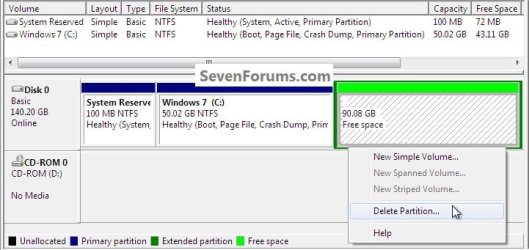
If this is what you have just right click it and delete it to make it unallocated space that can then be added to the other partition.

Partition or Volume - Extend


click to enlarge
Test.jpg


My Computer My Computer

At a glance

W 7 64-bit UltimateIntel Q9550 Yorkfield8GB Dominator 8500C5DATI : XFX 5870
Computer Manufacturer/Model Number
* BFK Customs *
OS
W 7 64-bit Ultimate
CPU
Intel Q9550 Yorkfield
Motherboard
ASUS P5Q Pro
Memory
8GB Dominator 8500C5D
Graphics Card(s)
ATI : XFX 5870
Sound Card
Realtek HD Audio 7-1
Monitor(s) Displays
1x 47" LCD HDMI & 3x 26" LCD HDMI
Screen Resolution
1920x1080P & 1920x1200
Hard Drives
1x 80GB Intel X25-M G2 SSD : 1x 500GB & 1x 640GB WD Caviar Black(s)
PSU
Corsair 620HX
Case
Cooler Master RC-690
Cooling
Tuniq Tower 120, 2x 140mm and 3x 120mm case fans
Keyboard
Microsoft 500
Mouse
Razer Diamondback 3G
Internet Speed
14 Mb/s
Other Info
1x Koutech 3Gb/s SATA HDD Hot Swap Rack
Can you post a screen shot Disk management?

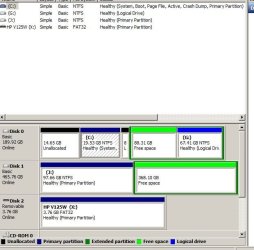
Sure , here is the D.M. screen shot .

In this you'll see similar operations I have done on the h/d 0.
However , as this h/d also contains a dual boot setup between XP and WIN 7 , I deliberately was not going to mention that drive in the interests of simplicity - I intend to remove the XP eventually .
The Dual Boot setup was done using software called "BING NT" from terabyteunlimited.com and is not really relevant to what I'm attempting here.

Basically , I'm in the process of removing excess Partitons while , at the same time preserving data which existed on them before I deleted them and , if I can restrict my comments to what I'm trying to do to the h/d 1 situation , I think it will make any replies simpler to answer.

On this second h/d you'll see the Primary Partition J together with the "Free Space" This was where I had several Partitions before deleting them. I have left J untouched , so far , as it contains data.

What I would like to do now is change this h/d into undivided space formatted in NTFS without loosing the data in J.

Hence my question as to whether it will be possible to combine Partition J with the "Free Space" on this h/d so that I end up with a h/d undivided , formatted in NTFS with its present data preserved.

Hopefully this rather long-winded explanation has not muddied the waters too much !
 

Attachments

  • free space.JPG
    free space.JPG
    53 KB · Views: 78

My Computer My Computer

At a glance

Windows 7 Home Premium x64AMD 3000+ 2.00gHZ2048 MbsRAEDON 9800 PRO
Computer Manufacturer/Model Number
Home Built
OS
Windows 7 Home Premium x64
CPU
AMD 3000+ 2.00gHZ
Motherboard
ASUSTeK k8vsedx
Memory
2048 Mbs
Graphics Card(s)
RAEDON 9800 PRO
Monitor(s) Displays
Sony SDM-HS95P 19.1"vis
Hard Drives
2x500 Gbts
Hello mate.


If this is what you have just right click it and delete it to make it unallocated space that can then be added to the other partition.

Partition or Volume - Extend
click to enlarge
View attachment 130864


Yes do as I suggest in my post #3 above and delete the "free space" and use the tutorial to extend J: into the unallocated space created by the deleted free space; the data on J: will be safe and be sure to post back with any further questions you may have and to keep us informed.
 

My Computer My Computer

At a glance

W 7 64-bit UltimateIntel Q9550 Yorkfield8GB Dominator 8500C5DATI : XFX 5870
Computer Manufacturer/Model Number
* BFK Customs *
OS
W 7 64-bit Ultimate
CPU
Intel Q9550 Yorkfield
Motherboard
ASUS P5Q Pro
Memory
8GB Dominator 8500C5D
Graphics Card(s)
ATI : XFX 5870
Sound Card
Realtek HD Audio 7-1
Monitor(s) Displays
1x 47" LCD HDMI & 3x 26" LCD HDMI
Screen Resolution
1920x1080P & 1920x1200
Hard Drives
1x 80GB Intel X25-M G2 SSD : 1x 500GB & 1x 640GB WD Caviar Black(s)
PSU
Corsair 620HX
Case
Cooler Master RC-690
Cooling
Tuniq Tower 120, 2x 140mm and 3x 120mm case fans
Keyboard
Microsoft 500
Mouse
Razer Diamondback 3G
Internet Speed
14 Mb/s
Other Info
1x Koutech 3Gb/s SATA HDD Hot Swap Rack
You can also use the free bootable Partition Wizard CD to recover the 14.65GB unallocated space to the left of the C: partition on the Disk 0 into the C: partition if you choose to do so; have a look at this tutorial at the link below for some ideas on how to go about it; it is a very safe, reliable program to use.

Partition Wizard : Use the Bootable CD


Then you can delete the free space to the right of C: on Disk 0 to make unallocated space that can then be recovered into C: using the same Windows disk management method posted earlier.
 

My Computer My Computer

At a glance

W 7 64-bit UltimateIntel Q9550 Yorkfield8GB Dominator 8500C5DATI : XFX 5870
Computer Manufacturer/Model Number
* BFK Customs *
OS
W 7 64-bit Ultimate
CPU
Intel Q9550 Yorkfield
Motherboard
ASUS P5Q Pro
Memory
8GB Dominator 8500C5D
Graphics Card(s)
ATI : XFX 5870
Sound Card
Realtek HD Audio 7-1
Monitor(s) Displays
1x 47" LCD HDMI & 3x 26" LCD HDMI
Screen Resolution
1920x1080P & 1920x1200
Hard Drives
1x 80GB Intel X25-M G2 SSD : 1x 500GB & 1x 640GB WD Caviar Black(s)
PSU
Corsair 620HX
Case
Cooler Master RC-690
Cooling
Tuniq Tower 120, 2x 140mm and 3x 120mm case fans
Keyboard
Microsoft 500
Mouse
Razer Diamondback 3G
Internet Speed
14 Mb/s
Other Info
1x Koutech 3Gb/s SATA HDD Hot Swap Rack
Back
Top