Dual Boot with WinXP over Win7, without messing up

science2002

New member
Local time
11:43 AM
Messages
14
Starting point:
A (tablet) notebook Lenovo comes with Win7 pre-installed. The HD (Sata 2.5 by WD, 250MB) has three partitions, as default, two of them hidden.

Problem and aim:
A lot of software that I use does not run in Win7. XP mode is too slow. I'd like to install win XP (in my specific case Win TabletPC SP2) side by side Win7, so to make a choice in which one boot up. I do not want though to risk to mess up my Win7 partition & boot up.

What I learnt:
a) WinXP installation will destroy the Win7 boot sector. So as a consequence,
b) after installing WinXP, I will not able to boot in Win7 (that should be repaired with Win7 DVD that I do not have). Plus:
c) Possible problems with the first hidden partition, which is shown sometimes in XP partition and the need to use EasyBCD (under Win7,once recovered the partition) to make the initial dual boot menu: Win7 --- WinXP.

My attempt:
Since I do not want to mess up my HD, with a *direct* installation of WinXP (TabletPC in my case), I thought the following. 1) Make a new partition in my HD. 2) Remove physically the HD and attach a different external USB HD. 3) Install WinXP in the external USB HD. 4) Make sure it works, add SATA drivers, etc. (in my case WinXP is the default Lenovo installation) 5) Remount the original Sata HD, 6) Copy (or if necessary clone with Acronis/Ghost/and alike) the WinXP files/folders I installed from the external USB HD into the new partition of step 1 above, 7) Make the correction with EasyBCD in Win7 to add the dual-boot window at startup: Win7 --- WinXP.

Question(s):
Is my attempt completely silly? Or could it work and is it worth a try? If so, how sould be accomplished step 6. Can you simply copy the files or Acronis/Ghost are necessary? Does Acronis/Ghost cloning/transfer write in the MBR HD sector (or in boot sector of the *other* partitions), as it does a direct installation of WinXP? In this case I would be back to square 1, with problems a) and b) above -- the thing that I want to avoid!

Thank you for any advice or feedback.
 

My Computer My Computer

At a glance

WinXP 32bit and 32bit Win7 Business
OS
WinXP 32bit and 32bit Win7 Business
What are your system specs? XP Mode and Virtualbox should/would run at near native speeds on a proper system, especially on that supports VT.
 

My Computer My Computer

At a glance

Windows 7 Ultimate x64 SP1Intel Core i7-260012 GB Patriot Extreme DDR3-1333Nvidia GTX 470
OS
Windows 7 Ultimate x64 SP1
CPU
Intel Core i7-2600
Motherboard
Gigabyte GA-P67A-UD3P-B3
Memory
12 GB Patriot Extreme DDR3-1333
Graphics Card(s)
Nvidia GTX 470
Monitor(s) Displays
Dell UltraSharp 2209WA
Hard Drives
OCZ Agility3 240 GB, WD5001AALS, WD7501AALS
PSU
OCZ ModStream 700W
Case
CoolerMaster HAF 912 Advanced
Cooling
CoolerMaster Hyper 212 Plus
Thanks for inquiring.
It is a Lenovo ThinkPad X200 Tablet. Intel Core Duo 1.4Ghz, with 2.5GB of RAM.
I am running VirtualPC 2007 in my DesktopPC, which is much more capable, and in my case it does not run with the same speed at all as the native system (still a WinXP). Plus:
a) In my workflow I have many portable (ThinApp built myself) applications that only run on WinXP/WinTabletPC, not Win7, which is useless.
b) I guess that I could not install WinTabletPC in Win7 as XP mode.
c) I am probably wrong, but Win7+WinXP (mode) eat up RAM and CPU spasmodically, much more than it does WinXP (or TabletPC) alone.
This is why I would prefer a separate WinXP boot-up
 
Last edited:

My Computer My Computer

At a glance

WinXP 32bit and 32bit Win7 Business
OS
WinXP 32bit and 32bit Win7 Business
You cannot install Win7 to an external.

If you can't run XP mode, Virtual Player or Virtual Box to run XPired, then create a partition, install XP, add Net Franework to install EasyBCD then Add Win7.

If this fails, boot Win7 Repair CD to repair Win7 and install EasyBCD to Add XP. You 'll need to make sure Win7 partition is marked Active first then run Startup Repair up to 3 separate times. http://www.sevenforums.com/tutorials/71432-partition-mark-active.html
http://www.sevenforums.com/tutorials/105541-startup-repair-run-3-separate-times.html
http://www.sevenforums.com/tutorials/8057-dual-boot-installation-windows-7-xp.html

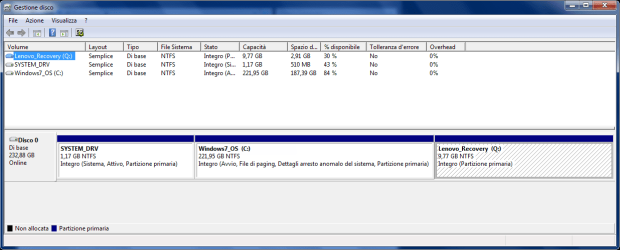
What was the exact concern about the hidden partition - that it is System Active which might need to be changed to XP or Win7 to manage the Dual Boot? Please post back a screenshot of your full Disk Mgmt drive map with listings using Snipping TOol in Start Menu so we can have a look.
 
Sorry, probably I was not clear enough: I do not want to install Win7 externally. It comes already pre-installed in the (internal) Sata HDD.

I want to installed WinXP externally, so to not affect the win7 boot sector, which in turn makes the Win7 partition (hopefully, temporary if one holds the Repair CD) unaccessible - that is why I want to remove the internal HDD, while installing WinXP.

Then I want to "transfer manually" WinXP file/folders to a new partition of the Internal Sata HDD.

On the hidden startup partition, I read several complains that once installed WinXP, (and once you boot up with WinXP) this small hidden partition becomes the C drive and there is no obivous ways to change it.
I do not have screenshots from my laptop, since I did not try yet to install WinXP.

I was just curious to know if my proposal could have a chance of success or it is just a waste of time. Thanks.

PS: how can be so difficult to make a dual boot, that one needs a PhD in computer science -- if it is enough! With other OSes, if you have a new partition you can make it on the fly.
 
Last edited:

My Computer My Computer

At a glance

WinXP 32bit and 32bit Win7 Business
OS
WinXP 32bit and 32bit Win7 Business
there is really no way to have windows 7 then install windows xp. my suggestion is to install windows xp first then install windows 7
 
Last edited:

My Computer My Computer

At a glance

Windows 7 Home Premium x64Intel Pentium Dual - Core4GB (1x4)Nvidia Galaxy Geforce 8400gs
Computer Manufacturer/Model Number
Dell Inspiron 560
OS
Windows 7 Home Premium x64
CPU
Intel Pentium Dual - Core
Motherboard
Dell 0K83V0
Memory
4GB (1x4)
Graphics Card(s)
Nvidia Galaxy Geforce 8400gs
Sound Card
Realtek PCIe Sound Card
Monitor(s) Displays
Samsung SyncMaster B2030
Hard Drives
320 GB Harddrive
PSU
Dell Stock
Case
Dell Inspiron 560 Stock
Cooling
Dell Stock
my suggestion is to install windows xp first then install windows 7

Very difficult, in my position. As I state in my first post, Lenovo does not include the CDs of Win7. So delete the pre-installed Win7 is not an option. I would also avoid to make images and then reverse them back. In my case, Lenovo has included the Recovery WinTablet SP2 CD, if I want to make a downgrade. I want to use this CD to make a dual boot.
 

My Computer My Computer

At a glance

WinXP 32bit and 32bit Win7 Business
OS
WinXP 32bit and 32bit Win7 Business
You can't install XP to an external either. Your best bet is to use Option Two of this tutorial: Dual Boot Installation with Windows 7 and XP

XP when installed should take the System Active flag. What I would do then is mark Win7 Active from XP, reboot into Win7 Repair CD to run Startup Repair 3 times to start Win7 and then install EasyBCD 2.0 which works better from Win7 to add XP.

Backup a Win7 backup image externally so you have a path back.

We need to see a screenshot of your Disk Mgmt drive map and listings to advise you on the possible boot partition conflict.
 
Thanks for the feedback. I enclosed a snapshot of the disk management, as it came from OEM (Sorry it is in Italian). As I said, no operations have been carried out up to now.

Thanks also for pointing out the Guide of Dual Boot Installation. I was aware of it, yet there is always the risk of messing up with the new WinXP installation the MBR-boot sector of Win7, that I would prefer to avoid.

If no WinXP installation is possible to external disk, as you say, would "My attempt" (See first post) be possible if at step 2, instead of an external USB disk, I would insert *another* internal SATA 2.5 HDD in place of the original, install WinXP in it and proceed with the other steps, i.e. "move" the WinXP file/folders from this disk to a new partition created in the original SATA HDD, which contains also Win7 Professional, etc.
Thanks again for any feedback
 

Attachments

  • Disk_Mgmt.PNG
    Disk_Mgmt.PNG
    21.3 KB · Views: 54
Last edited:

My Computer My Computer

At a glance

WinXP 32bit and 32bit Win7 Business
OS
WinXP 32bit and 32bit Win7 Business
Hello science2002, welcome to Seven Forums!


Using separate Hard Disk Drives to dual boot is the preferred method to dual boot between separate Operating Systems, this way the OSs aren't dependent on each other for the boot files needed to start Windows, making it very easy to remove one or the other OS/HDD without boot issues.

Disconnect the Windows 7 HDD data cable from the motherboard and leave it disconnected for the installation process, set the 'new' HDD as first boot device after the DVD/CD drive, when XP is booting good on the second HDD, power down and reconnect the other HDD data cable to the mobo and restart the PC to set the preferred OS/HDD as first boot device in the BIOS, then you can use the BIOS one-time boot menu for your specific PC to select the other OS/HDD to boot when needed.

I think you would use the blue Thinkvantage button to access the Levono one-time boot menu and be sure to post back with any further questions you may have and to keep us informed.
 

My Computer My Computer

At a glance

W 7 64-bit UltimateIntel Q9550 Yorkfield8GB Dominator 8500C5DATI : XFX 5870
Computer Manufacturer/Model Number
* BFK Customs *
OS
W 7 64-bit Ultimate
CPU
Intel Q9550 Yorkfield
Motherboard
ASUS P5Q Pro
Memory
8GB Dominator 8500C5D
Graphics Card(s)
ATI : XFX 5870
Sound Card
Realtek HD Audio 7-1
Monitor(s) Displays
1x 47" LCD HDMI & 3x 26" LCD HDMI
Screen Resolution
1920x1080P & 1920x1200
Hard Drives
1x 80GB Intel X25-M G2 SSD : 1x 500GB & 1x 640GB WD Caviar Black(s)
PSU
Corsair 620HX
Case
Cooler Master RC-690
Cooling
Tuniq Tower 120, 2x 140mm and 3x 120mm case fans
Keyboard
Microsoft 500
Mouse
Razer Diamondback 3G
Internet Speed
14 Mb/s
Other Info
1x Koutech 3Gb/s SATA HDD Hot Swap Rack
Hello science2002, welcome to Seven Forums!


Using separate Hard Disk Drives to dual boot is the preferred method to dual boot between separate Operating Systems, this way the OSs aren't dependent on each other for the boot files needed to start Windows, making it very easy to remove one or the other OS/HDD without boot issues.

Disconnect the Windows 7 HDD data cable from the motherboard and leave it disconnected for the installation process, set the 'new' HDD as first boot device after the DVD/CD drive, when XP is booting good on the second HDD, power down and reconnect the other HDD data cable to the mobo and restart the PC to set the preferred OS/HDD as first boot device in the BIOS, then you can use the BIOS one-time boot menu for your specific PC to select the other OS/HDD to boot when needed.

I think you would use the blue Thinkvantage button to access the Levono one-time boot menu and be sure to post back with any further questions you may have and to keep us informed.

As you have a notebook, you can not use the one-time boot menu.
What you can do is remove the HD's As when needed.


If you have not made your recovery disks,
You can Order Lenovo Recovery Disks from here:
Lenovo Support - How can I get a Product Recovery CD or DVD?
 

My Computer My Computer

At a glance

ME/XP/Vista/Win7
OS
ME/XP/Vista/Win7
Thanks again for your advice, for the welcome, and the links.

In my Desktop PC I have in fact three different disks and several (WinXp) OSes, which are used alternatively for different purposes: testing, work, etc. and troubleshooting issues: if one OS shows problems I start from another.

But as you know, the majority of notebooks have one HDD bay, mine included. Yes, swapping HDD could be a solution, but it is far from friendly!

Write and manage the boot.ini files in my DesktopPC have been (relatively) easy, even with multi WinXP - Win2000 OSes, placed in different partitions in the same HDD. I see at my expense that with (Vista and) Win7 things are much more troublesome: a very bad point for this new OS in my very humble opinion.
 

My Computer My Computer

At a glance

WinXP 32bit and 32bit Win7 Business
OS
WinXP 32bit and 32bit Win7 Business
I have copied XP from one HD to another using free Partition Wizard bootable CD, then added it to Dual Boot from Win7 using EasyBCD 2.0. This would accomplish your goal of not losing the first partition's System flag as likely would happen during XP install to the same HD.

If either of your HD's is Seagate or Western Digital I would use their excellent free Acronis app to backup externally an image of XP installed to the other HD. Choose not to copy the MBR or mark it Active during reimaging operation to space you create by shrinking Win7 in Disk Mgmt. If you can't use Acronis, then I'd use free Macrium Reflect or Paragon Backup 10 so you have these options. Be sure to make the boot disk for whichever you use.

If your not sure whether the System Active flags have been removed from XP before starting it after imaging then boot into Win7 DVD or Repair CD to use Diskpart to mark XP Inactive while making sure System is still marked Active: http://www.sevenforums.com/tutorials/71432-partition-mark-active.html. You can also use free Partition Wizard bootable CD (the best Win7 tool) to have a graphics picture while doing this.

Once you start Win7 install EasyBCD 2.0 to add XP on the Add OS tab, accept offered boot files, autocompletes, Save, Restart to Dual Boot Menu. If not post back a screenshot of your full Disk Mgmt drive map using Snipping Tool in Start Menu.

Before attempting any of this, back up externally an image of your entire HD.
 
@ gregrocker,
Thank you! that sounds (for now in theory) great! Few doubts in your instructions:
- "....Be sure to make the boot disk for whichever you use"
What do you mean (I know generally the programs, but I never used them regularly)?

- "....If your not sure whether the System Active flags have been removed".
Is one of the applications you mention, better than the others in making sure that this is done?

Thanks again.
 

My Computer My Computer

At a glance

WinXP 32bit and 32bit Win7 Business
OS
WinXP 32bit and 32bit Win7 Business
I would use free Partition Wizard bootable CD to get a graphic image of your partitions with the listings on each, to confirm which is System and/or Active. The other method uses a lot of line commands and is harder to interpret.

Whichever imaging app you use will allow you to make a boot CD in case it doesn't want to reimage from the program in Windows. So burn the boot CD to make sure you have a backup method to reimage.

We have a lot of imaging experts around here so ask all of the questions you need and we will help your through it.
 
Thanks. Just to update: I tried to make some experiments on my own, given the fact that in this moment I do not have a 2nd 2.5 HDD, while I do have only a *Pata* 3.5 80GB spare one, plus a USB HDD encloser.
I have obtained from a collegue a copy of Windows 7 Pro Recovery DVD (1/2 and 2/2) for my model.
So the experiment (HDD internal removed) up to now:
- Win7 recovery DVD installs without complains in the external USB (Pata) HDD. However near the end of the process, it asks another DVD (Supplement ...something... Disc 1 that I do not have: I guess that should be more than 2 DVDs for Rescue&Recovery, since I have 3 Original CDs just for WinTabletPC). The three partitions in the USB HDD have been created, folders/files are there, but obviously (the installation did not finish completly) the USB HDD is not bootable

-WinXP Rescue&recovery installation stucks at some point with a typical BSOD, probably because I have an External USB, and/or a Pata HD, while the standard recovery should have the Sata drivers, and probably nothing else.

I gave, meanwhile, a look to Paragon Partition Manager 11, which manages a lot of things. It seems able even to make a Boot manager window, to select different OSes. With WinXP it works: not clear what it changes, since boot.ini is intact. It should have written something in the boot sector itself.

Probably it is just me, but let me say that it is nice to play with HDDs when you have (touching wood) no apparent risk to lose something.
 

My Computer My Computer

At a glance

WinXP 32bit and 32bit Win7 Business
OS
WinXP 32bit and 32bit Win7 Business
Installing to a External HD will always fail, use a internal HD for your testing.
 

My Computer My Computer

At a glance

ME/XP/Vista/Win7
OS
ME/XP/Vista/Win7
Yep, but unfortunately I do not have an internal one now. On this matter: will esata connection be considered internal or external, i.e. will the installation fail with it or not? Thx
 

My Computer My Computer

At a glance

WinXP 32bit and 32bit Win7 Business
OS
WinXP 32bit and 32bit Win7 Business

My Computer My Computer

At a glance

Windows 7 Ultimate X86Pentium(R) Dual-Core CPU E5300 @ 2.60GHz2GBIntel 256mb
OS
Windows 7 Ultimate X86
CPU
Pentium(R) Dual-Core CPU E5300 @ 2.60GHz
Motherboard
Asus P5KPL-AM IN
Memory
2GB
Graphics Card(s)
Intel 256mb
Monitor(s) Displays
Generic PhP Moniter 1360x768
Screen Resolution
1360z768
Hard Drives
IDE-Device, hard drive
Internet Speed
140kbps
This is a tough situation.

If you had installation media for both OS's it would be a piece of cake.

I know you can install XP to another partition, but you will have to repair the boot sector of Windows 7 inorder to boot both successfully. Have you considered a virtual machine? Not quite XP mode, it works pretty well for programs that don't run under windows 7?
 

My Computer My Computer

At a glance

Windows 7 64 bitIntel Core i5 2400G. Skill 10700 2 x 2 GBOn Board Intel HD Graphics
Computer Manufacturer/Model Number
White Box/Home Brew
OS
Windows 7 64 bit
CPU
Intel Core i5 2400
Motherboard
ASRock H67M
Memory
G. Skill 10700 2 x 2 GB
Graphics Card(s)
On Board Intel HD Graphics
Sound Card
On Board Sound
Monitor(s) Displays
LG Flatron w2361
Hard Drives
WDC WD1001FALS
ST31000528AS
PSU
Corsair GS600
Case
Local Store House Case
Cooling
Intel Boxed cpu fan and House Case fan
Back
Top