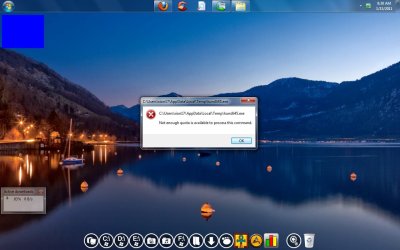
Getting error: Not enough quota is avialable to this command

Sunimar

New member
Power User
Local time
11:25 AM
Messages
206
Location
Mumbai
Friends,:D

i've been getting this error : ""Not enough quota is avialable to this command"" quite oftenly especially for this application/program & name of the program is Kundli45.

I'm unable to identify the reason for this error, as i'm logged in as the Adminstartor & also running it as "Run as Admin" still getting this error everytime. :confused: :(

I want to know what are the reason for this type of error while installing such programs? :confused:

here's the screenshot:
Untitled.jpg
 

My Computer My Computer

Computer type
Laptop
OS
Windows 7 Ultimate
From Microsoft...

Error Message:
Not enough quota is available to process this command.

User Action:

Close some applications and try again. If you still get this message, choose System from Control Panel, then choose Virtual Memory and increase the size of your paging file.
 

My Computer My Computer

Computer type
PC/Desktop
Computer Manufacturer/Model Number
LENOVO K450 @3.0GHZ
OS
64-bit Windows 8.1 Pro
CPU
Core(TM) i5 CPU 4330 Haswell @ 3.20GHz
Motherboard
LENOVO
Memory
12.00 GB
Graphics Card(s)
Intel(R) HD Graphics
Sound Card
Intel HD integtrated
Monitor(s) Displays
HP 25' ISP Monitor
Screen Resolution
1900/1020
Hard Drives
(1) ST1000DM003-1CH162 (2) Generic STORAGE DEVICE USB Device (3) Generic STORAGE DEVICE USB Device
Internet Speed
100mb down/10mb up
From Microsoft...

Error Message:

Not enough quota is available to process this command.

User Action:


Close some applications and try again. If you still get this message, choose System from Control Panel, then choose Virtual Memory and increase the size of your paging file.


Geez!!! Tom how can i miss that....Thnx buddy will try that...i can't believe i forgot that part. Thnx again!!! :geek:
 

My Computer My Computer

Computer type
Laptop
OS
Windows 7 Ultimate

My Computer My Computer

Computer type
Laptop
Computer Manufacturer/Model Number
Sony Vaio VPCEB47GM Laptop
OS
Win 7 Pro 64-bit
CPU
Intel i5 2.4 Ghz
Memory
8GB DDR3
Graphics Card(s)
Intel HD 3000
Sound Card
IDT High Definition
Monitor(s) Displays
15.6 WGXA Anti-Glare LED
Screen Resolution
1280x800
Hard Drives
640Gb 7200rpm
Antivirus
MSE
Browser
Opera (primary) with IE9 backup
Yeah, this sounds like desktop heap (the error message is actually pretty indicative of running out of session space, thus Windows cannot create the portions of the process required to display it, and fails).

This is usually not a common occurence on a Win7 system given that kernel memory is dynamic and no longer static, but if you run a lot of apps or are running on bare minimun requirements this can still happen. I do notice you have a Window Manager and perhaps an extra toolbar at the bottom - have you stopped loading these as a test (either stop from loading or uninstall temporarily) to see if the problem continues?
 

My Computer My Computer

Computer type
PC/Desktop
Computer Manufacturer/Model Number
Custom
OS
Windows 10 Pro x64
CPU
Intel Core i7 4790K @ 4.5GHz
Motherboard
Asus Maximus Hero VII
Memory
32GB DDR3
Graphics Card(s)
Nvidia GeForce GTX970
Sound Card
Realtek HD Audio
Screen Resolution
1920x1200
Hard Drives
1x Samsung 250GB SSD
4x WD RE 2TB (RAIDZ)
PSU
Corsair AX760i
Case
Fractal Design Define R4
Cooling
Noctua NH-D15
Tom the VM paging file is at maximum but still i'm getting the same (just did it now & got the same error).

But can you just let me know the path to make sure i did it correctly. Thnx (as i tend keep forgetting stuff):confused:
 

My Computer My Computer

Computer type
Laptop
OS
Windows 7 Ultimate
Desktop heap is a part of session space, which is a (very small, by default) section of kernel memory. The paging file has nothing to do with this - please re-read my last post and see what you can do to troubleshoot this. The error is likely correct, though, that you're running out of desktop heap.
 

My Computer My Computer

Computer type
PC/Desktop
Computer Manufacturer/Model Number
Custom
OS
Windows 10 Pro x64
CPU
Intel Core i7 4790K @ 4.5GHz
Motherboard
Asus Maximus Hero VII
Memory
32GB DDR3
Graphics Card(s)
Nvidia GeForce GTX970
Sound Card
Realtek HD Audio
Screen Resolution
1920x1200
Hard Drives
1x Samsung 250GB SSD
4x WD RE 2TB (RAIDZ)
PSU
Corsair AX760i
Case
Fractal Design Define R4
Cooling
Noctua NH-D15
Yeah, this sounds like desktop heap (the error message is actually pretty indicative of running out of session space, thus Windows cannot create the portions of the process required to display it, and fails).

This is usually not a common occurence on a Win7 system given that kernel memory is dynamic and no longer static, but if you run a lot of apps or are running on bare minimun requirements this can still happen. I do notice you have a Window Manager and perhaps an extra toolbar at the bottom - have you stopped loading these as a test (either stop from loading or uninstall temporarily) to see if the problem continues?


Hey Carl i got the 2nd part ie running on min.sys.req. but the 1st i missed as i got only 60% of it. But will answer the 2nd part as i got that.

Carl i tried running/installing the program with atleast 3-4 program running (as you can see in the screenshot) still i got the same error, so, i closed all the opened program & tried but it keep giving me the same error.

So, how can i resolve this issue??? Could you also help me with the term "desktop heap" as i'm not aware of that term.:confused:
 

My Computer My Computer

Computer type
Laptop
OS
Windows 7 Ultimate
We're starting to wade into deep waters - without an understanding of the basic Windows memory management, I'm not sure I'm going to be able to give you a good explanation of desktop heap. However, suffice to say desktop heap is the virtual address space the kernel uses to draw the desktop and all of the items on it. Depending on how much RAM you have in your system, this can be a *very* small space - under 40MB. It can grow larger, but only at the expense of another kernel resource, which may or may not be possible on your system. Assuming it's around 40 - 48MB of space, and depending on how much consumption of desktop heap is from your shell modifications, this could already be quite starved by the time you launch your first interactive application. Hence why I said that I noticed you'd modified the shell and added some customization programs, all of which would be direct consumers of desktop heap, and to see if removing them (uninstall if possible) as a test resolved the issue. If not, we may have to break out the debugger, which is a bit of a pain for desktop heap issues.
 

My Computer My Computer

Computer type
PC/Desktop
Computer Manufacturer/Model Number
Custom
OS
Windows 10 Pro x64
CPU
Intel Core i7 4790K @ 4.5GHz
Motherboard
Asus Maximus Hero VII
Memory
32GB DDR3
Graphics Card(s)
Nvidia GeForce GTX970
Sound Card
Realtek HD Audio
Screen Resolution
1920x1200
Hard Drives
1x Samsung 250GB SSD
4x WD RE 2TB (RAIDZ)
PSU
Corsair AX760i
Case
Fractal Design Define R4
Cooling
Noctua NH-D15
Maybe physical memory is malfunctioning, causing virtual to overload? Won't hurt to test the RAM with memtest86 for 5-6 passes or overnight to stress test.

Are you making system modifications or compound tweaking? This is death to Win7 which is already as lean as it can be.

May need a clean reinstall to shrug off any modifications and unnecessary tweaking, or to see if problem goes away.
 
If a read or write to a physical page failed, you'd bugcheck with a PTE or PDE error - this error is specific to session space exhaustion, which would happen if desktop heap were overloaded. The OP could check RAM, but any errors found there would be an inconvenience, but unrelated.
 

My Computer My Computer

Computer type
PC/Desktop
Computer Manufacturer/Model Number
Custom
OS
Windows 10 Pro x64
CPU
Intel Core i7 4790K @ 4.5GHz
Motherboard
Asus Maximus Hero VII
Memory
32GB DDR3
Graphics Card(s)
Nvidia GeForce GTX970
Sound Card
Realtek HD Audio
Screen Resolution
1920x1200
Hard Drives
1x Samsung 250GB SSD
4x WD RE 2TB (RAIDZ)
PSU
Corsair AX760i
Case
Fractal Design Define R4
Cooling
Noctua NH-D15
Maybe physical memory is malfunctioning, causing virtual to overload? Won't hurt to test the RAM with memtest86 for 5-6 passes or overnight to stress test.

Are you making system modifications or compound tweaking? This is death to Win7 which is already as lean as it can be.


May need a clean reinstall to shrug off any modifications and unnecessary tweaking, or to see if problem goes away.


Will try running the test. Thnx for the info. Greg. As far as your question is concerned: Greg not exactly i'm trying any of the above ie tweaking or modification in any form but trying to install a simple program but not sure why its giving the error?? :confused: Well reinstallation resolved most of the problems.

1 more FYI for you guys this program runned perfectl fine in WinXP but not with Win7 though on the website its mentioned that it is supported by Win7.


My Computer My Computer

Computer type
Laptop
OS
Windows 7 Ultimate

My Computer My Computer

Computer type
Laptop
OS
Windows 7 Ultimate
Back
Top