Solved No sound via HDMI to ASUS Monitor

According to the DxDiag, your sound device vendor is 10EC which is Realtek,
so it's ok to install the Realtek HD audio driver.
However, it doesn't enable HDMI sound.

According to the DxDiag, your display device vendor is 8086 which is Intel.
So you should have the "Intel Graphics" driver installed.
The HDMI driver may be packaged with the Intel Graphics driver.
Intel probably packaged it there, just as ATI does with it's video drivers.
So you probably won't find a download for an Intel HDMI audio driver on the
Intel site.

You can try uninstalling the Intel video driver and install this driver.......
http://downloadcenter.intel.com/Detail_Desc.aspx?agr=Y&DwnldID=19468&ProdId=2991&lang=eng

Thanks p5, but I try to install the driver it I get an error message saying "The driver being installed is not validated for this computer. Please obtain appropriate driver information from the computer manufacturer"

I'm guessing this is driver won't work for my computer? I didn't uninstall my Intel video driver because I was afraid I wouldn't be able to find it again it something should happen. Could that have had any affect on this process? This is frustating :mad:
 

My Computer My Computer

At a glance

Windows 7 Home Premium 32bit3Mobile Intel 4 Series Express Chipset Family
Computer Manufacturer/Model Number
Acer Aspire 5810T
OS
Windows 7 Home Premium 32bit
Memory
3
Graphics Card(s)
Mobile Intel 4 Series Express Chipset Family
Sound Card
Intel HD Audio HDMI
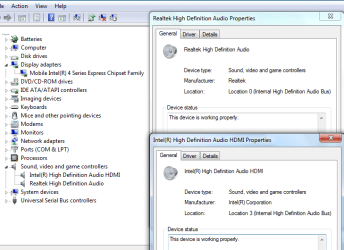
Can you post a snippet of your device manager, Sound, video and game controllers?
 

My Computer My Computer

At a glance

Windows 7 Home Premium 64 bitIntel Core i7-4790G.SKILL 8GB (2 x 4GB) DDR3 F3-10666CL9D-8GBNTAMD Radeon R7 250
Computer type
PC/Desktop
Computer Manufacturer/Model Number
Custom Build
OS
Windows 7 Home Premium 64 bit
CPU
Intel Core i7-4790
Motherboard
GA-Z87X-D3H
Memory
G.SKILL 8GB (2 x 4GB) DDR3 F3-10666CL9D-8GBNT
Graphics Card(s)
AMD Radeon R7 250
Sound Card
Realtek ALC892
Monitor(s) Displays
Samsung UN32EH5000, Dell 1703FPT
Screen Resolution
1920 x 1080, 1280 x 1024
Hard Drives
WD5003AZEX
WD10EZEX
Samsung HD103SJ
Samsung 128 GB 840 PRO
PSU
SeaSonic M12II SS-500GM
Case
Fractal Design Define R4
Cooling
Zalman CNPS9900ALED
Keyboard
Logitech K800
Mouse
Logitech M705
Internet Speed
16 Mbps
Antivirus
Avast
Browser
Firefox
Other Info
Bose Companion 2 Multimedia Speakers
Can you post a snippet of your device manager, Sound, video and game controllers?

Ok heres a look at my device manager along with the properties of my sound devices.
 

Attachments

  • Sound,video, game snippet.png
    Sound,video, game snippet.png
    29.4 KB · Views: 158

My Computer My Computer

At a glance

Windows 7 Home Premium 32bit3Mobile Intel 4 Series Express Chipset Family
Computer Manufacturer/Model Number
Acer Aspire 5810T
OS
Windows 7 Home Premium 32bit
Memory
3
Graphics Card(s)
Mobile Intel 4 Series Express Chipset Family
Sound Card
Intel HD Audio HDMI
If you plug headphones into the mini-jack do you have sound?
 

My Computer My Computer

At a glance

Windows 7 Enterprise (x64); Windows Server 20...16GB
Computer type
PC/Desktop
Computer Manufacturer/Model Number
Dell OP7010
OS
Windows 7 Enterprise (x64); Windows Server 2008 R2 (x64)
Memory
16GB
Monitor(s) Displays
4 Dell 24" LCD
Screen Resolution
1280x1024
Keyboard
Dell
Mouse
Dell Optical
Internet Speed
40meg
If you plug headphones into the mini-jack do you have sound?

Yes when the laptop is connected to the monitor via HDMI and I plug my headphones in I get sound through the headphones. When the headphones are not in, I get sound through my laptop speakers.
 

My Computer My Computer

At a glance

Windows 7 Home Premium 32bit3Mobile Intel 4 Series Express Chipset Family
Computer Manufacturer/Model Number
Acer Aspire 5810T
OS
Windows 7 Home Premium 32bit
Memory
3
Graphics Card(s)
Mobile Intel 4 Series Express Chipset Family
Sound Card
Intel HD Audio HDMI
The reason I asked is my system does the same thing. To get the audio on the TV\monitor I had to do 2 things. 1) Make sure the TV\Monitor was receiving the audio via HDMI. There may be a setting in the menus that say PC audio (analog or digital) or PC audio on HDMI et cetera. Everyone lists it differently. 2) I had to go into the audio settings on my Windows 7 machine and select the OUTPUT audio as the HDMI, once I did that I did not hear it on the speakers or the headphones and it worked on the TV\monitor.

On a side note several times I made the change in Windows 7 and had my headphones or external speakers plugged in and the output audio would not change or stick between reboots. You may have to disconnect your headphones and speakers or if you cannot disconnect the speakers disable the analog audio output, for this to work.

I hope that helps -WS
 

My Computer My Computer

At a glance

Windows 7 Enterprise (x64); Windows Server 20...16GB
Computer type
PC/Desktop
Computer Manufacturer/Model Number
Dell OP7010
OS
Windows 7 Enterprise (x64); Windows Server 2008 R2 (x64)
Memory
16GB
Monitor(s) Displays
4 Dell 24" LCD
Screen Resolution
1280x1024
Keyboard
Dell
Mouse
Dell Optical
Internet Speed
40meg
The reason I asked is my system does the same thing. To get the audio on the TV\monitor I had to do 2 things. 1) Make sure the TV\Monitor was receiving the audio via HDMI. There may be a setting in the menus that say PC audio (analog or digital) or PC audio on HDMI et cetera. Everyone lists it differently. 2) I had to go into the audio settings on my Windows 7 machine and select the OUTPUT audio as the HDMI, once I did that I did not hear it on the speakers or the headphones and it worked on the TV\monitor.

On a side note several times I made the change in Windows 7 and had my headphones or external speakers plugged in and the output audio would not change or stick between reboots. You may have to disconnect your headphones and speakers or if you cannot disconnect the speakers disable the analog audio output, for this to work.

I hope that helps -WS

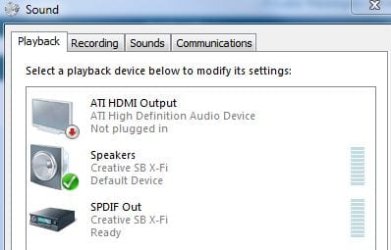
Thanks WS but the issue is that there is no HDMI icon under Playback Devices to select. I have checked to show all disabled and disconnected devices but I still have icon to select. Also, my monitor does not have any settings to allow me to change between analog and digital from a PC.

I find this whole thing strange because under device manager it shows I have an Intel High Definition HDMI, but there is no icon for HDMI under playback devices.
 

My Computer My Computer

At a glance

Windows 7 Home Premium 32bit3Mobile Intel 4 Series Express Chipset Family
Computer Manufacturer/Model Number
Acer Aspire 5810T
OS
Windows 7 Home Premium 32bit
Memory
3
Graphics Card(s)
Mobile Intel 4 Series Express Chipset Family
Sound Card
Intel HD Audio HDMI
I am at a loss. Must be a faulty driver. :(
 

My Computer My Computer

At a glance

Windows 7 Enterprise (x64); Windows Server 20...16GB
Computer type
PC/Desktop
Computer Manufacturer/Model Number
Dell OP7010
OS
Windows 7 Enterprise (x64); Windows Server 2008 R2 (x64)
Memory
16GB
Monitor(s) Displays
4 Dell 24" LCD
Screen Resolution
1280x1024
Keyboard
Dell
Mouse
Dell Optical
Internet Speed
40meg
I am at a loss. Must be a faulty driver. :(

Thanks WS, this is truly a frustrating thing. The laptop originally came with Vista so I wonder if something was lost or corrupted in the upgrade to Seven.
 

My Computer My Computer

At a glance

Windows 7 Home Premium 32bit3Mobile Intel 4 Series Express Chipset Family
Computer Manufacturer/Model Number
Acer Aspire 5810T
OS
Windows 7 Home Premium 32bit
Memory
3
Graphics Card(s)
Mobile Intel 4 Series Express Chipset Family
Sound Card
Intel HD Audio HDMI
If you right click the Volume Icon in the taskbar and choose Playback Devices it does not show a HDMI device like in my snip?

Capture.JPG


If not, I would agree with WindowsStar. Possibly a faulty driver.
it may be worth downloading and re-installing.
 

My Computer My Computer

At a glance

Windows 7 Home Premium 64bitIntel Core i7 2700k8GB Mushkin Redline Ridgebacks @1866EVGA GTX570 SC
Computer Manufacturer/Model Number
Custom (Self Build)
OS
Windows 7 Home Premium 64bit
CPU
Intel Core i7 2700k
Motherboard
eVGA P67 SLI
Memory
8GB Mushkin Redline Ridgebacks @1866
Graphics Card(s)
EVGA GTX570 SC
Sound Card
XiFi Titanium HD
Monitor(s) Displays
LG W2453V
Screen Resolution
1920x1080
Hard Drives
Intel 320 80GB -- Intel X25-V 40GB --WD Black 1TB x2 -- WD Blue 640GB
PSU
Seasonic x750
Case
Corsair 600T SE White
Cooling
eVGA Superclocked CPU Cooler
Keyboard
Saitek Cyborg
Antivirus
Kaspersky
Browser
IE
Other Info
LG BD/DVD
If you right click the Volume Icon in the taskbar and choose Playback Devices it does not show a HDMI device like in my snip?

View attachment 134298


If not, I would agree with WindowsStar. Possibly a faulty driver.
it may be worth downloading and re-installing.


No HDMI icon appears under playback devices. That has been the problem from the beginning. You can see from my previous post that my device manager shows that I have an Intel HMDI, but it doesn't show up in playback devices.

In an earlier post by P5 he suggested a driver to download but it was not compatible with my laptop. The Intel site says that I have a specialty driver and directs me to the Acer website, but the drivers there seem to make no difference when installed.

Could you point me to where I can find the driver for my laptop?
 

My Computer My Computer

At a glance

Windows 7 Home Premium 32bit3Mobile Intel 4 Series Express Chipset Family
Computer Manufacturer/Model Number
Acer Aspire 5810T
OS
Windows 7 Home Premium 32bit
Memory
3
Graphics Card(s)
Mobile Intel 4 Series Express Chipset Family
Sound Card
Intel HD Audio HDMI

My Computer My Computer

At a glance

Windows 7 Home Premium 64 bitIntel Core i7-4790G.SKILL 8GB (2 x 4GB) DDR3 F3-10666CL9D-8GBNTAMD Radeon R7 250
Computer type
PC/Desktop
Computer Manufacturer/Model Number
Custom Build
OS
Windows 7 Home Premium 64 bit
CPU
Intel Core i7-4790
Motherboard
GA-Z87X-D3H
Memory
G.SKILL 8GB (2 x 4GB) DDR3 F3-10666CL9D-8GBNT
Graphics Card(s)
AMD Radeon R7 250
Sound Card
Realtek ALC892
Monitor(s) Displays
Samsung UN32EH5000, Dell 1703FPT
Screen Resolution
1920 x 1080, 1280 x 1024
Hard Drives
WD5003AZEX
WD10EZEX
Samsung HD103SJ
Samsung 128 GB 840 PRO
PSU
SeaSonic M12II SS-500GM
Case
Fractal Design Define R4
Cooling
Zalman CNPS9900ALED
Keyboard
Logitech K800
Mouse
Logitech M705
Internet Speed
16 Mbps
Antivirus
Avast
Browser
Firefox
Other Info
Bose Companion 2 Multimedia Speakers
I don't know if this will work, but it's worth a shot.......
Intel® Driver Update Utility

A poster on the 2nd page suggested the same thing but when I visited Intel's website for information on the driver it tells me that the Mobile Intel(R) 4 Series Express Chipset Family is "A customized computer manufacturer driver is installed on your computer. The Intel Driver Update Utility is not able to update the driver. Installing a generic Intel driver instead of the customized computer manufacturer driver may cause technical issues. Contact your computer manufacturer for the latest driver for your computer. "

So I visited Acer's website I tried intstalling the latest drivers with no luck.

Perhaps rolling back to an older Vista driver would work? How would I go about doing that?
 
Last edited:

My Computer My Computer

At a glance

Windows 7 Home Premium 32bit3Mobile Intel 4 Series Express Chipset Family
Computer Manufacturer/Model Number
Acer Aspire 5810T
OS
Windows 7 Home Premium 32bit
Memory
3
Graphics Card(s)
Mobile Intel 4 Series Express Chipset Family
Sound Card
Intel HD Audio HDMI
According to the DxDiag, your sound device vendor is 10EC which is Realtek,
so it's ok to install the Realtek HD audio driver.
However, it doesn't enable HDMI sound.

According to the DxDiag, your display device vendor is 8086 which is Intel.
So you should have the "Intel Graphics" driver installed.
The HDMI driver may be packaged with the Intel Graphics driver.
Intel probably packaged it there, just as ATI does with it's video drivers.
So you probably won't find a download for an Intel HDMI audio driver on the
Intel site.

You can try uninstalling the Intel video driver and install this driver.......
http://downloadcenter.intel.com/Detail_Desc.aspx?agr=Y&DwnldID=19468&ProdId=2991&lang=eng

Thanks p5, but I try to install the driver it I get an error message saying "The driver being installed is not validated for this computer. Please obtain appropriate driver information from the computer manufacturer"

I'm guessing this is driver won't work for my computer? I didn't uninstall my Intel video driver because I was afraid I wouldn't be able to find it again it something should happen. Could that have had any affect on this process? This is frustating :mad:[/QUOT


The appropriate driver can be known.look at your motherboard,you will notice an audio chip with brand and serial number.remember the number and the brand etc: realtek 172912.go download the original audio driver!!
 

My Computer My Computer

At a glance

windows 7 ultimate
OS
windows 7 ultimate
I'm starting to think that this is a Windows 7 problem.
I've read about the problem here and there.
Hopefully they'll come up with a fix.
 

My Computer My Computer

At a glance

Windows 7 Home Premium 64 bitIntel Core i7-4790G.SKILL 8GB (2 x 4GB) DDR3 F3-10666CL9D-8GBNTAMD Radeon R7 250
Computer type
PC/Desktop
Computer Manufacturer/Model Number
Custom Build
OS
Windows 7 Home Premium 64 bit
CPU
Intel Core i7-4790
Motherboard
GA-Z87X-D3H
Memory
G.SKILL 8GB (2 x 4GB) DDR3 F3-10666CL9D-8GBNT
Graphics Card(s)
AMD Radeon R7 250
Sound Card
Realtek ALC892
Monitor(s) Displays
Samsung UN32EH5000, Dell 1703FPT
Screen Resolution
1920 x 1080, 1280 x 1024
Hard Drives
WD5003AZEX
WD10EZEX
Samsung HD103SJ
Samsung 128 GB 840 PRO
PSU
SeaSonic M12II SS-500GM
Case
Fractal Design Define R4
Cooling
Zalman CNPS9900ALED
Keyboard
Logitech K800
Mouse
Logitech M705
Internet Speed
16 Mbps
Antivirus
Avast
Browser
Firefox
Other Info
Bose Companion 2 Multimedia Speakers
May I offer a quick suggestion that worked for me. Right click on your volume icon in the bottom right and click on "Playback Devices." Click on the speakers icon, and then on "Properties." At the bottom click on "Device usage" and then select "Don't use this device (disable)." After I did this, suddenly I had HDMI sound. Then I added the speakers back, and HDMI remained. Hope this helps, but my setup might be a lot different than yours. However, I do have Realtek as my speakers driver, and Intel as my HDMI driver.
 

My Computer My Computer

At a glance

Windows 7 Home Premium 64bitIntel Core i3 CPU 530 @2.93GHz6.00 GBIntel Graphics Media Accelerator HD
Computer Manufacturer/Model Number
Gateway/DX4831
OS
Windows 7 Home Premium 64bit
CPU
Intel Core i3 CPU 530 @2.93GHz
Memory
6.00 GB
Graphics Card(s)
Intel Graphics Media Accelerator HD
Sound Card
Intel Display Audio, Realtek High Definition Audio
Monitor(s) Displays
HD LCD TV
Hard Drives
1 TB
SOLVED!

I now get sound and video via HDMI through my Asus monitor. The way I got it to work was by updated my chipset driver to an older version.

Steps I took:
1) Go to Device Manager
2) Open Display Adapters and right click and select Update Driver Software
3) Select Browse my computer for driver software
4) Select Let me pick from a list of device drivers on my computer
5) I then was given a list of drivers and selected the oldest version (2/26/09)

I restarted my computer and plugged in the HDMI and the HDMI icon magically showed up when I went into Playback Devices.

I have updated the OP to show my solution. Thank you all for your help. You guys have a very good community here.
 

My Computer My Computer

At a glance

Windows 7 Home Premium 32bit3Mobile Intel 4 Series Express Chipset Family
Computer Manufacturer/Model Number
Acer Aspire 5810T
OS
Windows 7 Home Premium 32bit
Memory
3
Graphics Card(s)
Mobile Intel 4 Series Express Chipset Family
Sound Card
Intel HD Audio HDMI
SOLVED!

I now get sound and video via HDMI through my Asus monitor. The way I got it to work was by updated my chipset driver to an older version.

Steps I took:
1) Go to Device Manager
2) Open Display Adapters and right click and select Update Driver Software
3) Select Browse my computer for driver software
4) Select Let me pick from a list of device drivers on my computer
5) I then was given a list of drivers and selected the oldest version (2/26/09)

I restarted my computer and plugged in the HDMI and the HDMI icon magically showed up when I went into Playback Devices.

I have updated the OP to show my solution. Thank you all for your help. You guys have a very good community here.

Fantastic!
 

My Computer My Computer

At a glance

Windows 7 Enterprise (x64); Windows Server 20...16GB
Computer type
PC/Desktop
Computer Manufacturer/Model Number
Dell OP7010
OS
Windows 7 Enterprise (x64); Windows Server 2008 R2 (x64)
Memory
16GB
Monitor(s) Displays
4 Dell 24" LCD
Screen Resolution
1280x1024
Keyboard
Dell
Mouse
Dell Optical
Internet Speed
40meg
Help needed with getting sound from new monitor w/speakers

I bought a new Dell XPS8700 and the graphics card is GeForce GT 720 | Specifications | GeForce. I had an HDMI cable and the bigger end went into the back of the monitor but the smaller end was really small. I need to know what cable to buy so I can get the sound from the monitor before I go buy speakers. Thanks!
Mary
 

My Computer My Computer

At a glance

Windows 7 Pro 64bit12gbNVIDIA GeForce GT 720 1GB DDR3
Computer type
PC/Desktop
Computer Manufacturer/Model Number
Dell
OS
Windows 7 Pro 64bit
Memory
12gb
Graphics Card(s)
NVIDIA GeForce GT 720 1GB DDR3
Hard Drives
1TB 7200 rpm Hard Drive
Antivirus
Microsoft Security
Browser
IE
Back
Top