Media Center- Setup Movie Library

How to Setup a Media Center Movie Library in Windows 7

   Information
This tutorial will show how to manage your movie library in Media Center, including poster images & full synopsis information.
   Note
Windows Media Center is not available in Windows 7 Starter and Windows 7 Home Basic editions.


The N and KN editions of Windows 7 have all the features that normally come with each individual Windows 7 edition, except for Windows Media Player 12 and related programs, such as Windows Media Center or Windows DVD Maker.

The N editions of Windows 7 allow you to choose your own media player and software required to manage and play CDs, DVDs, and other digital media files. If you choose to use Windows Media Player 12, downloading it, along with related software, is free. Download Media Feature Pack for Windows 7 N with Service Pack 1 and Windows 7 KN with Service Pack 1 (KB968211) from Official Microsoft Download Center

Examples: With & without poster information.
7 Example Media Center (Movies without posters).PNG8 Example Media Center (Movies with posters).png

Before you start:
NOTE: Special thanks to DemonSeed for the file2folder batch file. 1. Click on the Download button below to download the file2folder.zip file and extract the file2folder.bat file to the drive containing your movie files (e.g. G:\MOVIES). Run the file which will create directories based on the movie file name (e.g. Babylon A.D.avi will have the directory Babylon A.D created) and the movie file moved to the directory.

2. Search for & download a file for the movie you would like as a poster and save it in the movie folder and name it folder.jpg. Do this for each movie.
   Warning
I would advise at least 2GB of memory as due to the size of the folder.jpg files there is a lot of memory used. You could (like me) resize all folder.jpg files to a width of 300 pixels & maintain aspect ratio.


Here's How: 1. Run Media Center and navigate to Movies 1 Media Center (Start Page).PNG
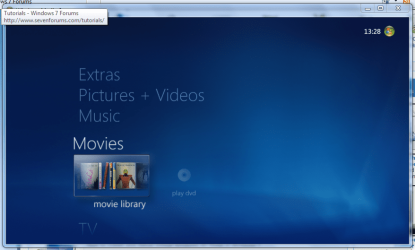
2. Open movie library, you should notice no movies shown 2 Media Center (Movie Library - Empty).PNG
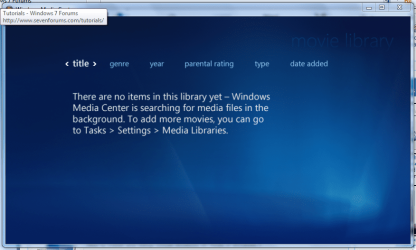
3. Right-Click within the inner (empty area) and select Manage Library, you will be shown the 'Add folders' wizard. Select 'Add folders to the library' and click next 3 Media Center (Add folder to library).PNG
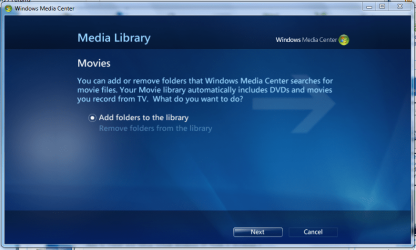
4. Select the location where your drive with the videos is stored, and click on next. 4 Media Center (Folder Selection 1).PNG
5. Navigate to the folder where your videos are stored (e.g. G:\MOVIES), and click next. 5 Media Center (Select Folder).PNG
6. On the final screen select 'Yes, use these locations' and click finish 6 Media Center (Finish Selection).PNG


Now your folder is added, Media Center will show the Video folders (with posters if you downloaded an image file for each movie).

   Note
If you wish to include metadata you will need to download Yammm. The meta data will download the DVDID.XML file which will allow for Media Center to download full synopsis information for each movie
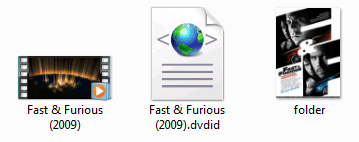

Example folder view.PNG

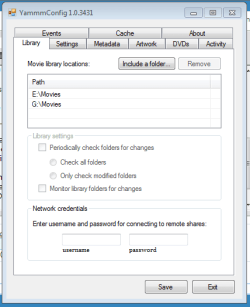
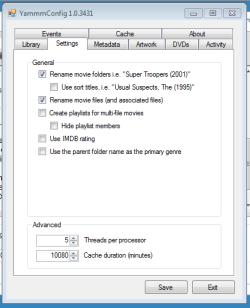
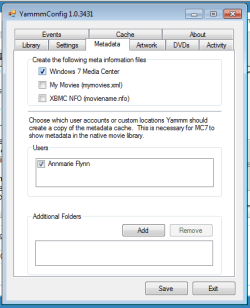
Recommended Yammm settings
1 yammm paths.PNG2 yammm settings.PNG
3 yammm metadata.PNG
   Note
These setting will automatically rename folders/files, download folder.jpg & DVDID.XML files for Media Center to read from.


Update

The Yammm application has been updated to include Image Resizing
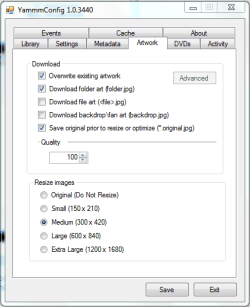
Yammm (Artwork).PNG

This will allow Media Center to use less memory when rendering folder images.

   Tip
It's recommended that you use a setting of 92 Quality & 300x420 medium size as this will greatly reduce the amount of memory used by 7MC when viewing a large movie library


Update 2: More Synopsis

I thought i'd include an example of how the DVDID.XML file works.

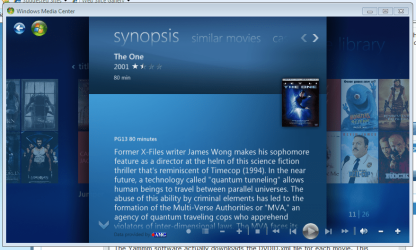
1, Full synopsis information Movie Library (Full Synopsis).PNG
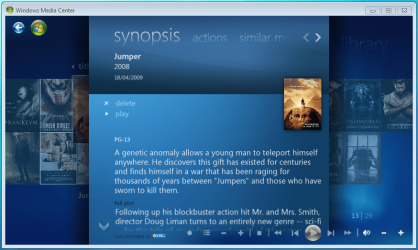
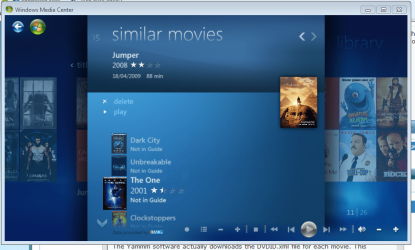
2, Similar Movies shown, with posters Movie Library (Similar Movies).PNG
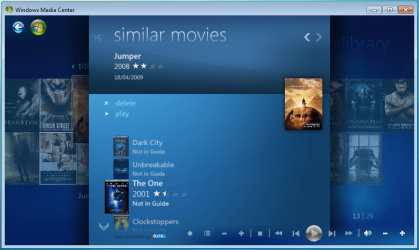
3, Click the similar movie to get full details of that movie Movie Library (Similar Movies - Synopsis).PNG
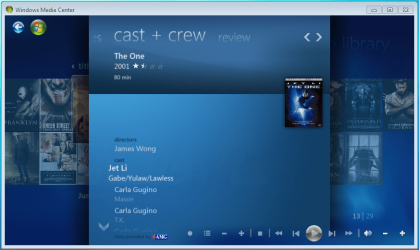
4, Cast & Crew information Movie Library (Cast & Crew).PNG
5, Click on a name to see a fimography (film list) relating to that actor/director Movie Library (Cast & Crew - Filmography).PNG

Enjoy
 

Attachments

  • file2folder.zip
    file2folder.zip
    230 bytes · Views: 22,835
  • synopsis.PNG
    synopsis.PNG
    127.1 KB · Views: 85
  • similar movies.PNG
    similar movies.PNG
    131.5 KB · Views: 66
  • similar movies detail.PNG
    similar movies detail.PNG
    140 KB · Views: 60
Last edited by a moderator:
Yes you'll need to run the bat per folder. I would keep them broken into genre subfolders as well. You'll see performance benefits of doing so (a blog post on why is coming).
 

My Computer My Computer

At a glance

6x W2K8 R2 (x64), 6x W7 7600 (x64), 2x Gentoo...Core2 Duo E8400 3.0GhzCorsair DDR-800 4GB RAMEVGA NVidia GeForce GT240
Computer Manufacturer/Model Number
My HTPC
OS
6x W2K8 R2 (x64), 6x W7 7600 (x64), 2x Gentoo (x64), 1x Ubuntu 9.04 (x64), 1x pfSense (FreeBSD)
CPU
Core2 Duo E8400 3.0Ghz
Motherboard
ASUS P5E-VM
Memory
Corsair DDR-800 4GB RAM
Graphics Card(s)
EVGA NVidia GeForce GT240
Screen Resolution
1080p
Hard Drives
OCZ Vertex 60GB (C:\D: System\Apps)
WD 1TB x1 (G: Temp\Recorded TV)
WD 2TB x8 (On Server)
PSU
Corsair HX520w
Case
Antec Fusion Max
Cooling
Passive Thermalright HR-1 CPU Heatsink w/ Nexus Fan
Yes you'll need to run the bat per folder. I would keep them broken into genre subfolders as well. You'll see performance benefits of doing so (a blog post on why is coming).

When and where will I find your blog... on your YAMMM site?
 

My Computer My Computer

At a glance

Windows 7 Ultimate 64 bit Steve Ballmer Signa...Intel Core 2 Quad - Q9550 - 2.83GHz stock - O...4GB DDR2 800MHz (PC6400) OCZ ReaperNvidia GE Force 8800 GTS
Computer Manufacturer/Model Number
Homebrew PC - "Alpha_Dawg"
OS
Windows 7 Ultimate 64 bit Steve Ballmer Signature Edition
CPU
Intel Core 2 Quad - Q9550 - 2.83GHz stock - OC'd to 3.6GHz
Motherboard
Gigabyte EP45-UD3P
Memory
4GB DDR2 800MHz (PC6400) OCZ Reaper
Graphics Card(s)
Nvidia GE Force 8800 GTS
Sound Card
Asus Xonar DX
Monitor(s) Displays
Samsung SyncMaster 2333HD
Screen Resolution
1920 x 1080
Hard Drives
WD Caviar Black 750GB - 7200RPM - 32MB cache
WD Caviar Green 1.5TB - 5400RPM - 64MB cache
WD Caviar Green 2.0TB - 5400RPM - 64MB cache
PSU
PC Power & Cooling Silencer 750
Case
Gigabyte 3D Aurora
Cooling
Case is Air - 5ea. 120mm fans (mix of Arctic and Xigmatec)
Keyboard
MS Natural Wireless KB
Mouse
MS Wireless Mouse
Internet Speed
50 mbps down/5 mbps up
Other Info
AVerMedia - AVerTVHD G2 Dual Tuner Card
Yes you'll need to run the bat per folder. I would keep them broken into genre subfolders as well. You'll see performance benefits of doing so (a blog post on why is coming).

Hope this was my answer as I didn't want to break up my folders. will be looking for your blog soon.

Do I have to put the bat per folder in each of my folders ?
 

My Computer My Computer

At a glance

Win7
OS
Win7
Do I have to put the bat per folder in each of my folders ?

Yes you'll need to move the bat into each folder and run from there. That or if you run the below command from your root folder it should do the trick as well.

FOR /D %d IN (*) DO FOR %i IN ("%d\*.*") DO (IF NOT EXIST "%d\%~ni" MD "%d\%~ni") & (MOVE "%i" "%d\%~ni")

Note: Only run the above command from the root movie folder. It will create a subfolder for every file located in the genre folders.
 

My Computer My Computer

At a glance

6x W2K8 R2 (x64), 6x W7 7600 (x64), 2x Gentoo...Core2 Duo E8400 3.0GhzCorsair DDR-800 4GB RAMEVGA NVidia GeForce GT240
Computer Manufacturer/Model Number
My HTPC
OS
6x W2K8 R2 (x64), 6x W7 7600 (x64), 2x Gentoo (x64), 1x Ubuntu 9.04 (x64), 1x pfSense (FreeBSD)
CPU
Core2 Duo E8400 3.0Ghz
Motherboard
ASUS P5E-VM
Memory
Corsair DDR-800 4GB RAM
Graphics Card(s)
EVGA NVidia GeForce GT240
Screen Resolution
1080p
Hard Drives
OCZ Vertex 60GB (C:\D: System\Apps)
WD 1TB x1 (G: Temp\Recorded TV)
WD 2TB x8 (On Server)
PSU
Corsair HX520w
Case
Antec Fusion Max
Cooling
Passive Thermalright HR-1 CPU Heatsink w/ Nexus Fan
When and where will I find your blog... on your YAMMM site?

When I don't know, it is a work-in-process. A lot of the delay in Yammm v2 has been work to improve the performance of the native Movie Library. I've been testing with 15,000 movies (I don't have this many but I create dummy files for test purposes) and it is near instant now.

The blog post will be on mikinho.com. I'm working on a "Early Access" area that I'll be publishing work-in-process apps to.
 

My Computer My Computer

At a glance

6x W2K8 R2 (x64), 6x W7 7600 (x64), 2x Gentoo...Core2 Duo E8400 3.0GhzCorsair DDR-800 4GB RAMEVGA NVidia GeForce GT240
Computer Manufacturer/Model Number
My HTPC
OS
6x W2K8 R2 (x64), 6x W7 7600 (x64), 2x Gentoo (x64), 1x Ubuntu 9.04 (x64), 1x pfSense (FreeBSD)
CPU
Core2 Duo E8400 3.0Ghz
Motherboard
ASUS P5E-VM
Memory
Corsair DDR-800 4GB RAM
Graphics Card(s)
EVGA NVidia GeForce GT240
Screen Resolution
1080p
Hard Drives
OCZ Vertex 60GB (C:\D: System\Apps)
WD 1TB x1 (G: Temp\Recorded TV)
WD 2TB x8 (On Server)
PSU
Corsair HX520w
Case
Antec Fusion Max
Cooling
Passive Thermalright HR-1 CPU Heatsink w/ Nexus Fan
When and where will I find your blog... on your YAMMM site?

When I don't know, it is a work-in-process. A lot of the delay in Yammm v2 has been work to improve the performance of the native Movie Library. I've been testing with 15,000 movies (I don't have this many but I create dummy files for test purposes) and it is near instant now.

The blog post will be on mikinho.com. I'm working on a "Early Access" area that I'll be publishing work-in-process apps to.


When you say, "improve the performance of the native Movie Library" and "it is near instant now" do you mean the speed of loading the images and meta data?
If so, I welcome the revision with open arms.

If we all send you $5... would that help? LOL!

Or... everyday when you get home from work tired and you dont want to work on Yammm... turn on your stereo and blast the theme to Rocky to pump your self up!

Personally, I love what your app has done for my digital media Library... and I know others do to!
 

My Computer My Computer

At a glance

Windows 7 Ultimate 64 bit Steve Ballmer Signa...Intel Core 2 Quad - Q9550 - 2.83GHz stock - O...4GB DDR2 800MHz (PC6400) OCZ ReaperNvidia GE Force 8800 GTS
Computer Manufacturer/Model Number
Homebrew PC - "Alpha_Dawg"
OS
Windows 7 Ultimate 64 bit Steve Ballmer Signature Edition
CPU
Intel Core 2 Quad - Q9550 - 2.83GHz stock - OC'd to 3.6GHz
Motherboard
Gigabyte EP45-UD3P
Memory
4GB DDR2 800MHz (PC6400) OCZ Reaper
Graphics Card(s)
Nvidia GE Force 8800 GTS
Sound Card
Asus Xonar DX
Monitor(s) Displays
Samsung SyncMaster 2333HD
Screen Resolution
1920 x 1080
Hard Drives
WD Caviar Black 750GB - 7200RPM - 32MB cache
WD Caviar Green 1.5TB - 5400RPM - 64MB cache
WD Caviar Green 2.0TB - 5400RPM - 64MB cache
PSU
PC Power & Cooling Silencer 750
Case
Gigabyte 3D Aurora
Cooling
Case is Air - 5ea. 120mm fans (mix of Arctic and Xigmatec)
Keyboard
MS Natural Wireless KB
Mouse
MS Wireless Mouse
Internet Speed
50 mbps down/5 mbps up
Other Info
AVerMedia - AVerTVHD G2 Dual Tuner Card
Could you guys help me please?

When I choose the folder with just my movies, windows media center loads up EVERY video file I have on my computer when I scroll to Movies section.

Any idea why? Please reply or email me at [email protected]

Thank you.
 

My Computer My Computer

At a glance

Windows 7Intel Pentium 4 2.60GHz1.50GBNvidea 7600GS
Computer Manufacturer/Model Number
HP a250n
OS
Windows 7
CPU
Intel Pentium 4 2.60GHz
Motherboard
ASUS P4SD-LA
Memory
1.50GB
Graphics Card(s)
Nvidea 7600GS
Sound Card
Integrated AC'97 with 6-channel configurable audio
Monitor(s) Displays
LG FLATRON L1720P
Hard Drives
120GB and 1TB Seagate
Case
HP
Cooling
Integrated
Hi Orbital Shark, two questions:
I have a lot of splited videos (eg. aaf-disgrace-cd1.avi and aaf-disgrace-cd2.avi), is there any way to show only one cover in my library? and when I play it, part 2 start automatically after part 1?
I cant see Similar Movies and Cast + Crews like yours screens, what should I do?

Thank you


edit: you have a splited movie in your 2nd screen, lesbian vampire killers and its shown in two parts... =/
12147d1243377713-media-center-setup-movie-library-8-example-media-center-movies-posters-.png
 
Last edited:

My Computer My Computer

At a glance

Windows 7 UltimatePhenon II X4 9654 x 1 GB Kingston 1333Sapphire 4890 VaporX 01 GB
Computer Manufacturer/Model Number
Home Build
OS
Windows 7 Ultimate
CPU
Phenon II X4 965
Motherboard
ECS A790GXM-AD3
Memory
4 x 1 GB Kingston 1333
Graphics Card(s)
Sapphire 4890 VaporX 01 GB
Sound Card
Onboard
Monitor(s) Displays
Samsung 2232 bw
Hard Drives
02 x 250 GB Seagate RAID 0
01 x 01 TB Samsung
01 x 500 GB WD
01 x 320 GB Samsung
PSU
CWT 750VH
Case
Coolermaster iTower 930
Cooling
Hyper TX3
Keyboard
MS Wired 500
Mouse
Logitech MX518
Internet Speed
512 Kbps
It is a feature of Yammm v2 to hide the splits movies. Since the Movie Library disregards the Hidden attribute on files it was a lot more difficult to do it gracefully but I think I my new method is pretty slick.

Other front-ends like Media Browser, OML, ... will only show the playlist that Yammm creates and not the hidden movie files.
 

My Computer My Computer

At a glance

6x W2K8 R2 (x64), 6x W7 7600 (x64), 2x Gentoo...Core2 Duo E8400 3.0GhzCorsair DDR-800 4GB RAMEVGA NVidia GeForce GT240
Computer Manufacturer/Model Number
My HTPC
OS
6x W2K8 R2 (x64), 6x W7 7600 (x64), 2x Gentoo (x64), 1x Ubuntu 9.04 (x64), 1x pfSense (FreeBSD)
CPU
Core2 Duo E8400 3.0Ghz
Motherboard
ASUS P5E-VM
Memory
Corsair DDR-800 4GB RAM
Graphics Card(s)
EVGA NVidia GeForce GT240
Screen Resolution
1080p
Hard Drives
OCZ Vertex 60GB (C:\D: System\Apps)
WD 1TB x1 (G: Temp\Recorded TV)
WD 2TB x8 (On Server)
PSU
Corsair HX520w
Case
Antec Fusion Max
Cooling
Passive Thermalright HR-1 CPU Heatsink w/ Nexus Fan
Yammm did not work for me

Hello Guys,

This plugin did not work for me , i used Yammm and file2folder and did everything as the doc said but it did not work , Yammm wont save the data properly and i dont see it getting any info from imdb. i guess i will pass to a diffrent software that will do everything for me and that works

Thank you
 

My Computer My Computer

At a glance

win 7
OS
win 7
So this doesnt appear to work very well when its attached to a network storage device. I removed all video, and had it rebuild everything. Everything then showed up instantly with the art work and synopsis. But then after about 5 minutes or so everything just disappeared. All the artwork disappeared, and so did the synopsis. If I copy everything off the NAS drive, then it appears to work instantly.

I am running WIN7 x64, with 8GB ram and an AMD X6 processor. The LAN is all 1GIG from my computer to the router, to the NAS drive. I can transfer files to the NAS drive at about 20mbs/ps. So its fairly quick. I dont get whats happening here. Anyone have any ideas?
 

My Computer My Computer

At a glance

Windows 7 ProAMD Phenom X68GBNVIDIA 9800+
Computer Manufacturer/Model Number
Gigabyte
OS
Windows 7 Pro
CPU
AMD Phenom X6
Motherboard
Gigabyte
Memory
8GB
Graphics Card(s)
NVIDIA 9800+
Sound Card
XFI
Monitor(s) Displays
SAMSUNG
Hard Drives
Hitatchi x 2TB
Samsung X 1TB
OCZ SSD x 60GB
ROCKS!!!!

I love it when I come across something that is not the way I had hoped, can Google the problem and often come right here to SevenForums and get the perfect answer.

THIS WHOLE SOLUTION IS AWESOME!!!!!!!!

Follow the steps...Open IMDb website and be ready to rename folders to the actual name of the movies as copied and pasted from IMDb. Be sure to have the YAMMM configuration running each time you make changes to folders or add movies. Something wrong, just delete the images, change a folder or whatever and it automatically updates. ROCKS!!!!!
 

My Computer My Computer

At a glance

Win 7 x64 Ent.Intel Quad4GDual nVidia SLI 8600
OS
Win 7 x64 Ent.
CPU
Intel Quad
Motherboard
eVGA 945 SLI
Memory
4G
Graphics Card(s)
Dual nVidia SLI 8600
Monitor(s) Displays
3
Hard Drives
6 SATA
I have used the batch file,but I don't like it,how can i fix the icons as before
 

My Computer My Computer

At a glance

Windows 7 Ultimate x64
OS
Windows 7 Ultimate x64
P.S What does the file2folder.bat do?
The File2Folder will place all single files bunched up in one folder into a folder for each file named after the file

Just place it in the folder with files and run and into folders they will go!

After I put file2folder.bat in my movies folder, I clicked on it and it puts all my movies in a folder and adds the cover. The only problem is that it also puts the bat file in a folder and every time I add a new movie, I have to take the bat file out of the folder and put it in the main movies folder. Is there a way to keep the bat file from getting placed in a folder like the movies do?
 

My Computer My Computer

At a glance

Windows 7 Ultimate x64
OS
Windows 7 Ultimate x64
Gah! I've got one movie that is driving me crazy!

I used Yammm to get the movie artwork, and it works great... except for one movie. It is convinced "Return of the King" (LOTR Trilogy) is some Disney version from 1980. Every time I delete the jpegs and .xml folders, it rebuilds it again as fast as I can delete... as the 1980 Disney thing!

P.S. Great tutorial, Orbital... and thanks Mikinho for the tasty Yammm!

How can I get Yammm to lose the data for this one movie and get the right stuff?
 

My Computer My Computer

At a glance

windows 7 x64 Home Premiumintel q6600g.skill 8gb ddr2 1066 (pc2 8500)evga geforce 9800 gtx 512 mb
Computer Manufacturer/Model Number
me / #1
OS
windows 7 x64 Home Premium
CPU
intel q6600
Motherboard
gigbyte ga ep45 ud3l
Memory
g.skill 8gb ddr2 1066 (pc2 8500)
Graphics Card(s)
evga geforce 9800 gtx 512 mb
Screen Resolution
1680 x 1050
Hard Drives
wd caviar black 500 gb
wd caviar black 1tb
wd elements 1tb external hd x2
PSU
raidmax 500w
Case
smilodon (yes, t'was the pretty blue lites that got me!)
Do three things:

1- Delete folder.original.jpg
2- Rename the folder to tt0167260
3- Delete folder.jpg

Both jpg files will be hidden by default so you may need to show hidden files to delete them.

Let me know if that works.
 

My Computer My Computer

At a glance

6x W2K8 R2 (x64), 6x W7 7600 (x64), 2x Gentoo...Core2 Duo E8400 3.0GhzCorsair DDR-800 4GB RAMEVGA NVidia GeForce GT240
Computer Manufacturer/Model Number
My HTPC
OS
6x W2K8 R2 (x64), 6x W7 7600 (x64), 2x Gentoo (x64), 1x Ubuntu 9.04 (x64), 1x pfSense (FreeBSD)
CPU
Core2 Duo E8400 3.0Ghz
Motherboard
ASUS P5E-VM
Memory
Corsair DDR-800 4GB RAM
Graphics Card(s)
EVGA NVidia GeForce GT240
Screen Resolution
1080p
Hard Drives
OCZ Vertex 60GB (C:\D: System\Apps)
WD 1TB x1 (G: Temp\Recorded TV)
WD 2TB x8 (On Server)
PSU
Corsair HX520w
Case
Antec Fusion Max
Cooling
Passive Thermalright HR-1 CPU Heatsink w/ Nexus Fan
Do three things:

1- Delete folder.original.jpg
2- Rename the folder to tt0167260
3- Delete folder.jpg

Both jpg files will be hidden by default so you may need to show hidden files to delete them.

Let me know if that works.

In step two, which folder should I rename? Folder.jpg or the movie's folder?
 

My Computer My Computer

At a glance

windows 7 x64 Home Premiumintel q6600g.skill 8gb ddr2 1066 (pc2 8500)evga geforce 9800 gtx 512 mb
Computer Manufacturer/Model Number
me / #1
OS
windows 7 x64 Home Premium
CPU
intel q6600
Motherboard
gigbyte ga ep45 ud3l
Memory
g.skill 8gb ddr2 1066 (pc2 8500)
Graphics Card(s)
evga geforce 9800 gtx 512 mb
Screen Resolution
1680 x 1050
Hard Drives
wd caviar black 500 gb
wd caviar black 1tb
wd elements 1tb external hd x2
PSU
raidmax 500w
Case
smilodon (yes, t'was the pretty blue lites that got me!)
The movie's folder. Assuming you have the latest Yammm you can specify the exact movie to tag in 1 of 3 ways:

1- Rename the movie folder to its imdb id
2- Add a hash of [imdb=<imdbid>]
3- Add a hash of [tmdb=<tmdb>]

i.e.

1- tt0167260
2- The Return of the King [imdb=tt0167260]
3- The Return of the King [tmdb=122]

Each of these will result in the folder being renamed to The Lord of the Rings- The Return of the King (2003)
 

My Computer My Computer

At a glance

6x W2K8 R2 (x64), 6x W7 7600 (x64), 2x Gentoo...Core2 Duo E8400 3.0GhzCorsair DDR-800 4GB RAMEVGA NVidia GeForce GT240
Computer Manufacturer/Model Number
My HTPC
OS
6x W2K8 R2 (x64), 6x W7 7600 (x64), 2x Gentoo (x64), 1x Ubuntu 9.04 (x64), 1x pfSense (FreeBSD)
CPU
Core2 Duo E8400 3.0Ghz
Motherboard
ASUS P5E-VM
Memory
Corsair DDR-800 4GB RAM
Graphics Card(s)
EVGA NVidia GeForce GT240
Screen Resolution
1080p
Hard Drives
OCZ Vertex 60GB (C:\D: System\Apps)
WD 1TB x1 (G: Temp\Recorded TV)
WD 2TB x8 (On Server)
PSU
Corsair HX520w
Case
Antec Fusion Max
Cooling
Passive Thermalright HR-1 CPU Heatsink w/ Nexus Fan
It worked! Yay!

So that number is the same as the number in the imdb url for each particular movie? That's a handy trick to know.

Thanks for the help!
 

My Computer My Computer

At a glance

windows 7 x64 Home Premiumintel q6600g.skill 8gb ddr2 1066 (pc2 8500)evga geforce 9800 gtx 512 mb
Computer Manufacturer/Model Number
me / #1
OS
windows 7 x64 Home Premium
CPU
intel q6600
Motherboard
gigbyte ga ep45 ud3l
Memory
g.skill 8gb ddr2 1066 (pc2 8500)
Graphics Card(s)
evga geforce 9800 gtx 512 mb
Screen Resolution
1680 x 1050
Hard Drives
wd caviar black 500 gb
wd caviar black 1tb
wd elements 1tb external hd x2
PSU
raidmax 500w
Case
smilodon (yes, t'was the pretty blue lites that got me!)
Back
Top