
Unable To Boot Disk For Windows 7 RC! - PLEASE HELP!

Windows 7 User

New member
Local time
3:24 PM
Messages
42
I downloaded the 7 RC 32 Bit Version. Using Magic ISO to burn the files into the DVD+R. The installation works from my current OS which is Windows Vista Home Premium 32 Bit.

When I load the DVD, it says something like, unable to boot.

How can I boot from the DVD so I can do a clean install?
 
Last edited:

My Computer My Computer

At a glance

Windows 7 Ultimate Version 6.1.7600 32 Bit.
OS
Windows 7 Ultimate Version 6.1.7600 32 Bit.
Windows 7 user
Is the dvd player listed in BIOS as a bootible device? when you re-boot there is a key (usually F2) that puts you into setup. Then find the section that device boot order (or something like it) and check the dvd to make sure its checked. You can force DVD boot by hitting the "d" key (sometimes the c key) untill it beeps.

Hope this helped

Ken
 

My Computer My Computer

At a glance

Win 8 Release candidate 8400[email protected]4 gigsNvidia 9600M
Computer Manufacturer/Model Number
HP Pavillion dv-7 1005 Tx
OS
Win 8 Release candidate 8400
CPU
[email protected]
Memory
4 gigs
Graphics Card(s)
Nvidia 9600M
Sound Card
HD built-in
Monitor(s) Displays
17" Wxga
Screen Resolution
1440x900
Cooling
none
Internet Speed
45Mb down 5Mb up
Windows 7 user
Is the dvd player listed in BIOS as a bootible device? when you re-boot there is a key (usually F2) that puts you into setup. Then find the section that device boot order (or something like it) and check the dvd to make sure its checked. You can force DVD boot by hitting the "d" key (sometimes the c key) untill it beeps.

Hope this helped

Ken

Yes I press f2, it tries to boot. I keep retrying with f1, but it does not boot.
 

My Computer My Computer

At a glance

Windows 7 Ultimate Version 6.1.7600 32 Bit.
OS
Windows 7 Ultimate Version 6.1.7600 32 Bit.
I press f2, it tries to boot. I keep retrying with f1, but it does not boot.
 

My Computer My Computer

At a glance

Windows 7 Ultimate Version 6.1.7600 32 Bit.
OS
Windows 7 Ultimate Version 6.1.7600 32 Bit.
You may want to try F8. If that doesn't work, hold down other Function keys until something different happens.
 

My Computer My Computer

At a glance

Windows 7 Home Premium x64Intel(R) Core(TM)2 Duo CPU T5450 @ 1.66GHz4 GB Texas Instruments PCIxx12 Integrated Fla...Mobile Intel(R) 965 Express Chipset Family
Computer Manufacturer/Model Number
Toshiba Satellite M205-S4806
OS
Windows 7 Home Premium x64
CPU
Intel(R) Core(TM)2 Duo CPU T5450 @ 1.66GHz
Memory
4 GB Texas Instruments PCIxx12 Integrated FlashMedia Control
Graphics Card(s)
Mobile Intel(R) 965 Express Chipset Family
Sound Card
Realtek HD Audio
Monitor(s) Displays
Laptop Monitor
Screen Resolution
1280x800
Hard Drives
200 GB Hitachi HTS542520K9SA00 ATA Device
Keyboard
Laptop Keyboard
Mouse
Synaptics Touchpad
Internet Speed
Broadband, up to 1.2 MB/s
You may want to try F8. If that doesn't work, hold down other Function keys until something different happens.

Well it tries to boot and the light goes on at the player.

Is it really a bootable disk?
 

My Computer My Computer

At a glance

Windows 7 Ultimate Version 6.1.7600 32 Bit.
OS
Windows 7 Ultimate Version 6.1.7600 32 Bit.
Im sorry
I wasnt very clear.
1-try booting from the install dvd by hitting the d key repeatedly during boot. does it boot from the dvd?
2-if not go into your bios setup by hitting f2 during boot. dont worry abt actually booting from the dvd. just see if in the area of BIOS called boot order it has your dvd marked as one of the places the computer can boot from.

See what those results are.

Ken
 

My Computer My Computer

At a glance

Win 8 Release candidate 8400[email protected]4 gigsNvidia 9600M
Computer Manufacturer/Model Number
HP Pavillion dv-7 1005 Tx
OS
Win 8 Release candidate 8400
CPU
[email protected]
Memory
4 gigs
Graphics Card(s)
Nvidia 9600M
Sound Card
HD built-in
Monitor(s) Displays
17" Wxga
Screen Resolution
1440x900
Cooling
none
Internet Speed
45Mb down 5Mb up
Im sorry
I wasnt very clear.
1-try booting from the install dvd by hitting the d key repeatedly during boot. does it boot from the dvd?
2-if not go into your bios setup by hitting f2 during boot. dont worry abt actually booting from the dvd. just see if in the area of BIOS called boot order it has your dvd marked as one of the places the computer can boot from.

See what those results are.

Ken


What I did was downloaded the ISO file from the MS site. Using Magic ISO, I burn the files into the DVD. ISO file itself was not burned into the DVD, just the files. I mean it runs from Vista but it won't boot from the DVD. I keep pressing F1 to retry and the light goes on for the drive, but it does not boot.
 

My Computer My Computer

At a glance

Windows 7 Ultimate Version 6.1.7600 32 Bit.
OS
Windows 7 Ultimate Version 6.1.7600 32 Bit.
Sounds like Magic Iso did not burn it correctly. Try Free program ImgBurn & burn a new DVD that will boot up. :geek:
 

My Computer My Computer

At a glance

Win7 Enterprise, Win7 x86 (Ult 7600), Win7 x6...AMD fx8350 4ghz, AMD-32 2400mhz, AMD-64 3200m...2gb, 4gb on the Ult 7600, 4gb on Technet RTM,...Draw my own Graphics, several nVidia cards
Computer type
PC/Desktop
Computer Manufacturer/Model Number
Built them myself, Science Experiments !
OS
Win7 Enterprise, Win7 x86 (Ult 7600), Win7 x64 Ult 7600, TechNet RTM on AMD x64 (2.8Ghz)
CPU
AMD fx8350 4ghz, AMD-32 2400mhz, AMD-64 3200mhz, AMDx64 2.8G
Motherboard
SIS 755, ECS-K8M890M-M (Ult 7600), GigaByte & others
Memory
2gb, 4gb on the Ult 7600, 4gb on Technet RTM, 32gb on FX8350
Graphics Card(s)
Draw my own Graphics, several nVidia cards
Sound Card
on motherboard
Monitor(s) Displays
19" flat scr, 28" I-Inc widescr,22" Emprex Widescr, 23" Acer
Screen Resolution
1280 x 1024, 1440 x 900, 1920 x 1080
Hard Drives
6 pata Ide HD's & 2 Sata HD's
added 80gb external on Ult 7600 computer,
numerous extra 1tb, 2TB, 3Tb SATA HD's
A collection of ext HD Docks w/ HDs
PSU
430w, 550w, 600w, 700, 800, etc
Case
All Generic Full Towers
Cooling
Open Air & a few fans, some w/ colored LEDs
Keyboard
Compaq & Dell recycled from GoodWill
Mouse
Made in China Optical Wired Mouse
Internet Speed
Fast Cable InterNet
Antivirus
AVG Free on 24 different Desktops, NO Problems!
Browser
IE 8 is preferred, but use FireFox sometimes
Other Info
Linksys Routers, switches, & Hubs
Too Many USB Flash Drives to count, Biggest is 64GB !
Eight computers in my home network.
Sixteen computers at my business network.
Linked via TeamViewer !
Lots of old used spare computer parts everywhere!
Well it tries to boot and the light goes on at the player.

Is it really a bootable disk?
looks like you said it was a dvd +- r maybe try burning using dvd+r at lowest speed possible
 

My Computer My Computer

At a glance

Windows 7 Ulti. x64AMD Phenom 8450 triple-core 2.10 ghz4GBATI Radion HD 3200
Computer Manufacturer/Model Number
Gateway GT5692
OS
Windows 7 Ulti. x64
CPU
AMD Phenom 8450 triple-core 2.10 ghz
Memory
4GB
Graphics Card(s)
ATI Radion HD 3200
Monitor(s) Displays
Gateway FPD1775W
Screen Resolution
1280x720
Hard Drives
465.6613 Gibibytes
looks like you said it was a dvd +- r maybe try burning using dvd+r at lowest speed possible


Correction its a DVR+R. Burned at 8x. Why does it matter if I burned at lowest speeds?
 

My Computer My Computer

At a glance

Windows 7 Ultimate Version 6.1.7600 32 Bit.
OS
Windows 7 Ultimate Version 6.1.7600 32 Bit.
Make sure you are actually burning the ISO and not just moving the ISO to the dvd. You can test this by using the DVD in your current OS and seeing is Autoplay startsup and says something about upgrading your OS.
 

My Computer My Computer

At a glance

Windows 7 Build 7600|16384- 64bitAMD Phenom II X4 810 - 2.61ghz Deneb4GB DDR3 Mushkin (1600 O.C. Rated)ATI HD Radeon 4890 1GB
Computer Manufacturer/Model Number
Custom Made
OS
Windows 7 Build 7600|16384- 64bit
CPU
AMD Phenom II X4 810 - 2.61ghz Deneb
Motherboard
Asus M4A79T Deluxe
Memory
4GB DDR3 Mushkin (1600 O.C. Rated)
Graphics Card(s)
ATI HD Radeon 4890 1GB
Sound Card
Realtek HD Onboard Audio
Monitor(s) Displays
AOC 912vwa-1
Screen Resolution
1440x900 (Max Monitor)
Hard Drives
10000RPM 150GB Western Digital Velociraptor
PSU
Corsair TSX750W
Case
Antec Nine Hundred
Cooling
Air Cooled
Keyboard
Logitech Elite
Mouse
Logitech MX518
Internet Speed
Comcast High-Speed (+Powerboost)
Sounds like Magic Iso did not burn it correctly. Try Free program ImgBurn & burn a new DVD that will boot up. :geek:

If there was an error in burning, Magic ISO would tell me right?

Am I extracting the files into a local hardrive first or just directly extracting into a DVD+R? It seems like Magic ISO formatted the disk and then burned it.
 

My Computer My Computer

At a glance

Windows 7 Ultimate Version 6.1.7600 32 Bit.
OS
Windows 7 Ultimate Version 6.1.7600 32 Bit.
Make sure you are actually burning the ISO and not just moving the ISO to the dvd. You can test this by using the DVD in your current OS and seeing is Autoplay startsup and says something about upgrading your OS.

MagicISO formatted the DVR+R and extracted the files from the ISO to the DVD+R. Is this right?

Are you trying to say that the ISO file is itself a bootable file?

When I put the DVD in, the autoplay does start and it asks me to install the OS. My problem is bootable from the disk so I can format my HD and do a clean install.
 

My Computer My Computer

At a glance

Windows 7 Ultimate Version 6.1.7600 32 Bit.
OS
Windows 7 Ultimate Version 6.1.7600 32 Bit.
Based on what you said it seems like the DVD works. Have you tired going into your BIOS and setting your CD/DVD drive to boot priority one?

As for burning it at a lower speeds, it reduces the chances that errors will occur.
 

My Computer My Computer

At a glance

Windows 7 Build 7600|16384- 64bitAMD Phenom II X4 810 - 2.61ghz Deneb4GB DDR3 Mushkin (1600 O.C. Rated)ATI HD Radeon 4890 1GB
Computer Manufacturer/Model Number
Custom Made
OS
Windows 7 Build 7600|16384- 64bit
CPU
AMD Phenom II X4 810 - 2.61ghz Deneb
Motherboard
Asus M4A79T Deluxe
Memory
4GB DDR3 Mushkin (1600 O.C. Rated)
Graphics Card(s)
ATI HD Radeon 4890 1GB
Sound Card
Realtek HD Onboard Audio
Monitor(s) Displays
AOC 912vwa-1
Screen Resolution
1440x900 (Max Monitor)
Hard Drives
10000RPM 150GB Western Digital Velociraptor
PSU
Corsair TSX750W
Case
Antec Nine Hundred
Cooling
Air Cooled
Keyboard
Logitech Elite
Mouse
Logitech MX518
Internet Speed
Comcast High-Speed (+Powerboost)
Based on what you said it seems like the DVD works. Have you tired going into your BIOS and setting your CD/DVD drive to boot priority one?

As for burning it at a lower speeds, it reduces the chances that errors will occur.

Priority is not an issue. It does try to boot from the DVD, I keep pressing F1 to retry and nothing happens.

Am I suppose to burn the ISO image itself to the DVD?
 

My Computer My Computer

At a glance

Windows 7 Ultimate Version 6.1.7600 32 Bit.
OS
Windows 7 Ultimate Version 6.1.7600 32 Bit.
Yes, burn the entire .iso as an image, not as data.

Do not extract the files. Do not format the dvd.
 

My Computers My Computers

  • At a glance

    7 X64i5 84002x8gb 3200mhz
    Computer type
    PC/Desktop
    OS
    7 X64
    CPU
    i5 8400
    Motherboard
    gigabyte b365m ds3h
    Memory
    2x8gb 3200mhz
    Hard Drives
    various
    PSU
    pure power 11 400w cm
    Case
    Coolermaster
    Cooling
    cryorig m9i
  • At a glance

    7x64g54008gb ddr4 2400
    Computer type
    PC/Desktop
    OS
    7x64
    CPU
    g5400
    Motherboard
    ga b365m ds3h
    Memory
    8gb ddr4 2400
    PSU
    xfx pro 450w
Sry to hijack the thread, but I'm having the same exact problem it seems. The only difference is, I used Roxio Creator DE 10.1. I already set the CD/DVD to boot first from the BIOS. When I boot the computer, it simply starts into Vista. I downloaded the file from MS as well. I also tried to force boot DVD but i get an option to start Windows Vista and that's it.

One thing I can also remember is that I formatted the DVD before copying the .iso file onto it. I'm making another copy to see if that fixes the problem.
 

My Computer My Computer

At a glance

Windows 7 64-bitIntel Core2 Duo T5500 1.83 GHz 2MG Cache3gb 667 MHz Dual DDR2 SDRAMIntegrated NVIDIA GeForce 8400M GS 128MB
Computer Manufacturer/Model Number
XPS M1530
OS
Windows 7 64-bit
CPU
Intel Core2 Duo T5500 1.83 GHz 2MG Cache
Motherboard
Mobile Intel PM965
Memory
3gb 667 MHz Dual DDR2 SDRAM
Graphics Card(s)
Integrated NVIDIA GeForce 8400M GS 128MB
Monitor(s) Displays
15.4" Widescreen WXGA TFT LCD display
Screen Resolution
1280 x 800
Okay, It's real easy. Just download ImgBurn from MajorGeeks :geek:

|MG| ImgBurn 2.4.4.0 Download

Do not extract files, Burn the .iso directly to DVD with ImgBurn. It will have the necessary boot files on the DVD in the proper place.

Insert new burned DVD in DVD drive on computer that you want to install to.

ReStart computer, select boot from CD/DVD drive or hit F8 key to get a select boot drive menu. WaLaah ! Simple :geek:
 

My Computer My Computer

At a glance

Win7 Enterprise, Win7 x86 (Ult 7600), Win7 x6...AMD fx8350 4ghz, AMD-32 2400mhz, AMD-64 3200m...2gb, 4gb on the Ult 7600, 4gb on Technet RTM,...Draw my own Graphics, several nVidia cards
Computer type
PC/Desktop
Computer Manufacturer/Model Number
Built them myself, Science Experiments !
OS
Win7 Enterprise, Win7 x86 (Ult 7600), Win7 x64 Ult 7600, TechNet RTM on AMD x64 (2.8Ghz)
CPU
AMD fx8350 4ghz, AMD-32 2400mhz, AMD-64 3200mhz, AMDx64 2.8G
Motherboard
SIS 755, ECS-K8M890M-M (Ult 7600), GigaByte & others
Memory
2gb, 4gb on the Ult 7600, 4gb on Technet RTM, 32gb on FX8350
Graphics Card(s)
Draw my own Graphics, several nVidia cards
Sound Card
on motherboard
Monitor(s) Displays
19" flat scr, 28" I-Inc widescr,22" Emprex Widescr, 23" Acer
Screen Resolution
1280 x 1024, 1440 x 900, 1920 x 1080
Hard Drives
6 pata Ide HD's & 2 Sata HD's
added 80gb external on Ult 7600 computer,
numerous extra 1tb, 2TB, 3Tb SATA HD's
A collection of ext HD Docks w/ HDs
PSU
430w, 550w, 600w, 700, 800, etc
Case
All Generic Full Towers
Cooling
Open Air & a few fans, some w/ colored LEDs
Keyboard
Compaq & Dell recycled from GoodWill
Mouse
Made in China Optical Wired Mouse
Internet Speed
Fast Cable InterNet
Antivirus
AVG Free on 24 different Desktops, NO Problems!
Browser
IE 8 is preferred, but use FireFox sometimes
Other Info
Linksys Routers, switches, & Hubs
Too Many USB Flash Drives to count, Biggest is 64GB !
Eight computers in my home network.
Sixteen computers at my business network.
Linked via TeamViewer !
Lots of old used spare computer parts everywhere!
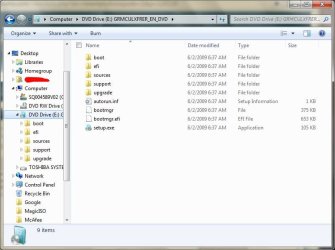
If you opened the .iso in MagicISO and told it to burn it to DVD, then it should have burned the files in the ISO to the DVD disc. To confirm this, in the DVD disc you should have 5 folders and 4 files, one of then being the setup.exe. I included a screenshot of the files in Build 7201 x64.

Also, I suggest that you make sure that the disk works and reads correctly by testing it in another computer.
 

Attachments

  • Capture.JPG
    Capture.JPG
    56.2 KB · Views: 145

My Computer My Computer

At a glance

Windows 7 Home Premium x64Intel(R) Core(TM)2 Duo CPU T5450 @ 1.66GHz4 GB Texas Instruments PCIxx12 Integrated Fla...Mobile Intel(R) 965 Express Chipset Family
Computer Manufacturer/Model Number
Toshiba Satellite M205-S4806
OS
Windows 7 Home Premium x64
CPU
Intel(R) Core(TM)2 Duo CPU T5450 @ 1.66GHz
Memory
4 GB Texas Instruments PCIxx12 Integrated FlashMedia Control
Graphics Card(s)
Mobile Intel(R) 965 Express Chipset Family
Sound Card
Realtek HD Audio
Monitor(s) Displays
Laptop Monitor
Screen Resolution
1280x800
Hard Drives
200 GB Hitachi HTS542520K9SA00 ATA Device
Keyboard
Laptop Keyboard
Mouse
Synaptics Touchpad
Internet Speed
Broadband, up to 1.2 MB/s
Back
Top