Create system image does not work with WD Mybook Essential USB 3.0

tilsonpa

New member
Local time
10:23 PM
Messages
8
I just bought a WD Mybook Essentials 3tb USB 3.0 external hard drive and ran Windows 7 backup to create a system image. It failed and I get the error message: "one of the backup files could not be created . (0x8078002A).
I have tried formatting the WD as a MBR at 1TB and 2TB and get the same error. I talked with WD support and they said they don't support multiple partitions and to initialize it as GPT, and try it again. I did that with the same results.

Has anyone got the disk imaging to work with this external hard drive?
 

My Computer My Computer

At a glance

Windows 8.1 Preview 64 bit
OS
Windows 8.1 Preview 64 bit
There may be something special about the 3TB My Book essentials.
The MBR is the first 512 bytes of the disk and it serves a number of functions. When it's a data disk it's the partition table which is of most importance.
The MBR partition table which is restricted to 2TB per partition. It's something historical.

GPT may overcome the MBR issue if you need 1 big partition. But I can't see why you can't partition in say 3x1TB partitions. I'm not sure why WD are telling you they don't support multiple partitions.

What puzzles me is you have tried formating the HDD as a 1TB (presumably 2TB unallocated) and it doesn't take an MBR and an image.

I have a 1TB WD essentials with 4 partitions (MBR) and it's full of images.
 
Last edited:

My Computer My Computer

At a glance

Windows 7x64 Home Premium SP1Intel i7 2600kG.Skill Ripjaws (DDR3-1600) 2x4GBNvidia GeForce GTS 450; Intel HD Graphics 300...
Computer type
PC/Desktop
Computer Manufacturer/Model Number
Own build
OS
Windows 7x64 Home Premium SP1
CPU
Intel i7 2600k
Motherboard
ASUS P8Z68 Deluxe
Memory
G.Skill Ripjaws (DDR3-1600) 2x4GB
Graphics Card(s)
Nvidia GeForce GTS 450; Intel HD Graphics 3000(GT2+)
Monitor(s) Displays
Dell Ultrasharp IPS panel U2311H, Samsung SyncMaster P2350
Screen Resolution
1920x1080
Hard Drives
Samsung 850 Pro SSD 256GB, Samsung SSD 840 120GB, Seagates 1TB Barracuda ST31000528AS x2
PSU
Seasonic M12II 520W
Case
Lian Li Lancool PC-K60
Cooling
Case: 1x120mm, 3x140mm CPU: Hyper 212+
Keyboard
Logitech MK520 (wireless)
Mouse
Logitech MK520
Internet Speed
6-7 Mbps
Antivirus
Norton Security Premium, Malwarebytes on 2 (MSE on 3rd PC)
Browser
FireFox
Other Info
Audio: Logitech Z523 2.1
Do you have the 100MB System Reserved partition. If so, how much free space is in the system reserved?
 

My Computers My Computers

  • At a glance

    Windows 11 ProRyzen 9 5900X32GB G Skill DDR4-3600EVGA RTX 3080 FTW 3 Ultra
    Computer type
    PC/Desktop
    Computer Manufacturer/Model Number
    ALWAYS UNDER CONSTRUCTION
    OS
    Windows 11 Pro
    CPU
    Ryzen 9 5900X
    Motherboard
    Asus X570 Crosshair Viii Hero
    Memory
    32GB G Skill DDR4-3600
    Graphics Card(s)
    EVGA RTX 3080 FTW 3 Ultra
    Sound Card
    On Board/Sennheiser PC37X Headset
    Monitor(s) Displays
    3 X Asus 27"
    Screen Resolution
    2560x1440
    Hard Drives
    2 X 1 TB NVME drives
    PSU
    EVGA 850
    Case
    Phanteks Eclipse P400A
    Cooling
    EVGA 280 AIO
    Keyboard
    Logitech G510s/ Logitech G13
    Mouse
    Logitech G502
    Internet Speed
    24/1
    Antivirus
    ESET/MBAM Pro/SAS Pro
    Browser
    Chrome/ Firefox/ Edge
  • At a glance

    Windows 11 ProIntel Ultra 9 288V32 GB LPDDR5X 8533
    Computer type
    Laptop
    System Manufacturer/Model Number
    Dell 16 Plus
    OS
    Windows 11 Pro
    CPU
    Intel Ultra 9 288V
    Memory
    32 GB LPDDR5X 8533
    Monitor(s) Displays
    16" Mini-LED HDR600 Touch 90 Hz
    Screen Resolution
    2560X1600
    Hard Drives
    1 TB NVME
Yes, the 100MB system reserved could be another issue. So as suggested check how full it is. Ideally it needs 50MB to be free for a shadow copy when imaging with windows imaging.
Disk management will show the % usage of the 100MB partition if you have one.
 

My Computer My Computer

At a glance

Windows 7x64 Home Premium SP1Intel i7 2600kG.Skill Ripjaws (DDR3-1600) 2x4GBNvidia GeForce GTS 450; Intel HD Graphics 300...
Computer type
PC/Desktop
Computer Manufacturer/Model Number
Own build
OS
Windows 7x64 Home Premium SP1
CPU
Intel i7 2600k
Motherboard
ASUS P8Z68 Deluxe
Memory
G.Skill Ripjaws (DDR3-1600) 2x4GB
Graphics Card(s)
Nvidia GeForce GTS 450; Intel HD Graphics 3000(GT2+)
Monitor(s) Displays
Dell Ultrasharp IPS panel U2311H, Samsung SyncMaster P2350
Screen Resolution
1920x1080
Hard Drives
Samsung 850 Pro SSD 256GB, Samsung SSD 840 120GB, Seagates 1TB Barracuda ST31000528AS x2
PSU
Seasonic M12II 520W
Case
Lian Li Lancool PC-K60
Cooling
Case: 1x120mm, 3x140mm CPU: Hyper 212+
Keyboard
Logitech MK520 (wireless)
Mouse
Logitech MK520
Internet Speed
6-7 Mbps
Antivirus
Norton Security Premium, Malwarebytes on 2 (MSE on 3rd PC)
Browser
FireFox
Other Info
Audio: Logitech Z523 2.1
MJF, I havd had several issues with that on a couple of occasions,Microsoft claims a minimum of 40GB but 50 would be better. That is why I no longer have a system reserved partition. The real issue of this problem is that Microsoft has been aware of it for at least 3 years that I know of. They have not fixed the issue and probably never will.I talked with them. They said that they were aware of the issue but had no fix for it. Just deal with it I guess.
 

My Computers My Computers

  • At a glance

    Windows 11 ProRyzen 9 5900X32GB G Skill DDR4-3600EVGA RTX 3080 FTW 3 Ultra
    Computer type
    PC/Desktop
    Computer Manufacturer/Model Number
    ALWAYS UNDER CONSTRUCTION
    OS
    Windows 11 Pro
    CPU
    Ryzen 9 5900X
    Motherboard
    Asus X570 Crosshair Viii Hero
    Memory
    32GB G Skill DDR4-3600
    Graphics Card(s)
    EVGA RTX 3080 FTW 3 Ultra
    Sound Card
    On Board/Sennheiser PC37X Headset
    Monitor(s) Displays
    3 X Asus 27"
    Screen Resolution
    2560x1440
    Hard Drives
    2 X 1 TB NVME drives
    PSU
    EVGA 850
    Case
    Phanteks Eclipse P400A
    Cooling
    EVGA 280 AIO
    Keyboard
    Logitech G510s/ Logitech G13
    Mouse
    Logitech G502
    Internet Speed
    24/1
    Antivirus
    ESET/MBAM Pro/SAS Pro
    Browser
    Chrome/ Firefox/ Edge
  • At a glance

    Windows 11 ProIntel Ultra 9 288V32 GB LPDDR5X 8533
    Computer type
    Laptop
    System Manufacturer/Model Number
    Dell 16 Plus
    OS
    Windows 11 Pro
    CPU
    Intel Ultra 9 288V
    Memory
    32 GB LPDDR5X 8533
    Monitor(s) Displays
    16" Mini-LED HDR600 Touch 90 Hz
    Screen Resolution
    2560X1600
    Hard Drives
    1 TB NVME
MJF, I havd had several issues with that on a couple of occasions,Microsoft claims a minimum of 40GB but 50 would be better. That is why I no longer have a system reserved partition. The real issue of this problem is that Microsoft has been aware of it for at least 3 years that I know of. They have not fixed the issue and probably never will.I talked with them. They said that they were aware of the issue but had no fix for it. Just deal with it I guess.
I understand at one stage it was meant to be 200MB as it apparently was in the Beta version. I think some OEMs ship systems with it > 100MB.
As I'm sure you know you can fix it yourself or get rid of it appropriately. The average person shouldn't need to learn this.
I'm sure MS can make their system image capability far more robust.
 

My Computer My Computer

At a glance

Windows 7x64 Home Premium SP1Intel i7 2600kG.Skill Ripjaws (DDR3-1600) 2x4GBNvidia GeForce GTS 450; Intel HD Graphics 300...
Computer type
PC/Desktop
Computer Manufacturer/Model Number
Own build
OS
Windows 7x64 Home Premium SP1
CPU
Intel i7 2600k
Motherboard
ASUS P8Z68 Deluxe
Memory
G.Skill Ripjaws (DDR3-1600) 2x4GB
Graphics Card(s)
Nvidia GeForce GTS 450; Intel HD Graphics 3000(GT2+)
Monitor(s) Displays
Dell Ultrasharp IPS panel U2311H, Samsung SyncMaster P2350
Screen Resolution
1920x1080
Hard Drives
Samsung 850 Pro SSD 256GB, Samsung SSD 840 120GB, Seagates 1TB Barracuda ST31000528AS x2
PSU
Seasonic M12II 520W
Case
Lian Li Lancool PC-K60
Cooling
Case: 1x120mm, 3x140mm CPU: Hyper 212+
Keyboard
Logitech MK520 (wireless)
Mouse
Logitech MK520
Internet Speed
6-7 Mbps
Antivirus
Norton Security Premium, Malwarebytes on 2 (MSE on 3rd PC)
Browser
FireFox
Other Info
Audio: Logitech Z523 2.1
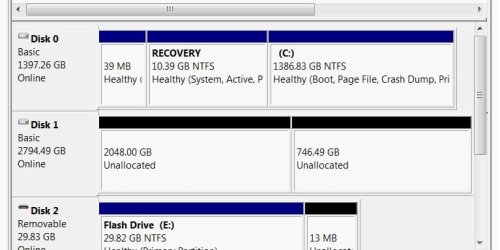
On my disk C: I have a 39MB (Healthy OEM Partition), a 10.39GB (RECOVERY), AND A 1386.83GB NTFS system. This is a Dell XPS 9000 computer.

I forgot to mention, I have a 750GB Western Digital MyBook USB 2.0 and have been creating images with Windows 7 Backup for 2 or 3 years, with no problem. I have also restored my system from one of the images and it worked beautifully. So I don't think it is my disk partition configuration. I think I am going to give up on Window 7 Backup and use something else. Can you recommend a backup program that is reliable, every time?
 
Last edited:

My Computer My Computer

At a glance

Windows 8.1 Preview 64 bit
OS
Windows 8.1 Preview 64 bit
Am I understanding you correct, your trying to create a bootable image on your external drive.?

If so then your probably out of luck. I suggest that you get a program like Acronis that will create images
of your system and allow you to extract files from it and re-write your system if you have problems.
I use Acronis to create a complete system image on external 500gig usb/esata drives on a weekly basis and
it allows you to create a bootable cd that when you connect everything and boot the cd. It will completely redo your system to the stat it was when you created the image.

If your trying to image your system to another hard disk, that is a different ball of wax. Some of the external drives that you can purchase have strange disk controller internals and won't allow you to create all the necessary partitions that a bootable image would reguire. I have done this on a external drive but I did it with one of those little dongle type devices that support esata and provide power to the drive. It also supports usb or esata. cost around $25. There isn't any drive controller electronics in them, just usb to sata
controls. They can be formatted from the hard disk options in control pane.l

I hope this explains a bit.
Acronis is available for around $25 (well worth it) from the user groups store at ugr.com for user group members. I don't have any financial interests..

Rich
 

My Computer My Computer

At a glance

Windows 7 Pro x64 SP1Intel Core I716 GigsNVIDIA GeForce GTX 670M
Computer type
Laptop
Computer Manufacturer/Model Number
Toshiba Laptop Qosimo X870
OS
Windows 7 Pro x64 SP1
CPU
Intel Core I7
Motherboard
Toshiba Qosmio
Memory
16 Gigs
Graphics Card(s)
NVIDIA GeForce GTX 670M
Monitor(s) Displays
17.7" laptop
Screen Resolution
1600 x 900
Hard Drives
256 Gig SanDisk SSD for C
256 Gig Intel SSD for D
Internet Speed
50/25 FIOS
Antivirus
Vipre (all you can eat for 10 machines)
Browser
IE and FF
Other Info
I have dos 6.22, wfwg 3.11, win98, 2000 and xp VHD's available for testing. MS's Virtual PC works great.
You may want to read this thread, it discusses the question you just asked about. Probably most people use either Windows system image, free macrium or Acronis. The truth is, as you will see in that thread, some work for some people and not for others. I have speculated that it has to do with hardware setup. BTW. With your Western Digital Drive you can download a free backup program from their web site. It is a free, scaled down version of Acronis.
I use all three so if one doesn't work another will. I also backup to two different extertnals (at least)- I have 4. Externals die just like internals. They seem to die at exactly the wrong time.

With that said, I don't know why your external does not work, it should. Although I do not understand the limitation, Windows sometimes has trouble with disks of 3TB. I don't know if that is the issue or not. If you have a smaller external try a backup on it to see if that is the problem.
I hope this helps.
 

My Computers My Computers

  • At a glance

    Windows 11 ProRyzen 9 5900X32GB G Skill DDR4-3600EVGA RTX 3080 FTW 3 Ultra
    Computer type
    PC/Desktop
    Computer Manufacturer/Model Number
    ALWAYS UNDER CONSTRUCTION
    OS
    Windows 11 Pro
    CPU
    Ryzen 9 5900X
    Motherboard
    Asus X570 Crosshair Viii Hero
    Memory
    32GB G Skill DDR4-3600
    Graphics Card(s)
    EVGA RTX 3080 FTW 3 Ultra
    Sound Card
    On Board/Sennheiser PC37X Headset
    Monitor(s) Displays
    3 X Asus 27"
    Screen Resolution
    2560x1440
    Hard Drives
    2 X 1 TB NVME drives
    PSU
    EVGA 850
    Case
    Phanteks Eclipse P400A
    Cooling
    EVGA 280 AIO
    Keyboard
    Logitech G510s/ Logitech G13
    Mouse
    Logitech G502
    Internet Speed
    24/1
    Antivirus
    ESET/MBAM Pro/SAS Pro
    Browser
    Chrome/ Firefox/ Edge
  • At a glance

    Windows 11 ProIntel Ultra 9 288V32 GB LPDDR5X 8533
    Computer type
    Laptop
    System Manufacturer/Model Number
    Dell 16 Plus
    OS
    Windows 11 Pro
    CPU
    Intel Ultra 9 288V
    Memory
    32 GB LPDDR5X 8533
    Monitor(s) Displays
    16" Mini-LED HDR600 Touch 90 Hz
    Screen Resolution
    2560X1600
    Hard Drives
    1 TB NVME
Also, I believe that if windows gives you that message it will also allow you to see the log file that will tell you which parts of the backup did not work. If you know that it may shed some light on the problem.
 

My Computers My Computers

  • At a glance

    Windows 11 ProRyzen 9 5900X32GB G Skill DDR4-3600EVGA RTX 3080 FTW 3 Ultra
    Computer type
    PC/Desktop
    Computer Manufacturer/Model Number
    ALWAYS UNDER CONSTRUCTION
    OS
    Windows 11 Pro
    CPU
    Ryzen 9 5900X
    Motherboard
    Asus X570 Crosshair Viii Hero
    Memory
    32GB G Skill DDR4-3600
    Graphics Card(s)
    EVGA RTX 3080 FTW 3 Ultra
    Sound Card
    On Board/Sennheiser PC37X Headset
    Monitor(s) Displays
    3 X Asus 27"
    Screen Resolution
    2560x1440
    Hard Drives
    2 X 1 TB NVME drives
    PSU
    EVGA 850
    Case
    Phanteks Eclipse P400A
    Cooling
    EVGA 280 AIO
    Keyboard
    Logitech G510s/ Logitech G13
    Mouse
    Logitech G502
    Internet Speed
    24/1
    Antivirus
    ESET/MBAM Pro/SAS Pro
    Browser
    Chrome/ Firefox/ Edge
  • At a glance

    Windows 11 ProIntel Ultra 9 288V32 GB LPDDR5X 8533
    Computer type
    Laptop
    System Manufacturer/Model Number
    Dell 16 Plus
    OS
    Windows 11 Pro
    CPU
    Intel Ultra 9 288V
    Memory
    32 GB LPDDR5X 8533
    Monitor(s) Displays
    16" Mini-LED HDR600 Touch 90 Hz
    Screen Resolution
    2560X1600
    Hard Drives
    1 TB NVME

My Computer My Computer

At a glance

Windows 7 ultimate 64 bit / XP Home sp3intel Core 2 Duo E8400 3.0ghz8 gigs 1066 OCZ Fata1tyEVGA GTX 580 Call of Duty Black Ops Edition
Computer Manufacturer/Model Number
Self Built
OS
Windows 7 ultimate 64 bit / XP Home sp3
CPU
intel Core 2 Duo E8400 3.0ghz
Motherboard
Asus P5ND bios 1401
Memory
8 gigs 1066 OCZ Fata1ty
Graphics Card(s)
EVGA GTX 580 Call of Duty Black Ops Edition
Sound Card
Creative Soundblaster Audigy 2zs
Monitor(s) Displays
Asus 24in LCD's 2MS X2
Screen Resolution
1920x1080p @60Hz
Hard Drives
WD Caviar 500 Black/ WD Caviar 200 Blue
PSU
OCZ 700W GameXtreme
Case
NZXT Apollo
Cooling
Corsair H50 CPU/120mm x3 /60mm x2 /Corsair Dominator Ram
Keyboard
Logitech Bluetooth Wireless MX5000
Mouse
Logitech Bluetooth Wireless MX1000
Internet Speed
Download 19.83 Upload 0.97
Other Info
Logitech Z2300 Speakers/ Bose Noise Cancelling Headphones/Avermedia PCI-e Hybrid TV Bravo/Epson NX415 all in one/ 4 Port Powered USB Hub/ LG 10x Bluray Burner /TSST Corp DVDRW External
On my disk C: I have a 39MB (Healthy OEM Partition), a 10.39GB (RECOVERY), AND A 1386.83GB NTFS system. This is a Dell XPS 9000 computer.

I forgot to mention, I have a 750GB Western Digital MyBook USB 2.0 and have been creating images with Windows 7 Backup for 2 or 3 years, with no problem. I have also restored my system from one of the images and it worked beautifully. So I don't think it is my disk partition configuration. I think I am going to give up on Window 7 Backup and use something else. Can you recommend a backup program that is reliable, every time?
When you go to "Disk Management" (not explorer) you don't see a small 100-200MB system reserved partition? I'm assuming you are saying NO.

I use Windows Imaging and Macrium Reflect (MR for security and a bit more flexibility).
Windows has always been my main imaging program. It has NEVER let me down. I have made over 20 images restored 5-10, one to a brand new HDD.
It appears you have had a good run with it as well. This is not justification for giving up on it but by all means consider another for insurance.

I'd like to see the spotlight put on your 3TB HDD at this stage. This is a BIG HDD and relatively new on the scene.

You should be able to partition using an MBR partition table provided each partition is 2TB or less. What are WD talking about???
Maybe we are seeing some mother board/BIOS issues with these big HDDs.
I'd partition the drive into 3 1TB partition format NTFS and do some integrity testing (assuming there is no WD warning).
If it fails and unless WD have some clear warning not to partition (other than the verbal) I'd return it.
 

My Computer My Computer

At a glance

Windows 7x64 Home Premium SP1Intel i7 2600kG.Skill Ripjaws (DDR3-1600) 2x4GBNvidia GeForce GTS 450; Intel HD Graphics 300...
Computer type
PC/Desktop
Computer Manufacturer/Model Number
Own build
OS
Windows 7x64 Home Premium SP1
CPU
Intel i7 2600k
Motherboard
ASUS P8Z68 Deluxe
Memory
G.Skill Ripjaws (DDR3-1600) 2x4GB
Graphics Card(s)
Nvidia GeForce GTS 450; Intel HD Graphics 3000(GT2+)
Monitor(s) Displays
Dell Ultrasharp IPS panel U2311H, Samsung SyncMaster P2350
Screen Resolution
1920x1080
Hard Drives
Samsung 850 Pro SSD 256GB, Samsung SSD 840 120GB, Seagates 1TB Barracuda ST31000528AS x2
PSU
Seasonic M12II 520W
Case
Lian Li Lancool PC-K60
Cooling
Case: 1x120mm, 3x140mm CPU: Hyper 212+
Keyboard
Logitech MK520 (wireless)
Mouse
Logitech MK520
Internet Speed
6-7 Mbps
Antivirus
Norton Security Premium, Malwarebytes on 2 (MSE on 3rd PC)
Browser
FireFox
Other Info
Audio: Logitech Z523 2.1
mjf, I have a Dell also. This is another case where OEM's are putting 3 primary partitions on the drive before you receive it. If I am not mistaken, the MBR resides in the recovery Partition. That could be verified if the OP will look in disk management and see which one of the partitions are active.
If the OP has or can copy a installation disk for the exact version of the OS, then reformat the disk and install the clean OS. The reserved partition will no longer be needed. The bloatware that is wanted can be downloaded from her account at Dell, or you could just have a real clean install. That is what I did. I made an 'all versions' installation disk so I don't have problems with any of my computers. I still resent having to purchase an OS but not getting the disk.
If a clean install could be done the system image would work or you would then confirm that it is the external drive (which I believe is the case). There are tutorials on this site for accomplishing what I described above.

One tutorial is How to Create a Bootable Windows 7 Installation USB Flash Drive
 

My Computers My Computers

  • At a glance

    Windows 11 ProRyzen 9 5900X32GB G Skill DDR4-3600EVGA RTX 3080 FTW 3 Ultra
    Computer type
    PC/Desktop
    Computer Manufacturer/Model Number
    ALWAYS UNDER CONSTRUCTION
    OS
    Windows 11 Pro
    CPU
    Ryzen 9 5900X
    Motherboard
    Asus X570 Crosshair Viii Hero
    Memory
    32GB G Skill DDR4-3600
    Graphics Card(s)
    EVGA RTX 3080 FTW 3 Ultra
    Sound Card
    On Board/Sennheiser PC37X Headset
    Monitor(s) Displays
    3 X Asus 27"
    Screen Resolution
    2560x1440
    Hard Drives
    2 X 1 TB NVME drives
    PSU
    EVGA 850
    Case
    Phanteks Eclipse P400A
    Cooling
    EVGA 280 AIO
    Keyboard
    Logitech G510s/ Logitech G13
    Mouse
    Logitech G502
    Internet Speed
    24/1
    Antivirus
    ESET/MBAM Pro/SAS Pro
    Browser
    Chrome/ Firefox/ Edge
  • At a glance

    Windows 11 ProIntel Ultra 9 288V32 GB LPDDR5X 8533
    Computer type
    Laptop
    System Manufacturer/Model Number
    Dell 16 Plus
    OS
    Windows 11 Pro
    CPU
    Intel Ultra 9 288V
    Memory
    32 GB LPDDR5X 8533
    Monitor(s) Displays
    16" Mini-LED HDR600 Touch 90 Hz
    Screen Resolution
    2560X1600
    Hard Drives
    1 TB NVME

My Computers My Computers

  • At a glance

    Windows 11 ProRyzen 9 5900X32GB G Skill DDR4-3600EVGA RTX 3080 FTW 3 Ultra
    Computer type
    PC/Desktop
    Computer Manufacturer/Model Number
    ALWAYS UNDER CONSTRUCTION
    OS
    Windows 11 Pro
    CPU
    Ryzen 9 5900X
    Motherboard
    Asus X570 Crosshair Viii Hero
    Memory
    32GB G Skill DDR4-3600
    Graphics Card(s)
    EVGA RTX 3080 FTW 3 Ultra
    Sound Card
    On Board/Sennheiser PC37X Headset
    Monitor(s) Displays
    3 X Asus 27"
    Screen Resolution
    2560x1440
    Hard Drives
    2 X 1 TB NVME drives
    PSU
    EVGA 850
    Case
    Phanteks Eclipse P400A
    Cooling
    EVGA 280 AIO
    Keyboard
    Logitech G510s/ Logitech G13
    Mouse
    Logitech G502
    Internet Speed
    24/1
    Antivirus
    ESET/MBAM Pro/SAS Pro
    Browser
    Chrome/ Firefox/ Edge
  • At a glance

    Windows 11 ProIntel Ultra 9 288V32 GB LPDDR5X 8533
    Computer type
    Laptop
    System Manufacturer/Model Number
    Dell 16 Plus
    OS
    Windows 11 Pro
    CPU
    Intel Ultra 9 288V
    Memory
    32 GB LPDDR5X 8533
    Monitor(s) Displays
    16" Mini-LED HDR600 Touch 90 Hz
    Screen Resolution
    2560X1600
    Hard Drives
    1 TB NVME
mjf, I have a Dell also. This is another case where OEM's are putting 3 primary partitions on the drive before you receive it. If I am not mistaken, the MBR resides in the recovery Partition. That could be verified if the OP will look in disk management and see which one of the partitions are active.
essenbe,
The MBR is a small critical 512 bytes up the front of the disk
PC Boot sequence post #24
It was specified 25 years ago when the concept of a 3TB drive on a PC was unthinkable. They only allowed space for a maximum of 2TB partitions.
The GUID Partition Table (GPT) is the attempt to overcome this old limitation.

If you don't use GPT and using the still common BIOS/MBR then as far as I can see you have to partition a 3TB drive. So the WD comment referred to earlier puzzles me.
In principle I can't see why the OP can't partition his 3TB drive and everything work fine.
 

My Computer My Computer

At a glance

Windows 7x64 Home Premium SP1Intel i7 2600kG.Skill Ripjaws (DDR3-1600) 2x4GBNvidia GeForce GTS 450; Intel HD Graphics 300...
Computer type
PC/Desktop
Computer Manufacturer/Model Number
Own build
OS
Windows 7x64 Home Premium SP1
CPU
Intel i7 2600k
Motherboard
ASUS P8Z68 Deluxe
Memory
G.Skill Ripjaws (DDR3-1600) 2x4GB
Graphics Card(s)
Nvidia GeForce GTS 450; Intel HD Graphics 3000(GT2+)
Monitor(s) Displays
Dell Ultrasharp IPS panel U2311H, Samsung SyncMaster P2350
Screen Resolution
1920x1080
Hard Drives
Samsung 850 Pro SSD 256GB, Samsung SSD 840 120GB, Seagates 1TB Barracuda ST31000528AS x2
PSU
Seasonic M12II 520W
Case
Lian Li Lancool PC-K60
Cooling
Case: 1x120mm, 3x140mm CPU: Hyper 212+
Keyboard
Logitech MK520 (wireless)
Mouse
Logitech MK520
Internet Speed
6-7 Mbps
Antivirus
Norton Security Premium, Malwarebytes on 2 (MSE on 3rd PC)
Browser
FireFox
Other Info
Audio: Logitech Z523 2.1
Attached is a picture of my drive configuration from Disk Management. Notice that the WD drive is MBR partition style with a 2TB partition, and the remaining space (about .7TB) is wasted. I can't create another drive in that space.

On Drive C, the first partition says "Healthy (OEM Partition)", the second one says "Healthy (System, Active, Primary Partition). The last one says "Healthy (Boot, Page File, Crash Dump, Primary Partition).

After corresponding with WD support via email and explaining everything, just like above, I received this:

From WD: I apologize for the inconvenience. Unfortunately this is an operating system issue that is outside the range of Western Digital’s support. Please contact Microsoft for assistance.
 

Attachments

  • WD USB 3 0 Problem.jpg
    WD USB 3 0 Problem.jpg
    34.1 KB · Views: 37
Last edited:

My Computer My Computer

At a glance

Windows 8.1 Preview 64 bit
OS
Windows 8.1 Preview 64 bit
Well there are 2 things
(1) On disk 0. Your Recovery partition is system active meaning it has the boot files (boot manager, BCD). C: is your OS. This looks wrong - is this the way Dell ship them? Have you run a system repair on the disk?
(2) The 3 TB is unallocated. The first 2 TB chunk/partition is probable the MBR partition size limitation I mentioned above.

Can you clear these 2 points up?
 

My Computer My Computer

At a glance

Windows 7x64 Home Premium SP1Intel i7 2600kG.Skill Ripjaws (DDR3-1600) 2x4GBNvidia GeForce GTS 450; Intel HD Graphics 300...
Computer type
PC/Desktop
Computer Manufacturer/Model Number
Own build
OS
Windows 7x64 Home Premium SP1
CPU
Intel i7 2600k
Motherboard
ASUS P8Z68 Deluxe
Memory
G.Skill Ripjaws (DDR3-1600) 2x4GB
Graphics Card(s)
Nvidia GeForce GTS 450; Intel HD Graphics 3000(GT2+)
Monitor(s) Displays
Dell Ultrasharp IPS panel U2311H, Samsung SyncMaster P2350
Screen Resolution
1920x1080
Hard Drives
Samsung 850 Pro SSD 256GB, Samsung SSD 840 120GB, Seagates 1TB Barracuda ST31000528AS x2
PSU
Seasonic M12II 520W
Case
Lian Li Lancool PC-K60
Cooling
Case: 1x120mm, 3x140mm CPU: Hyper 212+
Keyboard
Logitech MK520 (wireless)
Mouse
Logitech MK520
Internet Speed
6-7 Mbps
Antivirus
Norton Security Premium, Malwarebytes on 2 (MSE on 3rd PC)
Browser
FireFox
Other Info
Audio: Logitech Z523 2.1
That is the way Dell shipped it to me. I have run Dell's surface check on drive C and the new WD external drive, and both showed no problems. It must do a pretty good job, it takes 6 or 8 hours to run, on a fast XPS PC. The second drive is not set up now. After trying several configurations, see above, I just cleaned it and it is sitting there unallocated. I have tried (MBR, 1TB, MBR 2TB), and (GPT 3TB, GPT 2TB) and nothing works.

Do you think that if I image the C drive with "Acronis" or "Macrium Reflect", or whatever you recommend, and then repartition my C drive into 1 partition and reformat it, I could re-image it with one of the above? I have a free copy of "Macrium Reflect" and did an image with it onto the WD formatted GPT 3TB. It ran successful and shows the 3 partitions, seperately. It looks like I might be able to just select the C drive partition, and not the Recovery or Dell utility partitions. If all fails, I have the original DVD and could reload, but that would be a mess. I can never remember what all I have installed, and all of the tweeks that I have made.

My goal, and the reason I bought this WD disk, was to keep 4 or 5 images, about 2 weeks apart. This would allow me to go back past any virus's that I might have picked up in the last month, or so.
 

My Computer My Computer

At a glance

Windows 8.1 Preview 64 bit
OS
Windows 8.1 Preview 64 bit
That is the way Dell shipped it to me.

and then repartition my C drive into 1 partition and reformat it, I could re-image it with one of the above? I have a free copy of "Macrium Reflect" and did an image with it onto the WD formatted GPT 3TB. It ran successful and shows the 3 partitions, seperately. It looks like I might be able to just select the C drive partition, and not the Recovery or Dell utility partitions.

My goal, and the reason I bought this WD disk, was to keep 4 or 5 images, about 2 weeks apart. This would allow me to go back past any virus's that I might have picked up in the last month, or so.
Someone familiar with Dell may come along but that Recovery partition looks really odd.

You did not mean "repartition my C (OS) drive did you??? Don't do that.

I use Macrium as well (I just restored today with it). If it works then definitely use it. With Macrium you select the partitions you want to make up your set in one hit. When you restore you do it partition by partition. So even if you had say 3 partitions imaged in one set you can still select just say C: for restoring.

So try imaging just c: with Macrium, run the macrium verify. Then double clicking on the image will mount it and you can browse it with windows explorer.
 

My Computer My Computer

At a glance

Windows 7x64 Home Premium SP1Intel i7 2600kG.Skill Ripjaws (DDR3-1600) 2x4GBNvidia GeForce GTS 450; Intel HD Graphics 300...
Computer type
PC/Desktop
Computer Manufacturer/Model Number
Own build
OS
Windows 7x64 Home Premium SP1
CPU
Intel i7 2600k
Motherboard
ASUS P8Z68 Deluxe
Memory
G.Skill Ripjaws (DDR3-1600) 2x4GB
Graphics Card(s)
Nvidia GeForce GTS 450; Intel HD Graphics 3000(GT2+)
Monitor(s) Displays
Dell Ultrasharp IPS panel U2311H, Samsung SyncMaster P2350
Screen Resolution
1920x1080
Hard Drives
Samsung 850 Pro SSD 256GB, Samsung SSD 840 120GB, Seagates 1TB Barracuda ST31000528AS x2
PSU
Seasonic M12II 520W
Case
Lian Li Lancool PC-K60
Cooling
Case: 1x120mm, 3x140mm CPU: Hyper 212+
Keyboard
Logitech MK520 (wireless)
Mouse
Logitech MK520
Internet Speed
6-7 Mbps
Antivirus
Norton Security Premium, Malwarebytes on 2 (MSE on 3rd PC)
Browser
FireFox
Other Info
Audio: Logitech Z523 2.1
tilsonpa is correct.That is exactly the way Dell sets them up. Unless I am mistaken, tilsonpa does not have the installation disk. Dell does not send them. The disk is probably a recovery disk although for some strange reason Dell labels them as installation disks. That is why you have the recovery partition. It in place of an installation disk.
regardless, if there is no problem with the external drive, windows system image should work. Western Digital will require you to run the Data Lifeguard program if you have any thoughts of RMA.

have you ever run a system image before on anything? And, does windows show you the error logs as to what was not backed during the system image? If it does, let us know what it says.
 

My Computers My Computers

  • At a glance

    Windows 11 ProRyzen 9 5900X32GB G Skill DDR4-3600EVGA RTX 3080 FTW 3 Ultra
    Computer type
    PC/Desktop
    Computer Manufacturer/Model Number
    ALWAYS UNDER CONSTRUCTION
    OS
    Windows 11 Pro
    CPU
    Ryzen 9 5900X
    Motherboard
    Asus X570 Crosshair Viii Hero
    Memory
    32GB G Skill DDR4-3600
    Graphics Card(s)
    EVGA RTX 3080 FTW 3 Ultra
    Sound Card
    On Board/Sennheiser PC37X Headset
    Monitor(s) Displays
    3 X Asus 27"
    Screen Resolution
    2560x1440
    Hard Drives
    2 X 1 TB NVME drives
    PSU
    EVGA 850
    Case
    Phanteks Eclipse P400A
    Cooling
    EVGA 280 AIO
    Keyboard
    Logitech G510s/ Logitech G13
    Mouse
    Logitech G502
    Internet Speed
    24/1
    Antivirus
    ESET/MBAM Pro/SAS Pro
    Browser
    Chrome/ Firefox/ Edge
  • At a glance

    Windows 11 ProIntel Ultra 9 288V32 GB LPDDR5X 8533
    Computer type
    Laptop
    System Manufacturer/Model Number
    Dell 16 Plus
    OS
    Windows 11 Pro
    CPU
    Intel Ultra 9 288V
    Memory
    32 GB LPDDR5X 8533
    Monitor(s) Displays
    16" Mini-LED HDR600 Touch 90 Hz
    Screen Resolution
    2560X1600
    Hard Drives
    1 TB NVME
Back
Top