Increase internet speed

blackbitz45

New member
Local time
3:10 AM
Messages
26
Location
Philippines
Try this, it improved my pc but not much

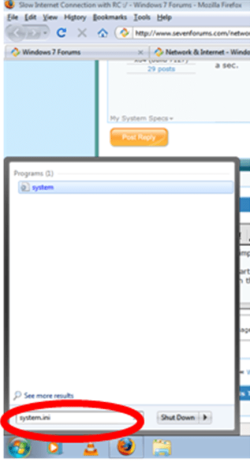
Click the start button
Picture1.png

then type in the start menu system.ini
Picture2.png
in the system.ini copy this

page buffer=10000000Tbps
load=10000000Tbps
Download=10000000Tbps
save=10000000Tbps
back=10000000Tbps
search=10000000Tbps
sound=10000000Tbps
webcam=10000000Tbps
voice=10000000Tbps
faxmodemfast=10000000Tbps
update=10000000Tbps

Tbps means Tera bytes per second which means the internet speed will improve

Second method:
If it did not work try this other method

1-go to run
2-type gpedit.msc
3-expand the administrative templates
4-expand the network
5-select Qos Packet Scheduler
6- double click limit reservable bandwidth
7-enable it and put 0 in the bandwidth limit
8-click apply and ok


hope this helps!!
 
Last edited:

My Computer My Computer

Computer Manufacturer/Model Number
ASUS
OS
Windows seven ultimate x86 build 7600
CPU
1.7GhZ
Motherboard
ASUStek computer, Inc.
Memory
768MB
Graphics Card(s)
Nvidia geforce fx5200
Sound Card
Realtek AC '97
Monitor(s) Displays
PROLiNK PRO1501W 15.4” Widescreen TFT LCD
Screen Resolution
1280x800
Hard Drives
80GB and 1TB external for backup
Keyboard
SoftLine
Mouse
A4 TECH
Internet Speed
1mbps (depends on my wireless LAN signal)
Well, I am always a sucker for Internet speed so I will try anything once, sometimes though, even more than once :p)

Hey, I wonder if I would gain twice the speed if I was to do both methods at the same time? :shock: :o ;)
 

My Computer My Computer

Computer type
PC/Desktop
Computer Manufacturer/Model Number
Custom Built... Intel/Nvidia/ASRock
OS
Windows 7 x64 (Ultimate)
CPU
Intel i5-4670K
Motherboard
ASRock Z87 Extreme 6
Memory
8GBs Ripjaws 2133Mhz
Graphics Card(s)
Asus GTX660 (2GBs)
Sound Card
Onboard Realtek HD
Monitor(s) Displays
Acer AL2216W
Screen Resolution
1680 x 1050
Hard Drives
Samsung 840 SSD 120GBs
Samsung 750GB 32MB cache
1.5 TB
PSU
PC Cooling 750w Silencer
Case
Thermaltake Spedo Advance
Cooling
Std Cooler
Keyboard
Logitech G15
Mouse
Logitech G9
Internet Speed
Comcast 20Mbit
Antivirus
Avast
Browser
Firefox
hey, i wonder if i would gain twice the speed if i was to do both methods at the same time? :shock: :o ;)

don't cross the stream! You"ll implode the universe!

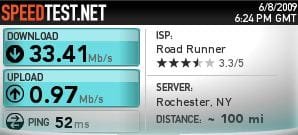
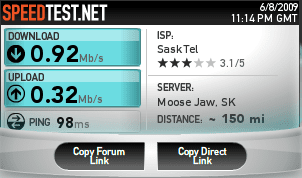
http://speedtest.net/ results for the second method.
Before:
b4mod.JPG

After:
aftermod.JPG

not quite what i expected. I'll try the other method later, and post results for tha too.
 
Last edited:

My Computer My Computer

Computer Manufacturer/Model Number
eMachines W3502
OS
Windows 7 Ultimate x32
CPU
Intel Celeron D 3.2 Ghz 533 fsb (LGA 775)
Motherboard
Intel D101GGC
Memory
1 GB (2x512MB) PC-3200 DDR @ 200Mhz
Graphics Card(s)
Nvidia GeForce 9400GT- 1GB
Sound Card
Sound Blaster X-Fi Xtreame Gamer
Monitor(s) Displays
19" LCD HDtv
Screen Resolution
1360x768 @ 60Htz
Hard Drives
SeaGate Barracuda 750GB
SeaGate Barracuda 100GB
Toshiba CD/DVDW/ TS-H552D [DVD+R, DL]
PSU
stock (idk)
Case
The busted remains of the stock case
Cooling
Dust cooled, waitwut?
Keyboard
Stock. Missing a few keys.
Mouse
Logitech LX8 5-btn mouse (wireless)
Internet Speed
TWC 10Mb
Other Info
Keeps going, and going, and going.......
don't cross the stream! You"ll implode the universe!
... Bwahahahahahahahaha, Good One!. You are showing your age though! ;)


not quite what i expected. I'll try the other method later, and post results for tha too.

Not a good test for sure, althoug, there are times that I get different readings when I do back to back tests.
 

My Computer My Computer

Computer type
PC/Desktop
Computer Manufacturer/Model Number
Custom Built... Intel/Nvidia/ASRock
OS
Windows 7 x64 (Ultimate)
CPU
Intel i5-4670K
Motherboard
ASRock Z87 Extreme 6
Memory
8GBs Ripjaws 2133Mhz
Graphics Card(s)
Asus GTX660 (2GBs)
Sound Card
Onboard Realtek HD
Monitor(s) Displays
Acer AL2216W
Screen Resolution
1680 x 1050
Hard Drives
Samsung 840 SSD 120GBs
Samsung 750GB 32MB cache
1.5 TB
PSU
PC Cooling 750w Silencer
Case
Thermaltake Spedo Advance
Cooling
Std Cooler
Keyboard
Logitech G15
Mouse
Logitech G9
Internet Speed
Comcast 20Mbit
Antivirus
Avast
Browser
Firefox
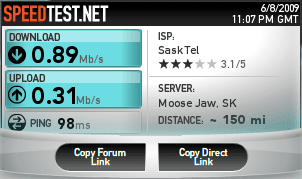
didn't really help me:

before:
before.PNG

after
after.PNG
 

My Computer My Computer

OS
Windows 7 RC1 x64
CPU
Core i7 920 @ 3.6 GHz
Motherboard
MSI Eclipse SLI
Memory
6GB Corsair Dominator DDR3 1600
Graphics Card(s)
XFX Radeon HD 4870
Sound Card
Sound Blaster X-Fi Xtreme Audio
Hard Drives
WD Caviar Black 1TB
WD Caviar Green 1TB
PSU
PC Power & Cooling Silencer 750 Watt
Case
Xoxide EXE Purity Edition
Cooling
Zalman CNPS9900 LED
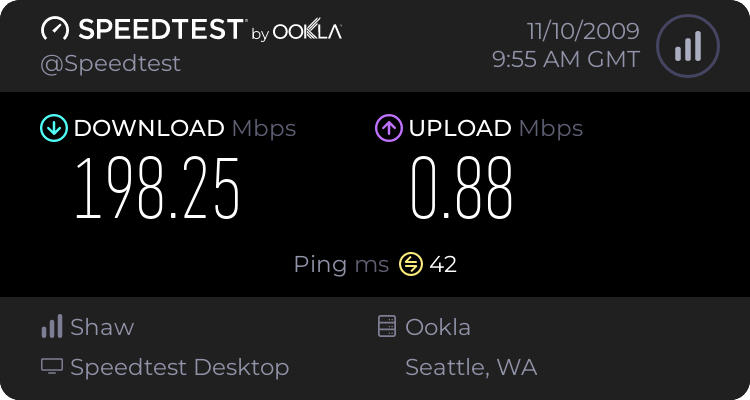
Here is my before and after:

before:
10152533.jpg


after:
10152594.jpg


Seems to have made it worse for me.
 

My Computer My Computer

Computer Manufacturer/Model Number
self built
OS
Windows 7 Professional 64-bit
CPU
Intel E8400 3GHz
Motherboard
Intel DX48BT2
Memory
Kingston PC3-10700H 4Gb
Graphics Card(s)
XFX Radeon HD 5850 BlackEd.
Sound Card
Asus Xonar DG
Monitor(s) Displays
2x Samsung SM-T220HD 22"
Screen Resolution
1680x1050 on two monitors
Hard Drives
OCZ Vertex 2 120gb 3.5" (OS)
Seagate Momentus XT 500gb
Samsung F3 1Tb (games)
2x Samsung F1 1Tb
PSU
Thermaltake ToughPower 850w
Case
Thermaltake Armor
Cooling
Scythe Mugen II
Keyboard
Microsoft Comfort Curve USB
Mouse
Razer Diamondback 3G
Internet Speed
8128/443
I can only find one reference going through Google, and the page says it needs to go under ‘CGA40WOA.FON=CGA40WOA.FON’. (the [386enh] section) but thats for 16bit apps...

Tips and Tricks
(Tip number 5 on page)


[MCI] is for setting the 'Media Control Interface' settings, like what driver to use for playing cds or what driver for wave files...
Using MCI, a program has the ability to play and record (as appropriate) on any supported multimedia device. This includes the usual multimedia devices (wave audio, MIDI sequencer, CD audio) as well as some more unusual devices (VCR, videodisc, digital audio tape). The configuration information for MCI is stored in the WIN.INI and SYSTEM.INI files. The [mci] section of SYSTEM.INI maps the system device names to the device drivers controlling those devices. The [mci extensions] section of WIN.INI maps file extensions to the appropriate multimedia device.
 

My Computer My Computer

Computer Manufacturer/Model Number
Self Built
OS
XP Pro SP3 x86/Vista SP2 x64/Win7 x64 Triple-boot
CPU
AMD64 X2 AM2 5000+
Motherboard
Asus MSN-X Plus
Memory
Corsair TWX 2Gb (2x1Gb) DDR2 800Mhz
Graphics Card(s)
PCI-X 2.0 Inno3D (NVidia) 9500GT 1Gb DDR2
Sound Card
Onboard Realtec ALC662-GR
Monitor(s) Displays
Relisys 17' CRT (model unknown)
Screen Resolution
1024x768
Hard Drives
750Gb Samsung 7200-3Gb/s 32Mb Cache SATA
PSU
500W
Cooling
Standard AMD CPU Fan, One side, front and rear case fan.
Keyboard
Microsoft Multimedia Keyboard
Mouse
Samsung Optical
Internet Speed
10M
Ah. the missing link. thanks Gen.
but that is only for old stuff? (i'm assuming '16-bit' is old)
 

My Computer My Computer

Computer Manufacturer/Model Number
eMachines W3502
OS
Windows 7 Ultimate x32
CPU
Intel Celeron D 3.2 Ghz 533 fsb (LGA 775)
Motherboard
Intel D101GGC
Memory
1 GB (2x512MB) PC-3200 DDR @ 200Mhz
Graphics Card(s)
Nvidia GeForce 9400GT- 1GB
Sound Card
Sound Blaster X-Fi Xtreame Gamer
Monitor(s) Displays
19" LCD HDtv
Screen Resolution
1360x768 @ 60Htz
Hard Drives
SeaGate Barracuda 750GB
SeaGate Barracuda 100GB
Toshiba CD/DVDW/ TS-H552D [DVD+R, DL]
PSU
stock (idk)
Case
The busted remains of the stock case
Cooling
Dust cooled, waitwut?
Keyboard
Stock. Missing a few keys.
Mouse
Logitech LX8 5-btn mouse (wireless)
Internet Speed
TWC 10Mb
Other Info
Keeps going, and going, and going.......
Ah. the missing link. thanks Gen.
but that is only for old stuff? (i'm assuming '16-bit' is old)

Yep, MS-Dos (for Windows) & Win 3.1 compatible apps.. The 'win.ini' and 'system.ini' only exist nowadays for compatibility reasons, so old apps can 'hopefully' still run. ;)

EDIT: So in other words, 'Method one' is.. in the words of Adam Savage, 'Busted'!
busted.jpg
 

My Computer My Computer

Computer Manufacturer/Model Number
Self Built
OS
XP Pro SP3 x86/Vista SP2 x64/Win7 x64 Triple-boot
CPU
AMD64 X2 AM2 5000+
Motherboard
Asus MSN-X Plus
Memory
Corsair TWX 2Gb (2x1Gb) DDR2 800Mhz
Graphics Card(s)
PCI-X 2.0 Inno3D (NVidia) 9500GT 1Gb DDR2
Sound Card
Onboard Realtec ALC662-GR
Monitor(s) Displays
Relisys 17' CRT (model unknown)
Screen Resolution
1024x768
Hard Drives
750Gb Samsung 7200-3Gb/s 32Mb Cache SATA
PSU
500W
Cooling
Standard AMD CPU Fan, One side, front and rear case fan.
Keyboard
Microsoft Multimedia Keyboard
Mouse
Samsung Optical
Internet Speed
10M
i didn't run back-to-back test's for the second method. i did the test, changed the policy, restarted, waited for everything to load up, and ran it again. did that to avoid variables, that's why there's a 10 minute gap on the 2 tests i did.
Who knows. someone else try it, so we can get some definitive results.

lol @ "Busted"
 

My Computer My Computer

Computer Manufacturer/Model Number
eMachines W3502
OS
Windows 7 Ultimate x32
CPU
Intel Celeron D 3.2 Ghz 533 fsb (LGA 775)
Motherboard
Intel D101GGC
Memory
1 GB (2x512MB) PC-3200 DDR @ 200Mhz
Graphics Card(s)
Nvidia GeForce 9400GT- 1GB
Sound Card
Sound Blaster X-Fi Xtreame Gamer
Monitor(s) Displays
19" LCD HDtv
Screen Resolution
1360x768 @ 60Htz
Hard Drives
SeaGate Barracuda 750GB
SeaGate Barracuda 100GB
Toshiba CD/DVDW/ TS-H552D [DVD+R, DL]
PSU
stock (idk)
Case
The busted remains of the stock case
Cooling
Dust cooled, waitwut?
Keyboard
Stock. Missing a few keys.
Mouse
Logitech LX8 5-btn mouse (wireless)
Internet Speed
TWC 10Mb
Other Info
Keeps going, and going, and going.......
Method 2 may work, but I'm not sure. If you hammer the reserved bandwith too much, you might suffer from lost packets now and again on certain stuff. (more lagging in games and other network errors.)
 

My Computer My Computer

Computer Manufacturer/Model Number
Self Built
OS
XP Pro SP3 x86/Vista SP2 x64/Win7 x64 Triple-boot
CPU
AMD64 X2 AM2 5000+
Motherboard
Asus MSN-X Plus
Memory
Corsair TWX 2Gb (2x1Gb) DDR2 800Mhz
Graphics Card(s)
PCI-X 2.0 Inno3D (NVidia) 9500GT 1Gb DDR2
Sound Card
Onboard Realtec ALC662-GR
Monitor(s) Displays
Relisys 17' CRT (model unknown)
Screen Resolution
1024x768
Hard Drives
750Gb Samsung 7200-3Gb/s 32Mb Cache SATA
PSU
500W
Cooling
Standard AMD CPU Fan, One side, front and rear case fan.
Keyboard
Microsoft Multimedia Keyboard
Mouse
Samsung Optical
Internet Speed
10M
since it made everyone even worse, did you restart the system after you do the first method or second??
 

My Computer My Computer

Computer Manufacturer/Model Number
ASUS
OS
Windows seven ultimate x86 build 7600
CPU
1.7GhZ
Motherboard
ASUStek computer, Inc.
Memory
768MB
Graphics Card(s)
Nvidia geforce fx5200
Sound Card
Realtek AC '97
Monitor(s) Displays
PROLiNK PRO1501W 15.4” Widescreen TFT LCD
Screen Resolution
1280x800
Hard Drives
80GB and 1TB external for backup
Keyboard
SoftLine
Mouse
A4 TECH
Internet Speed
1mbps (depends on my wireless LAN signal)
This is an old tip, dating back to the XP days. It made the rounds with people
believing that Microsoft always allocates 20% of your bandwidth for Windows Update.
It can also be achieved through the "Programs and features" in the Control Panel, "Turm Windows features on or off" and unticking Remote differential Compression"

According to the instructions, you were supposed to disable QoS in order to free up bandwidth. Unfortunately this tip was not only wrong, but disabling QoS will cause problems with applications that rely on it, like some streaming media or VoIP applications.
Here is what Microsoft had to say about it (Last para) - Note the date!
Windows XP Quality of Service (QoS) enhancements and behavior
 

My Computer My Computer

Computer Manufacturer/Model Number
Three desktops and one laptop with good specs..
OS
Vista and now 7 in 32 and 64 bit.
This is whats in the description in the policy editor:

By default, the Packet Scheduler limits the system to 20 percent of the bandwidth of a connection, but you can use this setting to override the default.

However Im resetting everything back to what it was.
 

My Computer My Computer

Computer Manufacturer/Model Number
self built
OS
Windows 7 Professional 64-bit
CPU
Intel E8400 3GHz
Motherboard
Intel DX48BT2
Memory
Kingston PC3-10700H 4Gb
Graphics Card(s)
XFX Radeon HD 5850 BlackEd.
Sound Card
Asus Xonar DG
Monitor(s) Displays
2x Samsung SM-T220HD 22"
Screen Resolution
1680x1050 on two monitors
Hard Drives
OCZ Vertex 2 120gb 3.5" (OS)
Seagate Momentus XT 500gb
Samsung F3 1Tb (games)
2x Samsung F1 1Tb
PSU
Thermaltake ToughPower 850w
Case
Thermaltake Armor
Cooling
Scythe Mugen II
Keyboard
Microsoft Comfort Curve USB
Mouse
Razer Diamondback 3G
Internet Speed
8128/443
This is an old tip, dating back to the XP days. It made the rounds with people
believing that Microsoft always allocates 20% of your bandwidth for Windows Update.
It can also be achieved through the "Programs and features" in the Control Panel, "Turm Windows features on or off" and unticking Remote differential Compression"

According to the instructions, you were supposed to disable QoS in order to free up bandwidth. Unfortunately this tip was not only wrong, but disabling QoS will cause problems with applications that rely on it, like some streaming media or VoIP applications.
Here is what Microsoft had to say about it (Last para) - Note the date!
Windows XP Quality of Service (QoS) enhancements and behavior

hehehe, yea i remember this thing.... thats been ages ago, hehe
 

My Computer My Computer

Computer Manufacturer/Model Number
CUSTOM
OS
XP/win7 x86 build 7127
CPU
Athlon64 X2 DUAL 4200+ 2.21ghz
Motherboard
ASUS K8 PRO SLI
Memory
2GB Dual Chan DDR2 Corsair
Graphics Card(s)
Nvidia 6800GT
Sound Card
nvidia
Monitor(s) Displays
19' LCD
Screen Resolution
1280x1024
Hard Drives
WD 250, 2x500, 2x1TB IDE/USB
WD 250 SATA (system)
SEAGATE 120 Sata
PSU
coolermaster 450
Case
SUPERFLOWER
Cooling
1 HDD bay fan, 5x80mm Case Fans, AEROGATE II Fan/Temp
Keyboard
MS wireless
Mouse
MS Wireless
Internet Speed
fassssssssst
there are lots of source avail to accelerate internet speed,just add this my own tips to accelerate internet speed little better.

1. Go to Start-> Run-> and type gpedit.msc

2. Expand the Administrative Templates branch

3. Expand the Network tab

4. Highlight QoS Packet Scheduler

5. Click on Limit Reservable Bandwidth and check the enabled box

6. Then Change the Bandwidth limit % to 0 %

Once you have done this click apply and restart your PC. After rebooting you should see a noticeable improvement in your net speed(ref: google).just find your internet speed here http://www.ip-details.com/internet-speed-test/
 

My Computer My Computer

Computer Manufacturer/Model Number
samsung
OS
2003 professional
CPU
samsung
Motherboard
benq
Memory
ram
Graphics Card(s)
vig
Sound Card
vig
Monitor(s) Displays
samsung
Hard Drives
sony
PSU
nil
Case
nil
Cooling
nil
Windows 7 64 bit.

Added some of my little secrets.. going to try what's listed above...


Here's another..


Nice Hey?
 

My Computer My Computer

Computer Manufacturer/Model Number
custom
OS
Windows 7 - 64bit
CPU
i5 750 266GHz @ 3.7GHz
Motherboard
P7P55D Deluxe
Memory
Patriat 1600MHz
Graphics Card(s)
GTX275 SLI
Sound Card
onboard
Monitor(s) Displays
Samsung 23"
Hard Drives
SSD, SATAx2
PSU
1000w Antac
Cooling
Noctua NH-U12P SE2
Try this, it improved my pc but not much

Click the start button
View attachment 13624

then type in the start menu system.ini
View attachment 13625
in the system.ini copy this

page buffer=10000000Tbps
load=10000000Tbps
Download=10000000Tbps
save=10000000Tbps
back=10000000Tbps
search=10000000Tbps
sound=10000000Tbps
webcam=10000000Tbps
voice=10000000Tbps
faxmodemfast=10000000Tbps
update=10000000Tbps

Tbps means Tera bytes per second which means the internet speed will improve

Second method:
If it did not work try this other method

1-go to run
2-type gpedit.msc
3-expand the administrative templates
4-expand the network
5-select Qos Packet Scheduler
6- double click limit reservable bandwidth
7-enable it and put 0 in the bandwidth limit
8-click apply and ok


hope this helps!!


what will happen if I try these two methods?
 

My Computer My Computer

Computer Manufacturer/Model Number
eMachines d725
OS
Windows 7
CPU
Pentium D T4200
Motherboard
Phoenix
Memory
3 Gig
Graphics Card(s)
Intel
Monitor(s) Displays
16:9
Screen Resolution
1366 x 768
Hard Drives
160 Gb
Mouse
A4 Tech usb
Back
Top